Tag Archives: javascript

Vercel’s Scriptc is a TypeScript to native code compiler – how did we get here?

Vercel has previewed Scriptc on GitHub, a native compiler for TypeScript which is open source under the Apache 2 license.

Scriptc takes TypeScript code as input and outputs a native code executable, along with an embedded JavaScript engine if needed, using the existing QuickJS ng project. The JavaScript engine is needed if there is code included that cannot be statically compiled, including JavaScript code, such as npm dependencies, or code typed as “any” in TypeScript.

Scriptc runs on Apple Silicon and uses cross-compilation to target Linux and Windows. The project claims some big improvements in performance: startup time for an example workload reduced from 47ms to 2.4ms, memory usage down from around 100MB to 4MB, binary size reduced from around 80MB to 3MB.

How Scriptc compiles TypeScript to native code

The Node.js API is supported as well as the TypeScript language and the idea seems to be that server applications running on Node could be compiled to native using this tool.

Although this sounds promising, comments on Hacker News are not entirely favourable. “The architecture is idiotic, they have zero credible perf numbers,” said one, claiming that the “project reeks of weapons grade AI psychosis.” Expanding on this, complaints include the use of QuickJS, using floats for numbers, and resorting too quickly to an embedded JavaScript engine.

Vercel as a company is enthusiastic about AI and Scriptc appears to have been made largely with AI.

When Microsoft introduced a native code TypeScript to JavaScript compiler in TypeScript 7, greatly reducing compilation time, the awkward question was: if native code is so much faster than JavaScript, why not use a more performant language for the application code as well?

How did we get here? It all started with Brendan Eich’s LiveScript for Netscape Navigator, renamed JavaScript when first released in December 1995, and the beginning of interactive web pages. Part of the thinking behind JavaScript was that it could be used to script Java applets – Java components embedded in web pages – but JavaScript itself was always more popular. Adobe used a variant of JavaScript, called ActionScript, for its Flash add-in which at one time looked likely to dominate the web.

Using the web browser as an application runtime was critical for companies trying to bypass Microsoft’s desktop application dominance, and Google in particular invested in JavaScript, creating the V8 JavaScript engine for its Chrome browser, first released in 2008.

Then came Node.js, a server-side runtime for JavaScript based on V8 and first released in 2009 by Ryan Dahl. Dahl was particularly interested in improving concurrency in web applications, but another thing that drove adoption was that developers could use the same language both on the server and in the browser, and that JavaScript was an easy language to learn.

The mass adoption of JavaScript that followed also exposed its shortcomings. Microsoft’s Anders Hejlsberg, who also invented the C# language, believed that strong typing for JavaScript was essential in order to make large applications maintainable. He therefore came up with TypeScript, a superset of JavaScript with strong types that compiles to JavaScript for runtime compatibility.

TypeScript has proved wildly popular and most applications which target JavaScript are now written in TypeScript. If we add Scriptc or an equivalent into the mix, then the JavaScript element is all-but eliminated, though note that as currently designed Scriptc will run some of the code in a JavaScript engine so we are not there yet.

If you write in TypeScript and compile to native code though, why use TypeScript, why not use Go or Rust? Or if those languages are too demanding, Java or C# both of which have strong ecosystems?

The answer is the familiarity of TypeScript, the massive range of npm packages, and the ability to use the same language on the server and in the browser.

Nevertheless, the problem which Scriptc sets out to solve can perhaps be bettered simply by choosing a more performant application stack and reserving TypeScript for code that runs in the browser.
TypeScript 7 is done

Principal product manager Daniel Rosenwasser reports that TypeScript 7 is now generally available – a big release, since this is the first to have the native port of the TypeScript compiler built in Go. Rosenwasser claims “speedups between 8x and 12x on full builds.”

There is a snag. Although TypeScript 7 is production-ready, it has no API; that will not come until TypeScript 7.1. It may come as a surprise to you that TypeScript has an API; it is not something highlighted in the TypeScript docs. You will find it covered in the official Wiki where there is an article on using the compiler API dated October 2023 and advising that “this is not yet a stable API.”

Despite the compiler API being somewhat obscure, Rosenwasser says this means that “workflows that use Vue, MDX, Astro, Svelte, and others will likely not yet be able to leverage TypeScript 7. Similarly, specialized type-checking within templates like Angular will also likely not use TypeScript 7.” That is a significant blocker to adoption.

The dedicated TypeScript 7/0 extension for Visual Studio Cdde

Users of Visual Studio Code should install the dedicated TypeScript 7.0 extension which already has enthusiastic reviews. “Saves us lots of time in CI/CD. The difference in speed is huge!” said one.

Personally I now use TypeScript rather than JavaScript almost exclusively, when targeting browser scripting, and will endeavour to switch to 7.0 immediately. I would much rather have the compiler find errors, than have them turn up in production.

Thoughtworks: do not choose to develop Single Page Applications by default

I have a lot of time for Thoughtworks, a global software development company, and always look at its Technology Radar, the latest version of which appeared recently. Plenty to digest, but what caught my eye was this comment regarding SPAs (Single Page Applications):

The sheer prevalence of teams choosing a single-page application (SPA) by default when they need a website has us concerned that people aren’t even recognizing SPAs as an architectural style to begin with, instead immediately jumping into framework selection. SPAs incur complexity that simply doesn’t exist with traditional server-based websites: search engine optimization, browser history management, web analytics, first page load time, etc. That complexity is often warranted for user experience reasons, and tooling continues to evolve to make those concerns easier to address (although the churn in the React community around state management hints at how hard it can be to get a generally applicable solution). Too often, though, we don’t see teams making that tradeoff analysis, blindly accepting the complexity of SPAs by default even when the business needs don’t justify it.

This struck a chord with me because of my adventures creating an online bridge playing platform using ASP.NET Core. I picked the platform because I was in a hurry, like C#, and had some existing code for implementing a bridge game, done for Windows. Any online game though needs lots of JavaScript and I soon became aware that the traditional ASP.NET approach, where each web page is a separate .cshtml file with server-side rendering and C# code-behind, is at odds with trends towards SPAs and JAMstack (JavaScript, API and Markup, where “Markup” is HTML and CSS).

Note that you can of course do SPAs and JAMstack with ASP.NET; ASP.NET is a nice technology for implementing an API and there are Visual Studio templates for things including “ASP.NET Core with React.js and Redux”. A Razor Pages application is still the default though, and gives you a UI for the ASP.NET Core Identity for free which saved me a lot of gruntwork. Still, as I got deeper into JavaScript libraries, including the AWS JavaScript SDK which I am using for audio and video, I found myself being steered towards React.js (resisted so far) and JavaScript bundling with Webpack (tried but was not a good fit). I also found that even switching my JavaScript code to TypeScript was surprisingly awkward, considering that the creator of TypeScript works for Microsoft. I found myself wondering if I should have started with an SPA, or convert my application to an SPA, in order to fit in well with the new world.

Separately, I’ve been involved with another project, in PHP and JavaScript, which is an SPA, and hitting some of the potential issues. For example, the application made a ton of database queries on first load, the data from which was in most cases never used, as users did not visit the parts of the application that required them. Refactoring to load this data on demand has made the application faster and more efficient.

A problem, which Thoughtworks alludes to in a remark about “closing the gap on user experience,” is that staying in JavaScript rather than loading a new page from the server generally makes for a smoother application. The way my bridge application has evolved is that the main play screen is a kind of SPA: everything is done in JavaScript and API calls, and I have written a ton of JavaScript code for things like rendering HTML tables where server-side rendering with Razor would be much easier, but unacceptable for usability. However, different parts of the application still use separate Razor pages, for things like viewing results, configuring a user profile, finding a game, and admin screens for managing members and running sessions.

JavaScript, now TypeScript, has exceeded my expectations in terms of performance and capability. It is annoying at times but a modern web browser is a phenomenal platform. I was glad though to see Thoughtworks noting that going the SPA route is not always the right decision

Microsoft releases WinJS cross-browser JavaScript library but why?

Microsoft has announced WinJS 3.0:

The Windows Library for JavaScript (WinJS) project is pleased to announce the general availability of its first release – WinJS 3.0 – since the open source project began at //BUILD 2014.

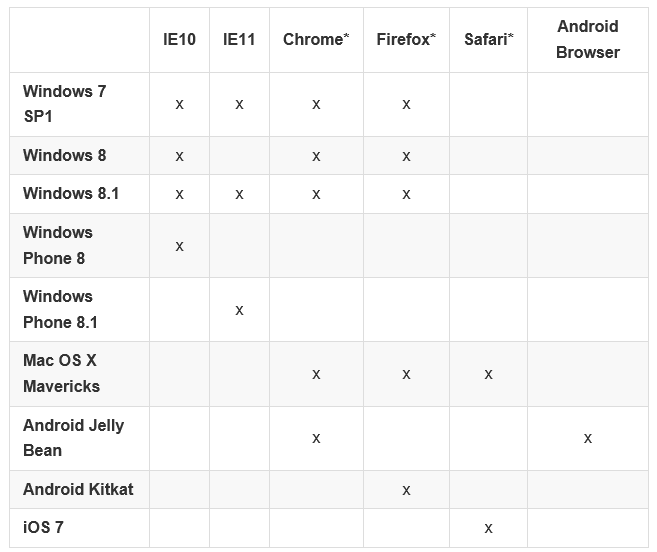
Much of WinJS will run on any modern browser but the browser support matrix has a number of gaps:

image

You can also see what runs where from this status table.

But what is WinJS? Note that it comes from the Windows apps team, not the web development team at Microsoft. WinJS was designed to enable app development for Windows 8 “Metro” (also known as the Windows Runtime) using JavaScript, CSS and HTML. Back in 2010, when Microsoft signalled the end of Silverlight and the rise of HTML 5 for browser-based applications, early versions of WinJS would already have been in preparation. Using WinJS you can share code across a Windows 8 app, web apps, and via an app packager like Apache Cordova, in apps for Android and iOS as well.

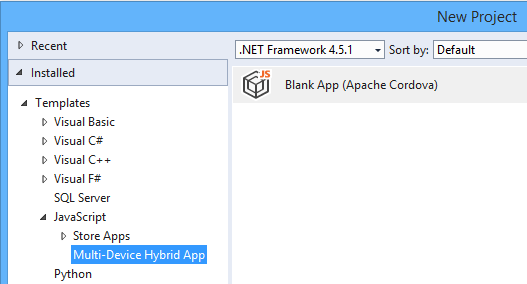
Note that Cordova is now integrated into Visual Studio, using the catchy name Multi-Device Hybrid App:

image

If you want to know what kind of controls and components are on offer in WinJS, you can find out using the excellent demo site here. This is Firefox:

image

Quick summary then: WinJS lets you build apps that look like Windows 8 Store apps, but which run cross-browser and cross-platform. But who wants to do that?

Maybe Microsoft does. The messaging from the company, especially since CEO Satya Nadella took over from Windows guy Steve Ballmer, is “any device”, provided of course that they hook up to Microsoft’s services. That messaging is intended for developers outside the company too. Check out the current campaign for Microsoft Azure, which says “consume on any device”.

image

This could be a web application, or it could be a client app using Azure Mobile Services or an ASP.NET Web API application to connect to cloud data.

You do not have to use WinJS to consume Microsoft’s services of course. Why would developers want to use the look and feel of a rather unloved app platform, rather than the native look and feel of Android or iOS? That is an excellent question, and in most cases they will not. There could be cases though, for example for internal business apps where users care most about functionality. What is the current stock? What is the lead time? Show me this customer’s order history. A WinJS app might not look right for the platform, but the UI will be touch-friendly, and ease of rollout across the major mobile platforms could trump Apple’s design guidelines.

If you are writing a pure web application, users expectations concerning native look and feel are not so high. The touch-oriented design of WinJS is its main appeal, though other web frameworks like JQuery Mobile also offer this. The “Metro” design language is distinctive, and Microsoft will be making a renewed push for Windows Store apps, or Universal Apps, as part of the new wave of Windows called Windows 9 or “Threshold”. WinJS is the way to build apps for that platform using JavaScript and HTML, with the added bonus of easy porting to a broad range of devices.

This is a hard sell though. I am impressed by the effort Microsoft has put into making WinJS work cross-platform, but will be surprised to see much usage outside Windows Store apps (including Windows Phone). On the other hand, it does help to keep the code honest: this really is HTML and JavaScript, not just a wrapper for Windows Runtime APIs.

Here comes TypeScript: Microsoft’s superset of JavaScript

Microsoft’s Anders Hejlsberg has introduced TypeScript, a programming language which is a superset of JavaScript and which compiles to JavaScript code.

The thinking behind TypeScript is that JavaScript is unsuitable for large projects.

“JavaScript was never designed to be a programming language for big applications,” says Microsoft’s Anders Hejlsberg, inventor of C#. “It’s a scripting language.”

The ubiquity of JavaScript makes it remarkably useful though, with that now extending to the server thanks to projects like node.js. Microsoft is using node.js for its Azure Mobile Services.

TypeScript therefore lets you use features including type annotations, classes, modules and interfaces to make large projects more robust and maintainable.

Variable names are preserved when TypeScript is compiled. Further, since TypeScript is a superset, any JavaScript code can be pasted into a TypeScript project. The compiler is open source and you can download an early version here.

Microsoft is also trying to stay close to the specification for Ecmascript 6, the proposed next iteration of the official JavaScript standard, where relevant.

There is tooling for Visual Studio including a language service to provide code hinting, syntax highlighting and the like.

TypeScript differs from projects like Google Web Toolkit or Script#, both of which also emit JavaScript, in that it does not compile from one language into another; rather, it compiles into a reduced version of itself.

Why is Microsoft doing this? That is the interesting question. I would conjecture that it is partly self-interest. Microsoft itself has to write increasing amounts of JavaScript, for things like Office Web Apps (apparently written in Script#) and the new Azure portals. Azure Mobile Services uses JavaScript as mentioned above. JavaScript is also one of the options for coding apps for Windows 8. Better tools will help Microsoft itself to be more productive.

That said, the arrival of TypeScript will re-ignite the debate about whether Microsoft, while not anywhere close to abandoning .NET, is nevertheless drifting away from it, towards both native code in Windows and now JavaScript in the managed code space.

More information from Microsoft’s S Somasegar here.

Dropbox turns to CoffeeScript to beat JavaScript syntactic noise

Dropbox is a high-profile convert to CoffeeScript, a language that has the elegance of Ruby or Python but compiles into clean JavaScript in order to run in the browser. The Dropbox team says that CoffeeScript fixes many of JavaScript’s “syntactic problems.” In addition, a porting exercise reduced 23,437 lines of JavaScript to 18,417 lines of CoffeeScript, code, and this brevity was considered the “strongest argument” in favour – even though many of those eliminated lines were just curly braces and parentheses.

In order to port the code, the team used the Js2coffee tool; a bit of a brain-twist, a tool to convert JavaScript to a language that later compiles back to JavaScript.

The whole post is worth a read, and gives before and after examples.

Consider also the following:

Google’s Dart is an alternative web language that compiles to JavaScript, as is Google Web Toolkit

Microsoft’s Office Web Apps are written in C# compiled to JavaScript with a version of Script#. Microsoft’s Roslyn compiler as a service project lets you copy and paste VB code as C# and vice versa, and is already also being used to compile C# as JavaScript. Microsoft’s Anders Hejlsberg is rumoured to be working on a JavaScript project.

JavaScript seems to be becoming the new Common Language Runtime, not that Microsoft’s .NET CLR is going away, but rather that JavaScript now better fulfils the goal: pick whatever language you like and run it in the browser. 

PostScript:

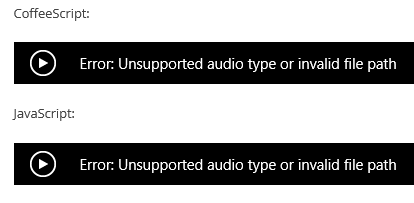
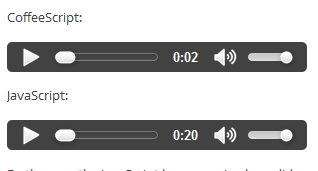
I was intrigued to note that the Dropbox post does not render properly in Internet Explorer 10. For some reason that must appeal to geeky humour, it includes code spoken as audio, but the audio tags fail:

image

instead of

image

Possible reasons: the Dropbox page has a DOCTYPE of XHTML 1.0, and the files are in .wav format where IE is documented only to support MP3 or MP4. IE10 therefore refuses to play the audio, which works fine in Google Chrome and Mozilla Firefox.

The significance of this is not so much the technicalities, but rather what it implies about how many people now use IE in the community most likely to read this post.

Convert .NET Intermediate Language to JavaScript

Whomever called JavaScript the assembly language of the web was a true prophet.

Compiling .Net code to JavaScript is not new. I have heard that Microsoft’s Office Web Apps, browser-hosted editing of Office documents, are built with Script#.

The difference with JSIL is that it compiles .NET Intermediate Language (IL), and therefore works with any .NET language – though note that:

JSIL is still in development. You will hit bugs

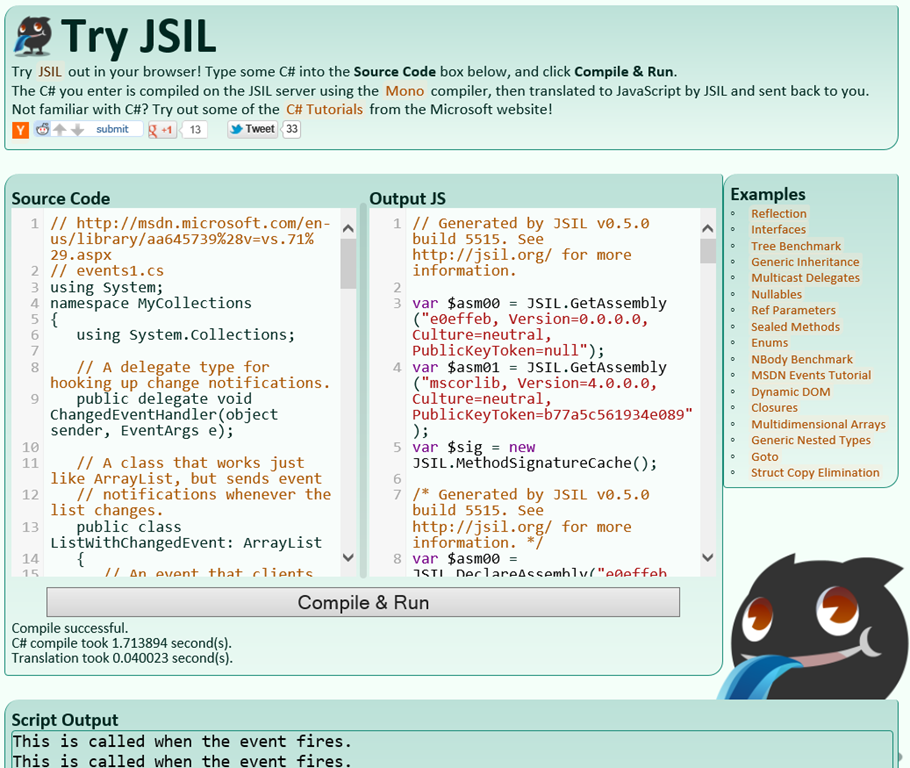
The screenshot says it all

image

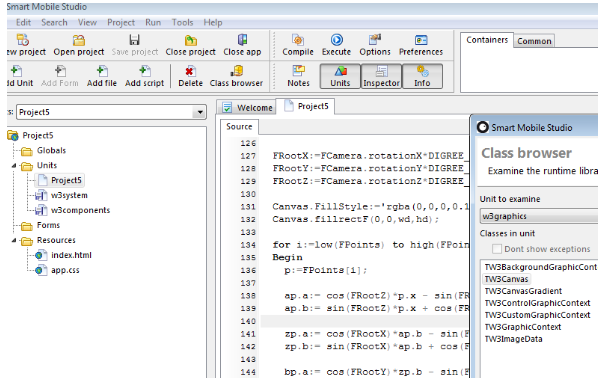
Compile Object Pascal to JavaScript with Smart Mobile Studio

Here is an interesting project for Delphi developers: a compiler and IDE that takes your Object Pascal code and outputs HTML and JavaScript. 

image

Smart Mobile Studio, also known as OPJS (Object Pascal to JavaScript) is a project from Optimale Systemer AS, and supports not only the Object Pascal language. but also reusable components in true Delphi style. The goal is to bring Object Pascal programming to mobile platforms, using PhoneGap to wrap the generated code as a native application for iOS, Android or other platforms.

According to the developers, “The Smart object pascal dialect is more or less identical to Delphi 7”. That said, there are no pointers, and ASM blocks contain normal JavaScript instead of machine instructions. This enables use of JavaScript libraries such as JQuery from Smart Mobile code:

You can access native JS through an ASM section, create an instance of it to a variant, and then access its methods directly.

Smart Mobile Studio is currently in closed Alpha so not ready for most of us just yet. Note that there are other options for mobile development with Delphi, including Embarcadero’s official FireMonkey project which can be used with the Free Pascal iOS compiler. Embarcadero has promised its own compiler for IOS in a future version, as well as an Android option.

Microsoft backs ECMAScript, dismisses Google Dart

Microsoft has posted an article on Evolving ECMAScript on its IE Blog. ECMAScript is the official standard for what we call JavaScript. The company is proposing some minor additions “to address gaps in Math, String and Number functionality as well as Globalization.” It has also taken the opportunity to take a shot at Google, which is proposing a new web language called Dart:

Some examples, like Dart, portend that JavaScript has fundamental flaws and to support these scenarios requires a “clean break” from JavaScript in both syntax and runtime. We disagree with this point of view. We believe that with committee participant focus, the standards runtime can be expanded and the syntactic features necessary to support JavaScript at scale can be built upon the existing JavaScript standard.

Dart will compile to JavaScript so there is a measure of compatibility, but if the language catches on then browsers without a native implementation will be disadvantaged.

Adobe’s Falcon JS: Compile Flex code to HTML and Javascript

Adobe has issued further information about its intention to donate the Flex SDK, which builds Flash applications from XML and ActionScript, to the Apache Software Foundation. Specifically, the donation will include:

  • BlazeDS, the free version of LiveCycle Data Services
  • Falcon, the new Flex compiler due to be completed in 2012
  • Falcon JS, a previously unannounced project

Of these, Falcon JS is the most eye-catching. This is an “experimental cross-compiler from MXML and ActionScript to HTML and JavaScript.” In other words, Falcon JS has the potential to give developers a migration path from Flash to HTML clients. Note that it is described as a cross-compiler rather than a porting tool, so it may well be that the output is not easily edited. The Google Web Toolkit works like this, converting Java to JavaScript but not in a form that anyone is expected to edit. Adobe also adds:

We have undertaken some experimental work in this area, but remain unsure as to the viability of fully translating Flex-based content to HTML. The Falcon JS cross-compiler, referenced above, represents this early work.

What about the most sensitive of Adobe’s statements, that HTML is the long-term solution for enterprise applications? Adobe says:

In time (and depending upon your application, it could be 3-5 years from now), we believe HTML5 could support the majority of use cases where Flex is used today.

and adds:

We intend to make investments in HTML-related technologies, so that we can help advance HTML5 to make it suitable for enterprise applications.

I am not sure to what extent the new statement will ease the worries of Flex developers; but at least Adobe is clear about its intentions. While there are benefits in the Flex SDK moving to Apache, overall the message is that Adobe is hastening towards HTML 5. I am surprised, considering the progress the company has made in creating a strong cross-platform toolkit for mobile and desktop applications. Although no-one should doubt that Adobe will continue to support and evolve Flex as a development platform, it has in effect declared it to be a legacy technology, and I would guess that the effect will be to depress the level of activity there.