Tag Archives: javascript

Google offers the web a new language called Dart – but why?

Google has announced an early preview of Dart, a new language for web applications. The news is not a surprise, especially if you have been keeping track of the developer conference GOTO Aarhus, whose organisers had pre-announced that Google would be announcing its new language there, as indeed it did.

image

Dart is a curly-brace language like JavaScript, Java, C, C++ and C#. In Dart, as in C# and Java, a class can implement multiple interfaces, but only inherit from a single class. Dart supports both static and dynamic typing. Google says it can be executed by a Dart VM, or converted to JavaScript:

Dart code can be executed in two different ways: either on a native virtual machine or on top of a JavaScript engine by using a compiler that translates Dart code to JavaScript. This means you can write a web application in Dart and have it compiled and run on any modern browser. The Dart VM is not currently integrated in Chrome but we plan to explore this option.

Google also says that you will be able to “execute Dart code directly in a VM on the server side”, so you can infer that Google has Dart in mind as an alternative PHP as well as to JavaScript. The company is using the phrase “structured web programming” to describe Dart, and this phrase appears in the announcement and as the subtitle on the Dart site. The implication is that JavaScript code tends to be poorly structured and that Dart will promote more maintainable code.

In the preview Dart only runs in Chrome, Safari 5 and Firefox 4+ – spot the missing browser vendors.

At first glance, Dart looks like a promising language, though I find myself asking what it is really for, when it bears a strong family resemblance to existing languages, and bearing in mind that the Google Web Toolkit, which compiles Java to JavaScript, already enables structured programming for web applications. The list of problems which Dart solves in the technical overview is not all that compelling.

Google states that:

Developers have not been able to create homogeneous systems that encompass both client and server, except for a few cases such as Node.js and Google Web Toolkit (GWT).

This is or was one of the attractions of Microsoft Silverlight, presuming you use C# on both server and client, but Silverlight is a plug-in that was never going to run on an iPad and from which Microsoft itself is now retreating; though it is worth noting that Dart is not unlike C#, especially the latest version of C# with dynamic features.

I guess that Dart is a consequence of the failure of ECMAScript 4.0, which was a cooperative effort to create a more modern and advanced JavaScript. Google is now going it alone; the key question is whether it can win support from others such as Apple and Microsoft, or whether this will be a Google language for Google on the server and Chrome on the client, or an interesting experiment that never really catches on.

Do we need Dart? I would value hearing from others what you think of Google’s proposal.
Wolfram announces Computable Document Format for interactive docs

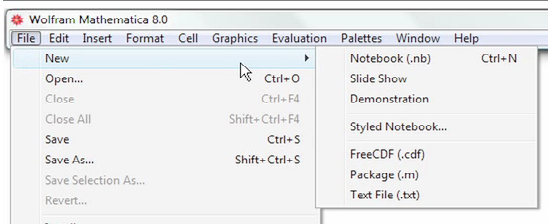
Wolfram has announced the Computable Document Format (CDF), a document format that enables live computation to be embedded within it. “It’s a new way to communicate the world’s quantitative ideas much more richly than we have in the past, and in doing that a new kind of active document,” says  Conrad Wolfram, Strategic Director of Wolfram Research. That said, the technology here is not really new. There is a close relationship between CDF and Mathematica, Wollfram’s tool for creating mathematical calculations and simulations. The authoring tool for CDF is Mathematica:

image 

The announcement then is really about a new player for Mathematica content and applications, to broaden their usage. The CDF player is free, though there are some limitations. If you charge for your document, or want to display it without the player chrome, then a paid licence is needed. A CDF document can also be compiled into a standalone executable, blurring the distinction between document and application.

The CDF player is available for Mac, Windows and Linux. There is also a browser plug-in for embedding CDF documents into web pages.

It is easy to find use cases for CDF. It is for documents where there is value in performing calculations or interacting with data within the page. An example is pension planning:

image

We have all seen those documents with a series of projections based on different assumptions about retirement age, contributions, investment growth and so on. This works better as an interactive chart where you can enter whatever values you like.

Other examples are statistical analysis and business intelligence, textbooks and course books where students can interact with equations and simulations, business proposals where you want to show how financial projections change based on different assumptions, or even general news reports where instead of a static chart you might want to show interactive graphics that let readers drill down into the data that interests them, or see real-time results.

Along with the computation engine, CDF supports a decent range of traditional content formatting features including cascading stylesheets.

Wolfram is correct in assuming that this kind of interactive document is important, and something we will increasingly take for granted in the era of the Web, eBooks and tablets. But can it succeed in establishing its own new document format when we already have HTML, Adobe PDF and Flash, Microsoft Excel and PowerPoint, and other formats which are also capable of embedded interactive content?

That is a key question. Wolfram offers a table which claims to show the benefits of CDF versus competitors such as HTML and PDF, but it is as skewed as these tables usually are. Wolfram says a PDF document cannot be compiled as a standalone executable, for example, but a PDF in an Adobe AIR application comes close. It is also worth noting that you can embed Flash in PDF, which would be an obvious route to something like the pension planning document mentioned above.

Nevertheless, CDF does have advantages. In particular, it has Mathematica, and whereas authoring a Flash applet requires programming and design skills, Mathematica is more approachable presuming you have the necessary mathematical, scientific or financial skills; and if you do not, you should not be authoring the document. Mathematica will construct a user interface automatically. It also has a huge range of built-in algorithms, functions and charts. Wolfram claims that authoring a CDF should be within reach of anyone who can work with an Excel macro.

The challenge Wolfram faces is how to make CDF usable across a broad range of devices and clients. Having to install a player or plug-in is a considerable deterrent. PDF or better still HTML5 has broader reach and works on Google Android and Apple iOS as well as on desktop PCs.

I tried the CDF plugin and player on Windows 7 and encountered several issues. The plug-in does not play nicely with Internet Explorer’s Protected mode and I saw this dialog frequently:

image

I also had some issues with the player. I could not get an example document on Gulf Oil Spill Estimation to work:

image

The player is currently for Windows, Mac and Linux – what about Apple iOS? Wolfram says it is working on this, with a two-pronged approach. One idea is presumably based on some sort of app, I’d guess either a player if Apple allows it, or some way to compile a CDF into an app. The other idea is to render the interactive parts server-side, so you could use them in a web page without a plug-in. This second idea could also remove the need for a plug-in on the desktop. You will get a performance hit because of all those trips back and forth to the server, but this could be mitigated by high performance computing on the server that will perform calculations more quickly than your client.

I can see CDF being popular within its niche, but whether it can transition into being a mass-market format I am not sure. Established plug-ins and runtimes such as Adobe Flash, Microsoft Silverlight, and Java on the client are all under pressure, particularly as Apple’s iOS spreads its reach; it is not a good moment to launch a new format that has a plug-in or runtime dependency. I wonder if Wolfram is exploring the possibility of compilation to HTML5 and JavaScript?

Despite these reservations, the broader vision behind CDF seems to me spot-on. There are many cases where we currently see static charts, that would be better served by an embedded computation engine.

Microsoft partners with Joyent to bring node.js server-side JavaScript to Windows

Microsoft will port node.js to Windows in partnership with Joyent. This will work on Windows Azure as well as other versions of Windows back to Server 2003.

But can you not already run node.js on Windows? This is possible using Cygwin and instructions are here. Cygwin makes Windows more like Linux by providing familiar Linux tools and a Linux API layer. Cygwin is a great tool, though it can be an awkward dependency, but a true Windows port should be higher performance and more robust, particularly as the intention is to use the IOCP API. See here for an explanation of IOCP:

With IOCP, you don’t need to supply a completion function, wait on an event handle to signal, or poll the status of the overlapped operation. Once you create the IOCP and add your overlapped socket handle to the IOCP, you can start the overlapped operation by using any of the I/O APIs mentioned above (except recv, recvfrom, send, or sendto). You will have your worker thread block on GetQueuedCompletionStatus API waiting for an I/O completion packet. When an overlapped I/O completes, an I/O completion packet arrives at the IOCP and GetQueuedCompletionStatus returns.

IOCP is the Windows NT Operating System support for writing a scalable, high throughput server using very simple threading and blocking code on overlapped I/O operations. Thus there can be a significant performance advantage of using overlapped socket I/O with Windows NT IOCPs.

I was impressed by node.js when I saw it presented by author Ryan Dahl at a pre-Dreamforce event last year. Since then it has become better known. This is an interesting move, particularly in the context of an greater focus on JavaScript in the forthcoming version of Windows known as Windows 8. End to end JavaScript for your next-generation real time networking applications?

Full circle at Microsoft: from the early days of .NET to the new Chakra JavaScript engine

A discussion with a friend about the origins of Microsoft’s .NET runtime prompted a little research. How did it come about?

A quick search does not throw up any detailed accounts. Part of the problem is that much of it is internal Microsoft history, confidential at the time.

One strand, mentioned here, is Colusa’s OmniVM:

OmniVM was based on research carried out by Steven Lucco at Carnegie Mellon University. Steven co-founded Colusa Software in February 1994 in Berkeley, California. Omniware was released in August 1995. Colusa started working with Microsoft in February 1996. Microsoft acquired Colusa Software on March 12, 1996. Steven is currently a senior researcher at the Microsoft Bay Area Research Center.

OmniVM was appealing to Microsoft because Colusa had already created Visual Basic and C/C++ development environments for the VM. The VM was also claimed to be capable of running Java.

Microsoft took to calling the VM by the name of CVM, presumably for Colusa Virtual Machine. Or perhaps this is where the code name Cool came into being. Other names used at Microsoft include Universal Virtual Machine (UVM), and Intermediate Language (IL).

Microsoft’s Jason Zander, commenting to a story on this blog, does not mention OmniVM:

The CLR was actually built out of the COM+ team as an incubation starting in late 1996. At first we called it the "Component Object Runtime" or COR. That’s why several of the unmanaged DLL methods and environment variables in the CLR start with the Cor prefix.

Still, the timing pretty much matches. If Lucco came to Microsoft in 1996, he could have been part of an incubation project starting later that year.

In June 1999 Microsoft previewed the Common Executable Format for Windows CE:

A demonstration on Common Executable Format (CEF), a new compiler target within the Visual C++® development system for Windows CE, was also presented. This compiler enables cross-processor portability within a category of devices, such as Palm-size PCs or Handheld PCs. A single program executable under CEF is translated to the native code on either the host PC or the device, as desired. This capability eliminates the need for developers to recompile an application for every possible processor on a given Windows CE-based appliance before bringing it to market, thus enabling them to support every version of a device (Palm-size or Handheld PC) quickly and easily.

In 2000 I interviewed Bob Powell, then at Stingray, who told me this in relation to .NET:

There was an early version of the system for Windows CE called the Common Executable Format (CEF). The Pocket PC, which uses around seven different processor types, and which has many different versions of the operating system, is a deployment nightmare. This problem was addressed by the CEF, which was a test case. What is now in the IL is a more refined version of that.

Hmm, now that Windows is coming to ARM alongside x86, this sounds like it could be useful technology … though despite obvious similarities, I don’t think CEF was really an early version of the CLR. Maybe the teams communicated to some extent.

Now this is interesting and brings the story up to date. Lucco is still at Microsoft and apparently his team built Chakra, the new JavaScript engine introduced in Internet Explorer 9:

image

Steven E. Lucco is currently the chief architect for the Microsoft Browser Programmability and Tools (BPT) team. BPT builds the Internet Explorer’s Chakra Javascript script engine, as well as the Visual Studio tools for creating scalable, efficient Web client applications.

Right now, these are dark days for .NET, because Microsoft now seems to be positioning HTML and JavaScript as the new universal runtime.

It seems that the man who perhaps began the .NET Runtime is also at the centre of the technology that might overtake it.

Update: this post has prompted some discussion and the consensus so far is that the OmniVM acquisition probably had little to do with the technology that ended up as .NET. The one thing that is beyond doubt is that the COM team created the .NET CLR as Zander reported. I actually spoke to Zander at TechEd recently and we touched on his early days at Microsoft working with Scott Guthrie:

I was actually one of the original CLR developers. When Scott and I first started working together, he invented ASP.NET and my team invented the CLR.

The history is interesting and if the relevant people at Microsoft are willing to talk about it in more detail it is something I would love to write up – so if that is you, please get in touch!

Considering Windows 8 as an HTML platform

Amongst all the fuss about whether Microsoft is deprecating Silverlight or even client-side .NET, it is easy to lose sight of the other angle on this. What are the implications of Microsoft embracing HTML and JavaScript as a new first-class Windows development platform? Here’s the quote again:

Today, we also talked a bit about how developers will build apps for the new system. Windows 8 apps use the power of HTML5, tapping into the native capabilities of Windows using standard JavaScript and HTML to deliver new kinds of experiences. These new Windows 8 apps are full-screen and touch-optimized, and they easily integrate with the capabilities of the new Windows user interface.

When Microsoft introduced IE9 with hardware-accelerated graphics, support for some key parts of HTML 5, and a new fast JavaScript engine, it was not only trying to recover ground in the browser wars. It also had in mind a new application runtime for Windows, for desktop as well as for web applications.

In order to achieve this, we can expect more hooks between the browser engine and the local operating system. There is potential security risk, but Microsoft of all companies will be sensitive to this and I would expect it to get the security right. The further implication is that some parts of a Windows HTML application will be Windows-specific. It is an “Embrace and extend” strategy, as I noted in this Register article back in September last year when former Silverlight product manager Scott Barnes broke the story of how the Windows team at Microsoft was favouring HTML and JavaScript above .NET.

The rationale for this is two-fold. First, I’m guessing that Microsoft thinks it will work better. Although .NET client apps are now commonplace, especially for custom business applications, problems like slow start-up and heavy memory requirements never really went away, though I would argue that in Silverlight they are almost eliminated.

Second, HTML and JavaScript is a universal programming platform. With the new model, any developer who can code a web page can also code a Windows app. Corporate VP Michael Angiulo said at Computex in Taipei:

Windows 8’s new application platform … is based on HTML 5, JavaScript and CSS, the most widely understood programming languages of all time. These languages form the backbone of the web, so that on day 1 when Windows 8 ships hundreds of millions of developers will already know how to build great apps for Windows 8.

These are both compelling arguments. Nevertheless, there are several reasons why making Windows an HTML platform might not be the instant hit that Microsoft will be hoping for. Here are a few:

  • Microsoft’s Visual Studio is .NET oriented. It does have a web design tool, Expression Web, which is OK but still falls short compared to Adobe Dreamweaver. Web designers tend to use Dreamweaver anyway, thanks to Mac compatibility and integration with other Adobe tools. Even Dreamweaver is not great as an application development tool, as opposed to a web design tool. Tooling is a problem, and it is fair to say that whatever goodies Microsoft comes up with in this area will likely be a step back compared to what it already has for C# or C++.
  • Standards are a mixed blessing if you are trying to sell an operating system. If Microsoft does such a good job of standards support that the same apps run with minor tweaks on an iPad and on Android, users may do just that. If Microsoft encumbers the standards with too many proprietary extensions, the universality of the platform is lost.
  • Windows plus HTML and JavaScript sounds a lot like Palm/HP WebOS, which has gained favourable reviews but has yet to take off in terms of sales. Otherwise, Palm would not have been taken over by HP.
  • The question of whether HTML and JavaScript will really take over app development is open. I certainly hear voices saying so. I interviewed Nitobi’s president André Charland, in charge of PhoneGap, and he makes a good case. On the other hand, App development today is still dominated by platform-specific development, Objective C for Apple iOS and Java on Dalvik, the Google Android virtual machine.
  • The standard in HTML/JavaScript app platforms is not Microsoft’s Internet Explorer, but WebKit, as used in iOS and in Google Android and Chrome. Microsoft did great work in standards support in IE9, but so far it has not stopped its browser share decline. Worldwide figures from StatCounter show Internet Explorer in continuing slow decline overall, and Chrome still growing and set to overtake Firefox in a year or so.

In other words, there is little evidence that embracing HTML and JavaScript as an app platform will ensure success for Windows 8.

That said, other factors count for more. Developers will go where their customers are, and if Microsoft turns out a version of Windows that wins substantial market share in the emerging tablet market as well as on traditional notebooks, the new platform will be a hit.

The risk though is that the market will continue to perceive Windows as an OS for desktop and laptop, and look to iOS or Android for mobile and touch devices. The dual personality of Windows 8 may count against it, if it means devices that are compromised by having to support both user interface models.

Dreamweaver CS5.5 PhoneGap apps: performance issues on Android

This is a follow-on from my earlier post about building a simple PhoneGap app using Adobe Dreamweaver CS5.5. I built it on Windows targeting Android. I liked the development experience up to the point of trying the app: it looks great, but performance is terrible. That is, you tap a button and there is a perceptible pause before the app responds. It is worse in the emulator than on my HTC Desire, but still poor.

I had thought it was a configuration setting – though Dreamweaver makes it rather hard to access the build settings – but I am now wondering if jQuery mobile plus PhoneGap is just too demanding for most Android devices out there right now. Admittedly my Desire is a year or so old now. See this thread for example:

JQuery Mobile on Android is definitely slow. (Tested A2 and A3Pre on Samsung Galaxy S, HTC Desire, ZTE Blade (edit: 2.2 Froyo) – with PhoneGap, stock browser, Opera Mobile)

Something has to be done. The experience is low quality.

It is worth noting that PhoneGap is not yet a version 1.0 release – I was told it may be done by July. Further, you do not have to use jQuery Mobile with it in Dreamweaver; it just happens to provide a great set of user interface widgets. It may be better on Apple iOS; I have not tried that yet.

Nevertheless, this looks like a significant issue if you planning to dive in and deliver Android apps using the tools in the new Dreamweaver.

Native apps better than web apps? That’s silly talk says PhoneGap president

When I attended Mobile World Congress in February one of my goals was to explore the merits of the various different approaches to writing cross-platform mobile apps. One of the key ones is PhoneGap, and I got in touch with Nitobi’s president and co-founder André Charland. As it turned out he was not at that particular event, but he kept in touch and I spoke to him last week.

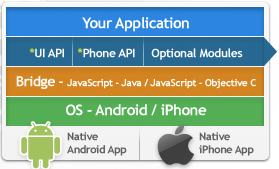
PhoneGap works by using the installed HTML and JavaScript engine on the device as a runtime for apps. That is not as limiting as it may sound, since today’s devices have high performance JavaScript engines, and PhoneGap apps can be extended with native plug-ins if necessary. But aren’t there inconsistencies between all these different browser engines?

Sure, it’s kinda like doing web development today. Just a lot better because it’s just different flavours of WebKit, not WebKit, Gecko, whatever is in IE, and all sorts of other differentiation. So that’s definitely how it is, but that is being overcome rather quickly I’d say with modern mobile JavaScript libraries. There’s JQuery Mobile, there’s Sencha Touch, there’s DoJo Mobile just released, SproutCore, which is backed by Strobe, which is kinda the core of Apple’s MobileMe.

There’s tons of these things, Zepto.js which is from the scriptaculous guy, Jo which is a framework out of a Palm engineer, the list of JavaScript frameworks coming out is getting longer and longer and they’re getting refined and used quite a bit, and those really deal with these platform nuances.

At the same time, phone manufacturers, or iOS, Android, WebOS, and now RIM, they’re competing to have the best WebKit. That means you’re getting more HTML5 features implemented quicker, you’re getting better JavaScript performance, and PhoneGap developers get to take advantage of that.

says Charland. He goes further when I put to him the argument made by native code advocates – Apple CEO Steve Jobs among them – that PhoneGap apps can never achieve the level of integration, the level of performance that they get with native code. Will the gap narrow?

I think it will go away, and people will look back on what they’re saying today and think, that was a silly thing to say.

Today there are definitely performance benefits you can get with native code, and our answer to that is simply that PhoneGap is a bundle made of core libraries, so at any point in your application that you don’t want to use HTML and JavaScript you can write a native plugin, it’s a very flexible, extensible architecture … So you can do it. We don’t necessarily say that’s the best way to go. Really if you’re into good software development practices the web stack will get you 90%, 95% of the way there, so that apps are indistinguishable from native apps.

Some of the native features we see in iOS apps, they’re reminiscent of Flash home pages of ten years ago, sure you can’t do it in HTML and JavaScript but it doesn’t add any value to the end user, and it detracts from the actual purpose of the application.

The other thing is, a lot of these HTML and JavaScript things, are one step away from being as good in a web stack as they are in native. When hardware acceleration gets into WebKit and the browser, then performance is really just as good.

Charland is also enthusiastic about Adobe’s recent announcement, that PhoneGap is integrated into Dreamweaver 5.5:

Two things are exciting from our perspective. It gives us massive reach. Dreamweaver is a widely used product that ties in very nicely to the other parts of the creative suite toolchain, so you can get from a high-level graphic concept to code a lot quicker. Having PhoneGap and JQuery Mobile in there together is nice, JQuery Mobile is definitely one of the more popular frameworks that we see our community latching on to.

The other thing is that Dreamweaver targets a broader level of developer, it’s maybe not super hard core, either Vi or super-enterprise, Eclipse guys, you know, it’s people who are more focused on the UI side of things. Now it gives them access to quickly use PhoneGap and package their applications, test them, prove their concepts, send them out to the marketplace.

He says Adobe should embrace HTML and Flash equally.

I also asked about Windows Phone support, and given that Microsoft shows no sign of implementing WebKit, I was surprised to get a strongly positive response:

We have something like 80% of the APIs in PhoneGap running on Windows Phone already. That’s open and in the public repo. We are just waiting basically for the IE9 functionality to hit the phone. The sooner they get that out in public, the sooner we can support Windows Phone 7. We have customers knocking at our door begging for it, we’ve actually signed contracts to implement it, with some very large customers. Just can’t there soon enough, really. I think it’s an oversight on their part to not get IE9 onto the phone quicker.

PhoneGap is at version 0.94 at the moment; Charland says 0.95 will be out “in a few weeks” and he is hoping to get 1.0 completed by O’Reilly OSCON in July.

I’ve posted nearly the complete transcript of my interview, so if you are interested in Charland’s comments on building a business on open source, and how PhoneGap compares to Appcelerator’s Titanium, and what to do about different implementations of local SQL on devices, be sure to read the longer piece.

How Microsoft’s Office Web Apps were written in C# and compiled to JavaScript, maybe

While researching another product I came across this 2009 tweet from Microsoft’s Nikhil Kothari:

Office 2010 web apps – perhaps one of the most ambitious script# projects!

Script# is loosely equivalent to the Google Web Toolkit, but whereas GWT compiles Java to JavaScript, Script# compiles C# to JavaScript. According to the site:

Script# is used extensively by developers within Microsoft building Ajax experiences in Windows Live, Office to name just a couple, as well as by a external developers and companies including Facebook.

I had come across the project before, but was waiting to see if would evolve beyond what looks like a personal project for Kothari. It is hosted on http://projects.nikhilk.net rather than on an official Microsoft domain, and the latest release is 0.6.2. In other words, it does not have the look of a project that you would recommend for production work, interesting though it is. Nor is there much public activity around Script# that I can see, though there is a CodePlex site dedicated to improving its JQuery support.

Seeing Kothari’s tweet though raises several questions.

  • Did Microsoft really use it for Office Web Apps, a high profile project which is a key part of Microsoft’s cloud computing strategy?
  • Is there another, more up-to-date version of Script# that is used internally and which may one day burst into the public arena?
  • How might it impact the Silverlight vs HTML5 debate, if Microsoft comes up with a C# to JavaScript compiler in Visual Studio that lets developers code in .NET but deploy to cross-platform JavaScript?

I am sure there are readers of this blog who know more than I do, so by all means let me know.

Appcelerator acquires Aptana

Appcelerator, a company whose main product is a cross-platform desktop and mobile toolkit called Titanium, has acquired Aptana, whose Aptana Studio 2 is probably the best IDE for JavaScript application development, and which also supports Ruby on Rails, PHP, Python, and Adobe AIR.

It makes sense, in that Titanium uses JavaScript as the primary language for the application logic and UI.

image

Appcelerator is already doing well from the current surge of interest in mobile apps, offering an obvious solution to developers endeavouring to support both Apple iOS and Google Android with a single code base. Aptana looks a good acquisition; but the news may not be so welcome to those who rely on Aptana Studio for Adobe AIR; I imagine Appcelerator may see this as a competing platform. Then again, most AIR developers use the Flash IDE or Flash Builder so it is unlikely to have a huge impact even if AIR support is dropped (I do not know what the plans are in this respect).

The server-side technologies like PHP and Ruby are a better fit, since many mobile apps have a server component.

Update: in the webcast about the acquisition, Appcelerator CEO Jeff Haynie said “There’s quite a few questions around Aptana as it relates to Adobe and ColdFusion; I don’t think we can say anything about that.”

The company is expecting to release a joint Aptana Studio/Appcelerator Titanium beta in March 2011. The initial release will not include a visual designer, though this is planned for some future release.

Don’t miss Ryan Dahl on Node.js

I’m just back from Dreamforce in San Francisco, where one of the sessions I enjoyed most was from Ryan Dahl in the Cloudstock pre-conference event.

He is the author of node.js, a binding for the V8 Javascript engine, not for running in the browser but for creating server apps. However, it is interesting even if you don’t want to use V8, because of the approach he takes to concurrency and I/O. I wrote up the session here, under the title Nginx the new Apache, node.js the new PHP?

What was Dahl doing at a Dreamforce conference? That was a question that puzzled me, until later in the week when it was announced that Salesforce.com is acquiring Heroku. Heroku has been experimenting with running node.js on its hosted infrastructure for Ruby applications, and may come up with a Ruby wrapper.