More reflections on Oslo, over at the IT Job Blog.
Category Archives: microsoft
Developers: will you or have you signed for ribbon rights?
This is the dialog you see when installing Delphi 2009 or C++ Builder 2009:
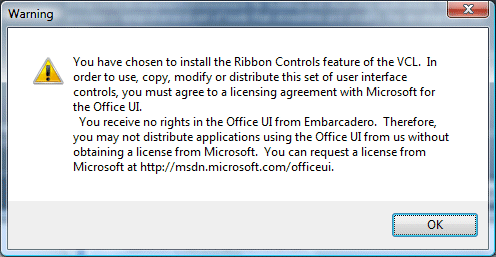
There’s a similar restriction on use of the ribbon controls in the latest MFC.
The license information page is here. The license itself has two provisions that you might care about. First, you agree not to use the Ribbon, also known as the Fluent UI, in “Excluded products”:
“Excluded Products” are software products or components, or web-based or hosted services that perform primarily the same general functions as the Microsoft Office Word, Excel, PowerPoint, Outlook and Access software applications, and that are created or marketed as a replacement for any or all of those Microsoft applications.
OpenOffice.org – that’s you.
The second provision is more troublesome (unless you are OpenOffice or Google Apps). You have to comply with the Design Guidelines:
Your Licensed UI must comply with the Design Guidelines. If Microsoft notifies you that the Design Guidelines have been updated or that you are not complying with the Design Guidelines, you will make the necessary changes to comply as soon as you reasonably can, but no later than your next product release that is 6 months or more from the date you receive notice.
So what are the Design Guidelines? Good question. This is where it gets silly. In order to see the Design Guidelines, you have to agree the “2007 Microsoft Office Fluent User Interface Design Guidelines Evaluation License Agreement”, which among other things is a non-disclosure agreement. Furthermore, you have to destroy them within 30 days:
3. RESTRICTIONS. The Design Guidelines are for reference only and may not be used in development. You agree that you will destroy the Design Guidelines within thirty (30) days after you first acquire them or upon termination, whichever is earlier.
I am guessing here, but I hope and suppose that if you agree the main license you no longer have to destroy the guidelines to which you are meant to be conforming. It’s not obvious that this is the case, since the main agreement refers back to the UI licensing page, and the only way I can see to get the design guidelines is by agreeing the evaluation license which requires you to destroy them.
I reckon Microsoft’s lawyers are getting carried away.
Lunacy aside, I’d presume that the guidelines are detailed and that conforming could involve considerable work. It is also unclear to me what would happen in the real world if Microsoft issued an edict requiring you to update your application to its latest version with 3D revolving icons, for example. If you are an external developer and your customer does not want to pay, what then? I suppose in theory you should insure against it, or sneak in a clause to your development contract that says the customer pays for extra work imposed by Microsoft in the event that it exercises its rights.
Pragmatically I guess it is unlikely to happen. Still, I don’t like unreasonable agreements. In any case, are we sure that if you did not agree the license, but still went ahead and used the Ribbon UI, that Microsoft could successfully pursue you? Call it a toolbar, and it’s been commonplace in software for years.
Microsoft makes up with the OMG
Microsoft has joined the Object Management Group:
Microsoft Corp. today outlined its approach for taking modeling into mainstream industry use and announced its membership in the standards body Object Management Group™ (OMG™).
I’m not clear exactly when Microsoft joined the OMG. It is already listed as a Contributing Member (the highest level) here. Still, the warm words are something new. In the past Microsoft’s modelling strategy has been presented as an alternative to the OMG. For example, here’s IBM’s Agile Development expert Scott Ambler in a 2005 article:
Luckily, the OMG isn’t the only modeling game in town. Microsoft has struck out on its own, a strategy that has clearly served it well in the past, and is suggesting a new approach to modeling: Domain Specific Languages (DSLs).
And here’s Grady Booch in 2004, on why UML is good and why he “disagrees with Microsoft’s rejection of the UML in favour of proprietary domain-specific languages.”
Before the UML vs DSL wars it was the CORBA vs COM wars, and in both cases it was OMG on one side and Microsoft on the other.
It’s different now, with warm words from OMG CEO Dr Richard Mark Soley:
Microsoft has always been one of the driving forces in the development industry, helping to make innovation possible but also simplifying many of the most challenging aspects of the application development process …[stuff about UML] … Microsoft’s broad expertise and impact will make its membership in OMG beneficial to everyone involved.
It is all part of Microsoft’s efforts to establish “Oslo”, its new modelling initiative which it hopes is the next big thing in development productivity, and will feature in the next Visual Studio.
I wonder what has happened to software factories, which was Microsoft’s modelling buzzword just a couple of years ago? Part of Oslo, or now abandoned?
Doubling performance with Silverlight multithreading
Bart Czernicki has a detailed post showing how Silverlight 2.0’s multithreading can improve performance. He took my counting primes code and adapted it for parallel processing. On my quad core system the results are impressive:

As you can see by squinting at the screen grab, the processing time went from 0.43 to 0.20 seconds.
Multithreading is getting a bad rap in some quarters, because it greatly complicated debugging. On the other hand, if you have an app which does some heavy duty calculations then performance benefits like this are worth a little pain.
H.264, AAC comes to Silverlight. Game over for VC-1?
Microsoft has announced that Silverlight will support the H.264 video standard “in a future version”, along with AAC for audio. H.264 is also used by Adobe Flash and has wide adoption across the industry; it’s likely that your HD video camera records to H.264, for example.
Good news for Silverlight, though it may be a while before we see this rolled out, but surely bad news for VC-1, Microsoft’s preferred video format and part of the Windows Media family. Why would anyone not standardize on H.264 now?
Defining cloud computing
I liked this post by Larry Dignan on the cloud computing buzzword and how meaningless it has become.
Writing on the subject recently, I was struck by the gulf between what some people mean – online apps like Google Apps and Gmail – and what others mean, on-demand utility computing such as that delivered by Amazon Elastic Compute Cloud or Flexiscale. These things have little in common.
Dignan has even more examples.
Should we abandon the term? Maybe, but I find it useful if only as shorthand for describing how the centre of gravity is shifting to the Internet.
Some services are more cloudy than others. Dignan refers to this Forrester report (though you’ll have to look at the blog post for the extracts, unless you want to buy it) which has a table of “six key characteristics.” I don’t agree with all of them; the business model, for example, is not an inherent part of cloud computing. I am interested in number two:
Accessible via Internet protocols from any computer
Any computer? OK, probably not the Atari ST which I have in the loft. Any computer with a web browser? What about requiring a “modern” web browser, is that OK? Java? Flash? Silverlight? A specific version of Java or Flash? What about when we need a runtime like Adobe AIR or Microsoft Live Mesh? What if it doesn’t run on Linux? Or on an Apple iPhone? What about when there is an offline component such as Google Gears? All these things narrow what is meant by “any computer”.
This is the old “rich versus reach” debate; it is still being played out. My point: cloud computing isn’t a boolean characteristic, but a continuum from very cloudy (NTP) to not cloudy at all (Microsoft Office).
Microsoft Oslo: a tool, a language, a repository
A couple of Microsofties are talking up the Oslo launch at the forthcoming PDC. “Oslo” is what Microsoft sees as the next generation of software development – I think.
Don Box and Douglas Purdy have just posted their own definitions. They should know, they’re working on it.
With Oslo, we’re doing two things:
1. We’re making it easier for people to write things down in ways that make sense for the domain they are working in – the common term for this in the wild is modeling.
2. We’re making the things people wrote down accessible to platform components during program execution.
we have boiled down Oslo to three very simple things:
- A tool that helps people define and interact with models in a rich and visual manner
- A language that helps people create and use textual domain-specific languages and data models
- A relational repository that makes models available to both tools and platform components
There will be a CTP for us all to try at PDC.
The last time the industry tried this I believe it was called UML 2.0; it excited a lot of theoreticians but made little impact on real-world application development. I’m sceptical about Oslo too; but let’s acknowledge at least that the goal is a worthy one.
Having said that, what do you think about this remark from Purdy:
For me personally, Oslo is the first step in my vision “to make everyone a programmer (even if they don’t know it)”.
I’m sorry, that “everyone a programmer” line brings to mind spaghetti-macros in Excel or some of those unmaintainable Access and Visual Basic applications which you still see sometimes if you hang around small businesses.
Still, there is a costly divide in development, which is to do with the fact that A is an expert is some particular field, B is a programmer; and somehow A’s expertise has to be expressed in B’s code. I think this is about bridging that gap.
What happens to the browser market when Google plays the OEM card?
Here’s a bit of speculation. My initial thinking about Google Chrome was that it would mainly take market share from Firefox; and that while IE’s share may continue to erode, Chrome is unlikely to accelerate that much.
I’m beginning to change my mind. One factor is OEM installs. We all know what a huge influence default installs have on users, which is why software vendors are happy to pay the likes of Dell and HP for space on the desktop, or to be the default anti-virus engine, for example. This has often been to the detriment of the user’s experience overall, to the extent that it helped to damage Vista’s reputation, but that is an aside.
Now, one thing I’ve noticed is that Google’s toolbar often turns up by default in OEM installs of Windows. When you start up for the first time (or the first time for real, after all those reboots), IE confronts you with Google’s terms of service. However, I have not yet seen Firefox installed as the default web browser. I’ve presumed that Mozilla doesn’t quite have the financial muscle to do it, or maybe there are other reasons.
Google is a more formidable presence than Mozilla. What if Google buys browser share by being the default browser on machines from the leading OEMs? I suspect that would soon impact IE’s share. Microsoft cannot prevent it because of anti-trust constraints.
Since Chrome is in effect the new Google toolbar, this move strikes me as inevitable.
This would mainly impact the consumer and small business space. IE has some special advantages for enterprises, since it hooks in tightly to Microsoft’s software management tools, and there are further improvements to this aspect in IE8. The consumer/business separation is a leaky one so it could still have a big impact.
Flash and Silverlight are the Chrome losers, says Zoho boss
Zoho CEO Sridhar Vembu makes an interesting statement in an email he has circulated following the launch of Google Chrome:
The biggest losers in Google’s announcement are not really competing browsers, but competing rich client engines like Flash and Silverlight. As Javascript advances rapidly, it inevitably encroaches on the territory currently held by Flash. Native browser video is likely the last nail in the coffin — and Google needs native browser-based video for its own YouTube; so we can be confident Google Chrome and Firefox will both have native video support, with Javascript-accessible VOM (video object model) APIs for web applications to manipulate video. As for Silverlight, let me just say that if Silverlight is the future of web computing, companies like us might as well find another line of work — and I suspect Google and Yahoo probably see it the same way too.
These last weeks have not been good for Adobe. First there was the Harmony announcement, sidelining the Adobe/Mozilla Tamarin project and making Adobe’s ActionScript 3.0 look more proprietary. Now there is Chrome; and I’m inclined to agree with Vembu, that Google will try to move away from Flash dependency. If that is right, then neither Google, nor Microsoft, nor Apple wants to play the Flash game.
As for Silverlight, I see this more as a Microsoft platform solution, extending its reach beyond the Windows client. I doubt it will be much affected by Chrome, though Vembu is right in saying that the more capable the browser becomes, the less necessity there is for something like Silverlight.
What about Zoho itself? I would take it more seriously if it were not so desperately slow whenever I give it a try, in contrast to Google’s usually responsive servers. It may be better in the USA, or perhaps there is some other reason, but for me the performance just kills it.
Counting primes in Google Chrome
A while back I put together a quick prime counting test for Flash and Silverlight.
As someone noted, this test runs remarkably fast in Chrome, thanks to the V8 JavaScript engine.
Here’s the JavaScript version of the test – note that you cannot easily run this in IE or Firefox for larger values, because the script times out, though you can configure your browser to prevent this.
Here are my figures on Vista (lower is better):
- Microsoft Silverlight 2.0 beta 2: 0.464 secs
- JavaScript Google Chrome: 1.4 secs
- Adobe Flash: 1.667 secs
- JavaScript Mozilla Firefox 3: 6.046 secs
- JavaScript Microsoft IE7: 11.916 secs
I can’t easily test IE8 as I have it installed in a virtual machine.