Category Archives: microsoft

Microsoft’s Vista Capable campaign: where it all went wrong

A series of remarkable internal emails have been made public as a result of the class action lawsuit against Microsoft for its “Vista capable” marketing campaign in the second half of 2006. In essence, the claim is that many of these PCs were not really Vista-compatible, because they could only run Vista Basic, and not Vista’s distinctive Aero graphics.

This is not just about eye candy. See Microsoft’s Greg Schechter’s explanation of Vista’s Desktop Window Manager, part of Aero:

The primary takeaway for desktop composition:  the way an application gets pixels on the screen has fundamentally changed.

It’s fair to say that missing out on Aero means missing out on a core feature of Vista.

Todd Bishop’s Microsoft blog has more details on the case, including a large PDF document showing internal correspondence from Microsoft and its partners, giving insight into how the Vista Capable campaign evolved.

The problem was that Microsoft allowed machines to carry the “Vista Capable” sticker even if they were not able to run Aero. An email from Microsoft’s Ken Goetsch:

We have removed the technical requirement that a Windows Vista Capable PC contains a Graphics Processor Unit (GPU) that supports the Windows Display Driver Model (WDDM), formerly known as the Longhorn Display Driver Model.

Other correspondence in the PDF shows that many at Microsoft were uneasy with this decision; however it was apparently done to help out Intel. Here’s an internal email from John Kalkman, dated February 26 2007::

In the end, we lowered the requirement to help Intel make their quarterly earnings so they could continue to sell motherboards with 915 graphics embedded. This in turn did two things: 1. Decreased focus of OEMs planning and shipping higher-end graphics for Vista ready programs and 2. Reduced the focus by IHVs to ready great WHQL qualified graphics drivers. We can see this today with Intel’s inability to ship a compelling full featured 945 graphics driver for Windows Vista.

Later he says:

It was a mistake on our part to change the original graphics requirements. This created confusion in the industry on how important the aspect of visual computing would play as a feature set to new Windows Vista upgraders.

Now I know why I have over two hundred comments to my January 2007 post, Vista display driver takes a break. My laptop, a Toshiba Portege M400, has the 945 chipset. I bought it specifically to run Vista, towards the end of 2006; and yes, it has a “Windows Vista Capable” sticker. The early Vista graphics drivers were indeed faulty, though in my case a February 2007 update pretty much fixed the problems. I was lucky it did not have a 915 chipset.

How did all this mess come about? The heart of the problem seems to be the infamous Vista reset in 2004, when a ton of work on Longhorn was scrapped, and work resumed based on the Windows 2003 codebase. This was almost certainly a good decision (or the least-bad one possible); but the consequence was that Vista was very late. Another reason was the huge effort put into Windows XP SP2; and the reason for that was the number of desperate security problems in Windows XP.

So Vista was late, and in consequence was rushed. In addition, PC sales were sagging because XP was old and people were waiting for Vista (or switching to Macs), so Intel had overstock. All the pieces were now in place for a Vista-capable sticker whose meaning was not what most people would expect.

Embarrassing for Microsoft. It is better to be transparent even with bad news like, “Your PC will never run Vista properly”, rather than fudge the issue. The episode also illustrates one of the downsides of working with multiple hardware partners, rather than keeping both hardware and software in-house as Apple does.


Technorati tags: , ,

Silverlight steals the show at Microsoft’s UK Heroes launch

I attended Microsoft’s “Heroes Happen Here” launch in London yesterday, which overlapped the US launch presented by CEO Steve Ballmer. The launch is for Visual Studio 2008, Windows Server 2008, and SQL Server 2008, though these products are in varying degrees of readiness.

The event was marred by excessive reliance on buzzwords like “Dynamic IT” – someone should tell Microsoft that phrases like this, or “People Ready” which was used for the Vista launch, have no meaning. Dr Andrew Hopkirk from UK’s National Computing Centre enthused about the general benefits of virtualization, which led to a comical moment later. I asked one of Hopkirk’s colleagues what the NCC thought about Microsoft’s Hyper-V or other virtualization technologies. “Oh, we haven’t evaluated it,” he said. “Most people use VMware and they love it”.

I hate to be disloyal, but the US event which was relayed by satellite, and which hardly any of the UK journalists watched, was more up my street. Ballmer didn’t shout too much, and I liked the drilldowns into specific features of the three products.

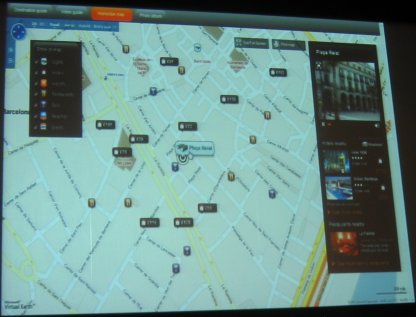
Still, after several dry presentations the UK event brightened up when Paul Curtis from EasyJet, a UK budget airline, showed us a proof-of-concept Silverlight application which the company plans to implement on its web site towards the end of this year. We saw an attractive Rich Internet Application which was a mash-up of flight routes and fares, Microsoft Virtual Earth, and reviews from TripAdvisor. Here’s a blurry snap of how you might book a hotel in Barcelona. It’s a compelling visual UI which of course reminded me of similar things I’ve seen implemented with Adobe’s Flash and Flex. Behind the scenes the app will use Server 2008, IIS 7.0, and a SQL Server 2008 Data Warehouse, so this is the perfect case study.

I wanted to ask Curtis whether he was happy with Silverlight’s cross-platform capabilities, and why he was using Silverlight in preference to Flash. However, his bio states that he is a member of the Windows Live Special Interest Group and on the Microsoft Architect Council, so I suspect the answer would be, “it’s what we know.” It does support my impression that despite the rise of Flash, there is still a place for Silverlight within the large Microsoft platform community.

Finally, there was brief mention of high take-up for Microsoft Softgrid, which is described as “application virtualization”. I’ve made this the subject of a separate post.

PS: I met blogger Mark Wilson at the event; he has a more detailed write-up.

Microsoft Softgrid: virtualization for applications

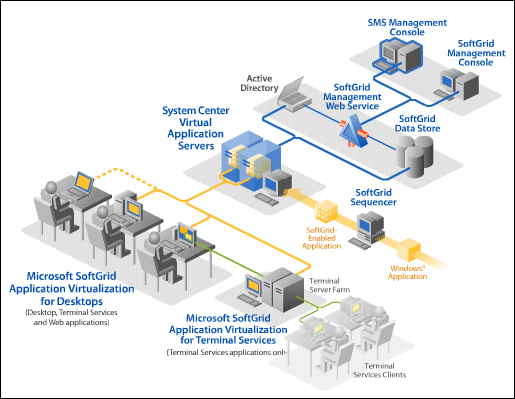
At Microsoft’s Heroes Happen Here launch, I caught up a little with something to which I’ve paid insufficient attention: Microsoft Softgrid, which is described as Application Virtualization. Softgrid is a way of packaging an application and its dependencies into an isolated bundle that runs on the client, but hardly touches the client environment. Each application has its own virtual registery, DLLs, COM DLLs, and even a virtual file system. As a consequence, it “just works”. It also lets you run otherwise incompatible applications side by side. For example, you could have an old Access 97 application, for which the developer left long ago and nobody dares to touch the code, and run it alongside Access 2007. This is apparently a huge hit for Microsoft, which does not surprise me as it solves all sorts of deployment problems. Unfortunately it’s not that easy to get Softgrid: you need to sign up for a thing called the Desktop Optimization Pack for Software Assurance and it is hooked to other components of Microsoft’s enterprise server system:

I would like to see Softgrid’s technology also made available for more general use.

Technorati tags: ,

Trolltech says Qt for Windows CE coming in May

Trolltech has announced Windows CE support in the 4.4 release of Qt, its cross-platform development framework. A pre-release is already available. Qt already supports desktop Windows, Linux, and Mac OS X, so this plugs a significant gap. Features include SVG (Scalable Vector Graphics) and OpenGL. It’s good to see this going ahead  despite Nokia’s acquisition of Trolltech, which is set to be completed in the second quarter of 2008. Nokia is committed to a couple of rival embedded operating systems, Linux and Symbian.

What about Qt for Symbian then? There are hints that it will happen. Then again, perhaps Nokia will increase its focus on Linux?

Technorati tags: , , ,

Chris Anderson on Freeconomics

Chris Anderson, the Wired editor who coined the term “long tail”, has written a lengthy piece on Free – why $0.00 is the future of business, and is writing a book on the subject.

It caught my eye in part because of what Sun’s Jonathan Schwartz told me the other day: the only acceptable price is free.

The idea must terrify Microsoft, which makes most of its money from software licenses, while letting third-parties take the profits from custom development and services. Companies are less vulnerable if they sell both hardware and software, or have strong services departments.

The paradox here is that even when the marginal cost drops close to zero, there still has to be a business model. Something I am still trying to figure out as I give away content on this blog.

Fixing Windows Media Player after a system upgrade

A while back I upgraded my motherboard. Windows Media Player seemed fine – in fact, it works quite a bit better with the faster CPU – until today, when it started crashing shortly after starting. The faulting module was Indiv01.key.

The solution is in this thread. On Vista, what you have to do is to delete the contents of the folder C:\ProgramData\Microsoft\Windows\DRM (not the folder itself). Note that this folder is invisible by default. In Explorer – Folder Options – View, you have to check Show hidden files and folders, and uncheck Hide protected operating system files.

Observe the caveat:

Note that anything recorded on the old system that is DRM protected will not be playable after this procedure.

I recall doing something similar to get BBC iPlayer (download version) working.

This is all to do with tying DRM to hardware. You are not meant to copy a protected file to another PC and still be able to play it. There used to be a method for backing up and restoring your licenses, but it seems to have gone in Vista. From online help:

This version of the Player does not permit you to back up your media usage rights. However, depending upon where your protected files came from, you might be able to restore your rights over the Internet. For more information, see the question in this topic about how to restore your media usage rights.

This leaves a few questions for Microsoft to consider:

  • Why does a DRM problem break Windows Media Player even when playing non-DRM content?
  • Why does a DRM problem cause Windows Media Player to crash, rather than reporting a DRM problem?
  • Why does the user have to uncheck a box in Explorer options that says “Recommended” and warns you that you may make your computer inoperable, in order to fix a common problem? I mean “Hide protected operating system files”?
  • Is it acceptable to say, “you might be able to restore your rights”, when a user could in theory have thousands of pounds invested in DRM-protected content?

Fortunately I don’t have any DRM-protected content that I am aware of.

Everything is fine now.

How long should it take to set up a laptop?

So you need a new laptop. Ignoring those irritating voices that say you should go Apple, you select a value-for-money offering from one of the big names like Toshiba or HP, hit the buy button at Ebuyer or the like, and a day or so later a van is at the door and you have your shiny new laptop. You slit the tape, pull the thing out of the box, plug it in and turn it on. How long should it take before you are happily typing away in Word or enjoying a DVD?

The answer I guess is as short a time as possible. In principle, I don’t see why it should take more than 5 or 10 minutes. The manufacturer has pre-installed the operating system and can ensure that all the right drivers are in place.

Here’s what actually happened when I did this for a friend yesterday. Toshiba Satellite Pro A200 with Vista Business. Not a bad machine, great value. We also had a key to activate Office 2007, which came pre-installed as part of Microsoft’s Office Ready scheme.

I started mid-morning. Turned on. It takes ages before it lets you in. I lost count of the reboots. There is some sort of partitioning dance, then when Vista itself starts up it goes through an optimisation process, then various Toshiba and third-party utilities install themselves, sometimes requiring a reboot. I broke for lunch.

After lunch I connected to the Internet. Vista immediately set about downloading updates. Needed reboots, naturally. Then I ran the Office Activation Wizard. Microsoft’s Office-Ready program is great marketing, but fairly annoying, because typically you don’t want to purchase all of it. In our case we had purchased Office Small Business, but not Access. In consequence, you end up with an installation that is partially a trial version, even though you have paid. I’ve heard of this scenario actually preventing a machine from passing “Genuine Office Validation” when trying to download updates from Microsoft. Not a good way to treat customers. The solution is to uninstall the bits of Office you are not actually buying.

At this point I could have declared “job done”, but I knew that it wasn’t. I applied Vista SP1, which takes ages. I applied Office 2007 SP1, which is fairly quick. I removed a few things that I knew would not be needed, like Outlook’s Business Contact Manager.

I uninstalled Toshiba’s ConfigFree utility. This is a thing that is meant to “simplify” managing wireless (and wired) networks. It hijacks Vista’s perfectly good built-in wireless configuration utility. Now, it is possible that ConfigFree genuinely offers some added value, but even if it does this kind of thing is still a nuisance. First, because people like myself know how the Windows version works, and are disinclined to learn the foibles of an unnecessary replacement. Second, because the official item will be maintained and updated through Windows update, rather than at the whim of Toshiba (or whomever).

If you are really unlucky, the supplier of your wireless card, or wireless router, or your ISP, will persuade you to install yet more network configuration software. Once two or three of these guys are fighting to manage and diagnose your wireless connection, you have little chance of connecting successfully to anything.

There there is anti-virus to think about. Personally I reckon the practice of installing trial versions of Norton’s anti-virus suite (or similar) is a disgrace. It makes for a lousy user experience because the first thing you see after enduring setup is a nag screen assuring you that your new computer is insecure. It is a disgrace because if you accept the trial but don’t pay up, you end up with an out-of-date anti-virus utility, which leaves you vulnerable. Let’s not forget that basic anti-virus software is available for free from AVG and a few others – if Toshiba really cared about the security of its customers, it would pre-install that. I have zero confidence in anti-virus software anyway, but this is not the place.

Result overall: three to four hours spent on something that should take a few minutes.

I have a good understanding of the commercial, technical and political reasons for these hassles, and I don’t regard Toshiba as the worst offender. Nevertheless, Microsoft and its partners have failed to tackle the problem effectively, and this is a factor behind Apple’s resurgence. Frankly, Ubuntu and other Linux distros are more fun to install, though with Linux you inevitably end up Googling to solve one or more strange issues so overall it is no better for the non-technical user.

Recently I’ve been working with Windows Server 2008, which is a delight by comparison. The concept is simple: pre-install the bare bones, and make all the features optional. So Microsoft can do it. Why can’t consumer Windows work the same way? Install a clean, fast, basic version of Windows, and then let the user decide what else they require?

Microsoft moves to protect its Office business in format war

Here’s a key snippet from yesterday’s interoperability announcement:

We’re also designing new APIs for Microsoft Word, Excel and PowerPoint applications that will enable developers to plug in additional document formats and allow users to select those formats as their default for saving documents.

Translation: if OOXML fails to get ISO standardisation, and/or if the rival ODF catches on or is mandated by institutions, then Microsoft wants you to keep using Office.

Product Manager Gray Knowlton has a little more detail here.

I’m not clear how extensive these changes are. Presumably it amounts to more than just tweaking the open and save dialogs to enable different defaults. Office applications already let you select from a range of different formats.

A few further comments. First, I’d like to see OOXML standardized. Aggressive IBM-sponsored lobbying has not convinced me this is a bad idea. And yes, I’ve pored over the spec and even done a little development with OOXML. Standardization tends to improve documentation and helps to protect developers from arbitrary changes.

It is interesting to see someone like Patrick Durusau, Chair of incits, coming out in favour of  OOXML standardization [PDF]:

I have seen some attacks on OpenXML saying it is not an “open” standard. I am quite puzzled by those attacks and think that OpenXML makes the case for open development of standards.

Understand that as the Project Editor for ISO/IEC 26300 and the OpenDocument Format TC editor in OASIS, I carry no brief for OpenXML. However, a well defined and publicly controlled OpenXML would be a great benefit for future work on the OpenDocument Format standard so I have no reason to wish it ill.

That does not mean Microsoft has done everything right. Microsoft’s Jean Paoli, now an evangelist for standardization, told me three years ago that OOXML was not suitable to be managed by a standards body. Why the change of heart? Simply, the threat of losing market share to a rival that was standardized. Microsoft had years of unchallenged Office supremacy in which it could have opened up its formats; but did nothing until its profits were threatened.

This should tell us something about the benefits of competition.

Despite Microsoft’s efforts, gains in ODF market acceptance will damage Microsoft Office. It will take more than a few API changes to make Microsoft Office as good an ODF editor as Open Office, which has a family relationship with the rival formats.

Standardization is only a small piece of this puzzle. On the Microsoft side, Office is a decent product with massive market dominance. On the ODF side, Open Office is also a decent product and is free and open source. The fight will still be on, no matter how the standards thing plays out.

Technorati tags: , , , , ,

Sun’s Jonathan Schwartz makes the case for free and open source software

I interviewed Sun CEO Jonathan Schwartz last week, and wrote it up for Guardian Technology. By the way, the picture is much better in the print edition.

Sun is gambling on open source – not only open source, but free software. This is possibly easier for Sun that it would be for, say, Microsoft or Oracle, because Sun, like Apple, is a hardware company. You can therefore think of the software as an overhead for selling the hardware. It is not without risk though – most of the software (including its Solaris operating system) runs on commodity x86 hardware as well as on Sun’s SPARC processors.

Not everything we discussed made it into the Guardian piece. I put it to Schwartz that Sun has historically done a poor job of monetizing the software it gives away. For example, it made Java the most popular programming language in the world, with huge enterprise adoption, yet until recently the company was posting losses. I then asked whether he considered that the fundamental open source model – give away the software, make money on support and services – was the future for the whole industry, rather than just for Sun and a few others?

I think first of all our strategy is to build the broadest global communities we can, and then from those communities to identify the opportunities to make money by building datacenters and by building the technologies that go into those datacenters. Software, systems, services, and microelectronics. So right now, in responding to the question is that the future of the industry, right now if you’d like a free Microsoft-office compatible Office suite, you could go to OpenOffice.org, download it, as roughly 100 million people have done in the past couple of years, and you’d have to pay nothing. Or, you could go to your local retailer and pay for the latest proprietary office suite. So if you were a betting man, and you looked at 3.3 billion people online today, where do you think the majority of them will acquire their office productivity suites? They’ll probably acquire the free ones, by definition those will be the most popular.

Now the same thing would apply to search. If you wanted to be in the search business can you imagine trying to run a search portal today, charging customers 50 cents per search? You’d probably have no takers. So, if you want to be the broadest supplier of volume technology into the marketplace, the only acceptable price tag is free.

We are in fact interested in pursuing the broadest global developer community possible, for whom the only acceptable price is free. So I think, if you’re going to try to compete against our virtualization products, our office productivity products, our network infrastructure products, you have to come to the table with a free product. Absent a free product, you won’t even be considered by the majority of the marketplace. So right now I believe we stand alone in having evolved our business model to actually monetize that community. That’s exactly what we’re doing, every day. So when people ask, when will you monetize those free software downloads, again, we had 7% operating margin last quarter. It’s not going to be a single line item, it’s going to be the whole company’s market opportunity expanding. So I feel very comfortable that this is not only the direction for Sun, and it’s a great direction, it’s the direction for the industry. The move towards free software is unstoppable. Not simply in your home, but at your workplace.

Note that it helps to consider this in a global context, not just the traditional highly developed locations like Europe or the USA.

Is he right? The world’s biggest and most profitable tech companies are not built on open source. IBM, Microsoft, Apple, Oracle, Google, for example. All these companies flirt with open source, even make real and meaningful contributions, but they keep their prize jewels proprietary.

Bottom line: Schwartz may well be right, but he’s not right yet. Still, follow the trend. Free software continues to improve; the proprietary vendors are giving away more of their stuff; the cloud is growing in importance relative to the desktop; and tough economic times are likely in tech’s most profitable markets. I doubt Sun will be the only company to change its business model.

Technorati tags: , ,

Contemplating an in-place upgrade to Server 2008? Read this first

Microsoft evangelist Neil Hutson has a detailed post describing what happens when you upgrade to Windows Server 2008. As with Vista, the new upgrade procedure is actually a clean install into which your old stuff gets copied afterwards:

Instead of just installing new versions of binaries over those of an existing computer, the new operating system is installed side-by-side with the older operating system. Then the data and settings are migrated from the older version to the newer version, and then the source is deleted. While this is architecturally more correct and certainly build a clean OS install, this does cause some obvious complications that you should be aware of.  Secondly in Windows Server 2008 the upgrade process is destructive to the pre-existing operating system state.

My instant reaction: there’s enough that go wrong, that a true clean install looks a great deal more attractive.

Technorati tags: ,