Category Archives: software development

Is Eclipse adoption peaking?

The rise and rise of Eclipse, the open-source tools platform, is now an old and familiar story. It’s possible though that Eclipse adoption is nearing its peak. I’ve just received issue 43 of the EclipseSource newsletter, which includes the results of BZMedia’s November 2006 survey. Here are some snippets that interested me:

  • The survey is in its third year, and shows Eclipse Enterprise adoption at 54% in 2004, 62% in 2005 and now 67% (the survey says “two thirds”). Still growing, but a flattening curve.
  • The single most popular feature of Eclipse is its low cost (cited by 65% of respondents)
  • By far the primary use of Eclipse is for Java development (more than 70%), despite its support for other languages. In terms of languages, the next most used is SQL at 25% and C++ at 24% (of course these stats overlap).

Although Eclipse clearly still dominates Java development, I’ve picked up some dissatisfaction among developers I’ve talked to at conferences. Some of the complaints are the variable quality of Eclipse plug-ins, difficulty in managing plug-in dependencies especially across a team, and the view that Eclipse is less productive than favourites such as IntelliJ IDEA.

I also note that “free” is not such an unique feature these days, and that the Sun-sponsored NetBeans is winning praise for advances in its Java tools.

Don’t misunderstand me; Eclipse is not under threat. But I would not be surprised to see further levelling off of its adoption curve, or even a small decline in the next year or two.

Technorati tags: , , ,

Using MSBuild from the command line

Now that the holidays are over, here’s some hardcore tweakery for Visual Studio 2005 developers. Visual Studio 2005 includes a completely new build system based on XML build files and a standalone build utility called MSBuild. Visual Studio project files are in fact MSBuild files. Open them up in a text editor and you’ll see that they begin like this:

<Project DefaultTargets=”Build” xmlns=”http://schemas.microsoft.com/developer/msbuild/2003″>

You can also build entire solutions from the command line. Just open up a Visual Studio 2005 command prompt (an easy way of setting up the correct path and enviromental variables), navigate to the project directory, and type:

msbuild yourapp.sln

This is NOT dependent on Visual Studio, since MSBuild is actually part of the .NET Framework redistributable package. This means you can take your project files and build them on machines that don’t have Visual Studio installed, which can be handy for servers.

But what if you want to edit the solution build file? Curiously, solutions are defined in .sln files which are not msbuild files. When you run MSBuild against an .sln file, it actually creates a new in-memory build file for compilation, making it hard to edit.

This is where the tweak comes in. If you define the enviroment variable msbuildemitsolution, then MSBuild generates the solution build file and leaves it there for you to edit. It is given the name yourapp.sln.proj. For the next build, you can run msbuild against this file directly, thus incorporating any manual changes.

Why it works like this, who knows? Still, it’s an intriguing tip and as you can guess I didn’t discover it by accident. I got it from Sayed Ibrahim Hashim’s excellent blog. He is the author of the MSBuild/ClickOnce book Deploying .NET applications. I haven’t seen the book, but I recommend the blog if you want to know more about msbuild; the book is likely good as well.

Technorati tags: , ,

Amazon S3 sample update

When I added background threading to my Delphi S3 sample, I inadvertently broke the ability to connect with SSL. I’ve fixed the problem, and included the necessary openssl DLLs in the download, so you can run this even if you don’t have Delphi. I use it to backup my own files.

Amazon S3 is a web service for storing files on the internet. It works well and is good value compared to most online storage services.

The distinctive features of this sample are first, that it is Delphi, and second, that it is native Win32. Most of the samples out there are for Java, .NET or scripting languages.

Technorati tags: , ,

Farewell to consistent UI on Windows

Dare Obesanjo says 2006 is the year Microsoft gave up on consistent UI. It’s a follow-up to a post by Mike Torres in which he identifies inconsistencies in various new apps from Microsoft this year. One thing they all have in common is that traditional menus are deprecated, either hidden by default (IE7, Windows Media Player 11) or not available at all (Office 2007).

The reason this is happening is the influence of the Web. The Web gives designers a lot of freedom over how applications are designed, especially in conjunction with Flash. The Web also forces app developers to find some alternative to the traditional menu bar, since it has a page model rather than a window model. Standard desktop apps with File and Edit menus now look dated.

Microsoft has embraced the new designer religion, with the innovative Office 2007 UI, the Expression range of designer-oriented tools, and the Windows Presentation Foundation which gives far more freedom to UI designers.

Nevertheless, Microsoft has slipped up here. The differences that Torres identifies are bewildering to users. I predict that the company will settle on some specific approach (probably the Office ribbon) and try to enforce it throughout. Visual Studio with a ribbon UI?

It means developers have a tricky choice to make with new applications. Broadly:

  1. Stick with tried and tested menus and toolbars until things settle down.
  2. Adopt the ribbon, facing the sign-or-don’t-sign dilemma.
  3. Do your own thing, after all everyone else does.

For an in-house app I’d suggest (1). Menus and toolbars work pretty well, everyone knows how to use them, and most important, it is a lot less work. Further, when non-designers try to take a design-centric approach, the results are invariably ugly.

Technorati tags: , , ,

Bugs in IE7 RSS platform?

I welcome the introduction of the RSS platform in IE7; I think a central repository for RSS feeds is a great idea, even though Outlook’s RSS integration strikes me as totally broken

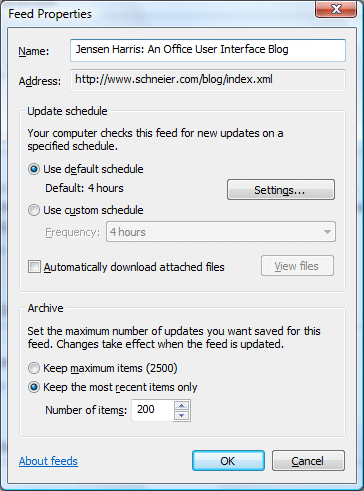
But is it reliable? I was using it to browse Jensen Harris’s excellent blog and noticed that the entries were from somebody else. A look at the feed properties reveals all:

It appears that the RSS store had somehow zapped the blog, but kept its title attached to a different feed, Bruce Schneier’s security blog as it happens.

I don’t think I have much hope of discovering why this bug occurred, unless someone from the team would care to comment, but it does cast doubt on the RSS store’s reliablity. Or could it be a problem with my blogreader app? The only time this writes to the store is when it marks a feeditem as read, which it does by setting the IsRead property on a FeedItem reference. Strange.

Technorati tags: ,

Free preview chapter of Adam Nathan’s WPF book

Some of you will know Microsoft’s Adam Nathan as the author of .NET and COM, still the best book available for drilling deep into the way .NET interops with native code. He’s now written a guide to the Windows Presentation Foundation, one of the key components of the new Windows API. I’ll be reviewing the book in due course, but in the meantime the publishers have kindly given permission for me to offer a free chapter to readers of this blog.

Download Chapter 3, Important New Concepts in WPF [PDF].

Chapter 3 covers WPF logical trees, dependency properties, routed events, commands, and the overall class hierarchy.

If you like the book, you can order it here:

Nathan: Windows Presentation Foundation (US customers)

Nathan: Windows Presentation Foundation (UK customers)

Technorati tags:

XNA, XBox 360 and the decline of computer science

I promised some more comment on the conference on XNA game development last week. It was a fascinating event, not so much because of sparkling content (though it was good), but because of the underlying themes. This conference was for the academic community, both students and lecturers. The idea was to promote the adoption of XNA on computer science courses. Presenters included members of Microsoft’s XNA team, Nick Burton who is a graphics programmer from Rare, and Peter Molyneux from Lionhead.

XNA is Microsoft’s new framework for games development. It is a .NET wrapper for DirectX, and a replacement for the earlier Managed DirectX libraries. You can create games for both Windows and XBox 360. The initial target is student and hobbyist developers, and the development kit is free except that to deploy to an XBox 360 you have to join the XNA Creator’s Club, for a modest subscription fee. Even then, you cannot distribute your 360 game except as source code to other club members; you would need to find a publisher or get the game on XBox Live Arcade. A future XNA studio product is planned which will target professional developers.

There is an obvious benefit to Microsoft if it can establish XNA in universities. It gets students familiar with the Visual Studio/Windows platform and helps foster the next generation of Windows and XBox 360 game developers. But what’s in it for the universities?

Here the context is important. There is a crisis in computer science, with dramatic falls in the numbers of students applying for courses. I spoke to Rob Miles, lecturer in computer science at the University of Hull. “The number of people applying to courses across the country has dropped by something like 40% over the last few years,” he told me. Including games programming in the syllabus is a bit of sugar to attract new students. “It will help me motivate students to want to learn to program,” said Miles.

Microsoft says XNA will help to address another crisis, this time in the games industry itself. Developing a game has become extraordinarily expensive. The industry has moved towards the Hollywood model of big-budget titles that can make or break their publishers. Gamers on the other hand complain of too many sequels, lack of innovation, and poor gameplay. Microsoft likes to talk up XNA as the future YouTube of games, recovering the community and excitement that was around thirty years ago, in the days of the BBC micro and other home computers.

Here XNA is competing with Flash, which already has a considerable community of game developers. XNA is vastly more powerful than Flash, but for small, easily deployed games Flash has many advantages including cross-platform support and browser integration.

Is XNA just another hobbyist game programming tool, likes others including AMOS and STOS (for the Amiga and Atari ST), or more recently DarkBASIC? There is a range of opinions here. Peter Molyneux enthused to me about XNA, saying it is “a fast, efficient, better language” than earlier more compromised tools, and “built with ambition in mind,” so that XNA programmers can create the next Populous (the game which made Molyneux his fortune).

On the other hand, Molyneux undermined his evangelism by also stating that C++ remains the language of choice for professional development. If this is the case, then XNA will always be a hobbyist niche, which implies that serious students of game programming should not waste too much time on it.

Not everyone takes this line. The Rare team has spent time with XNA and appears genuinely impressed with its capabilities. Nick Burton showed us both the dramatic reduction in code and the impressive performance of XNA code. While Rare is not yet using XNA commercially, it does expect to do so in a few year’s time. This might be some sort of mixed code, using XNA for game logic and C++ for graphics heavy lifting, or might be pure XNA. A factor for Rare and any professional game studio is the extensive C++ code library which it has built up over the years, which makes any quick move to another platform out of the question.

My view is that the productivity win makes XNA or something like it inevitable in games development at every level. Timing is another matter, and C++ will be hard to shift.

Finally, a couple of hot snippets of game gossip. One is that Rare is working on a Live Arcade title. I got the impression that it is fairly well advanced, though nothing is yet formally announced.

The other is that Molyneux talked up innovation in Fable 2. He told me that it has an unique and surprising feature which he had to fight to include, and which will be unveiled in March at the Game Developers Conference in San Francisco.

Microsoft’s XNA site is here. Note that if you want to develop in XNA, you are well-advised to get hold of the wired XBox 360 controller. It is a decent controller and works nicely with XNA both on Windows and 360.
Technorati tags: , , , , , ,

Installing XNA Game Studio Express on Vista

Yesterday I attended a conference on XNA game development. More on that soon; but first a quick note on what happened when, fired with enthusiasm for XNA, I installed the release build of XNA Game Studio Express on Vista.

At least I tried. You have to install Visual C# Express first (since for some reason XNA does not work with the grown-up Visual Studio 2005). That’s OK since it works side-by-side. Visual C# Express went on OK, but setup for XNA Game Studio Express failed towards the end of the install with an error about a file that could not be run. The install then rolls back completely leaving you with nothing.

I ran msiexec with logging to see more detail. Here it is:

Error 1721. There is a problem with this Windows Installer package. A program required for this install to complete could not be run. Contact your support personnel or package vendor. Action: RegisterWithCSExpress, location: E:\, command: “C:\Program Files\Microsoft Visual Studio 8\Common7\IDE\VCSExpress.exe” /installvstemplates

It occurred to me that even an install without the templates might be of some use, or perhaps I could manually install the templates. So I ran up Orca (MSI editor), opened the InstallExecuteSequence table, and deleted the RegisterWithCSExpress action (yes, I’ve wrestled with MSI before).

The hacked install ran OK, and to my surprise the templates were present. This might be because of the earlier failed install, or because I also ran:

VCSExpress.exe /installvstemplates

from the command line. This command, which tells VC# Express to refresh its template cache, is the one that fails. On my system it causes VC# Express to crash, which is why it trips up the XNA install, but it appears to install the templates before it crashes so it is kinda OK.

My official advice therefore is not to try and install XNA on Vista, but the above may help if you are determined.

Microsoft knows about problems with Visual Studio on Vista; we are promised a “Vista Support Update” next year. In the meantime it does mostly work if you run it with elevated permissions.

I noticed that the Microsoft folk were running XNA on Vista yesterday.

JetBrains OMEA going free and open source

Prior to my current experiments with the IE7 RSS platform, my blog reader of choice was Omea Reader. However, despite the popularity of RSS, Omea Reader somehow never made it beyond a small niche, as I know from my own web stats. The company has just announced that the product is now free and will become open source.

Oddly, I can’t find a valid url for the announcement, though it turned up in my blog reader. Here’s the quote:

After collecting your opinions and having long internal discussions, we have finally decided to move Omea Pro into the open source domain.

This will definitely take some time, but the first step has already been made – from now on, Omea Pro is available free of charge.

Thank you for your input, and you are welcome to contribute to Omea Pro development when it goes open-source.

— The Omea Team at JetBrains

I am sorry that Omea Reader has not been a big commercial success, especially as I admire the work JetBrains is doing with its Java IDE IntelliJ IDEA and with ReSharper for Visual Studio. Even so, a big thank-you to JetBrains for doing the right thing and open-sourcing OMEA rather than freezing it as so may companies do with their abandoned products. I think the Omea code will be interesting as a .NET sample project even for those who do not want to use it. I will be intrigued to see how much PInvoke code is in there.

As an aside, one thing I notice when I talk to IDEA users is satisfied they are with the product. They feel it gives them an edge over competitors working with more popular tools like Eclipse and NetBeans. By contrast Eclipse users almost always have some grumbles. Same with NetBeans though I don’t hear so many complaints since version 5.x.

The death of SVG

This is not news; but I’ve just come across Adobe’s end of life notice for its SVG viewer. Adobe was a key supporter of SVG, which is the W3C standard for vector graphics and animation embedded in web pages, until it acquired Macromedia and with it the rival but proprietary Flash technology. The demise of the Adobe viewer is a shame for SVG supporters since it was the best available. All very predictable, though I’m not impressed by the reason given in Adobe’s FAQ on the subject [pdf]:

There are a number of other third-party SVG viewer implementations in the marketplace, including native support for SVG in many Web browsers. The SVG language and its adoption in the marketplace have both matured to the point where it is no longer necessary for Adobe to provide an SVG viewer.

In this context “matured” must mean “critically ill”, with Adobe’s announcement the killer blow (though let’s acknowledge that SVG was making limited headway even before the merger). The real reason comes a little further down:

You may also want to consider converting your SVG application to an Adobe Flex® application.

It’s easy to understand Adobe’s decision, though let me close with a question. How much harder would it be for Microsoft to establish WPF/E, if the industry had settled on a W3C standard rather than the proprietary Flash?

Technorati tags: , , , , ,