Category Archives: software development

CodeGear (Borland) to support PHP tools

New is drifting out concerning CodeGear’s plans to evolve its development tools. Here’s a snippet from Michael Swindell, CodeGear’s VP of products, writing in the Delphi non-technical newsgroup:

Dynamic languages such as PHP and Ruby new areas where we will be going. Some products will be more in the RAD camp, aligned with Delphi and VCL, and others will be more in the Open Source/Eclipse/Enterprise world. As a developer focused company we cannot be just the Object Pascal, C++, Java development company… there is way too much happening in the world of programming and languages and frameworks for us to stand still.

All a bit vague, but I do get the impression of renewed energy at CodeGear now that it is somewhat independent of its parent company, Borland. There are also mutters about Ruby and about another take on Kylix, Delphi for Linux.

Is PHP a good bet? Possibly, insofar as PHP is hugely popular but not particularly well supported by development tools. Personally I’d rather work in ASP.NET or Java; yet I have huge admiration for WordPress, to mention just one PHP-based application. As ever, CodeGear will be up against strong free tools, not least the existing Eclipse PHP Development Tool.

Cast your mind back 12 years, if you have been around that long. Borland’s Delphi 1.0, released in 1995, was worth paying for, in fact a fantastic bargain, because it cracked the problem of combining visual RAD productivity and fast native compiled code. What could have a similar impact today, when Microsoft has Windows development wrapped up, and Java has a surfeit of high quality free tools? I don’t find it easy to see.

Technorati tags: , , , , ,

IE7 script madness

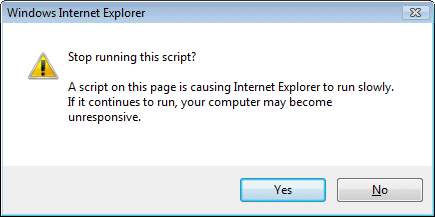
Ever seen this guy?

Stop running this script dialog in IE7

I’m writing a piece on Javascript. In the new world of AJAX, web applications may run large amounts of client-side code in the browser. I’m having a look at performance issues, so I wrote some code that does some processing in a tight loop and tested it in IE7, FireFox 2.0 and Flash 9.

Getting timings was difficult, because IE7 pops up this “Stop running this script” dialog when my code is running. Nor will it let go. You click “No”, and 1 second later the dialog pops up again. And again. And again.

I’ve trawled through the IE7 options looking for a way to switch this thing off, but cannot find one. I’m hoping I’ve missed it, or that there is a secret registry key I can change, because it is really annoying.

I don’t understand why there is no option for “don’t ask me again”, or “allow long-running scripts at this site”. After all, this scenario is going to get increasingly common. Neither FireFox nor Flash suffers from this problem.

I appreciate that IE7 is trying to be helpful here. There is though a fine line between helpful and annoying. Without any obvious way to prevent it, this falls in the latter category.

That said, I did find a way to get my timings, because of my experience with the htmleditor.  If you host Mshtml in an application, you can implement the COM interface IDocHostShowUI. This has a ShowMessage function which IE calls when it wants to show a dialog. This enables you to catch the over-helpful “stop this script” message and not show it.

Unfortunately this solution isn’t something users can easily apply. It requires creating your own customized version of IE. There must be some easier way and I look forward to learning what it is.

One last comment: why does Microsoft still come up with poorly thought-out UI elements like this? It is easy to think of better ways than a brutal modal dialog. How about a “stop script” toolbar button that appears only when scripts are taking too long or grabbing too much CPU?

Update

FireFox does exactly the same thing, also with a modal dialog, “A script on this page may be busy” …

Still, two benefits to FireFox. First, the timeout is set to a more reasonable 10 seconds. Second, you can easily amend it. Navigate to about:config. Find the entry dom.max_script_run_time. Change it from 10 to whatever you like. 

Further update

A comment has pointed me to this knowledgebase article.

Here’s the fix:

  1. Using a Registry Editor such as Regedt32.exe, open this key:
    HKEY_CURRENT_USER\Software\Microsoft\InternetExplorer\Styles

    Note If the Styles key is not present, create a new key that is called Styles.

  2. Create a new DWORD value called “MaxScriptStatements” under this key and set the value to the desired number of script statements.

    By default the key doesn’t exist. If the key has not been added, Internet Explorer 4 defaults to 5,000,000 statements executed as the trigger for the time-out dialog box.

Technorati tags: , , ,

Free WPF datagrid control from Xceed

A notable omission from the controls available in the first release of Windows Presentation Foundation is a datagrid. Component vendor XCeed has stepped up with a free WPF datagrid. Registration is required, but Xceed says:

The free license is a perpetual license and includes royalty-free distribution, bugfixes, and new features, so your company can use it with full confidence.

Paying customers get support along with an option for source code.

I’ve not tried the control yet, but if you are experimenting with WPF, it strikes me as worth a look.

Technorati tags: , ,

Delphi and Windows Installer: small problem, fiddly solution

A Windows technology I love to hate is the Windows Installer, the setup engine built into Windows that is hard to avoid if you want to comply with Microsoft logo requirements and system management tools.

I have a little application which uses this, which uses a custom action written in Delphi. Originally this was an executable with some command-line arguments, which worked fine except that occasionally the custom action needs to show a dialog. Sometimes (not always) this would show up behind the main setup window, causing users to think that setup had hung.

Incidentally, I saw this exact problem when installing Delphi itself on Windows Vista.

It is all to do with a long-standing and complex Windows issue concerning whether applications can force a window to be on top of other windows. In a nutshell, a well-behaved application should not normally do this, though it can make itself flash in the taskbar. Not a great user experience. However, you can ensure that a window is on top within a specific application (in this case the setup), provided you know the handle of that application’s main window. Unfortunately there is no obvious way to get this value, other than via an API called FindWindow which might occasionally find the wrong window, for example if the user managed to open two instances of the setup.

The correct solution for this is not to use an EXE as a custom actions, but rather to use a DLL. This runs in-process with the setup, which enables it to call MSI (Microsoft Installer) functions like MsiProcessMessage, enabling it to show dialogs safely. You can also do useful things like writing entries to the installer log. (Thanks to Mike on the Microsoft.public.windows.msi newsgroup for this tip).

Therefore I converted the custom action to a DLL. Not too difficult; but I discovered that the Windows Installer is not especially flexible about calling custom actions in DLLs. The only argument it can (and must) give is a handle to itself. That’s unlikely to be enough. So how do you pass data to your custom action?

If you use an MSI editor such as that in Visual Studio, you will see a property called CustomActionData which you can set when calling a custom action. All this does is to set a property within the installer. Your custom action can then call MsiGetProperty to retrieve the value. It is a single string; if you want to pass several values, you need to use some sort of delimiter and parse it within your custom action code.

Although many Windows API functions have Delphi wrappers built into Delphi’s runtime library, the Installer functions are not among them. I hate reinventing the wheel, so I searched for a Delphi wrapper for msi.dll. It’s not easy to find, suggesting that few developers have gone down this route, though it is part of some versions of the Project JEDI JCL (JEDI component library). In the end it was easier to find the header files in the SDK and do my own wrapper for the few functions I needed.

Delphi is a great tool, but at times like this you realise that there is a price to pay for not falling in with the crowd and using Visual C++. All the low-level Windows API documentation assumes that you are at least using C++.

The good news: it all works fine. Dialogs appear reliably above the setup window, and access to the MSI API may prove useful for other things as well.

That said, it all goes to demonstrate why developers sometimes take ages to fix seemingly simple problems.


Technorati tags: , , ,

Sun’s J2EE certification may be too slack

In a series of blog posts here and here, Compuware’s Andrei Iltchenko writes about incompatibilities between different vendor implementations of J2EE. He works on the OptimalJ MDA (Model Driven Architecture)  product which generates Java code from language-independent application models. He found unexpected inconsistencies between Sun-certified J2EE application servers, for example:

When we started testing our code generation modules for J2EE web services on one vendor’s application server, we were in for a big surprise. The application server had a non-XML Schema aware web services stack, which effectively meant no proper support for WS-I Basic Profile. Why wasn’t such a major omission caught by SUN’s compatibility test suite for J2EE 1.4?

I was also surprised by his comments since in general Java’s cross-platform, cross-vendor compatibility strikes me as much better than it was in the early days. No doubt Iltchenko stresses this more than most developers, but note his conclusion:

With the differences in implementing the same J2EE 1.4 features I described, one should probably start questioning how feasible it would be to maintain a J2EE 1.4 application that needs to run on more than one application server and not be rigged toward a given vendor.

Technorati tags: , , ,

Tube trains show off Windows Presentation Foundation

If you have any interest in .NET Framework 3.0 I recommend this keynote presentation, from Microsoft’s UK developer launch for Vista and Office last weekend. It was given by Sanjay Parthasarathy, Vice president of the Developer and Platform Evangelism Group at Microsoft Corp. He reiterates the themes Microsoft watchers will have heard before: unifying designer and developer, SOA (Service Oriented Architecture), Office as a platform, Enterprise mashups and so on. I’d advise skipping forward to about 38.30 and viewing the presentation given by a couple of developers from the London Underground on their WPF (Windows Presentation Foundation) application for managing the network.

The London Underground is a busy network, clocking up 971 million passenger journeys last year. The WPF app is a real-time visual presentation of its status, based on the familiar tube map. There are “teardrop” indicators which show where there is congestion, technical problems, crime or other incidents. You can click an indicator to open a detailed panel, and dock the panel to get live update. All the data is driven by web services. Everything zooms and drags; you can show or hide specific lines and indicators; and finally there is an amazing 3D view which seems to model the entire system so you can access a report on any part of it with a click. Of course there is an option to see little trains chugging round and stopping at lights; how could this fail to enthuse developers?

The claim is that WPF/XAML combined with SOA makes creating this kind of application much easier than in the past (the whole thing is an XBAP – browser-hosted WPF).

I certainly found the demonstration thought-provoking. This particular case study is a great fit for a highly visual presentation, but to what extent does this also apply to the mainstream business applications that occupy so much developer time? What about the danger of prettification – highly visual apps that are slower and harder to use than the simple GUIs they replace? That app you are working on right now – would it benefit from a WPF redesign?

If you have any insights or comments on the above, I’d love to hear them.

MySpace, Microsoft and scalability

I was impressed when I learned at Mix06 last year that MySpace runs on Microsoft’s platform. After all, MySpace is one of the top 10 busiest sites on the web (currently 6 according to Alexa), and stuffed with dynamic content. So it makes a great case study for Microsoft.

Or does it? The downside of being so prominent is that problems with MySpace reflect badly on Microsoft’s platform. Thus you get articles like Larry Dignan’s MySpace: IT On a Wing and Microsoft Prayer.  

The article Dignan references describes how MySpace has coped, just about, with unexpected and explosive growth. It’s been a ragged evolution, and sounds more like a desperate attempt to keep pace than smooth upscaling. That said, this is more a characteristic of the particular scenario – web site copes with unexpected growth – than a characteristic of the Microsoft platform as such. However it is apparent that 32-bit SQL Server 7.0 was really not up to this level of scalability, and by all accounts even 64-bit SQL Server 2005 is being pushed to its limits.

Two bits of context here. First, the majority of software projects have far more modest requirements than MySpace. Second, there are other scalability examples, such as Microsoft’s favourite case study the London Stock Exchange, which runs smoothly enough as far as I know. Smaller than MySpace, of course, but business-critical in a way that MySpace will never be. On balance it seems that Microsoft’s platform is scalable enough for most of us. That does not mean that it is the best choice, or the most cost effective, or the more reliable. It just means that muttering “it doesn’t scale” is not the potent argument that perhaps it used to be.

Technorati tags: , , ,

The tangled web of Windows Vista versioning and compatibility

There are good reasons why applications may need to know what version of Windows they running on. Some things work differently, such as Unicode on Windows 9x vs Windows NT series; some features may need to be enabled or disabled; or at worst the application may need to close because it just does not work on certain versions of Windows.

Naturally enough, there is an API call for this purpose. Two in fact: GetVersion and GetVersionEx.

Trouble is, they lie. There are three characters in this drama. Let’s call them Nanny Microsoft, Good Developer and Bad Developer.

The problems start with Bad Developer, who writes an app that requires (let’s say) Windows 2000 or XP. These versions of Windows (and Server 2003 as it happens) have a major version number of 5. So Bad Developer writes an app that checks for a major version number of 5. If it is anything else, the app says “Goodbye” – maybe during setup, maybe at runtime, or maybe both.

Enter Nanny Microsoft with a brand new edition of Windows. The major version number is now 6. Bad Developer’s app won’t run, because 5 != 6. Customers are unhappy. No problem, says Nanny Microsoft. The silly Bad Developer should have written the app to check for versions equal or greater to 5. We’ll fix GetVersion so that in certain circumstances it returns a major version of 5 even when it should return 6.

In which circumstances, you wonder. That’s when it gets unclear. Could be one of the compatibility modes. Could be when specific known applications are calling the API. Here’s a past case (not Vista, though I haven’t checked) that gives special treatment to apps called either setup.exe or launch.exe.

So Nanny Microsoft “fixes” GetVersion to lie, Bad Developer’s app works, and everyone is happy.

Everyone that is except Good Developer, who wrote an app that really does need to know the version of Windows. Good Developer’s app is failing because customers are running it on versions of Windows it does not support. Good Developer’s code checks the OS version dutifully, but it gets the wrong result because of the work Nanny Microsoft did on behalf of Bad Developer.

The snag here is that Microsoft can’t introduce an API call like GetRealVersion. If it did, Bad Developer would call it and make the same mistake, and then GetRealVersion would end up dishonest as well.

Is Bad Developer bad?

In reality, Bad Developer may not be happy with Nanny Microsoft either. How can any developer lacking psychic powers know whether or not their app will run on a later version of Windows? Nanny Microsoft is taking a chance here – balancing the desire of customers for maximum compatibility with the desire of developers for maximum safety.

Vista compatibility confusion

Vista seems to have more compatibility switches than ever before. There is UAC (User Account Control) with its registry and folder virtualization, as well as 6 “compatibility modes” for versions of Windows from 95 to 2003, and other settings like “Disable visual themes” or “Run in 640 x 400 screen resolution”.

I understand why these switches exist, yet there is a downside. Developers with apps already deployed have no control over whether users choose to run their apps with or without a compatibility mode, or even whether Nanny Microsoft has done something special just for them.

I recall talking through a particularly mysterious problem with a user on one occasion. This was in Windows XP. Somehow, one of the compatibility modes got switched on for the app that was failing. Naturally the resulting errors gave no clue as to the cause of the problem.

I hope that somewhere in the depths of MSDN is a clear description of what all the compatibility modes actually do.

This application might not have installed correctly

This brings me to a feature of Vista I really dislike. You install an app, and at the end a dialog pops up asking you whether it installed correctly. This happens before you have run it, so the correct answer is, “I haven’t a clue.” Nevertheless, Vista wants you to reinstall with “recommended settings”. What settings? I assume one of the compatibility modes above, but I’m guessing.

I always assure Vista that the app installed just fine. I’d rather troubleshoot specific issues, than have apps install with unkown compatibility switches in operation.

DIY GetVersion

If you are a Good Developer (which I presume), then you know not to trust GetVersion. The official advice is to try not to care about the Windows version. If you need to know about a particular feature, check for that feature. 

Good advice, but what if you do want to know the version? I’ve done a snippet of code for PCW for this, but can’t post it yet. It’s not difficult though, provided you are happy with an implicit “or higher”: find some feature that you know is only on that version of Windows, and check for that.