Category Archives: software development

Why Google Gears? Thoughts from Google Developer Day

Google Gears is a browser plug-in to support running web applications offline. It has several components:

A local server – not a complete web server, but a cache for web pages. One of its benefits is to solve versioning issues. For example, what if you had an application that retreived one page from the cache, complete with Javascript, and another from the Web, including some updated Javascript? The app would likely break. The Gears local server lets you define a set of pages as an application, so you can ensure that either all or none of the pages are delivered from the cache.

A local database. SQLite of course. I can think of many uses for this – whether or not your application needs to work offline. Searching and displaying data from a local database will be quicker than retrieving it remotely. In the current beta, there is no limit to the size of the database you can download or create on the user’s machine.

A WorkerPool for running Javascript in a background thread. Again, there are many possible applications, but a key reason for its inclusion is so you can do long-running synchronization tasks in the background.

A Javscript library to enable access to all these goodies.

Synchronization

Synchronization is integral to the Gears concept. The idea is that your web application works the same online and offline; and then when you reconnect, any changes you made offline are transparently synched back to the server. Google’s demo app for Gears is Reader, a blog reader app, but you can see how this would work nicely with Documents and Spreadsheets, removing one of the disincentives for its use. I’m reminded of comments from James Governor and others about the Synchronized Web – cloud storage, but with full offline capability.

Gears vs Apollo

How does Gears impact Adobe, which is promoting offline web applications in the guise of Apollo, desktop applications running on Flash? You can argue this either way. On the one hand, you could say that Gears removes the need for Apollo. Now any web application can work offline. On the other hand, you could say that Gears is not targetting the same space. Apollo is for desktop apps; Gears is for web applications that happen to work offline.

My take is that Google is making its pitch for ubiquitous web apps which break the offline barrier. The attraction of Gears is that it is seamless, at least for the user. Look at the reader example: it’s the same app, but now it works offline. As I see it, Google is saying that you don’t need Apollo (or WPF, or Java) for compelling apps that work connected and disconnected. That said, it’s not against Flash; there are even handy Google Javascript APIs for simplifying SWF hosting.

Another twist is that Adobe says it is supporting the Gears API in Apollo. That presumably means Apollo now has a fast embedded SQL database engine, which must be a good thing.


SQLite will be everywhere

One of the core components in Google’s new Gears API is SQLite, an open source database engine. I’ve been an enthusiast for SQLite for a while now – I first blogged about it in 2003. I’ve also worked a little on SQLIte wrappers for Java and Delphi.

It’s a superb embedded database engine and I’m pleased but not surprised to see it now picked up by Google. It’s part of PHP 5.x, and also used by Apple for Core Data and Spotlight search in OS X. Now it is part of Gears and I imagine will be widely deployed. Google is also apparently contributing to the project – Full Text Search has been mentioned here at Developer Day – though I’ve not yet looked at this in detail. Congratulations to the primary author D. Richard Hipp, truly a star of the open source world, and thanks to him for making SQLite “completely free and unencumbered by copyright“.


Google’s offline problem

Here at Developer Day I attended the workshop on new Maps API features. Unfortunately I was one of the last into the session and could not connect to the internet. I suspect a problem with IP number allocation but I don’t know for sure. I spend some time trying to get it working, then gave up and returned to the blogger lounge, where the wi-fi worked perfectly.

A let-down; yet nicely illustrates the reason why we need Gears.

That said that, even Gears isn’t going to enable offline Geocode lookup.

Next up is the session on Gears.


Technorati tags: , ,

My question to Google

I grabbed the first question after the opening keynote today. It was prompted by my visit to the Google Gears site – I’d intended to install the beta. I was confronted with this dialog:

I asked:

Why does Google display an 8-page agreement in a box 7 lines high?

More significantly, why does it include this clause which strikes me as unreasonable:

12. Software updates
12.1 The Software which you use may automatically download and install updates from time to time from Google. These updates are designed to improve, enhance and further develop the Services and may take the form of bug fixes, enhanced functions, new software modules and completely new versions. You agree to receive such updates (and permit Google to deliver these to you) as part of your use of the Services.

Of course I’ll have to install Gears; I can’t do my job otherwise. But I’m inclined to do so in a virtual machine, because I prefer to keep control of what gets installed.

There’s plenty more in the agreement that you might object to- have a read and see.

It all sits uncomfortably with the stuff we’ve heard about how much Google loves open source, Creative Commons licenses and so on.

My question wasn’t answered, but Chris DiBona invited me to email him with the question, which I’ve done, referencing this post.

Technorati tags: , ,

Google Developer Day begins

I’m early to the London event; but registration is open and I get a flimsy red bag with oddments including a tin of “Goo” which turns out to be thinking putty. The event is at The Brewery in the heart of the City. We are ushered into the Blogger Lounge – stylish, with bright-coloured cushions, soft pastel lighting, fresh-squeezed orange juice and no chairs. A quick glance around the room tells me that Macs outnumber Windows by about 4 to 1.

The event will kick off with a keynote from Chris DiBona “Developer message” and Ed Parsons “Geo Message”. Then I’ve got API workshops – lots of AJAX and Maps – and closing with another keynote live from Mountain View.

I’m already familiar in a broad sense with Google’s developer offerings, but what is the strategy? Getting closer to that is one reason to be here. The other to assess how useful all this stuff is in the real world – to developers that is, rather than to Google.

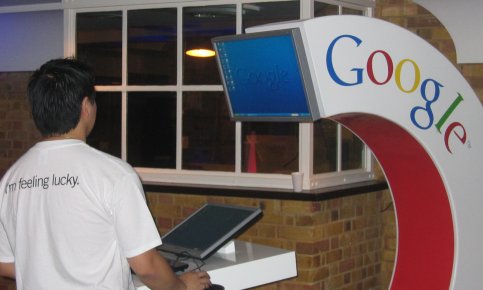
Delegate using laptop station at Google dev day in London

More as it happens.

Technorati tags: ,

Not convinced by LINA

Set for public release next month, LINA is a new approach to cross-platform development. Write your app once, for Linux, then deploy using a lightweight virtual machine, implemented for Windows, Mac and Linux. Why even Linux on Linux? Well, on Linux compatibility is a problem, with a multitude of different distributions out there. A VM provides a secure, reliable and predictable environment for your app. LINA’s creators claim to have solved the obvious problems: access to resources in the host operating system, and matching the look and feel which the user is expecting.

I’ll look it with interest when it appears next month, but I’m sceptical. It strikes me as a heavyweight approach, and I’d like to see the extent to which LINA blends with the host O/S before believing all the claims. Some of the publicity annoys me too. Here’s a quote from the white paper:

All computer users – individuals and organizations alike – make the most fundamental software decision when they choose an operating system. Historically, this choice locks the user into a single, clearly-demarcated realm of available software. As a result, Windows and Mac users have virtually no  access to the vast world of Open Source software.

I do most of my work on Windows Vista, so apparently I have “virtually no access” to open source software. Yet happily installed on the Vista box in front of me is:

  • Open Office
  • FireFox
  • Filezilla
  • Apache web server (installed with Delphi for PHP)
  • Tortoise SVN (Subversion client)
  • 7-Zip file archiver
  • Audacity sound editor
  • Ethereal Network Protocol Analyzer
  • NetBeans Java IDE
  • Eclipse Java IDE

and I’m sure there is more if I spend time looking. All open source, mostly cross-platform. Some of this is on the techie side; but the first two above are true mainstream apps.

Writing cross-platform apps is still a challenge, but easier than was the case a few years back, with numerous viable approaches available. So do we really need LINA?


Sutter on Concurrency

Herb Sutter, Software architect at Microsoft and C++ guru, has posted his slides (PDF) from OGDC, a game development conference. His talk was on the challenge programming for concurrency. If you’re not familiar with the subject, the earlier article The Free Lunch is Over is a great starting point.

The free lunch is the assumption that faster processor speeds will fix our slow applications. It’s now well-known that chipmakers are running into the wall in terms of speed, but getting very good at providing multiple processors. The secret of faster or smarter software is to take advantage of those multiple processors with concurrent programming.

A few highlights from the slides:

  • Sutter says that manycore processors are improving rapidly: “Intel could build 100-Pentium chips today if they wanted to.”
  • He observes that the issue is largely solved on the server, but not on the client
  • Locking is inadequate as a way of managing shared state. In particular, it breaks composability
  • He favours transactional memory to reduce but not eliminate dependency on locks: “Version memory ‘like a database.’ Automatic concurrency control, rollback and retry for competing transactions”

Finally, Sutter says:

The concurrency sea change impacts the entire software stack: Tools, languages, libraries, runtimes, operating systems. No programming language can ignore it and remain relevant.

My comment: we’ve seen threading get a little easier in programming languages like C# and Java, thanks to wrapper classes, and in C++ OpenMP can work magic, but what is the radical language innovation that will make concurrency achievable for mortals?

Microsoft PDC postponed due to lack of content

Microsoft’s Professional Developers Conference, which was to take place in October, has been postponed.

The stated reason is that the conference, which is meant to be focused on futures, would have been too late for the current round of developer releases:

By this fall, however, upcoming platform technologies including Windows Server 2008, SQL Server codenamed “Katmai,” Visual Studio codenamed “Orcas” and Silverlight will already be in developers’ hands and approaching launch.

The implication is that PDC would also have been too early for the next round of platform updates.

There are other conferences you can attend for a Microsoft fix. There’s another problem though: Tech-Ed developer in Europe conflicts with DevConnections in Las Vegas – and key speakers like Scott Guthrie and Tom Rizzo are already announced for DevConnections.

I tend to agree about PDC. Talking futures is not what Microsoft needs at the moment. Getting developers to engage with the current crop (WPF, Silverlight) is more to the point.

As for me, my next dev conferences are in London: Google Developer Day followed by Adobe Live/Adobe Developer Day. If you’re going to either and would like to chat, let me know.


Technorati tags: , , ,

Why Rich Internet Applications Matter

Anne Zelenka is sceptical about RIAs:

The idea is that we need more rich interactivity from our browser apps than they give us. But is this just developer fantasy, or does it represent a real end user need?

It’s a great question. I believe it’s fair to say that the all the interest in RIA, sparked by Flash and enflamed by Silverlight, is still more hype than real-world usage (especially Silverlight, still in Alpha for the .NET version).

There are multiple issues here. In particular:

  • Will we see HTML/CSS/JavaScript (call it AJAX if you like) gradually giving way to browser-hosted apps running in plug-ins (Flash, Silverlight, Java)?
  • Will we see a new breed of internet-delivered, zero-install desktop apps that will diminish our dependence on web browsers?  

I have few doubts about the first of these. Ease of development, flexibility and predictability of design, performance benefits of JIT compilers, convergence between internet and broadcasting, richer content enabled by ubiquitous broadband, to name some of them. 

The second is more contentious. But I think it will happen. There is room for debate about what constitutes a “real end user need”; but if you rephrase that as “real end user benefits” then it makes more sense. The main reasons are offline use and better integration with local OS services.

A while back a web app sceptic (I forget who) described the browser to me. “I call it Window”, he said. His point still holds. There is no need to do all your work within a browser box.


Technorati tags: , , ,

Adobe CS3 won’t install

Users are complaining that Adobe Creative Suite 3 simply won’t install. I’m one of them, running 32-bit Vista Professional. Pop the DVD in, click Install CS3 Web Premium, setup starts running, then silently closes. No error message, no install either.

Of course I have tried a few things. I’m not the only one struggling: the Adobe user forums are full of similar problems. Note: similar but not identical. There appear to be multiple issues, and not just on Vista but on XP as well. Here are some popular solutions:

I’ve tried the first two without success so far, on two different machines. Next stop tech support.

It looks to me as if Adobe is having Windows Installer issues. Perhaps nobody had time to read and observe the Tao of the Windows Installer. Still, I reckon Adobe could do a better job with the error logging and reporting. There are installer logs by default in \Program Files\Common Files\Adobe\Installers\, but mine have nothing helpful; no errors are reported. The Windows installer supports a detailed logging mode, but it seems difficult to enable with this particular installer. The calls to the installer itself are wrapped by some kind of Adobe package manager, and the .msi files are designed to prevent you from opening them directly.

Here’s what I get if I run setup from a command prompt:

Begin Adobe Setup
UI mode: Full GUI
End Adobe Setup. Exit code: 4

Hardly illuminating. If I do the silent mode, I get Exit code: 7 instead.

The bottom line is that I have no clue what is going wrong. Perhaps it is a campaign to promote the Mac version. I’ll keep you posted.

Update

I fixed it. First, the logging was more helpful than I realised at first. In the Installers folder mentioned above, there is a file called:

Add or Remove Adobe Creative Suite 3 Web Premium 1.0.log.gz

I’d not looked at this because I also had a file called:

Adobe Creative Suite 3 Web Premium 1.0.log

It turns out that the former is more useful than the latter. Of course it is compressed in .gz format, which Vista does not understand, but the open source 7-zip archiver takes care of that. So I extracted the log and found this entry:

DEBUG: Error 2739: Could not access JavaScript runtime for custom action Internal Error 2739.

That gave me something to troubleshoot. I soon found this article which says to re-register JScript:

regsvr32 jscript.dll

from an administrator command prompt. I was away; the setup ran fine after that.

Incidentally I did call tech support, but the techie didn’t help directly; he asked me to email the log though, and it was looking at that which gave me the answer. Now I can get on with the review…

Technorati tags: , , , ,