Category Archives: windows

Office Open XML needs wrapper classes

I’ve been writing a hands-on style article on using the Packaging API and Office Open XML. It all works smoothly, but its glaringly apparent that Microsoft needs to provide some wrapper classes for Open XML documents to make the API more usable. You can download some code snippets, which is a start, but these only scratch the surface. After all, Office developers are used to the COM automation API which makes it relatively easy to create and manipulate documents. By contrast, to get anywhere with Open XML you have to understand the raw XML. It is still miles better than working with RTF, or with the binary Office formats, but more difficult than it should be.

By way of illustration, look no further than the official code snippet for XLInsertStringIntoCell, which does what its name suggests: writes a string into the specified cell of an Excel spreadsheet. It is over 200 lines of code and comment (in fairness, more comment than code). That would be just 2 or 3 lines in VBA. Of course, once you have the wrapper function, it is just as easy. Unfortuntely there is a lot to wrap, but it is not necessary to be comprehensive. A simplified DOM that enabled the creation of basic formatted documents and spreadsheets without having to write thousands of lines of code would meet most needs.

I realise that you can write a “Hello world” document fairly easily; I’ve done it myself. But “Hello World” is not particularly useful. After all, you could output plain text or CSV, and Word and Excel will open them happily enough. The point of Open XML is to enable documents that have a little more to them: headers and footers, specified margins, rich formatting with fonts and paragraph styles, tables and graphics. Doing all that in Open XML is not trivial.

I am not the first to think along these lines. For example, here’s some code posted to CodePlex for working with Excel. Good stuff, but personally I’d like to see some official libraries, or even a well-run (WIX-style) officially endorsed open source project for this. It’s badly needed.


Technorati tags: , ,

Developers still miss VB6

A couple of years ago I wrote a piece on why Visual Basic 6 was frozen.

The topic is still of interest, and some reason reddit.com picked this link up recently, so the article has thousands of new readers.

If nothing else, it proves that developers still miss the old Visual Basic. Perhaps not so surprising; as I pointed out, it once had a reasonable claim to be the most popular programming language. That would not be true now; C# seems to be more popular than VB.NET, certainly among professionals, and I suspect Java is the number one overall (though these things are hard to measure intelligently).

Would I write the same article today? More or less, though the arrival of Vista and Office 2007 would make me state more forcibly that neither COM nor the Win32 API is dead. I still think that maintaining old-style VB would not have been feasible for Microsoft, except like FoxPro as a legacy thing and sadly now a dead end.

It’s also worth noting that VBA lives on, even though Microsoft is focusing on VSTO in its place. Except on the Mac, which is another story.

PS: I’ve fixed the comment feature on the article, so you can now have your say.

Technorati tags: , , , , ,

Why you should keep UAC enabled on Vista

Ian Griffiths has a nice post on why you should not disable UAC, even if you are are a developer.

I’ve followed that advice and it works for me, though there are still one or two apps where I have to Run As Administrator.

That does not include Visual Studio 2005. Despite the warning which it issues, I find it works for me without it (I realise there are scenarios where this won’t be the case).

The intriguing thing is that (as Griffiths notes) even Microsoft is not solidly behind UAC. I’ve commented on this before.

Since there is still a myth that running Vista with UAC enabled results in an avalanche of intrusive dialogs, it’s worth popping up from time to time to say that it is not so.

Windows security affects all of us, even if you do not like Windows or use it. UAC (and IE7’s protected mode, which depends on it) is a step forward and worth supporting.


Technorati tags: , ,

Hi, got a Dell? Outlook slow? Let me fix it

I enjoyed this comment from Thad Leingang who found one of my posts on Outlook 2007 performance problems. He is one of many to suffer from a Dell add-in installed by default called Media Direct; I’m not sure what this is meant to do, but as a side-effect it apparently slows Outlook 2007 to a crawl. Leingang fixed the issue thanks to an earlier comment here, but for him that was not enough:

I have made it a personal mission to seek out every DELL XPS1210 customer and tell him to ditch Media Direct. I am in sales and travel quite a bit. So in the past 3 weeks, I have interacted with 7 M1210 users. For instance, in Airports it is easy to spot the other Business travelers and it is customary to size-up each other’s package (PC that it). “Hi there, I see you have a M1210. Are you having a performance problem with your Outlook?” At first, I often get this “who the heck are you” look but after I explain more, I see tears form in their eyes. Tears of gratitude! Last Sunday in salt Lake airport, I help a guy named Dave delete Media Direct from his Dell. I was rewarded with free beer until I could drink no more (I had to catch my flight.) I even receive an unsolicited hug from a lovely lady in Irvine.

But why are users resorting to peer-to-peer support in airport lounges? Mainly because of the failure of the official alternative:

After I fixed my PC, My IT guy (Charlie) called Dell support and they said, “Oh yea, we are aware of this issue.” THEN WHY THE #@&K did you not tell us in the last 6 support emails we entered? “I am sorry sir, I will report this to my manager” BULL. This is undoubtedly a Dell problem!

I would be interested to know, first, whether Dell has fixed the issue with this add-in; and second, whether it has bothered to email its registered customers with the information Leingang is dispensing on his travels.


Technorati tags: , ,

Pay and play: how the Silverlight .Net runtime is kept small

Silverlight 1.1, currently in Alpha, will include a cross-platform version of the .NET runtime. The desktop version of this runtime is over 22MB, yet Microsoft is promising to keep Silverlight at around 4MB. How is this size reduction achieved? In part by stripping down the libraries to a minimal core, but Microsoft is also using another technique which it calls pay and play. This means that further class libraries are downloaded as needed, increasing the effective range of available libraries without impacting the size of the core runtime. Sleight of hand perhaps, but it does make sense for online apps.

Developers coding for Silverlight will need to know which of the libraries available in desktop .NET are also in the Silverlight framework. Because of pay and play, some will be in the core, some will be available on demand, and others will never be available. Apparently Visual Studio will give you a visual indication of which is which.

How big will the Silverlight runtime be if you include all the pay and play libraries? Here at Mix07, Microsoft’s Joe Stegman would not say, but I got the impression it will be substantially larger. Of course this is still Alpha; everything can change, and final decisions about what is core and what is pay and play are yet to come. Stegman was also uncertain about some aspects of delivery. You would imagine that pay and play DLLs would be downloaded from Microsoft’s servers, and that once downloaded they would be persisted and shared so that other applications can use them without a further download. Stegman says this is probably what will happen, but there seems to be some doubt.

The Silverlight 1.1 runtime will not be as small as it first appears.


Technorati tags: , , ,

C# code to detect UAC elevation on Vista

A couple of days ago I posted about programmatically detecting whether UAC is enabled. I was proposing to read a registry entry. Thanks to the power of blogs, my post drew a comment from Andrei Belogortseff, who has posted C++ code that does this properly. His library has functions for detecting whether the current process is elevated, detecting whether UAC is enabled, and running new processes both elevated and non-elevated (the last of these is the hardest to do).

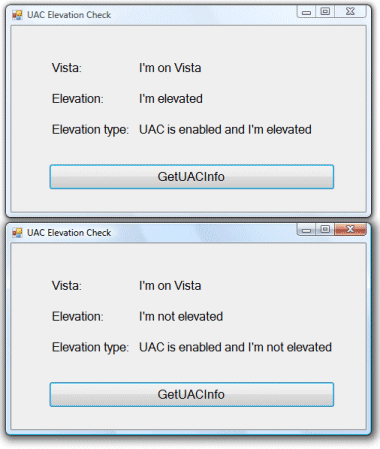
I liked the libary but wanted to use it from .NET. I compiled his code to a DLL and did a C# wrapper; then I considered the hassles of adding a dependency on the Visual C++ runtime libraries. I therefore did a quick C# implementation of the functions I cared about; I haven’t included the code for running new processes. Please go ahead and download the code, and let me know if you have any suggestions, or even if there is a much easier way to do this that I have missed. There is an app called UACElevationCheck, which calls functions in VistaTools.cs.

The code is only intended to be called from Vista and will throw an exception otherwise; of course you can modify it as you like.

I’ve included a function IsReallyVista that looks for a Vista-only API call, rather than relying on the reported version information. This is because the version information is unreliable if the app runs in a compatibility mode. On the other hand, IsReallyVista is a hack; if you don’t like it, use IsVista which uses the version information instead.

You may be able to do this using the System.Security namespace rather than PInvoke. I had a quick look but the PInvoke code seemed easier to me, especially since Belogortseff has already done the real work.


Technorati tags: , , , , , ,

More Windows Installer confusion: managed code custom actions a no-no

People who should know say not to use managed code custom actions in your Windows Installer setups. Like Rob Mensching of Wix fame who says:

…today the Windows Installer does not support managed code CustomActions and the general direction appears to be to try to reduce the need for CustomActions overall.

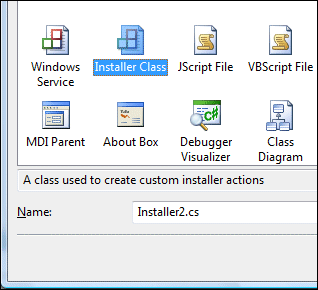
Read the blog entry for the reasons. The strange thing is, Visual Studio 2005 has specific support for managed code custom actions; there is an Installer class and an MSDN walkthrough on how to use it

Now, I have always avoided managed code custom actions anyway, but only from instinct. Windows Installer setups are problematic enough as it is; adding .NET Framework dependency seems unnecessary. Mensching’s post above explains why it is also error-prone. See also Aaron Stebner’s post from March 2005.

… in summary, I strongly encourage you to not use managed code in your product setup.  I realize that some teams do this here at Microsoft, but please don’t use our bad (in my opinion) examples to justify doing so in your own setup….

Presuming these guys are right, might it not be wise for the Visual Studio folk to remove support for managed code custom actions from the product? A point of confusion is that the managed installer class works with a utility called InstallUtil which is distinct from the Windows Installer; in fact, I believe that Visual Studio setup projects which include managed code custom actions actually call InstallUtil.

I suggest Delphi as a handy alternative, if you would rather avoid Visual C++.

Finally, I hear many good things about Wix, the free XML-based authoring too for Windows Installer setups. If you are embarking on a new setup project it is worth a look.


Technorati tags: , , ,

Programmatically detecting whether UAC is enabled

An application may sometimes need to know whether or not the current user has administrative rights. This is complicated in Windows Vista by User Account Control (UAC) – the user may be in the Adminstrators group on the local machine, but nevertheless running with limited rights. When I came across this blog entry on COM elevation by Christoph Wille(thanks to Daniel Moth) I was interested to see the function he mentions called IsUACEnabledOS. I downloaded his code, but was disappointed to see this:

// a really simple check that does not account for possible UAC-disabledness via group policy
public static bool IsUACEnabledOS()
{
int majorVersion = Environment.OSVersion.Version.Major;
int minorVersion = Environment.OSVersion.Version.Minor;

return (majorVersion >= 6);
}

This just detects Vista or higher; in fact, it won’t always return the correct result, since Vista will lie about the version number if an application is running under compatibility settings. How then do we discover if UAC is enabled? The best I’ve come across so far is to query this registry entry:

HKLM\Software\Microsoft\Windows\CurrentVersion\Policies\System\EnableLUA

If the entry does not exist or is 0, UAC is not enabled. Of course there is no guarantee that this always work, but it’s unlikely to change. I also haven’t checked that it is there in the base versions of Vista; again, it is probably the same.

Update: See the comments to this post for a better solution from Andrei Belogortseff, using the GetTokenInformation API call.  

I’ve now posted a C# implementation of Andrei’s code.

Technorati tags: ,

A bug in Vista’s UAC

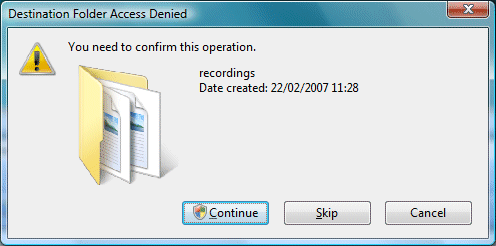
Vista’s User Account Control (UAC) elevation prompt sometimes appears when it shouldn’t. Here is an example which works every time for me. I have a folder in Documents (within my home directory) called recordings, containing MP3 files. I double-click one of these files and it opens in Windows Media Player. Now let’s say I try to rename the recordings folder. I get a dialog saying I need to confirm this operation, complete with a UAC shield.

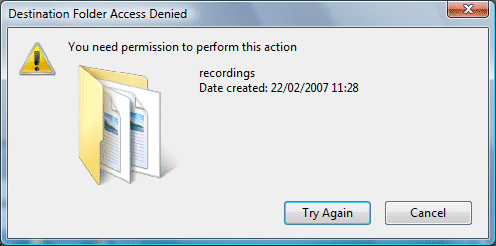
I click Continue and get the screen flash and the elvation prompt. It’s not enough though; I now get a dialog that says “Destination Folder Access Denied – You need permission to perform this action.” If I click Try Again, I get the same dialog, for ever.

It’s nonsense of course. I don’t need permission; I need to close the MP3 file. Indeed, if I close the file I can then rename the folder.

Oddly, if I try this with a Word document, Vista correctly reports that the folder in in use by Word. But if I try a second time, I get the inappropriate UAC prompt.

It’s possible that some Windows API call is returning an access denied error, when it should indicate a file or folder in use by another process, or there could be some other explanation. The end result is a poor user experience.

If Microsoft can’t always get this right, it illustrates how hard it is for developers to give users appropriate error messages when working with UAC on Vista.


Technorati tags: , ,

Official performance patch for Outlook 2007

Computerworld has drawn my attention to a new performance patch for Outlook 2007, issued on Friday. Here’s what Microsoft says:

This update fixes a problem in which a calendar item that is marked as private is opened if it is found by using the Search Desktop feature. The update also fixes performance issues that occur when you work with items in a large .pst file or .ost file.

The patch is welcome; there’s no doubting that Outlook 2007 has proved horribly slow for many users. But does it fix the problems? If you read through the comments to earlier postings on this subject you’ll notice that there are actually several performance issues. The main ones I’m aware of:

  1. Slow receive from POP3 mail servers. Sometimes caused by conflicts between Vista’s TCP optimization and certain routers – see comment 27 here for a fix.
  2. Add-ins, for example Dell Media Direct, Acrobat PDFMaker, Microsoft’s Business Contact Manager. See Tools – Trust Center – Add-ins and click Go by the “Com Add-ins” dropdown to manage these.
  3. Desktop search indexing. You can disable this (it’s an add-in) but it is a shame to do so, since it is one of the best new features.
  4. Large local mailbox – could be a standalone .PST (Personal Store), or an .OST (Offline Store) that is kept in synch with Exchange.

The published fix appears to address only the problem with large local mailboxes.

Does it work? I’ve applied it, and it seems to help a bit, though I reckon performance remains worse than Outlook 2003. My hunch is that the issues are too deep-rooted for a quick fix, especially if you keep desktop search enabled. I’ll be interested to see whether the patch fixes another Outlook 2007 annoyance: if you close down Windows while Search is still indexing Outlook, you almost always get a message saying “The data file ‘Mailbox …’ was not closed properly. The file is being checked for problems. Then, of course, you wait and wait.

Is it our fault for having large mailboxes? Here’s a comment from Microsoft’s Jessica Arnold, quoted in the Computerworld article referenced above:

Outlook wasn’t designed to be a file dump, it was meant to be a communications tool,” she said. “There is that fine line, but we don’t necessarily want to optimize the software for people that store their e-mail in the same .PST file for ten years.”

A fair point; yet quick, indexed access to email archives is important to many of us. Archiving to a PST is hazardous, especially since by default Outlook archives to the local machine, not to the server; and in many organizations local documents are not backed up. Running a large mailbox may not be a good solution, but what is better?

Perhaps the answer is Gmail, if you are always online and can cope with the privacy issues. Note the first selling point which Google claims for its service:

Fast search
Use Google search to find the exact message you want, no matter when it was sent or received.

Apparently Google understands that users want to be able to find old messages. Surely a desktop application should be at least as good for finding these, as an internet mailbox that might be thousands of miles away?

Update: I still get “The data file ‘Mailbox …’ was not closed properly.” Not fixed.

See also http://blogs.msdn.com/willkennedy/archive/2007/04/17/outlook-performance-update.aspx where a member of the Outlook team further describes the patch.