Category Archives: windows

I broke Vista again

Last time it was Windows Search. This time it was the Start menu. I don’t know what triggered it, but today I noticed something was wrong. When I clicked the Start button, the top level items had all disappeared. There was only a single entry, for All Programs, above which was a large white rectangle whether the other items should have been. After a short while, the Start menu stopped working completely. Clicking the Start button or pressing Ctrl-Esc did nothing at all. I also noticed that the explorer process was using 50% of my CPU time. This probably meant that one of the two available processors in a dual-core box was entirely devoted to some sort of useless loop. On a single processor system Windows might have frozen completely.

I tried a few things. Restarting Windows, of course, and restarting the Explorer process. Didn’t work; same symptoms. I tried the Customize button in Start menu properties, and clicking Use Default Settings. Didn’t work. I tried using Systernals Process Explorer to discover what was causing Explorer to go into a spin. That gave me a stack for the errant thread, but it wasn’t especially illuminating, except that it looked unlikely to be the fault of a third-party context menu handler.

At this point I had to do some other work. Did you know that you can use Task Manager as a crude shell manager?  Just use File – New Task to start an application, and Alt-Tab to switch between applications. Who needs Explorer?

OK, it is just a little clunky. I had another go. Logged on as a different user, and everything worked fine. So it is something in my user profile. Eventually I found the culprit, a registry entry called ProgramsCache at HKCU\Software\Microsoft\Windows\CurrentVersion\Explorer\StartPage. Somehow this had got corrupted. When I renamed it, Explorer fixed itself. This registry key seems to store your list of frequently used programs. These are the shortcuts that appear above All Programs but below the pinned shortcuts on the Start menu.

Now, how come the Use Default Settings button doesn’t reset this registry key? Still, at least I can get back to work now.

CodeGear puts 64-bit on the roadmap

CodeGear has updated its Delphi Roadmap. Newly added is Delphi codename “Commodore”, set for Winter 2008, which is to include native 64-bit development. After that the company is promising to focus on multi-core/multi-threaded development.

What else is coming? Delphi “Highlander”, due later this year, is a belated update to Delphi .NET, will support .NET 2.0, and has a new .NET database called SQL Datastore (likely some sort of port of JDataStore). No word on WPF or LINQ though – CodeGear is still playing catch-up here.

Delphi “Tiburón”, due next year, will bring another long-requested feature: full Unicode compatibility in the Win32 Delphi language and VCL (Visual Component Library), along with parameterized types. C++Builder “Barracuda” will follow, bringing the same features to C++.

The really interesting stuff comes at the end. CodeGear is “researching” a number of areas includes development for mobile devices, Rich Internet Applications, and cross-compilation to other operating systems. All this is at the “sometime, never” end of the time scale, so don’t get too excited.

All the above will be welcomed by Delphi developers, though I fear most of the potential .NET market has already been ceded to Visual Studio.

It’s not a bad roadmap though. That said, to my mind the most critical issue for CodeGear is quality control. Poor quality is what spoilt the launch of Delphi for PHP earlier this year. I discussed this issue with the new CEO Jim Douglas and EMEA product Director Jason Vokes when I was researching a recent article for The Register, and got the sense that the familiar pressure of having to release product (ready or not) to hit particular financial quarters is still a problem. Still, Delphi 2007 was a smoother launch than Delphi 2006, and that was miles better than Delphi 2005, so leaving aside Delphi for PHP things are improving.

Office Open XML vs COM automation

Looking at the new Open XML API, introduced by Kevin Boske here, makes you realise that old-style COM automation wasn’t so bad after all.

There are two distinct aspects to working programmatically with OOXML. First, there’s the Packaging API, which deals with how the various XML files which make up a document get stored in a ZIP archive. Second, there’s the XML specification itself, which defines the schema of elements and attributes that form the content of an OOXML document.

The new wrapper classes really only deal with the packaging aspect. You still have to work out how to parse and/or generate the correct XML content using your favourite XML parser. And it’s a lot more complex then HTML.

By contrast, the old COM automation API for Office presents a programmatic object model for the content, and you don’t have to worry much about how the document gets stored – you just tell Word or Excel to save it.

The (very big) downside of the COM object model is that it depends on the presence of Microsoft Office. High resource requirements, version problems, Windows-only, and inappropriate for server apps.

We seem to have traded one problem for another. What Microsoft needs to provide is wrapper classes for the content, rather than just its packaging.

Technorati tags: , , , ,

How to speed up Vista: disable the slow slow search

What’s the biggest problems with Vista? Not the buggy drivers, which are gradually getting sorted. Not the evil DRM, which I haven’t encountered directly, though it may be a factor in increasing the complexity and therefore the bugginess of video and audio drivers. Not User Account Control security, which I think is pretty good. Not the user interface, which I reckon improves on Windows XP though there are annoyances.

No, my biggest complaint is performance. This morning I noticed that if I clicked the Start button and then Documents, it took around 15 seconds for the explorer window to display, fully populated. Doing this with Task Manager monitoring performance, I could see CPU usage spike from below 10% to between 55% and 60% while Explorer did its stuff.

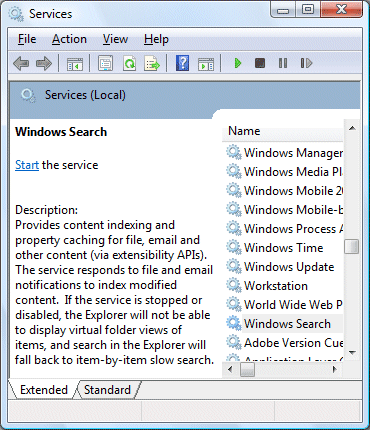
Explorer gets blamed for many things that are not really its fault. Applications which integrate with the desktop, such as file archive utilities, hook into Explorer and can cause problems. I tried to figure out what was slowing it down. I opened up Services (in Administrative Tools) and looked at what was running. It didn’t take long to find the main culprit – Windows Search:

Windows Search in Services

You will notice that the above dialog shows that the service is not running. That’s because I stopped it. The difference is amazing. The Documents folder now shows in less than a second. When I click the Start button, the menu displays immediately instead of pausing for thought. Everything seems faster.

Looking at the description above, it is not surprising that there is a performance impact. The indexer gets notified every time you change a file or receive an email (if you are using Outlook or Windows Mail). The same service creates virtual folder views in Explorer, a poor man’s WinFS that should make the real location of files less important. Notice that the explanatory text warns me that by stopping the service I lose these features and have to “fall back to item-by-item slow search”.

I think it should say, “If the service is started, Explorer will take fifteen times longer to open and your system will run more slowly.”

Desktop search is a great feature, but only if it is unobtrusive. In Vista, that’s not the case.

This kind of thing will vary substantially from one system to another. Another user may say that Windows Search causes no problems. I also believe that the system impact is much greater if the indexer has many outstanding tasks – such as indexing a large Outlook mailbox, for example. Further, disabling Windows search really does slow down the search function in Explorer.

Turning off Windows search is therefore not something to do lightly. It breaks an important part of Vista.

Still, sometimes you need to get your work done. That fifteen seconds delay soon adds up when repeated many times.

In truth, we should not be faced with this decision. Microsoft should know better – it has plenty of database expertise, after all. There’s no excuse for a system service that slows things down to this extent.

By the way, if you have understood all the caveats and still want to run without Windows Search, until Microsoft fix it, then you must set the service to disabled. Otherwise applications like Outlook will helpfully restart it for you.

Update

See comments below – a couple of others have reported (as I expected) that search works fine for them. So what is the issue here? In my case I think it is related to Outlook 2007, known to have performance problems especially with large mailboxes like mine. But what’s the general conclusion? If you are suffering from performance problems with Vista, I recommend experimenting with Search – stop and disable it temporarily, to see what effect it has. If there’s no improvement, you can always enable it again.

It strikes me that there is some unfortunate interaction between Explorer, Search, and Outlook; it’s possible that there are other bad combinations as well.

Technorati tags: , , ,

New Live Writer is out

Beta, of course. But since this is my favourite offline blog authoring tool, I’m taking a break from Google posts to mention it here. You can download it here – I’m using it to write this post. The official blog has a list of new features.

Do they amount to much? Inline spell checking (wiggly underlines) is great, except that it still seems to be hard-wired to US English. I like Paste Special, particularly as I’ve had problems pasting from Word in the past, with Writer inserting annoying font tags (something to do with using the embedded IE editor, no doubt). That said, I’ve just tried a paste from Word and it worked fine, so perhaps this is fixed too. Synch between local and online edits is neat – when you retrieve a post from Live Writer’s local cache, it updates it from the online version, so that it is now safe to edit in either location. Writer also exposes a richer set of properties, including Excerpt. There are a bunch of other changes that don’t matter much to me, such as Sharepoint support. Table editing? I don’t generally use tables in blog posts, but it could be useful.

On the minus side, Writer has sprouted an odd extra toolbar so that you now have three rows above the working area: menu, toolbar, and editing toolbar. That looks cluttered and unnecessary. There’s the spelling problem mentioned above. And as for this, words fail me:


Overall, a useful but low-key upgrade.

Update: Graham Chastney has a hack to fix the US spelling.

Microsoft: .doc and .xls are dangerous

A common phenomenon in the tech world is when vendors trash their own past products in an effort to convince you of the value of shiny new ones.

Here is an example. Microsoft’s security advisory 937696 and the related KB 935865 tells us of the dangers posed by Office binary formats including .doc, .xls and .ppt:

MOICE uses the 2007 Microsoft Office system converters to convert the Office binary format files into the Office Open XML format. This process helps remove the potential threat that may exist if the document is opened in the binary format. Additionally, MOICE converts incoming files in an isolated environment. This helps protect the computer from a potential threat.

What’s MOICE? It’s the Microsoft Office Isolated Conversion Environment, proving that even after Silverlight, the department of verbose and meaningless names is alive and well in Redmond. It is an add-on to Office 2003 or 2007 that automatically converts Office binary formats to Office Open XML (OOXML). Further, administrators can now choose to implement File Block, which prevents users from opening specified binary document types without first converting them.

The presumption here is that OOXML documents are safer. Probably true, especially since documents containing macros now require a different extension (.docm, .xlm) to flag the fact that they contain macros.

A side effect is that MOICE spreads the adoption of OOXML. Like Joe Wilcox, I can’t help wondering whether it was this, rather than security, which has prompted this release.

OOXML has real advantages, yet it can also be tiresome. Users install Office 2007, email a Word document to someone, then get a perplexed reply saying that the document won’t open. I’ve been known to show people how to set the default back to the old binary formats to avoid this problem – I would love to know how many Office 2007 rollouts do this as a matter of course.

After all, it is late in the day for Microsoft to consider blocking these formats. The Sophos web site has a Top Ten Viruses page with a neat feature: you can see stats for the last 10 years. These confirm my hunch. Back in 1999, there were 9 office macro viruses in the top 10 (Sophos prefixes these with WM or XM). Today? None. Further, note that the top 10, according to Sophos, account for 94.6% of all viruses in the wild.

The reason is that in the intervening years Microsoft has built reasonably good macro protection into Office. A factor here is that emailed documents rarely need to contain macros, so if you double-click an attachment and it wants to run a macro, that’s a big clue that something is awry.

That said, there is clearly still some risk from macro viruses, or from documents with crafted corruptions that infect a PC. Recently, Open Office has also been shown to be vulnerable. So MOICE has a value, but is it enough to compensate for the cost in terms of inconvenience? After all, while Office binary formats are almost universally readable, that’s not the case for OOXML. If you run Windows, and have Office 2000 or higher, and broadband Internet, and sufficient rights to install the converter, then the process is reasonably smooth; but that is a long way from universal.

MOICE strikes me as low priority in security terms, but nevertheless an intriguing development in the battle for XML office format adoption.


Adobe CS3 won’t install

Users are complaining that Adobe Creative Suite 3 simply won’t install. I’m one of them, running 32-bit Vista Professional. Pop the DVD in, click Install CS3 Web Premium, setup starts running, then silently closes. No error message, no install either.

Of course I have tried a few things. I’m not the only one struggling: the Adobe user forums are full of similar problems. Note: similar but not identical. There appear to be multiple issues, and not just on Vista but on XP as well. Here are some popular solutions:

I’ve tried the first two without success so far, on two different machines. Next stop tech support.

It looks to me as if Adobe is having Windows Installer issues. Perhaps nobody had time to read and observe the Tao of the Windows Installer. Still, I reckon Adobe could do a better job with the error logging and reporting. There are installer logs by default in \Program Files\Common Files\Adobe\Installers\, but mine have nothing helpful; no errors are reported. The Windows installer supports a detailed logging mode, but it seems difficult to enable with this particular installer. The calls to the installer itself are wrapped by some kind of Adobe package manager, and the .msi files are designed to prevent you from opening them directly.

Here’s what I get if I run setup from a command prompt:

Begin Adobe Setup
UI mode: Full GUI
End Adobe Setup. Exit code: 4

Hardly illuminating. If I do the silent mode, I get Exit code: 7 instead.

The bottom line is that I have no clue what is going wrong. Perhaps it is a campaign to promote the Mac version. I’ll keep you posted.

Update

I fixed it. First, the logging was more helpful than I realised at first. In the Installers folder mentioned above, there is a file called:

Add or Remove Adobe Creative Suite 3 Web Premium 1.0.log.gz

I’d not looked at this because I also had a file called:

Adobe Creative Suite 3 Web Premium 1.0.log

It turns out that the former is more useful than the latter. Of course it is compressed in .gz format, which Vista does not understand, but the open source 7-zip archiver takes care of that. So I extracted the log and found this entry:

DEBUG: Error 2739: Could not access JavaScript runtime for custom action Internal Error 2739.

That gave me something to troubleshoot. I soon found this article which says to re-register JScript:

regsvr32 jscript.dll

from an administrator command prompt. I was away; the setup ran fine after that.

Incidentally I did call tech support, but the techie didn’t help directly; he asked me to email the log though, and it was looking at that which gave me the answer. Now I can get on with the review…

Technorati tags: , , , ,

Microsoft has “no plans to litigate”

According to Bill Hilf, general manager of platform strategy, Microsoft is not planning to litigate against open source after all. In an interview for Infoworld he says:

Our strategy from everyone in the company — from [Steve] Ballmer to Brad Smith to me and everyone in between — has always been to license and not litigate as it relates to our intellectual property. So we have no plans to litigate. You can never say we’ll never do anything in the future, but that’s not our strategy.

I am not surprised – for the reasons I stated earlier. Of course, the other side of the coin is that if Microsoft doesn’t intend to enforce its patents, then all this patent waving is little more than bluster. It is shadow-boxing. We will see plenty more of it on both sides.


Technorati tags: , ,

A bad experience with Windows Live

The main problem I have with Windows Live is lack of confidence that it will actually work as advertised. There is a rational explanation for this kind of hunch. It is formed from previous experiences, and once formed, it hard to shake off.

Here’s what happened today. I wanted to contact a Microsoft blogger who hosts his blog on http://spaces.live.com. I couldn’t see an email address (understandably), so I clicked on the button that said Send a message. I was prompted to sign into Windows Live, which I did, and then after a bit of screen flashing and approving of ActiveX controls I had a form into which I could type.

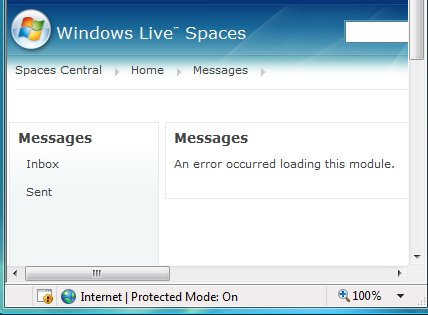
I typed the message. Then I did something which reflects my lack of confidence: I copied the message to the clipboard, in case something went wrong and I had to type it again. Finally, I clicked Send. This is what I got:

Note that all my text was zapped. I closed the browser, restarted it, signed in again, returned to the message form, pasted in my text, and clicked Send again. Same result.

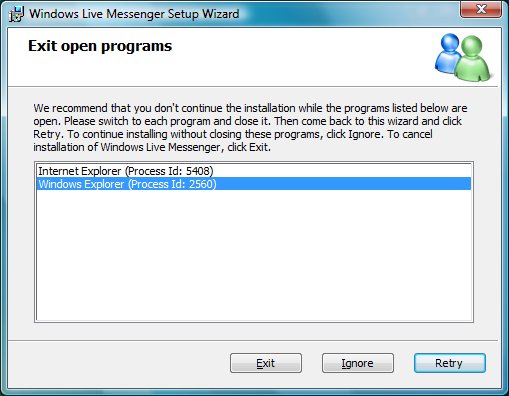
I’d noticed during the process that this messaging system has some relationship with Live Messenger. I figured therefore that upgrading Messenger to the latest version might help, especially since Messenger nags me on this subject whenever I start it up. So I fired up Messenger and allowed it to update itself. During the install I got this dialog:

Frankly, I will not take anything Microsoft says about user experience seriously until the company stops inflicting this kind of dialog on its users. Look at it. It recommends that I close some open programs, but does not say what the consequences will be if I do not. It is a vague threat that something might not work right. But that’s not all. Internet Explorer was not visibly open at the time. I had to go into Task Manager and end the process. Many users would not make it that far.

It gets worse. I’m being asked to close Windows Explorer. This is the application that forms the Windows desktop. If you close it, you lose the Start menu, taskbar, desktop icons, pretty much everything except the background.

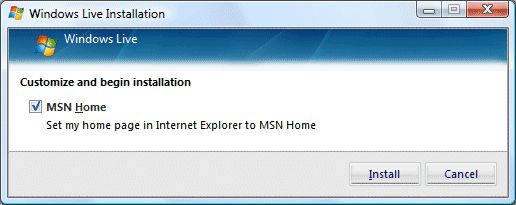
Still, I didn’t want to risk a bad install. I went into Task Manager and ended the explorer.exe process. No more desktop. Then I continued the Messenger setup. It went through fine (except that no, I don’t want msn.com as my home page, but thanks for asking). Finally, I restarted Explorer. Task Manager – New Task – type Explorer – hit Enter. Yes, I’ve been here before. Zing! back comes my desktop.

Back to Live Spaces, paste in message, click send, and … you’ve guessed it.  “An error occurred loading this module”. Never mind.


Microsoft vs Open Source: only one loser

Microsoft, of course. Fortune reports that Microsoft will seek to extract royalties from users of open-source software. That would be monumental folly. Here’s why.

First, the company already has an image problem. It’s the “Evil Empire”, the vendor we love to hate. Litigating against free software would be appalling PR.

Second, let’s consider who would lose out if Microsoft succeeded in making widely used open source operating systems or applications illegal. Clearly, it would be the users of that software. But these users are in many cases also Microsoft’s customers. Windows on the desktop, Linux and Apache on the server, for example. Anyone who uses the internet uses open source software. If Microsoft litigates against open source, it will be litigating against its own customers.

Third, Microsoft won’t succeed. I don’t find it difficult to believe that:

…FOSS infringes on no fewer than 235 Microsoft patents.

as Fortune reports. But what if big patent holders like IBM decide to trawl their files looking for ways in which Windows or Office might infringe a patent or two? I’d be astonished if they came back empty-handed. This is not a game that Microsoft can win.

Fourth, the free and open source software movement is good for all of us. It’s lowered prices and fostered innovation. That’s a problem for a company that decides to attack it, because everyone will want it to fail.

Fifth, Microsoft has a dismal record in the courtroom.

Sixth, major legal confrontations are a huge distraction. They drain productivity. They divert energy and attention away from what the company is good at.

If Fortune is to be believed, Microsoft has been listening too much to its lawyers, and not enough to its customers.

Microsoft can thrive alongside open source. The way to do so is to create great software like Silverlight. Not by embarking on unwinnable legal contests.

Despite the above, I can understand (though not approve) that Microsoft may wish to mutter about its patents now and again, to spread a little FUD and dissuade customers from a switch to Linux. This may be no more than that. Otherwise, it is making a costly mistake.


Technorati tags: , , , , ,