Category Archives: windows

Got Paint.NET?

I am late with this; Paint.NET 3.0 was released at the end of last month. It deserves more publicity, since it is of high quality. If you have .NET Framework 2.0, Download it here.

The application is fine for general use; I may switch to it from my old favourite Paint Shop Pro, for trimming and touching up screen captures. One feature I like is the way it handles multiple documents. A thumbnail of each open document appears at top right, in a fat toolbar; click a thumbnail to switch to that document.

Paint.NET is particularly interesting for developers. It is written in C#, and started out as a design project; as I understand it, one of the intentions was to discover whether Microsoft’s .NET Framework was up to the task, given that image applications do a lot of intensive number-crunching. Most of the code is C# but not quite all. There is a shell extension written in C++ and some use of PInvoke and COM interop. I get the impression that the chief developer Rick Brewster is now more interested in creating an excellent application than in proving a point about .NET.

One point of interest is the user of multi-threading for optimized performance on multicore processors. Brewster has recently posted his performance tests on various processors from two to eight cores:

The 8-core system is frightfully fast, and it’s very clear that having rendering code optimized for multiple threads is a big win. However, I will be honest and state that the performance scaling is not at the level I was hoping for: we’re already seeing diminishing returns at this point! In general, I am seeing gains of about 3.0x on a quad-core system, and 5.1x on an 8-core system (compared to running with only 1 thread). Unfortunately, I do not have an 8-core Opteron system to compare against which might provide some more meaty information to chew on (does it scale better? worse?).

I take his point, though a 5.1x gain on an 8-core system strikes me as decent. I recommend downloading the source code and taking a look; it is well commented and has workarounds for various System.Windows.Forms annoyances. Before you ask the obvious question, Brewster recently commented in the Paint.NET forum that he has not yet looked at WPF (Windows Presentation Foundation).


Technorati tags: , , ,

Peeking into Vista’s virtual store

In the user data area in Vista is a virtual store. Find it at:

C:\Users\[USERNAME]\AppData\Local\VirtualStore\

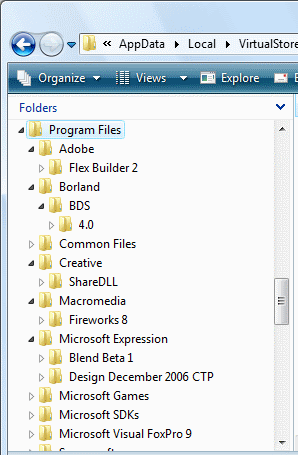
It is worth having a peek now and again. Here’s part of mine:

The Virtual Store is a feature of User Account Control, the centerpiece of Vista’s enhanced security. Applications that try to write to protected system locations, including Program Files, Windows, and HKEY_LOCAL_MACHINE in the registry, are prevented from doing so. Instead, a compatibility feature kicks in, and these applications write to a location in your home directory. Registry entries are written to a special area in HKEY_CURRENT_USER. The application mostly won’t know the difference, though there are limitations and you can get strange results. For example, if an application deletes a file from the virtual store when a file of the same name exists in the real location, the delete appears to succeed but the file still exists. Virtualization also fails (by design) if the application is run under another user account, or using Run As Administrator. The files written to the first user’s virtual store are invisible to these other users.

Virtualization is a stop-gap measure. Well-behaved applications should not write to these locations except when first installed, or for maintenance, both of which are administrative tasks. So the Virtual Store is a hall of shame. Microsoft features heavily in mine; we can just about forgive the appearance of the beta Expression tools, but Visual Foxpro 9.0? Adobe’s Flex Builder 2 is another disappointment. In most cases there are only one or two files, so we are not talking about major design issues, but they still need fixing.

If you are developing software, it is worth checking your virtual store in case stuff is slipping through. Note that you must have UAC enabled, and not be using Run As Administrator, since either of these settings will prevent the virtual store being used.

Technorati tags: , , ,

Annoying Word 2007 problem: can’t select text

I run Word 2007 on Vista. Today I hit a curious problem. Word opened, but something was badly wrong. I could not select text with the mouse. The document scroll bar did not work. Word crashed on exit. And going into Options – Addins, I could not navigate beyond the “Popular” section.

After several crashes an Office Diagnostics wizard popped up and offered to help. Kind of it. It chugged through numerous tests and finally told me it could not see anything wrong. Never mind.

Checking the newgroups, I found fellow-sufferers but no solution. I decided to be methodical. I started Word in safe mode. (winword /a). It worked. Probably an add-in. I went to the COM add-ins and tried to disable them. Message: “The connected state of Office add-ins registered in HKEY_LOCAL_MACHINE cannot be changed”. OK, registry then. Navigated to:

HKEY_LOCAL_MACHINE\SOFTWARE\Microsoft\Office\Word\Addins

Found three add-ins listed. I changed the value of the LoadBehavior key from 3 to 0 for each add-in.

Word now worked OK, but still crashed on closing. I found I could restore two of the add-ins without problems. The guilty party: OfficePrintAddIn, a component of Flash Paper.

I had a look at active templates. There was one called FlashPaperWordUITemplate.2302.dot. If I tried to unload it, Word crashed. Perhaps it needs the related COM add-in to be loaded. I closed Word, found the template file, and deleted it. Everything is fine now.

A quicker route might be to uninstall Macromedia Flash Paper, unless you use this of course.

I’m still puzzled about why this problem only showed up today. I’d not made any changes to Flash Paper or Word that I’m aware of. And I don’t blame Macromedia (now Adobe) for this; Word 2007 did not exist when this Flash add-in was released.

Posted in the hope that it saves someone else some time.


Technorati tags: ,

Microsoft Soapbox uses Flash

Took a quick look at Microsoft Soapbox which seems to be a me-too version of YouTube.

The first thing I noticed was the absence of any content I wanted to view, whereas YouTube is really dangerous if you want to avoid distraction. That will change if the service is popular; but I’m not clear why someone would use Microsoft’s service instead of YouTube which gets the traffic.

The second thing I noticed is that Microsoft is using Flash for these videos, as does YouTube. I gave it a cross-platform test, and was able to use the site on the Mac with Safari and on Linux with FireFox, so kudos to Microsoft for that. I’m puzzled though, because the system requirements state Windows Media Player 9 as well as Flash 8, and Windows Media Player 9 isn’t available for Linux. Nevertheless, it works.

That said, I’m surprised that Microsoft isn’t using SoapBox to show off WPF/E. I appreciate that this is still in beta, but then so is Soapbox. Does Microsoft not intend to use its cross-platform, video-capable solution for its own site? Or will it transition in future?


Technorati tags: , , ,

How secure is Windows Vista?

Tech journalists have a tough job. They are meant to take the vast complexity of things like computers and operating systems and translate them into terms that ordinary people can understand.

Of course there is never a one-to-one mapping between the complex and the simple. The simplified explanation is a compromise.

So let’s look at the question: how secure is Windows Vista? Unfortunately the question is not amenable to a simple answer. Perhaps the best you can do is to try and explain the issues, the ways in which it is more secure than earlier versions of Windows, the ways in which it remains insecure.

Now read this piece on weaknesses in Vista’s UAC (User Account Control). Looks bad, right? About some insightful researcher who “found out — from Microsoft officials — that the default no-admin setting isn’t even a security mechanism anymore.”

This is a misunderstanding of a typically balanced and well-reasoned piece by Microsoft’s Mark Russinovich on UAC in Vista. At least the link is there in the ZDNet article, so you can read it for yourself.

Apparently, “In an e-mail interview, the Polish malware researcher said she was “pissed off” by what she perceived as Russinovich’s flippant attitude to the potential risk.”

Frankly, I defy anyone to read and understand Russinovich’s article and call it “flippant”. He explains how the mechanism works, he explains why it works as it does, acknowledges areas of compromise, and shows how to achieve higher security if you want it:

Without the convenience of elevations most of us would continue to run the way we have on previous versions of Windows: with administrative rights all the time. Protected Mode IE and PsExec’s -l option simply take advantage of ILs to create a sandbox around malware that gets past other security defenses. The elevation and Protected Mode IE sandboxes might have potential avenues of attack , but they’re better than no sandbox at all. If you value security over any convenience you can, of course, leverage the security boundary of separate user accounts by running as standard user all the time and switching to dedicated accounts for unsafe browsing and administrative activities.

He’s right. And personally I think ZDNet is giving too much weight to the strident researcher who calls Vista security “a big joke“, while doing too little to examine the real issues which Russinovich explains.

Of course that doesn’t prevent Slashdot and others picking up the story and presuming, because that’s what they want to believe, that Vista security is shot to bits.

It’s not. It is a real advance on XP, not least because of the point Russinovich highlights:

Why did Windows Vista go to the trouble of introducing elevations and ILs? To get us to a world where everyone runs as standard user by default and all software is written with that assumption.

Update

This story gets more curious the more you investigate. The gist of this researcher’s original complaint was that Vista forced her to run setup and installer applications with local admin rights:

That means that if you downloaded some freeware Tetris game, you will have to run its installer as administrator, giving it not only full access to all your file system and registry, but also allowing e.g. to load kernel drivers!

It’s a fair point, though problematic on examination. Installing applications is an administrative task. Still, it’s correct that many installers do not need full admin rights, so the system could be more granular. Fortunately Vista covers this. You can disable the automatic elevation of setup applications in local security policy. In fact, enterprise rollouts have this disabled by default. The researcher is actually aware of this, but says:

Even though it’s possible to disable heuristics-based installer detection via local policy settings, that doesn’t seem to work for those installer executables which have embedded manifest saying that they should be run as administrator. I see the above limitation as a very severe hole in the design of UAC.

Now she’s lost me. The complaint has shifted – there is no problem running setup applications with less than full admin rights, but if the developer specifies with a manifest that full admin rights are required, then Vista automatically prompts for elevation. This of course is working as designed. If you downloaded a “freeware Tetris game” and discovered a manifest insisting on full admin rights, you would likely be wary in any case.

So where is the “very severe hole in the design of UAC”? There is a “severe hole” here, but it is not in the design of UAC. The core problem is that users may try to install malware. They are browsing the web, and perhaps come across a flashing advertisement that says their PC has spyware, but this utility will fix it. They download it. They pass a dialog warning that the file is from the internet and might not be safe. They pass a dialog requesting elevation. At this point, only anti-virus software or something like Windows Defender might save them. How do you fix this, without taking away the user’s right to do what they want with the computer they own?

That said, there is a weakness in UAC in the potential of non-elevated processes to interfere with elevated processed. Mark Russinovich covers this well in his post referenced above. Bottom line is that it’s still best not to run with full admin rights, even with UAC enabled. The long-term purpose of UAC is to get Windows across the hump of legacy applications to a point where local admin rights for day-to-day use are unnecessary.

Technorati tags: , ,

Why Outlook 2007 is slow: Microsoft’s official answer

A knowledgebase article published last week acknowledges performance problems with Outlook 2007, though it says these only occur with mailboxes larger than 2GB:

You may experience one or more of the following performance problems when you are working with items in a large Personal Folder file (.pst) or in a large Offline Folder file (.ost) in Microsoft Office Outlook 2007 … Note When you perform the same operations on the large .pst or .ost file in earlier versions of Outlook, the same performance problems do not occur. These problems may occur if the .pst or .ost file is larger than 2 GB. Additionally, the performance problems are more pronounced when the .pst or .ost file is larger than 4 GB.

I think this is optimistic and that smaller mailboxes are slower too; nevertheless, it does confirm that that the size of the local store is the key issue.

If you use Exchange, the local store is the .PST or .OST file on your workstation or laptop. If you do not use Exchange, a local .PST store is all you have.

Here’s what Microsoft says is the reason:

To accommodate new features, Outlook 2007 introduced a new data structure for .pst and .ost files. In this new data structure, the frequency of writing data to the hard disk increases as the number of items in the .pst or .ost files increases.

Intriguing, especially as I had thought the .pst format was the same in Outlook 2003 and 2007. The big change was from Outlook 2000 to Outlook 2003, when Unicode was introduced and the maximum size increased to 20GB.

I’d also like to know whether Microsoft is just stating the obvious here (bigger file, more disk access); or whether there is some exponential increase in disk writes, suggesting a design fault in the software. I have already noticed that if you show the I/O columns in Task Manager’s performance tab, Outlook 2007 shows some extraordinarily large numbers.

So what’s the fix? The news is not too good. In essence, you have to reduce the size of the local store. You can archive or move items to separate .pst files, or switch off cached mode so you always work online to Exchange.

The article doesn’t say it, but there are significant problems with switching off cached mode. These include hugely increased network traffic, problems with junk mail filtering, and loss of all your mail when using a laptop disconnected from the network.

The most imaginative suggestion is to filter the sychronization. For example, you could filter out messagse with large attachments, or all messages from last year or earlier. These messages will still exist in Exchange, but not in the local store.

Worth a try, but none of the workarounds is really satisfactory. Outlook 2003 worked fine with large mailboxes, Outlook 2007 does not. That’s a blunder.


Vista – worth having?

Now that Vista is on the shelves, people are asking: is it worth having?

I’ve been testing it for a while now, using it for most of my work and as a media center.

If there is a “Wow” in Vista, it is in the Windows Presentation Foundation, not the core operating system. And WPF is available for XP as well; and there aren’t yet many applications which use it. So forget the wow for now.

That said, it is mostly an improvement. Why mostly? Mainly because of driver quality. For example, I’ve been chasing an Intel display driver bug for a couple of weeks. It made certain games unplayable and also caused problems when more than one display was active. Last week Intel posted an update that fixes the problem. That’s on a laptop; on my desktop the sound card doesn’t work as it should – because Creative’s Vista drivers are still in beta and far from production quality. I get stuttering sound from a supposedly high-end X-Fi card.

These issues will gradually disappear as the hardware vendors properly support Vista. That said, I have a scanner that will probably never work. It’s old enough that the vendor has no incentive to come up with a driver.

The other major issue is software compatibility. Everything has to work with XP, but Vista is new and there may be problems. Most of these are caused by the new security feature called User Account Control. In reality I have not had many problems. If you have a few key applications you depend on, it makes sense to verify whether or not they run on Vista before making the switch.

Upgrade? Buy new?

Now a few specifics. Would I upgrade a laptop? No, not unless you enjoy techie problems or can get a supported upgrade pack from the vendor. Laptops are stuffed with devices, updating the hardware is near-impossible, and things like sleep and resume are prone to go wrong.

Would I upgrade a desktop? Possibly, if it is no more than a couple of years old. It’s still somewhat risky. I’d plan to upgrade the RAM to 1GB or more, update the motherboard BIOS, and buy a new graphics card. You might get away without; but my impression is that Vista is more demanding (ie. slower) on the same hardware than XP.

Would I buy a new compter – desktop or laptop – with Vista rather than XP? Yes, provided you’ve established that you can run or replace the applications you depend on and the hardware you intend to plug in. 

Vista is a better version of Windows, more logically organized, more pleasant to use, more secure. The best feature for usability is the search box on the start menu. No more hunting through the fly-out menus; just click Start, type the first few letters of what you want and hit Enter.

Security

How much more secure? Unfortunately the blizzard of hype and counter-hype has obscured the security changes in Vista. A substantial industry has been built on security weaknesses in Windows, and this industry is desperate to persuade us that we still need its services, while journalists everywhere are keen to find and publicise any security problems; and undoubtedly there are and will be problems to find.

The key change is that users by default run without local administrator permissions. This brings Windows into line with standard practice on other operating systems including Linux and Mac OS X. In consequence system files are protected unless the user passes a dialog approving a change. Some claim that these dialogs pop up frequently and are annoying. I can’t substantiate that – I don’t often see them, and when they do appear I don’t find them particularly objectionable though there are cases when I’m not sure why admin rights are needed.

Of course if a virus comes along in an email attachment and says, “I’m an important update from Microsoft, please run me”, and you click Allow, then Vista isn’t going to help you.

Another less publicized change is Internet Explorer’s Protected mode, again on by default. This means IE runs with even more limited rights, and should help to prevent silent installs of malicious software. Arguably, this makes IE more secure than FireFox on Vista. 

In reality, this is a process. The changes in Vista mean that software vendors might actually stop producing applications that breach basic Windows guidelines. A side-effect will be better separation of application code and data, which will help with backup as well as security. It will make sense to set Vista to a higher level of security, where you have to enter an admin password to make system changes, and the intrusive dialogs will appear less often.


Technorati tags: , , , ,

IE7 script madness

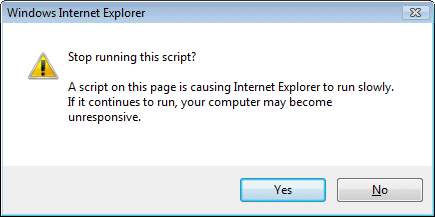
Ever seen this guy?

Stop running this script dialog in IE7

I’m writing a piece on Javascript. In the new world of AJAX, web applications may run large amounts of client-side code in the browser. I’m having a look at performance issues, so I wrote some code that does some processing in a tight loop and tested it in IE7, FireFox 2.0 and Flash 9.

Getting timings was difficult, because IE7 pops up this “Stop running this script” dialog when my code is running. Nor will it let go. You click “No”, and 1 second later the dialog pops up again. And again. And again.

I’ve trawled through the IE7 options looking for a way to switch this thing off, but cannot find one. I’m hoping I’ve missed it, or that there is a secret registry key I can change, because it is really annoying.

I don’t understand why there is no option for “don’t ask me again”, or “allow long-running scripts at this site”. After all, this scenario is going to get increasingly common. Neither FireFox nor Flash suffers from this problem.

I appreciate that IE7 is trying to be helpful here. There is though a fine line between helpful and annoying. Without any obvious way to prevent it, this falls in the latter category.

That said, I did find a way to get my timings, because of my experience with the htmleditor.  If you host Mshtml in an application, you can implement the COM interface IDocHostShowUI. This has a ShowMessage function which IE calls when it wants to show a dialog. This enables you to catch the over-helpful “stop this script” message and not show it.

Unfortunately this solution isn’t something users can easily apply. It requires creating your own customized version of IE. There must be some easier way and I look forward to learning what it is.

One last comment: why does Microsoft still come up with poorly thought-out UI elements like this? It is easy to think of better ways than a brutal modal dialog. How about a “stop script” toolbar button that appears only when scripts are taking too long or grabbing too much CPU?

Update

FireFox does exactly the same thing, also with a modal dialog, “A script on this page may be busy” …

Still, two benefits to FireFox. First, the timeout is set to a more reasonable 10 seconds. Second, you can easily amend it. Navigate to about:config. Find the entry dom.max_script_run_time. Change it from 10 to whatever you like. 

Further update

A comment has pointed me to this knowledgebase article.

Here’s the fix:

  1. Using a Registry Editor such as Regedt32.exe, open this key:
    HKEY_CURRENT_USER\Software\Microsoft\InternetExplorer\Styles

    Note If the Styles key is not present, create a new key that is called Styles.

  2. Create a new DWORD value called “MaxScriptStatements” under this key and set the value to the desired number of script statements.

    By default the key doesn’t exist. If the key has not been added, Internet Explorer 4 defaults to 5,000,000 statements executed as the trigger for the time-out dialog box.

Technorati tags: , , ,

Windows web server market share grows

Netcraft reports that Windows/IIS has a growing share of the web server market:

Microsoft-IIS gains 935K sites, continuing an advance that has seen Microsoft steadily chip away at what once seemed an insurmountable lead for Apache. In our Feb. 2006 survey, Apache held 68% market share, giving it lead of 47.5% over Windows (20.5% share). In this month’s survey, Microsoft’s share has improved to 31.0%, narrowing Apache’s advantage to 27.7%.

Netcraft counts sites, which means that its monthly figures are hugely influenced by the actions of a few big players in the web hosting market; many “sites” are no more than parked domains. It’s also worth noting that the total number of sites is constantly increasing. Apache probably has more users than ever before, despite the above “decline”. Other web servers have a miniscule market share.

Even with these caveats, it seems that Microsoft is at least holding its own in the web server market. My hunch is that this has to do with the high quality of ASP.NET, and the fact that Windows Server 2003 has won a decent reputation for security as a web server. I am not saying it is more secure than say Linux-Apache; just that security isn’t the deal-breaker that it tends to be on the desktop.

Congratulations to Scott Guthrie and his team.

Technorati tags: , ,

Open Document to Office Open XML converter: not good

The first full release of the Open XML to Open Document Format translator is available for download. Great news for interoperability – or is it?

I like to try things out before writing about them, so here’s what I did. I downloaded the Word 2007 add-in and ran the setup. Then I opened Word, and opened the document I was working on, which happens to be called Using DigiKam.docx. This is just under 800 words long and contains no graphics. I went to Home – Save As, and looked for Open Document in the list of document types. No deal. Puzzled, I looked again at the Home menu in Word 2007. Ah, there it is. A separate top-level entry for ODF with Open and Save As menu items. Not ideal in terms of integration, but never mind.

Note: there is an important issue here. Imagine you are an organization that has decided to mandate ODF for your documents, but to continue using Microsoft Office. What you want to do is to fiddle with Group Policy and have Word default to opening and saving ODT (Open Document Text). As far as I can tell, this is not possible with this version 1.0 release. In fact it is worse than that. If you have a new document, and choose ODF – Save As, you get the following error:

Please save your document before exporting to ODF. So instead of just clicking Save, users have to save twice, first as .docx, next as ODT. Ugly. It gets worse, read on.

OK, so I decided to save my current document as ODF. A wait message appeared: it took the converter about 30 seconds to save the document. I don’t like to think what would happen to a 10,000 word report full of charts and tables.

Next, I closed the document, went to ODF – Open, and chose the document I just saved. Another 30 seconds later I get this message about lost elements:

If I go into details, it tells me that the header dimensions and document creation and modification dates might have been lost. Fair enough, nothing drastic – unless perhaps I am laying out a booklet for publication. Of course you would be mad to use a document converter like this in such circumstances – but let’s not forget the implications of potential inflexible government legislation that might mandate such a thing.

I notice a curious thing. My opened document has been renamed to Using DigiKam_tmp.docx. Let me get my head round this. Let’s say I want always to save in ODF. I have to save as .docx, then export to ODF. Then I open the ODF document, which now has _tmp appended. I make some changes, and want to export it as ODF. I get, you guessed it, the “Please save before exporting” message. So I click save, and get a view of all my temporary documents, because the converter puts the imported document in my temp folder. If I try to save it directly, I get a “this file is read-only” error. So I save it to My Documents, then I go to ODF – Save As. Next session, I go to ODF – Open and guess what. My file is now called Using DigiKam_tmp_tmp.docx.

So the message is: don’t even think about using this converter as a means of standardising on Open Document while still using Word. It will cause immense and unnecessary hassle. However, it could still be useful for importing and exporting documents interchanged with others using, say, Open Office.

Not the same

That said, I noticed something else about my round-tripped document. It was different. In Word, I have my Normal style set with no space before or after. After round-tripping, these paragraphs had 10pt space after applied.

It gets worse. The converter lost all my paragraph styles – not the formatting, but the style tagging. This is a deal-breaker for me, as I depend on paragraph styles; but I am probably in a minority. Still, it prompted me to look at the list of unsupported features. Casting my eye down the page I came across this item:

In Open XML in real spacing between two consecutive paragraphs is the biger [stet]. For example first paragraph style has spacing after 10pt and second has spacing before 20pt the real spacing is 20pt. In Open Document Format real spacing is sum. In our example the real spacing is 30pt.

Is that my spacing problem? It could be related; but this is not what I would call a model of clarity. Let’s just say that the ODF converter will mess up your paragraph spacing.

Question: why was I warned that I might lose “header dimensions”, but these more significant issues – no paragraph styles, messed up spacing – went unmentioned?

Not professional quality

I realise that despite the flaws this converter could be a life-saver if you get a document that would otherwise be unreadable, or if you are forced by regulation to send a document in ODF format. However it does not merit Microsoft’s effusive press release, nor Brian Jones enthusiatic blog entry. It falls far short of the standards set by Microsoft Office. Perhaps I am judging too swiftly; but you will understand my scepticism considering the design flaws noted above, the extreme performance problems, and the fact that it somewhat messed up my short document without any graphics.

Practical considerations

In closing, some practical notes. If you really want to work with Open Document, don’t use Microsoft Office. If you want to use Microsoft Office, don’t use the converter except in an emergency, not in this release at least. For Word documents, RTF is the least bad option and macro-free; or failing that, the Office binary formats are actually well understood by third-party applications.

What if you use an application that supports Open Document and want to distribute richly formatted documents to others? Well, in the real world Microsoft Office is everywhere, so the same applies: RTF or Microsoft Office binary formats will help the recipients to get their work done.

Update: I spoke to Microsoft’s Jean Paoli about a number of Office Open XML issues – see here for the interview. He acknowledged there are some issues but said that performance is usually better than I found it to be. I’m sceptical but will try to do some more testing.

Technorati tags: , , , , , , ,