Account hijack is a worry for anyone. What kind of chaos could someone cause simply by taking over your email or social media account? Or how about spending money on your behalf on Amazon, eBay or other online retailers?
The obvious fraud will not be long-lasting, but there is an aftermath too. Changing passwords, getting back into accounts that have been compromised and their security information changed.
In the worst cases you might lose access to an account permanently. Organisations like Google, Microsoft, Facebook or eBay, are not easy to deal with in cases where your account is thoroughly compromised. They may not be sure whether your are the victim attempting to recover an account, or the imposter attempting to compromise an account. Even getting to speak to a human can be challenging, as they rely on automated systems, and when you do, you may not get the answer you want.
The solution is stronger security so that account hijack is less common, but security is never easy. It is a system, and like any system, any change you make can impact other parts of the system. In the old world, the most common approach had three key parts, username, password and email. The username was often the email address, so perhaps make that two key parts. Lose the password, and you can reset it by email.
Two problems with this approach. First, the password might be stolen or guessed (rather easy considering massive databases username/password combinations easily available online). And second, the email is security-critical, and email can be intercepted as it often travels the internet in plain text, for at least part of its journey. If you use Office 365, for example, your connection to Office 365 is encrypted, but an email sent to you may still be plain text until it arrives on Microsoft’s servers.
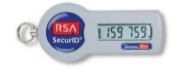
There is therefore a big trend towards 2-factor authentication (2FA): something you have as well as something you know. This is not new, and many of us have used things like little devices that display one-time pass codes that you use in addition to a password, such as the RSA SecureID key fob devices.
Another common approach is a card and a card reader. The card readers are all the same, and you use something like a bank card, put in your PIN, and it displays a code. An imposter would need to clone your card, or steal it and know the PIN.
in the EU, everyone is becoming familiar with 2FA thanks to the revised Payment Services Directive (PSD2) which comes into effect in September 2019 and requires Strong Customer Authentication (SCA). Details of what this means in the UK are here. See chapter 20:
Under the PSRs 2017, strong customer authentication means authentication based on the use of two or more independent elements (factors) from the following categories:
• something known only to the payment service user (knowledge)
• something held only by the payment service user (possession)
• something inherent to the payment service user (inherence)
So will we see a lot more card readers and token devices? Maybe not. They offer decent security, but they are expensive, and when users lose them or they wear out or the battery goes, they have to be replaced, which means more admin and expense. Giant companies like security, but they care almost as much about keeping costs down and automating password reset and account recovery.
Instead, the favoured approach is to use your mobile phone. There are several ways to do this, of which the simplest is where you are sent a one-time code by SMS. Another is where you install an app that generates codes, just like the key fob devices, but with support for multiple accounts and no need to clutter up your pocket or bag.
These are not bad solutions – some better than others – but this is a system, remember. It used to be your email address, but now it is your phone and/or your phone number that is critical to your security. All of us need to think carefully about a couple of things:
– if our phone is lost or broken, can we still get our work done?
– if a bad guy steals our phone or hijacks the number (not that difficult in many cases, via a little social engineering), what are the consequences?
Note that the SCA regulations insist that the factors are each independent of the other, but that can be difficult to achieve. There you are with your authenticator app, your password manager, your web browser with saved usernames and passwords, your email account – all on your phone.
Personally I realised recently that I now have about a dozen authenticator accounts on a phone that is quite old and might break; I started going through them and evaluating what would happen if I lost access to the app. Unlike many apps, most authenticator apps (for example those from Google and Microsoft) do not automatically reinstall complete with account data when you get a new phone.
Here are a few observations.
First, SMS codes are relatively easy from a recovery perspective (you just need a new phone with the same number), but not good for security. Simon Thorpe at Authy has a good outline of the issues with it here and concludes:
Essentially SMS is great for finding out your Uber is arriving, or when your restaurant table is ready. But SMS was never designed to provide a secure way for you to login to your online banking account.
Yes, Authy is pitching its alternative solutions but the issues are real. So try to avoid them; though, as Thorpe notes, SMS codes are much stronger security than password alone.
Second, the authenticator app problem. Each of those accounts is actually a long code. So you can back them up by storing the code. However it is not easy to get the code unless you hack your phone, for example getting root access to an Android device.
What you can do though is to use the “manually enter code” option when setting up an account, and copy the code somewhere safe. Yes you are undermining the security, but you can then easily recover the account. Up to you.
If you use the (free) Authy app, the accounts do roam between your various devices. This must mean Authy keeps a copy on its cloud services, hopefully suitably encrypted. So it must be a bit less secure, but it is another solution.
Third, check out the recovery process for those accounts where you rely on your authenticator app or smartphone number. In Google’s case, for example, you can access backup codes – they are in the same place where you set up the authenticator account. These will get you back into your account, once for each code. I highly recommend that you do something to cover yourself against the possibility of losing your authenticator code, as Google is not easy to deal with in account recovery cases.
A password manager or an encrypted device is a good place to store backup codes, or you may have better ideas.
The important thing is this: a smartphone is an easy thing to lose, so it pays to plan ahead.