Category Archives: .net

OpenID embedded into Windows 7?

While reviewing Windows 7 I noticed an interesting new option when sharing files or folders in a homegroup – the ad-hoc network intended for home users, equivalent to the old peer-to-peer workgroup. In this scenario there is no central user directory, so it is difficult to set fine-grained permissions, such as when you want Sally to have read-write access to a document, but Joe read-only access. The messy workaround is to create user accounts for each user on each computer.

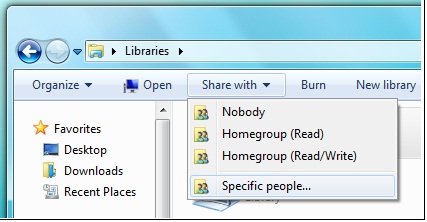
At least, that’s how it used to be. In Windows 7 there is a new option, though it is not fully enabled in Beta 1 (what was that about feature complete?). Users in a homegroup can be identified by an “online ID” instead of a Windows username. In effect, this makes the internet-based ID provider into the central directory for your homegroup, and enables sharing with “specific people” rather than entire homegroups:
The further advantage is that this identity persists across different networks, as the documentation makes clear:

If you have an online account, such as an e‑mail account, you can link that account with your Windows user account. Linking these accounts lets other people share files with you on a homegroup using your online account name (or ID) instead of your Windows user name. This makes it easier for people to share files with you, because they can use the online ID they are familiar with instead of adding your Windows user account to their computer. For example, if you have an e‑mail account that your friends and family use to communicate with you, such as molly_clark@example.com, they can use that online ID to share files with you on a network. You can also use that online ID to access your information on other computers on a network, such as accessing files on a home computer from your work computer.

Linking your account is a two-part process. First, you need to add your online ID provider, and then you need to link your online ID with your Windows user account.

So what is this online ID provider? My immediate assumption was that it meant a Live ID. You have always been able to link a Windows account with a Live ID (formerly Passport), which gives you instant sign-in to Windows Live properties. However, the language here is different, suggesting a variety of ID providers rather than just Microsoft.

Here is another snippet of documentation:

To add an online ID provider

1. Click to open User Accounts.

2. Click Link online ID.

3. Click Add an online ID provider.

4. Select your online ID provider from the list and follow the instructions.

To link your online ID with your Windows user account

1. Click to open User Accounts.

2. Click Link online IDs.

3. Next to the online ID that you want to link your user account with, click Add linked ID.

4. Type your user name and password for the online ID and then click OK.
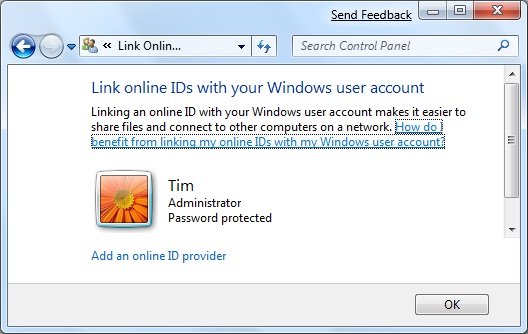
 

Unfortunately if you attempt to do this in the beta the list of providers redirects to the Windows home page. I was intrigued though – what technology is this, and who can be an online ID provider for Windows 7?

I asked Microsoft and got this answer:

Any service can choose to be an OpenID provider or a relying party. Customers of web sites that support OpenID can sign in with any OpenID provider.

Note that I did not ask about OpenID, only about online ID providers for Windows 7. Is Microsoft really hooking Windows 7 user identities to OpenID?

I was sceptical so I asked again. Here’s what I was told:

Regarding your Windows 7 question around Online ID in the beta, the online providers are an ISV opportunity and are not currently enabled in the beta. With regard to Windows Live, please find the link here <http://dev.live.com/blogs/devlive/archive/2008/10/27/421.aspx> that discusses Windows Live becoming an OpenID provider with its recent release.

Something less than a clear-cut answer; but again directing me to OpenID and to last year’s announcement that Windows Live will be an OpenID provider.

Still a few unanswered questions then; but I like the idea of linking local network sharing and online directories, which makes a lot of sense for home users that have no Active Directory. Actually it makes sense beyond that as well. I also like the idea of being able to select an OpenID provider as my preferred online identity provider, rather than having to choose Windows Live. It opens up the possibility of smooth integration across the local network and across a number of internet properties.

Do note though the lack of clarity in the answers I received, and that all the documentation is headed:

This content is preliminary and subject to change.
SharePoint – the good, the bad and the ugly

I’ve been messing around with SharePoint. When it works, it is a beautiful product. It is a smart file system with versioning, check-in and check-out, point-and-click workflow (eg document approval), offline support via Outlook, direct open and save from Office 2007, and more. It is an instant intranet with blogs, wikis, discussion forums, surveys, presence information, easy page authoring, and more. It is an application platform with all the features of ASP.NET combined with those of SharePoint. It is a content management system capable of supporting a public web site as well as an intranet. It is a search server capable of crawling the network, with a good-looking and sophisticated web UI. And in the high-end Enterprise version you get a server-side Excel engine and all sorts of Business Intelligence features. Fantastic.

Even better, the base product – Windows SharePoint Services 3.0 – comes free with Windows server. Search Server Express is also free and delivers all the search capability a small organization is likely to need.

What’s wrong with this picture? Here’s a few things:

  • Gets very expensive once you move to MOSS (Microsoft Office SharePoint Server) rather than the free WSS.
  • Deeply confusing. Working out the difference between WSS and MOSS is just the start. If you want to deploy it, you had better learn about site collections, applications, operations, farm topologies, web parts, workspaces, and the rest.
  • Complex to deploy. Make sure you read Planning and Architecture for Office SharePoint 2007 Part 1 (616pp); the good news is that part 2 is only 52pp. SharePoint is all that is bad about Microsoft deployments: a massive product with many dependencies, including IIS, ASP.NET and the .NET Framework, SQL Server in particular configurations, and of course hooks with Office 2007, Exchange and Active Directory.
  • Generates horrible source code. Try opening a page in SharePoint designer and viewing the source. Ugh.
  • Challenging to back up and restore, thanks to being spread across IIS and SQL Server.

I am out of sorts with SharePoint right now, after a difficult time with Search Server Express (SSX). I have a working WSS 3.0 installation, and I tried to install SSX on the same server. My setup is just slightly unusual, since I have both SharePoint and a default web site on port 80, using the host headers feature in IIS to direct traffic. The SSX install seemed to proceed reasonably well, expect for two things.

First, I puzzled for some time over what account to use as the default account for services. Setup asks you to specify this; and the documentation is a classic case of unhelpful help:

In the Default Account For Services section, type the user name and password for the default services account.

In the Search Center Account section, type the user name and password for the account for the application pool identity of the default Search Center site

Well, thanks, but I could have figured out that I have to type a user name where it says “User name”. But I would like help on how to create or select a suitable account. What permissions does it need? What are the security implications? The temptation is to use an administrator account just because it will most likely work.

Then there was the problem of creating the search site application manually. I had a go at this, helped by these notes from Ian Morrish. I set up a crawl rule and successfully indexed some content. Then I made a search, to be greeted by this error:

Your license for Microsoft Search Server has expired.

Well hang on, this is Search Server Express and meant to be free! A quick Google turns up this depressing recommendation from Microsoft:

To solve your immediate problem, however, it is suggested you uninstall WSS, MSS Express, repave your machine with a clean OS, and reinstall only MSS Express (WSS is installed with it).

Thanks but no thanks. See this thread for a more informative analysis. The user yanniemx reckons, after 10 reinstalls, that he has worked it out:

I realized it was due to using the Express version of Search and then not using the SQL install that is included in the install.  From what I can tell if you use another SQL instance it thinks you are using multiple servers and that is not allowed for the Express version.

I think I’ll just uninstall. I did another install of the full MOSS on its own server, and that one works fine. Running on a virtual machine is another good idea.

I hate the way certain Microsoft server products like to be installed on their own dedicated server. That makes sense in an Enterprise, but what about small organizations? I don’t see any inherent reason why something like SSX shouldn’t install neatly and in a reasonably isolated manner alongside other products and web applications. Equally, I am sure it can be done, just as I used the host headers trick to get WSS installed alongside another web site on port 80; but working out how to do it can be a considerable effort.

Windows Azure: since PDC, how is it going?

At the Professional Developers Conference 2008, held at the end of October 2008, Microsoft unveiled Windows Azure, its new cloud platform. I was there, and got the impression that this is a big deal for Microsoft; arguably the future of the company depends on it. It is likely that the industry will reduce its use of on-premise servers in favour of hosted applications, and if Microsoft is to preserve its overall market share it needs a credible cloud platform.

That was nearly two months ago. What’s been the developer reaction, and how is it going with the early tech previews made available at PDC? It’s hard to tell; but there is less public activity than I expected. On the official Azure forums there are just 550 messages at the time of writing; and glancing through them shows that many of them are from people simply having difficulty signing up. One of the problems is that access to the preview is limited by developer tokens of various types, and although Microsoft gave the impression at PDC that all attendees would have these, that has not really been the case. Those who attended hands-on labs at PDC got tokens there; others have had to apply and wait like everyone else. Part of the reason for lack of activity may just be that not many have been able to get in.

There are other issues too. I’ve spent some time trying out Live Framework and building applications for Live Mesh. I’ve written this up separately, in a piece that will be posted shortly. However, I found it harder than I expected to get good information on how to proceed. There is plenty of high-level marketing, but hands-on documentation is lacking. Azure may be different – though I was interested to find another user with similar frustrations (it’s worth reading this thread, as Microsoft’s moderator Yi-Lun Luo gives a handy technical outline of Azure and Live Services).

Still, let’s bear in mind that PDC is where Microsoft shares early technical information about the Windows platform, which is subject to change. Anyone who built applications for the preview Windows Longhorn code doled out at PDC 2003 (Paul Thurrott’s report is a reminder of what it felt like at the time) would have been in for some disappointment – Longhorn was both greatly delayed and much altered for its eventual release as Windows Vista.

It’s possible then that most developers are wisely waiting for the beta of Azure before doing serious experimentation. Alternatively – the bleakest outcome for Microsoft – they are ignoring Azure and presuming that if and when they do migrate applications to the cloud they will use some other platform.

Nevertheless, I’d suggest that Microsoft’s evangelism of Azure has been poor since PDC. There is more buzz about other things presented there – including Windows 7, which in contrast to Azure seems nearly done.

Update

Matt Rogers from Microsoft comments below that the service is not going to change radically between now and general release. He claims that feedback is extensive, but not evident in the online forums because it comes from other sources – he told me on Twitter that “we are getting much of it directly through relationships with customers, local user group meetings and through our evangelists”.

Maarten Balliauw has converted an application to Azure and written up the experience on his blog. He is using Azure TableStorage for data and Live ID for authentication. He says:

Overall, Microsoft is doing a good job with Azure. The platform itself seems reliable and stable, the concept is good.

Unfortunately the app itself does not work at the time of writing.

Top ten sites where developers hang out

Someone asked me today where developers hang out on the Net. Excluding platform-specific sites like MSDN, here’s my first go at a top ten list, in alphabetical order – but I’d love to hear other suggestions.


Coding Horror Jeff Attwood’s site. Both Attwood and Spolsky are on the Stack Overflow team

DzoneDIGG for developers, also includes Javalobby, which was set up on a wave of indignation back in the nineties when Microsoft seemed to be endangering Java’s run-anywhere promise, now a general Java discussion site.

Joel on Software I don’t always agree with Joel Spolsky, but he’s an excellent writer and deserves inclusion if only for his piece on leaky abstractions.

Reddit programming – another DIGG for developers, actually I prefer this one to Dzone

Slashdot – Geek news discussion site, not just for developers though you’ll find plenty of them there. If you need to know the meaning of the site name, you are outside the target readership.

Stack Overflow – community question and answer site for developers, mentioned by everyone when I asked about developers’ favourite sites on Twitter.

The Code Project – masses of code samples, mainly .NET but also Java, SQL, Linux

The Daily WTF – where WTF stands for “Worse than failure”, allegedly

The Register – IT news site willing to “Bite the hand that feeds IT”, includes a developer section. Disclaimer: I am a contributor.

TheServerSide which has mainly Java but also a .NET site, both geared to enterprise development. Seems less busy of late.


Other developer haunts I considered:

DaniWeb – IT discussion community with an active software development forum

DeveloperFusion – based in the UK, developer-focused articles, blogs and resources

Dr Dobbs – web site for the best software development magazine, docked several points for ad videos that auto-play when you visit

Rick Strahl’s web log – where you go to discover what really works or does not work in ASP.NET

SDTimes – web site for a family of Software development magazines, some good articles but not really a community


Update: Other sites I probably should have included:

InfoQ – developer-focused articles, Agile/Enterprise focus, sponsor the excellent QCon conferences

First steps with offline Silverlight and Live Framework

Yesterday I wrote a simple test application for Silverlight running on Live Mesh. It is an interesting scenario, which enables Silverlight applications to run offline, in the style of Adobe AIR. I wrote a to-do list which stores its data in the cloud; I added some items online, and deleted and added some items offline on another machine, and when it reconnected all the edits synchronized. Cool.

Even so, I’m not finding this particularly easy. Note that this is a limited-access Community Tech Preview, so make big allowance for that. Here are some of the problems I’ve run into to:

Convoluted sign-up and web site navigation.

This is a preview controlled by developer tokens. It’s complicated by the fact that a variety of different types of token control access to different parts of Windows Azure. You get a token, think you are done, then discover you have the wrong kind of token and need to apply for another one.

Even when you have the token, navigation is tricky. I’ve wasted time clicking through from one overview page to another; there are even promising links that seem to go back to the page you are looking at. Tip: when you find a useful page like the Developer Portal, for provisioning Azure and Live Framework apps, bookmark it quick.

Inadequate documentation.

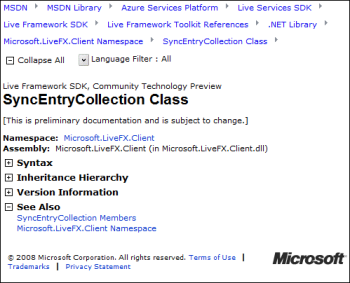
OK, I guess this is to be expected in a preview. But I’m finding an over-abundance of overviews and diagrams, too many videos, and a lack of plain-speaking developer-focused documentation that answers obvious questions. Most of the entries in the .NET reference for the Live Framework client look like this:

That’s right, auto-generated docs with no description of what the class member is for or how to use it. You can expand the plus symbols, but it is not rewarding.

Slow going

Microsoft’s online MSDN documentation and forums work, but I never look forward to visiting them because I know they will be slow to navigate and I’ll be sitting waiting for pages to refresh. I’m not sure that Microsoft understands the importance of this point. It works – so why complain? Well, because the cumulative effect over time is to make me want to go elsewhere. Google and Yahoo, by contrast, usually run much more responsive sites.

Microsoft could improve this quite easily. The key: fast is more important than pretty.

Bugs and outages

I certainly expect bugs and outages in a CTP. Still, they are frustrating. My very simple Mesh app did not work at all on a Mac, even running in the browser. In this scenario, you don’t need the Mesh client; it is just a Silverlight application running in a web page. I asked about this on the forum:

I confirm it from the core team. With quite aggressive timeline for PDC release with the current level of resources and CTP goals, we could only test XP SP3/Vista SP1 and IE7. We will eventually support Mac and Safari but this is not an immediate priority in the near future for CTP QFEs.

Fair enough, thought to me cross-platform is at the heart of why I might want to use this technology.

This morning my Silverlight Mesh application won’t run at all. I get a 404. I guess it’s the bleeding edge.

Online/Offline

I’ve also asked a couple of simple questions on the forum about the online/offline scenario. I’m finding that offline applications don’t run unless you are signed into Windows Live. That is, you can sign in and then go offline, and it works, but if you don’t sign in (for example, because you start up your laptop in an aeroplane), then the app does not start. There must be some way to use cached credentials?

My other question is about synchronization. How do you enforce constraints on a Mesh datafeed, given that it could be edited online and offline simultaneously, bypassing checks in your code? This is not quite the same as a conflict, where the same entry is edited by two different people. My example is how to make sure that duplicate items are not added to a list.

Early days

I expect that this Azure stuff will get much smoother in future updates; and bear in mind that what I’m working with here – Mesh, Silverlight, and the .NET Live Framework client library – is just one small corner of the whole.

I can’t help wondering though if Microsoft is being over-ambitious. Another technology I’ve been looking at recently is Adobe AIR. The scope of this is small relative to Live Mesh. You can describe it in a few words: run a Flash application on the desktop. It has limitations and frustrations, but at least it is easy to understand, and furthermore, it has pretty much worked as advertised from the earliest public previews.

By contrast, Mesh for developers feels like a huge thing that is part of an even huger thing (Azure); it has lots of promise, but it is harder to describe its essence in a few words (that are not marketing fluff).

That said, I like Silverlight itself. This piece at least is easy to grasp and works well, in my experience so far.

Working with Live Framework or Azure? I’d love to know how it is going for you.

JavaFX code runs at the speed of Java

The Java runtime used by Sun’s JavaFX is mature and well optimized, which means that non-visual code will generally perform well. I’ve just spotted that Josh Marinacci at Sun put up a version of my countprimes test to illustrate this. Here’s the JavaFX version. On my system JavaFX and Silverlight are neck-and-neck for this – sometimes one is faster, sometimes the other. Flash is much slower, and Javascript not in the race.

Next stop: an Alchemy version.

Adobe engineer: we gotta beat Silverlight

There was an amusing incident in the Flash Player Internals session this morning at Adobe MAX Milan. An attendee asked engineer Jim Corbett about what he said was a long-standing (10 years) Flash bug. Apparently, sprites sometimes tear as they move across the screen.

Corbett said he wasn’t familiar with the problem; but maybe it was a problem with the browser and that was why the bug had not been fixed.

Silverlight doesn’t have this problem, said the questioner.

Then we gotta fix it, said Corbett.

It reminded me how much I have heard Microsoft mentioned hear at Max. The Adobe execs make constant jibes at Microsoft; and are keen to emphasise wins like the BBC switching away from a Microsoft solution (not Silverlight) to Flash and AIR for its iPlayer.

It really is a war; and the winner for the time being is the user, as competition energises the development of these two Rich Internet Application platforms.

Amethyst from SapphireSteel: Develop Flex in Visual Studio, an alternative to Tofino

Not long ago I looked at an early preview of Ensemble’s Tofino, an extension to Visual Studio for developing Flex applications that target the Adobe Flash runtime. It was disappointing, though I’ve been assured that an improved build is in preparation. Ensemble had better be quick: I’ve just been informed of an alternative called Amethyst, from SapphireSteel software, creators of the Ruby Visual Studio extension Ruby in Steel. Here’s what I know so far about Amethyst:

  • ActionScript and MXML editing and project management
  • Installs into commercial editions of Visual Studio or the free Visual Studio shell
  • Initial beta of free personal edition available next week
  • Planned for the 2nd quarter of 2009: commercial Professional Edition with drag-and-drop Flex/AIR visual design environment, IntelliSense and graphical debugging tools
  • Can integrate with Ruby In Steel to create a multi-language Visual Studio solution with Flex at the front end and Rails at the back
  • Amethyst Personal will remain completely free

All sounds good; and Ruby in Steel is well-regarded so this is worth watching out for if you have any interest in developing for Flex in Visual Studio.

A high quality Visual Studio design tool for Flex would help Adobe gain adoption for Flex and AIR among Microsoft-platform developers.

Embarcadero RAD Studio 2009 is done

Embarcadero / CodeGear has released RAD Studio 2009, which includes Delphi 2009, C++ Builder 2009 and Delphi Prism. Note that Prism has its own IDE, which is actually the Visual Studio shell; this is the new take on Delphi for .NET that targets Mono as well as Microsoft .NET. You can also install Prism into an existing Visual Studio installation.

Looking at the UK prices, RAD Studio starts at £979.00, whereas Delphi starts at £549.00. Upgrades are much cheaper – less than half the price in some cases. The message seems to be: get RAD Studio if you think you might need more than one of these three products.

I’ve been asked whether the upgrade to Delphi 2009 is worth it. I have no idea, of course, since it depends what you need it for – though if you need Unicode I’d have thought it was worth it for that alone. I do think it is the best so far in the post-Delphi 7 series. Personally I prefer it to Delphi 7 as well; though check Mason Wheeler’s comments to a previous post for a contrary view. Vista compatibility is another advantage, though you can hack this in any version of Delphi. I doubt that Windows 7 will be much problem here; it is close to enough to Vista that the same stuff should work fine.

From the archives: Mark Anders and Scott Guthrie on ASP+

My editor at The Register asked me if I had any interviews that would be fun to dig out for a retrospective piece. This one is from September 2000, shortly after the announcement of the .NET Framework, where Microsoft’s Mark Anders and Scott Guthrie talk to me about ASP+, the name for ASP.NET when it was in preview.

Listening to the whole interview was a little frustrating, because most of the time I asked questions that were interesting at the time, like the relationship between ASP.NET and COM, but not so much now. I was reminded though that Guthrie gave an impressive demo of what we now call AJAX, where updates to a web page are processed on the client, and described to me how it worked.

The pair also enthused about hosting Windows Forms controls in the browser, one of the .NET ideas that did not really become practical until the release of Silverlight. The full WPF (Windows Presentation Foundation) also works well in the browser, but most web developers rule it out because it is Windows only.

As it turned out, AJAX might never have taken off without the work of Google, while Silverlight now looks like a reaction to Flash. I suspect that Microsoft found it difficult to evolve these ideas into full products because it clung to the idea of a Windows-centric Internet, where Windows rather than the browser is the rich client.

Guthrie is now Corporate VP, .NET Developer Division at Microsoft, while Anders is at Adobe where he has been working on a tool for the Flash platform called Catalyst, previously known as Thermo.