Category Archives: software development

Fast JavaScript engine in Apple iOS 4.3 is in standalone Safari only, but why?

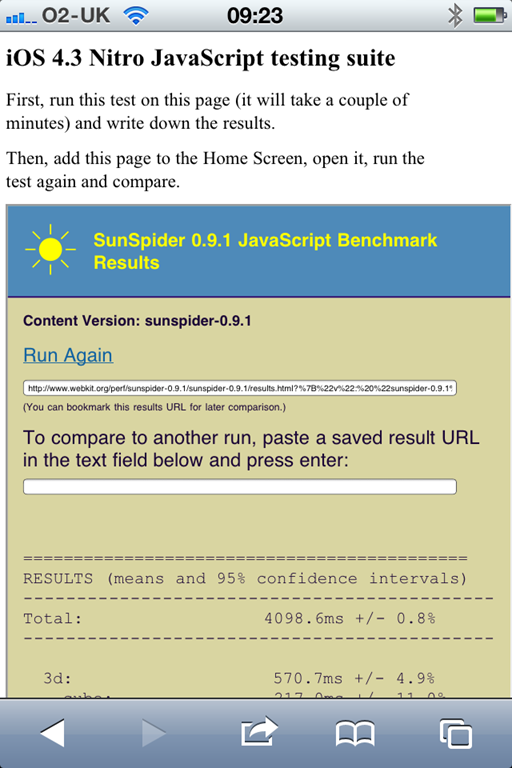
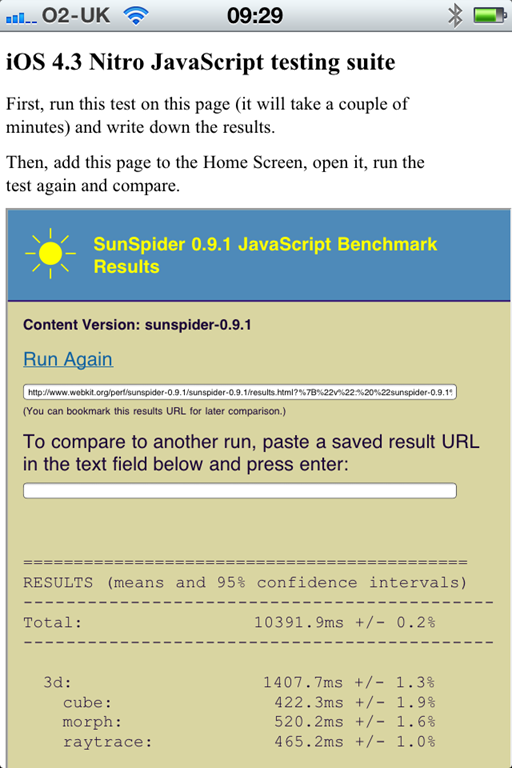
Now that Apple iOS 4.3 is generally available for iPhone and iPad, users have noticed something that seems curious. The fast new “Nitro” JavaScript engine only works in the standalone Safari browser, not when a web app is pinned to the home screen, or when a web view is embedded into an app.

This link at mobilexweb.com shows the evidence. Here is the SunSpider test standalone, showing a time of 4098ms, and pinned to the home screen as an app, where it shows 10391.9ms:

image image

The consequence: apps created using WebKit as a runtime, for example using PhoneGap, will not get the benefit of Nitro.

It would be easy to conclude that Apple is deliberately hobbling these apps in order to protect native apps, which can only be installed via Apple’s App Store and are subject to its 30% cut. However that might not be the case. It could be a bug – according to Hacker News it has been reported as such:

To add another note to this, its a bug that Apple seems to know about. I can’t link to it because its marked CONFIDENTIAL across the top of the dev forums, but in short its known about and being investigated.

or it could be a security feature. Using a just-in-time compiler exposes the operating system more than just interpreting the code; perhaps Safari has more protection when running standalone.

Either way, with the increasing interest in WebKit as a de facto cross-platform application runtime for mobile, this particular limitation is unfortunate.

Update: There are also reports of the HTML 5 offline cache not working other than in full Safari:

I’ve tested this by switching apple-mobile-web-app-capable from ‘yes’ to ‘no’ and offline cache works as expected. But whenever it’s switched back to ‘yes’, it’s not working anymore. This occurs when the app is standalone at home screen. As a website, viewed with Safari cache is working as expected.

Guardian.co.uk enthuses about MongoDB, plans to ditch Oracle

The Guardian’s Mat Wall has spoken here at Qcon London about why it is migrating its web site away from Oracle and towards MongoDB.

He also said there are moves towards cloud hosting, I think on Amazon’s hosted infrastructure, and that its own data centre can be used as a backup in case of cloud failure – an idea which makes some sense to me.

So what’s wrong with Oracle? The problem is the tight relationship between updates to the code that runs the site, and the Oracle database schema. Significant code updates tend to require schema updates too, which means pausing content updates while this takes place. Journalists on a major news site hate these pauses.

MongoDB by contrast is not a relational database. Rather, it stores documents in JSON (JavaScript Object Notation) format. This means that documents with new attributes can be added to the database at runtime.

Although this was the main motivation for change, the Guardian discovered other benefits. Developer productivity is significantly better with MongoDB and they are enjoying its API.

Currently both MongoDB and Oracle are in use. The Guardian has written its own API layer to wrap database access and handle the complexity of having two radically different data stores.

I enjoyed this talk, partly thanks to Wall’s clear presentation, and partly because I was glad to hear solid pragmatic reasons for moving to a NoSQL data store.

QCon London kicks off with call to rediscover Agile, use open source

I’m at the QCon developer conference in London – one of my favourite developer conferences of the year because of its breadth and energy.

The opening keynote was from Craig Larman who spoke on doing lean and agile development – in particular, the Scrum methodology – with large multi-site teams. He means sizeable product groups of 500-1500 persons, though he also remarked that development on this scale is really a bad idea and that a team of 10 smart folk is much better.

Still, I guess large teams are an inevitability, and Larman has written books on the subject. I am not going to summarise the talk exactly, interesting though it was, but I am going to pick out a couple of asides which interested me.

Agile methodology is really about promoting communication; and one of Larman’s themes is that if you do what seems obvious, that is to break down a project into components and give one to each small team, then you end up with numerous teams that do not communicate well with each other. Agile becomes something you do in name only.

Larman spent a bit of time on which collaboration tools to use. One of his points was not to use any commercial tool that describes itself as being for agile project management or similar. I can think of several. He says these tools are just the commercial tool vendors repackaging their old non-agile tools. Whiteboards, spreadsheets on Google docs, wikis and other simple tools are his recommendation. For source code management he suggests Subversion, Git or other open source solutions. Never use Rational Clearcase, he added, it always causes problems.

In fact, he went on to say that any commercial tools cause problems when mutli-site development extends beyond to teams in developing countries. They cannot afford the licences, he says, so avoid them.

It seems to me that the common theme here is how easily agile development intentions become non-agile in practice, especially in these large project groups.

Adobe targets Apple iPhone and iPad browsers with tool to convert Flash projects

Adobe has released an “experimental technology” codenamed Wallaby on its Adobe Labs site. Not all Adobe Labs projects become fully released products, but it is an indication of serious interest. The experiment was first previewed at the Adobe Max conference last year.

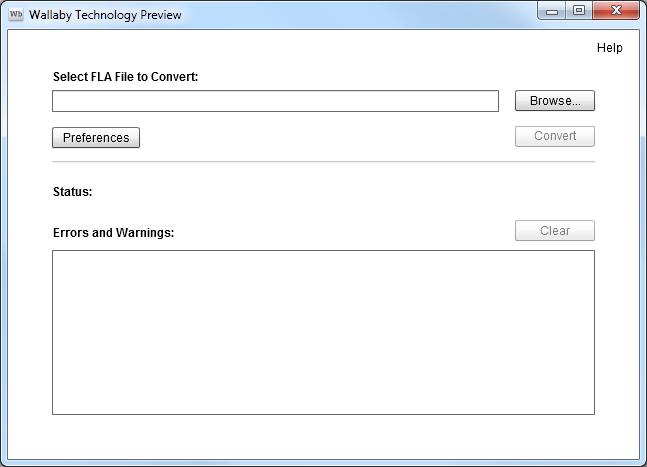
Wallaby is an Adobe AIR application for Windows and Mac. The tool is simplicity itself: just select a .FLA file and convert it.

image

.FLA is the format of Flash projects, not Flash output. gauges

According to Adobe’s John Nack Wallaby has limited goals, focused on “converting typical banner ads to HTML5.” It is aimed at WebKit-based browsers, the implication being that Adobe’s main intent is to enable Flash ads to work on Apple’s iPhone and iPad, though it also works on Google Chrome and Apple Safari on the desktop. There is no ActionScript conversion, though you can edit the exported project after conversion and add your own scripting.

ActionScript is based on JavaScript so a conversion tool should not be too hard.

Other Flash features not supported include video, sound, 3D transforms, Filters, Inverse Kinematics, and gradient strokes

The fascinating aspect of Wallaby is in its potential. Users do not care whether a web site or application uses Flash or HTML5; they just want it to work. Adobe’s primary strength is in its design tools. One possible scenario is that Adobe might gradually extend its HTML5 support so that the tools are applicable for both platforms; Flash could become a workaround technology for legacy browsers.

No doubt Adobe would rather see the Flash runtime used everywhere but at least the company has a plan B. If, for example, Apple comes to dominate personal and mobile computing and continues to block Flash wherever it can, then that is important. Adobe already has a Flash to iOS packager for apps; now it has the beginnings of a solution for in-browser Flash on iOS as well.

Update: revised post with more detail about what is not supported.

Mono project: no plans for cross-platform WPF

Miguel de Icaza’s report from the Game Developer Conference is upbeat, rightly so in my view as usage of Mono is continuing to build, not only in game development with Unity, a development tool that uses Mono as its scripting engine, but also for mobile development for Apple’s iOS with Monotouch and for Android with Monodroid. These mobile toolkits also give Mono a stronger business model; many sites use Mono for serving ASP.NET applications on Linux, but without paying or contributing back to the project.

Mono is an open source implementation of C# and Microsoft’s .NET Framework.

That said, it is interesting that Mono is still struggling with an issue that has been a problem since its first days: how to implement Microsoft’s GUI (Graphical User Interface) framework on other platforms. Mono does have Gtk# for Windows, Mac and Linux, but this does not meet the goal of letting developers easily port their Visual Studio client projects to Mono. There is also an implementation of Windows.Forms, but de Icaza mentions that “our Windows.Forms is not actively developed.”

Apparently many tools vendors asked the Mono team at GDC when Windows Presentation Foundation (WPF) would be implemented for Mono. WPF is the current presentation framework for Microsoft.NET, though there is some uncertainty about where Microsoft intends to take it. I remember asking de Icaza about this back in 2003, when the WPF framework was first announced (then called Avalon); he said it was too complex and that he did not plan to implement it.

This is still the case:

We have no plans on building WPF. We just do not have the man power to build an implementation in any reasonable time-frame.

That said, Mono has implemented Silverlight, which is based on WPF, and there are some signs that Microsoft might merge WPF and Silverlight. What would the Mono team do then?

Miguel de Icaza says:

Silverlight runs on a sandbox, so you can not really P/Invoke into native libraries, or host DirectX/Win32 content inside of it.
There are other things missing, like menubar integration and things like that.

Of course, this is no longer true on Windows: Platform Invoke is coming in Silverlight 5.

Perhaps the Mono team will knuckle down and implement Silverlight with desktop integration, which would be good for cross-platform Silverlight and compatibility with Microsoft .NET.

Then again, it seems to me that Mono is increasingly divergent from Microsoft .NET, focusing on implementing C# in places that Microsoft does not touch, such as the mobile platforms from Apple and Google.

That is actually a sign of health; and you can understand why the Mono team may be reluctant to shadow Microsoft’s every move with Silverlight and WPF.

DevExpress developers ask for more Windows Forms, say Silverlight and WPF not ready

DevExpress, which creates add-on components and tools for Windows and Delphi, has posted its 2011 roadmap. This shows more convergence between components for Silverlight and WPF:

In essence, by the end of the year, the functionality of DXGrid, DXEditors, DXDocking, and DXRibbon will be the same across both platforms.

As for Windows Forms, or winforms, the roadmap says:

With regard to the Windows Forms controls, it is most likely that there will be a large number of smaller enhancements and new features rather than any large complex new control. The reason for this is simple: we believe that our offerings for this platform are very mature and robust.

Customers posting comments to CTO Julian Bucknall’s blog are not happy:

It is sad to see Winforms pushed back so much. WPF is still too slow on most computers for major apps and SL is not mature enough for a complete ERP app.

says Sigurd Decroos, while Heiko Mueller is more blunt:

Sorry guys, but with this roadmap I will not extend my subscription. I use only WinForms and ASP.NET and I’m not interested in WPF/Silverlight – WPF at this time for me is not suitable for my kind of applications (larger business Apps). Silverlight in my eyes is a dead technology – HTML5 is the future for rich internet applications.

Porting is also an issue says Ioannis Mpourkelis:

I believe that you should put more resources on the WinForms controls for 2011. Winforms is here to stay for many years, especially for the companies who want to support existing Winfroms applications. Currently it is impossible to port WinForms applicaitons to Silverlight and very difficult to port WinForms applications to WPF.

Check the full comments for more.

More evidence for the uncertainty around where Microsoft is going with its rich client API.

Update: Bucknall comments on this specific issue here.

JetBrains announces IDE for Objective C to compete with Xcode

JetBrains, maker of the admired IntelliJ IDEA Java IDE, has announced CIDR, an IDE for Objective C.

The 10 facts in the initial post tell us that it will be Intel Mac only, will open and create Xcode projects, and integrates with the standard interface builder and with the iOS simulator.

Xcode is decent so what is the point? Mainly I guess because of the refactoring and productivity tools JetBrains builds into its tools. W are promised refactories, on the fly code analysis, and code completion.

I am sure it will be worth a look, though taking on Apple will not be easy; it is a bit like going up against Microsoft’s Visual Studio n Windows, except that Xcode is free.

That said, it does not take much in terms of added productivity to pay back the cost of an IDE.

Apple announces slightly better iPad, world goes nuts

Apple CEO Steve Jobs says the iPad 2, announced today, is “magical, revolutionary and at an unbelievable price”.

The new iPad is dual-core, has front and back cameras, and a new magnetic cover which also forms a stand. It is also 33% thinner and 15% lighter.

image

These are nice improvements, but the truth is that it will not be very different from the first one.

It was enough though for the press to announce catastrophe for the competition:

Larry Dignan on ZDNet:

Apple just ensured that the other tablets are dead on arrival.

James Kendrick on ZDNet:

Here’s all you need to know about the iPad 2: it’s thinner, lighter, faster, got cameras and is more capable than the iPad, for the same price. Apple had dominated the tablet wars with the original iPad, and with the iPad 2 it is game over … Apple will continue to maintain or grow its market share in the tablet space, and the competition will release tablets that are not as good and cost lots more than the iPad/iPad 2. Rarely does one company in the technology sector dominate a product category so totally as Apple does the tablet space.

I am still mulling this over. There is a lot to like about the iPad – convenience, design, long battery life – but there are also annoyances; and while Dignan and Kendrick may be right, I would like to think there will be healthy competition and that at least some of the interesting devices on show at Mobile World Congress earlier this month will find a market.

Another question is how the appearance of ever more powerful smartphones will influence the tablet market. It is hard to believe that the average person will carry three devices: smartphone, tablet, laptop. Personally I would like to get it down to one, which is why I find the Motorola Atrix an interesting concept: it plugs into a laptop-like external keyboard and screen when required.

Apple’s advantage though is its focus on quality and design, rather than features. Few other manufacturers have learned this lesson. There is always something not quite right; and rather than fix it, a new model six months later with something else not quite right.

There was something else interesting about today’s event. iMovie for iPad 2, priced at $4.99. What is happening to the price of software, and what are the implications for developers? Something I will explore in another post shortly.

Spare a thought for Microsoft. Remember Bill Gates, telling us that one day tablets would dominate portable computing? Fumbling tablet computing may have been Microsoft’s biggest mistake.

JetBrains WebStorm 2.0 and PHPStorm 2.0 First Look

I respect JetBrains, an IDE company which survives despite intense competition from free tools such as Eclipse and NetBeans. It does so because developers like the products, especially the IntelliJ IDEA Java IDE. The tools are focused on coding; there are few visual designers but lots of coding help, such as code completion, refactoring, find usages, and fast navigation. The tools are also relatively lightweight, so start up quickly, and generally run on Windows, Mac OS X and Linux.

The latest from JetBrains is two related web development IDEs. WebStorm 2.0 is for general HTML/CSS/JavaScript work, and PHPStorm 2.0 is a superset of WebStorm which adds PHP editing and debugging. There is also some support for Adobe’s Flex and ActionScript code.

New in PHPStorm is PHP 5.3 support, Zend Debugger support, improved SQL editing, support for the Mercurial source code management system, and updates for HTML 5 and EcmaScript 5.

I am interested in these tools since HTML development is increasingly important. Browsers are getting increasingly powerful, with HTML 5 and fast JavaScript engines challenging plugins as rich application runtimes, and PHP is less well served by IDEs than you would expect considering its popularity.

My first impressions though are mixed. I noticed a lot to like, in particular the work JetBrains has done on supporting mixed languages: HTML, JavaScript, CSS, SQL,XML and so on. One of its features is that code completion works even within quotes. For example, if your PHP is outputting HTML to the browser, code completion still works. Most editors treat anything within quotes as plain text rather than as code.

image

The IDE is highly configurable and also supports plugins. Live templates let you expand abbreviations to code fragments. There is support for generating documentation with JSDoc, ASDoc and PHPDoc. Testing with PHPUnit is integrated. These are products that will appeal to developers who are code-oriented – are there any others? – and who like the ability to fine-tune their tools to improve productivity.

That said, I did not find it easy to get started with PHPStorm. The main challenge is configuring your PHP environment to support debugging. I have not yet succeeded, though I have not spent all that long on it. Difficulty getting PHP debugging working seems to be the biggest single topic on the support forums currently.

I know this is tricky and it took me a while to get it working with Eclipse. It is important though, and anything the tools vendors can do to make this easier to setup would be welcome. There is a case for simply installing a dedicated LAMP or WAMP server with the product so that developers get immediate and reliable support for PHP debugging, with the option to configure for their own PHP server later.

Another thing I found annoying was the over-zealous spell checker, which seems inclined to check variable names as well as being unaware of PHP extensions like mysqli:

image

I expect there is a way to fix both issues by configuring the product.

In general JetBrains does not seem to suffer from the “not invented here” syndrome and uses open source libraries and tools; in fact it depends on Firefox for JavaScript debugging, and automatically installs its own plugin to improve integration.

image

However I picked up a note of disapproval in the description on the Zen Coding site about the way JetBrains has chosen to implement Zen Coding abbreviations:

These plugins are developed by third-party and has their own ZC engine implementation, which leads to different feature set and abbreviation syntax. Zen Coding team has no relation to this projects

WebStorm is modestly priced at £54.00 for individual developers or £115 per concurrent user for organisations.  PHPStorm is £77 or £154 on the same basis. Free licenses are available for education or for open source projects, on application.

Competing products include the free Eclipse PDT and NetBeans, the commercial Zend Studio, and for a more designer-friendly approach to PHP, Adobe Dreamweaver CS5.

NVIDIA CUDA 4.0 simplifies GPU programming, aims for mainstream

NVIDIA has announced CUDA 4.0, a major update to its C++ toolkit for general programming on the GPU. The idea is to take advantage of the many cores of NVIDIA’s GPUs for speeding up tasks that may not be graphic-related.

There are three key features:

Unified Virtual Addressing provides a single address space for the main system RAM and the GPU RAM, or even RAM across multiple GPUs if available. This significantly simplifies programming.

image

GPUDIRECT 2.0 is NVIDIA’s name for peer-to-peer communication between multiple GPUs on the same computer. Instead of copying objects from one GPU, to main memory, and to a second GPU, the data can go directly.

Thrust C++ template libraries Thrust is a CUDA library which is similar to the parallel algorithms in the C++ Standard Template Library (STL). NVIDIA claims that typical Thrust routines are 5 to 100 times faster than with STL or Intel’s Threading Building Blocks. Thrust is not really new but is getting pushed to the mainstream of CUDA programming.

Other new features include debugging (cuda-gdb) support on Mac OS X, support for new/delete and virtual functions in C++, and improvement to multi-threading.

The common theme of these features is to make it easier for mortals to move from general C/C++  programming to CUDA programming, and to port existing code. This is how NVIDIA sees CUDA progress:

image

Certainly I see increasing interest in GPU programming, and not just among super-computer researchers.

A weakness is that CUDA only works on NVIDIA GPUs. You can use OpenCL for generic GPU programming but it is less advanced.

CUDA 4.0 release candidate will be available from March 4 if you sign up for the CUDA Registered Developer Program.