Category Archives: software development

First steps with offline Silverlight and Live Framework

Yesterday I wrote a simple test application for Silverlight running on Live Mesh. It is an interesting scenario, which enables Silverlight applications to run offline, in the style of Adobe AIR. I wrote a to-do list which stores its data in the cloud; I added some items online, and deleted and added some items offline on another machine, and when it reconnected all the edits synchronized. Cool.

Even so, I’m not finding this particularly easy. Note that this is a limited-access Community Tech Preview, so make big allowance for that. Here are some of the problems I’ve run into to:

Convoluted sign-up and web site navigation.

This is a preview controlled by developer tokens. It’s complicated by the fact that a variety of different types of token control access to different parts of Windows Azure. You get a token, think you are done, then discover you have the wrong kind of token and need to apply for another one.

Even when you have the token, navigation is tricky. I’ve wasted time clicking through from one overview page to another; there are even promising links that seem to go back to the page you are looking at. Tip: when you find a useful page like the Developer Portal, for provisioning Azure and Live Framework apps, bookmark it quick.

Inadequate documentation.

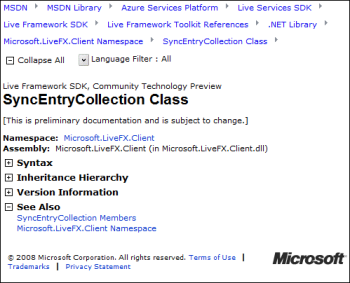
OK, I guess this is to be expected in a preview. But I’m finding an over-abundance of overviews and diagrams, too many videos, and a lack of plain-speaking developer-focused documentation that answers obvious questions. Most of the entries in the .NET reference for the Live Framework client look like this:

That’s right, auto-generated docs with no description of what the class member is for or how to use it. You can expand the plus symbols, but it is not rewarding.

Slow going

Microsoft’s online MSDN documentation and forums work, but I never look forward to visiting them because I know they will be slow to navigate and I’ll be sitting waiting for pages to refresh. I’m not sure that Microsoft understands the importance of this point. It works – so why complain? Well, because the cumulative effect over time is to make me want to go elsewhere. Google and Yahoo, by contrast, usually run much more responsive sites.

Microsoft could improve this quite easily. The key: fast is more important than pretty.

Bugs and outages

I certainly expect bugs and outages in a CTP. Still, they are frustrating. My very simple Mesh app did not work at all on a Mac, even running in the browser. In this scenario, you don’t need the Mesh client; it is just a Silverlight application running in a web page. I asked about this on the forum:

I confirm it from the core team. With quite aggressive timeline for PDC release with the current level of resources and CTP goals, we could only test XP SP3/Vista SP1 and IE7. We will eventually support Mac and Safari but this is not an immediate priority in the near future for CTP QFEs.

Fair enough, thought to me cross-platform is at the heart of why I might want to use this technology.

This morning my Silverlight Mesh application won’t run at all. I get a 404. I guess it’s the bleeding edge.

Online/Offline

I’ve also asked a couple of simple questions on the forum about the online/offline scenario. I’m finding that offline applications don’t run unless you are signed into Windows Live. That is, you can sign in and then go offline, and it works, but if you don’t sign in (for example, because you start up your laptop in an aeroplane), then the app does not start. There must be some way to use cached credentials?

My other question is about synchronization. How do you enforce constraints on a Mesh datafeed, given that it could be edited online and offline simultaneously, bypassing checks in your code? This is not quite the same as a conflict, where the same entry is edited by two different people. My example is how to make sure that duplicate items are not added to a list.

Early days

I expect that this Azure stuff will get much smoother in future updates; and bear in mind that what I’m working with here – Mesh, Silverlight, and the .NET Live Framework client library – is just one small corner of the whole.

I can’t help wondering though if Microsoft is being over-ambitious. Another technology I’ve been looking at recently is Adobe AIR. The scope of this is small relative to Live Mesh. You can describe it in a few words: run a Flash application on the desktop. It has limitations and frustrations, but at least it is easy to understand, and furthermore, it has pretty much worked as advertised from the earliest public previews.

By contrast, Mesh for developers feels like a huge thing that is part of an even huger thing (Azure); it has lots of promise, but it is harder to describe its essence in a few words (that are not marketing fluff).

That said, I like Silverlight itself. This piece at least is easy to grasp and works well, in my experience so far.

Working with Live Framework or Azure? I’d love to know how it is going for you.

Adobe’s disappointing results, headcount reduction plans

Adobe has announced earnings slightly below its estimates. More worrying is its report of “weaker-than-expected demand for its new Creative Suite 4 family of products” and “steps to reduce its headcount by approximately 600 full-time positions globally”.

Is Adobe getting it wrong, or is this the effect of a weak global economy? I’d guess the latter; it may even be a good result in context. Adobe is dominating web video; Flash usage is still growing; there’s nothing out that that can compete with Photoshop; and there is a lot of interest in its Flex/Flash/AIR programming story. CS4 is a remarkable release; you can argue about some of the details (why is Soundbooth included instead of the superior Audition?) or grumble about the price (especially outside the USA), but there is a lot more right than wrong.

Even so, Adobe has a weakness in its business model. It makes its money on tools and server-side products, while giving away the runtimes like Flash player and Adobe reader. Could Adobe get into a Sun-like funk where everyone uses its technology, but the company itself gets relatively modest benefit? It is possible. You can do a lot with Flash and PDF without paying anything to Adobe. This is good for users, since even with high adoption of the runtimes, Adobe cannot sit back and watch the money roll in. It has to maintain the quality of its design and authoring tools, and it has to charge real money for them, because they are the heart of its business.

According to this document (PDF) Adobe’s business breaks down like this:

Revenue by segment ($millions) FY2008 YTD August 2008 – representing 3 quarters

  • Creative Solutions $1564.3
  • Business Productivity Solutions $786
  • Mobile and Device solutions $64.9
  • Other $249.4

I’m guessing a little; but I imagine that Creative Solutions is mostly Creative Suite, though it also includes Flash Media Server; and Business Productivity mostly Acrobat (authoring and server). Note that LiveCycle Data Services ES, which connects Flex to enterprise application servers, is part of Business Productivity, though Flex Builder is classified as Other. It seems that CS + Acrobat is where Adobe makes most of its money.

JavaFX code runs at the speed of Java

The Java runtime used by Sun’s JavaFX is mature and well optimized, which means that non-visual code will generally perform well. I’ve just spotted that Josh Marinacci at Sun put up a version of my countprimes test to illustrate this. Here’s the JavaFX version. On my system JavaFX and Silverlight are neck-and-neck for this – sometimes one is faster, sometimes the other. Flash is much slower, and Javascript not in the race.

Next stop: an Alchemy version.

Adobe engineer: we gotta beat Silverlight

There was an amusing incident in the Flash Player Internals session this morning at Adobe MAX Milan. An attendee asked engineer Jim Corbett about what he said was a long-standing (10 years) Flash bug. Apparently, sprites sometimes tear as they move across the screen.

Corbett said he wasn’t familiar with the problem; but maybe it was a problem with the browser and that was why the bug had not been fixed.

Silverlight doesn’t have this problem, said the questioner.

Then we gotta fix it, said Corbett.

It reminded me how much I have heard Microsoft mentioned hear at Max. The Adobe execs make constant jibes at Microsoft; and are keen to emphasise wins like the BBC switching away from a Microsoft solution (not Silverlight) to Flash and AIR for its iPlayer.

It really is a war; and the winner for the time being is the user, as competition energises the development of these two Rich Internet Application platforms.

Amethyst from SapphireSteel: Develop Flex in Visual Studio, an alternative to Tofino

Not long ago I looked at an early preview of Ensemble’s Tofino, an extension to Visual Studio for developing Flex applications that target the Adobe Flash runtime. It was disappointing, though I’ve been assured that an improved build is in preparation. Ensemble had better be quick: I’ve just been informed of an alternative called Amethyst, from SapphireSteel software, creators of the Ruby Visual Studio extension Ruby in Steel. Here’s what I know so far about Amethyst:

  • ActionScript and MXML editing and project management
  • Installs into commercial editions of Visual Studio or the free Visual Studio shell
  • Initial beta of free personal edition available next week
  • Planned for the 2nd quarter of 2009: commercial Professional Edition with drag-and-drop Flex/AIR visual design environment, IntelliSense and graphical debugging tools
  • Can integrate with Ruby In Steel to create a multi-language Visual Studio solution with Flex at the front end and Rails at the back
  • Amethyst Personal will remain completely free

All sounds good; and Ruby in Steel is well-regarded so this is worth watching out for if you have any interest in developing for Flex in Visual Studio.

A high quality Visual Studio design tool for Flex would help Adobe gain adoption for Flex and AIR among Microsoft-platform developers.

Embarcadero RAD Studio 2009 is done

Embarcadero / CodeGear has released RAD Studio 2009, which includes Delphi 2009, C++ Builder 2009 and Delphi Prism. Note that Prism has its own IDE, which is actually the Visual Studio shell; this is the new take on Delphi for .NET that targets Mono as well as Microsoft .NET. You can also install Prism into an existing Visual Studio installation.

Looking at the UK prices, RAD Studio starts at £979.00, whereas Delphi starts at £549.00. Upgrades are much cheaper – less than half the price in some cases. The message seems to be: get RAD Studio if you think you might need more than one of these three products.

I’ve been asked whether the upgrade to Delphi 2009 is worth it. I have no idea, of course, since it depends what you need it for – though if you need Unicode I’d have thought it was worth it for that alone. I do think it is the best so far in the post-Delphi 7 series. Personally I prefer it to Delphi 7 as well; though check Mason Wheeler’s comments to a previous post for a contrary view. Vista compatibility is another advantage, though you can hack this in any version of Delphi. I doubt that Windows 7 will be much problem here; it is close to enough to Vista that the same stuff should work fine.

From the archives: Mark Anders and Scott Guthrie on ASP+

My editor at The Register asked me if I had any interviews that would be fun to dig out for a retrospective piece. This one is from September 2000, shortly after the announcement of the .NET Framework, where Microsoft’s Mark Anders and Scott Guthrie talk to me about ASP+, the name for ASP.NET when it was in preview.

Listening to the whole interview was a little frustrating, because most of the time I asked questions that were interesting at the time, like the relationship between ASP.NET and COM, but not so much now. I was reminded though that Guthrie gave an impressive demo of what we now call AJAX, where updates to a web page are processed on the client, and described to me how it worked.

The pair also enthused about hosting Windows Forms controls in the browser, one of the .NET ideas that did not really become practical until the release of Silverlight. The full WPF (Windows Presentation Foundation) also works well in the browser, but most web developers rule it out because it is Windows only.

As it turned out, AJAX might never have taken off without the work of Google, while Silverlight now looks like a reaction to Flash. I suspect that Microsoft found it difficult to evolve these ideas into full products because it clung to the idea of a Windows-centric Internet, where Windows rather than the browser is the rich client.

Guthrie is now Corporate VP, .NET Developer Division at Microsoft, while Anders is at Adobe where he has been working on a tool for the Flash platform called Catalyst, previously known as Thermo.

Service triggers: an attempt to reduce bloat in Windows 7

I’ve been reading through the Windows 7 Developer Guide. I like this document; it is tilted more towards information than hype, and is readable even for non-developers. There are things mentioned which I had not spotted before.

One example is triggers in the service control manager. There was actually a PDC session which covered this, among other things, under the unexciting title Designing Efficient Background Processes (PowerPoint). If you check out the slides, you’ll see that this is actually something significant for Windows users. It is an attempt to reduce all that stuff that runs whether or not you need it, increasing boot time and slowing performance. Apparently some people are so upset with the time it takes Windows to boot that they are threatening to sue; so yes, this does matter.

Services are applications that run in the background, usually without any visible interface. They consume system resources, so it makes sense to run them only when needed. Unfortunately, many services run on a “just in case” basis. For example, if I check the services on this machine I see I have one running called Apple Mobile Device, just in case I might connect one. It is using 4MB of RAM. However, I never connect an Apple device to this machine. I’m sure it was installed by iTunes, which I rarely use, though I like to keep up-to-date with what Apple is doing. So every time I start Windows this thing also starts, running uselessly in the background.

According to Vikram Singh, who took the PDC session, adding 10 typical 3rd party services to a clean Vista install has a dramatic effect on performance:

  • Boot time: up by 87% (24.7 to 46.1 seconds)
  • CPU time when idle: up by six times (to 6.04%)
  • Disk Read Count: up by three times (from 10,192 to 31,401 in 15 seconds)

Service triggers are an attempt to address this, by making it possible to install services that start in response to specific events, instead of always running “just in case”. Four trigger types are mentioned:

  • On connection of a certain class of device
  • On connection to a Windows domain
  • On group policy refresh
  • On connection to a network (based on IP address change)

In theory then, Apple can rewrite iTunes for Windows 7, so that the Apple Mobile Device service only starts when an Apple device is connected. A good plan.

Now, I can think of three reasons why this might not happen. First, inertia. Second, compatibility. This means coding specifically for Windows 7, whereas it will be easier just to do it the old, compatible way. Third, I imagine this would mean faster boot, but slower response when connecting the device. Apple (or any third party) might think: the user will just blame Windows for slow boot, but a slow response when connecting the device will impact the perceived performance of our product. So the service will still run at start-up, just in case.

Still, I’m encouraged that Microsoft is at least thinking about the problem and providing a possible solution. We may also benefit if Microsoft tweaks some of its own Windows services to start on-demand.

Adobe Alchemy – compile C/C++ to ActionScript

I love the careful wording on Adobe’s Alchemy site:

The purpose of this preview is to assess the level of community interest in reusing existing C and C++ libraries in Web applications that run on Adobe® Flash® Player and Adobe AIR®.

It needs to be put cautiously, because Alchemy – unlike Google Web Toolkit, which handles Java to Javascript – is not intended to become a general-purpose alternative to ActionScript. Rather, the idea is to enable existing C/C++ libraries to work within Flash applications. Examples given include transcoders, cryptographic algorithms, and XML parsers. Performance is said to be 2-10x slower than native code. Alchemy was demoed today at Adobe’s MAX conference.

Possibly a Java to ActionScript compiler would be more useful to most of us; though for new code ActionScript 3.0 is close enough to Java that it should not be difficult for most developers to learn.

Technorati tags: , ,