Category Archives: windows

Silverlight steals the show at Microsoft’s UK Heroes launch

I attended Microsoft’s “Heroes Happen Here” launch in London yesterday, which overlapped the US launch presented by CEO Steve Ballmer. The launch is for Visual Studio 2008, Windows Server 2008, and SQL Server 2008, though these products are in varying degrees of readiness.

The event was marred by excessive reliance on buzzwords like “Dynamic IT” – someone should tell Microsoft that phrases like this, or “People Ready” which was used for the Vista launch, have no meaning. Dr Andrew Hopkirk from UK’s National Computing Centre enthused about the general benefits of virtualization, which led to a comical moment later. I asked one of Hopkirk’s colleagues what the NCC thought about Microsoft’s Hyper-V or other virtualization technologies. “Oh, we haven’t evaluated it,” he said. “Most people use VMware and they love it”.

I hate to be disloyal, but the US event which was relayed by satellite, and which hardly any of the UK journalists watched, was more up my street. Ballmer didn’t shout too much, and I liked the drilldowns into specific features of the three products.

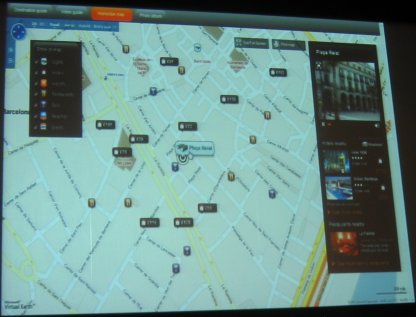
Still, after several dry presentations the UK event brightened up when Paul Curtis from EasyJet, a UK budget airline, showed us a proof-of-concept Silverlight application which the company plans to implement on its web site towards the end of this year. We saw an attractive Rich Internet Application which was a mash-up of flight routes and fares, Microsoft Virtual Earth, and reviews from TripAdvisor. Here’s a blurry snap of how you might book a hotel in Barcelona. It’s a compelling visual UI which of course reminded me of similar things I’ve seen implemented with Adobe’s Flash and Flex. Behind the scenes the app will use Server 2008, IIS 7.0, and a SQL Server 2008 Data Warehouse, so this is the perfect case study.

I wanted to ask Curtis whether he was happy with Silverlight’s cross-platform capabilities, and why he was using Silverlight in preference to Flash. However, his bio states that he is a member of the Windows Live Special Interest Group and on the Microsoft Architect Council, so I suspect the answer would be, “it’s what we know.” It does support my impression that despite the rise of Flash, there is still a place for Silverlight within the large Microsoft platform community.

Finally, there was brief mention of high take-up for Microsoft Softgrid, which is described as “application virtualization”. I’ve made this the subject of a separate post.

PS: I met blogger Mark Wilson at the event; he has a more detailed write-up.

Trolltech says Qt for Windows CE coming in May

Trolltech has announced Windows CE support in the 4.4 release of Qt, its cross-platform development framework. A pre-release is already available. Qt already supports desktop Windows, Linux, and Mac OS X, so this plugs a significant gap. Features include SVG (Scalable Vector Graphics) and OpenGL. It’s good to see this going ahead  despite Nokia’s acquisition of Trolltech, which is set to be completed in the second quarter of 2008. Nokia is committed to a couple of rival embedded operating systems, Linux and Symbian.

What about Qt for Symbian then? There are hints that it will happen. Then again, perhaps Nokia will increase its focus on Linux?

Technorati tags: , , ,

Fixing Windows Media Player after a system upgrade

A while back I upgraded my motherboard. Windows Media Player seemed fine – in fact, it works quite a bit better with the faster CPU – until today, when it started crashing shortly after starting. The faulting module was Indiv01.key.

The solution is in this thread. On Vista, what you have to do is to delete the contents of the folder C:\ProgramData\Microsoft\Windows\DRM (not the folder itself). Note that this folder is invisible by default. In Explorer – Folder Options – View, you have to check Show hidden files and folders, and uncheck Hide protected operating system files.

Observe the caveat:

Note that anything recorded on the old system that is DRM protected will not be playable after this procedure.

I recall doing something similar to get BBC iPlayer (download version) working.

This is all to do with tying DRM to hardware. You are not meant to copy a protected file to another PC and still be able to play it. There used to be a method for backing up and restoring your licenses, but it seems to have gone in Vista. From online help:

This version of the Player does not permit you to back up your media usage rights. However, depending upon where your protected files came from, you might be able to restore your rights over the Internet. For more information, see the question in this topic about how to restore your media usage rights.

This leaves a few questions for Microsoft to consider:

  • Why does a DRM problem break Windows Media Player even when playing non-DRM content?
  • Why does a DRM problem cause Windows Media Player to crash, rather than reporting a DRM problem?
  • Why does the user have to uncheck a box in Explorer options that says “Recommended” and warns you that you may make your computer inoperable, in order to fix a common problem? I mean “Hide protected operating system files”?
  • Is it acceptable to say, “you might be able to restore your rights”, when a user could in theory have thousands of pounds invested in DRM-protected content?

Fortunately I don’t have any DRM-protected content that I am aware of.

Everything is fine now.

How long should it take to set up a laptop?

So you need a new laptop. Ignoring those irritating voices that say you should go Apple, you select a value-for-money offering from one of the big names like Toshiba or HP, hit the buy button at Ebuyer or the like, and a day or so later a van is at the door and you have your shiny new laptop. You slit the tape, pull the thing out of the box, plug it in and turn it on. How long should it take before you are happily typing away in Word or enjoying a DVD?

The answer I guess is as short a time as possible. In principle, I don’t see why it should take more than 5 or 10 minutes. The manufacturer has pre-installed the operating system and can ensure that all the right drivers are in place.

Here’s what actually happened when I did this for a friend yesterday. Toshiba Satellite Pro A200 with Vista Business. Not a bad machine, great value. We also had a key to activate Office 2007, which came pre-installed as part of Microsoft’s Office Ready scheme.

I started mid-morning. Turned on. It takes ages before it lets you in. I lost count of the reboots. There is some sort of partitioning dance, then when Vista itself starts up it goes through an optimisation process, then various Toshiba and third-party utilities install themselves, sometimes requiring a reboot. I broke for lunch.

After lunch I connected to the Internet. Vista immediately set about downloading updates. Needed reboots, naturally. Then I ran the Office Activation Wizard. Microsoft’s Office-Ready program is great marketing, but fairly annoying, because typically you don’t want to purchase all of it. In our case we had purchased Office Small Business, but not Access. In consequence, you end up with an installation that is partially a trial version, even though you have paid. I’ve heard of this scenario actually preventing a machine from passing “Genuine Office Validation” when trying to download updates from Microsoft. Not a good way to treat customers. The solution is to uninstall the bits of Office you are not actually buying.

At this point I could have declared “job done”, but I knew that it wasn’t. I applied Vista SP1, which takes ages. I applied Office 2007 SP1, which is fairly quick. I removed a few things that I knew would not be needed, like Outlook’s Business Contact Manager.

I uninstalled Toshiba’s ConfigFree utility. This is a thing that is meant to “simplify” managing wireless (and wired) networks. It hijacks Vista’s perfectly good built-in wireless configuration utility. Now, it is possible that ConfigFree genuinely offers some added value, but even if it does this kind of thing is still a nuisance. First, because people like myself know how the Windows version works, and are disinclined to learn the foibles of an unnecessary replacement. Second, because the official item will be maintained and updated through Windows update, rather than at the whim of Toshiba (or whomever).

If you are really unlucky, the supplier of your wireless card, or wireless router, or your ISP, will persuade you to install yet more network configuration software. Once two or three of these guys are fighting to manage and diagnose your wireless connection, you have little chance of connecting successfully to anything.

There there is anti-virus to think about. Personally I reckon the practice of installing trial versions of Norton’s anti-virus suite (or similar) is a disgrace. It makes for a lousy user experience because the first thing you see after enduring setup is a nag screen assuring you that your new computer is insecure. It is a disgrace because if you accept the trial but don’t pay up, you end up with an out-of-date anti-virus utility, which leaves you vulnerable. Let’s not forget that basic anti-virus software is available for free from AVG and a few others – if Toshiba really cared about the security of its customers, it would pre-install that. I have zero confidence in anti-virus software anyway, but this is not the place.

Result overall: three to four hours spent on something that should take a few minutes.

I have a good understanding of the commercial, technical and political reasons for these hassles, and I don’t regard Toshiba as the worst offender. Nevertheless, Microsoft and its partners have failed to tackle the problem effectively, and this is a factor behind Apple’s resurgence. Frankly, Ubuntu and other Linux distros are more fun to install, though with Linux you inevitably end up Googling to solve one or more strange issues so overall it is no better for the non-technical user.

Recently I’ve been working with Windows Server 2008, which is a delight by comparison. The concept is simple: pre-install the bare bones, and make all the features optional. So Microsoft can do it. Why can’t consumer Windows work the same way? Install a clean, fast, basic version of Windows, and then let the user decide what else they require?

Contemplating an in-place upgrade to Server 2008? Read this first

Microsoft evangelist Neil Hutson has a detailed post describing what happens when you upgrade to Windows Server 2008. As with Vista, the new upgrade procedure is actually a clean install into which your old stuff gets copied afterwards:

Instead of just installing new versions of binaries over those of an existing computer, the new operating system is installed side-by-side with the older operating system. Then the data and settings are migrated from the older version to the newer version, and then the source is deleted. While this is architecturally more correct and certainly build a clean OS install, this does cause some obvious complications that you should be aware of.  Secondly in Windows Server 2008 the upgrade process is destructive to the pre-existing operating system state.

My instant reaction: there’s enough that go wrong, that a true clean install looks a great deal more attractive.

Technorati tags: ,

Microsoft promises WPF DataGrid, big performance improvement for .NET clients

Microsoft’s Scott Guthrie posts about coming service updates to client-side .NET (Windows Forms and Windows Presentation Foundation). He says we can expect:

  • A new, quicker and more efficient setup framework
  • 25%-40% faster start-up for applications using .NET 2.0 and higher, and smaller runtime footprint
  • More hardware acceleration in WPF, plus better video performance and data-handling improvements
  • A DataGrid, Ribbon, and Calendar/DatePicker for WPF
  • Improved WPF designer for Visual Studio 2008

These address common real-world complaints. I’m sceptical; when version 1.0 of the .NET Framework came out, Microsoft said it was working to reduce the runtime memory footprint for Windows Forms applications, but it never happened. Let’s hope this time it will be different.

Vista SP1 report

I’ve installed Vista SP1 on several machines. Takes ages, but otherwise it’s been without incident.

This does not dramatically improve Vista (in my experience); but then again, it wasn’t that bad before. It does seem to speed up Explorer and zip extraction. It tames UAC slightly – some operations that used to require several prompts now only require one. Otherwise, I haven’t noticed much change, though I’m aware that it includes numerous small updates.

What I do find interesting is that Server 2008, which has the same core as Vista SP1, is delightfully smooth in comparison to Vista. Just don’t ever install the Desktop Experience on 2008 – this is a separate feature that is off by default – or whatever it is that makes Vista still somewhat prone to sitting and thinking when you want to get on with your work.

Technorati tags: ,

Doing Web 2.0

What ever Web 2.0 is, I reckon Danny Bradbury is doing it:

In fact, I’m finding online applications replacing Microsoft’s products almost entirely. I write my articles in Zoho Writer and mail those to editors straight from the browser, so that I don’t have to worry about synchronising Word docs between machines. I’m managing my article deadlines and my newsletter schedule using Zoho Sheet. I only use Office, quietly grumbling under my breath, for one client which demands that I fiddle about with Word styles to accomodate its content management system.

Technorati tags: , ,

Hyper-V in Server 2008 RTM doesn’t like non-US locales

Hyper-V is Microsoft’s whizzy new virtual server manager, which uses new virtualization features in recent Intel and AMD processors to support more efficient virtual machines. Intel’s extensions are called Intel Virtualization Technology (Intel-VT), formerly code-named Vanderpool, while AMD’s extensions are called AMD Virtualization (AMD-V), formerly code-named Pacifica. Here’s what Intel says:

How does Intel Virtualization Technology eliminate the gaps in current virtualization solutions?
Three ways. First, the technology provides a new, higher privilege ring for the VMM. This allows guest OSs and applications to run in the rings they were designed for, while ensuring the VMM has privileged control over platform resources. It eliminates many potential conflicts, simplifies VMM requirements, and improves compatibility with unmodified legacy OSs. Second, handoffs between the VMM and guest OSs are supported in hardware. This reduces the need for complex, compute-intensive software transitions. Third, processor state information is retained for the VMM and for each guest OS in dedicated address spaces. This helps to accelerate transitions and ensure the integrity of the process.

Hyper-V is a good reason to use Server 2008 x64 (it is not supported on x86), but it is not done yet. Microsoft has shipped a beta of Hyper-V in the release build of Server 2008, and is promising a full release within 180 days from now. It is not something to use casually – Paul Thurrott quotes Microsoft’s Bryon Surace as saying:

Conceptually, it jacks up the OS and slides in the Hypervisor underneath. So we clearly don’t want that installed by default on servers that won’t be running Virtualization.

So don’t even think about using it for real just yet. When it does get finished, Microsoft recommends using Server Core rather than the full Server 2008 as the host OS. However, Hyper-V is interesting to developers as well as admins, so I wanted to take a look. Unfortunately, after I added the Hyper-V role to the server, the Virtual Machine Management Service failed to start, presenting the gloriously obscure message:

The service changed to an unexpected state.

This problem has been mentioned by others. Apparently the fix is simple but extreme: re-install Server 2008 using the English (United States) locale. Can’t you just change the locale in your existing installation? It didn’t work for me, and Microsoft’s Ben Armstrong says, “It is not sufficient to change the locale after OS installation.”

Once Hyper-V is installed, you can change the locale to what you want and it will still work, though I don’t know if this is supported.

Annoying. Yes, it is mentioned in the release notes – but what if Hyper-V beta had required you to set a non-US locale at install time. Do you think Microsoft would have flagged this problem more prominently?

Technorati tags: ,

Vista SP1 shares same core as Server 2008

I attended a Server 2008 briefing yesterday and it was mentioned that Vista SP1 and Server 2008 share the same core. This is why Server 2008 declares itself as being Service Pack 1 even on its initial release. This isn’t news but I thought it worth a post since I’m not sure that the close relationship between Vista and Server 2008 is all that well known. If Server 2008 wins a decent reputation, which I suspect it will, then it may even help Vista’s tarnished image a little.

When Windows 2003 came out, some enthusiasts ran it as a desktop OS, because it ran better than XP and application compatibility was pretty good. There won’t be any point in doing this with Server 2008. Same code.

Technorati tags: , , ,