Category Archives: windows

Help! We’re running a VB3 app and we’ve lost the code

I write a programming column for Personal Computer World. A reader contacted me with a problem. He had an application which he knew was written in Visual Basic 3, but for which he did not have the source code. He now wanted to adapt it to run on Windows Mobile.

VB 3.0 came out in 1993, a mere 15 years ago but an eternity in Internet time. It was hugely popular, partly because it included the JET database engine, the same one as used by Microsoft Access. Both professionals and keen amateurs used it to create little (and not so little) business apps. VB 3.0 is 16-bit, and although these apps may still run OK on Windows XP or Vista 32-bit, though perhaps with a few cosmetic glitches, they will not run on 64-bit Windows, which has no 16-bit emulation layer.

Not many organizations are moving to 64-bit desktops just yet, though they may well do so in a couple of years, but there is still a problem if you need to adapt or port the code.

I thought this would make a fun case study so I wrote it up in the May 2008 column. I tracked down the VB3 decompiler put out some years back by Hans-Peter Diettrich, also known as Dodi. He gave me a demo version to distribute to readers. The app in question turned out to be very simple, and decompiled easily. I then imported the project into VB 6 (because later versions won’t look at VB3 apps), and finally pulled the VB6 conversion into Visual Studio 2008. Once I’d fixed up the Windows version, I created a new Compact Framework solution into which I copied code from the desktop project. Much of the code made it all the way from the VB3 original to the Compact Framework, and ran fine on my IPAQ Pocket PC.

Working with decompiled code is a bit like solving a crossword puzzle. Variable names are mangled so you have to work out what they are for. It won’t be a quick and easy process except in the simplest of cases.

The incident makes me wonder: how many business-critical apps with lost source are out there? Someone posted a cartoon recently which I can’t now track down, but it was a graveside scene. One mourner says to another, “I’m sorry to ask at a time like this, but did he say anything about source code?”

How hard can it be to play an AVI file?

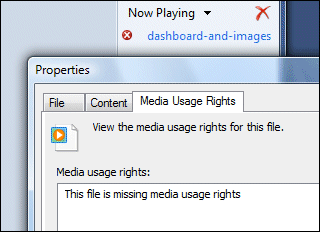
It depends. I saw Matt Mullenweg’s post about new features in WordPress 2.5. He’s included a video in several formats, and since the embedded Flash version didn’t want to play (maybe bandwidth issues), I downloaded the AVI and double-clicked. Windows Media Player tried to play it, said it was acquiring the codec, and then played only the audio. This is what I got when I looked at properties:

Did Mullenweg include restrictive DRM on his promo for the next WordPress? Unlikely. I right-clicked and chose to open in QuickTime. QuickTime said I needed some new components to play the file, and directed me here – but without telling me which of the 10 downloads on offer might fix the problem.

I right-clicked again and chose VLC. Perfect playback. But I was intrigued. I looked at the Stream and Media info in VLC and found that the video codec was TSCC. I looked this up and found it here. It is the TechSmith screen recording codec. I downloaded and installed the TSCC codec (ignoring Vista’s insistence that it “did not install correctly”) and now the file plays fine in both WMP and QuickTime.

Still, I have a couple of questions. If TSCC is a reasonably well-known codec, how come these players are not smart enough to direct users to the right download, or at least display the name of the codec to make it a little easier to find?

Second, why does WMP think media usage rights are missing? More Windows DRM madness.

Note: the problem with AVI is that it is just a way of bundling audio and video into one file. There are many possible formats for the internal streams, so just because one AVI file plays OK, it doesn’t mean that another will. Hassles like this are one of the reasons Flash video is so popular.

Small Business Server 2008: no ISA Server, no built-in tape backup

I have caught up a little with what is coming in Small Business Server 2008, code-named Cougar. Short version: Microsoft is focusing on ease of use but omitting some of the features that made previous versions attractive. This will be an upgrade headache if you used those features.

The new version is 64-bit only and includes Exchange Server 2007, Sharepoint Services 3.0 and WSUS (Windows Server Update Services) 3.0 as standard. Go Premium to get SQL Server 2008 and a license for a second server (which can be 32-bit).

Program Manager Sean Daniel says in an interview (video) that the install is easier than before, and that wizards are scenario-based rather than task-based. I think this means that more decisions are taken for you. However, two changes have caused some consternation.

The first is that tape backup is no longer built in. The new backup system only supports external USB or FireWire drives. I’m not sure about backup over the network; it would be silly to omit this, but who knows? It is based on differential backup, which means you can backup in 10 minutes and do it every hour if you like.

Microsoft says this is because external drives are cheaper than tapes, and that most SBS users have moved to hard drive backup in any case. This is true unless you have a lot of tapes. However, tape advocates point out that tapes are more robust in transit and safer for archiving. Personally I’ve had problems with the cheapest bus-powered external drives, mainly because of the power being inadequate, but I’d hope that up-to-date hardware fixes this. If you still love tape, the solution is to buy a third-party tape backup system.

The other big omission is ISA Server, Microsoft’s firewall and proxy server. This is a bigger deal. ISA is a complex but sophisticated product that requires two network cards to be installed. If you can work out how to administer it, it provides extra security in conjunction with an external firewall, and numerous features for publishing internal servers and services. Why has it been dropped? Daniel makes a curious comment in this Q&A:

I am as disappointed as you with this. Certain circumstances with the changes in Longhorn server left us without firewall solution in our standard product. We attempted to move ISA into the standard product, but legal issues prevented this. There was nothing we could do.

Legal issues? This is a Microsoft product bundled with a Microsoft product. I wonder if he means internal politics?

In particular, note that there is a new multi-server bundle called Windows Essential Business Server 2008, which does include ISA.

So what do you do if you have a full-works, dual-NIC SBS 2003 box and want to upgrade? There’s no in-place upgrade, because this is 32-bit to 64-bit; and the disappearance of ISA means you have to rethink your network architecture, or upgrade to the aforementioned EBS.

Two things disappoint me here. One is that Microsoft is pushing small businesses towards multiple servers, in SBS Premium or EBS. Although this has administrative advantages, it’s not very green, it’s losing the essence of what SBS was about, and seems out of tune with the more general industry move towards fewer servers and virtualization.

The second disappointment is that Microsoft seems to be pretty much ignoring the cloud. I may be wrong: the blurb says “Integration with Microsoft Office Live Services Small Business”, though I’m not sure what this amounts to. Personally I reckon the cloud is the future for the niche that SBS fills. I’d design SBS Next as a local cache for cloud services.

Windows 7 rumoured to have new UI framework with Ribbon and Jewel

Not sure what to make of this. A number of sites are reporting on a Microsoft job posting which includes the following text:

Come lead the effort to update the Windows 7 platform with the latest advancements in User Interface design. Bring the Ribbon, Jewel, and other new UI concepts to the Windows platform … Our mission is to enable the next generation of user interface development on the Windows platform. We will be determining the new Windows user interface guidelines and building a platform that supports it. We’ll eliminate much of the drudgery of Win32 UI development and enable rich, graphical, animated user interface by using markup based UI and a small, high performance, native code runtime … The UI Platform Team is looking for a senior technical leader to help drive the design and implementation of the new UI framework.

The posting appears to have been pulled, which means I can’t verify that it ever existed. Still, it’s thought-provoking. The “Jewel”, by the way, is the big button at top left of Office 2007 apps – the one you have to click when in search of the File menu.

I get on OK with the ribbon in Office 2007, but it has annoyances. For example, in Excel, why is Insert Cells and Rows on the Home ribbon but not on the Insert ribbon? I tolerate it because of the Quick Access Toolbar which lets me group the commands I often use but can’t find easily.

Even so, there’s no harm in making the ribbon a first-class citizen in Windows. But what about this new “markup based UI” and “small, high performance, native code runtime”? It is hard to believe that Microsoft would abandon WPF, which is already a markup-based UI. Might this be a new WPF runtime that does not require .NET? This may seem plausible if you recall that early versions of Longhorn attempted to use .NET for the core Windows UI, a mistaken decision that was a factor in the infamous reset, and thus indirectly caused Vista to be delivered both late and unready.

It still makes little sense. Microsoft already has a small, high-performance, alternative WPF runtime: Silverlight. Why build another one? Further, Windows needs simplification, not new frameworks. It also seems late in the day to be contemplating the “design and implementation” of a new UI framework. Perhaps it is just an early April Fool; or maybe plans are further along than the posting implies.

Technorati tags: , , , ,

The psychic powers of the man from Mozilla

I spoke to Dean Hachamovitch, General Manager of the Internet Explorer team at Microsoft, and used some of his comments in a piece for Guardian Technology. I’m pondering putting the whole transcript online.

One of the topics was whether Internet Explorer will ever support ECMAScript 4.0 (aka JavaScript 2), which has been a contentious subject. For the sake of balance I also spoke to Mike Schroepfer, VP of engineering at Mozilla, who was also at Mix08. I told Schroepfer that I’d spoken to Hachamovitch and that he had said he could not commit to ES 4.0 when it was not yet finalized. Schroepfer then said:

…but what he didn’t say was, we’re actively working on it, we’re excited about it, we hope when it’s finished we will implement something in the future. He didn’t even go anywhere near that. He gave you a correct and politically astute answer.

Schroepfer was spot-on and I was impressed by his psychic powers, since he had not been present when I spoke to Hachamovitch. Microsoft has lots of experience in implementing languages with features similar to ES 4.0 and it seems to me that its reluctance to embrace it must be for strategic rather than technical reasons.

Technorati tags: , , , ,

Beck on Agile: it’s all about the team

Kent Beck is really a relationship consultant, or should that be counsellor? This is not a bad thing. Beck gave a keynote this morning here at Qcon and talked a bit about techie topics like frequent deployment (he claims that Flickr deploys every half an hour) and creating more tests more often, but the main focus of his talk is relationships within the development team and between the team and the business people (if they regard themselves as separate).

Beck says that the ubiquity of computing is changing the typical characteristics of a programmer. When only geeks had computers, programmers were inevitably geeky – and for whatever reason, that often meant something of a social misfit. Today everyone grows up with computers, which he says makes programming more accessible to non-geeks, who have better social skills.

Reflecting on this, I’m not quite convinced. Yes, everyone grows up with computers, but few have any inclination to understand how they work. A nation of car-drivers does not make a nation of engineers.

Still, that doesn’t affect his main point, which is that characteristics like trustworthiness, transparency, honesty, accountability, and the ability to get on well with others, are critical to successful development:

I focus on what developers can do to have better social skills and be better business partners.

In an aside on accountability, Beck makes a point about Windows and the “beginning of the end of the Microsoft monopoly.” He says that people are realising that they don’t have to put up with computers that are unreliable or require frequent restarts:

How many hours are spent worldwide waiting for Windows to restart, do the maths. Software needs to be effective and needs to work; increasingly there are alternatives.

Windows can work pretty well in the right circumstances; but it’s a fair point nonetheless. I recall the effort it took to set up a laptop recently. Microsoft’s fault, or third-party problems? Both; but the user doesn’t care whose fault it is, but only wants a better experience.

Incidentally, the team theme came up again when Peter Goodliffe spoke on good and bad application design. He observed that bad design is damaging to teams; uncertainty about what the code does or where new code should go stresses relationships, and working with a bad design damages morale. My reflection was that the team is primary, not the design. A bad team will never come up with a good design. A good team could still find itself working with a bad design though, so focus on design is never wasted.

Mix08 is all online

Microsoft has put the sessions from Mix08 online. You can stream them with Silverlight, or hit the download button to save them in WMV or MP4 (“for iPod”). The quality of the sessions I’ve attended or watched was uniformly high, so I recommend these if you have any interest in Microsoft’s web development plans. In particular, the sessions on IE8 and Silverlight deliver lots of new information.

Technorati tags: ,

Help! My app only works maximized

A built-in feature of Windows Forms applications is that the main window remembers its size and position. Normally this is an OK feature. If you had your app sized small and in the bottom left of the screen last time you used it, it opens at the same place next time.

Unfortunately, perhaps because of a bug somewhere in Windows or somewhere in Windows Forms, this can go wrong. What happens is that somehow your app saves negative position coordinates and in effect disappears. The application icon appears on the taskbar, but if you click on it the app still doesn’t appear. The workaround is to right-click the taskbar icon and choose Maximize. Then the app appears full-screen. However, you can’t resize a maximized app, and when you hit “Restore down”, your app disappears again.

One possibility is to figure out where the app writes its old position. Somewhere in the registry, or in an XML config file somewhere? You tell me. So here’s another workaround. Display the app normally, so you can’t see it but it isn’t actually minimized. At this point, the focus is on the app. Hit Alt+Spacebar to display the window menu. Because of some quirk in Windows, this seems to appear on the visible screen, even if the rest of the app does not. Now press M for “Move”, hold the left mouse button down, and drag the app to where you can see it. Sounds strange? Sure, but it worked for me. Thank goodness for keyboard shortcuts.

Mix08: Rich Internet the Microsoft way

I’ve just registered here at Microsoft’s Mix08 conference in Las Vegas. I’ve heard a lot from Adobe recently, with Adobe AIR just launched, so this is a great opportunity to get Microsoft’s angle on the Rich Internet Application concept. Silverlight 2.0 will be prominent, as will Internet Explorer 8. I asked a developer on the plane what he likes about Silverlight compared to Flash. He told me that it is much easier to create Silverlight content dynamically at runtime, thanks to XAML. Silverlight renders XAML, whereas Flex compiles MXML – a significant difference.

In the Mix “Sandbox” lounge I got my first glimpse of Microsoft surface, which looks compelling. I hope to have  a better play later.

This evening O’Reilly is launching a new book by Christian Lenz called Essential Silverlight 2 Up-to-date. It is a new concept from O’Reilly, using a kind of ring binder (not actually a ring, but you know the kind of thing). The book which I saw is 50% blank pages; but the idea is that you will be able to receive or download additional pages and insert them into the book to keep it up-to-date. Not a new concept, but still an interesting attempt to address the problem of technical books quickly becoming out-of-date. It is particularly suitable for Silverlight 2.0 which is not done yet. At the same time, I can imagine this being a considerable hassle, and pages bound like this don’t turn quite as easily. I hope to review the book in due course.

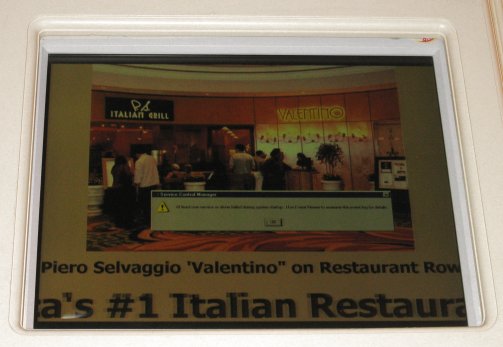
It turns out that the Venetian Hotel and Casino, where Mix takes place, is a Microsoft customer. How do I know? Well, many of the rooms sport screens over the door advertising various hotel attractions, and I spotted one that has a distinctive Microsoft flavour.

Which goes to show that wherever you are in the world, you are never more than 12 screens from a Windows error message.

If you’re at Mix and would like to chat, by all means get in touch.

Microsoft’s Vista Capable campaign: where it all went wrong

A series of remarkable internal emails have been made public as a result of the class action lawsuit against Microsoft for its “Vista capable” marketing campaign in the second half of 2006. In essence, the claim is that many of these PCs were not really Vista-compatible, because they could only run Vista Basic, and not Vista’s distinctive Aero graphics.

This is not just about eye candy. See Microsoft’s Greg Schechter’s explanation of Vista’s Desktop Window Manager, part of Aero:

The primary takeaway for desktop composition:  the way an application gets pixels on the screen has fundamentally changed.

It’s fair to say that missing out on Aero means missing out on a core feature of Vista.

Todd Bishop’s Microsoft blog has more details on the case, including a large PDF document showing internal correspondence from Microsoft and its partners, giving insight into how the Vista Capable campaign evolved.

The problem was that Microsoft allowed machines to carry the “Vista Capable” sticker even if they were not able to run Aero. An email from Microsoft’s Ken Goetsch:

We have removed the technical requirement that a Windows Vista Capable PC contains a Graphics Processor Unit (GPU) that supports the Windows Display Driver Model (WDDM), formerly known as the Longhorn Display Driver Model.

Other correspondence in the PDF shows that many at Microsoft were uneasy with this decision; however it was apparently done to help out Intel. Here’s an internal email from John Kalkman, dated February 26 2007::

In the end, we lowered the requirement to help Intel make their quarterly earnings so they could continue to sell motherboards with 915 graphics embedded. This in turn did two things: 1. Decreased focus of OEMs planning and shipping higher-end graphics for Vista ready programs and 2. Reduced the focus by IHVs to ready great WHQL qualified graphics drivers. We can see this today with Intel’s inability to ship a compelling full featured 945 graphics driver for Windows Vista.

Later he says:

It was a mistake on our part to change the original graphics requirements. This created confusion in the industry on how important the aspect of visual computing would play as a feature set to new Windows Vista upgraders.

Now I know why I have over two hundred comments to my January 2007 post, Vista display driver takes a break. My laptop, a Toshiba Portege M400, has the 945 chipset. I bought it specifically to run Vista, towards the end of 2006; and yes, it has a “Windows Vista Capable” sticker. The early Vista graphics drivers were indeed faulty, though in my case a February 2007 update pretty much fixed the problems. I was lucky it did not have a 915 chipset.

How did all this mess come about? The heart of the problem seems to be the infamous Vista reset in 2004, when a ton of work on Longhorn was scrapped, and work resumed based on the Windows 2003 codebase. This was almost certainly a good decision (or the least-bad one possible); but the consequence was that Vista was very late. Another reason was the huge effort put into Windows XP SP2; and the reason for that was the number of desperate security problems in Windows XP.

So Vista was late, and in consequence was rushed. In addition, PC sales were sagging because XP was old and people were waiting for Vista (or switching to Macs), so Intel had overstock. All the pieces were now in place for a Vista-capable sticker whose meaning was not what most people would expect.

Embarrassing for Microsoft. It is better to be transparent even with bad news like, “Your PC will never run Vista properly”, rather than fudge the issue. The episode also illustrates one of the downsides of working with multiple hardware partners, rather than keeping both hardware and software in-house as Apple does.

Technorati tags: , ,