Category Archives: windows

The Samsung i600 and Windows Mobile

I’ve been looking for a new Smartphone for a while, and decided to try the Samsung i600, a Windows Mobile device with strong connectivity (GPRS,Bluetooth,UMTS,HSDPA,wi-fi) and a tiny QWERTY keyboard. It is not a touch screen, which to me is a good thing in a mobile phone. I’ve not tried the finger-driven iPhone yet, but I did use a Palm Treo for a while and found the stylus a nuisance. For me, email and web access are just as important as voice, and I’ve already found the keyboard useful. You can find the specs of the i600 elsewhere; but here are my observations so far.

Pros

I like the feel of the device. The central button and joystick is a pleasure to use, and the backlit keyboard is pretty good considering its size. The 320 x 240 screen is excellent (dust aside, see below), and browsing the web is a realistic proposition provided that you are not paying something ludicrous like £4.00 per MB (yes, that’s what some operators charge in the UK). I’ve not tried all the features yet, but I’ve had success with IMAP email, wi-fi, Bluetooth, and playing MP3 music.

The i600 has a neat “card wheel” UI on its home screen, which provides quick access to most of the features. Using the joystick or scroll wheel, you first find the card you want, and then scroll within the card to find what you want. For example, the Profile card lets you select a profile such as Normal, Silent, or Vibrate. The Now Playing card is particularly good, letting you pause, play and skip songs without leaving the home screen.

The camera is decent for a mobile, but still nowhere near good enough to replace a separate camera even for my limited use. You can also capture a jerky little video. There are actually two cameras, one on the back for taking pictures, and one on the front for video calls.

Others have found battery life a problem, but Samsung has solved it by bundling an extended battery and external charger in the box. Fitting the extended battery makes the phone a little thicker, but not excessively so. You also get a standard battery, which you can use as an emergency backup. I’ve found this more than sufficient. Apparently not all bundles include the extra battery, so it’s worth checking this point if you are considering the phone.

This is also a good device for developers, provided you are happy with Visual Studio. I was up and running quickly once I’d worked out the security issue (separate post coming soon). I did purchase an unlocked device, as I hate the whole contract circus. A Micro SD storage card is also essential.

Cons

Windows Mobile is still not as easy as it should be. I really think Microsoft should have ActiveSync sorted by now, but apparently not. When I first connected to my Vista desktop PC, Windows Installer started up, thrashed around for a bit, then declared it was quitting because a newer version was installed. After that, nothing. I connected the device with USB, there was no error, but the Mobile Device Center could not see the phone. I fixed this by downloading Mobile Device Center 6.1. That mostly works, but I still have strange problems syncing with Exchange. This works through wi-fi provided I set the connection to “work” rather than “internet”, but not through USB. Perhaps I’ll work out why, but this sort of thing is frustrating and difficult, and online help is a masterpiece of polite unhelpfulness. Try a search for “cannot connect with current connection” (with the quotes) if you really want to know more.

More generally, I find navigation with Windows Mobile unpredictable at times. Example: I click Start, then Organizer, then Calendar. This fires up the Calendar, which defaults to the monthly view. I select a day, and click OK to view an appointment. Then I click the Back button. I should be back at the monthly view, but I’m not: I’ve exited Calendar and I’m back on the Organizer group in the Start menu.

I find the email client similarly confusing. No matter how hard I try, I seem to end up switching out of the app completely when I don’t mean to.

A crazy omission in Windows Mobile for Smartphone is cut, copy and paste. I couldn’t believe this at first, on a device with a keyboard, but it is true. I believe there are third-party solutions. I’ve also installed the trial of Documents To Go, which does support the clipboard, though this won’t fix Mobile Outlook.

No Flash support in Pocket IE.

I have a few complaints about the i600 itself. No socket for a standard headphone jack, so you have to use the supplied ear buds. Dangly plastic covers for the data cable and Micro SD ports, which are bound to break off in time. No support for Micro SDHC, which means a 2GB limit on the storage card. I’ve also applied the official Windows Mobile 6.0 upgrade (pretending to be from the Netherlands) and was disappointed to find no Mobile Office – having said which, Documents To Go is probably better in any case.

Most seriously, I can already see dust behind the screen. It’s not yet a big problem, but how much worse will it get in prolonged use? There appears to be no fix other than returning the unit for service or replacement. 

Overall

Despite the cons, this is easily the best mobile I’ve used.

Technorati tags: , , , ,

Microsoft’s Vista update – SP1 by another name?

I’ve installed Microsoft’s two new Vista patches – one for reliability, and the other for performance. No ill-effects so far and in fact the OS does feel a bit snappier. The updates claim to fix some long-standing gripes, including this one:

  • When you copy or move a large file, the “estimated time remaining” takes a long time to be calculated and displayed.

It also fixes some nasty-sounding bugs that I haven’t encountered, like this one:

  • When you synchronize an offline file to a server, the offline file is corrupted.

and includes some vague but important-sounding issues like this:

  • Poor memory management performance occurs.

Another key fix is related to one that has received a lot of attention on this blog (over 160 comments):

  • The computer stops responding, and you receive a “Display driver stopped responding and has recovered” error message. You can restart the computer only by pressing the computer’s power button.

I fixed this with a driver update, but possibly the driver update was a workaround for a bug in Vista. That seems plausible since it occurs with drivers from different vendors – though note that I did not usually experience a complete hang when I encountered this problem. Here’s another goodie:

  • The computer stops responding or restarts unexpectedly when you play video games or perform desktop operations.

There are many more fixes listed, and overall, this looks like a must-have update; and indeed, it will be rolled out automatically through Windows update in due course, according to Mary Jo Foley.

Clearly this is not SP1, though it is larger than other Vista updates I’ve seen. Why the delay before the real SP1? The rumour is that this is because of changes being made in response to Google’s complaints about search integration. No doubt making these changes requires considerable work, but I can’t help thinking that it does no harm to Microsoft to delay the Google-friendly SP1, while wasting no time in rolling out the other updates that would have been in SP1. 

Technorati tags: , , ,

Fixing an over-sleepy Toshiba Portege M400 running Vista

Long-term readers may recall my experiments with Vista on a Toshiba Portege M400 Tablet. Since then I’ve kept the drivers up to date as new versions appeared. The machine is stickered “Windows Vista Capable.”

It’s been OK though the annoying problem with the machine not waking from sleep persisted. Although this may sound a minor issue, it is really not good, as you can lose data. By default the laptop sleeps after a fairly short interval of non-use. I set it to hibernate instead, which works, but waking from hibernation is slower. The symptom of the sleep problem is that when you try to resume, the machine seems to start up but the screen stays blank. It’s a known issue on several Toshiba machines, and sometimes fixable by twisting the display, or toggling the display on and off, but I found that often did not work. On one occasion when trying to resume from sleep, the screen stayed dark but the CPU fan went into overdrive, making such a racket that heads turned at the conference where I was taking notes. Embarrassing.

Of course I wanted to fix the problem. Updating BIOS and drivers didn’t seem to make any difference, but I found this tech note on Toshiba’s US site, which refers to “Blank screen after waking from standby state” and says:

A firmware upgrade for a component on the computer’s main circuit board corrects this problem. This upgrade must be performed by a Toshiba Authorized Service Provider (ASP).

I called support but the UK folk denied all knowledge of the fix, and when I referred to the tech note, said that it probably would not apply to a UK machine (though I’m doubtful that there is much difference). To be fair, my local Toshiba service centre did offer to look at it, but I was busy and didn’t want to hand over the machine immediately.

Two other things happened which forced my hand. First, the FireWire port became unreliable. Second, someone knocked the machine off a coffee table, and when it fell on the carpet part of the base snapped off, leaving a jagged edge. Ouch.

I sent the machine away for a new base, adding that I would also like the FireWire and resume problems fixed under warranty. I paid for the base, of course, but Toshiba honoured the warranty on the FireWire problem, which fortunately I’d reported before the accidental damage.

No word about the resume issue, but the engineer decided that fixing the FireWire port required a new motherboard. Got the machine back, and guess what? No resume problem. So far, it wakes from sleep perfectly. I know this is nothing to do with drivers, because I removed the drive with Vista on it before sending the machine away, and refitted it on return with no changes.

I didn’t enjoy the damage to my expensive laptop, but it’s good to have it working properly with Vista.

Technorati tags: , ,

Family.Show – an excellent WPF demo app

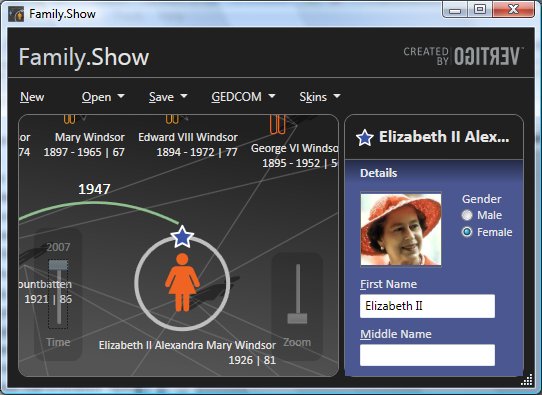
Microsoft’s Tim Sneath drew my attention to Family.Show, which he describes as “our first end-to-end reference sample for WPF”. This genealogy application was made public three months ago, but I had not tried it before. Source code is available, and there is a white paper [XPS] about how it was developed.

The application feels a little unfinished, but nevertheless it is excellent. I started the application and without reading any documentation started entering my family details. I enjoyed the results and carried on longer than I had intended. It scales beautifully, both when you resize the main window, and when you use the zoom control. Another neat feature is the time slider, which lets you change the current year. As you go back in time, everyone’s age goes down and people not yet born fade into the background.

WFP applications are unlike what we know as Windows applications. This is partly because they don’t use standard Windows controls, and partly because WPF encourages a different approach. It is more like a Flash application, and requires design skills to build.

The paper is also a good read. Family.Show apparently uses XML Serialization to persist its genealogy files. I’m not sure this is wise, though I’m open to being convinced. I’d be inclined to use an old-fashioned relational database, which I suspect would perform better with large files. Another problem with XML Serialization is that it can be brittle when you want to revise the objects.

I am always interested in performance, and a tip from the paper is worth highlighting. This is the huge benefit of virtualizing the ListView control, which means it doesn’t bother instantiating elements that are not visible. The team found sorting 32 times faster, filtering 70 times faster, and memory use 75% less when using a virtual list.

An interactive cookery book for your kitchen computer

You don’t have a kitchen computer? Me neither, but it seems inevitable that someone will figure out how to do this nicely and in a way that will work for a mass market. This is one proposal, using Windows Media Center. I like the concept, but this looks too expensive for most of us.

Years ago I worked in book publishing, and had vague plans for an electronic cookery book. I liked the idea of a book that could answer the question: “What can I cook with the ingredients I have to hand?” An interactive cookery book is better still. User comments and recommendations, corrections (apparently a large number of printed recipes actually have errors and don’t work if you try to follow them), greater variety, filter by requirements such as “vegetarian” or “low-calorie”, etc.

Still, I suppose the question is: why bother with a Media Center PC and a special application, when you can just use Google, print out your recipe, get it as grubby as you like while preparing your gourmet masterpiece and then chuck it away at the end? The recipe, that is 🙂

Technorati tags: ,

CodeGear abandons .NET Windows Forms?

Intriguing blog post here suggests that future versions of Delphi .NET will not support Windows Forms, the most widely used GUI library for .NET. Apparently the Delphi 2006 Windows Forms designer will not appear in Delphi “Highlander”. If you want to do GUI work in Delphi .NET, you will have to use VCL.NET, or else make do without a designer.

At first glance this looks like a mistake. The main problem is third party components. There are plenty around for Windows Forms, few for VCL.NET. OK, you can import a Windows Forms component and use it in VCL.NET, but it’s not ideal.

Then again, what is the future for Delphi .NET? Pretty uncertain, judging by what CEO Jim Douglas told me. If the speculation about Windows Forms in Delphi is correct, then anyone who invested in Delphi Windows Forms development has been left stranded. Might not the same happen to VCL.NET developers? And what are the implication for WPF, a much nicer GUI library than Windows Forms though immature and little-used at the moment? Developers hate this kind of uncertainty.

Performance expert becomes Visual Studio Chief Architect

Microsoft’s performance specialist Rico Mariani is to be Chief Architect of Visual Studio.

Mariani has earned huge respect for his detailed blog posts on performance issues in .NET. He’s recently posted some fascinating figures on Linq to SQL performance. From a technical point of view, it looks like Visual Studio architecture is in good hands.

Perhaps this also indicates that Microsoft is giving higher priority to performance. That’s needed. Most of my gripes about Windows Vista are performance related. Take the new Event Viewer, for example, just because I used it this morning. It takes 20 seconds to open on my system, during which time it displays “reading log” messages. This never happened with the old event viewer, which opens without any delay. The new one is much prettier, but at what cost? These small delays, repeated n times a day, consume a huge amount of expensive admin time.

That said, it’s puzzling to find a performance guy in charge of architecture. Still, Visual Studio is the first link in a chain that leads eventually to Windows, Office, and most third-party Windows apps. More speed everywhere, please.

Audio in Vista: more hell than heaven

Here is a contradiction. On the one hand, Vista audio is said to be much improved over audio in earlier versions of Windows. Certainly this was Microsoft’s intention. Larry Osterman’s 2005 post refers to several goals, including moving audio code out of the kernel to improve reliability, and making Windows a better platform for audio professionals. Osterman also describes the new audio API called WASAPI, which enables low-latency, and provides an illustration of how it fits together. Vista clearly has a much richer audio API than Windows XP. Here is an easy to understand overview, full of enthusiasm for its benefits.

Why a contradiction? Well, the actual, real-world experience of audio in Vista is mixed at best. Here is a typical post, complaining of stutters and pops in Vista audio which recall bygone days when PCs were barely up to the task. Surely playing 16-bit audio should be a breeze for today’s PCs?

I’ve had the same experience. I care about high-quality audio, so I installed a high-end Creative card, the Xi-Fi Elite Pro. I’ve been through all the drivers, from early betas to recent and supposedly production-ready releases. None have worked smoothly. I’ve had problems playing CDs, problems in Audacity where playback stutters or simply stops working, or a strange effect where the right and left channels go out of synch. I’ve had problems in Windows Media Player, where the responsiveness of the play, pause and stop buttons becomes sluggish, or playback fails completely.

I thought this might be primarily a problem with Creative’s drivers. There are certainly howls of anguish on the Creative forums. I also notice that if I switch to the motherboard’s integrated Realtec audio, reliability is greatly increased, though sound quality is worse. There are still occasional problems. Everyday use is fine, but a heavy editing session in Audacity causes glitches.

I decided to go pro. I removed the Xi-Fi, purchased a Terratec Phase 22, aimed at the pro market, and attached an external DAC. I chose the Terratec because it is a no-frills affair and has a Vista driver, unlike many of the pro audio cards out there. Happy now?

Well, no. The Phase 22 works OK using its internal DAC, but I’m having problems with the  SPDIF digital output. If I direct audio specifically to this output, by making it the default device, or selecting it in the preferences of an app like Audacity, it does not work. I can sometimes get it to work temporarily using the Phase 22 control panel, but it fails again as soon as I stop and restart playback. If I direct output to the Phase 22 internal DAC, then SPDIF output works, but it is always re-sampled to 48 kHz. Ideally I want bit-perfect output to the external DAC. For example, I’ve got a 96 kHz FLAC file. If I play this in Vista, it is output at 48 kHz.

In Windows XP, by contrast, it works perfectly. Ripped CDs are output at 44.1 kHz, my 96 kHz FLAC file is output at 96 kHz.

I also have problems with Steinberg’s Cubase SX. This works well in XP with the Phase 22, or with the internal card on Vista, but it does not work with the Phase 22 in Vista (I’ve not spent a lot of time trying to troubleshoot this). I called Terratec support. The guy didn’t bother trying to analyze the problem; he just said wait for a new driver.

Digging a little deeper

Maybe some of these problems are specific to my machine or the way it is configured. Maybe, and I look forward to your tips. But here are a few observations.

Pro audio vendors are very late with Vista drivers. I noticed this when looking for a replacement for the Xi-Fi. M-Audio, for example, has only patchy support, and some drivers are still in beta. E-Mu, Creative’s Pro range, is still on beta drivers. Bear in mind that Vista was released to manufacturing in November 2006, and that there were plenty of pre-releases.

Vista drivers, where available, may not be full-featured. Creative is a case in point. Its Vista drivers do not support decoding of Dolby Digital and DTS, DVD-Audio, 6.1 speaker mode, or DirectSound-based EAX effects.

General advice in the Pro community seems to be: stick with XP for the moment. I don’t see many posts from musicians raving about how much better Vista is for their work. I see plenty of posts about problems with audio in Vista.

What’s gone wrong? I don’t have a definitive answer, but can speculate a little. What we do know is that audio in Vista, and multimedia in general, is greatly changed. The links I gave above are just overviews. For a real drill-down, try the lengthy audio processing in Vista thread on the AVSForum, along with Creative’s explanation of audio in Vista. Note that a number of older APIs are now emulated on top of the new WASAPI. Emulation, as everyone knows, often means slow. Note also the two modes in Vista audio: shared and exclusive. As I understand it, in shared mode, Windows will always munge the audio at least a little. In exclusive mode this won’t happen, but according to this post, writing exclusive-mode drivers is exceedingly complex.

There’s also DRM to think about. Is the notorious protected media path getting in the way of faithful audio reproduction on Vista? Personally I doubt it, but it could be a factor.

Speculations

The bottom line is that Vista audio should be great, but in practice it is problematic for many users. Why? Here are a few possibilities.

1. Vista audio is great, but third-party vendors are a lazy bunch and haven’t bothered to do decent drivers. This is the view of many on the Creative forums, but I don’t buy this entirely. The failure to provide good drivers in a timely manner seems to go right across the industry. I am sure some vendors could have done better but I’m inclined to think there are other factors, such as perhaps…

2. Vista audio is so complex and different that third-parties had no chance of writing good drivers in time. This seems at least plausible. I still find it curious. I don’t doubt that the leading vendors of audio add-ons worked closely with Microsoft in the run up to Vista. Why then is support for the new operating system so limited and late?

3. Microsoft slipped up; audio in Vista does not work properly. It will certainly be interesting to see what effect Vista’s service pack 1 has, when it arrives later this year.

No conclusion

A year from now, we might all be saying Vista’s audio is fantastic. That will be after Vista SP1 and another year of driver development. Alternatively, we may know more clearly why it does not deliver. In the meantime, my own view is that Vista audio is more hell than heaven.
Technorati tags: , , , ,

Microsoft sets launch day for Visual Studio 2008, SQL Server 2008, Windows Server 2008

According to a press release just received, Microsoft has set 27 February 2008 for the “global launch” of its 2008 server and developer products:

Today at the Microsoft Worldwide Partner Conference, COO Kevin Turner announced that the company will jointly launch Windows Server 2008, Visual Studio 2008 and SQL Server 2008 in Los Angeles on 27 February, 2008. The event will kick off a “launch wave” of hundreds of events that Microsoft will host worldwide including training, virtual events and extensive online resources.

Windows Server 2008 has the IIS 7.0 web server, PowerShell command-line, and “Server core” which lets you install servers without any GUI components. Funny how Windows is getting more like Unix.

SQL Server 2008 has a new FileStream data type (a better blob), spatial and location data types, integrated full-text search, and a bunch of scalability and management improvements.

Visual Studio 2008 is the LINQ (Language Integrated Query) and WPF (Windows Presentation Foundation) release. WPF is already out there, but this has full design-time support. There is also ASP.NET AJAX. Visual Studio 2008 goes hand-in-hand with C# 3.0 and VB 9.0. The underlying CLR (Common Language Runtime) is still essentially 2.0, the same as for Visual Studio 2005.

Of course there are a zillion other new features, but I’ve picked out a few highlights.

Will this change our lives? LINQ is exciting, and so is WPF if anyone actually starts to use it, but of course we’ve known about these things for a while. Microsoft’s release cycle for new technology – from first announcement to full release – seems to stretch out for ages. Otherwise, this feels more like consolidation than any sort of new direction.

Microsoft on Visual Studio 2008 and beyond

I spoke to Prashant Sridharan, group product manager for Visual Studio. He told me that Visual Studio 2008, formerly codenamed Orcas, is set to ship by the end of the year, which probably means November or December. Among many new features, he highlighed LINQ (Language Integrated Query), which he classified as a productivity feature, new optimization and analysis tools, and scalability and performance improvements in Team System. SQL Server 2008 will be supported. We will also get designers for WPF (Windows Presentation Foundation), and in due course for Silverlight as well. Shridharan said that the final Silverlight designer might not make the initial release, but will be available shortly after at worst.

I am still puzzled as to why it has taken Microsoft a year from the release of .NET Framework 3.0, which was released with Vista, to come up with non-beta designers for WPF. Shridharan did not really explain the delay, but commented that .NET Framework 3.0 was really an interim release; Visual Studio 2008 will ship more or less simultaneously with .NET Framework 3.5.

I asked whether the direction established with the free Express tools is likely to continue. Shridharan says that it will, but that he feels the current Express line is too complex and confusing for its target novice users. The 2008 range will be similar, but it may be further simplified in subsequent releases. I am not sure how to decode this message. Is it really that the tools are confusing for novices, or is Microsoft giving too much away and wants to draw back a little? The complexity problem is real, but chopping out a few features will not improve it much; it would take radical re-thinking of the whole development approach – think PopFly, which I’ve just noticed also uses the Express word in its slogan, “Express yourself.” See also the note on commoditization below.

I also touched on the question of software factories, about which Jack Greenfield enthused at the architecture conference I attended in March. Will this be surfaced at all in Visual Studio 2008? Well, one thing which was apparent from my chat to Greenfield was that Microsoft’s software architecture strategy is vulnerable to the musical chairs of internal reorganization. Shridharan did say that the Patterns and Practices team is now integrated with the Visual Studio team, which should mean that more of its (most interesting) work is surfaced in Visual Studio itself. That sounds good; but what of Greenfield’s vision for how software factories can transform software development? It doesn’t seem to be one shared by Shridharan, who observed that all the Visual Studio designers are software factories and was vague about future developments in this area. That may mean he is the wrong person to talk to about this, or it might suggest a more conservative approach than Greenfield hopes for. In any event, it seems that it won’t be this release which delivers radical changes in the modeling or software factories area.

Finally, I asked Sridharan about the commoditization of development tools, and whether Microsoft might one day give away Visual Studio in order to promote its platform. He prevaricated a bit. “We’re not a profit centre in the same way as Office. We do make a sizeable chunk of revenue of out Visual Studio … you can have co-existence of free tools with a high-end product on which you drive revenue.”

All true, but the free tools are improving and the trend is in that direction. “We are I think close to an infexion point , but I don’t think we’re quite there yet, in terms of the commoditization around tools,” says Sridharan. “We’re very close. Within Microsoft that gets a lot of debate, and we’re investigating actively. You’re certainly not going to see anything happen in Visual Studio 2008, but over time, who knows?”