I am evaluating Microsoft’s MAUI (Multi-platform app UI) for use on a cross-platform project. I mainly develop on a Mac with Visual Studio Code.
Setup for MAUI development is well explained here though getting everything in place for Mac Catalyst, iOS and Android is tedious. There is a tricky issue related to Apple’s Xcode, needed for MAUI for the Apple targets. Apple’s recommendation is that you install Xcode from the App Store. As you would expect, it updates quite frequently and always when there is a new version of macOS. The version on my machine is therefore 26.6. After installing MAUI for .NET 10 I got an error when trying to build, stating that I had the wrong version (mine was too new).
The workaround for this is either to install multiple versions of Xcode, which is fiddly, or to set ValidateXcodeVersion to false in the .csproj project file.
As it turns out, there is another fix. The .NET for iOS SDK (used by MAUI) was updated last month to require Xcode 26.6. Note: require, not support. Each version of the SDK requires one and only one version of Xcode, and there is a lag between Apple releasing a new version, and Microsoft updating its SDKs.
My instinct is to set ValidateXcodeVersion false during development and to watch out for strange errors that might be fixed for a production build, using the correct Xcode version.
Updates can include different things that amount to varying levels of work. Sometimes there’s api changes in the SDKs Xcode ships that we need to account for, sometimes they change Cli tools or break things in other ways. Depending on the changes it can be a little bit of work or a lot.
Lately minor version updates to Xcode tend to be somewhat compatible with existing MAUI (Mac/ios) workloads and you can technically force trying to use it with the right build settings, but we generally advise not installing Xcode from the App Store so that it isn’t silently updated and you can install updates when you know they’ll be supported by MAUI instead.
This is friction, though it comes with the cross-platform territory. Note that Apple insists on building with the latest Xcode for store submission.
With that out of the say, I started building an experimental app. This is not Windows and conceptually one should think of the app UI as a single page, mobile app style, even if developing for Windows and Mac Catalyst. I decided to use a Tab Bar for navigation, but ran into an issue: when debugging the app for Mac Catalyst, the Tab Bar did not appear.
I thought this was something I was doing wrong, even though it was a simple and basic case. Then after digging a bit I discovered that it was a bug, that I was not the first to hit it, and that it was fixed with a workaround late last year.
The solution is to run: dotnet workload update from the command line to get the latest version.
Both issues are a reminder of how tricksy cross-platform development can be, particularly for frameworks like MAUI which use native widgets rather then drawing them from scratch like Flutter or Avalonia UI.
The solution, it seems to me, is to keep the user interface simple.
One thing Microsoft is generally good about is keeping old applications running. Applications built with Visual Basic 6.0 (first released in 1998) still run well (in most cases) on the latest Windows.
I maintain an application which is not quite that old, but which was built with Visual Studio 2008 and .NET Framework 2.0. It still runs but needs modernizing and taking cross-platform.
I tried opening the project in Visual Studio 2026 but the automatic project conversion failed and it was proving difficult to fix up. Maybe it would be easier to keep it as-is and import it piecemeal to a new project, converting the database from Access MDB to SQLite along the way.
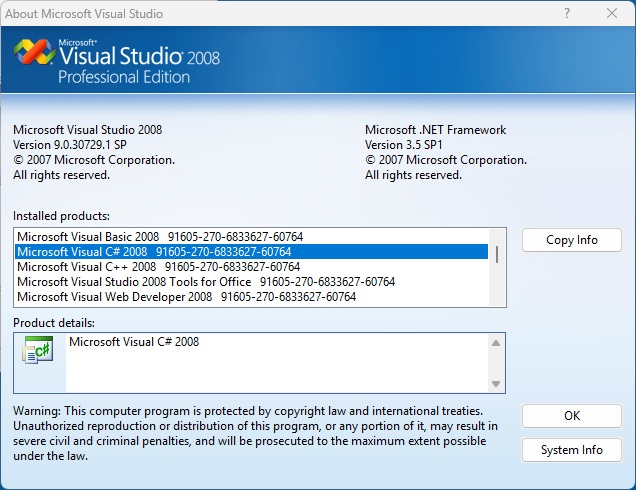
To this end, I decided to install Visual Studio 2008 on Windows 11. One can still download the trial from Microsoft as this Stack Overflow thread discusses, and upgrade to full if you have a valid key. I had to disable Windows 11 Smart App Control in order to mount the .iso files.
I installed both VS 2008 and the SP1 patch, as well as the MSDN library. Remarkably everything worked smoothly, with the exception of SQL Server 2005 (installed by default) which Windows warns will not work correctly.
My project loads and runs perfectly and the old Visual Studio is delightfully responsive to use.
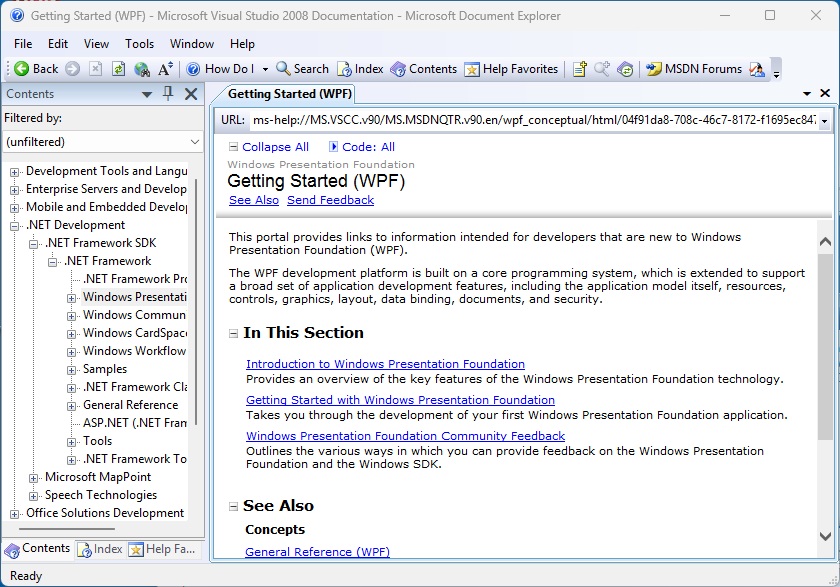
The presence of local help is nostalgic:
One of the first things I did was to write code to export the MDB to SQLite, an important step forward in the modernization journey, and the task was completed in less than a day.
Signing applications is a requirement for deploying a desktop or mobile application and can be fiddly. Microsoft’s Azure Artifact Signing always looked to me like a good solution in that the pricing is reasonable at $9.99 per month for up to 5,000 signings, and it is run by Microsoft so one would think that the certificates will be satisfactory for Windows users.
This week I got started with the service. Microsoft has a handy quickstart guide and the first thing to note is that availability is limited to USA and Canada for individual developers, or USA, Canada, EU and UK for organizations. Luckily I work for a small UK limited company so qualify as an organization.
I also noted that a pay as you go Azure subscription is required; if you have a sponsored subscription that will not work.
The first step is to create an Artifact Signing Account. Billing starts from when this account is created, even if you are unsuccessful in obtaining a signing certificate. Should this be the case, make sure to delete the account.
Next, check the roles assigned to the user that will operate the code signing. There are two: Artifact Signing Identity Verifier and Artifact Signing Certificate Profile Signer. I assigned them both to my Entra ID user.
Now there are two steps to obtaining a certificate profile. The first is Identity Validation. In my case this is for an organization; you will need a DUNS number, two valid email addresses, a functioning web site, and the first and last name of the individual that will use the service. The organization address should match the one recorded at Companies House, even if day to day work is done elsewhere.
The organization identity verification automatically progresses to individual identity verification. In my case this was done by a company called AU10TIX and I was able to use a UK driving licence.
Next I hit what looked like a roadblock. I received an email asking me to verify my email address; however clicking the link got me a web page stating “the request is blocked” and “service unavailable”. Thinking that perhaps the service was unavailable, I tried several times and on different networks. I am not the first to experience this. I was on the point of raising a support case when I got a further email advising that validation was complete.
Once identity validation is complete you can create a certificate profile. The type I need is called Public Trust. I had several mysterious failures with uninformative errors; I suspect this might be to do with non-unique profile names but no idea really. Again I was on the point of contacting support when I tried a new profile name and it worked.
The quickstart guide ends at this point and the next document you need is the one on setting up signing integrations. You will need a recent Windows SDK including SignTool.exe, the .NET 8.0 runtime, and the Azure Artifact Signing client tools, if like me you want to sign a Windows executable.
Then you need to create a JSON file traditionally called metadata.json, and a command to sign the file. The command will be lengthy so fire up Notepad or similar and put it in a .cmd file or similar. You need to discover the location of SignTool and the location of Azure.CodeSigning.Dlib.dll and note that there are different x64 and x86 versions.
The command includes a timestamp without which the code signing is useless as the certificate has a lifetime of just three days.
I carefully assembled the command and I am happy to report that it worked first time.
Output from code signing command
So far so good. The whole process is somewhat intricate but I am hoping this will prove a good solution for Windows.
One of the oddities of Microsoft’s Visual Studio Code is that it is free to use for almost anything other than the company’s own .NET platform. That is, there is nothing to stop developers from coding in C# with VS Code and using the .net command-line tools without paying Microsoft for a license; but the official C# Dev Kit extension requires a license for teams of 6 developers or more:
For personal, academic, and open-source projects, C# Dev Kit can be used at no cost. For commercial purposes, teams of up to 5 can also use the C# Dev Kit at no cost. For 6+ developers, those users will need a Visual Studio Professional (or higher) subscription.
In addition, there are licensing restrictions on Microsoft’s .NET debugger which impact VS Code forks:
The C# extension for Visual Studio Code includes the Microsoft .NET Core Debugger (vsdbg). Unlike VS Code, and most other parts of the .NET Core ecosystem, vsdbg is not an open source product but rather is a proprietary part of Visual Studio. It is licensed to work only with IDEs from Microsoft — Visual Studio Code, Visual Studio, or Visual Studio for Mac.
JetBrains has now introduced C# debugging support for the ReSharper VS Code extension, which means there is now another high quality option for developers who either prefer not to use the C# Dev Kit, or are using a VS Code fork such as AWS Kiro, Cursor, Windsurf or Google Antigravity, for which the official .NET debugger is not licensed.
ReSharper is free for non-commercial use, or costs £119.00 ($149.00) per year for an individual or £295.00 ($389.00) per year for developers working for an organization. The cheapest standalone Visual Studio Professional plan is currently $540.00 per year, though some developers will get it bundled with other plans.
Leaving aside licensing and cost considerations, how does ReSharper compare to C# DevKit and the Microsoft .NET debugger? I have yet to use ReSharper so do not have a personal opinion; but will note that Microsoft’s recent change which removed the Solution Explorer is unpopular.
Finally, my personal view is that Microsoft has more to gain by making .NET and its tooling fully open, than by playing games with licensing restrictions in an effort to keep developers hooked to Visual Studio or VS Code.
What framework to choose for a cross-platform .NET GUI application continues to be awkward, with multiple good-ish options but no obvious first choice.
The three leading contenders are Microsoft’s MAUI (multi-platform app UI), third-party Avalonia UI, and third-party Uno Platform.
Joseph Tomkinson, head of software engineering at the British Heart Foundation, has an excellent post on the pros and cons of MAUI vs Avalonia UI, noting the fundamental difference that MAUI wraps native controls while Avalonia UI does all its own rendering. Tomkinson argues that MAUI has stronger mobile support (since this has only come recently to Avalonia) but that Avalonia has advantages in consistency, desktop performance, and Linux support.
A concern with Avalonia UI has been the drift towards important features becoming commercial-only, not unreasonable but a barrier to adoption for some developers. That has improved though since a sponsor appeared to fund Avalonia open-source development. CEO Mike James (formerly at Xamarin and then Microsoft) has posted about the difference this has made.
According to James, the Avalonia UI team has more than doubled, to 20 people, and now includes a QA lead. He says usage is growing:
“In the whole of 2025, Avalonia projects were built over 122 million times. In the first six months of 2026 alone, that figure has already passed 410 million.”
I am not sure exactly what this metric is counting – telemetry every time a developer builds a project? – but presuming it is like with like, that is impressive.
On the MAUI side though, one thing Tomkinson notes is that third-party components are more widely available, because it is an official Microsoft framework, and that quality is much better now than it was early on.
The BigCorp factor is not entirely in MAUI’s favour though. Microsoft might change direction and decide MAUI is no longer important, particularly as its own internal usage of the framework still seems minimal.
I am inclined to try building an example project in both frameworks to get my own feel for which would work best.
I have a .Net project which is largely developed on a Mac using Visual Studio Code and deployed to an Azure Web App service using Azure DevOps Pipelines.
This works pretty well, though occasionally a pipeline fails because of a timeout, and works next time round.
Recently though I made some changes including upgrading to .Net 10 and migrating to Central Package Management (CPM). CPM is to my mind a great feature though seemingly little used. It means that package versions are defined in a single file at the root of the solution, and applied to all projects. Package versions are no longer specified in the individual .csproj project files. It means you have consistent package versions and simplifies upgrades. If for some compatibility reason you need different versions, there are ways to override CPM.
Everything worked fine in development but the pipeline no longer worked. The pipeline runs on Ubuntu and failed with the error:
NU1015: The following PackageReference item(s) do not have a version specified
for all the Nuget packages in the solution.
I loaded the solution in Visual Studio 2026 and everything worked fine there. I resorted to using the Visual Studio publish tool instead of the pipeline as a workaround. The pipeline works better for me though, as it runs automatically on all commits, running a suite of tests before actually deploying, and lets me work entirely on a Mac.
I made a bug report and got some well-intended advice that did not fix the problem.
Then, scrutinising the project one more time, I noticed that the documented name for the critical file that enables CPM is:
Directory.Packages.props
whereas I had:
Directory.Packages.Props
This worked fine on Windows and Mac which are mostly not case-sensitive file systems, but not on Ubuntu. I am not sure why I typed it wrong though I’ve noticed looking around that there are other references to using Directory.Packages.Props so I am not the only one.
After that I just had to figure out how to change the case of the filename on GitHub (temporarily set the config to core.ignorecase false) and everything worked.
PS: I am not sure why Visual Studio 2026 does not provide any UI for setting Central Package Management. This is likely a major reason why it is little used.
Several years ago I created a web application using ASP.NET and Azure AD authentication. The requirement was that only members of certain security groups could access the application, and the level of access varied according to the group membership. Pretty standard one would think.
The application has been running well but stopped working – because it used ADAL (Azure Active Directory Authentication Library) and the Microsoft Graph API with the old graph.windows.net URL both of which are deprecated.
No problem, I thought, I’ll quickly run up a new application using the latest libraries and port the code across. Easier than trying to re-plumb the existing app because this identity stuff is so fiddly.
Latest Visual Studio 2022 17.13.6. Create new application and choose ASP.NET Core Web App (Razor Pages) which is perhaps the primary .NET app framework.
Next the wizard tells me I need to install the dotnet msidentity tool – a dedicated tool for configuring ASP.NET projects to use the Microsoft identity platform. OK.
I have to sign in to my Azure tenancy (expected) and register the app. Here I can see existing registrations or create a new one. I create a new one:
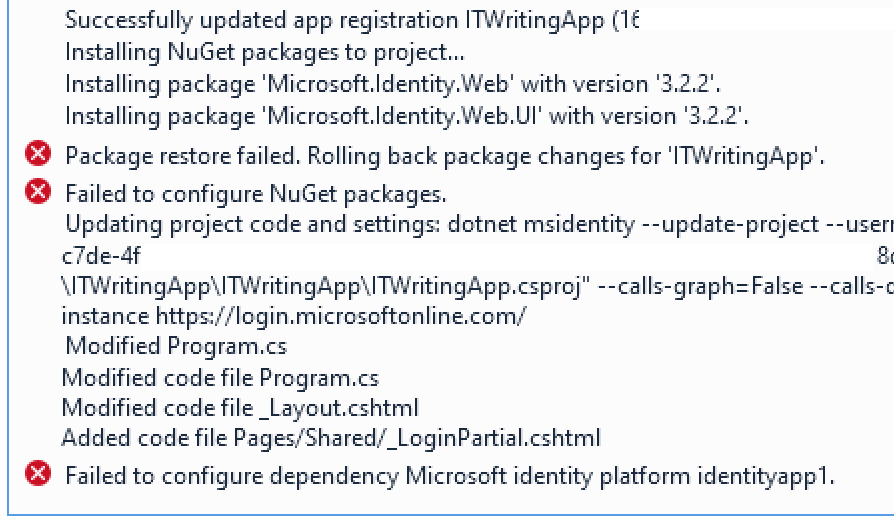
I continue in the wizard but it errors:
This does not appear to be an easy fix. I click Back and ask the wizard just to update the project code. I will add packages and do other configuration manually. Though as it turned out the failed step had actually added packages and the app does already work. However Visual Studio is warning me that the version of Microsoft.Identity.Web installed has a critical security vulnerability. I edit Nuget packages and update to version 3.8.3.
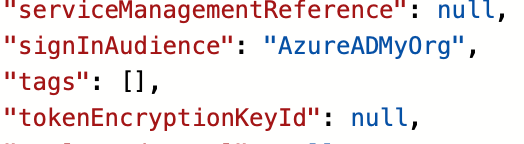
The app works and I can sign in but it is necessary to take a close look at the app registration. By default my app allows anyone with any Entra ID or personal Microsoft account to sign in. I feel this is unlikely to be what many devs intend and that the default should be more restricted. What you have to do (if this is not what you want) is to head to the Azure portal, Entra ID, App registrations, find your app, and edit the manifest. I edited the signInAudience from AzureADandPersonalMicrosoftAccount to be AzureADMyOrg:
noting that Microsoft has not been able to eliminate AzureAD from its code despite the probably misguided rename to Entra ID.
However my application has no concept of restriction by security group. I’ve added a group called AccessITWritingApp and made myself a member, but getting the app to read this turns out to be awkward. There are a couple of things to be done.
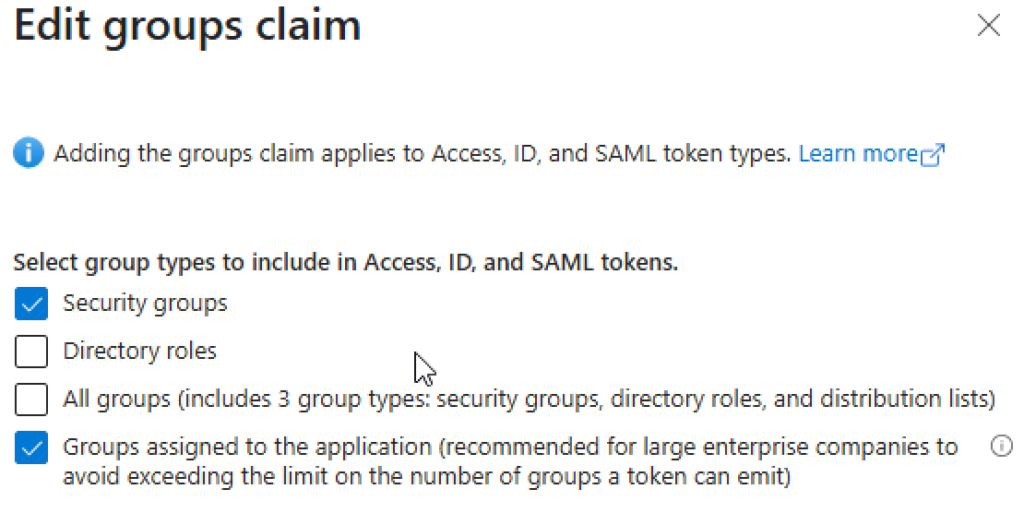
First, while we are in the App Registration, find the bit that says Token Configuration and click Edit Groups Claim. This will instruct Azure to send group membership with the access token so our app can read it. Here we have a difficult decision.
If we choose all security groups, this will send all groups with the token including users who are in a group within a group – but only up to a limit of somewhere between 6 and 200. If we choose Groups assigned to the application we can limit this to just AccessITWritingApp but this will only work for direct members. By the way, you will have to assign the group to the app in Enterprise applications in the Azure portal but the app might not appear there. You can do this though via the Overview in the App registration and clicking the link for Manage application in local directory. Why two sections for app registrations? Why is the app both in and not in Enterprise applications? I am sure it makes sense to someone.
In the enterprise application you can click Assign users and groups and add the AccessITWritingWebApp group – though only if you have a premium “Active Directory plan level” meaning a premium Entra ID directory plan level. There is some confusion about this.
Another option is App Roles. You can assign App Roles to a user of the application with a standard (P1) Entra ID subscription. Information on using App Roles rather than groups, or alongside them, is here. Though note:
“Currently, if you add a service principal to a group, and then assign an app role to that group, Microsoft Entra ID doesn’t add the roles claim to tokens it issues.”
Note that assigning a group or a user here will not by default either allow or prevent access for other users. It does link the user or group with the application and makes it visible to them. If you want to restrict access for a user you can do it by checking the Assignment required option in the enterprise application properties. That is not super clear either. Read up on the details here and note once again that nested group memberships are not supported “at this time” which is a bit rubbish.
OK, so we are going down the groups route. What I want to do is to use ASP.NET Core role-based authorization. I create a new Razor page called SecurePage and at the top of the code-behind class I stick this attribute:
[Authorize(Roles = "AccessITWritingApp,[yourGroupID")]
public class SecurePageModel : PageModel
Notice I am using the GroupID alongside the group name as that seems to be what arrives in the token.
Now I run the app, I can sign in, but when I try to access SecurePage I get Access Denied.
We have to make some changes for this to work. First, add a Groups section to appsettings.json like this:
// Add services to the container.
builder.Services.AddAuthentication(OpenIdConnectDefaults.AuthenticationScheme)
.AddMicrosoftIdentityWebApp(builder.Configuration.GetSection("AzureAd"));
and change it to:
// Add services to the container.
builder.Services.AddAuthentication(OpenIdConnectDefaults.AuthenticationScheme)
.AddMicrosoftIdentityWebApp(options =>
{
// Ensure default token validation is carried out
builder.Configuration.Bind("AzureAd", options);
// The following lines code instruct the asp.net core middleware to use the data in the "roles" claim in the [Authorize] attribute, policy.RequireRole() and User.IsInRole()
// See https://docs.microsoft.com/aspnet/core/security/authorization/roles for more info.
options.TokenValidationParameters.RoleClaimType = "groups";
options.Events.OnTokenValidated = async context =>
{
if (context != null)
{
List requiredGroupsIds = builder.Configuration.GetSection("Groups")
.AsEnumerable().Select(x => x.Value).Where(x => x != null).ToList();
// Calls method to process groups overage claim (before policy checks kick-in)
//await GraphHelper.ProcessAnyGroupsOverage(context, requiredGroupsIds, cacheSettings);
    }
    await Task.CompletedTask;
};
}
);
Run the app, and now I can access SecurePage:
There are a few things to add though. Note I have commented a call to GraphHelper; you might want to uncomment this but there are further steps if you do. GraphHelper is custom code in this sample https://github.com/Azure-Samples/active-directory-aspnetcore-webapp-openidconnect-v2/ and specifically the one in 5-WebApp-AuthZ/g-2-Groups. I do not think I could have got this working without this sample.
The sample does something clever though. If the token does not supply all the groups of which the user is a member, it calls a method called ProcessAnyGroupsOverage which eventually calls graphClient.Me.GetMemberGroups to get all the groups of which the user is a member. As far as I can tell this does retrieve membership via nested groups though note there is a limit of 11,000 results.
Note that in the above I have not described how to install the GraphClient as there are a few complications, mainly regarding permissions.
It is all rather gnarly and I was surprised that years after I coded the first version of this application there is still no simple method such as graphClient.isMemberOf() that discovers if a user is a member of a specific group; or a simple way of doing this that supports nested groups which are often easier to manage than direct membership.
Further it is disappointing to get errors with Visual Studio templates that one would have thought are commonly used.
And another time perhaps I will describe the issues I had deploying the application to Azure App Service – yes, more errors despite a very simple application and using the latest Visual Studio wizard.
I have a bridge platform (yes the game) written in C# which I am gradually improving. Like many bridge applications it makes use of the open source double dummy solver (DDS) by Bo Haglund and Soren Hein.
My own project started out on Windows and is deployed to Linux (on Azure) but I now develop it mostly on a Mac with Visual Studio Code. The DDS library is cross-platform and I have compiled it for Windows, Linux and Mac – I had some issues with a dependency, described here, which taught me a lot about the Linux app service on Azure, among other things.
Unfortunately though the library has never worked with C# on the Mac – until today that is. I could compile it successfully with Xcode, it worked with its own test application dtest, but not from C#. This weekend I decided to investigate and see if I could fix it.
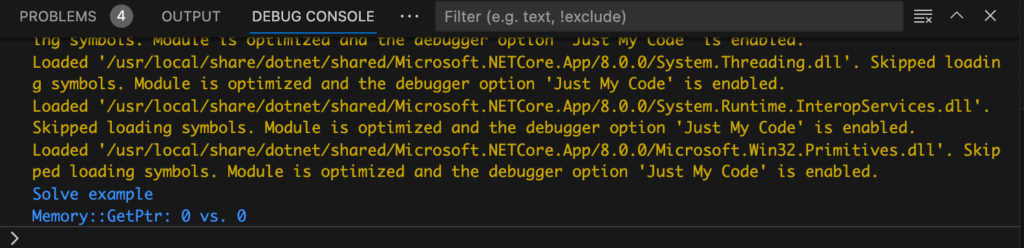
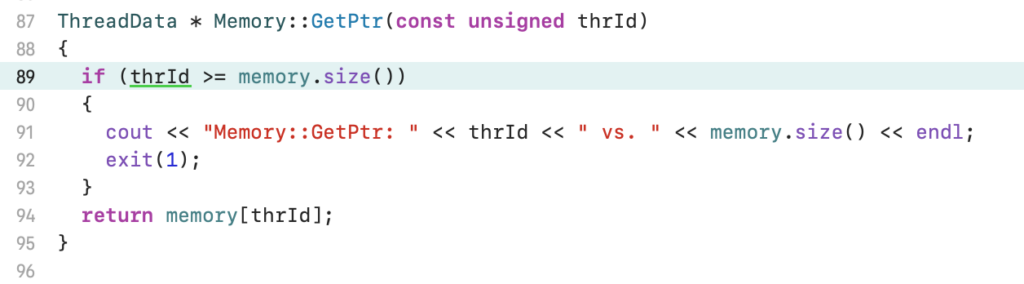
I have an Xcode project which includes both dtest and the DDS library, which is configured as a dynamic library. What I wanted to do was to debug the C++ code from my .NET application. For this purpose I did not use the ASP.Net bridge platform but a simple command line wrapper for DDS which I wrote some time back as a utility. It uses the same .NET wrapper DLL for DDS as the bridge platform. The problem I had was that when the application called a function from the DDS native library, it printed: Memory::GetPtr 0 vs. 0 and then quit.
The error from my .NET wrapper
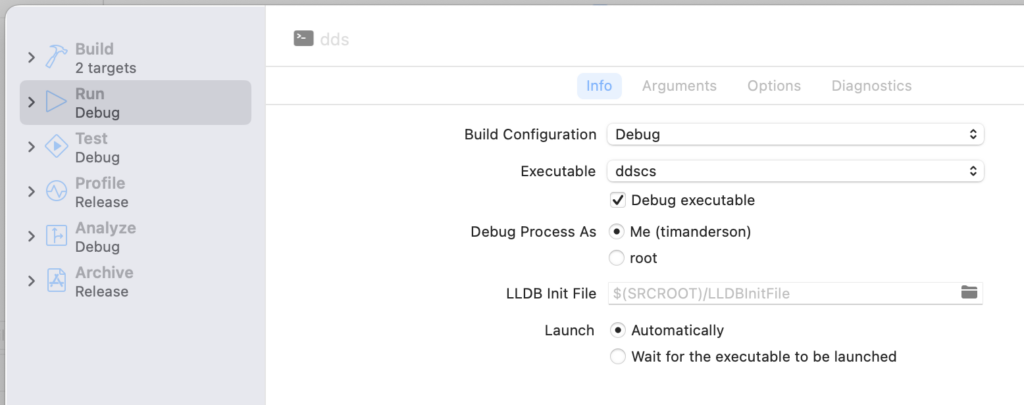
I am not all that familiar with Xcode and do not often code in C++ so debugging this was a bit of an adventure. In Xcode, I went to Product – Scheme – Edit Scheme, checked Debug executable under Info, and then selected the .NET application which is called ddscs.
Adding the .NET application as the executable for debugging.
I also had to add an argument under Arguments passed on Launch, so that my application would exercise the library.
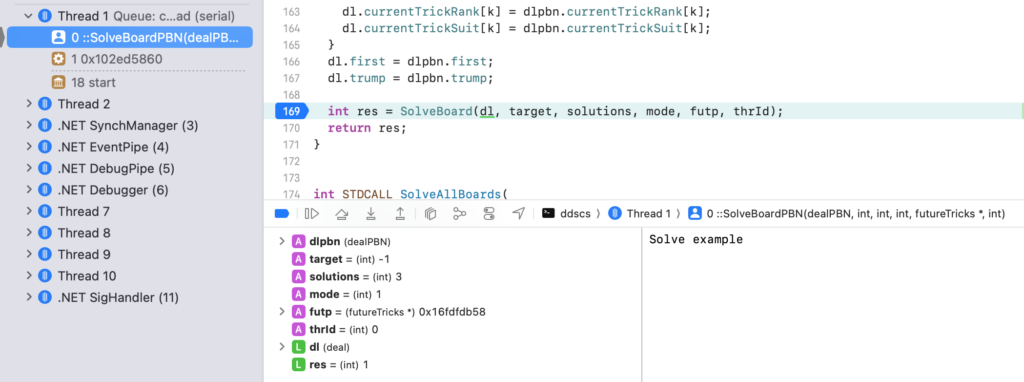
Then I could go to Product – Run and success, I could step through the C++ code called by my .NET application. I could see that the marshalling was working fine.
Stepping through the C++ code in Xcode
Now I could see where my error message came from:
The source of my error message.
So how to fix it? The problem was that DDS sets how much memory it allows itself to use and it was set to zero. I looked at the dtest application and noticed this line of code:
This is closely related to another DDS function called SetMaxThreads. I looked at the docs for DDS and found this remark:
The number of threads is automatically configured by DDS on Windows, taking into account the number of processor cores and available memory. The number of threads can be influenced using by calling SetMaxThreads. This function should probably always be called on Linux/Mac, with a zero argument for auto configuration.
“Probably” huh! So I added this to my C# wrapper, using something I have not used before, a static constructor. It just called SetMaxThreads(0) via P/Invoke.
Everything started working. Like so many programming issues, simple when one has figured out the problem!
I am developing an application which is deployed to Azure App Service. It runs on .NET 5.0 on Linux. I have set up a simple DevOps process so that committing changes to GitHub runs an Azure DevOps pipeline that deploys the application to a staging slot on Azure App Service for Linux. Then I can use Swap in the Azure portal to update the production slot. Swap simply exchanges the content of the staging slot with that in the production slot, so there is a route back in the event of disaster. Swap also restarts the application and forces users to log back in.
Yesterday I fixed a bug, deployed the change to the staging slot, and performed a swap. Logged back into the application, but the bug was still there, though intermittent. That was the bit I could not figure out: what was causing the code to behave differently on different requests? I became suspicious that it was sometimes serving the old version. I proved this by refreshing a page that demonstrated the bug. My page has an application version in the footer, and I could see that when the bug appeared, the version was older.
Well this is odd. In the App Service Deployment slot settings I have traffic set to 100% for the production slot:
In general I tend to assume a bug in my code or an error in my configuration settings is more likely than an issue with the Azure App Service. This does look odd though: why, if traffic is going 100% to the production slot, does the application sometimes serve the old version?
The pragmatic fix was easy. A second deployment to the staging slot means both now have code that works. The bug no longer appears; but I have kept the version number different and can see that the issue is actually still occurring.
I will update this post when I have more information, just in case anyone else hits this issue.
I am developing a web site for playing bridge, a project which kicked off in March when lockdown caused bridge clubs everywhere to close. There are lots of sites where you can play bridge online, but not many options (particularly back in March) for clubs that wanted to run their own online sessions.
It’s going OK with a number of clubs now using it every week, though it is still in development. I have learned a painful lesson though. In order to proceed as quickly as possible, I started my project with the Visual Studio template for an ASP.Net Core application with ASP.NET Core Identity – the latter an easy decision since it handles all the complications of registration, password reset and so on. (I did end up having to re-plumb it to use int rather than GUID for the primary key but that is another story).
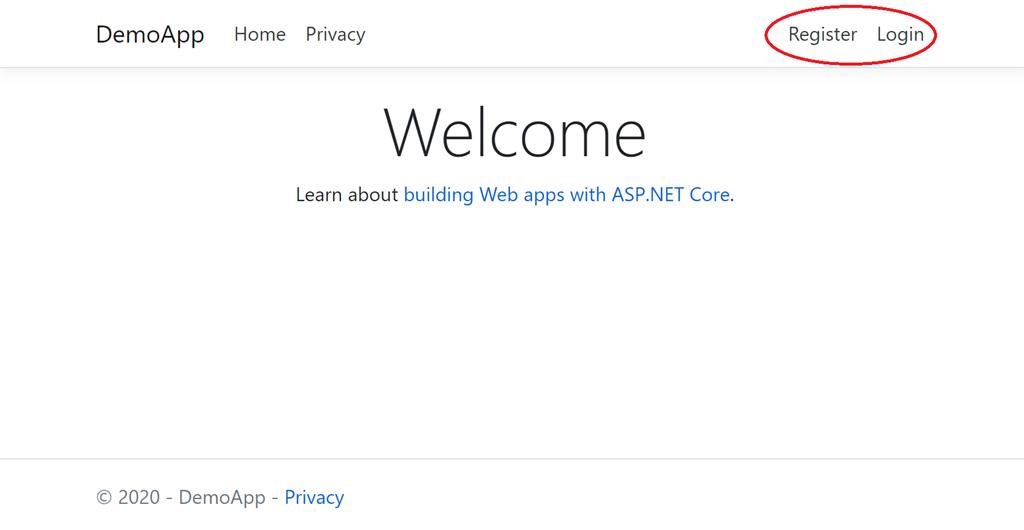
The default home page the template generates looks like this, with options in the menu to Register or Login.
Registration and login are fundamental concepts that have been part of the web forever. It’s simple for a developer to understand: you register to create an account, you login if you already have an account.
The painful discovery is that this is not obvious to everyone, particularly to an older demographic that did not grow up with computers. Another factor is that cookies, browser-saved passwords and single sign-on with Google/Facebook etc means that this whole area is a bit of a mess and there are people who just kinda expect web sites to know who they are (which in one way horrifies me but I do see the massive convenience).
The consequence is that a surprising (to me) number of people had difficulty knowing whether Registration or Login was what they needed. They would Register, then return to the site and hit Register again. Why is this site asking for my details again? Maybe a security thing? Oh no, why does it now say username not available?
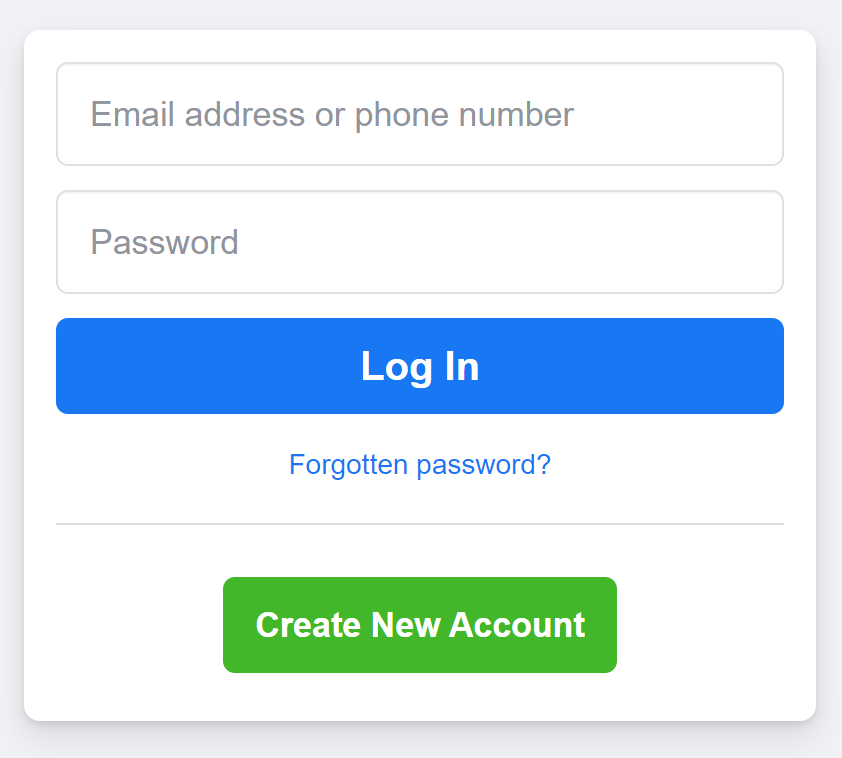
This is because asking the user to make this choice is not good design. Registration is rare, login is common. Further, Register is a confusing word. We sometimes use the word register when accounts already exist. Create Account is better. And a better UI is just Login. I need to access this website. Then, underneath the username/password request, an option that says “I need to create an account”. The two options should not be equally prominent; and if you look at how many prominent sites design this, that is what they do:
Lesson learned; but I wish this had occurred to me sooner!