Category Archives: microsoft

What is the future of Microsoft Small Business Server?

I’ve just attended a briefing on Microsoft Server and the future of the Small Business variant was one of the things we discussed.

There are a couple of issues with Small Business Server that make me question its future. One is that, at a time when cloud-based services are proving their ability to simplify computing for small businesses, Microsoft’s offering is more or less cloud-free.

A second issue is that by bundling onto one machine products that were designed to live on separate servers, Microsoft has made Small Business Server more complex to manage than a grown-up Windows server environment, especially when upgrading to a new version.

I’d like to see SBS migrated to a virtual environment, with separate VMs for Exchange, SharePoint and Active Directory, all running as virtual machines. This is more or less how I run my own test system, and it works very well. It is more flexible, less fragile, requires no special tuning, and is easier to look after than single-server SBS.

That of course presumes that you think there still is a need for SBS at all. The other scenario I’d like to see enabled is one where the on-premise server is in effect a cache for cloud-based services. If a disaster occurs, there would be no interruption of business.

But what does Microsoft have in mind? It is not saying, though I was assured that it is an area of continuing investment – in other words, there will be another Small Business Server – and that sales remain healthy (then again, vendors always say that).

One of the complications for Microsoft is that SBS is generally installed and maintained by partners (of varying levels of competence) and it will take courage to disrupt that business. More than likely we will just get SBS 2010 with Exchange 2010, 2008 R2 and so on. In other words, more of the same.

Reflections on Microsoft PDC 2009

Microsoft’s Professional Developers Conference has long been a key event in the company’s calendar. CEO Steve Ballmer and his colleagues are famous for their belief that developers make or break a platform, and PDC is where the most committed of those developers learn as much as Microsoft is willing to share of its long-term plans. There have been good – for example, 2000 C# and .NET launch, 2008 Windows 7 – and bad – for example, 2001 Hailstorm, 2003 Longhorn – PDCs but they have all been interesting, at least the ones I have attended.

So how was PDC 2009? While there was a ton of good content there, and an impressive launch for Silverlight 4, there was a noticeable lack of direction; maybe that was why Ballmer decided not to show up. It should have been the Windows Azure PDC, but as I have just written elsewhere, Microsoft has little excitement about its cloud. Chief Software Architect Ray Ozzie gave almost exactly the same keynote this year that he gave last year; and the body language, as it were, is more about avoiding the cloud than embracing it. Cross-platform clients, commodity pricing, throw away your servers: from Microsoft’s point of view, what’s not to hate?

In theory, mobile computing could have been another big story at the PDC, but Microsoft’s slow progress in Mobile is well known.

My instinct is that Microsoft needs to change but does not know how: the wheels continue to turn and we will get new versions of Windows, ever more complex iterations of Windows Server, Exchange, SharePoint, and feature after feature added to Microsoft Office – does it really need to become PhotoShop – but in the end this is more of the same.

The mitigating factors are the high quality of Windows 7, which will drive a lot of new PC sales for a quarter or two, and the strong products coming out of the developer division. Visual Studio 2010 plus Silverlight is an interesting platform, and ASP.NET MVC is in my opinion a big advance from Web Forms.

That’s not enough though; and we still await a convincing strategic discussion of how Microsoft intends to flourish in the next decade.

Technorati Tags: ,,

How Microsoft adds COM to everything

I’ve been writing a retrospective on Microsoft and noticed an intriguing pattern.

When Microsoft was fighting the browser wars, it first of all developed its own web browser, and then added COM (ActiveX).

When Microsoft was countering Sun’s Java, it came up with its own implementation, Visual J++. Key differentiator: COM integration.

When Microsoft was responding to Adobe Flash, it came up with its own implementation, Silverlight, and then – you guessed.

The reason is that COM is the gateway to everything Windows; but it is a frustrating habit for those who want to live in a cross-platform world.

Importing folders to SharePoint

I’ve been working with Small Business Server 2008 recently and one of the tasks was to import an existing shared folder into SharePoint.

You would have thought that would be trivial, but it turns out it is not quite so. The normal suggestion is to open a SharePoint library in Explorer and do the import there. That’s actually not ideal. One problem is that, at least in our case, it does not work on the server though it does work on workstations. I suspect this is some arcane permission problem or feature; but doing this over the network is inefficient. Another issue is that Explorer is not smart about things like setting the date to that of the original, which can be annoying. A third problem is that some characters are allowed in document names on the file system, but not in SharePoint – such as  & { } and %. If your Explorer copy hits one of these the copy will fail.

I looked for a script-based solution, initially using PowerShell, but came across SPIEFolder instead. This is a simple C# application. Once I’d figured out that you have to run it from an elevated command prompt, it worked fine. However, it only imports into the top level of a SharePoint library. I added a target subfolder argument to SPIEFolder, and some name mangling to deal with illegal characters, and now it does what I want. I’ve not changed the default file date behaviour yet; but I think I can see how do do this if necessary: see http://msdn.microsoft.com/en-us/library/ms439259.aspx for the code.

Google Gears out, HTML 5 in: what this means for offline web apps

I was interested to read that Google is abandoning Gears in favour of HTML 5.

While that makes sense, it is a hassle for developers who have developed for Gears, since there are differences between features such as HTML 5 local storage and Gears LocalServer. The Gears API was tidy and effective so in some ways I’m sorry to see it go, though a broad standard will be much more useful.

Still, this does mean that you can develop to the HTML 5 standard for Offline Web Applications with some hope that, although broad implementation is lacking now, it will come in future. Even IE 9 is likely to have a fair amount of HTML 5 in it.

It is a critical standard because the success of something like Google’s Chrome OS will depend on it. Nobody can count on being always connected.

In the meantime, there are also offline features in Adobe Flash and Microsoft Silverlight.

Hyper-V VMs can fail to start if the host is copying a large file

I have a couple of Microsoft Hyper-V servers which I’ve been working with, one of which has 20GB RAM. It had two virtual machine guests, one with 12GB allocated and another with 2GB allocated. I created a third VM with 2GB and started it up. It worked initially, but on rebooting the VM I got the message:

Failed to create partition: Insufficient system resources exist to complete the requested service. (0x800705AA)

This was puzzling. Most people consider that the Hyper-V host does not need very much RAM for its own operations – Brien Possey suggests 2GB, for example – and I am running the stripped-down Hyper-V 2008 R2. 4GB should be more than enough.

After chasing round for a bit, and wondering if it was something to do with NUMA, or WMIPrvse.exe gobbling all the RAM, I found out the reason. At the time I was trying to start the VM, the Hyper-V host was copying a large file (a .VHD) to an external drive for backup. In order to perform this action, the host was using a large amount of RAM for a temporary cache; and was apparently unable to release it for a VM to use until the copy completed.

In some circumstances this could be unfortunate. If you had a scheduled task in the host for copying a large file at the same moment that a guest needed a restart, perhaps triggered by Windows Update, the guest might fail to restart.

Something worth knowing if you work with Hyper-V.

Technorati Tags: ,

Wrestling with Windows Server Core

Windows Server Core is a stripped-down build of Windows Server 2008 which lacks most of the GUI. It’s a great idea: more lightweight, less to go wrong, and as the Unix folk have always said, who needs a GUI on a server anyway?

That said, the Windows culture has always assumed the presence of the GUI and most of the tools and utilities out there assume it. This means that you can expect some extra friction in managing your Server Core installation.

I recently attended a couple of Microsoft conferences and one of the things I was trying gently to discover was the extent of the take-up for Server Core, and to what extent hardware vendors such as HP had taken it to heart and were no longer assuming that all their Windows server customers could use GUI tools. I didn’t come away with any useful information on the subject, though perhaps that in itself says something.

I’ve been using Hyper-V 2008 R2, which is in effect Server Core with just one role, and a recent experience illustrates my point. After considerable effort (and help from semi-official scripts) I managed to get Hyper-V Manager working remotely, in order to create and manage the virtual machines. However, I ran into an annoying problem. There are three physical NICs in this box, and the idea was to have one for the host, and two others for virtual switches (for use by guests). Somehow, probably as a result of an early experiment, the virtual switch configuration got slightly messed up. I only had one virtual switch, and when I tried to create a second one on an otherwise unused NIC, I got the message:

Cannot bind to [Network connection name] because it is already bound to another virtual network.

That wasn’t the case as far as I could see; but that was no consolation.

The problem led me to this blog post which says that, if you are lucky, all you need to do to resolve it is to remove the binding to Microsoft Virtual Network Switch Protocol from the affected network connection. To do this, just open Local Area Connection Properties … but wait, this is Server Core, I don’t have a Local Area Connection Properties dialog.

Luckily, the guy has thought of that and says you can use the command-line tool nvspbind.exe instead. Great. But where is it? It has a page on MSDN which documents the tool, authored by a member of the Hyper-V team called Keith Mange, but there is no download. How infuriating can you get? There are a few desperate requests for a download link, and a comment “Unfortunately the nvspbind is no longer available for download”, and that is that.

All was not lost. I poked around Mange’s other downloads on MSDN and found two other utilities, nvspscrub.js and nvspinfo.js. Nvspscrub.js is a tool of last resort: it removes all the Virtual Switch bindings and deletes them from Hyper-V. I did not want that, because my first virtual switch was working fine. However, I figured I could modify Nvspscrub.js just to delete the one that was troublesome. I modified the script, deleted most of the code that modified the system, and added an if condition so that only the device with the GUID which I specified would be unbound.

It worked first time, and I was able to create my second virtual switch.

Still, the fact that this problem is known, and that the only documented cure (that I can find) is in a blog post which refers to a tool that has been pulled, suggests to me that this stuff is not yet mainstream.

COM automation in Silverlight 4 is not an “edge case”

I wrote a piece for The Register about the arrival of Windows-specific features in Silverlight, which attracted some comments both on the Reg and also on Slashdot. Plenty of people said it was just what they expected from Microsoft, some of them misunderstanding the point that this only applies to out-of-browser applications that are trusted: the user has to pass a dialog box granting the application permission to access the local system. A few defended Microsoft’s decision; and this Slashdot comment on COM automation in Silverlight 4 strikes me as a good encapsulation of the official line:

This is a fairly obscure feature, and I’m fairly surprised that it was included at all, but doubt it’ll be of use to the vast majority of current and future Silverlight developers out there. Like the html control, it’s a crutch, to allow developers that want to use Silverlight a way to leverage existing investments. The mantra I’ve heard out of the Silverlight team is to focus on unblocking customer scenarios (scenarios they cannot unblock themselves) without compromising the overall feature goals (like keeping the runtime download small) … it’s an edge case feature that doesn’t affect Silverlight’s over all "Cross-Platforminess".

The idea that COM automation is merely an “edge case” surprises me, even though I also recall it being described like that at PDC. Access to COM automation gives a Silverlight desktop application on Windows substantial extra capability. At PDC program manager Joe Stegman showed how Silverlight 4 can integrate with Office, sending data into an Excel spreadsheet: an example with obvious value for real applications. I also heard developers at PDC discussing how they might wrap up a Silverlight application with a COM DLL, creating an application which in effect has full access to the local operating system. Although Silverlight cannot access the Windows API directly, there are no such restrictions on the COM DLL, so the combination means that pretty much anything is possible.

Let’s also bear in mind that Microsoft’s Brad Becker is on record saying that one day WPF and Silverlight might simply become different .NET profiles. He told me this at Mix earlier this year; and said a similar thing to Mary Jo Foley at PDC:

Some day — Microsoft won’t say exactly when — Silverlight and WPF are going to merge into one Web programming and app delivery model that, most likely, will be known as Silverlight, Brad Becker, Director of Product Management for Microsoft’s Rich Client Platforms, told me this week

If Microsoft is contemplating such a thing, then clearly full access to the native features of Windows will have to be possible.

I am not entirely negative about this prospect. Even if you are only targeting Windows, Silverlight has a lot to commend it: a small runtime, easy setup, and options for browser-hosted or desktop deployment. If you have ever wrestled with the Windows installer or tackled a failed .NET runtime installation you will like the simplicity of running a Silverlight application.

Nevertheless, with version 4.0 Microsoft is changing its Silverlight story. It is no longer a pure cross-platform play; rather, it is a runtime where some features are cross-platform, and others Windows only. Microsoft calls this developer choice; I see it as evolving into the inverse of Sun’s aim with Java. Sun tried strenuously to guide developers towards cross-platform, but provided a way out – via Java Native Interface – if absolutely necessary. Microsoft will provide cross-platform where we really need it, but make it easy to slip into Windows-only development in order to get some nice feature like a location API, or Office integration.

I see this as an advantage for Flash, because developers know that Adobe has no incentive to prefer one operating system over another – except to the extent that minority platforms (like desktop Linux) tend to receive less investment.

Personally I think Microsoft should at least provide a way for Mac users to get similar benefits – perhaps by implementing something like the native process API in Adobe AIR 2.

I also think Microsoft will have to get real about Linux support. It is wrong that Microsoft will cheerfully state:

Silverlight 4 runs across all platforms and major browsers

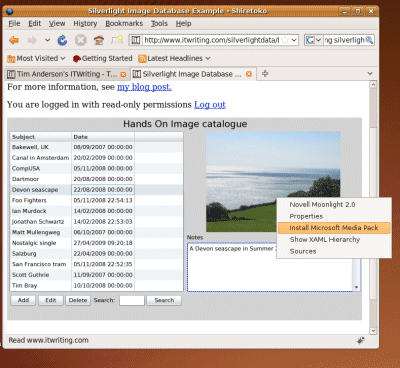
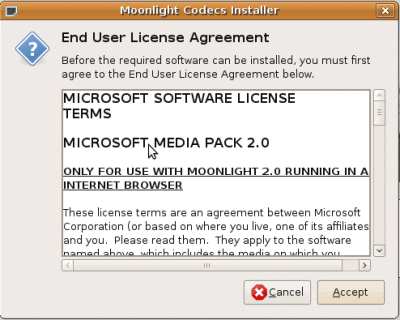
as it does in the “Fact sheet” handed out at PDC; while leaving Linux implementation to a third-party process uncertain in both features and timing. Here is the reality of cross-platform Silverlight, in a screenshot taken seconds ago from Linux:

Right now it is a two-platform play – admittedly, the two platforms that matter most, especially in a Western world business context, but never forget that Google Chrome OS is coming.

PDC day two: Silverlight 4 and a free laptop

There were two big themes at PDC in Los Angeles today. One was the Silverlight 4 beta, the subject of the most impressive section at the keynote. The other was the announcement of free laptops for every attendee – aside from press and government. It is remarkable how a generous gift can change the atmosphere. The lack of breakfast or Universal Studios party was soon forgotten as the audience cheered its own good fortune.

There is actually some justification for handing out this hardware. It’s a decent machine, a modified Acer Aspire 1420P with Windows 7 x64, 2GB RAM, multi-touch display, and accelerometer. Most of us do not have multi-touch machines, and giving them to the core Windows developers who attend PDC may help stimulate the creation of applications that properly support this feature.

Otherwise, it was a Silverlight day. Although SharePoint 2010 was also in the keynote, the cheers it received felt more like relief, that it finally has sensible development and debugging tools in Visual Studio, than real enthusiasm. Somehow the keynote did not capture the potential of the product.

Silverlight though was well received. It is a huge release that opens up many new possibilities, though I am discovering some details that look awkward. There is also one troubling aspect, which is that Microsoft is introducing imbalance in its cross-platform story. The Windows version of Silverlight 4.0 supports COM automation, enabling integration with local APIs such as location on Windows 7, and Microsoft Office. There is no equivalent in the Mac release. It would not be so bad if Microsoft offered some route to similar functionality on the Mac, but there is none that I am aware of.

Microsoft folk that I spoke to about this dismissed it as a minor point, but it is not. Cross-platform is a discipline; this is a failure to observe that discipline and hands an advantage to Adobe Flash for developers that require broad reach.

Silverlight 4 ticks all the boxes, questions remain

Microsoft has announced Silverlight 4 here at PDC in Los Angeles. The gist of it I was expecting – device support, an option for fuller system access out of the browser – but the extent of the new features is remarkable. Here’s a few highlights:

  • Improved Just-in-time compilation gives 30% faster start-up, up to 100% performance increase
  • COM automation support on Windows when out of browser with full trust
  • Access to local file system, cross-site Internet access, custom window chrome when in full trust out of browser
  • Notification pop-up support even when sandboxed
  • Drag and drop target even when sandboxed
  • HTML control (only works out of browser), supports plug-ins
  • Rich text control with right-to-left text support
  • Printing support
  • Clipboard, right-click and mouse wheel support
  • Web cam and microphone support

Of course there are a few unanswered questions, such as what level of HTML support is available, or how Microsoft is protecting users from malicious Silverlight applets; I’ll be exploring these later today.

It’s clear though that Microsoft wants to compete fully with Adobe AIR, and that its energetic Silverlight development is continuing at full pace.

The beta is available now; full release is promised for the first half of 2010.

So where is Microsoft going with this? Why would anyone develop for WPF and Windows, if good enough features, cross-platform, and zero install is available through Silverlight?

Interesting times for .NET developers.

Technorati Tags: ,,,