Category Archives: microsoft

Future of Web Apps cheers the independent Web

The Future of Web Applications conference in London is always a thought-provoking event, thanks to its diversity, independence and character. That said, it is a frustrating creature at times. The frustration on day 1 was the barely functional wi-fi, which ruined a promising interactive application called HelloApp, built with ASP.NET MVC. HelloApp would have told us who we were sitting next to, what their interests were, their twitter ID and so on. Microsoft must be disappointed since the developers, some of them more used to technologies like PHP and Ruby, said how impressed they were with the framework and Visual Studio. The poor connectivity was a shame, and a bad slip-up for a web application conference. Even the speakers had to work mostly offline – cloud devotees beware.

Ryan Carson at the Future of Web Apps London, 2009

FOWA has been at London Excel recently, but this event was back to its earlier venue of Kensington Town Hall, more crowded but a better atmosphere and easier to get to. I suspect a little downsizing, but much prefer it. Organizer Ryan Carson has his heart set on enabling start-ups, proffering business advice and uniting developers, designers and money folk, though many attendees are not in the start-up category at all. When revealing the results of a survey showing that many web app hopefuls had less then 1000 site visitors a month he shook his head despairingly “you’re never gonna build a business on that kind of traffic”.

Carson has excellent contacts and the day kicked off with Digg’s Kevin Rose on how to get those visitor numbers up – he should know if anyone does. Rose exceeded my expectations with tips on massaging your visitor egos, avoiding analysis paralysis, hanging round event parties to meet influencers even when you can’t afford to attend the event, and even how to hack the press.

After that the day was disappointingly low-key, at least until midday. Then we got Francisco Tolmasky from 280 North and it all changed. Tolmasky’s line is that we should use pure web technology but with the richness of desktop applications, and to enable this he’s put forward cappuccino, a JavaScript framework inspired by Apple’s Objective C and Cocoa – Cappuccino uses Objective-J. This now has a visual development tool (web-based of course) called Atlas, and in Tolmasky’s demo it looked superb. See here for more details.

The surprising twist is that after developers told Tolmasky that they (or their companies) were not willing to trust code to the web, 280 North came up with a desktop version of Atlas with the added ability to create desktop applications as well. I am not clear about all the runtime details, though it no doubt involves webkit, but Tolmasky’s differentiator versus alternatives like Java or Adobe AIR is that Atlas uses only web APIs.

We heard a lot at FOWA about social media, how to use it for marketing, and how to integrate it into applications. Cat Lee from Facebook gave us a breathless presentation on how simple it is to hook into Facebook Connect. It was OK but it was a sales pitch, and that never goes down well at FOWA. 

The later afternoon sessions were excellent. Bruce Lawson of Opera gave us an entertaining overview of how HTML 5 would make life easier for developers. There was nothing new here, but nevertheless a revealing moment. He showed some rich media working in HTML 5 and made the comment, jabbing at Adobe Flash and Microsoft Silverlight, that the web was too important to place control in the hands of any one vendor. A loud and spontaneous cheer went up.

This was echoed later when Aza Raskin of Mozilla gave us a browser-centric view of social media, suggesting that the browser could broker our “social graph” by integrating with multiple identity providers. Raskin’s line: social media is too important to be in the hands of any one vendor.

The Guardian’s Chris Thorpe gave a bold presentation about how the Guardian wants to embed itself in the web through its open platform. Like most print media, the Guardian has many challenges around its future business model (disclaimer: I write for the Guardian from time to time); but Thorpe’s presentation shows that his newspaper is coming up with an intelligent response, promoting interaction and building out into the wider web rather than erecting paywalls. Having said that, maybe the Guardian will try other business models too; it is a journey into the unknown.

Overall a day for social media and the open web, and a good antidote to the more vendor-centric conferences at which I often find myself. Next week, for example, it is the Flash-centric Adobe MAX; and having heard very little about Flash at FOWA that will make an interesting contrast.

Why Outlook rules copy a message when you asked for it to be moved

Ever wished computers had a “do what I mean” button?

Here’s a case in point. I use Outlook/Exchange rules to sort email into subfolders. I set up a new rule, and was annoyed to find that while messages were correctly being moved into the selected folder, they were not being deleted from the source folder. In other words, I’d asked for move but I was getting copy.

Bug in Outlook/Exchange rules? I don’t entirely trust them; but on this occasion it was my fault. The problem: these messages also matched another rule, which moved them to a different subfolder – the one, in fact, that I was treating as the “source folder”. When confronted with two rules that both move a message, Exchange makes a copy. Whether that is the right behaviour is arguable, but it is not a bug.

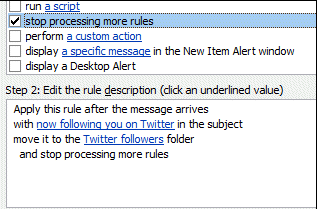
Here’s the solution. In the Actions for the rule, also check the option to “Stop processing more rules”.

Problem solved.

Technorati Tags: ,

Hands On with Microsoft Security Essentials – terrible name, but product looks good

Microsoft has released its free Security Essentials software, antivirus and antispyware protection aimed at home users. It runs on XP 32-bit, or Vista or Windows 7 32-bit or 64-bit, the only technical restriction being that Windows must validate as “genuine”.  Businesses are meant to use Forefront Client Security, though “home-based small businesses” are specifically permitted in the license agreement. I installed it on my Windows 7 64-bit desktop PC.

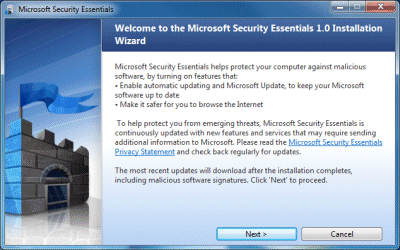
Installation was smooth, guided by a simple wizard with a castle logo:

The trickiest moment comes when the installer recommends that you “remove other antivirus and antispyware programs”:

I am glad that Microsoft is confronting this issue, since running multiple antivirus applications is terrible for performance. It does make the point that this free software will not be good for competitors at this end of the market. The other issue is that removing other security software will probably mean a reboot as well as passing one or more dialogs pleading with you to reconsider. Do this before running the installer.

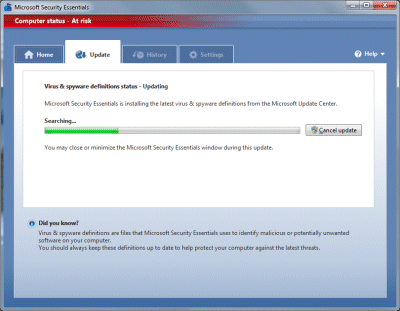
Once done, Security Essentials – a terrible, unmemorable, tongue-twisting name – announces that your computer is at risk while it goes off and downloads updates:

When the update completes, it does a quick scan, which took around 30 minutes on my machine. I let this complete – nothing was found – and then had a poke around the tabs and settings.

The user interface is nicely designed and there isn’t much to see. Be default Security Essentials will scan your PC once a week on Sunday night. You can specify quick or full scans. The software also monitors all file activity looking for malware. I get the impression that Microsoft has tried to make Security Essentials as unobtrusive as possible, which is most welcome.

One thing that did annoy me is the settings for recommended actions:

In patronising style, Microsoft offers “Recommended action” as the default when malware is detected, but does not tell you what that action is. It is explained here – for severe or high alerts, it attempts to remove the malware, while for medium or low alerts it quarantines it. However, it does seem to ask first, which is important in the case of false positives.

I couldn’t find any way of setting the frequency of updates, which surprised me.

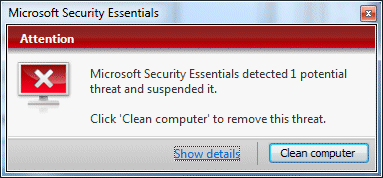
I gave Security Essentials an easy test by downloading eicar, a harmless file which for testing antivirus software. Security Essentials sprang into life:

I clicked Show details and got another red dialog offering to perform the recommended action, which was Remove. Another click, and it claimed to have done it, with the dialog turning a reassuring shade of green.

Is it any good? That’s a tough one. I don’t have high expectations of any security software based on scanning for known malware. Such software tends to fail when new viruses appear, as they do constantly. Another problem is that the bad guys can run the same security software as you, and design their malware to avoid its effects. In general, it is obvious that antivirus software has failed to prevent the spread of malware. I rate other things as more important, such as keeping systems up-to-date with patches and observing best practice concerning what you allow to execute. Unfortunately clever social engineering can often defeat good intentions.

Still, if you consider antivirus software a necessary evil, this one impresses by being nicely designed and mostly staying out of the way. If you are looking for the highest detection rates, you will have to wait for statistical analyses to be done. I am sure the commercial security companies will be quick to report on failures.

Personally I’m delighted that users can now get the Windows security center (Action Center in Windows 7) to stop bugging them without installing third-party software. Another advantage is that the software won’t stop updating when the user fails to subscribe or renew. Microsoft has plenty of incentive to get this one right, and to deliver something at least as good as the competition without slugging performance or annoying the user with advertisements and/or  constant exhortations to upgrade. I think it is worth a try.

Microsoft, Moonlight and open source

I was surprised by the announcement that Silverlight is being ported to Intel’s Moblin Linux, which I’ve already reported both here and on The Register. It feels like a u-turn from Microsoft, which had previously stated that while it would build Silverlight for both Windows and Mac, Linux support was to be done by Novell. This is from the 2007 press release:

Microsoft will work with Novell Inc. to deliver Silverlight support for Linux, called Moonlight, and based on the project started on mono-project.com … Microsoft is committed to ensuring that organizations have the best tools and resources to begin building Silverlight-based solutions with the broadest possible reach. The decision to work with Novell to offer Silverlight support for the Linux platform is in direct response to customer feedback, and both companies are optimistic about the impact this extended partnership will have in the industry.

Now, given that Microsoft has long expressed an intention to bring Silverlight to mobile devices, and that many mobile devices run some variety of Linux, you can argue that the Moblin announcement is merely in line with that strategy. This is what Brian Goldfarb told me – that the Intel deal is in the “mobile device” category, and therefore distinct from the work with Mono.

That said, if you look at the specs for something like Dell’s Mini 10v with Moblin – 1.6Ghz Atom CPU, 160GB hard drive, 1GB RAM, 10.1" 1024×600 display – it really has more in common with a traditional laptop than with, say, a mobile phone. Further, I’m getting the impression that this will be a full Silverlight 3.0 implementation, not a cut-down version like Flash Lite, complete with the Silverlight version of the .NET Framework.

If Microsoft had announced this kind of deal in the early days of Silverlight, it would have have been encouraging for open source advocates. Even though this Silverlight for Moblin is not an open source project, it extends support for a key Microsoft technology to Linux users. Silverlight developers may well prefer that the same code will be running on Moblin as on Windows or Mac, subject to whatever has to be done to make the port work.

Unfortunately at this point the announcement is having an opposite effect, casting doubt on Microsoft’s ability to work with open source partners. The impression is that Mono was a useful means of ticking the Linux box for Silverlight’s launch – though the version which includes .NET is still not complete – but that when it really wants to support a Linux OS, Microsoft is quick to find another route.

It is stating the obvious to say that the open source community is wary of Microsoft. Everything the company does is eyed with suspicion. Microsoft’s official support for Moonlight, along with great work from people like John Lam who works on IronRuby, was beginning to soften some of that hostility. Miguel de Icaza, leader of the Mono project, has been a great bridgebuilder between Microsoft and the open source community – so much so, that Richard Stallman recently called him “basically a traitor to the free software community”. Stallman has done his cause no credit with this remark. “I think we officially hit a new low here”, says OS news.

A terrible moment then for Microsoft to snub Moonlight by doing its own thing with Intel for Silverlight on Linux. What was even more striking is that the company seemingly had no idea of the impact of its announcement, and that it might be a sensitive matter, and apparently did nothing to prepare the Mono team in advance for the obvious questions that would be asked.

What is more important – that Silverlight works smoothly on Moblin, or Microsoft’s relationship with the open source community?

Microsoft brings Silverlight – not Mono – to Linux via Intel

Yesterday I speculated about what was meant by the inclusion of Silverlight among supported runtimes for Intel’s Moblin Linux, which is being used on netbooks using the Atom processor. I had assumed it was some new development of Moonlight, Mono’s Silverlight implementation, but apparently this is not the case. Here’s what Microsoft’s Brian Goldfarb, director of the Developer Platform Group at Microsoft, said:

Microsoft and Intel announced today that the two companies have agreed to work together to bring support for Silverlight 3 to Intel’s Atom-based Mobile Internet Devices (MID). These Atom-based devices run on Windows and Moblin, an open source, Linux-based operating system targeted at Atom-based devices. In order to help bring Silverlight content to these devices, Microsoft has provided Intel with Silverlight source code and test suites, and Intel will provide Microsoft with an optimized version of Silverlight for Moblin devices that Microsoft can then redistribute to OEMs.

There are a couple of curious aspects to this. One is why Microsoft would not simply feed optimisations into the Moonlight project, which would benefit Silverlight/Moonlight on all Linux systems. Goldfarb did add:

The Silverlight for Moblin announcement is independent from Microsoft’s work with Novell on Moonlight. The Intel/Moblin effort is specifically about building great out-of-box experiences for consumers on Atom-based devices. Microsoft’s efforts with Novell remain critical as they build an open-source, compatible, and broadly available Silverlight solution for Linux.

Another is whether Intel/Microsoft are devising some way for Silverlight to run as a desktop application, rather than just as a browser plug-in. I’m hopping to clarify these points soon.

Intel has a press release here.

Intel gets into the App Store game – but where does Silverlight fit in?

Intel has announced its Atom Developer Program including a new app store. The idea is to encourage a flow of applications that are well suited to netbooks, rather than general desktop applications that tend to get pressed into service because they are there, but may not be well suited to the smaller screen and more limited resources typical of netbooks versus full laptops. No doubt Intel has its eye on Apple’s successful iPhone App Store, which enhances sales of the hardware as well as providing a ready-made sales channel for independent software vendors, and wants to do the same for netbooks.

In order to participate as a developer, you have to sign up for the program, which will cost $99 annually though currently it is free. An interesting twist is that the developer program is a component market as well as an application market. Write a cool component, and you can get paid whenever any application that uses your component is sold. Intel handles all the business details, for a cut of course.

Intel is supporting two operating systems, Windows and Moblin, Intel’s Linux distribution. Your applications must be one of the following:

  • Native Windows (I am not sure whether .NET is allowed)
  • Native Moblin
  • Java
  • Adobe AIR

A puzzle is that Intel’s press release makes several references to Silverlight as a cross-platform runtime; yet although there is a Linux version of Silverlight, called Moonlight, there isn’t any exact equivalent to AIR for desktop Silverlight and I am not clear how Silverlight fits in any of the categories above. I may be reading too much into this; but perhaps all will be explained when Silverlight 4 is unveiled at PDC in November? Here’s what the press release says:

“Using Silverlight’s cross-device, cross-browser, cross-platform technology, developers will be able to write applications once and have them run on Windows and Moblin devices – expanding the reach of Silverlight applications to more consumers, regardless of whether the device they’re using is a PC, TV or phone,” said Ian Ellison Taylor, general manager, Microsoft Client Platforms and Tools.

Note that despite the above quote, Moonlight 2.0 is still in beta, and no current phones include the Silverlight runtime.

Apps must be delivered in one of the following forms:

  • .msi (for Windows*)
  • .jar (for Java*)
  • .air (for Adobe® AIR*)
  • .deb (for Debian Mobilin/Linux)
  • .rpm (for RedHat* Linux)

All applications in the store are subject to Intel’s approval (called validation):

The validation process checks your code for suitability for the Developer Program, licensing and legal issues, and some basic functionality.

Here’s the checklist. Note this requirement:

Runtimes and technologies the application can support can only be any of the following: Moblin* Native, Windows* Native, Adobe AIR*, Java FX *, and Microsoft* Silverlight*.

Hmm, Silverlight again.

Intel gets 30% of your revenue. You can also market components and if your application uses a paid-for component a share of the revenue will be paid to the component vendor. Free applications and components are also permitted.

I really like the checklist – I wish all desktop applications conformed to some of the requirements. Like this one:

The application will completely uninstall when desired, and leave no garbage files behind.

are great to read.

You can sign up here, though the SDK is not yet available.

One curious facet of the program is that although it is specifically for the Atom, in most cases your application will likely run fine on other processors. I am not sure if Intel will do anything to ensure that only Atom-powered computers use the store.

In May I posted that we should get ready for more app stores. This is really coming to pass now, with Adobe’s offering which I mentioned yesterday, Nokia’s Ovi, as well as others for Android, Palm Pre and so on.

Office Web Apps: is Microsoft missing its big opportunity?

I have been found the technical preview of Microsoft’s Office Web Apps mostly disappointing. One problem is bugs. These are to be expected in a technical preview, but I have had more problems than I would expect in a widely distributed technical preview. PowerPoint has been particularly problematic. When I try to edit a PowerPoint document I now almost always get “PowerPoint Web App encountered an error. Please try again.” Once I get this error I am stuck with it for the rest of the session. On the Mac I am unable to open documents in Office 2008; I get a message that says “To open this presentation, your computer must be running a version of Microsoft PowerPoint and a browser that supports opening files directly from the Office Web Apps.” On Linux the edit features of the Web Apps seem to be disabled completely. When collaborating in Excel, you cannot see what the other person is editing, which can result in your work being overwritten. Trying to load an Excel sheet that included VBA macros gave the blunt message: “Excel Web App was unable to load the workbook that you requested”.

No doubt these things will be fixed, or at least the messages improved, but it raises doubts about whether the Web Apps will be ready in time.

The performance of the web apps overall is mixed: load times can be slow, but once loaded it is not so bad – scrolling through a Word document in the Silverlight viewer is fine. Performance seems to vary, which may suggest server load issues, and/or the effects of caching as a session continues. Anyway, it was weak enough that when I tried an experiment with a larger spreadsheet I did so with no great expectations.

Here’s what I did. I ran a script that reads every filename and writes it to a file, and ran it against a drive containing many files. I imported this to Excel (which coped without blinking) and saved it both as an .xlsx and a .xls with a little over 30,000 rows. I tried importing it to Google Apps, which says it accepts spreadsheets up to 1MB (my sheet was 883K). Google wasn’t having it, and gave me an error – maybe because an .xlsx is really zipped, and uncompressed the .xls was nearly 3MB. I cut it down to 100,000 rows, whereupon Google accepted it OK. Scrolling from top to bottom took around 15 seconds, or nearer 5 seconds in Chrome: impressive.

Next I tried Office Web Apps. To my surprise, it accepted the large sheet without protest; even the upload was quick. Better still, it was able to scroll from top to bottom in less than 10 seconds, faster once loaded.

I was impressed, though something is not quite right. I put a little calculation towards the bottom of the sheet and for some reason I can’t figure out, it isn’t working.

Still, it seems that Excel Web App is ready for workbooks larger than Google will accept. It’s a significant issue, since there are plenty of large spreadsheets in the world; and I can’t see any inherent reason why web applications should not be able to deal with them. Deep Zoom does a great job of dealing with large bitmaps, so why not spreadsheets as well, on the same principle that you only need to see a small portion at any one time?

The Office Web Apps build on Excel Services along with equivalent services that are being developed for the other Office applications, so Microsoft is in fact building a server-side Office. It is a huge opportunity given the dominance of Microsoft Office in business, with the potential to jump-start Microsoft’s efforts to establish itself alongside the likes of Google and Salesforce.com as a provider of online applications. The big question is to what extent it is willing to surface the features of server-side Office so that users can take full advantage.

The answer currently seems to be, “not much.” The editing features are extremely limited. Here’s what product manager Chris Adams told me when I asked him to describe the limitations:

Our goal is not to replicate the desktop software on the web. The web is a few years away from providing the same kind of rich, powerful experience that we have on the desktop. One of our goals is that cross-browser, cross-platform support. Without wanting to use extra add-ins to add functionality, it does limit us in some ways.

We’ve been trying to look at the key things people might want to do when they access a web app. Smart Art is an example. Smart Art was introduced in Office 2007 on the desktop. With the web app we’ll look to enable people to edit Smart Art, update some elements in it, but we won’t allow you to create new smart art.

We’re trying to replicate the right features and functionality for what we think users will want to do with the web version. This is the first time that a lot of people will get to use it, so the feedback starts now. What people tell us now will inform what we eventually end up with as a feature set.

My feedback here is that the web apps should be as full-featured as possible, so that you can do all your work without having to click that Edit in Office button – which is never going to work anyway in some scenarios, such as on Linux.

Despite denials, I am sure that Microsoft is deliberately limiting the editing options in the web apps so as to ensure that we still need desktop Office. I cannot make sense of what is on offer in Excel Web App, for example, in any other way.

It seems to me that Microsoft is choosing between two paths here.

  • On one path it makes the Web Apps as good as possible, and risks losing sales of Office licences as well as making non-Windows operating systems more viable on the desktop.
  • On the other path, it limits the capabilities of the Web Apps, and risks losing customers in their entirety as they realise that Microsoft is not serious about letting them work through a web-based system.

Not easy, but I’d suggest that the first option above is less dangerous for Microsoft than the second.

London Stock Exchange migrating from .NET to Oracle/UNIX platform

The London Stock Exchange has agreed to acquire MillenniumIT, and will be replacing its TradElect and Infolect systems with the MillenniumIT trading system. TradElect is based on Windows Server and .NET,  and was created by Microsoft and Accenture. Microsoft used to use the LSE’s system as a showcase for .NET scalability, but while it proved that .NET can work for large systems, the LSE suffered an outage in September 2008 that was rumoured to be the fault of TradElect.

I don’t know much about MillenniumIT but note that the company is a partner with Sun and Oracle and that the MillenniumIT Exchange brochure [pdf] states:

Operating System: UNIX or Linux

Database: Oracle

As Brian Bryson of IBM/Rational observes, it is short-sighted to lay the blame on the platform. Nevertheless, considering the high profile of this system and Microsoft’s active involvement it is at least an embarrassment.

The mitigation for Microsoft is that .NET has less to prove these days. Even if running a system as large and performance-critical as the London Stock Exchange was a step too far, particularly for Server 2003 and (apparently) SQL Server 2000, that doesn’t rule out Microsoft’s technology for more usual workloads; and there are improvements in Server 2008 and SQL Server 2008.

Still, I’d love to know more about why the LSE is abandoning TradElect and what the lessons are for those designing and implementing systems at this level.

The problems with TradElect are thoroughly debated in the comments here.

Update: Microsoft’s LSE Case Study from 2006 is here.

I have also received the following statement from a Microsoft spokesperson:

Microsoft continues to support some of the most demanding, mission-critical environments in the world and is constantly raising the performance bar with new solutions.  Most recently, Microsoft completed three different proof-of-concept projects for a major international stock exchange that demonstrate Windows Server 2008 and Microsoft .NET can successfully support very low latency trading activities, in the 100 microsecond range using standard 1 Gigabit Ethernet.  With the addition of Microsoft Network Direct, that latency is further reduced by 50%, which is industry leading performance.

Sony’s Flash advantage for PlayStation 3 vs Xbox 360

Sony’s PlayStation 3 includes a web browser and for some time it has been possible to view BBC iPlayer content there. The iPlayer is based on Adobe Flash. The attraction of this approach is that the console is already plugged into the home TV, so it is a relatively seamless shift from conventional broadcasting, provided you can figure out how to operate it using a game controller.

According to the BBC’s Anthony Rose, people are figuring this out big time, now that Sony has both enhanced Flash with h.264 support and full-screen hardware acceleration, and added an iPlayer icon to the PS3 menu (I should think the latter counted for more than the former). He’s revealed on the BBC Internet blog that:

… iPlayer on PS3 now accounts for a massive ~10% of all iPlayer viewing, overtaking Mac (8.5%) to be our 2nd most popular platform for IP-delivered content.

I find that impressive given that the PS3 is still marketed primarily as a games console.

The obvious question: what about Xbox 360, which is inherently more than capable of the same feat? The problem is that Flash is not supported on the 360, nor does it have a web browser. You can watch TV via a 360, by using it as a Media Center Extender, but that means getting quite a few other pieces in place in your digital home, including a Media Center PC with a TV aerial plugged into it – and even then, you are not getting iPlayer, just digital TV.

There are a couple of solutions that come to mind. One is that Microsoft could get together with Adobe and support Flash on the 360. The other is that Microsoft could get a move on with its Silverlight support on 360 and persuade the BBC to serve up iPlayer content for Silverlight as well as Flash. Both are technically feasible; the first would be easier for the BBC but embarrassing for Microsoft, which is promoting its own video streaming technology, while the second would be expensive for the BBC.

Another party which is likely to be watching with interest is ITV, which has its own catch-up service. This used to be based on Silverlight but now seems to be pretty much all Flash, perhaps because of quality problems or simply to take advantage of the wider deployment of the Flash runtime. Even though it does not have its own icon on a PS3, you could watch ITV Player via the browser.

Catch-up viewing is popular, and this sensible Flash-based development alongside existing Blu-ray support gives Sony’s machine a substantial advantage over the 360 when considered as a home entertainment device, rather than merely a games console. I’d expect this to be a significant factor as buyers make their choices in the coming Christmas season.

Finally, I wonder what other interesting potential there is for runtimes like Flash or Silverlight on a game console that is wired directly into the family home? Could there be a PS3 app store in the console’s future?

Update: A couple of informative comments below observe that there is a way to get iPlayer on the 360 via WMV download and Media Center; and that Sky Player is Silverlight-based and coming to Xbox. So it is not game over yet.

The desktop versus web application debate

I posted a piece entitled Desktop applications are dead which attracted the following comment:

Web apps have plenty of cons too. You seem to only be looking to the Pros.

There’s something in it; though the article is a little more nuanced than its title. There’s also another debate to be had around the question of what a web application really is. If thousands of lines of JavaScript are executing on the client, is it a web app? If it is running in Flash or Silverlight is it a web app? If it is running out of browser (Adobe AIR, Silverlight, JavaFX) has it crossed the border to become a desktop app? This last case is particularly interesting, since although something like AIR should probably be categorised as desktop, its programming model is normally that of a web application with an offline cache.

The semantic discussion can distract from the real issues. The ascendancy of web applications has a lot to teach software developers. The enforced simplicity, even crudeness, in the user interface of early web applications brought some surprising benefits: users generally liked the minimalist approach and ease of navigation. The page model, intended for documents, turns out to work for applications as well.

Another big lesson: users value zero-install extremely highly. The routine of go to the web page – run the app is easy to understand. Some find it easier than finding an application shortcut in the Windows Start menu, and that is after the potentially painful business of running setup.

Still, I am slipping into reiterating the advantages of web apps. What about their cons? What about the pros of desktop applications?

I still use desktop applications a great deal: Microsoft Office, Live Writer, Foobar, Visual Studio, Eclipse, all the things I listed in 10 Mac alternatives to Windows utilities. Doesn’t that prove that desktop applications are still important?

It does; but there is an important qualification. None of these are line of business applications of the type which occupy so much of the time of corporate software developers and contractors.

The real point: if there is a discussion about whether a particular project should be implemented as a desktop or web application, it is not the web application advocates who need to make their case. Rather, it is the desktop advocates who need to show the particular reasons (which may be good ones) why only a traditional local install will do.

It is also important to follow the curve on the graph. The list of things that can only be done by desktop applications gets shorter with every upgrade to the web platform – whether you think of that as HTML/AJAX, Adobe Flash, Microsoft Silverlight, or [insert your favourite web technology].

Ten years ago, a web version of Photoshop seemed an unlikely prospect. Today, here it is. Office and email is going the same way, even if it is not quite ready for all of us; Microsoft will have to accept that or lose its business.

I don’t follow Rich Internet Applications with such interest because they are cool, but because they are the future of the client – and increasingly the present as well.