Category Archives: windows

The Exchange VSS plug-in for Server 2008 that isn’t (yet)

If you install Exchange 2007 on Server 2008, one problem to consider is that the built-in backup is not Exchange-aware. You have to use a third-party backup, or hack in the old ntbackup from Server 2003. Otherwise, Exchange might not be restorable, and won’t truncate its logs after a backup.

In June 2008 Scott Schnoll, Principal Technical Writer on the Exchange Server product team, announced that:

As a result of the large amount of feedback we received on this issue, we have decided to ship a plug-in for WSB created by Windows and the Small Business Server (SBS) team that enables VSS-based backups of Exchange.

He is making reference to the fact that Small Business Server 2008 does include a VSS (Volume Shadow Copy Service) plug-in for Exchange, so that the built-in backup works as you would expect. This was also announced at the 2008 TechEd, shipping later that summer was mentioned, and the decision was generally applauded. But SBS 2008 shipped last year. So where is the plug-in?

This became the subject of a thread on TechNet, started in August 2008, in which the participants refused to accept a series of meaningless “we’re working on it” responses:

This is becoming more than a little absurd.  I understand that these things can take time, and that unexpected delays can occur, but I rather expect that more information might be provided than “we’re working on it”, because I know that already and knew it months ago.  What sort of timeframe are we looking at, broadly?  What is the most that you are able to tell us?

Then someone spotted a comment by Group Program Manager Kurt Phillips in this thread:

We’re planning on starting work on a backup solution in December – more to follow on that.

Phillips then said in the first thread mentioned above:

The SBS team did implement a plug-in for this.  In fact, we met with them to discuss some of the early design work and when we postponed doing it in late summer, they went ahead with their own plans, as it is clearly more targeted toward their customer segment (small businesses) than the overall Exchange market.

We are certainly evaluating their work in our plan.

For those anxiously awaiting the plug-in, because they either mistrust or don’t want to pay for a third-party solution, the story has changed quite a bit from the June announcement. Apparently no work was done on the plug-in for six months or so; and rather than implementing the SBS plug-in it now seems that the Exchange team is doing its own. Not good communication; and here comes Mr Fed-Up:

Like most things from this company, we can expect a beta quality “solution” by sometime in 2010. We have a few hundred small business clients that we do outsourced IT for, and as it’s come time to replace machines, we’ve been replacing Windows PCs with Macs, and Windows servers with Linux. It’s really amazing how easy it is to setup a Windows domain on a Linux server these days. The end users can’t tell a difference.

What this illustrates is that blogging, forums and open communication are great, but only when you communicate bad news as well as good. It is remarkable how much more patient users are when they feel in touch with what is happening.

Technorati tags: , ,

Mixing Hyper-V, Domain Controller and DHCP server

My one-box Windows server infrastructure is working fine, but I ran into a little problem with DHCP. I’d decided to have the host operating system run not only Hyper-V, but also domain services, including Active Directory, DNS and DHCP. I’m not sure this is best practice. Sander Berkouwer has a useful couple of posts in which he explains first that making the host OS a domain controller is poor design:

From an architectural point of view this is not a desired configuration. From this point of view you want to separate the virtualization and platforms from the services and applications. This way you’re not bound to a virtualization product, a platform, certain services or applications. Microsoft’s high horse from an architectural point of view is the One Server, One Server Role thought, in which one server role per server platform gets deployed. No need for a WINS server anymore? Simply shut it down…

Next, he goes on to explain the pitfalls of having your DC in a VM:

Virtualizing a Domain Controller reintroduces possibilities to mess up the Domain Controller in ways most of the Directory Services Most Valuable Professionals (MVPs) and other Active Directory enthusiasts have been fixing since the dawn of Active Directory.

He talks about problems with time synchronization, backup and restore, saved state (don’t do it), and possible replication errors. His preference after all that:

In a Hyper-V environment I recommend placing one Domain Controller per domain outside of your virtualized platform and making this Domain Controller a Global Catalog. (especially in environments with Microsoft Exchange).

Sounds good, except that for a tiny network there are a couple of other factors. First, to avoid running multiple servers all hungry for power. Second, to make best user of limited resources on a single box. That means either risking running a Primary Domain Controller (PDC) on a VM (perhaps with the strange scenario of having the host OS joined to the domain controlled by one of its VMs), or risking making the host OS the PDC. I’ve opted for the latter for the moment, though it would be fairly easy to change course. I figure it could be good to have a VM as a backup domain controller for disaster recovery in the scenario where the host OS would not restore, but the VMs would – belt and braces within the confines of one server.

One of the essential services on a network is DHCP, which assigns IP numbers to computers. There must be one and only one on the network (unless you use static addresses everywhere, which I hate). So I disabled the existing DCHP server, and added the DHCP server role to the new server.

It was not happy. No IP addresses were served, and the error logged was 1041:

The DHCP service is not servicing any DHCPv4 clients because none of the active network interfaces have statically configured IPv4 addresses, or there are no active interfaces.

Now, this box has two real NICs (one for use by ISA), which means four virtual NICs after Hyper-V is installed. The only one that the DHCP server should see is the virtual NIC for the LAN, which is configured with a static address. So why the error?

I’m not the first to run into this problem. Various solutions are proposed, including fitting an additional NIC just for DHCP. However, this one worked for me.

I simply changed the mask on the desired interface from 255.255.255.0 to 255.255.0.0, saved it, then changed it back.  Suddenly the interface appeared in the DHCP bindings.

Strange I know. The configuration afterwards was the same as before, but the DHCP server now runs fine. Looks like a bug to me.

Hands on with Hyper-V: it’s brilliant

I have just installed an entire Windows server setup on a single cheap box. It goes like this. Take one budget server stuffed with 8GB RAM and two network cards. Install Server 2008 with the Hyper-V and Active Directory Domain Services, DNS and DHCP. Install Server 2003 on a 1GB Hyper-V VM for ISA 2006. Install Server 2008 on a 4GB VM for Exchange 2007. Presto: it’s another take on Small Business Server, except that you don’t get all the wizards; but you do get the flexibility of multiple servers, and you do still have ISA (which is missing from SBS 2008).

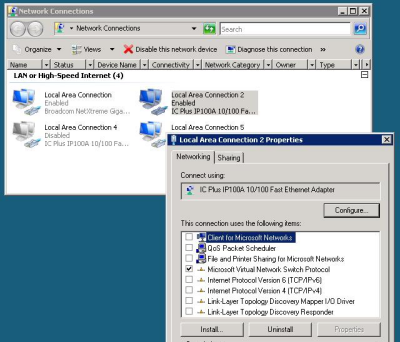
Can ISA really secure the network in a VM (including the machine on which it is hosted)? A separate physical box would be better practice. On the other hand, Hyper-V has a neat approach to network cards. When you install Hyper-V, all bindings are removed from the “real” network card and even the host system uses a virtual network card. Hence your two NICs become four:

As you may be able to see if you squint at the image, I’ve disabled Local Area Connection 4, which is the virtual NIC for the host PC. Local Area Connection 2 represents the real NIC and is bound only to “Microsoft Virtual Network Switch Protocol”.

This enables the VM running ISA to use this as its external NIC. It strikes me as a reasonable arrangement, surely no worse than SBS 2003 which runs ISA and all your other applications on a single instance of the OS.

Hyper-V lets you set start-up and shut-down actions for the servers it is hosting. I’ve set the ISA box to start up first, with the Exchange box following on after a delay. I’ve also set Hyper-V to shut down the servers cleanly (through integration services installed into the hosted operating systems) rather than saving their state; I may be wrong but this seems more robust to me.

Even with everything running, the system is snoozing. I’m not sure that Exchange needs as much as 4GB on a small network; I could try cutting it down and making space for a virtual SharePoint box. Alternatively, I’m tempted to create a 1GB server to act as a secondary domain controller. The rationale for this is that disaster recovery from a VM may well be easier than from a native machine backup. The big dirty secret of backup and restore is that it only works for sure on identical hardware, which may not be available.

This arrangement has several advantages over an all-in-one Small Business Server. There’s backup and restore, as above. Troubleshooting is easier, because each major application is isolated and can be worked on separately. There’s no danger of notorious memory hogs like store.exe (part of Exchange) grabbing more than their fair share of RAM, because it is safely partitioned in its own VM. After all, Microsoft designed applications like Exchange, ISA and SharePoint to run on dedicated servers. If the business grows and you need to scale, just move a VM to another machine where it can enjoy more RAM and CPU.

I ran a backup from the host by enabling VSS backup for Hyper-V (requires manual registry editing for some reason), attaching an external hard drive, and running Windows Server backup. The big questions: would it restore successfully to the same hardware? To different hardware? Good questions; but I like the fact that you can mount the backup and copy individual files, including the virtual hard drives of your VMs. Of course you can also do backups from within the guest operating systems. There’s also a snag with Exchange, since a backup like this is not Exchange-aware and won’t truncate its logs, which will grow infinitely. There are fixes; and Microsoft is said to be working on making Server 2008 backup Exchange-aware.

Would a system like this be suitable for production, as opposed to a test and development setup like mine? There are a couple of snags. One is licensing cost. I’ve not worked out the cost, but it is going to add up to a lot more than buying SBS. Another advantage of SBS is that it is fully supported as a complete system aimed at small businesses. Dealing with separate virtual servers is also more demanding than running SBS wizards for setup, though I’d argue it is actually easier for troubleshooting.

Still, this post is really about Hyper-V. I’ve found it great to work with. I had a few hassles, particularly with Server 2003 – I had to remember my Windows keyboard shortcuts until I could get SP2 and Hyper-V Integration Services installed. Once installed though, I log on to the VM using remote desktop and it behaves just like a dedicated box. The performance overhead of using a VM seems small enough not to be an issue.

I’ve found it an interesting experiment. Maybe some future SBS might be delivered like this.

Update: I tried reducing the RAM for the Exchange VM and it markedly reduced performance. 4GB seems the best spot.

Gears of War certificate expiry a reminder to developers: always timestamp signed code

Users of the PC version of Gears of War have been unable to run the game since yesterday (29th January 2009). If they try, they get a message:

You cannot run the game with modified executable code

Joe Graf from Epic has acknowledged the problem:

We have been notified of the issue and are working with Microsoft to get it resolved. Sorry for any problems related to this. I’ll post more once we have a resolution.

The workaround is to set back your system clock. An ugly solution. Of course, some users went through the agony of full Windows reinstalls in an effort to get playing again.

So what happened? This looks to me like a code-signing problem, not a DRM problem as such, though the motivation for it may have been to protect against piracy. Code signing is a technique for verifying both the publisher of an executable, and that it has not tampered with. When you sign code, for example using the signwizard utility in the Windows SDK, you have to select a certificate with which to sign, and then you have an option to apply a timestamp. The wizard doesn’t mention it, but the consequences of not applying a timestamp are severe:

Microsoft Authenticode allows you to timestamp your signed code. Timestamping ensures that code will not expire when the certificate expires because the browser validates the timestamp. The timestamping service is provided courtesy of VeriSign. If you use the timestamping service when signing code, a hash of your code is sent to VeriSign’s server to record a timestamp for your code. A user’s software can distinguish between code signed with an expired certificate that should not be trusted and code that was signed with a Certificate that was valid at the time the code was signed but which has subsequently expired … If you do not use the timestamping option during the signing, you must re-sign your code and re-send it out to your customers.

Unfortunately, there is no timestamping for Netscape Object Signing and JavaSoft Certificates. Therefore you need to re-sign your code with a new certificate after the old certificate expires.

I don’t know if this is the exact reason for the problems with Gears of War, and I’m surprised that the game refuses to run, as opposed to issuing a warning, but this could be where the anti-piracy measures kick in. Epic’s programmers may have assumed that the only reason the certificate would be invalid is if the code had been modified.

I blogged about a similar problem in February 2006, when a Java certificate expired causing APC’s PowerChute software (a utility for an uninterruptible power supply) to fail. That one caused servers to run slow or refuse to boot.

As far as I know, there is no way of telling whether other not-yet-expired certificates are sitting on our PCs waiting to cause havoc one morning. If there are some examples, I hope it does not affect software running, say, Air Traffic Control systems or nuclear power stations.

If you are a Windows developer, the message is: always timestamp when signing your code.

Hands On with Office Live Workspace beta

I was asked today: how can I share documents with a remote worker? This is a two-person business. There are a zillion and one solutions these days, but all have downsides.

Set up a server and VPN: fine when it works, but what to do when it fails? Backup? Maintenance and patching?

Google Docs: A great solution, but what if you want to work with real Word and Excel documents? Excel in particular is hard to replace if you use it in earnest (big sheets, many calculations).

Netdocuments: This looks promising, though I haven’t tried it.

Subversion: This is what I use (with TortoiseSVN), but it’s terribly techie.

Live Mesh: Brilliant concept; automatic offline copies; just save documents to a shared folder and you’re done. One hesitation is that I’ve known the Mesh client to crash mysteriously. It’s a beta. And how secure are your Mesh documents from prying eyes?

What about Office Live Workspace? This is a form of hosted SharePoint and in theory it’s ideal – except, perhaps, that you have to keep a local copy of documents just in case the service goes down. You can store “over 1000 documents” online for free. I took a quick look. Signed up. Some sort of Live client needed. Client also needed a Vista update. Vista update installed and wanted a reboot. Live client declared it was already installed and setup closed. Rebooted. Back to Live Workspace. Live Client starts to install again, this time succeeds. Try to save from Word 2007, Live ID password prompt pops up numerous times. Word wants a further add-in. Second reboot. Something like that, anyway; the usual Windows merry-go-round.

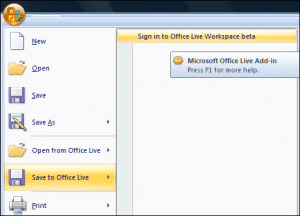
Still, eventually I appear to have all the pieces in place. I type a new document in Word and click the Office button. I now have a new option, Save to Office Live:

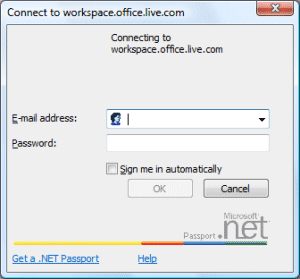
Cool. I click Sign in to Office Live Workspace beta. Prompt comes up:

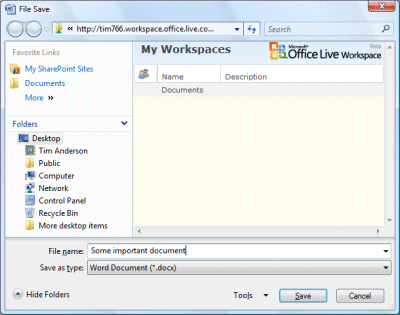
One of my problems is that I refuse to check “Sign me in automatically”. I don’t like it; I consider it more secure to sign in and out of services as I need them. There’s also a problem if you have more than one Live ID. Unfortunately some services deliver a poor user experience if you don’t sign in automatically, and I suspect Live Workspace is one of them. Anyway, I sign-in and wait 10-15 seconds. Then I get this dialog:

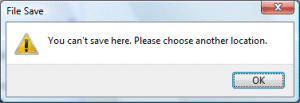
I hit Save. Mistake: I get this dialog:

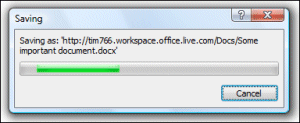
OK, my error was not to select a folder within the workspace. Easy mistake to make though, and the error message could be better. I double-click Documents and retry. I get this progress bar:

Takes a few seconds, and I’m done.

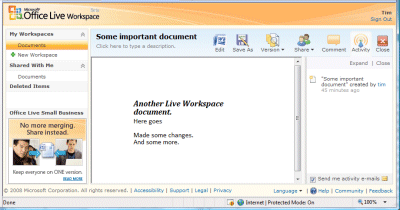
Once your document is online, it is accessible over the web with an neat in-browser preview:

The toolbar has some handy options including versions and sharing:

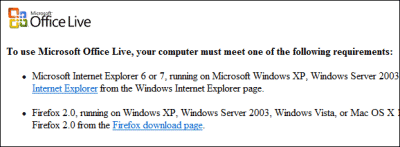
I love it; but have two reservations. First, the painful setup, sometimes slow performance, and occasional strange errors, like the fact that Office Live sometimes decides my IE7, fully patched browser is not up to scratch:

If I recommend this to my contact, what’s the chance that I’ll get a call concerning some odd behaviour or failure with the Live client, or the Office Live add-in, or Internet Explorer, and end up (as so often) troubleshooting Windows instead of getting on with work?

Second, I’m concerned about availability in a business context. If a customer calls you, and you need to see a document, what if Live Workspace (or Google Docs,  or any online service) is temporarily unavailable? You give that lame excuse, “We’re having computer problems, can you call back?”; or else keep offline copies – but if you keep offline copies, getting the workflow right becomes difficult. I notice that Netdocuments has a Local Document Server option which may fix this. SharePoint solves this to some extent with Outlook lists, but I’m not convinced that these work well enough with large document libraries, and I don’t know if Live Workspace offers them.

That is the beauty of seamless online/offline solutions like Live Mesh, or indeed Subversion, or some future Google Docs with Gears doing the offline stuff.

Finally, why is Microsoft offering both Live Mesh and Live Workspace? Different teams I guess; but it makes a confusing offering overall.

More RSS madness from Microsoft – this time it’s Live Mail

Once upon a time I was enthusiastic about the “common feed list” in Windows. I thought there was all sorts of potential for sharing and synchronizing content across the network. When it was introduced, Microsoft called it the Windows RSS Platform, though it gets installed as part of IE7.

What’s curious is that even Microsoft doesn’t seem to use the platform in the way it was (presumably) intended. I opened up Windows Live Mail 2009 today (I use it only occasionally as a newsgroup reader), and was puzzled to see 6724 unread feed items.

What’s going on? Well, I use the IE7 feed list and access it either in IE7 or in my own home-brew reader, which uses the COM API to the common feed list.

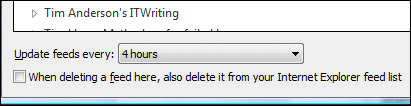
Windows Live Mail had grabbed the list of feeds and made its own copy of all the data. Am I sure? Yes, first because of this suspicious option in Live Mail:

“When deleting a feed here, also delete it from your Internet Explorer feed list” – implying synchronization, not a common database. Note also the jargon; the Live Mail folk clearly think of this as a feature of IE, not a feature of Windows.

I also took a look in:

C:\Users\USERNAME\AppData\Local\Microsoft\Windows Live Mail\Your Feeds\

and there is was, a copy of all the entries in X-MimeOLE format. The real common feed list, by contrast, is stored in:

C:\Users\USERNAME\AppData\Local\Microsoft\Feeds

It is not quite as bad as it first appears. When I chose to sync the feeds in Live Mail, the unread items synchronized with those in IE7. I am also hopeful that the data is only retrieved from the Internet once. though it is hard to be sure. A quick experiment suggests that if you delete a feed in IE7, it stays in Live Mail, though it no longer updates (one or other of these facts could be a bug). If you delete a feed in Live Mail it is deleted from IE7 unless, presumably, the box in the dialog above is checked.

The Outlook team made a similar error, but worse, because the feeds end up messing up your Exchange mailbox as well.

So why doesn’t Live Mail simply present a view of the common feed list, like my home-brew reader? Well, maybe the API is not robust or fast enough. The solution then is to fix the common feed list, not to do all this error-prone synchronization.

The whole thing would make more sense if the feed list was synchronized with the cloud, so that I could also read my feeds on the Web, in the style of Google Reader. Despite the name, Live Mail seems thoroughly bound to the desktop. It is simply an update to Outlook Express.

Microsoft Expression Web causes PHP error

I ran into a strange and surprising PHP error today. I’m working on a little PHP application which has a login page. The login script calls session_start() to start or resume a PHP session. It was working OK so I decided to decorate the page a little (I was working in Eclipse). I like to try a variety of tools, so I ran up Microsoft’s Expression Web, added an image, then re-ran the script to see how it looked.

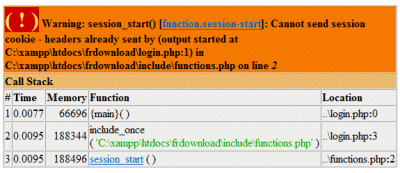
The answer was not good, because I now had an error:

Warning: session_start(): Cannot send session cookie – headers already sent

I puzzled over this for some time. The error was in line 0 of my login page. I couldn’t see anything that was different from before, except the static image that meant nothing to PHP.

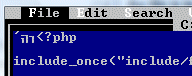
Eventually I worked it out. Eclipse (running on Windows) created the PHP files using ANSI. On saving, Expression Web silently changed them to UTF-8. That in itself was no bad thing – it’s usually a better choice – though I reckon it should ask. The bigger problem was that Expression also added a BOM (byte order mark) to the beginning of the file. This is actually optional for UTF-8, and most non-Windows editors do not add it. It happens to flummox PHP, which interprets them who-knows-how and sends some output to the browser, preventing session_start from working.

This is particularly painful to debug since most editors do not display the BOM; they simply use it to confirm the character set in use. So you can have file A which works, and file B which does not, and they are character-by-character identical.

One way to see and remove the BOM is to open it with Edit.com, which does not understand it at all:

I guess both Expression and PHP could do better here. The bit that puzzles me is that I can’t be the first to run into this. Doesn’t Microsoft know that its UTF-8 BOM breaks PHP files, at least on the two versions I tried (XAMPP on Windows and PHP 5.2.1 on Linux)? I can’t even see a preference in Expression that would prevent it being written. And if you remove it, and then re-edit in Expression, it carefully writes it back. Unlike Adobe’s Dreamweaver, which leaves well alone.

PS if you want to know all about BOMs, see here.

Update: See comments – apparently this was fixed in Expression Web 2.0. Tina Clarke discusses the problem here.

Microsoft Small Business Server 2008 too expensive for hardware, market

When Microsoft introduced Small Business Server 2008, it upped the price of the base package and reduced the cost of client access licenses.

That’s OK for the, umm, larger small business; but it’s made the product expensive for those tiny setups who only need 5 or 10 CALs.

RIght now, ebuyer.com is offering SBS 2008 Standard for 835.49+VAT and an OEM version for £535.55+VAT.

By contrast, you can get the old SBS 2003 Standard OEM for £275.90+VAT.

Suitable servers on the other hand are now at rock-bottom prices. If you are lucky you can pick up an HP ML110 for around £200+VAT (try Amazon). Of course you have to add some RAM and probably a second hard drive for RAID, but neither is particularly expensive.

The 2003 edition was better value. This has also made Linux more attractive for those with the skills to look after it, and businesses that are not saddled with Windows-only software that has to run on the server.

Technorati tags: , , ,

10 steps to a well-behaved Windows application

I wrote a short summary of Microsoft’s latest (I think) guidelines for well-behaved Windows applications.

It is a significant topic. A large part of the thinking behind Vista’s contentious User Account Control (which is being continued in Windows 7) is to push app developers into writing applications that conform more closely to the guidelines, especially in respect of where they write data. If all applications conformed, there would be little need to log on as local administrator, and Windows would be more secure.

Windows 7 beta image gallery

The Guardian has posted a gallery of screenshots I took from the Windows 7 beta.

It includes an actual Device Stage, for the Sansa Clip. I did actually use this to update the firmware, which is not something you can do from the generic device connection dialog. It wasn’t truly seamless though, involving a download and a separate setup application.

I also illustrated the Library feature with three screenshots. The third of these illustrates a wee snag with this feature – documents with the same name, but in different folders, can appear identical in some views.

You can get a similar effect in Vista. If you look in \users\public with hidden items showing, you’ll find a folder called Public Desktop. Items in this folder show on your desktop merged with items in your user desktop. Put an item here with the same name as one in your user desktop, and both appear without any indication that they are different. This is also the reason why desktop.ini appears twice on the desktop if you show hidden files.

I guess it’s something users won’t run into very often (it’s pretty hard to do by accident in Vista); but it would be good if Windows could detect this situation and indicate it in some way. Bad outcomes would be if you deleted one of them thinking it was a duplicate, and lost some data; or sent someone a draft thinking it was the final version.

Technorati tags: , ,