Category Archives: windows

New in Windows 7 RC: Windows XP Mode, Remote Media Streaming

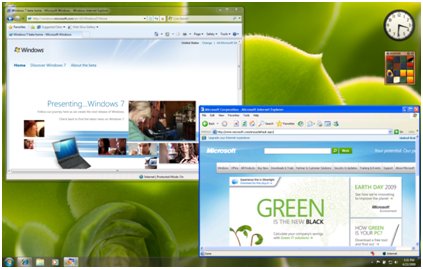
A new feature in Windows 7 has been announced as part of the Release Candidate rollout. Called XP Mode (XPM), it lets users run applications in a virtual instance of Windows XP itself, for excellent compatibility. Although not part of the retail Windows 7, XPM will be a free download or may be installed at no extra cost by PC vendors.

The neat aspect of this is that XP applications don’t have to run within an XP desktop, but can be published to the host system. What this means is that users can start an XP application from the Windows 7 desktop, and only see the application window. This is more user-friendly than having to cope with two operating systems at once.

The main advantage is compatibility. Since this really is XP, pretty much anything that works on XP should run correctly. That said, since the hardware is virtualized there could be issues with some devices, or with applications that require accelerated graphics.

Another aspect is security. For example, if you have some applications that do not work properly with UAC (User Account Control) enabled, you can run them in XP Mode rather than compromising the security of the entire system.

It is a clever move from Microsoft, since it will remove most compatibility concerns that could otherwise impede adoption.

Another interesting new feature is Remote Media Streaming:

Windows 7 offers new functionality called Remote Media Streaming that enables you to access your home-based digital media libraries over the Internet from another Windows 7-based computer outside the home. Simply associate two or more computers running Windows 7 with your online ID provider credentials (such as your Windows Live™ email address and password) and allow Internet access to your media.

says the press release. This feature extends to any PC in your home network, so if you have a fast enough connection you need never be parted from your music. Then again, you could just run Spotify. There’s also support for MOV files in Windows Media Player.

There’s a few more detail changes in the UI; I’ll report further when I’ve had a look.

Windows 7 RC will be released to Technet and MSDN subscribers on April 30th, and made generally available on May 5th.

Microsoft’s quarterly results: will it ever make sense of the cloud?

Most comments on Microsoft’s quarterly results are understandably focused on the overall picture: a quarterly revenue decline for the first time ever.

Revenue decline can be forgiven during a recession, but it’s more interesting to look at the breakdown. I made a simple quarter-on-quarter table to look at the pattern:

Quarter ending Mar 31st 2009 vs quarter ending March 31st 2008, $millions

Client Revenue % change Profit % change
Client (Windows) 3404 -15.6 2514 -19.29
Server and Tools 3467 7.07 1344 24.44
Online 721 14.47 -575 -154.42
Business (Office) 4505 -4.78 2877 -7.99
Entertainment and devices 1567 -1.57 -31 -129.25%

The weak Windows client figures are unsurprising. The poorly-received Windows Vista is out in the market, and the highly-praised Windows 7 is being prepared for release. When anyone asks me, I suggest that they should wait for Windows 7 before buying a new PC or laptop, if they are in a position to delay.

The Business division (Office) remains massively profitable, even though it too has declined a little. Office may be ludicrously expensive, but there’s little evidence of a significant shift to cheaper or free alternatives.

It’s also notable that the server and tools business continues to perform well. Again, I’m not surprised: Server 2008 strikes me as a solid product, and there’s not much wrong with products like SQL Server 2008 and Visual Studio.

Not much to say about entertainment and devices. Xbox is doing so-so; Windows Mobile is rather a mess.

The real shocker here is the online business. Revenue is down and losses have grown. It is no use just blaming the recession: this is a sector that is growing in importance. Should Microsoft back out and leave it to Google? That would be as if Kodak had refused to invest in digital photography. But something is badly wrong here.

That said, I’m guessing that the figures mostly represent the failure of the various Windows Live properties to attract advertising income; the small market share of Live Search must be an important factor. The newer cloud computing business model, where Microsoft sells subscriptions to its online platform and services, is largely still in beta – I’m thinking of things like Windows Azure and Live Mesh. Further, I’m not sure where Microsoft puts revenue from things like hosted Exchange or hosted Dynamics CRM, which straddle server and online. There is still time for the company to get this right.

I’m not convinced though that Microsoft yet has the will or the direction to make sense of its online business. Evidence: the way the company blows hot and cold about Live Mesh; the way SQL Server Data Services was scrapped and replaced by full online SQL Server at short notice; and the ugly and confusing web site devoted to Windows Azure.

When I looked at Virtual Earth recently I was impressed by its high quality and ease of development. It illustrates the point that within Microsoft there are teams which are creating excellent online services. Others are less strong; but what is really lacking is the ability to meld everything together into a compelling online platform.

That could change at any time; but we’ve been waiting a long while already.

Ubuntu 9.04 not so jaunty

I still love Ubuntu, but it’s hard to find much to enthuse about in the latest release, 9.04 also known as Jaunty Jackalope. As this post observes, most of the changes are under the hood, so users will not notice much difference from the previous release, Intrepid Ibex or 8.10. Well, there’s faster start-up, and Open Office 3.0 – but then again, I installed Open Office 3.0 as soon as Intrepid came out, so this is not really exciting.

My own upgrade went better than the last one, but I’ve still had problems. Specifically:

  • I had to edit Grub’s menu.lst manually after the upgrade. I always have to do this, since it detects the hard drive configuration incorrectly.
  • My Adobe AIR installation was broken and had to be re-installed
  • I’ve lost hardware graphics acceleration and desktop effects. This is a laptop with embedded Intel graphics; apparently this is a common problem and Intel graphics support in Jaunty is work in progress. See here for more details an experimental suggested fix, which is not for the faint-hearted.

There are other updates, of course, and I was glad to see Mono 2.0.1 and MonoDevelop 2.0 available in the repository, for .NET development on Linux. If Jaunty is the same as before, but faster and more stable, that is no bad thing, though the shaky Intel graphics support undermines that argument.

My question: why is Canonical persevering with its policy of supposedly major releases every six months? This looks to me like a minor update; would it not be better presented as updates to 8.10, and focusing efforts on 9.10 in October? Six-monthly releases must be a heavy burden for the team.

I don’t mean to put you off Ubuntu. It is well worth trying either as a companion or alternative to Windows and Mac.

Update:

I have fixed my desktop effects. How? First, a little more about the problem. DRI (Direct Rendering Infrastructure) was not enabled. My graphics card (from lspci –nn | grep VGA) is:

Intel Corporation Mobile 945GM/GMS, 943/940GML Express Integrated Graphics Controller [8086:27a2] (rev 03)

The problem I had before was reported in Xorg.0.log as:

Xorg.0.log:(EE) intel(0): [dri] DRIScreenInit failed. Disabling DRI.

I also noticed that /dev/dri/card0 did not exist on my system.

Well, I tried the technique described here. That is, I booted into an older version of the kernel; the oldest available on my system being 2.6.22.14. DRI magically started working. Then I rebooted into the latest version of the kernel, 2.6.28.11. DRI still works. So I am sorted. I’d be interested to know why this works.

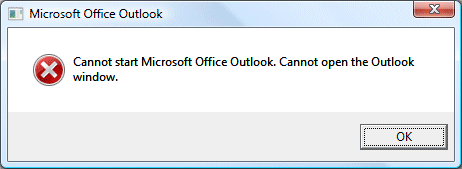
Cannot open the Outlook window – what sort of error message is that?

I’m actually enjoying Outlook 2007 on my desktop, especially since applying the February patch. It opens in a couple of seconds even from cold. I’m running on Vista 64-bit, and not using cached Exchange mode.

Until today, that is. Started Outlook and got this bewildering message:

This Microsoft article suggested I might not have a default gateway. That was nonsense; so I opened Mail setup (I can get to this through the Properties of the Outlook shortcut), clicked Show Profiles, added a new profile and set the new one as default.

Outlook works fine now. I’m not impressed with the error message though.

Update

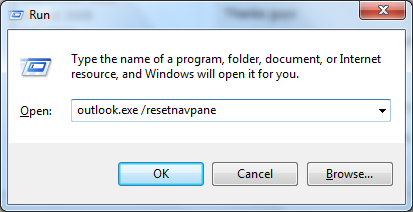
While using a new profile works, there is an easier fix as noted in many of the comments to this post. You can run Outlook with the /resetnavpane argument. Here’s the step by step:

1. Press Windows key and R together to open the Run dialog.

2. In the Open field, type:

outlook.exe /resetnavpane

image

Note: there is a space between outlook.exe and /resetnavpane. There are no other spaces in what you have to type.

3. Click OK. Outlook should open.

Helpful post? Sponsor ITWriting.com for ad-free access to the site

RIA (Rich Internet Applications): one day, all applications will be like this

I loved this piece by Robin Bloor on The PC, The Cloud, RIA and the future. My favourite line:

Nowadays very few Mac/PC users have any idea where any program is executing.

And why should they? Users want stuff to just work, after all. Bloor says more clearly than I have managed why RIA is the future of client computing. He emphasises the cost savings of multi-tenancy, and the importance of offline capability; he says the PC will become a caching device. He thinks Google Chrome is significant. So do I. He makes an interesting point about piracy:

All apps will gradually move to RIA as a matter of vendor self interest. (They’d be mad not to, it prevents theft entirely.)

Bloor has said some of this before, of course, and been only half-right. In 1997 he made his remark that

Java is the epicenter of a software earthquake, and the shockwaves are already shaking the foundations of the software industry.

predicting that Java browser-hosted or thin clients would dominate computing; he was wrong about Java’s impact, though perhaps he could have been right if Sun had evolved the Java client runtime to be more like Adobe Flash or Microsoft Silverlight, prior to its recent hurried efforts with JavaFX. I also suspect that Microsoft and Windows have prospered more than Bloor expected in the intervening 12 years. These two things may be connected.

I think Bloor is more than half-right this time round, and that the RIA model with offline capability will grow in importance, making Flash vs Silverlight vs AJAX a key battleground.

Mono creeping into the mainstream?

For those of you who have not already seen this link on Twitter: I’ve posted a short piece on Mono, the open source implementation of Microsoft .NET. The piece was prompted by my own experience writing a simple .NET application in Visual Studio and deploying it to Linux. Admittedly I anticipated the move by using MySQL rather than SQL Server as the database; but even so, I was impressed by how easy it was – I spent more time recently deploying an application from Visual Studio 2008 to Windows Server 2008, thanks to some issues with SQL Server Express.

Don’t Miguel de Icaza’s comment about scalability and garbage collection, two of the factors that have deterred some from real-world Mono deployments.

Hands on with ASP.Net Membership, SQL Express and Server 2008

Is it worth using the built-in membership framework in your ASP.Net application, or should you roll your own? I’ve been trying it out recently, and I have mixed feelings.

On the plus side, it does get you up and running quickly with user login and role-based permissions, saving time and possibly achieving more reliable results, on the grounds that Microsoft and countless other users should have found and fixed any bugs by now.

One the negative side, there are annoying limitations. The most obvious one is that a user as defined in the framework only has a minimal number of fields, not including information you probably want to store like first and last name. You are meant to fill this gap by using profiles, another ASP.Net feature which lets you store arbitrary name-value pairs in a database as a kind of persistent session. That works, but the way profile properties are stored makes it hard to do things like sorting users by last name. Therefore, you will probably end up managing your own user database and joining it to the membership system with the user ID, at which point you begin to lose some of the benefits.

Some of the supplied controls, like the CreateUserWizard, seem rough-and-ready too.

Still, the real fun began when I tried to deploy my demo app to Server 2008 and SQL Server Express 2008. By the way, make sure you install .NET Framework 3.5 SP1 and Windows Installer 4.5 before installing the latest SQL Server Express, otherwise the setup spends ages unpacking its files and then exits with a brief message. I got there eventually, copied my application across, and optimistically tried to run it.

When you debug a web application in Visual Studio, it defaults to a SQL Express database in the App_Data folder within the web site, attached on demand. In theory, that should make it easy to deploy to another machine with SQL Express installed: just copy it across, right? There must be a way of getting this to  work, but it seems a lot of people have problems. I got the message:

Login failed for user ‘NT AUTHORITY\NETWORK SERVICE’.

This makes sense, insofar as ASP.NET runs as this user. I temporarily attached the database and added the login, to be rewarded with a different and more perplexing error:

Failed to generate a user instance of SQL Server due to a failure in starting the process for the user instance.

A quick Google shows that many users have suffered from these errors, and that a large number of remedies have been proposed. I abandoned the idea of attaching the database on demand and set up a new database, made ready with Aspnet_regsql. I still got one or other of these errors.

Eventually I realised that my application was using more than one connection string. The problem is that the membership framework uses three different "providers", one for membership, one for roles, and one for profiles. By default in IIS 7.0, these all use an attach-on-demand connection string, defined as LocalSqlServer, and inherited from machine.config buried deep within your Microsoft .NET Framework system folder. In order to prevent ASP.Net membership from using this, you have to override all three providers in the web.config for your application. There’s an example in this article from ISP MaximumASP. I wish I’d come across it sooner; but my demo works fine now.
Hyper-V disk I/O: performance of dynamic vs fixed virtual hard disks

The dynamic virtual hard drive is one of the best things about virtualization. It is like Dr Who’s Tardis. The virtualized OS thinks it has plenty of space, while on the host machine your 128GB virtual drive might occupy just 4 or 5GB – this is typical of the test VMs I set up, running say Server 2008 and a server application or two.

Trouble is, there’s a performance penalty. I first came across this with a hilariously slow Ubuntu install, where the problem is made worse by the lack of integration services, the utilities and drivers that install into the guest to enable smooth interaction with the host.

As an experiment, I created a second Ubuntu VM using a 30GB fixed-size drive. Better? Yes, much better. Here are the figures on my admittedly slow low-end HP Xeon server:

Copy an 891MB file:

  • Ubuntu 8.10 on 127GB dynamic drive with 1GB RAM: 6 min 45 secs
  • Ubuntu 8.10 on 30GB fixed drive with 1GB RAM: 3 min 15 secs

As a further test, I copied the same file in Server 2008:

  • Server 2008 on 127GB dynamic drive with 2GB RAM: 5 min 55 secs

My immediate thoughts: you would be crazy to use VMs in production with dynamic drives. Always use fixed drives. You can still expand them manually if necessary. Note that Hyper-V defaults to dynamic drives.

Still, these tests are not extensive or rigorous; I’d be interested in other results. I’ll also be creating my next Server 2008 VM on a fixed drive and will repeat the test there.

I’ve posted some further hyper-v tips and gotchas here.

Technorati tags: , ,

How Hyper-V can seem to lose your data

I’m sure it can really lose your data as well, but in this case “seem” is the appropriate word. I’ve been messing around with Hyper-V and one of my test machines is a SharePoint server. I started this up and found I could not access it over the network. On further investigation, it turned out to be a broken trust relationship with the Domain Controller. In other words, on attempting to log on with domain credentials I got the message:

The trust relationship between this workstation and the primary domain failed

The official advice when confronted with this problem is to remove and re-join it to the domain, creating a new computer account. I did so. Logged on, and was disappointed to discover that SharePoint was now empty. Worse still, even checking out the SQL Server databases did not uncover them. All my documents had vanished.

It turned out that I had done the wrong thing. What had really happened is that Hyper-V had been saving my changes on that virtual hard drive to a “differencing disk”, a file with an .avhd extension. This is part of the Hyper-V snapshot system. Somehow, Hyper-V had forgotten the differencing disk, and started up my SharePoint VM using the last fully merged copy of the drive, which was over a month old. My drive had gone back in time, so the data had gone.

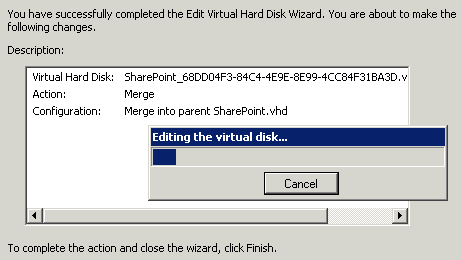
The solution was to restore the old parent .vhd from backup, and then manually merge it with the differencing file. Step by step instructions are here. Since I had deleted the original computer account, I then had to remove and rejoin the machine to the domain a second time. All was well and my data reappeared.

The bug here is how Hyper-V managed to start with an old version of the virtual hard drive in the first place. I can imagine this causing panic if it occurs in production – and once you start writing new, important data to the old version you are really in trouble. I was lucky that the discrepancy was severe enough that Active Directory complained.

Virtualization may be wonderful; but it also introduces new problems of its own.

The other lesson is that those .vhd files in C:\Users\Public\Public Documents\Hyper-V\Virtual Hard Disks do not necessarily contain your latest data. You also need to consider the .avhd files stored handily at C:\Program Data\Microsoft\Windows\Hyper-V\Snapshots.

Technorati tags: , , ,

Fixing the Exchange 2007 quarantine – most obscure Outlook operation ever

I’ve been testing Exchange 2007 recently and overall I’m impressed. Smooth and powerful; and the built-in anti-spam is a great improvement on what is in Exchange 2003. One of the features lets you redirect spam to a quarantine mailbox. You know the kind of thing: it’s a junk bucket, and someone gets the job of sifting through it looking for false positives, like lotteries you really have won (still looking).

Sounds a nice feature, but apparently Microsoft did not quite finish it. The quarantine is a standard Exchange mailbox, which means you have to add a quarantine user. To view the quarantine, you log onto that mailbox. A bit of a nuisance, but not too bad once you have figured out the somewhat obscure means of opening another user’s mailbox within your own Outlook. You’ll notice a little usability issue. All the entries are non-delivery reports from the administrator. You cannot see who they are from without reading the report, making it harder to scan them for genuine messages.

Another issue is when you find an email you want to pluck out of the bucket. My guess is that you will need to Google this one, or call support. The trick is to open the message, and click Send Again. It is counter-intuitive, because the message you are sending again is not the one you can see – that’s the Administrator’s report – but the original message which is otherwise hidden.

So you hit Send Again. As if by magic, the lost message appears. Great; but there’s another little issue. If you hit Send, the message will be sent from you, not from the original sender.

Both issues can be fixed. The fix for Send Again is to log on as the quarantine user – opening the mailbox is not enough. Since it is not particularly easy to switch user in Outlook, the obvious solution is Outlook Web Access; or you could use Switch User in Vista to log on with Outlook as the quarantine user. Send Again will then use the original sender by default.

How about being able to see the original sender in Outlook? No problem – just follow the instructions here. I won’t bore you by repeating them; but they form, I believe, a new winner in the Outlook obscurity hall of shame. After using Notepad to create and save a form config file, you use the UI to install it, and here’s a screenshot showing how deeply the required dialog is buried:

A few more steps involving a field picker dialog reminiscent of Windows 95, and now you can see all those faked sender email addresses:

The mitigating factor is that the anti-spam rules themselves are pretty good, and I’ve not found many false positives.