Category Archives: windows

Lively attack on Microsoft’s poor marketing – from within

Microsoft employee Kirk Allen Evans has a go at Microsoft’s marketing efforts:

I am so completely and utterly sick, as an employee and a Microsoft shareholder, of seeing empty spending on crap like "People_Ready".  Remember the completely ridiculous Office Dinosaur spots?  C’mon, marketing, grow a pair… let’s see some results.  No, I don’t want to see a retort ad making fun of the "I’m a Mac, I’m a PC" goons.  That ship has long since sailed.  Let’s see what all that Microsoft money and some of the smartest people in the world can come up with.

He’s right. So are the comments to his post, observing that marketing isn’t the only problem, or even the core problem.

Still, Vista is now actually better than its reputation. That’s a marketing issue.

Technorati tags: , ,

Sample code for a very very simple VB database application

I wrote a short piece for Personal Computer World about making a simple Windows Forms database application. I did this because I get a lot of enquiries about it, and search hits to this site looking for samples.

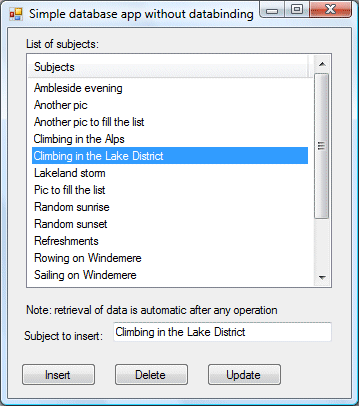
The piece is actually in two parts. Part one shows how to do CRUD without any databinding or datasets.

You can download the code here – but please don’t bother if you can already do this in your sleep. The app is for Visual Basic Express 2008.

Part two is about using the VB wizards to create an app with a typed dataset, TableAdapters and so on. The database is SQL Server CE, which is well suited to this kind of application. It is the default in Visual Studio 2008 even though it turns out not to be fully compatible with the wizards. Typical Microsoft – simple, but with enough gotchas to frustrate beginners and keep experts in business.

I ran into another little puzzle while doing the sample. I needed to populate the listbox with both a string value and the ID that is the primary key in the database table. The way I would do this normally is to create a custom class to represent the record, implement a ToString() that returns the display value, and add instances of this object to the listbox. I wanted an even simpler way though, so I decided to use a ListView. This lets you add items that have both a key and a value. You can do this with one of the overloaded Add methods for a ListViewItemCollection, documented like this:

Creates an item with the specified key, text, and image and adds an item to the collection.

The strange thing is, the ListViewItem has no key property. So how do you retrieve the value of the key?

The answer is that the ListViewItem.Name property returns the value of the key. So the key is the name. Why not call it the name in both places? Or the key?

I guess that would be too easy.

What’s new in Subversion 1.5

The team behind the open source SCM (Software Configuration Management) tool Subversion released version 1.50 last month. Karl Fogel, president of the Subversion Corporation, says:

Measuring by new features alone, Subversion 1.5 is our biggest release since version 1.0 became available in February 2004.

I am a contented Subversion user, so took a look at the changes. Top of the list is “merge tracking”, though it is described as “foundational” which means that although the basic support is there, there is performance and feature work which remains to be done. From the user’s perspective, the difference is that branching and merging is just easier than before, as explained by Ben Sussman:

Notice how I never had to type a single revision number in my example: Subversion 1.5 knows when the branch was created, which changes need to be synced from branch to trunk, and which changes need to be merged back into the trunk when I’m done. It’s all magic now. This is how it should have been in the first place.

Other changes include sparse checkouts (when you only want to grab a small part of a repository), and changelists, a client feature which lets you tag a set of files under a changelist name and work on them as a group. There are also improvements aimed at making Subversion better suited to large-scale deployments using multiple servers. Subversion is still a centralized rather than a distributed SCM system, but 1.5 is better suited for use in a distributed manner. No doubt the Subversion team is aware of the increasing interest in Git, a distributed system. There are also numerous bug-fixes and performance tweaks. The changes are described here.

I want to move to Subversion 1.5 but it is not that easy. Compatibility is good, in that older clients work with 1.5 servers and vice versa, the main proviso being that you cannot mix several versions of the Subversion client with the same working copy. That is not likely to be a problem for most users.

The difficulty I encountered is that mainstream Linux distributions still have older versions of Subversion in their stable repositories. Ubuntu, for example, has version 1.4.4. My most-used Subversion repositories are on a Debian server, which also has an old version. I don’t want to switch the server to sid, Debian’s development distribution, and mixing packages is often problematic. I could do a manual installation I guess; but instead I will be patient.

I did install 1.50 on Windows, for an intranet repository. I used the Collabnet download. All I needed to do was to inform the installer of the location of my existing repository, and then copy a few lines from the old Apache 2.0 configuration file to the new Apache 2.2 configuration file. Everything works fine. I also updated TortoiseSVN on the Windows clients.

One of the advantages of Subversion (or any SCM) repositories over synched folders like those in Microsoft’s Live Mesh or Apple’s MobileMe (as I understand it) is that you get version history. I regard this as a key feature. The problem with synchronization is that you might overwrite a good copy with a bad one. It is easy to do; it might be caused by user error, or a bug in your word processor, or a failing hard drive. Automatic synch (un)helpfully replicates the bad copy all over. Versioning means you can just rollback to the good one.
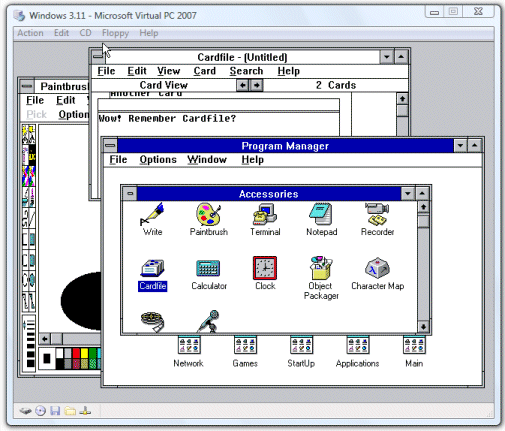
Windows 3.1 in a Virtual Machine – Virtual PC wins this one

Andrew Brown asked about how to run Windows 3.1.

It is not too difficult, provided you have access to the install disks for DOS and Windows. An MSDN subscription will do. I tried Virtual Box with MSDOS 6.22 and Windows for Workgroups 3.11. Although it installed OK, it freezes if you use the mouse. Known bug apparently.

I tried Virtual PC instead. Microsoft wins this one: everything was fine.

I used the same procedure both times. It is slightly fiddly. I downloaded MSDOS 6.22 and WFW 3.11 from MSDN (subscription required). For some reason, the MSDOS you can download is an upgrade version. Therefore, I also downloaded a floppy image for 6.22 from bootdisk.com. This one is handy because it has a CD ROM driver. Note that my PC does not have a floppy drive. Here are the steps I used:

1. Make an ISO CD image including the WFW and MSDOS 6.22 files.

2. Boot a new VPC from the bootdisk floppy. FDISK and FORMAT /S to setup up drive C.

3. Mount the MSDOS 6.22 CD. Boot again from the bootdisk floppy. Copy setup files from MSDOS and WFW to C.

4. Boot from C. Run setup for MSDOS. Run setup for WFW.

5. Copy the CD driver and configuration from the bootdisk.

Since there is knowledge locked up in old, obsolete executables, the ability to run this stuff in VMs is reassuring.

Technorati tags: ,

Microsoft MSMVPs blog site taken over by malware

Susan Bradley is blogging about a break-in on the server that runs numerous blogs for Microsoft MVPs (Most Valuable Professionals).

She describes spotting a service that turned out to be the W32/Rbot-GOS work with IRC backdoor functionality.

Currently she doesn’t know how it happened, but promises to let us know; it’s also being investigated by Microsoft support.

Kudos to Bradley for being open about this. It’s embarrassing for someone with deep expertise who blogs about security; on the other hand it demonstrates what a tough problem this is. I’ll be watching with interest for the further analysis.

Wine is 1.0

Congratulations to the Wine community which has released Wine 1.0:

The Wine team is proud to announce that Wine 1.0 is now available. This is the first stable release of Wine after 15 years of development and beta testing.

Wine is a compatibility layer that enables Windows applications to run on Linux, Mac OS X, and other Unix-like systems.

Although in beta, Wine has been used in numerous commercial applications over the years. Two I can think of: WordPerfect 9 from Corel, and the Kylix IDE from Borland. More accurately, Kylix used Winelib, which uses the Wine API at compile-time rather than at runtime.

Another notable example is Google’s Picasa for Linux.

Despite this landmark, Wine seems less significant now than it did a few years back. For one thing, it is easier to write a cross-platform application. For another, web applications have grown in importance, reducing the number of native applications we need to run. Finally, virtualization is now a better, more compatible route to running Windows apps on Unix in many scenarios.

Technorati tags: , , , ,

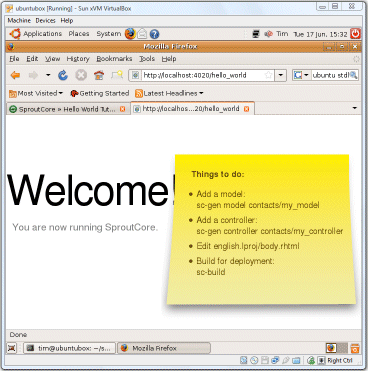
Installing SproutCore on Ubuntu on VirtualBox

If you check out the installation instructions for SproutCore you will notice that Windows developers are not really catered for (though I am sure it can be done). I also noticed some Windows issues in the Sproutcore forum. More evidence of the Windows/Unix disconnect.

Having been impressed by VirtualBox recently, I figured it might be easier to use VirtualBox and Ubuntu.

Here’s how it went. I ran up a new VirtualBox image and installed Ubuntu. Very easy; just point VirtualBox to the Ubuntu install iso. This worked, except that Ubuntu did not recognize the video driver and defaulted to 800 x 600 resolution. Solution: install dkms in Synaptic (or using apt-get); then install the VirtualBox Linux Additions. That gave me 1024 x 768, which is good enough.

Next, you need to install Ruby (developer version) (use sudo or root)

apt-get install ruby

apt-get install rubygems

apt-get install ruby1.8-dev

and some build tools as one of the SproutCore dependencies (hpricot) calls make when installed:

apt-get install build-essential

I thought that would be enough, but my first go at installing SproutCore failed, apparently because gem is not on the path. Although it seemed to work, I got “command not found” when running sproutcore. So:

export PATH=$PATH:/var/lib/gems/1.8/bin

Now you can install SproutCore:

gem install sproutcore

Several components, such as hpricot, ask which version to install. I chose the variant designated (ruby).

After that, the Hello World tutorial ran exactly as expected.

By the way, although this example makes it look as if SproutCore is a dynamic server framework, it is not. The usual way to deploy a SproutCore application is as static files; the server arrangement is for debugging.

Note: the command above only amends the path for the current session. To make it permanent, I added the following to lines to the end of /etc/profile (needs root permissions to edit)*:

PATH=$PATH:/var/lib/gems/1.8/bin
export PATH

*See comment below for an even better suggestion.

Why developers don’t write apps for Vista

From Evans Data we get this statistic (email address required):

Only eight percent of North American software developers are currently writing applications to run on Microsoft’s Vista operating system, while half are still writing programs for XP, according to Evans Data’s Spring 2008, North American Development Survey. These same developers forecast a fragmented Windows market in 2009 with only 24 percent expecting to target Vista and 29% expecting to continue with XP.

Matt Asay picks this up, saying that 92 percent of developers are ignoring Vista.

Sorry, this is silly. Sane Windows developers are writing apps that work on both XP and Vista. Writing an app that only works on Vista is equally as short-sighted as writing an app that only works on XP. Even WPF apps work on XP. So what are these 8% of Vista-only developers doing? Targeting DirectX 10?

Or did they get a somewhat ambiguous questionnaire and were collectively inconsistent over which boxes they ticked?

I agree that Vista has some problems, but this is not a useful analysis.

Two more interesting questions would be:

1. What proportion of developers are starting new projects that are cross-platform rather than Windows-only?

2. What proportion of developers are starting new projects that run from the Internet with zero desktop install, or maybe just a plug-in dependency?

There is a reason why Microsoft is fighting to establish Silverlight, and why Flex and Flash are suddenly so interesting to developers.

Technorati tags: , , , , ,

UK official tax CD caught by Vista’s virtual store

In the UK, HM Revenue and Customs issues an Employer CD-ROM which calculates tax and national insurance. Small businesses can use it to enter pay details through the year; then at the end of the tax year the application allows uploading of the data as the company’s formal annual submission.

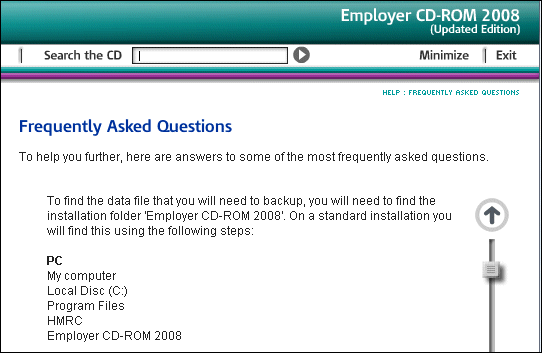
Very handy; but clearly it’s important to backup the data. There is an entry on this in the CD’s online Help:

We recommend that you backup the data after each pay period and keep it separate from the computer.

Good advice; but the instructions puzzled me. It says all the data is in the program files folder (in breach of Microsoft’s guidelines, even though this is a 2008 CD), and that to backup:

Copy the folder named ‘Data’ to your chosen means of backup. (To copy, right click the folder and select ‘Send to’).

I found this surprising because on Vista the Program Files directory is read-only. I checked; and there is no user data in this folder on Vista. Instead, the data is in Vista’s Virtual Store, and you can find it at:

C:\Users\[Username]\AppData\Local\VirtualStore\Program Files\HMRC\Employer CD-ROM 2008\data

There’s a couple of issues here. First, why is the UK government sending out CDs that are not properly compatible with Windows Vista, more than a year after its release? The Virtual Store is a compatibility feature; it is not intended for long-term use.

More important, the backup instructions are plain wrong for Vista users. How many businesses out there have got carefully made backups of a folder that does not in fact contain their data?

In an official application used by many thousands of businesses, it’s a significant blunder.

Upgrading to Silverlight 2.0 Beta 2? Proceed with care

I dived straight into the Silverlight 2.0 Beta 2 download, and soon hit this dialog:

I discovered that I should have read this guide to installation by Microsoft’s Bradley Bartz. It is a little arduous: remove KB949325 (which requires the Visual Studio installation media) as well as any previous Silverlight SDK and tools, apply Visual Studio 2008 SP1 Beta if you have not yet done so, then install Silverlight. Otherwise you may get an error relating to silverlight_uninstallrtmpatches.exe as I did.

I’m grateful to BradleyB. I admit, the issue is also noted on the download page:

If you have previously installed Silverlight Tools Beta 1, you must uninstall KB949325 before installing Visual Studio 2008 SP1 Beta.

I should have read it more carefully.

Update

In my case, it was worse than that. I could not find KB949325 in the list of installed programs, but the Visual Studio SP1 Beta install still failed. I found this post by Heath Stewart. I had to follow the manual steps with reg.exe; the utility did not work for me. I also found that KB945140, which is the SP1 Beta, was actually listed as installed in Programs in Control Panel, but only for the Visual Studio 2008 Shell (Integrated mode). I removed that too. Eventually, SP1 Beta installed successfully, following which the Silverlight SDK and Blend 2.5 installed without further issue.

Stewart has not responded to Will Dean’s comment on his post:

It sometimes feels that VS + .NET FX are in a death-spiral of an ever-increasing prevalence of this sort of issue.   

For more evidence, see Aaron Stebner’s worrying posts about problems with the installation of .NET Framework 3.5 Client Profile. Apparently this beta, once installed, makes it hard to install other versions of .NET or applications which depend on them; and uninstall is a multi-step process that has to be done in a certain order.

The only positive thought I can muster from all these complications is that this is the kind of issue that running apps in the browser avoids, at least for users rather than developers. That assumes that the install for the Silverlight runtime is bulletproof; I’ve been impressed with it so far, though I’ve heard of some users having problems. The Flash runtime isn’t immune either; I’ve had issues installing the latest security update and resorted to Adobe’s Flash uninstaller.