Category Archives: windows

Windows 7 screenshots hit the web

Windows 7 screenshots are showing up, for example on thinknext.net and windowsvienna.com. Much to see? Well, ribbon UI in WordPad and Paint; a much-enhanced Calculator with Standard, Scientific, Programmer, Statistics and Date Calculation modes; and an IDE, sorry ISE (Integrated Script Environment) for PowerShell.

Presuming these are genuine, they don’t tell us a lot about Windows 7 except that, as widely predicted, it looks more like a refined version of Vista than something boldly different. Given that Server 2008 turned out nicely, I’d say that’s no bad thing.

For the official word on Windows 7, see the Engineering Blog.

Technorati tags: , , ,

Google Chrome for Mac and Linux will be a long while coming

When I looked at the Chromium source code and did a build, I noticed how much of it was Windows-specific. Although the WebKit rendering component is already cross-platform, it seems that the Mac and Linux versions of Chromium and therefore Chrome are a long way from ready. This is from the build notes for Mac OS X:

Right now, the Mac build is a work in progress that is much closer to the start than the finish. No application that renders web pages is generated at the end of these instructions!

Cross-platform work usually involves compromises, and it looks like the Google team pointed the dial more towards optimising for Windows than towards ease of porting. That surprises me, since it likely means more work maintaining the application for several platforms as well as delays now.

Chrome’s ambitions as an application platform cannot be realised until it runs on the Mac. Further, a disproportionate number of web designers and developers use Apple.

How long is a long while? Good question. I’ll be seeing some Google folk tomorrow; I’ll let you know what they say.

Technorati tags: , , , ,

Microsoft Oslo: a tool, a language, a repository

A couple of Microsofties are talking up the Oslo launch at the forthcoming PDC. “Oslo” is what Microsoft sees as the next generation of software development – I think.

Don Box and Douglas Purdy have just posted their own definitions. They should know, they’re working on it.

Box says:

With Oslo, we’re doing two things:

1. We’re making it easier for people to write things down in ways that make sense for the domain they are working in – the common term for this in the wild is modeling.

2. We’re making the things people wrote down accessible to platform components during program execution.

Purdy:

we have boiled down Oslo to three very simple things:

  • A tool that helps people define and interact with models in a rich and visual manner
  • A language that helps people create and use textual domain-specific languages and data models
  • A relational repository that makes models available to both tools and platform components

There will be a CTP for us all to try at PDC.

The last time the industry tried this I believe it was called UML 2.0; it excited a lot of theoreticians but made little impact on real-world application development. I’m sceptical about Oslo too; but let’s acknowledge at least that the goal is a worthy one.

Having said that, what do you think about this remark from Purdy:

For me personally, Oslo is the first step in my vision “to make everyone a programmer (even if they don’t know it)”.

I’m sorry, that “everyone a programmer” line brings to mind spaghetti-macros in Excel or some of those unmaintainable Access and Visual Basic applications which you still see sometimes if you hang around small businesses.

Still, there is a costly divide in development, which is to do with the fact that A is an expert is some particular field, B is a programmer; and somehow A’s expertise has to be expressed in B’s code. I think this is about bridging that gap.

Technorati tags: , , ,

What does not a valid win32 application mean? Say, with Chrome setup?

Browsing through my logs I see a ton of searches like this:

chrome setup.exe not valid win32

I’m not sure which part of this site they are hitting. Anyway, this is for you.

In my experience “not a valid win32 application” invariably means a corrupt executable. I’d guess that what has happened here is that your web browser did not download the entire setup file, but stopped half way. Internet Explorer is particularly bad in this respect: it tells you that a download is complete, when you can see that it is not because the download size is not what it should be. It usually happens when the connection is poor, either at your end, or because of a busy server. It beats me why browsers don’t make a basic check on the file size after download.

It can also happen with a CD or DVD install, if the disk is corrupt or the drive is failing; or if your hard drive is failing.

The usual solution is to re-download the file.

Technorati tags: , , ,

What happens to the browser market when Google plays the OEM card?

Here’s a bit of speculation. My initial thinking about Google Chrome was that it would mainly take market share from Firefox; and that while IE’s share may continue to erode, Chrome is unlikely to accelerate that much.

I’m beginning to change my mind. One factor is OEM installs. We all know what a huge influence default installs have on users, which is why software vendors are happy to pay the likes of Dell and HP for space on the desktop, or to be the default anti-virus engine, for example. This has often been to the detriment of the user’s experience overall, to the extent that it helped to damage Vista’s reputation, but that is an aside.

Now, one thing I’ve noticed is that Google’s toolbar often turns up by default in OEM installs of Windows. When you start up for the first time (or the first time for real, after all those reboots), IE confronts you with Google’s terms of service. However, I have not yet seen Firefox installed as the default web browser. I’ve presumed that Mozilla doesn’t quite have the financial muscle to do it, or maybe there are other reasons.

Google is a more formidable presence than Mozilla. What if Google buys browser share by being the default browser on machines from the leading OEMs? I suspect that would soon impact IE’s share. Microsoft cannot prevent it because of anti-trust constraints.

Since Chrome is in effect the new Google toolbar, this move strikes me as inevitable.

This would mainly impact the consumer and small business space. IE has some special advantages for enterprises, since it hooks in tightly to Microsoft’s software management tools, and there are further improvements to this aspect in IE8. The consumer/business separation is a leaky one so it could still have a big impact.

Technorati tags: , ,

Vista shell annoyances

CodeGear’s Barry Kelly has a well-explained list of Vista shell annoyances. I don’t dislike Vista as much as Kelly but these things annoy me too, with the exception of the Start menu which I prefer in its Vista guise. Kelly doesn’t like the way Vista constrains it to a scrolling panel, but I find the search box more than compensates, and I dislike the way the XP Start menu expands all over the screen and gives up when it runs out of room.

He includes a handy tip about how to get a direct shortcut to the Network Connections control panel applet.

There’s an interesting point about menus in Vista applets:

It has become fashionable for applications designed for Vista to hide menu bars. Unfortunately, they usually haven’t been replaced by a viable alternative.

In every case I can think of – for example, Internet Explorer, Explorer, Media Player – I’ve enabled the traditional menus, even though they are hidden by default.

Technorati tags: , ,

Microsoft Silverlight: 10 reasons to love it, 10 reasons to hate it

A year or so a go I wrote a post called Adobe AIR: 10 reasons to love it, 10 reasons to hate it. Here’s the same kind of list for Microsoft’s Silverlight, based on the forthcoming Silverlight 2.0 rather than the current version. The items are not in any kind of order; they also reflect my interest in application development rather than design. It is not a definitive list, so there are many more points you could make – by all means comment – and it will be interesting to have another look a year from now when the real thing has been out for a while.
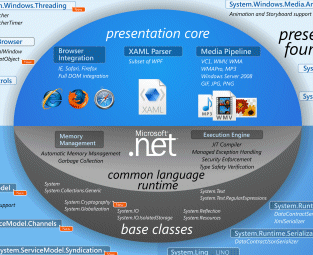
This Silverlight developer chart is available in full on Brad Abrams’ blog here, or in Joe Stegman’s Deep Zoom version here.

The pros…

1. The Silverlight plug-in means developers can target a single, consistent runtime for browser-based applications, rather than dealing with the complexity of multiple browsers in different versions. You also get video and multimedia effects that are hard or impossible with pure HTML and JavaScript; though Adobe’s Flash has the same advantages.

2. Execute .NET code without deploying the .NET runtime. Of course, the Silverlight plug-in does include a cut-down .NET runtime, but instead of dealing with a large download and the complexities of the Windows installer, the user has a small download of about 4MB, all handled within the browser. In my experience so far, installation is smooth and easy.

3. Performance is promising. Silverlight comes out well in this prime number calculator, thanks no doubt to JIT compilation to native code, though it may not compare so well for rendering graphics.

4. Support for Mono (Moonlight) means there will be an official open source implementation of Silverlight, mitigating the proprietary aspect.

5. Silverlight interprets XAML directly, whereas Adobe’s XML GUI language, MXML, gets converted to SWF at compile time. In fact, XAML pages are included as resources in the compiled .XAP binary used for deploying Silverlight applications. A .XAP file is just a ZIP with a different extension. This also means that search engines can potentially index text within a Silverlight application, just as they can with Flash.

6. Third-party component vendors are already well on with Silverlight add-ons. For example, Infragistics, ComponentOne and DevExpress.

7. Take your .NET code cross-platform. With Macs popping up everywhere, the ability to migrate VB or C# code to a cross-platform, browser-based Silverlight client will be increasingly useful. Clearly this only applies to existing .NET developers: I guess this is the main market for Silverlight, but it is a large one. The same applies to the next point:

8. Uses Visual Studio. Microsoft’s IDE is a mature and well-liked development environment; and since it is also the tool for ASP.NET, you can use it for server-side code as well as for the Silverlight client. For those who don’t get on with Visual Studio, the Silverlight SDK also supports command-line compilation.

9. Choose your language. Support for multiple languages has been part of .NET since its beginning, and having the .NET runtime in Silverlight 2.0 means you can code your client-side logic in C#, Visual Basic, or thanks to the DLR (Dynamic Language Runtime) Iron Ruby or Iron Python.

10. Isolated storage gives Silverlight applications local file access, but only in a protected location specific to the application, providing a relatively secure way to get this benefit.

The cons…

1. If Apple won’t even allow Flash on the iPhone, what chance is there for Silverlight?

2. Silverlight is late to the game. Flash is mature, well trusted and ubiquitous; Silverlight only comes out of beta in the Autumn (we hope) in the version we care about – the one that includes the .NET runtime – and will still lack support on mobile devices, even Windows Mobile, though this is promised at some unspecified later date.

3. The design tools are Expression Blend and Expression Design – but who uses them? The design world uses Adobe PhotoShop.

4. While having solution compatibility between Expression Blend and Visual Studio sounds good, it’s actually a hassle having to use two separate tools, especially when there are niggling incompatibilities, as in the current beta.

5. No support for the popular H.264 video codec. Instead hi-def video for Silverlight must be in VC-1, which is less common.

6. It’s another effort to promote proprietary technology rather than open standards.

7. Yes Linux will be supported via Moonlight, but when? It seems likely that the Linux implementation will always lag behind the Windows and Mac releases.

8. Silverlight supports SOAP web services, or REST provided you don’t use PUT or DELETE, but doesn’t have an optimized binary protocol like Adobe’s AMF (ActionScript Message Format), which likely means slower performance in some scenarios.

9. Silverlight is a browser-only solution, whereas Flash can be deployed for the desktop using AIR (Adobe Integrated Runtime). Having said that, yes I have seen this.

10. You have to develop on Windows. This is particularly a problem for the Expression design tools, since designers have a disproportionately high number of Macs.

More Oslo hints in PDC schedule

Wondering what exactly Microsoft’s “Oslo” is? Here’s a few hints from the PDC 2008 schedule:

A lap around Oslo

"Oslo" is the family of new technologies that enable data-driven development and execution of services and applications. Come and learn how to capture all aspects of an application schematized in the "Oslo" repository and use "Oslo" directly to drive the execution of deployed applications.

Oslo: The language

“Oslo" provides a language for creating schemas, queries, views, and values. Learn the key features of the language, including its type system, instance construction, and query. Understand supporting runtime features such as dynamic construction and compilation, SQL generation, and deployment. Learn to author content for the "Oslo" repository and understand how to programmatically construct and process the content.

Technorati tags: ,

Analysing Mojave: is Vista really that good?

Microsoft’s Mojave Experiment is now online. As I understand it, a group of people with negative perceptions of Windows Vista were shown a forthcoming version of OS code-named Mojave. In the cases Microsoft is choosing to present, they liked it much better – one woman scored Vista 0, and Mojave 10. Finally, it was revealed that Mojave was in fact Vista.

It’s a fun promotion and strikes me as a good effort in persuading people to take another look. Still, a few things puzzle me. The web page is somewhat frustrating, since to get all the content you have to click all of the little boxes – there are 55, but some repeat – but we still never see a complete video of what one of these subjects saw demonstrated.

I’ll describe one of them. Early on in her session (I presume), a woman is asked:

“Have you heard of Windows Vista?”

“Based on all the negative comments and frustrations I’ve seen my husband having to deal with I wouldn’t touch the thing,” she replies.

Now we get a snippet from the end of her session:

“Windows Mojave is actually Windows Vista”

“Oh is it [laughs] … Maybe it has more to do with the user than the application.”

I am going to defend her husband. Sure, users can be unpredictable and frustrating to deal with, but consumer software is meant to be “user-friendly” which means that if someone – and in Vista’s case, many people – have a negative and frustrating experience, then something is wrong with the software. That’s not necessarily Microsoft’s software; it could be third-party drivers, or lack of drivers, or the ugly stuff that gets bundled with a new computer.

Personally I moved to Vista back in 2006 and have never wanted to return to Windows XP. Then again, I did my own clean installs. I’ve also had problems including buggy display drivers flashing the screen, Windows Search causing painful delays in Explorer, stuttering sound with supposedly high-end audio cards, hours spent getting a new laptop ready for use,  Explorer wrongly displaying files as music, Media Center corrupting itself, and network weirdness (today) which knocked me off the Internet. Finally, when I compared Vista and XP performance, XP came out noticeably faster.

Few computers operate entirely without problems. Even so, I’ve seen enough to understand why someone might get frustrated; and that’s with clean installs of the OS.

There’s not much wrong with the core of Vista, as demonstrated by the generally solid performance of Server 2008, and now by Mojave. That doesn’t excuse the numerous problems that have spoilt the release. Let’s hope lessons have been learned.

Technorati tags: , , , ,

Vista Network weirdness

My Vista laptop could no longer connect to the Internet, when I plugged it directly into my router (to bypass my ISA firewall, to test some stuff).

Checked the IP settings, all fine – except that I had two Default Gateways, one of which was 0.0.0.0, the other of which was correct. Tried fixed IP with hard-coded default gateway, same result.

Booted into Linux, all fine.

Studied the Network and Sharing center. I had two active networks. One was called Network 5, the other Unidentified. Both were using the same connection – Local Area Connection 6.

Aside: I presume that when I first installed Vista this was Local Area Connection 1. Somehow, over time, Windows decided it should delete it and re-detect it, with a new name, 5 times over.

That didn’t look right. I noticed that if you click Customize, to the right of a network in the Network and Sharing Center, you get an option to “Merge or delete network locations”. Worth a try. Clicking this option gets you an ugly functional dialog that lets you select a network and, umm, merge or delete it. All the networks I have ever joined in hotels, conferences and hotspots round the world were listed.

My first thought was to merge. However, you can’t merge networks that are in use. I disabled the network card (in Manage Network Connections) and tried again. But, “Unidentified” was not listed. Forget that – I selected the lot and clicked Delete.

Re-enabled the card, and I’m back on the Internet. One default gateway. All fine.

I’d be interested to know what went wrong. And the network UI in Vista seems over-complex to me.