Category Archives: windows

Live Mesh: Hailstorm take 2?

So says Spolsky, in a rant about both unwanted mega-architectures, and the way big companies snaffle up all the best coders.

Is he right? Well, I attended the Hailstorm PDC in 2001 and I still have the book that we were given: .NET My Services specification. There are definitely parallels, not least in the marketing pitch (from page 3):

.NET My Services will enable the end user to gain access to key information and receive alerts about important events anywhere, on any device, at any time. This technology will put users in total control of their data and make them more productive.

Swap “.NET My Services” for “Live Mesh” and you wouldn’t know the difference.

But is it really the same? Spolsky deliberately intermingles several points in his piece. He says it is the same stuff reheated. One implication is that because Hailstorm failed, Live Mesh will fail. Another point is that Live Mesh is based on synchronization, which he says is not a killer feature. A third point is that the thing is too large and overbearing; it is not based on what anyone wants.

Before going further, I think we should ask ourselves why Hailstorm failed. Let’s look at what some of the people involved think. We should look at this post by Mark Lucovsky, chief software architect for Hailstorm and now at Google, who says:

I believe that there are systems out there today that are based in large part on a similar set of core concepts. My feeling is that the various RSS/Atom based systems share these core concepts and are therefore very similar, and more importantly, that a vibrant, open and accessible, developer friendly eco-system is forming around these systems.

Joshua Allen, an engineer still at Microsoft, disagrees:

All of these technologies predate Hailstorm by a long shot.  There is a reason they succeeded where Hailstorm failed.  It’s because Hailstorm failed to adopt their essence; not because they adopted Hailstorm’s essence …. the “principles” Mark’s blog post cites are actually principles of the technologies Hailstorm aimed to replace.

but as Allen shows in the latter part of his post, the technology was incidental to the main reasons Hailstorm failed:

  1. Hailstorm intended to be a complete, comprehensive set of APIs and services ala Win32.  Everything — state management, identity, payments, provisioning, transactions — was to be handled by Hailstorm.
  2. Hailstorm was to be based on proprietary, patented schemas developed by a single entity (Microsoft).
  3. All your data belonged to Microsoft.  ISVs could build on top of the platform (after jumping through all sorts of licensing hoops), but we controlled all the access.  If we want to charge for alerts, we charge for alerts.  If we want to charge a fee for payment clearing, we charge a fee.  Once an ISV wrote on top of Hailstorm, they were locked in to our platform.  Unless we licensed a third party to implement the platform as well, kind of like if we licensed Apple to implement Win32.

Hailstorm’s technology was SOAP plus Passport authentication. There were some technical issues. I recall that Passport in those days was suspect. Some smart people worked out that it was not as secure as it should be, and there was a general feeling that it was OK for logging into Hotmail but not something you would want to use for online banking. As for SOAP, it gets a bad rap these days but it can work. That said, these problems were merely incidental compared to the political aspect. Hailstorm failed for lack of industry partners and public trust.

Right, so is Live Mesh any different? It could be. Let me quickly lay out a few differences.

  1. Live Mesh is built on XML feeds, not SOAP messaging. I think that is a better place to start.
  2. Synchronization is a big feature of Mesh, that wasn’t in Hailstorm. I don’t agree with Spolsky; I think this is a killer feature, if it works right.
  3. Live Mesh is an application platform, whereas Hailstorm was not. Mesh plus Silverlight strikes me as appealing.

Still, even if the technology is better, what about the trust aspect? Will Mesh fail for the same reasons?

It is too soon to say. We do not yet know the whole story. In principle, it could be different. Mesh is currently Passport (now Live ID) only. Will it be easy to use alternative authentication providers? If the company listens to its own Kim Cameron, you would think so.

Currently Mesh cloud data resides only on Microsoft’s servers, though it can also apparently do peer-to-peer synch. Will we be able to run Mesh entirely from our own servers? That is not yet known. What about one user having multiple meshs, say one for work, one personal, and one for some other role? Again, I’m not sure if this is possible. If there is only One True Mesh and it lives on Live.com, then some Hailstorm spectres will rise again.

Finally, the world has changed in the last 7 years. Google is feared today in the way that Microsoft was feared in 2001: the entity that wants to have all our information. But Google has softened us up to be more accepting of something like Live Mesh or even Hailstorm. Google already has our search history, perhaps our email, perhaps our online documents, perhaps an index of our local documents. Google already runs on many desktops; Google Checkout has our credit card details. What boundary can Live Mesh cross, that Google has not already crossed?

Hailstorm revisited is an easy jibe, but I’m keeping an open mind.

What is Microsoft’s new language?

From Douglas Purdy’s blog:

It is not very often that you get to be part of a team that is developing a programming language that aspires to be used by every developer on the Microsoft platform.

In addition, it is not very often that you can be part of a team that aspires to radically change the dynamics of building a new language, to the extent that a developer can write their own model-driven language in a straightforward way while getting all the language services (Intellisense, colorization, etc.) for “free”.

I am lucky enough to be on such a team – and if you are interested you could be as well.

Something to do with Oslo I guess. And Live Mesh?

All will be revealed at PDC.

Technorati tags: , , , ,

Buying a Microsoft code-signing certificate from Thawte? Don’t use Vista.

Here’s the problem. You go along to http://www.thawte.com and ask to buy a Microsoft authenticode certificate. It’s the right thing to do; signing code is increasingly important in these days of Internet delivery of applications; and unsigned code presents the user with dire warnings that may unnerve them.

So you go to buy a certificate. The way this works is in two stages. When you apply for the certificate, you are issued with a new private key, but not the certificate itself. Thawte then does its due diligence and checks out that you really do represent the organization for which you are requesting a certificate. Finally, you can go back and download the certificate and get on with signing your apps.

This process works differently on Vista than on XP. I got this wrong when I first tried it, because it is not obvious. To begin with, you have to relax IE’s security for the thawte site – ironic, for a security operation – and make sure it is not running in protected mode. Next, the first page of the application is a big form that has the details of the organization, how you are going to pay, and so on. If you complete this on Vista, and click Submit, you get a message saying “This web site is requesting a new certificate on your behalf”:


You complete the application, sit back and wait. A few days later you get an email saying your certificate is ready for download. You download it; it is a file called something like mycert.spc. You can right-click and choose Install Certificate, to place it in the Windows certificate store. You can even sign code with it. Just open a Visual Studio command prompt, type:

signtool signwizard

and off you go. You can select the new certificate from your certificate store, timestamp the code (recommended), and you’re done.

So what’s the problem? Well, what if you want to sign code on a different machine than the one on which you applied for the certificate? And what if you want to back up your certificate?

Did you realise when you made the purchase that you were irretrievably hooking the certificate to the actual Vista installation which you were using for the transaction?

It is all to do with the private key. To sign code, you need the private key, which was installed into your certificate store when that first page of the application was submitted. Unfortunately it cannot be exported; it is marked as non-exportable, which means the Export feature of Vista’s Certificate Manager will not allow the private key to be exported. Thawte cannot re-issue the private key; the only solution I know of is to get the entire certificate revoked reissued (fortunately this is a free service).

This problem does not occur on Windows XP. Here is the evidence. The screenshot below shows part of the application form on Vista:

Now, here is the same part of the form on Windows XP (still IE7):

Spot the difference? An additional section appears in XP, which lets you specify where to save your private key as a file with a .pvk extension. On Vista, you don’t get that choice and you don’t get a .pvk file. Once you have both the .pvk and the .spc files, you can backup or move the certificate wherever you want, with full signing capability. You can import the the certificate plus private key into your certificate store using this tool:

http://www.microsoft.com/downloads/details.aspx?FamilyID=F9992C94-B129-46BC-B240-414BDFF679A7&displaylang=EN

which is billed as a tool for Office 2000, but works fine for this purpose.

Now, I guess this is a security feature. If you have these private key files hanging around, they are easier to steal than if they are locked into your certificate store and marked non-exportable. Fair enough, but I’d rather make that decision for myself, than have it imposed by an obscure installation process.

Vista SP1 vs Server 2008 as a desktop OS: more comparisons

I’ve been intrigued by reports that Server 2008, suitably configured, makes a better desktop OS than Windows Vista. In my previous post on the subject, I reported some observations by others, suggesting that Server 2008 performs better than Vista with Service Pack 1, even though it is meant to have the same core components. I though it was time I took a look myself.

I have some free space on my usual desktop box, so I created two new partitions and installed Vista 32-bit with Service Pack 1 on the first, and Server 2008 32-bit on the other.

Aside: Both installs were smooth. The integrated Vista SP1 install works nicely, and few updates were required after the first boot. It is remarkable how much more pleasant it is to install Vista from scratch, instead of dealing with an OEM pre-install. Surely it should be the other way round?

I tried to make both installs usable desktops. On both operating systems, I installed the driver for my Terratec soundcard, along with Intel’s .INF installer for the motherboard, Management Engine Interface, and storage driver. I also installed a recent NVidia driver. The result was that all devices were enabled in device manager.

On Server 2008 I also installed the Desktop Experience and .NET Framework 3.0. I enabled the network, the audio engine, the Themes service, Windows Update, and Aero graphics. I created a new user account and logged in as that user, so that UAC (User Account Control) was active. I set it to optimize performance for programs rather than background services.

Next I ran the PassMark performance tests I’ve used before. Advantage Server 08 – but not by much. It scored 1118.3 vs Vista’s 1102.3. I doubt this is significant; there is also small variation between different runs, which could account for a difference like this.

Looking at the detailed results shows something intriguing though. On the Graphics 2D GUI test, which exercises Windows controls like listboxes, checkboxes and dropdowns, Server 2008 scored 149.8 operations per second, vs 119.2 on Vista – more than 25% faster. I hesitate to attach much significance to my simple tests, but that might account for a snappier feel in the user interface. I repeated this particular test several times; Vista never scored higher than 123, and Server 2008 was consistent too.

There was also a notable difference in the “Memory – Large RAM” test. Vista 32-bit performed 802 operations per second, Server 08 1074: just over 33% faster.

On most tests, Vista was slightly slower, though on the disk tests it was fractionally faster. There were no other differences as big as the above.

I thought it would be interested to compare the list of running services on the two machines, after the changes mentioned above. Here are the services I spotted running on Vista but not Server 2008:

  • Computer Browser
  • Offline Files
  • Portable Device Enumerator
  • Program Compatibility Assistant
  • ReadyBoost
  • Security Center
  • SSDP Discovery
  • Superfetch
  • UPNP Device Host
  • Windows Connect
  • Windows Image Acquisition
  • Windows Search

and on Server 2008 but not Vista:

  • Remote registry
  • SL UI Notification
  • Windows Remote Management

So how would it be if Vista did not have the burden of these additional services? I stopped them. Result: no significant difference; the overall score was 1102.

Tentative conclusions

Benchmarks are not always a good measure of real-world performance. There are aspects of performance which the benchmark does not measure. In addition, some of the perceived advantage of Server 2008 is likely to be the effect of a new clean installation – never forget Windows Cruft.

Even so, on my particular system (Intel board, Core 2 Quad Q6600 CPU, NVidia 6800 graphics) Server 2008 does measure better. I’m particularly intrigued by the Graphics 2D GUI results. I do not know why Server 2008 is faster; but look forward to the same improvement appearing in desktop Windows in due course.

Update – 2D performance difference solved

I’ve worked out the reason for the difference in Graphics 2D GUI performance. It is because Server 2008 defaults to different settings for visual effects. You can see these by right-clicking Computer in the Start menu, choosing Properties, Advanced System Settings, Advanced tab, Settings, Performance options. I am sure there are other routes to the same dialog, some of which may be less arduous.

If I set these to Adjust for Best Performance on both systems, Vista actually goes ahead of Server 2008, with a score of 180 vs 172 on Graphics 2D GUI. That’s not much to worry about.

I’m satisfied that the performance differences between Server 2008 and Vista are mainly about configuration, rather than core components. If you want to speed up your own desktop, these settings are a good candidate for experimentation.


Technorati tags: , ,

Microsoft’s Office UI patent trap: watch out with that MFC update

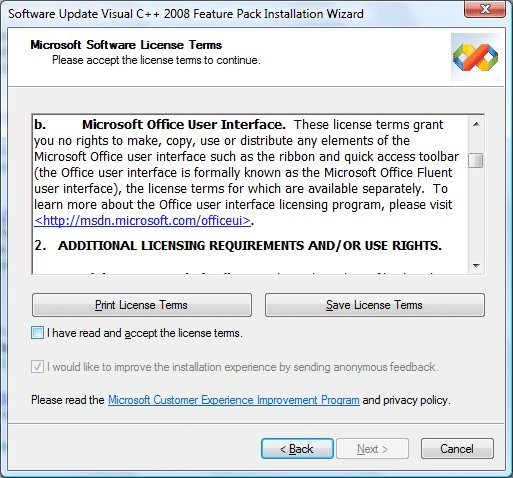
I installed the Visual Studio 2008 Feature Pack today – which, by the way, you will not find if you use Check for Updates on the Visual Studio 2008 Help menu – and noticed this paragraph in the setup agreement:

What’s this all about? Microsoft has not said so, but it seems likely to be part of the company’s war against OpenOffice. The efforts of Sun and others to improve OpenOffice, along with all the XML standardization brouhaha, prodded Microsoft into delivering the most significant Office upgrade for many years. One of its intentions was to increase the differentiation between Microsoft Office and OpenOffice. The strategy would not work if some future OpenOffice just copied the feature, hence the license.

The unintended consequences concern me.

Until now, you could pretty much use the out-of-the-box UI components in Visual Studio and not worry about licensing. That has now changed. According to Microsoft if you use any element of the Office user interface, for which the feature update supplies new classes, then you have to agree to a separate license.

Is this a burden? Well, the licensing page is now out of date, because it says “The program does not involve code”, but the feature pack provides what it calls “MFC C++ library source code for the Microsoft Office Fluent User Interface. However, Microsoft says that the license is free and covers:

…applications on any platform, except for applications that compete directly with the five Office applications that currently have the new UI (Microsoft Word, Excel, PowerPoint, Outlook, and Access)

What does it mean, to “compete directly”? It sounds like the sort of thing lawyers could have fun with. Further, if you read the license details and FAQ, it is clear that you take on a further obligation, which is to comply with Microsoft’s Office Design Guidelines, and even to update your application if Microsoft changes them:

Your Licensed UI must comply with the Design Guidelines. If Microsoft notifies you that the Design Guidelines have been updated or that you are not complying with the Design Guidelines, you will make the necessary changes to comply as soon as you reasonably can, but no later than your next product release that is 6 months or more from the date you receive notice.

OK, so let’s say you are developing some software for a customer. You deliver the app; customer pays you. Now Microsoft brings out Office 2009, changes the guidelines, and says you must update the app, even though the customer is happy with it as-is. Who will pay? I guess you would need to agree beforehand; but it is a disincentive to using the fluent UI.

Presuming you do not want to sign up, avoid all the CMFCRibbon* classes. Microsoft has helpfully commented these with a paragraph that says:

License terms to copy, use or distribute the Fluent UI are available separately.

Would any of this stand up in court? I have no idea, but I’d be reluctant to sign up or to use these classes lest I might have to find out.

Fixing Vista: Microsoft’s third-party problem

Ed Bott has a post on how he fixed a Sony Vaio running Vista, when the user had dismissed it as an unusable brick. Bott reasoned that it was all to do with drivers, configuration, and unnecessary pre-installed applications. He proved his point, making the machine usable. The owner made a video about what he thought of the reconfigured machine. Key points:

1. He thought it was much improved

2. He’s sticking with the Mac as his primary machine

The problem wasn’t only that Sony originally stuffed the machine with unwanted trialware. Bott’s new install also benefited from Service Pack 1 and a bunch of updated drivers.

Still, it’s a good demonstration of how big manufacturers like Sony have neglected the user experience for the sake of a few pennies of royalty, or a quicker rush to market, and in doing so lost both sales and credibility. The public mood on this has changed, perhaps because both Apple and the Linux folk are offering better alternatives in this respect.

Incidentally, all my Vista installs have been clean installs, so I haven’t personally suffered from death by trialware, though I have seen it frequently on other machines. Consumer products are worse than those aimed at businesses, but both categories are affected.

Technorati tags: , , , ,

Microsoft: Live Mesh or Live Mess? Here’s what to read.

Here’s what I suggest you read to get to grips with Live Mesh:

Amit Mital’s introduction (he’s the General Manager)

Mike Zintel’s Live Mesh as a Platform (he’s Director of Service Infrastructure)

Mary Jo Foley’s Ten things to know and the helpful stack diagram.

I have a few initial comments. First, it’s the platform that matters, not the Live Desktop which is the first thing Microsoft is delivering and which you will find presented at mesh.com. Microsoft is finally showing us what it means by the “software plus services” thing it has been talking about for so long. It involves a new “Mesh Operating Runtime” which has both cloud pieces and client pieces, a MeshFX API, and an identity system which is Live ID (formerly Passport).

As far as I can tell, Microsoft is delivering an API which we will be able to use to build internet-based data, document and configuration into either desktop or web applications, with synchronization to local storage for offline use. Zintel adds:

… customers will ultimately license applications to their mesh, as opposed to an instantiation of Windows, Mac or a mobile account or a web site.  Such applications will be seamlessly installed and run from their mesh and application settings persisted across their mesh

It sounds good, though the obvious question is whether Microsoft is overstating the importance of the client in an attempt to preserve its core market. Do we need this special client piece? Here’s a paragraph from Zintel’s piece that caught my eye:

A key design goal of the Live Mesh data synchronization platform is to allow customers to retain the ownership of their data that is implicit with local storage while improving on the anywhere access appeal of the web. The evolution of the web as a combined experience and storage platform is increasingly forcing customers to choose between the advantages of local storage (privacy, price, performance and applications) and the browser’s implicit promise of data durability, anywhere access and in many cases, easy sharing.

Can Microsoft improve on the “anywhere access appeal of the web? Zintel says we need to combine it with the advantages of local storage, but the advantages Zintel identifies are not all that convincing. Let’s look at them:

Privacy: maybe, but local data is vulnerable to worms, trojans, viruses; well secured Internet data accessed over SSL is arguably more secure. Data not connected to the Internet is nice and secure, but can’t participate in the Mesh.

Price: I don’t see how Mesh helps here. Yes, local storage is cheap, but as soon as data enters the Mesh it is on the Internet and we are paying for data transfer as well as possibly Internet storage. I realise that Microsoft (among others) offers generous Internet storage for free, but that is just a way of buying market share.

Performance: Granted, some types of application work faster with local storage. Still, there are non-Mesh ways of getting this from web applications in a fairly seamless manner, such as Google Gears or Adobe’s AIR.

Applications: This is perhaps the big one. Many of us are reluctant to do without traditional local applications such as Office. Well, mainly Office. Still, web equivalents get better all the time. One day they will be good enough; and new technology like Silverlight is bringing that day closer. 

What about identity management and permissions? Zintel says:

A side effect of the competition to store customer data in the cloud and display it in a web browser is the fragmentation of that data and subsequent loss of ownership. Individual sites like Spaces, Flickr and Facebook make sharing easy, provided the people you are sharing with also use the same site. It is in fact very difficult to share across sites and equally difficult to work on the same data across the PC, mobile and web tiers.

True; but Mesh currently identifies users by their Live ID. Isn’t that the same as Spaces?

If Microsoft delivers a bunch of useful web services, that’s great. If it tries to somehow replace the web with its Mesh, it will fail.

Mary Jo Foley also asks the question: to what extent is Microsoft extending, and to what extent is it replacing, existing Live services such as Office Live or the excellent Skydrive? Making sense of all this is a challenge.

Now let’s mash all this up with Yahoo! (maybe). Ouch.

Windows Server 2008 is better than Vista, but why?

Mark Wilson asks:

It seems that, wherever you look, Windows Server 2008 is almost universally acclaimed. And rightly so – I believe that it is a fantastic operating system release (let’s face it, Windows Server 2003 and R2 were very good too) and is packed full of features that have the potential to add significant value to solutions.

So, tell me, why are the same journalists who think Windows Server 2008 is great, still berating Windows Vista – the client version of the same operating system codebase?

The short answer is that Server 2008 delivers new features that customers wanted, whereas Vista delivers new features that Microsoft thought its customers should want. However, it seems there may be more to it than that. Maybe Server 2008 really does perform better than Vista.

According to this post, Server 2008 performs 11-17% faster than Vista SP1, running a couple of benchmarks which test typical client applications. Christian Mohn concurs:

Windows Server 2008 performs better, even with the Aero features enabled, than Vista ever did on the same hardware. To me, this a bit strange, even if a lot of services are still disabled, as the codebase is pretty much the same as Vista.

though Mohn’s example is less scientific: he never ran Vista SP1, and also moved from 32-bit to 64-bit.

Server 2008 has a “Desktop Experience” feature, which installs things like Windows Media Player, Aero GUI effects, and other fluff that doesn’t belong on a server. My assumption had been that once you installed this, Server 2008 would perform in a similar manner to Vista. Apparently this is not the case.

It seems to me there are a few possibilities. One is that Microsoft isn’t being straight with us about this “same codebase” stuff. It would be interesting to analyze the core DLLs and work out which are the same, and which are different.

The second possibility is that there’s stuff in Vista which is not part of the core, nor part of the Desktop Experience, but which slugs performance. If so, it would be great to identify it and turn it off.

The third explanation is that the testers are wrong, and that performance is actually similar. For example, maybe Vista was running a background update or backup during tests. Background processes make it hard to conduct truly rigorous performance comparisons.

I’d like to see Mark Russinovich get his teeth into this. I’m also tempted to try the Server 2008 desktop experiment myself.

JBuilder 2008 and Vista’s Program Compatibility Assistant

One of Vista’s annoyances is this dialog, which you may see shortly after installing an application:

As you can see, I got this after installing CodeGear’s new JBuilder. The reason it annoys me is that it doesn’t tell you what “compatibility settings” it has applied. In this case, even if you go to JBuilder.exe in Explorer and view its properties, you will find all the compatibility options unchecked. So what has it done?

Of course I clicked “What settings are applied”. Here’s what it says:

As you can see, this still does not tell you what settings are applied. By the way, Group Policy enables you to disable the Program Compatibility Assistant completely, but does not show the settings for individual applications.

I ran the registry editor, and found this entry:

It looks like the Persisted key tells Vista which applications have already had settings applied, while the Layers key tells Vista what settings to apply. ELEVATECREATEPROCESS lets the application create child processes which require admin rights, though they still raise a UAC prompt.

I also found this Microsoft article which does a good job of explaining how the Compatibility Assistant works. It appears that JBuilder 2008 tries to run something which requires administrator permissions, but does not use the  correct Vista technique for doing so. I soon found out what it is:

It’s running regedit, and exporting some keys that appear to relate to Mozilla’s Gecko Runtime project, for embedding a browser in an application. Unfortunately it does this (twice) every time it runs, which is unlikely to be necessary. You would have thought there would be a better way to use these registry entries, than exporting a temporary file.

Conclusions? None really; I just wanted to know what this annoying wizard does. A couple of observations though. First, it’s careless of CodeGear to let JBuilder 2008 out like this. It just looks bad, to have your app identified as an old one that needs compatibility help.

Second, if you read Microsoft’s article you’ll notice that among other things Vista “instruments” the CreateProcess API call in order to make this work. There must be a performance impact. I guess Microsoft will say it is a small one; but I guess it also makes its little contribution to Vista’s overall performance issues.