Tag Archives: iphone

Review: Audyssey iPhone Audio Dock South of Market Edition

How good can a dock for an Apple iPod or iPhone sound? Pretty good, as this high-end South of Market Audio Dock from Audyssey demonstrates. If you think all iPod docks have thin, tinny bass, think again. It also turns out to be a neat speakerphone.

The dock has a distinctive bulbous shape, measuring around 24cm (9.5”) square on its largest side, with the dock mounted on the front edge. The unit is designed to sit on a desk or table and is surprisingly heavy for its size – probably an encouraging sign. Viewed from the front it looks tall and compact.

image

The side view though shows that the speakers do have some room to breathe.

image

As you can see, the speakers are firing more or less sideways. This is not ideal for stereo imaging, but in practice the dock delivers a wider image than you might expect.

Here is what you get out of the box: the dock, a remote with a battery, a USB cable, and two 3.5mm audio cables.

image

Getting started is just a matter of putting the battery in the remote (slightly fiddly), plugging in the power cable, docking your iPod or iPhone, and playing some music. There is also an app you can download that provides some additional settings.

Before going into more detail about what this dock is capable of, let me say immediately that the sound quality is excellent. Words that come to mind are crisp, deep, rich, smooth and powerful. Vocals have real presence. The dock successfully conveyed the drama of a Mahler symphony, the growl of Tom Waits, the complex rhythms and pace of Santana, and the tender emotion of English folk singer Sandy Denny. Once I started playing music, I did not want to stop.

The secret of this high quality is twofold. First, the electronics follows high-end principles. There are four speakers – two 4-inch woofers, two .75 inch tweeters – which are powered by four separate amplifiers controlled by an active crossover. By contrast, a typical home hi-fi would have two amplifiers driving speakers with passive crossovers. Active crossovers mean that the musical signal is divided into the optimum frequencies for each speaker driver at a low level, introducing less distortion and improving control.

Audyssey takes further advantage of this, by using software processing to mitigate the limitations of the speaker drivers. That’s no surprise, since Audyssey specialises in audio processing technology for other manufacturers, which gets incorporated into home theatre and in-car equipment.

According to the specification, there are several techniques implemented in this dock. BassXT extends the bass response by boosting the signal dynamically to flatten the frequency response at a point when it would normally be dropping off. Audyssey EQ corrects “time and frequency response” imperfections introduced by the loudspeakers and cabinets. Dynamic EQ performs frequency response correction to preserve a flat response as volume changes. Dynamic Volume evens out the volume level to compensate for differences in the volume of the source.

Some of these features can be controlled or disabled by a companion iOS app, free to install. Specifically, you can disable Dynamic Volume or set it to optimize for Background Listening; you can apply tone controls including a single tone control called Tilt or traditional bass and treble; or you can set your own custom EQ.

image image

I admit that seems a lot of processing; and it would not have surprised me if the results were worse than pure straight-through audio reproduction. That is not the case though; the unit sounds very good indeed. Given the challenge of getting high quality sound from a relatively small enclosure, taking advantage of digital processing makes sense to me, provided it is carefully implemented at it is here.

Controlling playback

Once you have docked an iPhone and set it playing, you can control it either from the iPhone itself, or from the supplied remote, or pause and play by tapping an illuminated icon on top of the unit (It is not obvious that this is a button, but once you discover it, it is a handy feature; it also has some other functions including answering phone calls and showing Bluetooth status).

The remote has buttons for volume up/down, pause/play, and skip forward or back.

image

The Audyssey dock supports Bluetooth and for full features you should pair your iPhone with it and keep Bluetooth on. Now you can stream music from an iPhone even when it is not docked. This can be handy, since the iPhone is easier to use in your hand then when docked. Using Bluetooth, you can undock it with only brief interruption in playback, for example for selecting music. Range seems good, and I was able to detach the iPhone, walk through the door of my study and into the corridor, and the music kept playing – though note that the audio quality will not be as good. I found the quality acceptable though noticeably inferior.

When docked, the iPhone will charge provided the dock is not in standby mode.

There are also buttons on the remote intended for the dock’s speakerphone feature, which deserves its own paragraph.

Audyssey as conferencing speakerphone

The most intriguing feature of the Audyssey South of Market dock is its speakerphone feature. For this to work, you must have Bluetooth enabled.

Scenario: you are enjoying music, when a call comes in. At this point the music pauses, the iPhone invites you to decline or answer the call, and a ring sounds through the dock’s loudspeakers. Tap the phone icon on the remote and you can answer the call while using the dock as a speakerphone.

It turns out the Audyssey dock makes a rather good speakerphone. It performs microphone array processing and echo cancellation to improve voice quality, using front and rear microphones, and in my testing this worked well.

You can also wire up the dock to a computer, using its line in and mic out connections. This lets you use it as a speakerphone with Skype or other Voice over IP providers. Nice idea, though my guess it that this is too inconvenient for most users. Working with the iPhone is more compelling.

Connections

image

This is the back panel, showing the microphone output, line in, and USB port. Above the panel is a button for pairing a Bluetooth device. If you connect the USB port to a computer, the docked iPhone will sync with iTunes, though auto-sync can be a nuisance if you frequently dock and undock the device.

Annoyances

Not that many. However, I would like some way to select music from my seat when the iPhone is docked, beyond the simple track skip on the remote. Of course you can do this using Bluetooth streaming, though sound quality may be compromised.

Even with Bluetooth set up, I find that removing the iPhone from the dock pauses the music. I have to tap play to resume it. Re-docking the iPhone interrupts the music briefly but it resumes automatically.

Considering the cost of the device though, it’s a shame that Audyssey does not supply a proper manual; there is an excellent one online [pdf], but the one in the box is just safety warnings and limited warranty, pleasing for the lawyers but not for users.

The stereo separation is good considering it is a single box, but poor compared to two speakers set apart in the normal way.

Summary

The Audyssey South of Market Dock costs more than most iPod/iPhone docks, but in return it delivers superb sound quality along with some well thought-out speakerphone features.

The B&W Zeppelin makes an interesting comparison. The Zeppelin is a little more expensive but has better stereo separation thanks to its 640mm (25.2 in) width, and has a sub-woofer for extended bass. On the other hand, the Audyssey is more compact and could be considered less intrusive depending on what you think of the Zeppelin’s distinctive styling, and the Zeppelin has no Bluetooth streaming.

In the USA it is an easy decision. The Audyssey dock at around $400 is better value than a Zeppelin at around $600. In the UK the fact that B&W is a UK company whereas Audyssey is based in Los Angeles seems to bring the prices closer together: £400 for a Zeppelin versus £350 for the Audyssey dock. Try to hear them both; but the Audyssey dock is not shamed and is still well worth considering.

Compatibility

The South of Market Audio Dock fits:

  • iPhone 4
  • iPhone 3 and 3GS
  • iPod Touch
  • iPod Nano (4th and 5th generation)
  • iPod classic

Price and availability

The Audyssey South of Market Dock costs around $399.00. You should find it at Apple stores among other retailers.

Amazon.co.uk is advertising this dock for availability from 15th January 2011, at £349.99


iPhone plus Amazon app = shopping revolution through magic of barcode scanning

Amazon has added barcode scanning to its Apple iPhone shopping app. It is an amazing feature. Here’s why.

Among the questions that shoppers ask themselves, two of the biggest ones are first, is it any good; and second, is it good value? Barcode scanning helps with both of these. The scenario is that you are in the shop looking at a book, CD or DVD – or almost anything really, from kettles to MP3 players – and you wave your iPhone over it. Up comes the entry for that item in Amazon’s store, where you can see the rating, read customer reviews, and check the price both new and used.

OK, there is a little bit more involved than waving the iPhone, but not much. Here is how it works. Tap the Amazon app on the iPhone, then Search.

image 

Tap Scan a barcode and hold the iPhone over the barcode.

image

You adjust the size and position by moving the iPhone until the code is roughly central between the guide lines. At this point, the guide lines turn green.

image

No need to tap; the app will now look up the item and show you the results. Tap the right-pointing arrow for more detail.

image

Confession: I am sufficiently an Amazon addict that I have done this in shops even before the advent of the barcode feature. One reason is price-checking. We all know that you pay a premium for the instant gratification of bricks and mortar shopping; but how bad is it? This will tell you instantly.

That might not help if you need a gift at the last minute, but the reviews might. I use this for video games, or for CDs that I have not heard or DVDs/Blu-rays that I have not seen. It has saved me from some expensive mistakes.

Of course reviews are subjective and some are likely planted by publishers, authors or competitors; but there are usually enough to give you some idea of the range of opinions.

It is also handy for electronic devices. Is that MP3 player any good? How does that iPod dock sound?

When I was at school we learned about the concept of perfect competition. One of the requirements for perfect competition is perfect information – for example, knowing the price charged for an item in every outlet which sells it. We are a long way from that, but thanks to the Amazon marketplace, where third-party sellers compete, we are closer than we were. The barcode feature in the Amazon iPhone app makes it easy to access that information while shopping, which is a big feature.

Apple gives up on Xserve dedicated server hardware – looking towards the cloud?

Apple is scrapping is Xserve products, according to the latest information on its web site:

Xserve will no longer be available after January 31, but we’ll continue to fully support it. To learn more, view the PDF.

If you do indeed view the PDF, it confirms that:

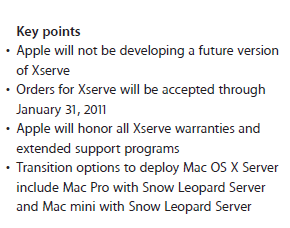
Apple will not be developing a future version of Xserve

However, the Snow Leopard Server, a version of OS X tuned for server use, remains; and Apple suggests that you install it either on a Mac Pro or on a Mac Mini.

image

That’s all very well; but while a Mini might well make sense for a very small business, larger organisations will not be impressed by the lack of features like dual redundant power supplies, lights out management, and rack mounting, which the Xserve provides.

There are a couple of ways to look at this. One is that Apple is giving up on the server market. Largely true, I think; but my guess is that Apple realises that this type of on-premise server is under threat from the cloud. I do not see this as Apple giving up on corporate computing; that would be unexpected considering the gains it is making with Mac, iPhone and iPad. I do see this as a move towards a client and cloud, or device and cloud, strategy. In that context it is not so surprising.

That said, I imagine there are a few businesses out there focused on supplying Xserve-based systems who will be disappointed by the news. I’ve not used one myself; but from what I’ve heard it is rather good.

Windows Phone 7 battles indifference in London

Today is launch day for Windows Phone 7 in the UK – but the hoped-for crowds of people waiting to buy the new phone failed to appear.

They are billed as the handsets that could topple the iPhone. Yet as Microsoft’s Windows 7 phones went on sale this morning there was not a queue in sight.

reported the London Evening Standard.

The device also suffered faint praise from the influential Wall Street Journal reviewer Walt Mossberg. Although he called the user interface “novel and attractive”, he complained about missing features:

Microsoft has inexplicably omitted from Windows Phone 7 key features now common, or becoming so, on competitive phones. These missing features include copy and paste, visual voicemail, multitasking of third-party apps, and the ability to do video calling and to use the phone to connect other devices to the Internet. The Android phones and the iPhone handle all these things today.

adding that

I couldn’t find a killer innovation that would be likely to make iPhone or Android users envious, except possibly for dedicated Xbox users.

Is he right? In some ways it does not matter; perception is reality. That said, none of his missing features strike me as deal-breakers for a majority of users. You can also argue that Microsoft has learnt from Apple not to put every possible feature into the first release, but rather to make the features it does implement work as well as possible and to build on that in the future.

The problem is that there is so much momentum around Google Android and Apple iPhone that the average consumer looking for a smartphone will need a lot of persuading before paying out for Windows Phone 7, or even really noticing it. Microsoft needed rave reviews, not so-so ones. There is a danger that the new phone may suffer the same fate as Palm’s webOS devices, well liked by those who take the trouble to explore them, but absent from the mainstream of consumer consciousness.

I’ve had a device for a few days, and it has been favourably received by people I’ve shown it to. Some of the games look great – The Harvest, for example, a Microsoft exclusive. The Facebook integration is also appealing to fans of that site, and feels deeper than Facebook apps on other devices. Windows Phone 7 does have distinctive features.

I’ll be reviewing the device properly in due course. What is more interesting than my opinions though is how the phone is received in the market. I had expected more interest from the curious on day one of retail release.

Update: Microsoft found a queue or two for its press release today. Big in Australia?

Rethinking Developers Developers Developers

I’m waiting for Microsoft CEO Steve Ballmer to speak at the London School of Economics, which seems a good moment to reflect on his well-known war cry “Developers Developers Developers”.

Behind the phrase is a theory about how to make your platform succeed. The logic is something like this. Successful platforms have lots of applications, and applications are created by developers. If you make your platform appealing to developers, they will build applications which users will want to run, therefore your platform will win in the market.

Today though we have an interesting case study – Apple’s iPhone. The iPhone has lots of apps and is winning in the market, but not because Apple made it appealing to developers. In fact, Apple put down some roadblocks for developers. The official SDK has one programming language, Objective C, which is not particularly easy to use, and unlikely to be known other than by existing Apple platform developers. Apps can only be distributed through Apple’s store, and you have to pay a fee as well as submit to an uncertain approval process to get your apps out there. Some aspects of iPhone (and iPad) development have improved since its first launch. A clause in the developer agreement forbidding use of languages other than Objective C was introduced and then removed, and the criteria for approval have been clearly stated. Nevertheless, the platform was already successful. It is hard to argue that the iPhone has prospered thanks to Apple’s developer-friendly policies.

Rather, the iPhone succeeded because its design made it appealing to users and customers. Developers went there because Apple created a ready market for their applications. If Apple CEO Steve Jobs were prone to shouting words in triplicate, they might be “Design Design Design” or “Usability usability usability”. And as for developers, what they want is “Customers customers customers.”

Well, there are vicious and virtuous circles here. Clearly it pays, in general, to make it easy for developers to target your platform. Equally, it is not enough.

Microsoft’s own behaviour shows a shift in focus towards winning customers through usability, thanks no doubt to Apple’s influence and competition. Windows 7 and Windows Phone 7 demonstrate that. Windows Phone 7 is relatively developer-friendly, particularly for .NET developers, since applications are built on Silverlight, XNA and the .NET Framework. If it succeeds though, it will be more because of its appeal to users than to developers.

What do developers want? Customers customers customers.

RunRev renames product to LiveCode, supports iPad and iPhone but not Windows Phone 7

Runtime Revolution has renamed its software development IDE and runtime to LiveCode, which it says is a “modern descendent of natural-language technologies such as Apple’s HyperCard.” The emphasis is on easy and rapid development using visual development supplemented with script.

It is now a cross-platform development platform that targets Windows, Mac and Linux. Android is promised soon, there is a pre-release for Windows Mobile, and a new pre-release targets Apple’s iOS for iPad and iPhone.

LiveCode primarily creates standalone applications, but there is also a plug-in for hosting applets in the browser, though this option will not be available for iOS.

Now that Apple has lifted its restrictions on cross-platform development for iOS, it is Microsoft’s Windows Phone 7 that looks more of a closed device. The problem here is that Microsoft does not permit native code on Windows Phone 7, a restriction which also prohibits alternative runtimes such as LiveCode. You have to code applications in Silverlight or XNA. However, Adobe is getting a special pass for Flash, though it will not be ready in time for the first release of Windows Phone 7.

If Windows Phone 7 is popular, I imagine other companies will be asking for special passes. The ubiquity of Flash is one factor holding back Silverlight adoption, so in some ways it is surprising that Microsoft gives it favoured treatment, though it makes a nice selling point versus Apple’s iPhone.

Latest job stats on technology adoption – Flash, Silverlight, iPhone, Android, C#, Java

It is all very well expressing opinions on which technologies are hot and which are struggling, but what is happening in the real world? It is hard to get an accurate picture – surveys tend to have sampling biases of one kind or another, and vendors rarely release sales figures. I’ve never been happy with the TIOBE approach, counting mentions on the Internet; it is a measure of what is discussed, not what is used.

Another approach is to look at job vacancies. This is not ideal either; the number of vacancies might not be proportionate to the numbers in work, keyword searches are arbitrary and can include false positives and omit relevant ads that happen not to mention the keywords. Still, it is a real-world metric and worth inspecting along with the others. The following table shows figures as of today at indeed.com (for the US) and itjobswatch (for the UK), both of which make it easy to get stats.

Update – for the UK I’ve added both permanent and contract jobs from itjobswatch. I’ve also added C, C++, Python and F#, (which hardly registers). For C I searched Indeed.com for “C programming”.

  Indeed.com (US) itjobswatch (UK permanent) itjobswatch (UK contract)
Java 97,890 17,844 6,919
Flash 52,616 2,288 723
C++ 48,816 8,440 2470
C# 46,708 18,345 5.674
Visual Basic 35,412 3,332 1,061
C 27,195 7,225 3,137
ASP.NET 25,613 10,353 2,628
Python 17,256 1,970 520
Ruby 9,757 968 157
iPhone 7,067 783 335
Silverlight 5,026 2,162 524
Android 4,755 585 164
WPF 4,441 3,088 857
Adobe Flex 2,920 1,143 579
Azure 892 76 5
F# 36 66 1

A few quick comments. First, don’t take the figures too seriously – it’s a quick snapshot of a couple of job sites and there could be all sorts of reasons why the figures are skewed.

Second, there are some surprising differences between the two sites in some cases, particularly for Flash – this may be because indeed.com covers design jobs but itjobswatch not really. The difference for Ruby surprises me, but it is a common word and may be over-stated at Indeed.com.

Third, I noticed that of 892 Azure jobs at Indeed.com, 442 of the vacancies are in Redmond.

Fourth, I struggled to search for Flex at Indeed.com. A search for Flex on its own pulls in plenty of jobs that have nothing to do with Adobe, while narrowing with a second word understates the figure.

The language stats probably mean more than the technology stats. There are plenty of ads that mention C# but don’t regard it as necessary to state “ASP.NET” or “WPF” – but that C# code must be running somewhere.

Conclusions? Well, Java is not dead. Silverlight is not unseating Flash, though it is on the map. iPhone and Android have come from nowhere to become significant platforms, especially in the USA. Beyond that I’m not sure, though I’ll aim to repeat the exercise in six months and see how it changes.

If you have better stats, let me know or comment below.

Microsoft’s Scott Guthrie: We have 200+ engineers working on Silverlight and WPF

Microsoft is countering rumours that WPF (Windows Presentation Foundation) or Silverlight, a cross-platform browser plug-in based on the same XAML markup language and .NET programming combination as WPF, are under any sort of threat from HTML 5.0.

We have 200+ engineers right now working on upcoming releases of SL and WPF – which is a heck of a lot.

says Corporate VP .NET Developer Platform Scott Guthrie in a Twitter post. Other comments include this one:

We are investing heavily in Silverlight and WPF

and this one:

We just shipped Silverlight for Windows Phone 7 last week, and WPF Ribbon about 30 days ago: http://bit.ly/aB6e6X

In addition, Microsoft has been showing off IIS Media Services 4.0 at the International Broadcasting Conference, which uses Silverlight as the multimedia client:

Key new features include sub-two-second low-latency streaming, transmuxing between H.264 file formats and integrated transcoding through Microsoft Expression Encoder 4. Microsoft will also show technology demonstrations of Silverlight Enhanced Movies, surround sound in Silverlight and live 3-D 1080p Internet broadcasting using IIS Smooth Streaming and Silverlight technologies.

No problem then? Well, Silverlight is great work from Microsoft, powerful, flexible, and surprisingly small and lightweight for what it can do. Combined with ASP.NET or Windows Azure it forms part of an excellent cloud-to-client .NET platform. Rumours of internal wrangling aside, the biggest issue is that Microsoft seems reluctant to grasp its cross-platform potential, leaving it as a Windows and desktop Mac solution just at the time when iPhone, iPad and Android devices are exploding in popularity. 

I will be interested to see if Microsoft announces Silverlight for Android this autumn, and if it does, how long it will take to deliver. The company could also give more visibility to its work on Silverlight for Symbian – maybe this will come more into the spotlight following the appointment of Stephen Elop, formerly of Microsoft, as Nokia CEO.

Apple is another matter. A neat solution I’ve seen proposed a few times is to create a Silverlight-to-JavaScript compiler along the lines of GWT (Google Web Toolkit) which converts Java to JavaScript. Of course it would also need to convert XAML layout to SVG. Incidentally, this could also be an interesting option for Adobe Flash applications.

As for WPF, I would be surprised if Microsoft is giving it anything like the attention being devoted to Silverlight, unless the Windows team has decided to embrace it within the OS itself. That said, WPF is already a mature framework. WPF will not go away, but I can readily believe that its future progress will be slow.

Apple lifts restrictions on app development tools, publishes review guidelines

Apple has lifted its restrictions on the development tools used to create iOS (iPhone and iPad) apps, in a statement published today:

We have listened to our developers and taken much of their feedback to heart. Based on their input, today we are making some important changes to our iOS Developer Program license in sections 3.3.1, 3.3.2 and 3.3.9 to relax some restrictions we put in place earlier this year. In particular, we are relaxing all restrictions on the development tools used to create iOS apps, as long as the resulting apps do not download any code. This should give developers the flexibility they want, while preserving the security we need.

In addition, Apple says it is publishing the App Store Review Guidelines in the hope that this will make the approval process more transparent.

Good news I guess; but why? Maybe in part because the restrictions made little sense and were possibly unenforceable; and in part because Android’s popularity is putting pressure on Apple to be more developer-friendly. In practice, some apps that you would have thought breached the requirements apparently made it through the approval process; and those publishers of cross-platform tools which kept their nerve have their patience rewarded.

But what about Adobe? Apple’s development restrictions seems to trigger a significant change of direction, with work on the Packager for iPhone stopped, Android devices issued to employees, and evangelism for Android in Adobe blogs and tweets.

Since Apple is not changing its mind about runtimes, but only about development tools, this change of mind does not enable Flash on the iPhone; but I guess Adobe could now revive its cross-compilation work. On the other hand, Apple’s pronouncements have caused disruption for Adobe and perhaps served more as a wake-up call: this is a closed platform with one owner and therefore a risky target for investment.

Ten reasons the Apple iPhone 4 beats the Android HTC Desire

I’ve recently been trying the Android-based HTC Desire for some development research. I’ve also been using the iPhone 4 since its release in the UK. How do they compare? Yesterday I posted Ten ways the Android HTC Desire beats Apple’s iPhone. Now here’s the opposite – ten ways the iPhone is better. Conclusions then? Maybe in another post.

1. The iPhone gets left alone by the operators, presumably at Apple’s insistence. When the OS is updated, everyone gets it at around the same time and from the same source – Apple. Contrast this with Desire, the software for which is customised by each OEM with different apps and possibly some bits missing. Orange UK removes Google Talk, for example. Right now everyone wants Android 2.2 “Froyo”, but whether you have it or not depends on which operator you are with and/or whether you are willing to hack your phone a little to remove the branding.

2. The iPhone is more beautiful. The Desire is not bad, but purely as a design object does not come close to the iPhone with its smooth lines and solid, cool metal and glass construction.

3. The iPhone is a better music player. Not surprising given that it evolved from the iPod family of devices. iPod for iPhone is delightful to navigate, does videos and audiobooks, and integrates with iTunes for buying songs over the air. Now, you could always install Amazon MP3 for Android to enable OTA music download, whereas – no surprise – this is not available for iPhone. The speaker is better on the iPhone, not that you are likely to use it much for music.

4. The battery life is better. My Desire is only a month old, but I struggle to get a full day out of it if it is used with any intensity for wi-fi, 3G internet, web browsing and so on. The iPhone normally makes it. Neither is great of course – there are simpler phones that last for a week, though they do much less. The Desire’s battery problems are mitigated by the ability to carry a spare, though given the way the back case clips on I suspect it might break if frequently removed and refitted.

5. The iPhone has better text input. It is not too bad on the Desire, bearing in mind that it is a touch device only, but the iPhone has that great press-and-hold edit bubble that lets you move the cursor (though the Desire has the optical joystick which also works for this). Another iPhone advantage is that if you touch the wrong letter, you can slide to the correct one, whereas the Desire keyboard uses this gesture to enabled accented characters and so on, which is less useful for me.

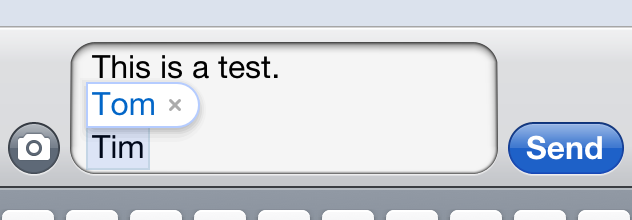
That said, the iPhone has its annoyances. Here’s one that drives me nuts. There must be a lot of people at Apple called Tom, because whenever I type my first name it wants to correct it:

image

At this point, if I hit return I get Tom. If I hit spacebar, I get Tom. In order to keep what I have actually typed, I have to tap the word Tom, which is counter-intuitive as it feels like selecting it, then it goes away. Having mentioned it here, I am sure someone will point out a way to fix it; please do.

6. App availability is better on the iPhone and the quality is better. I say this with reluctance, because the iPhone App Store is also full of rubbish, but overall I find the standard slightly higher. This is actually logical: the Apple App Store has a higher barrier to entry, both financial and in terms of developer skills. In addition, the App Store is nicer to use than the Market, and works better. In my case I had to open a port on my firewall before I could download from the Market at all.

7. The iPhone scores on “it just works”, with greater UI consistency and a sense that Apple has thought about all the common actions on a smartphone and made them work well. Often the iPhone goes one better and makes everyday apps fun to use. The messaging app on the iPhone, for example, is attractive as well as functional. The Desire equivalent is effective, but dull. The single main button on the iPhone makes it quick to learn, whereas the Desire’s five buttons (Home, Menu, Trackpad, Back and Search) give you more to think about, and mean more frequent switching between touching the screen and clicking a button. The Desire is missing some basic things out of the box, like a notes app, though you can add one for free from the Market.

If money and freedom are no object, I’d suggest iPhone over Desire for someone who wants to get on with their work and not tinker with their phone.

8. The iPhone has a better screen. 960 x 640 vs 800 x 480, and is a little better in sunlight than the Desire.

9. I prefer the Exchange app on the iPhone. For example, I use a lot of folders, and the iPhone shows me these on the main screen. On the Desire, I have to click Menu, then Folders, then select a folder from the pop-up window.

10. The iPhone has smooth, attractive transitions between screens. For example, if I am on the home screen and tap Mail, I get a nice zoom animation. On the Desire, screens typically just appear, or there is some lag and brief ugliness. It all contributes to a smooth-as-silk impression operating the iPhone, whereas Android feels rough and ready by contrast.

All these things are relative. Next to my old Windows Mobile 6.0 phone, Desire is delightfully smooth.