Category Archives: development

ComponentOne’s TouchToolkit for Windows Forms: another approach to the Windows tablet problem

Software component vendor ComponentOne has released Studio Enterprise 2013 v2.5, the latest in its suite of components, with support for Windows 8.1 and Visual Studio 2013.

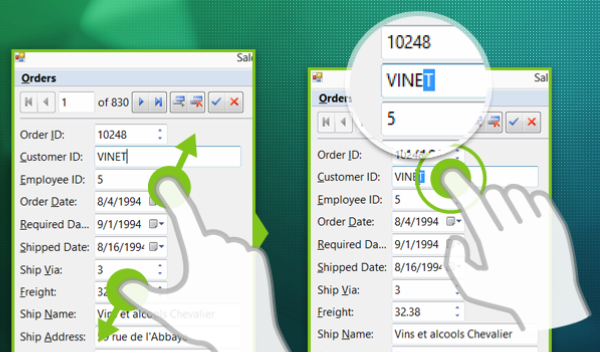
The piece that caught my eye is the TouchToolkit for Windows Forms.

image

Here’s the problem. The Windows desktop is poor with touch control, which is why Microsoft created Windows 8 with its alternate, touch-friendly Windows Runtime platform. However users are resistant to the changed user interface, and it does not help with existing desktop apps.

Developers are also faced with a question of simple mathematics. Develop a Windows 8 Store app, get a market of x. Develop a Windows desktop app, get a market of many times x, since Windows 8 can run desktop apps, but Windows 7 cannot run Store apps.

Embarcadero approached this problem with a framework called Metropolis, for Delphi and RAD Studio. It builds apps that mimic the Windows Runtime look and feel, but which are actually desktop apps. Of course they do not run on Windows RT, the ARM version. It is a confusing solution in my opinion, leading users into what Martin Fowler calls the Uncanny Valley, where stuff works almost but not quite how you expect.

I prefer the thinking behind the TouchToolkit. Take your existing Windows Forms apps, or write a new one, using these controls to make them more touch-friendly. They will never be as well suited to touch control as a Store app, but they might be good enough, and of course will run on Windows 7 and earlier versions.

The controls include a magnifier, support for zoom gestures, and a touch event provider that adds gesture support to any control.

Windows Forms, we all know, is not as good as WPF if you want an application that scales nicely and supports modern design. On the other hand, Windows Forms is pragmatic and easy to use framework that remains popular for line of business apps.

Embarcadero RAD Studio XE5 (Delphi) for Android now available

Today Embarcadero released RAD Studio XE5 which lets you build apps for Windows, Mac, iOS and Android. You can also buy Delphi XE5 separately if you prefer.

Embarcadero’s release cycle is relatively rapid. It was only six months ago that RAD Studio XE4 with iOS support appeared.

The big deal in this release is Android support. If you use the FireMonkey framework, you can build apps for all supported platforms.

There is also a new REST client library and some other enhancements – see here for a list of what’s new.

Embarcadero’s approach to Android development is distinctive. In keeping with Delphi’s tradition of native code compilation, Android apps are compiled using the NDK (Native Development Kit). Embarcadero’s developer evangelist John Thomas told me that this delivers excellent performance. I can believe it, though note what Google says:

Before downloading the NDK, you should understand that the NDK will not benefit most apps. As a developer, you need to balance its benefits against its drawbacks. Notably, using native code on Android generally does not result in a noticable performance improvement, but it always increases your app complexity. In general, you should only use the NDK if it is essential to your app—never because you simply prefer to program in C/C++.

Delphi developers are largely shielded from the complexity of the NDK, since you code using the high level abstraction provided by the runtime library (RTL) and the FireMonkey framework. If that is all you need I should think everything will be fine. If you have a Java library you need to call from your Delphi Android application, you need to use JNI (Java Native Interface) which is not so much fun.

Another point to note is that FireMonkey emulates most visual controls like buttons and lists, by drawing them itself. Users might not notice, if they look and behave exactly like the native controls, but this is hard to do perfectly. Embarcadero’s approach is native in respect of the code it generates, but not in respect of the controls it uses.

I installed RAD Studio XE5 on a Windows 8 machine and set about building an Android app. I already had the Android SDK installed so I asked the RAD Studio installer to skip the SDK but to install the NDK. As it turned out, I am not sure whether it did or did not (I could not find it quickly), but it was easier to download the NDK manually.

I have previously tried Delphi for iOS, for which the usual approach is to run Delphi (or RAD Studio) in a Windows emulator on a Mac, since the Delphi IDE is Windows only. This approach is not so good for Android development because its hard to attach Android devices to an emulator for debugging. Therefore, a real Windows PC is a better platform for Android development. If you want to target iOS as well, you can still do so, by using the remote agent running on a Mac.

Setting up for Android development is a little harder than setting up iOS development. The Android device I used for my test is a Sony Xperia T, and I installed the Sony PC Companion to be sure of having the correct USB drivers for debugging. With Java, the SDK, the NDK, RAD Studio itself, and getting the device connected, that is a fair number of moving parts.

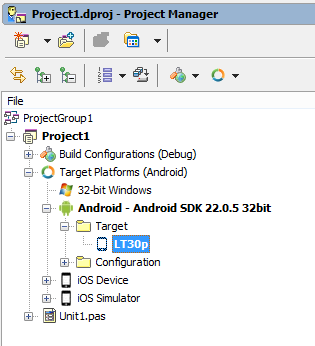
It worked though. I created an Android app, connected my Xperia, and it showed up as a target in Delphi (it is also called the LT30p).

image

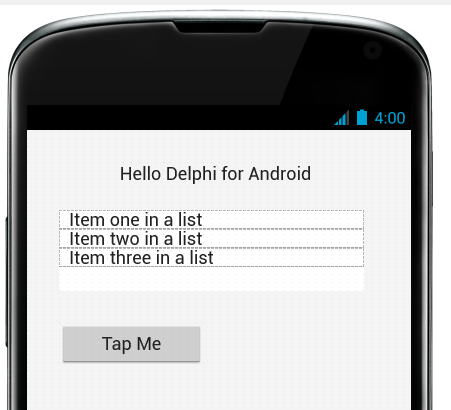
I threw a label, a listbox and a button onto my app’s main screen.

image

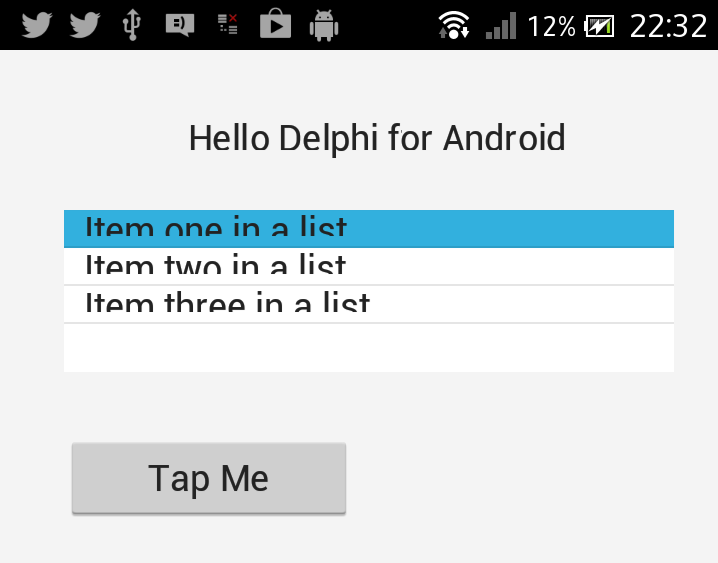
As it turned out, I should have taken a little more trouble. Here is my app running on the phone:

image

Something has gone wrong with the list, but it looks easy to fix.

According to Embarcadero, a recent survey of over 1300 Windows developers showed that 85% get requests for mobile apps. But what mobile platform is most requested? Android is apparently at the top of the list:

  • 83% Android
  • 67% iOS
  • 33% Windows Phone
  • 17% Windows RT
  • 14% Blackberry

Is that really Windows RT (ARM) or could it include WinRT (Windows 8 Store app) I wonder? Neither are supported by Delphi yet; but at least with Android it now supports the most highly requested platform.

Cross-platform mobile development is critical today, and the new capabilities in Delphi and RAD Studio will be welcome. Is it the best approach? The trade-off is this. On the plus side, you get a cross-platform GUI framework that lets you share the maximum amount of code across all the targets you support. On the minus side, that might not be a good idea; see this post for some thoughts on that. You also get a native executable that should perform well, certainly better than an HTML/JavaScript approach, though I’m not convinced that using the NDK on Android is ideal.

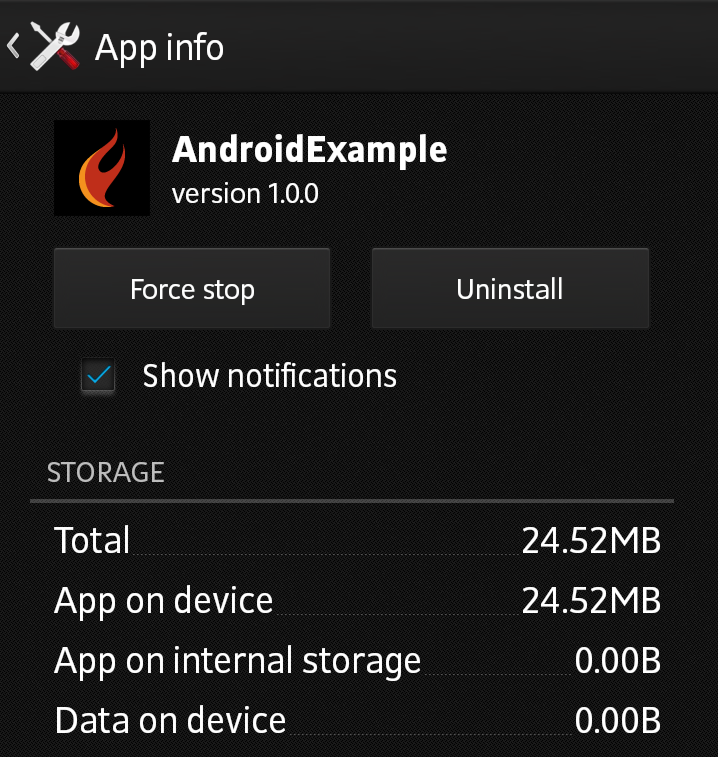
How big is your Delphi Android app? Using the Hello World example above, this is what I got in debug configuration:

image

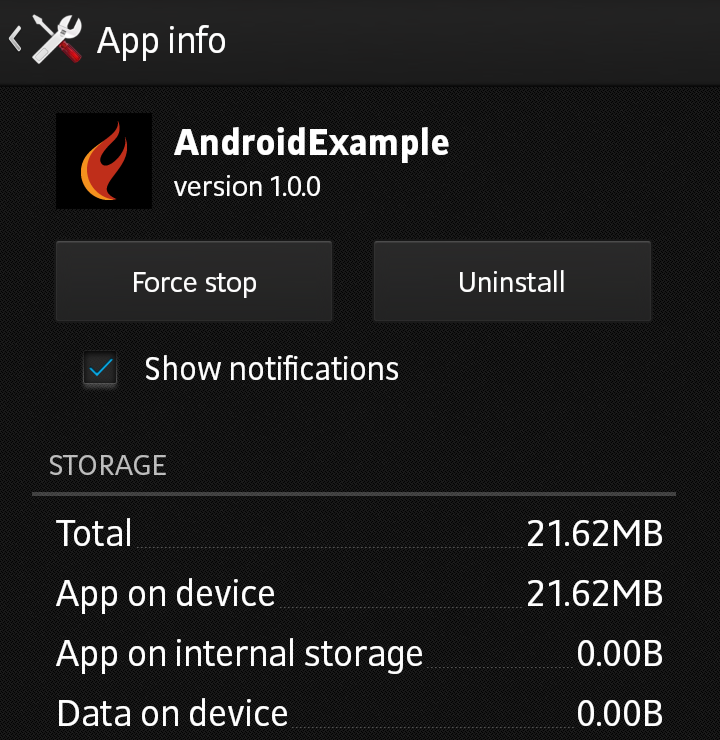
24.52MB storage. I changed to release configuration and got this:

image

That saved nearly 3MB, to 21.62MB.

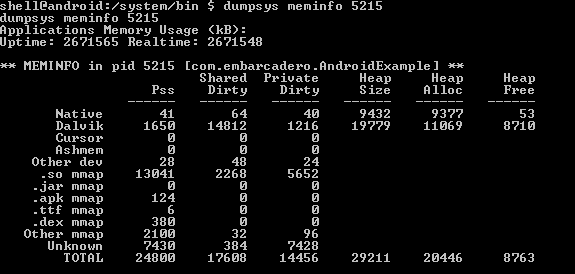
Here is the RAM usage:

image

I would be interested in hearing from developers using Delphi or C++ Builder for Android development. How is the quality of this first release? Is the fact that you are not developing in Java a problem in practice?

Microsoft’s MSDN changes: too much marketing

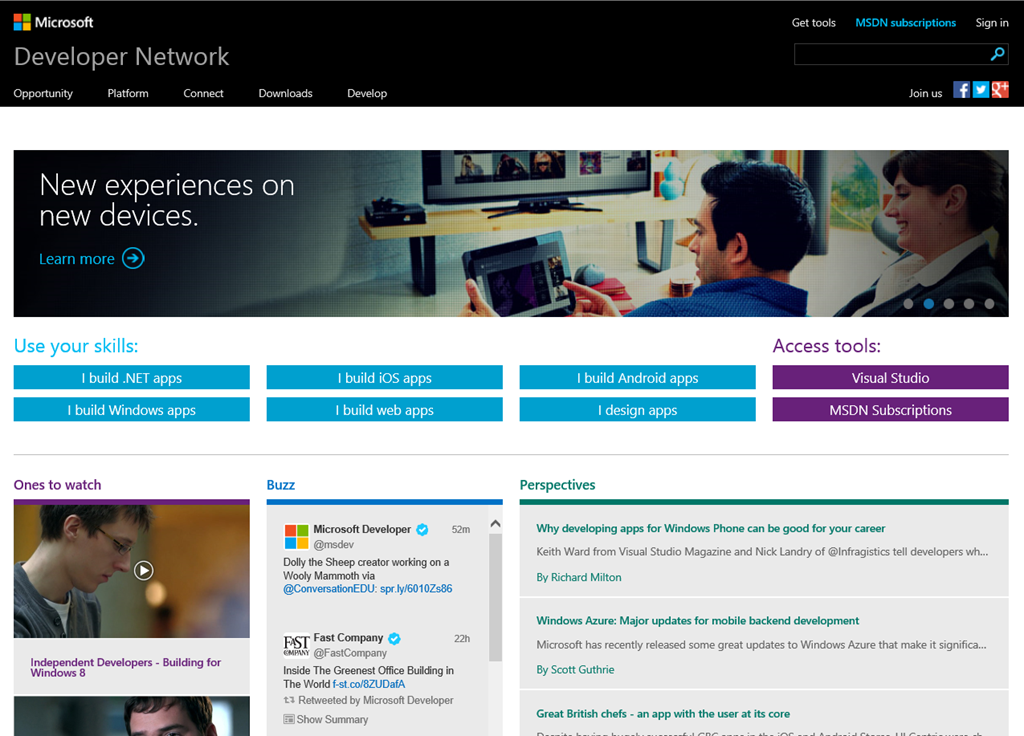
Microsoft has updated its developer site, MSDN (Microsoft Developer Network). Simple, relevant and community driven, says Product Manager Brian Harry in a post introducing the new site.

image

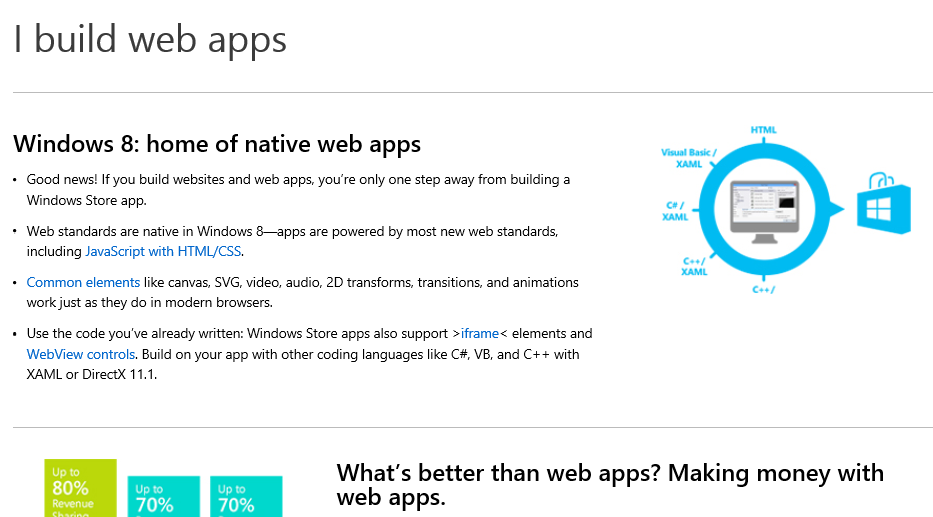
Developers are not convinced that it is an improvement. The comments to Harry’s post are pretty damning, in fact. The core complaint is that the new MSDN home page is not a developer site, but a marketing site. Click on those “Use your skills” buttons and you get not technical references, but marketing pitches. They are misleading too. Click on “I build web apps” and you get a pitch for Windows Store apps build with HTML and JavaScript – and no mention of ASP.NET or Windows Azure.

image

What do developers want? Here’s a good suggestion:

Why don’t you have your team work on changes to MSDN that people would actually want? Like editable blog comments with formatting and code snippet options? Or Connect/UserVoice sites that aren’t horrific and disjointed? Or adding the TypeScript blog to the Dev Tools blog feed (something I’ve mentioned a half dozen times already to various people at MS, you’d think this 5 second update might make it into someone’s queue after TypeScript being out for almost a year now)?

I just cannot fathom how you guys are so adamant that listening to developers is important to you when 99% of feedback is ignored in lieu of changes that no one asked for and no one wants.

Most people come to MSDN in search of technical information. I suspect the strong marketing pitch for Windows Store apps will be counter-productive.

On the other hand, present developers with a fast, coherent, logically organised technical resource so that you can easily find both the API reference for the platform you are targeting, and comments and help with using it, and this will attract them and make them want to use the platform more often.

Appcelerator plans to rethink Titanium architecture, standardise on WebKit JavaScript engine

Appcelerator CEO Jeff Haynie has posted about his plans for Titanium, the company’s cross-platform mobile development toolkit.

The plan is to completely rewrite the core engine, while maintaining a mostly-compatible API. Central to the plans is the idea of using one JavaScript engine on all platforms:

With Ti.Next, we’ve created a small microkernel design that will allow us to have minimal bootstrap code in the native language (C, Java, C#, etc) that talks to a common set of compilers, tools and a single JavaScript Virtual Machine. We have found a way to make the WebKit KJS VM work on multiple platforms instead of using different VMs per platform. This means we can heavily optimize the microkernel (herein after called the “TiRuntime”) and maintenance, optimizations and profiling can be greatly simplified. We’re talking about ~5K LOC vs. 100K LOC per platform.

This will make it possible to share almost all the Titanium code itself across all platforms. The Titanium runtime itself will be shared code written in JavaScript.

Appcelerator says that Titanium code will be “faster than native code in most situations.”

No date for Ti.Next is given though according to this slidedeck the plan is to have the “first set of developer builds available soon to GitHub repo – possibly in the next 45-60 days”. It adds, “production builds are a ways away.”

Using a WebKit JavaScript engine on Windows Phone, for example, sounds interesting.

Anders Hejlsberg says C# 6.0 to use Roslyn compiler, coming in next Visual Studio after VS 2013

A disappointment at Microsoft’s Build conference last month was lack of news about the next version of C#, version 6.0. C# architect Anders Hejlsberg did present a session, but it was on TypeScript, a language which compiles to JavaScript.

Aside: Hejlsberg talks about the new Xbox music app in Windows 8.1 (and Xbox One) which is written in JavaScript. It is a large app with 500,000  lines of code, and new features are now implemented in TypeScript (30,000 lines so far).

However, Hejlsberg did also talk about C# 6.0 at Build, during this Channel 9 Q&A, though you have to scroll through to reach the C# content (about 34 minutes in).

image

He confirmed that C# in Visual Studio 2013 is the same as before, but there will be new previews of the forthcoming “Roslyn” compiler soon, and that C# 6.0 will be in the “next Visual Studio after” which suggests Visual Studio 2014, presuming Microsoft sticks to its annual release cycle.

“We are at a point where the Roslyn compilers are done,” he said.

Roslyn, Hejlsberg explained, is the new compiler for “C#, and VB, and the language services in the IDE.”

Roslyn performance will be at least as good as the existing native compiler, says Hejlsberg. It is better suited to parallel processing so will take advantage of multi-core machines, “particularly for large projects.”

You can read more about Roslyn here. Microsoft describes it as “opening up the Visual Basic and C# compilers as APIs.” Practical benefits include features like instant porting of VB code to and from C#, and the use of C# and VB as macro languages within a .NET application.

Hejlsberg also says that Roslyn will enable a faster pace of evolution for C# in future.

Another aside: Xamarin, which provides a compiler for C# targeting iOS and Android, gets a nod of approval from Hejlsjberg. “I’m a great fan of their work,” he says.

Blogger (and former Microsoft Excel developer) Wesner Moise provides a transcript of the key points.

Mobile developer survey: Apple iOS most profitable platform, but even Windows Phone is viable

Vision Mobile has released the results of a survey of 6000 mobile developers, sponsored by Blackberry and Mozilla.

Reading through the survey reminds me that despite the critical importance of apps to mobile platforms, surveys which look at developer intent are poor predictors of the future health of specific platforms. High interest or even affection for some new platform tends to dissipate quickly if platform adoption is poor.

Developers influence the success of a platform by developing (or not developing) desirable apps, but this is only one among many factors. Others include:

  • Mobile operators: which devices are they promoting and subsidising most?
  • Devices: which has the right blend of looks, usability and features?
  • Fashion: which smartphones are my friends using?
  • Price: which devices are best value?
  • Marketing: which vendor is doing the best job?
  • Enterprise: in business, security and manageability are important

The report confirms the dominance of iOS and Android and is generally down on Windows Phone while there are more optimistic remarks than I had expected about Blackberry 10 and Firefox OS (but note the sponsors).

Here is a stat that caught my eye though:

Monthly Revenue per developer per platform:

  • $5,200 iOS
  • $4,700 Android
  • $3,600 Windows Phone
  • $2,900 HTML5
  • $1,200 Blackberry 10

There is more money in iOS and Android, but Windows Phone and to some extent HTML5 is financially viable too. On niche platforms like Windows Phone, I guess there is a benefit in having less competition.

Adobe Creative Cloud giveaway at Microsoft Build: sign of a new alliance?

At Microsoft’s Build conference last week, one among a number of giveaways to all attendees was a year’s subscription to Adobe’s Creative Cloud. This was announced by Developer and Platform Evangelism VP Steven Guggenheimer during the day 2 keynote.

image

Creative Cloud costs $49.99 (or £39 + VAT) per month for an individual subscription.

Guggenheimer in effect said that the gift came from Adobe; he suggested that “you guys should send them a nice email”.

The stated purpose of the giveaway is to promote the Digital Publishing Suite (DPS). Creative Cloud comes with DPS Single Edition, which lets you create rich, interactive magazine content and publish it to the iPad and Android. Announced at Build was DPS support for Windows 8.1 in “late 2013”; a sign if nothing else that Adobe is taking Microsoft’s tablet platform seriously.

The odd aspect though is that Build is a developer conference and not quite the right target audience for DPS. On the other hand, there are numerous tools in Creative Cloud that are well suited to developers, including the Edge web content tools, PhoneGap Build, and of course the mighty Photoshop for image editing.

Adobe’s Adam Lehman was interviewed at Build about the Creative Cloud tools, especially Edge, here.

Microsoft is no longer trying to compete with Adobe on design tools. Expression Web and Expression Design have been discontinued. The Flash versus Silverlight wars are also consigned to history, making it easier for these two companies to work together.

Visual C++ will implement all of C++ 11 and C++ 14, some of C99 says Microsoft

Microsoft’s Herb Sutter spoke at Microsoft Build in San Francisco on the future of C++.

image

Microsoft has been criticised for being slow to implement all the features of ISO C++ 11. Sutter says most features are now included in the public preview of Visual Studio 2013 – which has a “Go Live” license so you can use it in production – including the oft-requested variadic templates. The full list:

  • Explicit conversion operators
  • Raw string literals
  • Function template default arguments
  • Delegating constructors
  • Uniform int and initializer_lists
  • Variadic templates

More features are coming in the RTM (final release) of Visual Studio 2013 later this year:

  • Non-static member initializers
  • =default
  • =delete
  • ‘using’ aliases

A technical preview will then follow and Sutter listed possible features of which there will be a subset. Full conformance will follow at an unspecified time.

Microsoft is also promising a full implementation of C++ 14, the next update to the standard, even though the exact specification is not yet fully agreed. Some C++ 14 features will be implemented ahead of C++ 11 features, if they are considered to add high value.

Two other points of interest.

Async/await (familiar to C# developers) will be implemented in the post-RTM CTP because it is such a useful feature for Windows Runtime app developers, even though it is not part of the ISO standard.

Finally, Microsoft will also several C99 features in the RTM of Visual Studio 2013:

  • Variable decls
  • C99_Bool
  • compound literals
  • designated initializers

The reason for implementing these is that they are needed to compile popular open source libraries like FFmpeg.

I asked Sutter why Microsoft is not planning full conformance to C99. He said it was a matter of priorities and that work on C++ 11 and C++ 14 was more important. If there are particular additional features of C99 developers would like to see implemented, contacting Sutter with requests and rationale might eventually yield results.

image

Miguel de Icaza: don’t blame Google for Microsoft’s contempt for developers

Xamarin’s Miguel de Icaza (founder of the Mono project) has complained on Twitter about Microsoft’s Windows Division’s “contempt for developers” when it created the Windows Runtime and a “4th incompatible Xaml stack”, in a conversation prompted by the company’s spat with Google over the YouTube app for Windows Phone. Google wants this removed because it does not show YouTube ads, to which Microsoft counters that the API for showing these ads is not available.

image 

I am more interested in his general reflections on the wisdom (or lack of it) shown by Microsoft in creating a new platform for touch-friendly apps in Windows 8, that lacks compatibility with previous Windows frameworks. “No developer wants to build apps twice for Windows: one for desktop, one for winstore” he also remarked.

The four XAML stacks are Windows Presentation Foundation, Silverlight (for which de Icaza created a version for Linux called Moonlight), Windows Phone (which runs a slightly different version of Silverlight), and now the Windows Runtime.

Could Microsoft have done this differently, without compromising the goal of creating a new tablet personality for Windows rather than continue with doomed attempts to make the desktop touch-friendly?

The obvious answer is that it could have used more of Silverlight, which had already been adapted to a touch environment for Windows Phone. On the other hand, the Windows division was keen to support native code and HTML/JavaScript as equally capable options for Windows Runtime development. In practice, I have heard developers remark that HTML/JavaScript is better than C#/XAML for the new platform.

It is worth noting that the Windows Runtime stack is by no means entirely incompatible with what has gone before. It still uses the Windows API, although parts are not available for security reasons, and for non-visual code much of the .NET Framework works as before.

Adobe announces next Creative Suite, now called Creative Cloud

Adobe has announced the next version of its all-conquering Creative Suite, now renamed (or subsumed into) Creative Cloud.

Availability is set for June 2013. There will not be any perpetual licenses for the updated applications:

Can I purchase a perpetual license for the new Creative Cloud (CC) desktop applications that were announced in May 2013?

No. The new CC versions of the desktop applications are available only through Creative Cloud offerings for individuals, teams, and enterprise. We do not have any current plans to release future CC tools outside Creative Cloud.

Let’s start with the important stuff. I like the new “totems” which are intricate and abstract; but I think it works. Here is Creative Cloud:

image

and here is InDesign, wow:

image

Here is Premiere, can you see the lettering?

image

So what about the technical stuff? Here is quick tour of what’s new.

Adobe always seems to demo Creative Suite on the Mac these days, but says there is feature-parity between Mac and Windows. GPU acceleration of algorithms (such as in the Mercury engine) no longer uses NVidia Cuda but rather Open CL for best cross-platform compatibility.

Typekit Fonts can now be installed on your desktop, and once installed work like any other font – you can use them in Microsoft Office, for example.

image

We quizzed Adobe about what happens to the fonts if you stop subscribing to Creative Cloud. The answer seems to be that you must no longer use them, but whether this is technically enforced is unclear.

Settings synchronisation is a theme across a number of apps including Dreamweaver and After Effects. This touches on a curious aspect of Creative Cloud: despite the name, the applications are desktop applications. Sync settings means you can log in on any machine with the suite installed and get your settings back, including for example web sites in Dreamweaver. The consequence is to bring the make your desktop experience more cloud-like in respect of working from anywhere.

image

Photoshop gets an amazing camera shake reduction feature. Camera shake is a big problem for me, as I rarely have a tripod. The new feature detects how the camera moved during the shot and compensates accordingly. The demo worked great on Adobe’s sample shot, but then it would, so it is not until we get to try this with some of our own images that we will know whether Adobe’s claim of “making unusable images usable” is justified. Still, Adobe has a good track record and I am optimistic.

Other interesting features are a filter for Camera Raw, and a “straighten” effect for perspective distorting in images such as those of tall buildings which look as if they are leaning (though I am sure I have seen ways of handling this in earlier versions too). There is also an rounded rectangle editor, a new artefact removal feature, and the ability to upsample an image so that your low-resolution bitmap magically becomes more suitable for print.

There will no longer be an Extended Photoshop. If you have it, you have it all.

The Kuler colour theme chooser has been rebuilt in HTML.

image

Illustrator gets a CSS properties panel.

Flash has a Publish feature which converts Flash to HTML (We can see where Adobe is going with this). This uses the CreateJS framework; it does not convert ActionScript.

Premiere Pro now includes the engine from Audition for advanced audio editing within the application.

image

Edge Animate is able to animate a sprite across a Motion Path curve for some cool effects.

image

Fireworks is still in the suite, but is not being updated. Bad news for Fireworks lovers.

Dreamweaver has a new CSS designer, and a Fluid Grid Layout for designing adaptive web sites:

image

image

After Effects now embeds the Cineware 4D engine, which is big news if you use both AE and Cineware (as many do).

image

InDesign is now 64-bit with an updated user interface.

image

InDesign also has a “favourite fonts” feature making it easier to manage a multiplicity of fonts on your system.

What have I missed? A lot, no doubt; but I am impressed with how well Adobe has managed its transition from mainly perpetual licences to mainly subscription, how it is rapidly adding features to Creative Cloud, and how it has also managed the transition from Flash to HTML.