Category Archives: microsoft

Hands on with Microsoft’s Azure Cloud Rights Management: not ready yet

If you could describe the perfect document security system, it might go something like this. “I’d like to share this document with X, Y, and Z, but I’d like control over whether they can modify it, I’d like to forbid them to share it with anyone else, and I’d like to be able to destroy their copy at a time I specify”.

This is pretty much what Microsoft’s new Azure Rights Management system promises, kind-of:

ITPros have the flexibility in their choice of storage locale for their data and Security Officers have the flexibility of maintaining policies across these various storage classes. It can be kept on premise, placed in an business cloud data store such as SharePoint, or it can placed pretty much anywhere and remain safe (e.g. thumb drive, personal consumer-grade cloud drives).

says the blog post.

There is a crucial distinction to be made though. Does Rights Management truly enforce document security, so that it cannot be bypassed without deep hacking; or is it more of an aide-memoire, helping users to do the right thing but not really enforcing it?

I tried the preview of Azure Rights Management, available here. Currently it seems more the latter, rather than any sort of deep protection, but see what you think. It is in preview, and a number of features are missing, so expect improvements.

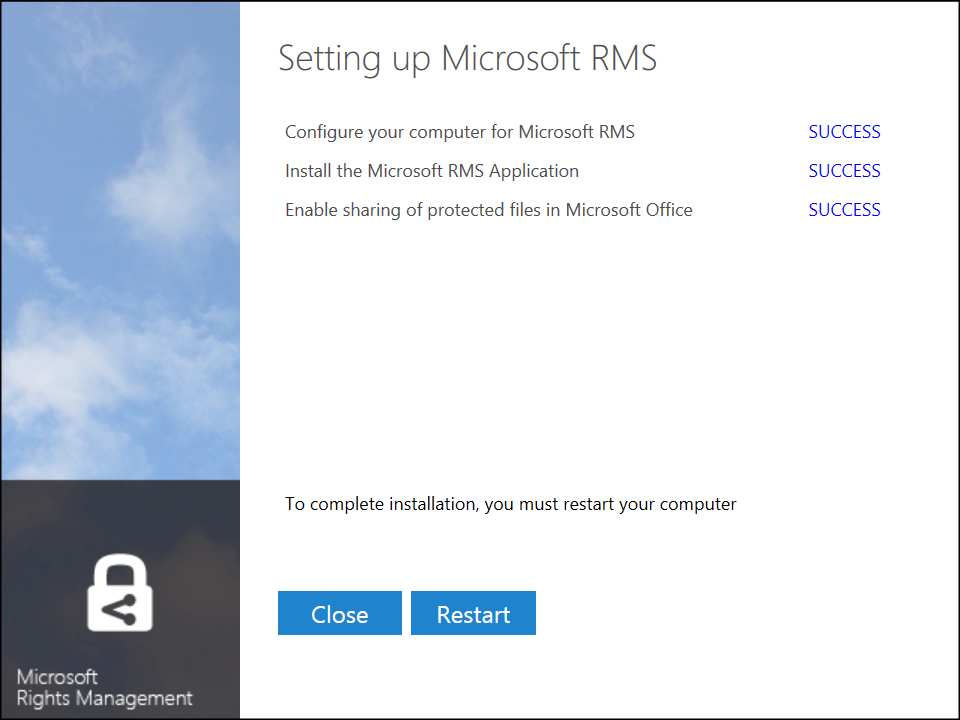
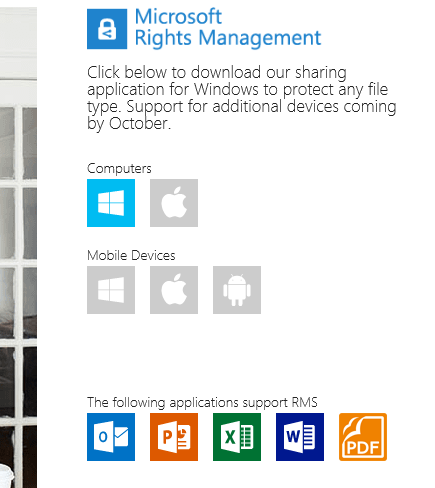
I signed up and installed the software into my Windows 8 PC.

image

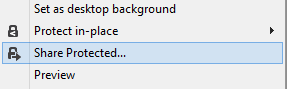
The way this works is that “enlightened” applications (currently Microsoft Office and Foxit PDF, though even they are not fully enlightened as far as I can tell) get enhancements to their user interface so you can protect documents. You can also protect *any* document by right-click in Explorer:

image

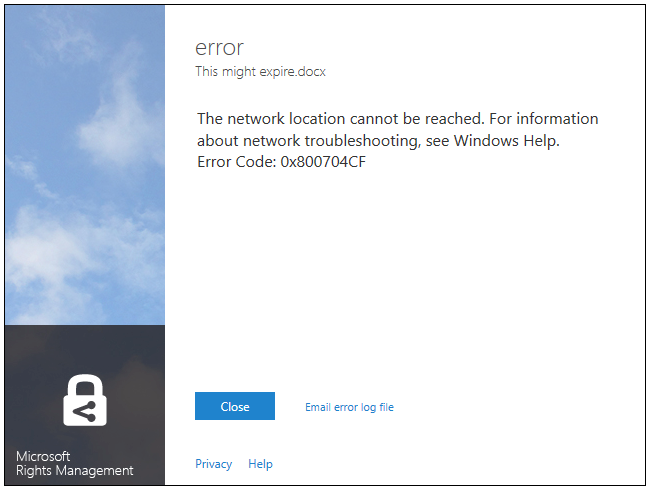
I typed a document in Word and hit Share Protected in the ribbon. Unfortunately I immediately got an error, that the network location cannot be reached:

image

I contacted the team about this, who asked for the log file and then gave me a quick response. The reason for the error was that Rights Management was looking for a server on my network that I sent to the skip long ago.

Many years ago I must have tried Microsoft IRM (Information Rights Management) though I barely remember. The new software was finding the old information in my Active Directory, and not trying to contact Azure at all.

This is unlikely to be a common problem, but illustrates that Microsoft is extending its existing rights management system, not creating a new one.

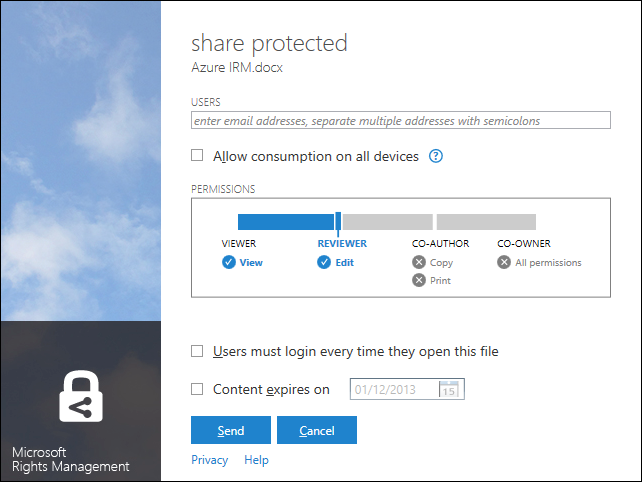
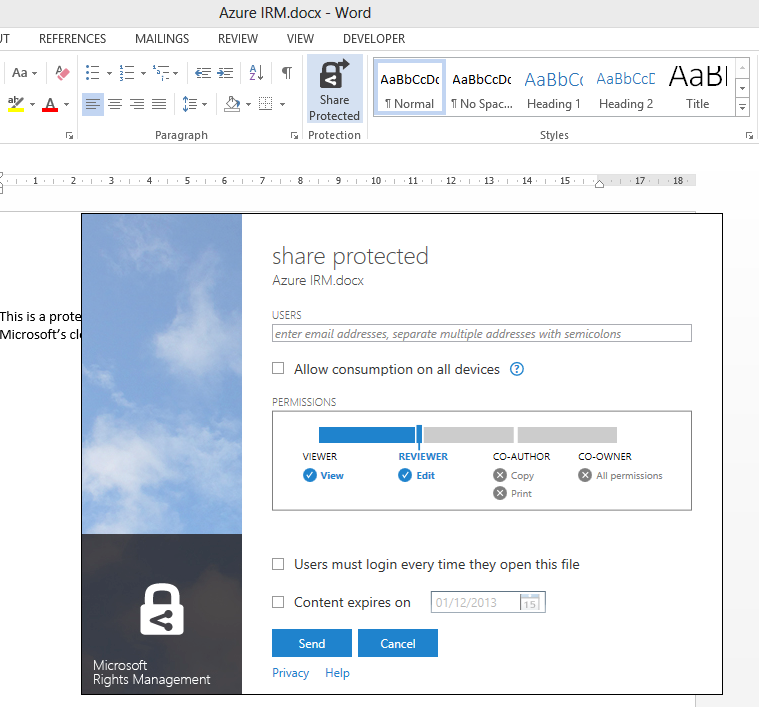
With that fixed, I was able to protect and share a document. This is the dialog:

image

It is not a Word dialog, but rather part of the Rights Management application that you install. You get the same dialog if you right-click any file in Explorer and choose Share Protected.

I entered a Gmail email address and sent the protected document, which was now wrapped in a file with a .pfile (Protected File) extension.

Next, I got my Gmail on another machine.

First, I tried to open the file on Android. Unfortunately only x86 Windows is supported at the moment:

image

There is an SDK for Android, but that is all.

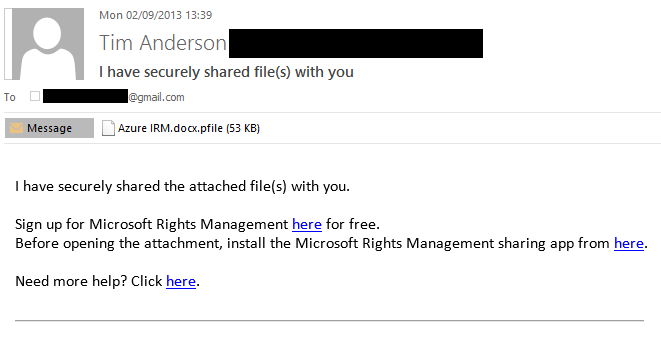
I tried again on a Windows machine. Here is the email:

image

There is also note in the email:

[Note: This Preview build has some limitations at this time. For example, sharing protected files with users external to your organization will result in access control without additional usage restrictions. Learn More about the Preview]

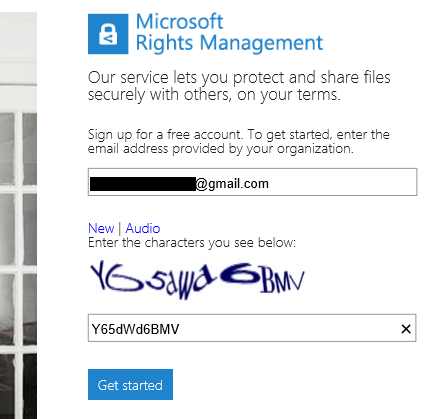
I was about to discover some more of these limitations. I attempted to sign up using the Gmail address. Registration involves solving a vile CAPTCHA

image

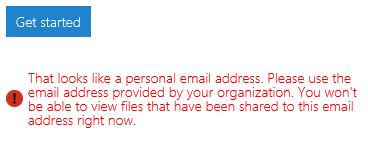
but got this message:

image

In other words, you cannot yet use the service with Gmail addresses. I tried it with a Hotmail address; but Microsoft is being even-handed; that did not work either.

Next, I tried another email address at a different, private email domain (yes, I have lots of email addresses). No go:

image

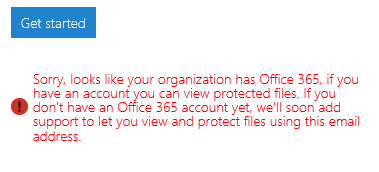
The message said that the address I used was from an organisation that has Office 365 (this is correct). It then remarked, bewilderingly:

If you have an account you can view protected files. If you don’t have an Office 365 account yet, we’ll soon add support…

This email address does have an Office 365 account. I am not sure what the message means; whether it means the Office 365 account needs to sign up for rights management at £2 per user per month, or what, but it was clearly not suitable for my test.

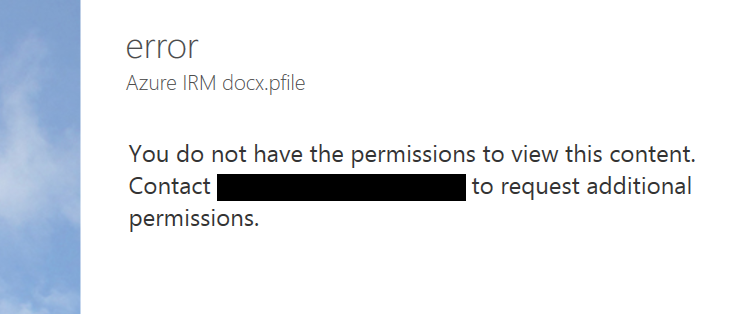
I tried yet another email address that is not in any way linked to Office 365 and I was up and running. Of course I had to resend the protected file, otherwise this message appears:

image

Incidentally, I think the UI for this dialog is wrong. It is not an error, it is working as designed, so it should not be titled “error”. I see little mistakes like this frequently and they do contribute to user frustration.

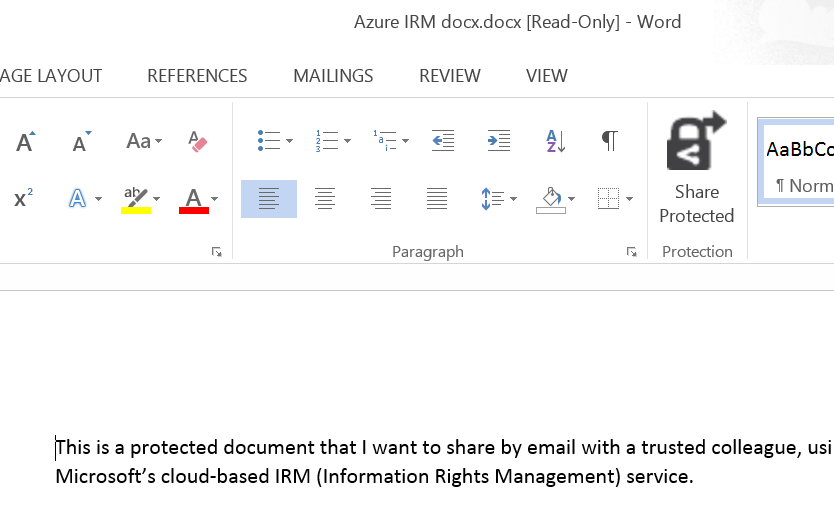
Finally, I received a document to an enabled email address and was able to open it:

image

For some reason, the packaging results in a document called “Azure IRM docx.docx” which is odd, but never mind.

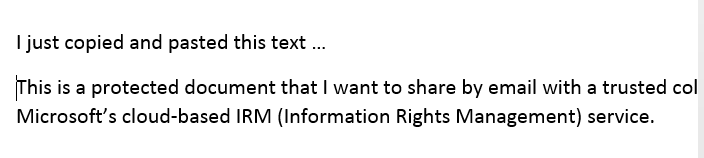
My question though: to what extent is this document protected? I took the screen grab using the Snipping Tool and pasted it into my blog for all to read, for example. The clipboard also works:

image

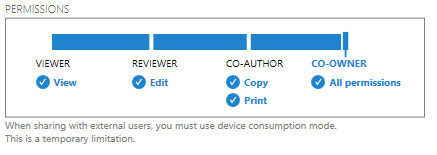
That said, the plan is for tighter protection to be offered in due course, at lease in “enlightened” applications. The problem with the preview is that if you share to someone in a different email domain, you are forced to give full access. Note the warning in the dialog:

image

Inherently though, the client application has to have decrypted access to the file in order to open it. All the rights management service does, really, is to decrypt the file for users logged into the Azure system and identified by their email address. What happens after that is a matter of implementation.

The consequences of documents getting into the wrong hands are a hot topic today, after Wikileaks et al. Is Microsoft’s IRM a solution?

Making this Azure-based and open to any recipient (once the limitation on “public” email addresses is lifted”) makes sense to me. However I note the following:

  • As currently implemented, this provides limited security. It does encrypt the document, so an intercepted email cannot easily be read, but once opened by the recipient, anything could happen.
  • The usability of the preview is horrid. Do you really want your trusted recipient to struggle with a CAPTCHA?
  • Support beyond Windows is essential, and I am surprised that this even went into preview without it.

I should add that I am sceptical whether this can ever work. Would it not be easier, and just as effective (or ineffective), simply to have data on a web site with secure log-in? The idea of securely emailing documents to external recipients is great, but it seems to add immense complexity for little added value. I may be missing something here and would welcome comments.


had to sign in twice since I didn’t check “Remember password!"

image

If you try recursion, it will package the already packaged file.

Microsoft completes Windows 8.1, it says, but developers are unable to test their apps

Microsoft has released Windows 8.1 to its hardware partners according to VP Antoine Leblond; but developers will be unable to test whether or not their apps work on the updated operating system until it is also in the hands of users:

While our partners are preparing these exciting new devices we will continue to work closely with them as we put the finishing touches on Windows 8.1 to ensure a quality experience at general availability on October 18th. This is the date when Windows 8.1 will be broadly available for commercial customers with or without volume licensing agreements, our broad partner ecosystem, subscribers to MSDN and TechNet, as well as consumers.

One reason for subscribing to MSDN is to get early access to new versions of Windows for test and development, so this is a surprising and disappointing move.

We pay thousands for MSDN access so we can test our software/apps properly, early testing, before GA, is an important part of that process! We don’t care about a couple of bugs in your OS, we about bug in our software. Most of us actually want to support Windows 8.1, a lot of us want to get apps ready for the awesome 8.1 features, but we can’t properly do that unless we get the RTM bits before the public gets the Windows 8.1 update!

says one comment to Leblond’s post.

It is hard to make sense of Microsoft’s reasoning here, though Microsoft’s Brandon LeBlanc comments that despite the RTM (Release to Manufacturing), Windows 8.1 is not altogether finished:

We are continuing to put the finishing touches on Windows 8.1 to ensure a quality experience at general availability

he says.

Windows 8 needs more high quality apps in order to win users over to its new tablet-friendly user interface, so it is unfortunate that Microsoft is not doing more to help developers support it.

On Steve Ballmer and Microsoft’s future

The announcement that Microsoft CEO Steve Ballmer will retire “within the next 12 months” prompts some quick reflections on Ballmer and the state of his company.

Ballmer suffers from lack of charisma on stage, and this combined with missteps like failing to compete effectively in mobile devices, nearly buying Yahoo at a ludicrous price, the Kin debacle, making far too many Surface RT devices, and the poor reception overall for Windows 8, means that Ballmer’s time as CEO may be judged harshly.

image

Many commentators seemingly forget that Microsoft’s financial results under Ballmer have been generally excellent. Further, if we blame Ballmer for the various blunders that occurred during his time as CEO, we should also credit him for the successes, like Windows 7, the steady improvements in Windows server, and the market success of Xbox versus Sony PlayStation (though not forgetting the red ring of death nor the numerous loss-making quarters for entertainment and devices).

Nor would it be correct to portray the Ballmer years as conservative turn-the-handle profit making from Windows and Office. Under Ballmer, Microsoft is transitioning towards the cloud with Office 365 and Windows Azure (with considerable success), and he was willing to take bold steps with both Windows (“reimagined” in Windows 8) and Office (moving towards a subscription model).

It is worth noting too that by all accounts Microsoft is not an easy company to direct. From my perception, its overly bureaucratic and somewhat dysfunctional management style was allowed to develop under former CEO Bill Gates, and while you can blame Ballmer for failing to fix it, the last reshuffle shows his effort to pull the company towards a more collaborative and efficient way of working:

We are rallying behind a single strategy as one company — not a collection of divisional strategies. Although we will deliver multiple devices and services to execute and monetize the strategy, the single core strategy will drive us to set shared goals for everything we do. We will see our product line holistically, not as a set of islands. We will allocate resources and build devices and services that provide compelling, integrated experiences across the many screens in our lives, with maximum return to shareholders. All parts of the company will share and contribute to the success of core offerings, like Windows, Windows Phone, Xbox, Surface, Office 365 and our EA offer, Bing, Skype, Dynamics, Azure and our servers.

What should the new CEO, and Ballmer in his final months, do now? I will refer to you to this interview with Scott Guthrie about what happened when he was reshuffled, along with several other Microsoft execs, to take on Windows Azure. Just to remind you, Azure was not a success when first launched, being both difficult to use and poorly presented by Microsoft.

We did an app building exercise about a year ago, my second or third week in the job, where we took all the 65 top leaders in the organisation and we went to a hotel and spent all day building on Azure," said Guthrie. "We split up everyone into teams, bought a credit card for each team, and we said: ‘You need to sign up for a new account on Azure and build an app today. It was an eye-opening experience. About a third of the people weren’t able to actually sign up successfully, which was kind of embarrassing. We had billing problems, the SMS channel didn’t always work, the documentation was hard, it was hard to install stuff.

“We used that [experience] to catalyze and said: ‘OK, how do we turn this into an awesome experience?’ We came up with a plan in about four to five weeks and then executed.”

Azure was based on decent technology, but prior to the changes Guthrie describes, it was a relatively hostile platform for developers. Put another way, it was not so much the strategy that was wrong, as the way it was executed.

I recall similar comments from the former Windows chief Steven Sinofsky about how Windows 7 was designed, based on what users found annoying in Windows Vista.

Something I see frequently at Microsoft is good ideas poorly executed or spoilt by errors of detail, and Ballmer could have done more to insist on higher standards. Recently I have been working with Office 365, and while the underlying platform is strong, working with it can be infuriating. It needs Guthrie’s approach: get people to try the product, watch what goes wrong, and fix it.

Microsoft’s devices and services strategy makes a lot of sense but the company needs more attention to detail to make it work.

Lenovo’s bundled Start menu: more OEM trouble for Microsoft

Lenovo and SweetLabs announced a deal yesterday whereby the Pokki app store and Start menu replacement will be pre-installed on Windows PCs.

This has been widely interpreted as a response to user dissatisfaction with the Windows 8 Start screen, which replaces with the hierarchical Windows 7 Start menu with a full-screen tiled view of application shortcuts. The press release, though, focuses more on the app store element:

Apps are dynamically recommended in the Pokki Start menu, app store, and game arcade to users by SweetLabs’ real-time app recommendation system, which matches the right apps with the right users. This system has already served one billion app recommendations this year, and the addition of Lenovo substantially extends the reach of this distribution opportunity for app developers looking to be promoted on brand new Windows 8 devices.

image

In other words, this is not just an app launcher but also a form of adware or if you prefer a third-party app store; the apps it installs will not be Windows Store apps running in the tablet-friendly Windows 8 environment, but desktop apps.

Microsoft could benefit I suppose if users concerned about missing the Start menu buy Windows 8, but in every other respect this is a retrograde step. Users who do want a Start menu would be better off with something like Start8 which will not nag them to install apps, which makes you wonder if Lenovo’s motivation is more to do with a lucrative deal than with pleasing its users. Microsoft’s strategy of building momentum for its own Windows 8 app store and platform will be undermined by this third-party effort.

Once again this illustrates how the relationship between Microsoft and its OEM partners can work to the detriment of both. The poor out of the box experience with Windows has been one of the factors driving users to the Mac or iPad over the years, and this is in large part due to trialware bundled by partner vendors.

Windows 8 is a special case, and there is no doubting the difficulty long-term Windows users have in getting used to the new Start screen. The new Start button in Windows 8.1 will help orient new users, but Microsoft is not backing away from Live Tiles or the Start screen. Lenovo’s efforts will make it harder for users to adjust, since they would be better off learning how to use Windows 8 as designed, rather than relying on a third-party utility.

Microsoft has Surface of course, which despite huge writedowns is well made and elegant, though too expensive; and this has not pleased the OEMs who previously had Windows to themselves.

It all makes you wonder if the famous gun-wielding cartoon of Microsoft’s organization chart should now be redrawn with the guns pointing between Microsoft and its hardware partners. After all, Windows Phone might also have gone better if the likes of Samsung and HTC had not been so focused on Android.

Email hassles with Android and Exchange: couldn’t open connection to server
I have an Asus/Google Nexus 7 which is set up to receive mail from Exchange 2010.

At least, it was. Some time ago it stopped receiving mail. When the mail client tried to sync, I got this message:

image

“Couldn’t open connection to server due to security error”.
The message is not particularly clear. I went back into the account settings and verified everything (including Accept all SSL certificates, since mine is self-signed) and it was all fine – as I knew it would be, since it used to work.

The error, it turns out, is to do with ActiveSync policies. Exchange is detecting that the device is not in conformance, and refusing to sync. Odd, since my ActiveSync policies are relaxed and allow anything.

I removed the account and added it back. Ah, now I have this dialog:

image

I tapped Activate and everything was fine. Mail now syncs again.

I am still not sure how you find this dialog if it does not pop up automatically.

Microsoft Office 365: migration hassles show why partners still have a role

I have been working with a small business migrating its email to Office 365. The task seems simple enough: migrate just over 100 mailboxes from on-premise Exchange 2007. There is no requirement for a hybrid deployment, so the normal approach is a cutover migration. You run a script on Exchange at the Office 365 end which sucks up all the mailboxes, creating user accounts as it goes. Once the mailboxes are synched, the script (called a migration batch) synchronises the mailboxes every 24 hours. You then change the MX (DNS) records so that mail goes to Office 365, get users to log on to the new mailboxes, and decommission the on-premise Exchange.

It sounds straightforward, and I am sure works fine with small mailboxes and just a few of them. It is meant to work for up to 1000 mailboxes though, so I did not think just 100 would cause any problems.

Here is what I discovered.

First, we soon ran into problems. The migration batch seems remarkably slow, partly thanks to using an ADSL connection (fast download but slow upload) but even slower than that would suggest. Some mailboxes report “Failed” for a variety of reasons, the most common being that they simply stop synching for no apparent reason, or in some cases never start synching. Here are some of the error messages:
  • Error: MigrationPermanentException: Error: Job is poisoned, poison count = 6.
  • Error: SyncTimeoutException: Email migration failed for this user because no email could be downloaded for 5 hours, 0 minutes.
  • Error: MigrationPermanentException: Error: The job has not made progress since 28/07/2013 08:43:19. Job was picked up at 27/07/2013 17:11:15.

image

So what do you do if you get these errors?

My first observation is that documentation for cutover migration is thin. It makes little provision for anything going wrong. There are a few things (like avoiding messages over 25MB or hidden addresses in Exchange) but nothing about “job is poisoned”.

Another observation is that the Cutover Migration Batch is lacking in common-sense options. For example, with a slow-ish connection you might prefer to migrate only two or three mailboxes at a time, rather than then 16, which seems to be the fixed number.
I was also puzzled by the option to “Stop” a migration batch, which you can do using a toolbar button.

image

What are the consequences of stopping a batch? Can you stop it in the morning, and restart in the evening, to reduce bandwidth during the working day, for example? Or do bad things happen?

I headed for the support community. Unfortunately this is not too good either. There are a number of unfailingly polite Microsoft support people there, but they don’t seem all that well informed when it comes to the details of what can go wrong and there is a lot of reference to support articles that might or might not answer the question; or an initial response that doesn’t quite answer the question and then no satisfactory follow-up; or retreat to private messages which, judging from the public responses, are also not always helpful either.

After being told that it was OK to stop and restart a migration batch I tried it. It did not work well at all for me. I even got this lovely error message for a Room mailbox:

Error: ProvisioningFailedException: Couldn‎’t convert the mailbox because the mailbox "mailboxname" is already of the type "Room”

I had better success deleting the migration batch and creating a new one, which is easy because it remembers the connection settings from last time. Mailboxes in progress resumed where they left off, and even some failed mailboxes started synching again.
Still, the detail of this is not so important. Fundamentally, Office 365 seems to me a strong service at a reasonable price (though I like Exchange better than SharePoint), and Microsoft is pushing small businesses towards it so hard that it is becoming difficult to stay on Microsoft’s platform at all unless you migrate – the disappearance of Small Business Server with bundled Exchange makes a small deployment expensive.

This being the case, you would have thought Microsoft would put its best effort into the migration tools, which are critical not only for successful transition, but also as many people’s first impression of the service. I did not expect what look like immature tools with skimpy documentation and poor community support.

Is Microsoft struggling to scale the system quickly enough to meet demand?

In some ways this may actually be good for Microsoft partners who still have their traditional role of puzzling out these kinds of problems and making it easier for their customers.

Not just Windows: even Mac sales are down

Apple has released its third quarter financial results, and they are decent: year on year revenue is up fractionally, from $35.023 billion to $35,323 billion, though profit is down from $8.8 billion to $6.9 billion.

Compared to the third quarter in 2012 though, Mac sales are 7% down though, from 4.02 million units to 3.754 million units. Revenue from the Mac has declined by 1%.

In isolation this is not a dramatic change, but the statistic is more interesting when you put it in context with what is happening with Windows PCs. Windows 8 is nearly a year old, released to manufacturing on August 1 2012 and generally available from October 26 2012.

Windows 8 has received a mixed reception, with many users reluctant to adopt the reinvented operating system, which replaces the Start menu and adds a touch-friendly tablet platform alongside the desktop user interface. So far it has done nothing to stem declining PC sales and may have accelerated the process. Gartner reports a 10.9% decline in worldwide PC sales in the second quarter of 2013  (same as Apple’s third quarter). Gartner’s figures also include Macs, though Gartner estimates only a 4.3% unit decline.

The evidence is that gains in Mac sales at the expense of Windows, which is a long-standing trend, is continuing, insofar as Mac sales have declined by less than the PC market overall. However the figures confirm that the decline in PC sales is due to fundamental changes in personal computing, in favour of tablets and other mobile devices, rather than market response to an unpopular Windows edition.

The twist here is that Windows 8 is designed for exactly that trend; and while there is plenty of scope for argument about how Microsoft has addressed it, there is little doubt that it was right to come up with a version of Windows for tablets – and one that was not a reprise of its previous stylus-based efforts.

My own view is that Windows 8 is a plausible strategy and that Microsoft should stick with it. Earlier comments on Windows RT are relevant here.

Hybrid devices that twist between laptops and tablets are not the answer though. They are transitional machines which end up too heavy and expensive to be good tablets. Many users will buy a cheaper laptop instead.

The question for Microsoft now is how much tablet market will be left by the time the Windows app ecosystem matures to the point when a Windows tablet can really compete with an iPad for usability and utility in pure slate form.

Apple has problems too. iPad sales are down by 27% from the same quarter last year, though iPhone is up 15%. The reason, I suspect, is Android.

Windows RT and Surface RT: Why Microsoft should persevere

Microsoft has reported a $900 million write-down on Surface RT inventory in its latest financial results. Was Surface RT a big mistake?

A loss of that size is a massive blunder, but the concept behind Surface RT is good and Microsoft should persevere. Here’s why.

Surface RT is experimental in two ways:

  • It was the first Microsoft-branded PC (or tablet if you prefer).
  • It was among the first Windows RT devices. Running on the ARM processor, Windows RT is locked down so that you can only install new-style Windows 8 apps, not desktop apps. However, the desktop is still there, and Microsoft bundles Office, a desktop application suite.

Microsoft had (and has) good reason to do both of these things.

Historically, DOS and Windows prospered because it was open to any hardware manufacturer to build machines running Microsoft’s operating system, creating a virtuous circle in which competition drove down prices, and abundance created widespread application support.

This ecosystem is now dysfunctional. The experience of using Windows was damaged by OEM vendors churning out indifferent hardware bundled with intrusive trial applications. It is still happening, and when I have to set up a new Windows laptop it takes hours to remove unwanted software.

Unfortunately this cycle is hard to break, because OEM vendors have to compete on price, and consumers are seemingly poor at discriminating based on overall quality; too often they look for the best specification they can get for their money.

Further, Windows remains a well understood and popular target for malware. One of the reasons is that despite huge efforts from Microsoft with User Account Control (the technology behind “do you really want to do this” prompts in Windows Vista onwards), most users outside the enterprise still tend to run with full administrative rights for their local machine.

Apple exploited these weaknesses with Mac hardware that is much more expensive (and profitable), but which delivers a less frustrating user experience.

Apple has been steadily increasing its market share at the high end, but an even bigger threat to Windows comes from below. Locked-down tablets, specifically the Apple iPad and later Android tablets, also fixed the user experience but at a relatively low price. Operating systems designed for touch control means that keyboard and mouse are no longer necessary, making them more elegant portable devices, and a wireless keyboard can easily be brought into use when needed.

Microsoft understood these trends, although late in the day. With Surface it began to manufacture its own hardware, an initiative which alongside the bricks-and-mortar Microsoft Stores (supplying trialware-free Windows PCs) aims to counter the corrosive race to the bottom among OEM vendors.

Windows 8 also introduces a new application model which is touch-friendly, secure, and offers easy app deployment via the app store.

In Windows RT the experiment is taken further, by locking down the operating system so that only these new-style apps can be installed.

Surface RT brings both these things together, solving many of the problems of Windows in a single package.

Why Surface RT failed

Surface RT is well made, though performance is disappointing; it seems that Nvidia’s Tegra 3 chipset is not quite sufficient to run Windows and Office briskly, though it is usable, and graphics performance not bad.

There were several problems though.

  • The price was high, especially when combined with the clever keyboard cover.
  • It may solve the problems of Windows, but for many users it also lacks the benefits of Windows. They cannot run their applications, and all too often their printers will not print and other devices lack drivers.
  • Surface RT launched when the Windows 8 app store was new. The new app ecosystem also has its problems (all these things are inter-related) and in consequence few compelling apps were available.
  • Microsoft’s built-in apps were poor to indifferent, and Office was bundled without Outlook.

I was in New York for the launch of Surface RT. There were “Click In” ads everywhere and it was obvious that Microsoft had convinced itself that it could sell the device in large numbers immediately. That was a fantasy. I suppose that if consumers had taken Windows 8 to heart quickly (as opposed to resisting the changes it imposes) and if the app ecosystem had flourished quickly then it could have taken off but neither was likely.

Surface RT positives

Despite all the above, Surface RT is not a bad device. Personally I was immediately drawn to its slim size, long battery life, and high build quality. The keyboard cover design is superb, though not everyone gets on with the “touch” cover. I purchased one of the launch machines and still use it regularly for cranking out Word documents on the road.

Reviews on Amazon’s UK site are largely positive:

image 

Surface RT is also improving as the software evolves. Windows 8.1, now in preview, adds Outlook and makes the device significantly more useful for Exchange users. Performance also gets a slight lift. The built-in apps are improving and app availability in general is much better than it was at launch, though still tiny compared to iPad or Android.

I have also been trying Surface Pro since receiving one at Microsoft’s Build conference last month. The Pro device has great performance and runs everything, but it is too bulky and heavy to be a satisfying tablet, and battery life is poor. I think of it more as a laptop, whereas Surface RT is a true tablet with a battery that gives pretty much a full day’s use when out and about.

Microsoft’s biggest mistake with Surface RT was not the concept, nor the quality of the device. Rather, they manufactured far too many thanks to unrealistic expectations of the size of the initial market. The sane approach would have been a limited release with the aim of improving and refining it.

I hope Microsoft perseveres both with Windows RT and with Surface RT. Give it better performance with something like Nvidia, Tegra 4, Windows 8.1, and improved app support, and it is near-perfect.

The future of Windows

Desktop Windows will remain forever, but its decline is inevitable. Even if it fails, we should recognise that Microsoft is trying to fix long-standing and deep-rooted problems with Windows through its Windows 8, Surface and Windows RT initiatives, and there is some sanity in the solutions it has devised. Despite a billion dollars thrown away on excess Surface RT inventory, it should follow through rather than abandon its strategy.

Anders Hejlsberg says C# 6.0 to use Roslyn compiler, coming in next Visual Studio after VS 2013

A disappointment at Microsoft’s Build conference last month was lack of news about the next version of C#, version 6.0. C# architect Anders Hejlsberg did present a session, but it was on TypeScript, a language which compiles to JavaScript.

Aside: Hejlsberg talks about the new Xbox music app in Windows 8.1 (and Xbox One) which is written in JavaScript. It is a large app with 500,000  lines of code, and new features are now implemented in TypeScript (30,000 lines so far).

However, Hejlsberg did also talk about C# 6.0 at Build, during this Channel 9 Q&A, though you have to scroll through to reach the C# content (about 34 minutes in).

image

He confirmed that C# in Visual Studio 2013 is the same as before, but there will be new previews of the forthcoming “Roslyn” compiler soon, and that C# 6.0 will be in the “next Visual Studio after” which suggests Visual Studio 2014, presuming Microsoft sticks to its annual release cycle.

“We are at a point where the Roslyn compilers are done,” he said.

Roslyn, Hejlsberg explained, is the new compiler for “C#, and VB, and the language services in the IDE.”

Roslyn performance will be at least as good as the existing native compiler, says Hejlsberg. It is better suited to parallel processing so will take advantage of multi-core machines, “particularly for large projects.”

You can read more about Roslyn here. Microsoft describes it as “opening up the Visual Basic and C# compilers as APIs.” Practical benefits include features like instant porting of VB code to and from C#, and the use of C# and VB as macro languages within a .NET application.

Hejlsberg also says that Roslyn will enable a faster pace of evolution for C# in future.

Another aside: Xamarin, which provides a compiler for C# targeting iOS and Android, gets a nod of approval from Hejlsjberg. “I’m a great fan of their work,” he says.

Blogger (and former Microsoft Excel developer) Wesner Moise provides a transcript of the key points.

What’s coming from Microsoft in its next financial year: July 2013-June 2014

Noticed this slide shown by COO Kevin Turner at Microsoft’s Worldwide Partner Conference under way in Houston.

image

What caught my eye in particular?

  • Common app platform between Windows and Windows Phone
  • Skype integration with Outlook.com and Office 365
  • Update to Surface RT and Surface Pro – does this mean updated hardware? That seems likely, given that both models will soon look obsolete without, especially the older Surface RT.