Category Archives: microsoft

Upgrade to Windows 7 in Europe: confusing as expected

PC manufacturers are now publicising their upgrade deals for Windows 7. Buy a machine with Vista today, get a free upgrade to Windows 7 later.

Except the software is not an upgrade as such – it’s a replacement. Here are the details from Asus, for example, which note:

The Windows® 7 Upgrade Option Program requires a clean installation of the Windows 7 upgrade media.  All personal data and settings, including documents, pictures, files, programs, music and video, should be backed-up prior to performing the clean installation of Windows 7.  After installation of Windows 7, the end user should then re-install all personal data and restore settings. Visit http://windows.microsoft.com/upgrade-windows-E for important information.

I think (and hope) that the referenced Microsoft site is only a placeholder, since its instructions are far from detailed:

… before installing E editions of Windows 7, make sure to back up your files and settings to an external hard disk, USB Flash Drive, or other media. After the installation, move your files and settings back to your PC and reinstall the programs you want to keep using.

Important: E editions of Windows 7 do not include Internet Explorer. We recommend that you get an Internet browser from Microsoft or another software manufacturer and have it available on a CD/DVD or other media so you can install it after you install Windows 7.

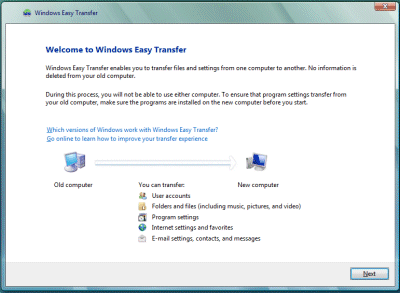
It is not a trivial exercise. There is a Windows Easy Transfer wizard for XP and Vista, and I presume this will be used:

Although this does a reasonable job, there are plenty of gotchas. The most obvious is that it generally cannot transfer applications, only data. It gives the user options concerning which folders to copy, but knowing which are needed may not be easy. It does not cope well if you partition the new computer in a different way. It presumes you have sufficient intermediate storage, which could be a problem if you have many gigabytes of media files to copy and no suitable external drive. You could get into difficulties with badly-behaved applications that store data in Program Files.

There is also a chicken-and-egg problem with reinstalling applications. You are meant to reinstall applications, and then run Easy Transfer, as otherwise installing an application might overwrite the settings you have transferred. On the other hand, if the reinstalled application has a different version than the source application (which is not unlikely if it is downloaded) then transferring settings over the top could mess it up.

Personally I’m wary of the tool. If I have to do this sort of reinstallation, I take a minimalist approach and only transfer documents, plus a few select settings that I understand. Without Easy Transfer though, it is easy to lose things like emails and address books, or browser bookmarks, the lack of which can cause aggravation.

Then there’s the matter of the web browser. Asus doesn’t say whether it is supplying one on its “driver” DVD.

Overall, I’m expecting this to be good business for armies of home PC support people.

Discussion of the reasons for this is here and here.

EU responds to questions on Microsoft’s plans for Windows 7

Events in the EU’s case against browser bundling in Windows have taken an odd twist. The case was brought originally by Opera, which complained that it couldn’t sell its browser because IE came free with Windows. Other interested parties such as Google and Mozilla joined in. In January the EU issued a statement of objection:

The evidence gathered during the investigation leads the Commission to believe that the tying of Internet Explorer with Windows, which makes Internet Explorer available on 90% of the world’s PCs, distorts competition on the merits between competing web browsers insofar as it provides Internet Explorer with an artificial distribution advantage which other web browsers are unable to match. The Commission is concerned that through the tying, Microsoft shields Internet Explorer from head to head competition with other browsers which is detrimental to the pace of product innovation and to the quality of products which consumers ultimately obtain. In addition, the Commission is concerned that the ubiquity of Internet Explorer creates artificial incentives for content providers and software developers to design websites or software primarily for Internet Explorer which ultimately risks undermining competition and innovation in the provision of services to consumers.

Microsoft’s problem: whatever the merits of the EU’s case, it is desperate to have a single global launch for Windows 7, to put Vista behind it, to persuade XP users to upgrade, and to compete with Apple. The EU had in mind some sort of install menu where users could choose a browser; but Microsoft unilaterally decided to unbundle Internet Explorer from Windows 7 completely, in a special Windows E edition. Today Microsoft also confirmed that because of the EU’s case, it will not offer upgrade editions of Windows 7 in Europe.

The odd thing is, Microsoft has no guarantee that its actions will necessarily appease the EU, as confirmed when I asked about this. The EU’s immediate response was not comforting:

At the level of both computer manufacturers and retail sales, the Commission’s Statement of Objections (SO) suggested that consumers should be provided with a genuine choice of browsers. Given that over 95% of consumers acquire Windows pre-installed on a PC, it is particularly important to ensure consumer choice through the computer manufacturer channel.

As for retail sales, which amount to less than 5% of total sales, the Commission had suggested to Microsoft that consumers be provided with a choice of web browsers. Instead Microsoft has apparently decided to supply retail consumers with a version of Windows without a web browser at all. Rather than more choice, Microsoft seems to have chosen to provide less.

I spoke to Jonathan Todd, European Commission spokesman on competition:


What could happen if Windows 7E doesn’t satisfy EU requirements?

We haven’t reached any conclusions yet as to whether or not their intention would in any way be relevant to the concerns that we’ve expressed in our statement of objections. Until such time as we’ve reached our conclusions it’s difficult to comment. If we were to find that there had been a breach of the anti-trust rules we could fine them and we could require them to change their business practices.

What is the likely timescale of the EU determining whether or not the planned release of Windows 7 conforms to the requirements?

Clearly we’re doing that as quickly as possible.

How long?

That depends to a certain extent on Microsoft.

What does Microsoft need to do to expedite the process?

As we indicated in our statement, one of our concerns was that we would have to verify whether the technical separation of Internet Explorer from Windows was not negated by other actions by Microsoft, for example as regards the terms and conditions under which Internet Explorer would be made available to computer manufacturers.

There’s some tension between the usability issues that people will face when they try and acquire Windows 7, for example that acquiring an operating system without a browser could be inconvenient, and the …

[interrupts] Let me make it clear, the commission has never ever suggested to Microsoft that they should supply Windows 7 without a browser.

This has never been one of the suggestions that we’ve made to them.

It is not necessarily relevant to resolving the concerns that we have about Microsoft’s conduct.

The considerations are that consumers have to have genuine choice about which browser they use.

Why do the same conditions not apply to Apple and other operating system vendors?

For the extremely simple reason that Apple doesn’t enjoy a dominant position of the operating system market. It’s not a problem to have a dominant position, but when you are in a dominant position in the market, and they have over 90% of the operating system market, when you are in a dominant position that places constraints on what you can and cannot do.

I suppose the counter argument is that if you are in the operating system market you need to be allowed to offer similar features to others in that same space?

Listen. You can do what you like in terms of bundling if you are not in a dominant position. If you are in a dominant position your actions have a direct affect on competition throughout that market. That’s the difference.

How low would Microsoft’s share of the market need to dip before they would no longer be required to hobble their product for the sake of competition law?

I don’t agree with your analogy about hobbling their product. What we’re talking about is making sure that consumers are not hobbled by what is imposed on them by Microsoft.

There are advantages to having a browser integrated with the operating system. For example, it means that a single vendor is managing security, that updates are coming down in a streamlined fashion, and that within enterprises the functions of the browser can be managed with the same tools that are used to manage the rest of the operating system.

If you bundle in your browser and you make it difficult for other browsers to get a market share, then you’re denying consumers choice and you’re taking away the incentive for innovation. Internet Explorer wasn’t updated for, how many years?

For five years, which was disgraceful by any measure.

Because they didn’t have an incentive to do so.

They did have an incentive to do so, but they didn’t realise that they did, and in fact Microsoft is losing market share quite rapidly in browsers which throws into doubt whether legislation is actually necessary.

You’ve read our statement. We’ve never ever suggested that Windows should be supplied without a browser. The heart of our case is genuine consumer choice. Therefore, certainly as regards retail sales of Windows 7, they appear to be taking away choice from consumers rather than giving them more.

I don’t think many users are going to be operating Windows without a browser so they are going to make that choice at some point.

Yes, but as we all know, if you are buying an operating system that doesn’t have a browser included it’s that much more difficult to actually get a browser.

If you require a software manufacturer to bundle another company’s software product with their own, it raises questions about security, about support, about updates, which are difficult ones, I understand why Microsoft might not be willing to do so.

We both know also that Microsoft claimed for many years it was technically impossible to separate Internet Explorer from the operating system.

Microsoft does not intend to remove the parts of IE that could reasonably be described as part of the operating system. All it intends to remove is the web browser as the user sees it.

For many years Microsoft said it is impossible to sell the operating system without a browser, that it’s not possible to separate out Internet Explorer from the operating system.


Todd said more than I had expected. There are a few things I find it hard to make sense of. The EU’s complaint seems to be not only about lack of competition, but about its consequences, spelt out as lack of innovation in browsers, and Microsoft’s unfairly-gained market share for IE. This made perfect sense a couple of years ago, but not so much now. Browser innovation is rapid – look at Google Chrome, WebKit and Safari, Mozilla FireFox, Opera (which never went away) – and Microsoft is already losing market share in browsers, a point which Todd did not answer.

On the other hand, I do not want to downplay Microsoft’s discreditable action in first energetically developing IE to squash the competition, and then leaving it frozen to promote Windows rather than the Web as the platform of choice. A disgrace; but one which the market is solving without EU legislation.

As for current developments, could Microsoft be trying to stimulate antipathy towards the EU by deliberately inconveniencing them with Windows E? Or is this really the company’s best effort to satisfy the EU while still releasing Windows 7 on time? I guess the latter; but it is an odd state of affairs.

Technorati Tags: ,

Windows 7: cheap prices but painful upgrade for EU

Microsoft is offering Windows 7 at bargain prices for customers who pre-order. General availability is set for October 22nd.

In the USA, Windows 7 will be on offer at $49.99 for Home Premium or $99.99 for Windows 7 Professional, if you order between 26th June and July 11th. Pre-order details are here, and upgrade deals here.

UK customers get Home Premium for £49.99 or Professional for £99.99 if they pre-order between July 15th and August 14th. That’s more expensive than in the USA but still reasonable.UK pre-order details are here, and UK upgrade deals are here.

Why so cheap? My guess is that Microsoft wants to get users off the unpopular Vista as rapidly as possible, and to persuade Windows XP diehards that now is the time to migrate. It pays to pre-order, since after the deadline prices rise to roughly match those for Windows Vista today.

The snag for customers in the EU is that there are no upgrade editions. To be clear, there is upgrade pricing, at least until December 31st 2009. Home Premium will be £79.99, Professional £189.99 and Ultimate £199.99. However, these will be discounted “Fully packaged product”, which is Microsoft-speak for an unencumbered edition you can clean install and transfer between PCs.

There will be no in-place upgrade allowed, neither for XP nor Vista. The same restriction applies to Vista PCs purchased with a “technology guarantee” that gives a free or nearly free upgrade to Windows 7 when available, a scheme which starts on June 26th for participating manufacturers.

Why not? It is all to do with the EU’s action against Microsoft concerning browser bundling. According to Microsoft’s Laurence Painell, Windows OEM & WGA Product Manager in the UK:

The reason we won’t be offering an upgrade product is because the customer with whatever previous version of Windows they had, didn’t make the decision to have IE installed. So we cannot carry Internet Explorer across into the latest version of Windows. However we’re working through the ramifications of this with the EU, but that’s pretty much what the expectations are. So currently we can’t offer an upgrade process from Windows Vista to Windows 7 that will be seamless. It will need to be a wipe and replace and the customer will then need to make a choice as to which browser they want to install after that point.

After telling me this, Painell gave a making-the-best-of-a-bad-job sigh, and I can understand why. Many users have no clue how to handle a “wipe and replace” replacement of Windows, which is not something to be undertaken lightly. In this type of installation, the hard drive is typically reformatted to be completely blank, and Windows installed as if it were a new machine. There are three substantial risks in this operation:

1. Parts of the hardware may not work if drivers are missing. You need to get these from the manufacturer’s web site.

2. All applications must be reinstalled. For this you need the setup disks or files plus serial numbers, keys and so on, which are not always available.

3. Most significant of all: any documents, pictures or other data on the hard drive is zapped. You need to copy this elsewhere first – if you know how to find it.

All this means that while technically a wipe-and-replace install is the best option (a point which Painell made to me), it is also a dangerous option for non-experts.

In mitigation, most users stick with whatever version of Windows is pre-installed, and Microsoft doesn’t support in-place upgrade from XP to Windows 7 anyway.

On the other hand, there are a couple of reasons why the in-place upgrade from Vista to 7 is unusually attractive. Unlike most Windows upgrades, 7 generally runs better than Vista on the same hardware. Vista also shares the same underlying architecture as 7, so the in-place upgrade has a good chance of working well.

Further complicating matters, EU Windows users have to cope with a version of Windows without a browser pre-installed. Painell was vague about how this will work exactly, for users who buy the retail product. Those who buy PCs with 7 pre-installed should have this sorted by the manufacturer. He did emphasise that IE will not be included at all:

Will we be putting IE disks in with the fully packaged product? No. It will be separate, and it will be down to the customer to decide whether or not they want to take it. We need to make sure that there is a clear split between IE and Windows.

How then will they get a browser? It could be “through disks in retail, through download options, or any other technology options that we can provide,” says Painell, explaining that Microsoft has between now and October to work out the details with its partners.

Could users buy an upgrade copy while on holiday in the USA, and use that?

Technically, yes, however we’re still working through what that means and whether we have to do anything in that space.

No doubt this and other workarounds will receive plenty of attention and publicity once Windows 7 is released.

It is all very inconvenient. The bizarre twist though is that Microsoft has no idea whether or not its actions in Windows E will satisfy EU requirements. I asked Painell if the EU might still object:

The conversation is still ongoing. We’re working through it with the EU, there is still the possibility, yes, but we don’t know at this stage. We’re doing what we can early on to pre-empt it and show that we’re trying to do the right thing by their decisions, but ultimately this is not final and we’re working through the process.

It all sounds like an elaborate game. Naturally I picked up the phone and spoke to the EU about Microsoft’s plans. Is it likely to disrupt them, and what are the implications? I’ve reported in a separate post.

Update: URLs added to give pre-order as well as upgrade details.

Technorati Tags: ,,

Outlook HTML is better broken and safe, than rich and dangerous

The campaign at fixoutlook.org is brilliant. Outlook 2010 will have broken HTML support, it says, because it will use Word to render HTML:

Microsoft has confirmed they plan on using the Word rendering engine to display HTML emails in Outlook 2010. This means for the next 5 years your email designs will need tables for layout, have no support for CSS like float and position, no background images and lots more.

The web page hooks into Twitter and displays avatars from – currently – over 20,000 supporters.

Here’s a few things the campaigners do not mention. First, the Word rendering was introduced in Outlook 2007. It is not a new issue; and in fact caused some commotion last time round.

Second, using Word to render HTML is safer. Here is the bit of Microsoft’s response that matters to me:

For e-mail viewing, Word also provides security benefits that are not available in a browser: Word cannot run web script or other active content that may threaten the security and safety of our customers.

I recall endless security problems with embedded Internet Explorer in earlier versions of Outlook. I used to set Outlook to display as plain text; and even then there were scenarios in which IE could be exploited.

Third, I have no enthusiasm for emails laden with “rich” HTML, JavaScript, Flash and the like. These kinds of emails are invariably marketing and usually not worth reading. What is the “Email Standards Project”? It’s nothing to do with the W3C. The major sponsor appears to be Freshview, whose main product is Campaign Monitor:

Built just for designers, Campaign Monitor is 100% rebrandable email marketing software. Send campaigns for yourself, your clients or let them send their own at prices you set.

I am not averse to simple formatting in emails, for which Word is more than adequate. I agree that Word is not good as an HTML editor or renderer; but in this context it matters little – though I was even happier with the simple HTML editor Outlook used to have for those who disabled Word integration.

Therefore I am opposed to this campaign and suspect that many of the signatories have clicked with little thought or investigation.

That said, there is plenty wrong with Outlook. Dire performance issues in Outlook 2007; the most impenetrable user interface in general use; broken RSS support that fails to integrate sensibly with either Exchange or Internet Explorer; an archiving system that by default leaves users that have more than one PC with archives all over the place and in hard-to-find locations; and plenty more.

It would be great if Microsoft would fix Outlook; but not, please, by returning to embedded IE.

Technorati Tags: ,,,,

Does Visual Basic have a future?

I was interested in this podcast with a member of the Visual Basic team at Microsoft, Lisa Feigenbaum, as I ask myself the same question.

Unfortunately the questioning from Joe Stagner (who also works for Microsoft) is tame. Nevertheless, there are a few points of interest.

“The things that come out of Microsoft, it is C# biased” admits Feigenbaum, which she says is because so many at Microsoft have a C or Java background.

That is part of the reason (though more C than Java) but I doubt it is that simple. If you go back to the beginnings of .NET, Microsoft designed C# and what was then the new framework and runtime together. VB on the other hand was hauled into the new world and still bears the scars.

Let’s answer the question first. Microsoft cannot afford to abandon VB, which remains popular, especially (though certainly not exclusively) at the less professional end of the market. VB isn’t going away.

Further, there’s really very little difference in the capabilities of the two languages, so there is little incentive for anyone to switch. Microsoft has attempted to differentiate them, but these attempts generally fail. “Any time we do something cool in one language, the other folks want it” says Stagner in the podcast.

As I see it, that’s part of the problem. It begs the question: what is the point of VB, other than to keep existing VB developers happy? In what circumstances would you advise a new programmer to learn VB rather than C#?

I dip in and out of both VB and C#, and of the two I prefer C#. I find VB’s slightly increased verbosity annoying, and I dislike the statement continuation character which is unnecessary in C#, because statements end with semicolons. I prefer case-sensitive languages, which give more flexibility when naming variables. If you want to do XNA games programming, currently only C# is supported. 

VB’s dynamic features are useful in some scenarios, particularly Office automation, though this advantage is removed in C# 4.0 which has dynamic variables.

The original attraction of BASIC, its English-like syntax, is nearly lost in today’s VB.

Well, choice is good; and the existence of VB alongside C# proved the cross-language credentials of the “common language” runtime from the get-go.

Nevertheless, I’m expecting VB usage to decline gradually. An external factor is the rise of the JavaScript family, which is more like C# than VB.

Incidentally, Feigenbaum threw in a comment about Visual Studio that I found interesting. After talking about the managed code editor in Visual Studio 2010, she remarks “In the release after 1010 we’re rewriting the compilers in managed code.”

Technorati Tags: ,,,,

Google Apps add-on breaks Outlook features in email wars

Google has released an add-on to Outlook that apparently breaks Outlook search. Google Apps Sync synchronizes Outlook email, calendar and contacts with Google Apps. Google recommends it as a transition tool for people migrating from Exchange, or for people who prefer the Outlook UI. A premium version of Google Apps is required.

Unfortunately it breaks some Outlook functionality. In particular, Outlook search no longer works correctly. There are also potential issues with the Hotmail connector and, according to Google, the Acrobat PDF Maker toolbar and the Outlook Change Notifier.

Although uninstalling Google Apps Sync should restore the features, this wasn’t working in early versions of Google Apps Sync. So the somewhat counter-intuitive advice is to upgrade Google Apps Sync to the latest version and then to uninstall; or tinker with the registry yourself according to Microsoft’s guidance.

Let’s reflect a bit on what is happening here. Google is encouraging its users to install an add-on that damages the functionality of a rival product. Understandably annoying for Microsoft; but it is explained in the documentation if you read it carefully. I doubt it is deliberate sabotage; on the other hand, it highlights the fragility of desktop versus cloud applications. Google’s technical advice on the subject is pretty much a shrug: if you don’t like it, uninstall it.

Another perspective on this is that if you are happy with Outlook with or without Exchange, be wary of third-party add-ons, especially from companies that want to migrate you to another product. If you are making the transition to Google Mail and just need to export your data, of course, breaking Outlook a little will not worry you.

The broader reflection is that many third-party add-ons for Windows, though claiming to make things better for you, actually make things worse.

Moving Vista to a larger hard drive using built-in backup and restore

I was running out of space on drive C, on my Vista 64-bit PC. Luckily hard drives are cheap, so I purchased a 1TB drive and then contemplated how to transfer the system. I have a slightly complex setup, with 3 physical drives installed and four versions of Windows (XP, XP64, Vista 32 and Vista 64) – Vista 64 is the one I use most of the time, but I find the others useful for testing or running otherwise incompatible software. Virtual machines are good for this too, but there is still a place for real installs

Last time I did this, on a laptop, I used an excellent tool called Drive Snapshot. It worked well; but I figured this was a good opportunity to test the backup and restore built into Windows. In effect, I would do a backup, then pretend my drive had failed and restore to a new one. I attached an external USB drive, opened Windows Backup and selected Create a Windows Complete PC Backup and Restore image of your entire computer, which can be used to recover from a hardware failure.

It started badly. As I mentioned, I was running out of space:

The backup failed: not enough disk space to create the volume shadow copy on the storage location.

I had a plan. Windows automatically creates a file called hiberfil.sys, which is roughly the same size as the amount of RAM in the system. Removing hiberfil.sys is easy, and frees up plenty of space. Just open a command prompt with administrator permissions and type:

powercfg.exe –h off

You can guess how to re-enable it later. I retried the backup and it worked. Next, I removed the old hard drive – my insurance policy – and attached the new one.

A little-known fact, which many people discover in bad circumstances: restore is harder than backup. This was no exception. I was expecting to boot from the Vista setup DVD, choose a restore option, and have my system back as it was. I was also hoping that I’d be able to resize the partitions, otherwise I’d be no better off than before, but if necessary that could be tackled later.

It didn’t go well. I booted from the Vista setup DVD, and clicked through several repair options selecting to use Windows Complete PC Restore. I arrived at this dialog (with apologies for the quality; it’s a photo of the screen):

The dialog says: This will delete any existing partitions and reformat all disks to match the layout of the backup. Yes, I had four partitions to restore. Still, this dialog caused me some anxiety. There were other physical disks in the machine, which I had not backed up recently; would Vista also format and re-partition these? I thought probably not; but to be on the safe side I powered down, disconnected the other drives, and started again. I then confidently clicked Finish.

Unfortunately I got this notorious dialog:

There are too few disks on this computer or one or more of the disks is too small. Add or change disks so they match the disks in the backup, and try the restore again.

Do you ever want to argue with your computer? I’d removed a 180GB drive, and replaced it with a 1TB drive, but Vista was insisting that it was too small.

Time to Bing, or should that be Google? I found this discussion, headed discouragingly A Windows Complete PC Restore always fails.

Luckily there were some tips in the thread, though not from Microsoft (a fact that has not gone unnoticed) even though this is an official forum. I rebooted and selected Command Prompt from the System Recovery Options. Then I ran diskpart, a command line tool which makes no pretence to user friendliness. I created four partitions, each bigger than the ones I was restoring. I tried to assign the correct drive letters, but the tool would not let me, advising me to check the system event log for more information. In the recovery environment? Thanks.

I tried again, but it still failed. Then I rebooted, just in case. This time it worked. Why? I’m not sure what was the key. It appears that the restore does not like to see a raw drive; yet as I discovered, it re-partitions it anyway. So I can’t give any definitive solution here, except to say, try fiddling with diskpart.

I went away for a few hours, and when I returned the restore was complete, the PC had restarted, and it was waiting for me to log in.

There was one snag. Rather than using the partitions I had created, the restore made its own, of the same size as on the old drive. Fortunately – and I’m not sure if this was accident or design – the partition I cared about was at the end of the drive, followed by free space. Unfortunately, the Extend Volume option in Disk Management was disabled and greyed out. Unfortunately again, the equivalent option in diskpart also failed. Whatever size I selected, I got The volume size you have selected is too large for the disk. Either select a disk with more free space, or specify a smaller volume. More lies. My drives are set to Basic; I guess that changing them to Dynamic might fix this.

I’m slightly distrustful of Dynamic drives, so I booted into a different version of Windows located on a different drive (I said this could be useful). This time, diskpart was happy to extend the volume. I then also typed extend filesystem. It worked:

Overall, I’m glad that the process worked, but not impressed with the fragility of the restore process and the lack of help with these puzzling error messages. I suppose Microsoft considers this an advanced task undertaken by professionals, who know how to Bing. I don’t see why the emergency restore should not be able to prepare a new hard drive, restore to it, and even offer to resize the partitions in a sensible manner.

I’d be interested to know whether Windows 7 handles this better, but not interested enough to try it.

Fortunately, I’ll never again need to do this. I mean, 750GB free is enough for anyone, right?

Technorati Tags: ,,,

For your nightmares: 10 more things which could be unbundled from Windows

Microsoft is caving to the EU and unbundling Internet Explorer from Windows 7 in Europe. Arguments over whether bundling a browser with Windows is anti-competitive go back many years of course, and were central to the US Department of Justice case in the late nineties. The DOJ won in court, but too late to save Netscape.

But which other vendors have lost market share when the functionality of their products became a standard part of Windows? There are numerous examples. Trumpet Winsock was a popular TCP/IP implementation for Windows 3.0, for example.

Windows didn’t always come with a built-in firewall. You had to use a 3rd party product such as ZoneAlarm.

Windows now has basic CD/DVD writing built-in, which can’t have helped the market for Nero and the like.

Media players of course from iTunes to Real Player, which have to compete with Windows Media Player. The EU’s solution was the useless Windows N.

Application runtimes like Java – the .NET runtime comes standard with Windows.

Video editing and authoring: Movie Maker is free with Windows, which can’t help Sony Vegas products, for example.

Zip compression and extraction: building this into Explorer must have been a blow to WinZip.

Email clients – Outlook Express / Windows Mail comes free, which reduces the market for Thunderbird and the like.

Fax clients – remember WinFax? Now we have Windows Fax and Scan built-in.

Hard disk defragmentation – does Diskeeper like having to compete with utilities built into Windows?

What would Windows be like if third-parties insisted on either the removal of the competing functionality, or some sort of equal billing with user choices or OEM bundling deals (to some extent we have the latter already)? Most likely vile. We would all flee to Apple, which seemingly has no problem bundling all this stuff, or to Linux, which in many ways is designed for this kind of free-for-all.

I am no lawyer; but I can’t help wondering which other third-parties are queuing up to say, “You did this for Opera, what about us?” In fact, the EU’s January 2008 press release specifically mentions desktop search and Windows Live as other topics about which complaints were received.

Competition is good; but so too is a rich, stable and complete operating system.

Technorati Tags: ,,

Microsoft unbundles Internet Explorer from Windows 7 – in Europe, that is

Microsoft is to offer a special version of Windows in Europe. Called Windows 7 E, it will be identical to Windows 7 elsewhere except for one thing:

The E versions of Windows 7 will include all the features and functionality of Windows 7 in the rest of the world, other than browsing with Internet Explorer.  Computer manufacturers will be able to add any browser they want to their Windows 7 machines, including Internet Explorer, so European consumers who purchase new PCs will be able to access the Internet without any problem.  Consumers will also be able to add any Web browser to their PCs, to supplement or replace the browsers preinstalled by their computer manufacturer.

There’s only one reason for this. It’s an effort to comply with EU competition law:

We believe that this new approach, while not our first choice, is the best path forward given the ongoing legal case in Europe.  It will address the “bundling” claim while providing European consumers with access to the full range of Windows 7 benefits that will be available in the rest of the world.

The post linked above is from Microsoft’s VP and Deputy General Counsel Dave Heiner, who notes that Microsoft is keen to avoid a delay in shipping Windows 7 in Europe. In other words, it would rather give up whatever advantage it gets from shipping with IE included, than risk some sort of sales injunction and/or fine which would be hugely costly. It has more pressing problems than its share of the browser market, including competition from Apple and Vista’s poor reputation.

It may be fined anyway, of course, for past misdemeanours in the EU’s eyes.

Personally I have mixed feelings about the EU’s legal efforts in relation to Microsoft. Last time around we got the absurd Windows N, to address a Windows Media monopoly that hardly existed – Apple and Adobe are winning in media, and that’s nothing to do with Windows N, which nobody bought. That said, the EU may have made life better for the Samba folk by forcing the publication of Windows protocols, which is an interoperability benefit. It’s unfortunate that fines go, apparently, straight into EU coffers; the anonymous Mini Microsoft blogger says:

EU: you say "ee-you", I say, "ewwww!" As long as the Microsoft ATM continues shooting out cash fines the EU is going to keep mashing our buttons.

and I see his point.

What are the implications this time around? It’s worth bearing in mind that OEM vendors can already make other browsers the default in Windows. Still, on the face of it this is good for competing browser vendors, though they may find themselves having to pay for prime position in OEM installs. It could be annoying though for users installing or re-installing Windows from shrink-wrap editions, who find they have no browser; presumably Microsoft will include some sort of download utility other than a web browser to get them started.

More interesting questions: how much will this affect the market share for IE, which is already declining, and how much does that matter? Believe it or not, there are reasons to use IE, particularly in a business context where its integration with group policy and the fact that security updates flow through Microsoft update mechanisms are an advantage. Most web sites work well with IE, because they still have to. I expect IE to remain popular in Windows 7; and I expect change to be driven more by a move to web applications which require fast JavaScript or other such features found in rival browsers, rather than by OEM defaults.

There is a war being fought for the next generation of the client, and whether it runs on Flash (Adobe), on Silverlight (Microsoft), on Java (Sun/Oracle), on HTML 5 (Google), on native Windows (Microsoft again), or on OS X (Apple). Unbundling IE from Windows 7 removes a small advantage from Microsoft, but I doubt it will be decisive.

Incidentally, I expect this unbundling to be mostly cosmetic. The IE executable, iexplore.exe, is a wrapper round other components in Windows that pretty much have to remain, otherwise lots of applications which rely on them would break. The presence of these components does no harm to other browser vendors though, so gives them no reason to complain.