Category Archives: mobile

Review: Plantronics Voyager Pro UC v2 – go hands free everywhere

Today’s gadget is a Bluetooth headset, the Plantronics Voyager Pro UC v2. This little guy fits snugly in your ear and provides hands-free calls with your mobile or PC softphone. The UC stands for Unified Communications; and indeed, once I had plugged in the supplied Bluetooth adapter, which is pre-paired with the headset, my Microsoft Lync client automatically picked it up. It also works well with Skype.

image

While that sounds simple, there are actually a fair number of features packed into this device. Some are more successful than others, but it is high quality and thoughtfully put together, right down to the unobtrusive magnetic closure on the padded case.

image

Not shown in the picture above, the set also includes a few foam ear tip covers, which are comfortable but tricky to fit, and a mains adapter for charging when there is no suitable PC or laptop to hand.

I have to say that the fit of this headset is excellent: once in place you soon forget about it, and it feels secure and stable. Having wrestled with numerous more awkward headset designs over the years, this is not something I take for granted.

Now a few details. The headset has several controls: volume up and down on the top of the ear clip, power button near the bottom of the ear clip (above the micro USB charging port), and a call button at the ear end of the microphone stalk, in effect on top of the ear pad. These buttons have multiple functions depending on the state of the device and how you press them, so there is a bit of a learning process. For example, pressing and holding both volume buttons when music is playing pauses or resumes the music. Pressing and holding both volume buttons during a call mutes or unmutes the microphone.

image

Much of the time you will be pressing these buttons while the headset is on, so you need to feel your way, as it were. How easy you find this will vary from one person to another. I found the volume buttons natural and easy to use, partly because if you rest your thumb on the bottom of the unit, you can easily squeeze the buttons at the top. The power button is a bit harder to find and use, but that does not matter too much because you would most likely take the headset off to use it, though it does speak the remaining talk time if you tap it and this can be handy.

I was less happy with the call button. If you are wearing the headset, and a call comes in, you have to tap this to answer. You can also use two taps to call back the last number, and tap and hold to use voice dialling on your mobile. I found the call button awkward to press and insufficiently tactile, though I am sure this improves with practice.

By way of mitigation, the Voyager has an auto-answer feature. A sensor in the device detects whether or not you are wearing it, and if you put the headset on when a call comes in, it will auto-answer.

The sensor also pauses music automatically when you remove the headset, and restarts when you put them back on.

If you pair the Voyager with an iPhone, you get a useful battery meter at the top right of the screen.

I found the Voyager rather good for listening to music. The quality is fine considering that it is mono. Of course it lacks the immersive sound and quality of stereo headphones; but that is the point – you would use the Voyager when you want private background music while still being in touch with what is going on around you. It is easy to carry on a conversation, for example, while music is playing.

I tried the voice dialling. This is a great idea in principle, since you can initiate a call without ever touching your mobile. First you have to press and hold the call button for two seconds, which is a little awkward as mentioned above. After a pause the Voyager beeps, and you can then speak a name to call. If you are lucky and it is found successfully, the Voyager reads the name to you, and if there are multiple numbers you can specify which one to call. If you are unlucky and your mobile starts calling the wrong person, a single tap on the call button ends the call.

I had some success with this, though it is a bit of an adventure. The key is patience. Once you have spoken the name, there is a wait of several seconds, at least with the iPhone, before anything happens.

PC Software

If you have a PC, you can install the Plantronics software to control your Voyager. The software is downloaded from the Plantronics site. You get a battery monitor that sits in the notification area:

image

and a control panel that reports the detail of your device model and firmware, and offers a number of settings.

image

Once again, the Voyager earns its UC designation by letting you automatically set your presence status when the device is worn or removed, though I struggled to find a setting for this that made sense for me personally.

One nice feature is that the Voyager integrates with PC media players as well as softphones, though some of my favourite media players are missing from the list.

image

If you are a Mac user it seems you are less well served by software, though Bluetooth audio still works, and note that the Voyager integrates well with the Apple iPhone.

The Voyager Pro UC copes with both a PC and a mobile connected simultaneously – that is one of the things you are paying extra for – but I found that some details could get confused. For example, the iPhone got into an state where it could not play music though the Voyager until I disconnected the PC.

Extras

The Voyager is expensive for a Bluetooth headset, but is particularly well equipped. The case is well made and has a belt clip as well as a little pocket for the USB Bluetooth adapter. The mains adapter has an LED to indicate the charging state. The Bluetooth adapter has an LED to show whether the headset is connected, and flashes while data is being transmitted.

Conclusion

Overall I am impressed with both the quality and the range of features in the Voyager Pro. It works well alongside Microsoft Lync, for which it is optimized, and in my view it works even better as a headset for an iPhone or other smartphone.

Note though that if you do not need the Unified Communications features or the USB Bluetooth adapter, then the older Voyager Pro + model is less than half the price. However this model lacks the Smart Sensor of the Pro UC v2.

My main gripe is with the awkward call button. Personally I’d like to see this repositioned next to the volume buttons for easier access.

It is also worth noting that even six hours talk time, which you get from a full charge, soon disappears if you play background music, so charging can be a bit of a nuisance.

Nevertheless, using a device like this shows that it really is not necessary to juggle with a handset just to take a phone call; and if you can get voice dialling to work, you can keep the mobile out of sight until you need it for something important like browsing the web or, well, playing a game.


Review: Plantronics Calisto 825: a speakerphone for Microsoft Lync, iPhone or other mobiles

When I was at the Mobile World Congress in Barcelona this month I came across the Plantronics Calisto 825, a speakerphone for Microsoft Lync (formerly known as Office Communications Server) or for any mobile over Bluetooth.

image

The device is USB powered and seems particularly well designed and built. The sound quality is excellent, the touchscreen buttons clear and nicely spaced, and there are some neat extras.

But what does this thing do? When I received it I did not have Lync installed, so I tried it with an Apple iPhone. You pair the mobile with the Calisto, and once done, the device picks up the iPhone whenever it is within range.

image

Answer yes, and calls to and from the mobile are routed through Calisto. I am a big fan of hands-free devices, and this one works really well.

If you get one of these, I recommend that you also get the optional PA50 wireless mic.

image

This little guy docks and charges on the Calisto when not in use. When you are at your desk, you clip it to your collar. Speakerphones work better with an external mic, as otherwise the mic is in the same box as the speaker, making it hard to avoid feedback or echo. The PA50 has good audio quality. It also has a mute button on the sides – essentially you squeeze the unit to mute the mic – and a big button to answer or end the current call.

The PA50 has what Plantronics calls 360 degree sound. This means you can lay it on the middle of a table and use it as a mic for an entire meeting.

This is an effective iPhone speakerphone then; but it is also designed to work with Microsoft Lync Server, which I have just installed on my test network.

image 

Setting up Lync Server is not trivial, but that will be subject of a separate post. Once installed up though, integration with Calisto was simple: plug it in, and it works. I did have to set Calisto as the default audio and microphone for the Lync client:

image

The beauty of this system is that now both your mobile and Lync calls arrive on the same device; and for dialling out you can choose between them. Note though that Calisto is not a full Lync client, in that it does not offer a pick-list of Lync contacts or show their availability: to get that, you have to use the client on the PC.

Some Calisto models can link to a landline as well, giving you three ways to connect.

I am impressed with Calisto, which is a nicely designed unit, particularly in conjunction with the PA50 wireless mic.

Microsoft’s stumbling Windows Phone 7 launch – from a fan

Danny Tuppeny’s post on Why I’m Close to Giving Up on Windows Phone 7, as a User and a Developer is worth a read. He describes his experience as a Microsoft-platform developer who is a natural enthusiast for Windows Phone, except that he has been unimpressed with how its launch has been handled.

The first thing he noticed was its lack of visibility on the high street – something I have also observed:

I popped into a Carphone Warehouse over the road from the office where I work on launch day. The staff knew nothing about WP7. I called all the local Orange stores, hoping for a HTC Mozart. Nobody knew when, or if, they would be getting any Windows Phone 7 devices. Wow.

That was not necessarily Microsoft’s fault. It had to convince its operator partners to promote the phone, and they had to convince retailers. All difficult with a launch device, in a market all-but sewn up by Apple and Android between them.

Over to Microsoft then, to convince the world of the value of its device. What would it take? Microsoft needed a start-up mentality. Total commitment to its mobile platform. Regular updates and bug-fixes. Responsive support.

As time went on, cracks started to show. There were bugs. Many bugs. At one point, the SMS message store for my wife got corrupt, which meant I couldn’t send, or read, text messages to/from her. I got in touch with the UK WP7 developer advocate that had sorted out the developer phone for my company, and explained the issue. After many emails going back and forth I was told that there may be logs on my phone that would help Microsoft track down this issue but security procedures do not allow them to share a tool to get the logs off my device. I was instead, told to try a factory reset. This fixed the issue, but Microsoft were no closer to finding/fixing the bug.

So what Tuppeny experienced was the opposite of start-up mentality; rather, the frustration of dealing with a huge corporation.

Next, he was disappointed by delays to the Windows Phone 7 update, promised at launch, that would add copy and paste to the operating system:

The update was delayed. And delayed. There was zero transparency from Microsoft. Despite the rest of the company making huge strides in this area over the previous few years, Windows Phone 7 is a quiet, closed box. Nobody knew what was happening with the update, and more importantly, the bug fixes.

He is not giving up:

I’m not giving up, just yet. I truly believe Windows Phone 7 can be something brilliant, but there are definitely issues that need addressing. To show how seriously I believe Microsoft could make this work, I’ve applied to go and work for the Windows Phone team.

My own perspective on this is that Microsoft as a whole does not convey commitment to its mobile platform. How can this be, when CEO Steve Ballmer makes a point of hyping the phone at events like CES and Mobile World Congress? Well, I ask myself why Microsoft has refused to use the Windows Phone 7 OS in a tablet form factor, for which it seems well suited; and I ask myself how the phone OS can survive if Windows 8 is launched on a multitude of different form factors and device types. Paul Thurrott says it:

I can and have speculated that Sinofsky, as the dominant sub-CEO executive at Microsoft now, will simply swoop in and dismantle WP when Windows 8 is ready, but that is just an uneducated outside opinion, nothing more.

That may well not be the case; but the mere fact that some signs point towards it undermines the platform.

If I were Nokia this would worry me; except that Nokia may also in fact plan to embrace some new Windows 8 thing when the time comes, and one presumes that Microsoft has shared more of its future plans with Nokia’s executives than it has with the rest of us.

Fast JavaScript engine in Apple iOS 4.3 is in standalone Safari only, but why?

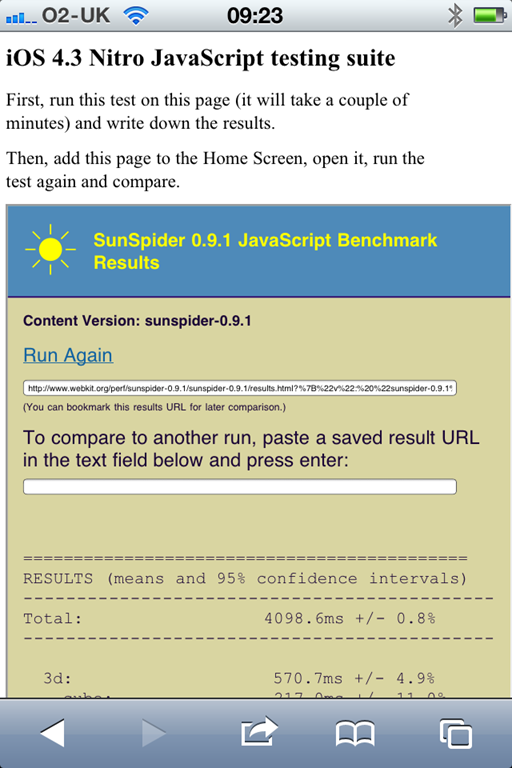
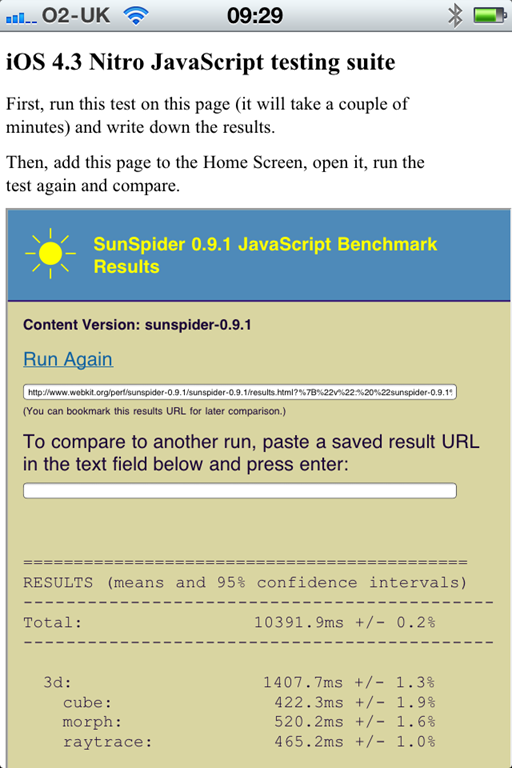
Now that Apple iOS 4.3 is generally available for iPhone and iPad, users have noticed something that seems curious. The fast new “Nitro” JavaScript engine only works in the standalone Safari browser, not when a web app is pinned to the home screen, or when a web view is embedded into an app.

This link at mobilexweb.com shows the evidence. Here is the SunSpider test standalone, showing a time of 4098ms, and pinned to the home screen as an app, where it shows 10391.9ms:

image image

The consequence: apps created using WebKit as a runtime, for example using PhoneGap, will not get the benefit of Nitro.

It would be easy to conclude that Apple is deliberately hobbling these apps in order to protect native apps, which can only be installed via Apple’s App Store and are subject to its 30% cut. However that might not be the case. It could be a bug – according to Hacker News it has been reported as such:

To add another note to this, its a bug that Apple seems to know about. I can’t link to it because its marked CONFIDENTIAL across the top of the dev forums, but in short its known about and being investigated.

or it could be a security feature. Using a just-in-time compiler exposes the operating system more than just interpreting the code; perhaps Safari has more protection when running standalone.

Either way, with the increasing interest in WebKit as a de facto cross-platform application runtime for mobile, this particular limitation is unfortunate.

Update: There are also reports of the HTML 5 offline cache not working other than in full Safari:

I’ve tested this by switching apple-mobile-web-app-capable from ‘yes’ to ‘no’ and offline cache works as expected. But whenever it’s switched back to ‘yes’, it’s not working anymore. This occurs when the app is standalone at home screen. As a website, viewed with Safari cache is working as expected.

The Apple iPad post-PC era in education

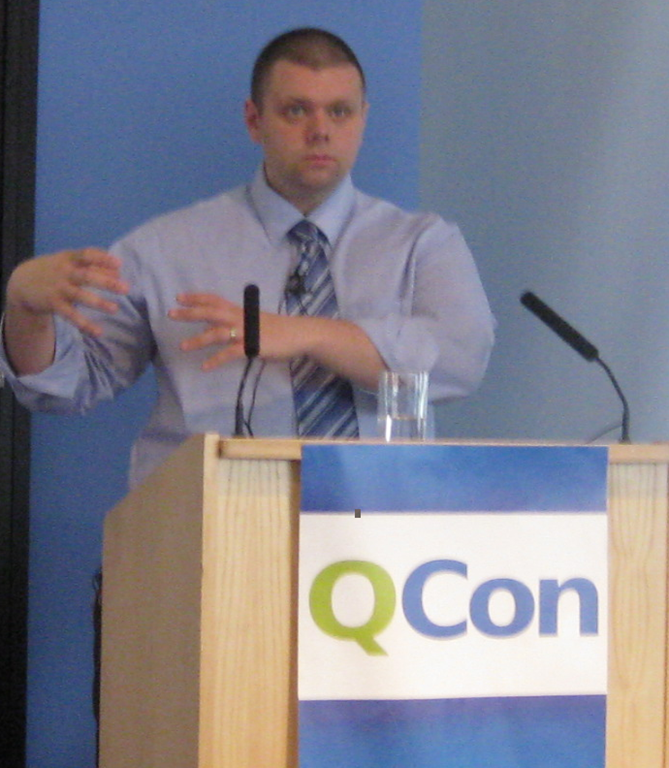
I am at the QCon conference in London where I attended a session by Fraser Spiers mysteriously titled The Invisible Computer Lab.

Spiers is the guy who won a certain amount of fame or notoriety by issuing all staff and pupils with Apple iPad devices at the Scottish private school where he teaches computing.

image

The session blurb did not mention the iPad but said, “this talk will argue for a new direction in school ICT.” I went along because I am conscious that the way computing is taught in UK schools is often ineffective. Problems include kids knowing more than teachers; out of date hardware; too much Microsoft Office; and often an exclusive focus on general purpose applications rather forming any understanding of what computers are and how they work.

There is probably a connection between this and the low interest in computer science in higher level education.

Spiers did mention this; but most of the talk was an iPad love-in. He is an Apple fan and showed us pictures of the original iMac and various Mac notebooks which preceded the arrival of the iPad at his school.

Nevertheless, he made a persuasive case for how the iPad had transformed teaching (not only computing) at the school. According to Spiers, the children write longer essays because they have discovered word processing for the first time; they have new artistic creativity; they use the web far more and the school had to upgrade its internet connectivity; they are escaping from a word-based approach to learning and presenting their work to one which makes use of multiple media types.

He added that some of the expected snags did not materialise. They were concerned about the virtual touch keyboard on the iPad and offered keyboard accessories to everyone; but in practice few wanted it. The kids, he said, now dislike plastic keyboards with their tiresome buttons.

It is not a new model of computing, it is a new model of education. Handwriting may longer be an important skill, said Spiers.

Now, I do make due allowance for the over-exuberance of an Apple evangelist; and that the reality may not be as rose-tinted as he describes it.

At the same time, you can see how well Apple’s controlled computing environment works in a school environment, where kids may try to break computers or do bad things with them, as well as how the design and usability revolution plays out in a school environment.

Note, however, that Apple is not yet really geared up for iPad in education and Spiers encountered silly issues like the inability to buy site licences for apps delivered over iTunes; each one has to be purchased individually, and they have to fudge the accounts since nobody under 13 can use the app store. I am sure issues like this will be fixed soon.

Objections? Well, there is the cost of Apple’s premium hardware and its tax on the software. There is the ethics of using Apple at all – today, as it happens, there are posts by Bill Thompson and by Tom Arah which do a good job of spelling out concerns about Apple’s authoritarian and increasingly greedy business practices, especially with iOS and the App Store. I would rather be writing up the impact of Linux or Android or open source in education.

However, I will close with my question to Spiers and his answer. What will happen, I asked, when these kids with their experience of iPad computing get jobs and are confronted by offices full of PCs?

“A child that starts this year is going to graduate in 2024,” he replied. “I don’t know what the business environment is going to be like in 2024. I think there will be convergence between iOS and the Mac. I think businesses that stick with the PC infrastructure will not be around in 2024.”

Mono project: no plans for cross-platform WPF

Miguel de Icaza’s report from the Game Developer Conference is upbeat, rightly so in my view as usage of Mono is continuing to build, not only in game development with Unity, a development tool that uses Mono as its scripting engine, but also for mobile development for Apple’s iOS with Monotouch and for Android with Monodroid. These mobile toolkits also give Mono a stronger business model; many sites use Mono for serving ASP.NET applications on Linux, but without paying or contributing back to the project.

Mono is an open source implementation of C# and Microsoft’s .NET Framework.

That said, it is interesting that Mono is still struggling with an issue that has been a problem since its first days: how to implement Microsoft’s GUI (Graphical User Interface) framework on other platforms. Mono does have Gtk# for Windows, Mac and Linux, but this does not meet the goal of letting developers easily port their Visual Studio client projects to Mono. There is also an implementation of Windows.Forms, but de Icaza mentions that “our Windows.Forms is not actively developed.”

Apparently many tools vendors asked the Mono team at GDC when Windows Presentation Foundation (WPF) would be implemented for Mono. WPF is the current presentation framework for Microsoft.NET, though there is some uncertainty about where Microsoft intends to take it. I remember asking de Icaza about this back in 2003, when the WPF framework was first announced (then called Avalon); he said it was too complex and that he did not plan to implement it.

This is still the case:

We have no plans on building WPF. We just do not have the man power to build an implementation in any reasonable time-frame.

That said, Mono has implemented Silverlight, which is based on WPF, and there are some signs that Microsoft might merge WPF and Silverlight. What would the Mono team do then?

Miguel de Icaza says:

Silverlight runs on a sandbox, so you can not really P/Invoke into native libraries, or host DirectX/Win32 content inside of it.
There are other things missing, like menubar integration and things like that.

Of course, this is no longer true on Windows: Platform Invoke is coming in Silverlight 5.

Perhaps the Mono team will knuckle down and implement Silverlight with desktop integration, which would be good for cross-platform Silverlight and compatibility with Microsoft .NET.

Then again, it seems to me that Mono is increasingly divergent from Microsoft .NET, focusing on implementing C# in places that Microsoft does not touch, such as the mobile platforms from Apple and Google.

That is actually a sign of health; and you can understand why the Mono team may be reluctant to shadow Microsoft’s every move with Silverlight and WPF.

Google fails to protect its mobile platform

The discovery of viruses in apps on Google’s Android Market is troubling. I like the fact that Android is open, and that you can easily install an APK (Android Package) from any source onto your device if you want to. That said, it is reasonable to expect that apps downloaded from the official Android Market will be virus-free, or at least that some attempt has been made to check them for malware.

Another problem which is apparently rampant in the Android market – and also to some extent in Apple’s app store – is app stealing, where someone takes an existing app, copies and re-uploads on their own account. In most cases it seems that the malware was on apps pirated in this manner.

Note that while it took Google less than five minutes to pull the malicious apps from the store, the original developer had apparently been trying for more than a week to get them pulled on copyright violation grounds.

Google takes 30% transaction fee for apps sold in the market. Enough, you would think, to check for malware.

Most seriously for the Android market, the situation for users is that apps on Android Market might be malware, whereas apps on Apple’s App Store are not. That is a big advantage for Apple, and one that you would have thought Google would want to counter.

The only winners here are the anti-virus companies, who will be delighted to inflict their subscriptions on mobile users just as they have on Windows desktops.

Apple announces slightly better iPad, world goes nuts

Apple CEO Steve Jobs says the iPad 2, announced today, is “magical, revolutionary and at an unbelievable price”.

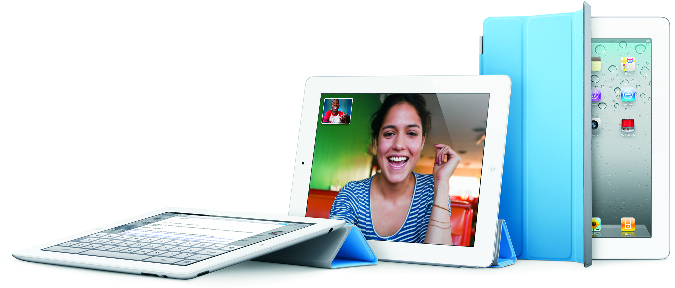
The new iPad is dual-core, has front and back cameras, and a new magnetic cover which also forms a stand. It is also 33% thinner and 15% lighter.

image

These are nice improvements, but the truth is that it will not be very different from the first one.

It was enough though for the press to announce catastrophe for the competition:

Larry Dignan on ZDNet:

Apple just ensured that the other tablets are dead on arrival.

James Kendrick on ZDNet:

Here’s all you need to know about the iPad 2: it’s thinner, lighter, faster, got cameras and is more capable than the iPad, for the same price. Apple had dominated the tablet wars with the original iPad, and with the iPad 2 it is game over … Apple will continue to maintain or grow its market share in the tablet space, and the competition will release tablets that are not as good and cost lots more than the iPad/iPad 2. Rarely does one company in the technology sector dominate a product category so totally as Apple does the tablet space.

I am still mulling this over. There is a lot to like about the iPad – convenience, design, long battery life – but there are also annoyances; and while Dignan and Kendrick may be right, I would like to think there will be healthy competition and that at least some of the interesting devices on show at Mobile World Congress earlier this month will find a market.

Another question is how the appearance of ever more powerful smartphones will influence the tablet market. It is hard to believe that the average person will carry three devices: smartphone, tablet, laptop. Personally I would like to get it down to one, which is why I find the Motorola Atrix an interesting concept: it plugs into a laptop-like external keyboard and screen when required.

Apple’s advantage though is its focus on quality and design, rather than features. Few other manufacturers have learned this lesson. There is always something not quite right; and rather than fix it, a new model six months later with something else not quite right.

There was something else interesting about today’s event. iMovie for iPad 2, priced at $4.99. What is happening to the price of software, and what are the implications for developers? Something I will explore in another post shortly.

Spare a thought for Microsoft. Remember Bill Gates, telling us that one day tablets would dominate portable computing? Fumbling tablet computing may have been Microsoft’s biggest mistake.

Solar charge your mobile: sounds good, but how practical is it?

Charge your mobile for free while out and about, and also do your bit to save energy: the new Freeloader Classic from Solar Technology International has obvious appeal. But how practical is it?

image

The Freeloader has two solar panels, and measures 123 x 62 x 17mm when folded. After 8 hours in the sun, it can deliver power to an Apple iPhone for 18 hours, a Nintendo DS for 2.5 hours, and an Apple iPad for 2 hours. Take care that it does not walk while your back is turned.

image

It comes with all sorts of tips, and can also be charged via USB in 3 hours in the event that the sun is not shining. For example, if you are in the UK.

image

While I like the idea of solar charging a mobile device, it is another gadget to pack, and could end up as more of a burden than an asset. Instead of just charging your mobile, you have to think about charging your Freeloader and then charging your mobile. 8 hours in the sun is far from instant.

Still, if you are planning a long hike in a remote part of the world, this could be just what you need.

Update: I have now been sent a Freeloader for review. The good news: the unit looks great. The bad news: initial tests are disappointing. It arrived 75% charged … I left it on a windowsill for several days and by the end it had lost all its charge! I am not giving up though and will report in due course.

Freeloader Classic costs £39.99 including VAT.

What’s in HP’s Beats Audio, marketing aside?

If you are like me you may be wondering what is actually in Beats Audio technology, which comes from HP in partnership with Beats by Dr Dre.

The technical information is not that easy to find; but a comment to this blog directed me to this video:

http://www.precentral.net/what-beats-audio

image

According to this, it comes down to four things:

1. Redesigned headphone jack with better insulation, hence less ground noise.

image

2. Discrete headphone amp to reduce crosstalk. This is also said to be “more powerful”, but since we do not know what it is more powerful than, I am not going to count that as technical information.

3. Isolated audio circuitry.

4. Software audio profiles which I think means some sort of equalizer.

These seem to me sensible features, though what I would really like to see is specifications showing the benefits versus other laptops of a comparable price.

There may be a bit more to Beats audio in certain models. For example, the Envy 14 laptop described here has a “triple bass reflex subwoofer”.

image

though this user was not greatly impressed:

I ran some audio tone test sites and found out the built in laptop speakers do not generate any sound below 200 Hz. In the IDT audio drivers speaker config there is only configuration for 2 speaker stereo system, no 2.1 speaker system (which includes subwoofer). I’m miffed, because on HP advertising copy claims “HP Triple Bass Reflex Subwoofer amplifiers put out 12W total while supporting a full range of treble and bass frequencies.” Clearly I am not getting “full range” frequencies.

Still, what do you expect from a subwoofer built into a laptop?