Category Archives: software development

What’s new in SQL Server 2012?

Microsoft’s SQL Server 2012 is released next month and available to download now (I am not sure what the distinction is). I have a high regard for Microsoft’s database server; it seems to me that the team mostly gets it right. The product has become somewhat diffuse though, especially as the Business Intelligence aspect has grown, and this may account for what to me is a rather unfocused launch for SQL Server 2012, even though its name suggests that it is the most significant release since SQL Server 2008.

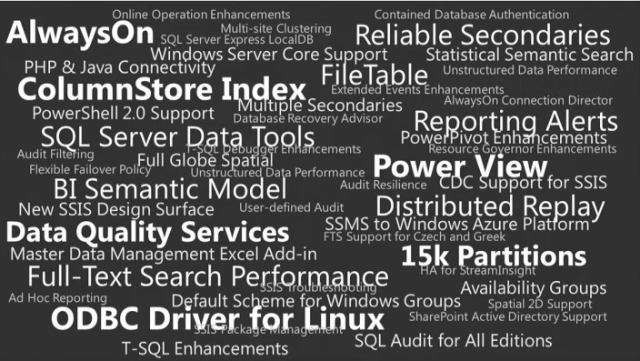
The following slide summarises the new features, presumably with the type size suggesting the importance of each one.
image

But is the ODBC Driver for Linux really more important than the SQL Server Data Tools, for example? Not in my view; but that reflects how SQL Server represents different things to different people.

So what are the key new feature? Here’s my quick take.

Always On

A new feature called Availability Groups that is an improved version of database mirroring

Improved failover clustering which supports multi-site clustering across subnets – above to failover across datacentres.

ColumnStore Index

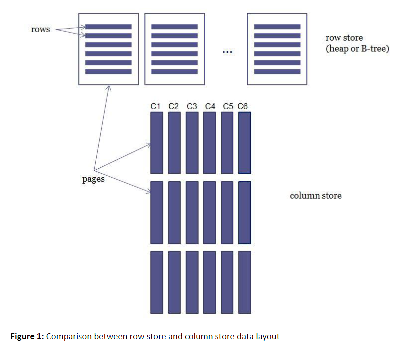
A new type of index for data warehouses. This is actually pretty simple: the name says it all. Here is Microsoft’s illustration:
image

and explanation:

A columnstore index stores each column in a separate set of disk pages, rather than storing multiple rows per page as data traditionally has been stored.

Why do this? Because it is more efficient when the query only requests a a few columns from the table. Microsoft claims performance improvements from 6X to 100X in cases where the the data can be cached in RAM, and thousand-fold improvements where the working set does not fit in RAM.

SQL Server Data Tools

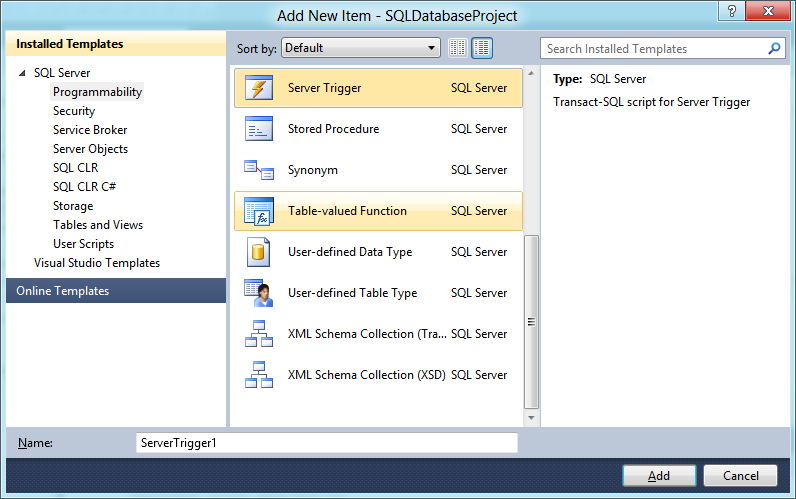
This is my favourite feature, probably because it is developer-focused. These are the tools that were code-named “Juneau” and which install into Visual Studio 2010. There are some visual tools, but this is essentially a code-centric approach to database design, where you design your database with all its tables, queries, triggers, stored procedures and so on. You can then build it and test it against a private “localdb” instance of SQL Server. What I like is that the database project includes the entire design of your database in a form that can be checked into source control and compared against other schema versions. Here is the Add New Item dialog for a database project:
image

Data Quality Services

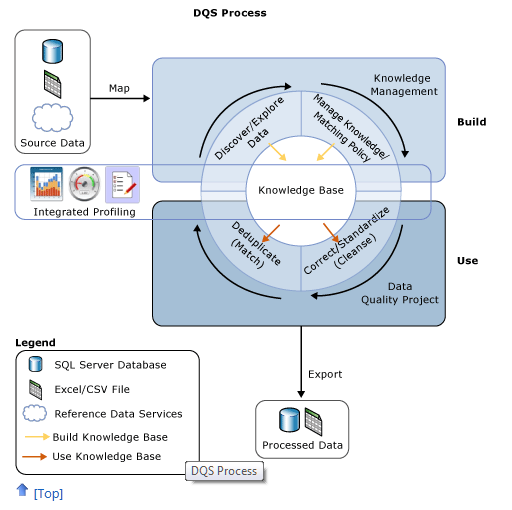
Data Quality Services (DQS) lets you check your data against a Data Quality Knowledge Base (DQKB), the contents of which are specific to the type of data in the database and may be created and maintained by your business or obtained from a third-party. If your data includes addresses, for example, the DQKB might have all valid city names to prevent errors. Features of DQS include data cleansing, de-duplication through data matching, profiling a database for quality, and monitoring data quality.
image

Illustration and more details are here.

Updated SQL Server Management Studio

SQL Server Management Studio now runs in the Visual Studio 2010 shell.

LocalDB

LocalDB is a local instance of SQL Server aimed at developers and for use as an embedded database in single-user applications. It is a variant of SQL Server Express, but different in that it does not run as a service. Rather, the LocalDB process is started on demand by the SQL native client and closed down when there are no more connections. You can attach database files at runtime by using AttachDBFileName in the connection string. LocalDB is intended to replace user instances which are now deprecated.

FileTables

This is the most intriguing feature in SQL Server 2012. It is described here:

The FileTable feature brings support for the Windows file namespace and compatibility with Windows applications to the file data stored in SQL Server … In other words, you can store files and documents in special tables in SQL Server called FileTables, but access them from Windows applications as if they were stored in the file system, without making any changes to your client applications.

and the purpose:

Enterprises can move this data from file servers into FileTables to take advantage of integrated administration and services provided by SQL Server. At the same time, they can maintain Windows application compatibility for their existing Windows applications that see this data as files in the file system.

Integration of the file system and the database is not a new idea, and Microsoft has tried variants before, such as the “M” drive that was once part of Exchange, the aborted WinFS feature planned for Windows Longhorn (Vista), and SharePoint, which can store documents in SQL Server while presenting them as Windows file shares through WebDAV.

That said, FileTables in SQL Server 2012 are not an attempt to reinvent the file system, but presented more as a way of supporting legacy applications while managing data in SQL Server. It is an interesting feature though, and it would not surprise me if users find some unexpected ways to exploit it.

Power View

Codenamed “Project Crescent”, this is a web-based reporting client for businesses that have embraced Microsoft’s platform, because it has several key dependencies:

  • SharePoint Server Enterprise Edition
  • SQL Server Reporting Services
  • Silverlight on the client

In fact, Power View is described as:

a feature of SQL Server 2012 Reporting Services Add-in for Microsoft SharePoint Server 2010 Enterprise Edition

Power View reports that I have seen do look good, and have an Office ribbon style designer for designing customising the report. That said, I would guess that Microsoft now wishes it had used HTML 5 rather than Silverlight for this – there are those Apple iPad and Windows 8 Metro users to think of, after all.

Microsoft emphasises that Power View is not a replacement for Report Designer or Report Builder, but an ad-hoc reporting tool.

Closing thoughts

There is more in SQL Server 2012, as a glance back at the initial slide will tell you, but the above is a starting point if you are wondering what it is all about. It is also worth noting that Microsoft still gives away SQL Server Express which supports up to 10GB per database and includes many of same features as the paid-for versions; it is the same product at heart.

Someone who finds that SQL Server Express actually meets all their needs asked me why Microsoft gives it away. My guess is that this is a consequence of all the other free database engines available such as MySQL, PostgreSQL, interesting  newer NoSQL options like mongoDB, and of course equivalent free versions of Oracle and IBM DB2. A proportion of customers who start with SQL Server Express will grow into the paid-for editions.

This does make SQL Server Express an excellent choice for smaller scale applications and small businesses, particularly since it integrates smoothly into Microsoft’s developer stack. Having said which, I am becoming something of an Entity Framework sceptic, but that is a story for another day – and fortunately you do not have to use EF if you do not want to.
PhoneGap is Adobe, Cordova is Apache

The hot cross-platform mobile toolkit PhoneGap was created by Nitobi, a company acquired by Adobe last year. Almost at the same time, the project was submitted to Apache as an open source project. However, the Apache project is not called PhoneGap; it was briefly known as Callback and is now called Cordova (the name of the street in Vancouver where Nitobi was based).

A new official log post explains why PhoneGap was renamed at Apache, but also makes the point that the PhoneGap brand will continue.

PhoneGap is a distribution of Apache Cordova. You can think of Apache Cordova as the engine that powers PhoneGap, similar to how WebKit is the engine that powers Chrome or Safari. (Browser geeks, please allow me the affordance of this analogy and I’ll buy you a beer later.)

Over time, the PhoneGap distribution may contain additional tools that tie into other Adobe services, which would not be appropriate for an Apache project. For example, PhoneGap Build and Adobe Shadow together make a whole lot of strategic sense. PhoneGap will always remain free, open source software and will always be a free distribution of Apache Cordova.

Read it carefully, because it is still potentially confusing. Note that PhoneGap “will always remain free, open source software” though it may gain hooks into commercial Adobe tools. At least, that is how I read it.

I would also expect that Adobe will come up with design and development tools for which PhoneGap (or Cordova) is invisible to the user. You will just be able to build for multiple platforms.

The post adds:

Currently, the only difference is in the name of the download package and will remain so for some time.

I will add that there is great brand-awareness of PhoneGap and what it is, and little for Cordova, so if you want to be understood talk about PhoneGap.

Microsoft’s platform nearly invisible at QCon London 2012

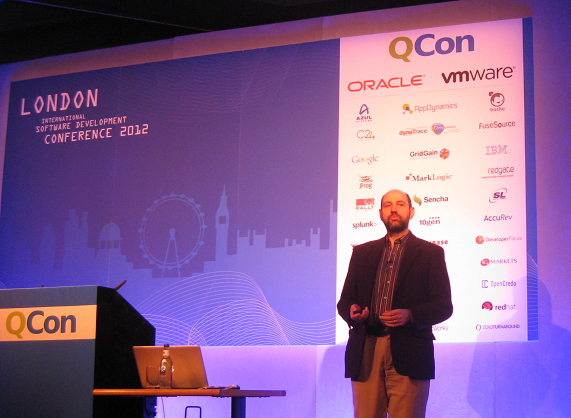
QCon London ended yesterday. It was the biggest London QCon yet, with around 1200 developers and a certain amount of room chaos, but still a friendly atmosphere and a great opportunity to catch up with developers, vendors, and industry trends.

Microsoft was near-invisible at QCon. There was a sparsely attended Azure session, mainly I would guess because QCon attendees do not see that Azure has any relevance to them. What does it offer that they cannot get from Amazon EC2, Google App Engine, Joyent or another niche provider, or from their own private clouds?

Mark Rendle at the Azure session did state that Node.js runs better on Windows (and Azure) than on Linux. However he did not have performance figure to hand. A quick search throws up these figures from Node.js inventor Ryan Dahl: 

  v 0.6.0 (Linux) v 0.6.0 (Windows)
http_simple.js /bytes/1024 6263 r/s 5823 r/s
io.js read 26.63 mB/s 26.51 mB/s
io.js write 17.40 mB/s 33.58 mB/s
startup.js 49.6 ms 52.04 ms

These figures are more “nothing to choose between them” than evidence for better performance, but since 0.6.0 was the first Windows release it is possible that it has swung in its favour since. It is a decent showing for sure, but there are other more important factors when choosing a cloud platform: cost, resiliency, services available and so on. Amazon is charging ahead; why choose Azure?

My sense is that developers presume that Azure is mainly relevant to Microsoft platform businesses hosting Microsoft platform applications; and I suspect that a detailed analysis would bear out that presumption despite the encouraging figures above. That said, Azure seems to me a solid though somewhat expensive offering and one that the company has undersold.

I have focused on Azure because QCon tends to be more about the server than the client (though there was  a good deal of mobile this year), and at enterprise scale. It beats me why Microsoft was not exhibiting there, as the attendees are an influential lot and exactly the target audience, if the company wants to move beyond its home crowd.

I heard little talk of Windows 8 and little talk of Windows Phone 7,  though Nokia sponsored some of the catering and ran a hospitality suite which unfortunately I was not able to attend.

Nor did I get to Tomas Petricek’s talk on asynchronous programming in F#, though functional programming was hot at QCon last year and I would guess he drew a bigger audience than Azure managed.

Microsoft is coming from behind in cloud -  Infrastructure as a Service and/or Platform as a Service – as well as in mobile.

I should add the company is, from what I hear, doing better with its Software as a Service cloud, Office 365; and of course I realise that there are plenty of Microsoft-platform folk who attend other events such as the company’s own BUILD, Tech Ed and so on.

Update:

This is the basis for the claim that node.js runs better on Windows:

IOCP supports Sockets, Pipes, and Regular Files.
That is, Windows has true async kernel file I/O.
(In Unix we have to fake it with a userspace thread pool.)

from Dahl’s presentation on the Node roadmap at NodeConf May 2011.

The most enduring software development techniques revealed at QCon London

I am in London for the QCon event, a vendor-neutral development conference which I have been fortunate to attend regularly over the last few years.

image

These events tend to have an underlying theme, which reflects the current thinking of developers and software architects. Each year I hear cogent and thoughtful explanations of why this or that approach will enable us to code better and please users more. Each year I also hear cogent and thoughtful explanations of why the fix proposed last year or the year before is actually a prime reason why projects fail.

Way back when it was SOA (Service Oriented Architecture) that was sweeping away the mistakes of the past. Next SOA itself was the mistake of the past and we got REST (Representational State Transfer). This year I am hearing how RPC is making a comeback, or at least not going away, for example because it can be more efficient when you want to transfer as little data as possible across the WAN.

Another example is enterprise Java. Enterprise Java Beans and J2EE were the fix, and then the problem, for scalable distributed applications. Rod Johnson came up with Spring, the lightweight alternative. Now I am hearing how Spring has become bloated and complicated and developers are looking for lightweight alternatives.

Test-driven development (TDD) brings fantastic benefits to software development, making it possible to change and improve your code while defending against the introduction of bugs. Yesterday though Dan North observed that TDD also has a cost, in that you write much more code. It is not uncommon for projects to have more test code than code that is active in production. If you did not write that code, you could be doing other productive work in the time made available. 

Agile methodologies like Scrum were devised to promote or even create communication and agility in software teams. Now every big enterprise vendor says it does Scrum and runs courses, but the result is a long way from the agile (with a small a) original concept.

This year I have heard a lot about over-optimisation, or creating code for situations that in fact never arise. This is the problem to which the solution is YAGNI (You Ain’t Gonna Need It). Since they apply across all the methodologies, I suggest that YAGNI, and its cousin DRY (Don’t Repeat Yourself), and the even older KISS (Keep It Simple Stupid) are the most enduring software methodologies.

That said, even DRY took a beating yesterday. Greg Young in his evening keynote said that rigorous DRY advocates can end up creating single blocks of code where really the procedure was only nearly the same. If your DRY functions are full of edge cases and special conditions, then maybe DRY has been taken to excess.

In the light of the above, I would therefore like to propose the first draft of my first theorem of software development:

There is no development methodology which will not become a burden when embraced rigidly

The other lesson I have learned from multiple QCons is that effective teams and smart developers count for much, much more than any specific tool or language or approach. There is no substitute.

How Amazon Web Services dominate infrastructure as a service

During Mobile World Congress I met with some folk from Twilio, the cloud telephony company, who said something that interested me. Twilio uses Amazon Web Service (AWS) for its infrastructure and told me that essentially there is no choice, AWS is the only cloud provider which can scale on demand quickly and smoothly as required.

Today at QCon London I met a guy from another major cloud-based company, which is also built on Amazon, and I put the same point to him. Not only did he agree, he said that Amazon is increasing its lead over the competition. Amazon is less visible than some, he said, because of its approach to PR. It concentrates on marketing directly to developers rather than chasing press stories or running big advertising campaigns.

Amazon has also just reduced its prices.

This is mixed news for the industry. In general developers I speak to like working with AWS, and its scalability is a huge benefit when, for example, you are entering a new market. You can do so without having to invest in IT infrastructure.

On the other hand, stronger competition would be healthy. My contact said that he reckoned his company could move away from Amazon in 12 weeks or so if necessary, so it is not an absolute lock-in.

Sold out QCon kicks off in London: big data, mobile, cloud, HTML 5

QCon London has just started in London, and I’m interested to see that it is both bigger than last year and also sold out. I should not be surprised, because it is usually the best conference I attend all year, being vendor-neutral (though with an Agile bias), wide-ranging and always thought-provoking.

image

A few more observations. One reason I attend is to watch industry trends, which are meaningful here because the agenda is driven by what currently concerns developers and software architects. Interesting then to see an entire track on cross-platform mobile, though one that is largely focused on HTML 5. In fact, mobile and cloud between them dominate here, with other tracks covering cloud architecture, big data, highly available systems, platform as a service, HTML 5 and JavaScript and more.

I also noticed that Abobe’s Christophe Coenraets is here this year as he was in 2011 – only this year he is talking not about Flex or AIR, but HTML, JavaScript and PhoneGap.

Embarcadero updates Delphi XE2, full reinstall required

Embarcadero has released Delphi XE2 Update 4. The depressing news is that you have to uninstall RAD Studio completely before installing the update. The reward is a large number of bug fixes, listed here, as well as new features:

  • Printing support in FireMonkey OS X
  • Support for Free Pascal 2.6 in FireMonkey iOS
  • New FireMonkey types and methods
  • New VCL styles
  • 64-bit type library import, for using COM libraries in Delphi

Delphi XE2 was somewhat rough on first release, so upgrading is advisable. Maybe it is now sufficiently robust to attract those more cautious developers who do not like to use new products in their first incarnation.

Compile Object Pascal to JavaScript with Smart Mobile Studio

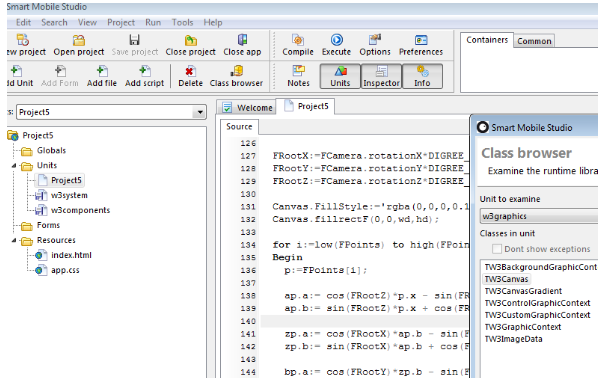
Here is an interesting project for Delphi developers: a compiler and IDE that takes your Object Pascal code and outputs HTML and JavaScript. 

image

Smart Mobile Studio, also known as OPJS (Object Pascal to JavaScript) is a project from Optimale Systemer AS, and supports not only the Object Pascal language. but also reusable components in true Delphi style. The goal is to bring Object Pascal programming to mobile platforms, using PhoneGap to wrap the generated code as a native application for iOS, Android or other platforms.

According to the developers, “The Smart object pascal dialect is more or less identical to Delphi 7”. That said, there are no pointers, and ASM blocks contain normal JavaScript instead of machine instructions. This enables use of JavaScript libraries such as JQuery from Smart Mobile code:

You can access native JS through an ASM section, create an instance of it to a variant, and then access its methods directly.

Smart Mobile Studio is currently in closed Alpha so not ready for most of us just yet. Note that there are other options for mobile development with Delphi, including Embarcadero’s official FireMonkey project which can be used with the Free Pascal iOS compiler. Embarcadero has promised its own compiler for IOS in a future version, as well as an Android option.

Mysteries of trapping errors in PowerShell

As everyone in IT knows, sometimes tasks that you think are quick and easy turn out to take longer.

Today I experiences a small example. I have a scheduled PowerShell script that copies a large file. I wanted to enhance the script so that I would receive an email stating whether the copy succeeded and when it completed.

The original script, for the sake of the example (it is actually a little more involved) is this:

Copy-Item somefile somefile.bak
"Clean up"

where “Clean up” represents some code that runs after the copy completes.

Now, by default a PowerShell may continue if it hits an error other than a syntax error. Again for the sake of the example, I will add a line which echoes text to represent the code that send an email. If you run this script:

Copy-Item somefile somefile.bak
"Clean up"
”Send email: File copied successfully”

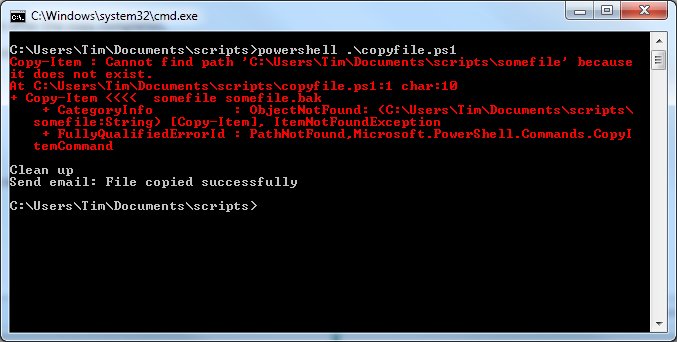
then the email gets sent whether or not the copy succeeds. Here is what happens if somefile does not exist:

image

Not much use. The solution, I thought, was to use PowerShell’s trap statement. This catches the exception you specify, or all exceptions, and runs some code. You can also use the break or continue keywords to determine whether the block of code in which the exception occurred continues with the next statement, or exits immediately. You can read about trap here. I therefore wrote a script that looks like this:

Function CopyIt {

trap {return "Error copying file: $_"; break;}

Copy-Item somefile somefile.bak
return "Copy successfully completed"
}

$result = CopyIt
"Clean up"
”Send email: $result”

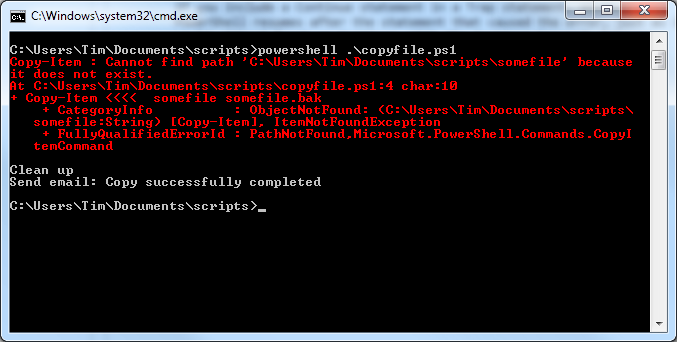
What I could not figure out though was that even when the copy failed, the script still sent me a success message:

image

I assumed I was misunderstanding how trap works. The output shows, in this example, that an ItemNotFoundException is thrown, so the trap should be triggered, right?

Wrong. In the case of non-terminating errors  (PowerShell jargon) you have to specify the ErrorAction. The default ErrorAction is “Continue”. Therefore I had to modify the script like this:

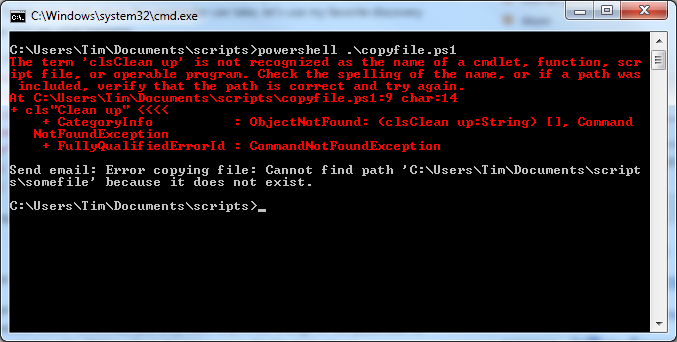
Copy-Item somefile somefile.bak -ErrorAction stop

Now I get an email with a failure message if the copy fails:

image

All very obvious to PowerShell experts; but it seems to me that PowerShell makes it easy for the unwary to write scripts that fail silently. You are unlikely to see the red text when your script is running on a server.

Windows on ARM fixes much that is wrong with Windows, but lack of apps makes it Microsoft’s big risk

Vendors who create new platforms work hard to attract developers, because high availability of apps is seen as essential for success. This is why, for example, RIM is offering free PlayBooks to developers who submit apps to BlackBerry App World.

image

Why then would Microsoft deliberately and consciously choose to release a new family of Windows machines on which existing Windows applications cannot run, even when recompiled? This is what is happening with Windows on ARM (WOA), as Windows President Steven Sinofsky makes clear in his lengthy post on the subject:

Developers wanting to reach WOA with existing apps have two options. Many apps will be best served by building new Metro style front ends for existing data sources or applications, and communicating through a web services API … Other existing applications will be well served by reusing large amounts of engine or runtime code, and surrounding that with a Metro style experience.

This restriction means that WOA cannot benefit from what what might otherwise be its biggest advantage versus the competition: huge numbers of apps that could easily be ported.

Microsoft’s reasoning is that the existing Windows software deployment model is broken so badly that it cannot be fixed:

If we enabled the broad porting of existing code we would fail to deliver on our commitment to longer battery life, predictable performance, and especially a reliable experience over time. The conventions used by today’s Windows apps do not necessarily provide this, whether it is background processes, polling loops, timers, system hooks, startup programs, registry changes, kernel mode code, admin rights, unsigned drivers, add-ins, or a host of other common techniques. By avoiding these constructs, WOA can deliver on a new level of customer satisfaction: your WOA PC will continue to perform well over time as apps are isolated from the system and each other, and you will remain in control of what additional software is running on your behalf, all while letting the capabilities of diverse hardware shine through.

says Sinofsky. It is a view that has merit, particularly when you consider how badly Windows has been damaged by poor quality OEM software.

Note that he is even promising an end to Windows “cruft”, as memorably described by Verity Stob in State of Decay:

Cruft Force 7. Wounded. Description: No longer able to logon using original account as the system freezes, so must logon as "Verity2" or similar

and the like. “Your WOA PC will continue to perform well over time,” Sinofsky promises.

Another reason to like this approach is that the Windows Runtime (WinRT), the platform for which third-parties are allowed to develop, is in my view a great piece of work. The WinRT apps in the Windows 8 Developer Preview perform well, even though they are simple things put together quickly, many of them by students as I recall. The insistence on asynchronous calls for any system API that might be slow to return should ensure responsive applications.

At the BUILD conference last September we were told that the Windows team sat down to create a new platform that avoids the mistakes of the past and while it introduce frustrations of its own, some of which we know about and some of which developers will discover, it does appear to be well thought-through.

Microsoft Office itself is not the best performing of software, particularly Outlook which is prone to long hangs. Fortunately, Outlook is missing from the version of Office 15 which will ship for WOA, and journalist Adrian Kingsley-Hughes reports positively on a recent glimpse at the software.

The big risk

A sure-fire success then? No, because the downside of WOA is that right now there are no apps for it, beyond what we have seen in the developer preview. It is a brand new platform; and the history of personal computing is littered with good products that failed because they could not achieve sufficient momentum.

I am just back from RIM’s BlackBerry conference in Amsterdam, impressed by what I have seen of the PlayBook and forthcoming BlackBerry 10 platform and its tools for developers, but thinking, is this enough to persuade a customer to buy a BlackBerry tablet instead of the safe choices of Apple iOS or Google Android?

Microsoft has the market presence to make this work, you may think; but the Windows Phone 7 story so far shows that this is not enough. The new phone OS has only a tiny market share after a year, and if it recovers, it will be more to do with Nokia than with Microsoft.

WOA also has interesting competition in the form of Windows 8 on x86, which will also have WinRT, but without the restrictions on desktop apps. If partners focus on Intel Windows 8, as the “full” version, it could be hard for WOA to find its market.

There are problems with Windows 8 on x86 too. Most of existing Windows apps will need a keyboard and mouse to work properly, and expect to find large amounts of storage, not the 16 or 32 GB in a typical tablet. Windows 8 Intel devices may end up like the Samsung tablet given to attendees at BUILD: powerful, but heavy, expensive, with short battery life, and complete with the clutter of a separate keyboard. Such devices have their place, but they are not an answer to the iPad.

It is WOA, not Windows 8 x86, that has to win market share from Apple.

Microsoft is choosing to do WOA right, rather than opening it up to the kinds of problems which have afflicted Windows in the past. That does makes sense, because it is those problems which have made users gladly move away from Windows now that compelling alternatives are available.

I also believe that OS vendors work too hard to pump up the app numbers, and not hard enough to ensure quality, resulting in app stores full of poor to indifferent apps. This is why schemes like the BlackBerry effort mentioned above do as much harm as good, enticing developers to submit rubbish in order to win a new gadget. An app store with 10 great apps is better for users than one with a thousand poor ones.

It is nevertheless true that apps make or break a platform. BUILD attendees and those who have downloaded the Windows 8 developer preview have had the tools to make WinRT apps for a few months now, but my impression is that most are waiting to see how it progresses before investing seriously in WinRT development. Another problem is that Windows 8 developer preview works nicely on a real tablet, but not so well in a virtual machine or on a PC without a touch screen.

I still think WOA may work.

  • If Microsoft does a good job with WOA Office, giving it an unique selling point against the competition.
  • If the WOA devices are competitively priced.
  • If the battery life is good.
  • If there are at least a handful of truly worthwhile third-party apps at launch.
  • If there is not some obvious problem with stability, or an annoyance that spoils the experience, like the one I found on the PlayBook when the virtual keyboard failed to pop up when trying to author a tweet in the web browser.

That is a lot of ifs though, and the progress of WOA will be a fascinating tech story throughout 2012.