Category Archives: software development

Full circle for Microsoft database APIs as OLEDB for SQL Server is deprecated

Microsoft’s Eric Nelson has posted about how the OLEDB driver for SQL Server is being deprecated and will not be supported beyond “Denali”, the forthcoming version.

OLEDB was created to be the successor to ODBC – expanding the supported data sources/models to include things other than relational databases. Notably OLEDB was tightly tied to a Windows only technology (COM) whilst ODBC was not (Although we did try and take COM cross platform via partners)

ODBC never did get replaced. What actually happened is that ODBC remained the dominant of the two technologies for many scenarios – and became increasingly used on none Windows platforms and has become the de-facto industry standard for native relational data access.

ODBC was as I recall Microsoft’s first attempt at creating a universal database API.

The death of OLEDB will be slow, according to Nelson. The OLEDB driver for Denali will be supported for seven years following Denali’s release. He also says that OLEDB itself, as opposed to the SQL Server OLEDB driver, is not necessarily being deprecated; though frankly if Microsoft ceases supporting it with its own database I cannot see much future for it.

Note that ADO.NET, which to some extent replaced OLEDB, is not being deprecated. However ADO.NET is only usable from .NET applications. When you consider that Microsoft may be to some extent tilting away from .NET and towards native code, the deprecation of OLEDB becomes even more significant.

ODBC is not particularly easy to use in its raw form. However, you can wrap ODBC with, yes, an OLEDB provider or an ADO.NET provider; or you can wrap the whole lot in an object-relational framework such as Entity Framework.

One more chapter in the long, strange and tortuous history of Microsoft’s data APIs.

Windows Live Messenger error message hell

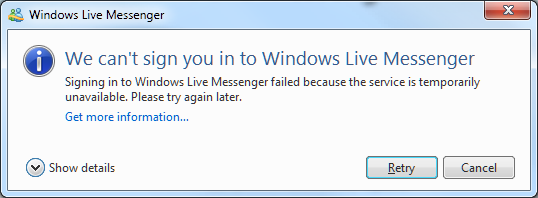
Recently I tried to sign into Live Messenger on Windows 7, only to be informed of what appears to be a temporary interruption in service.

image

Show details, by the way, shows Error code: 80040154

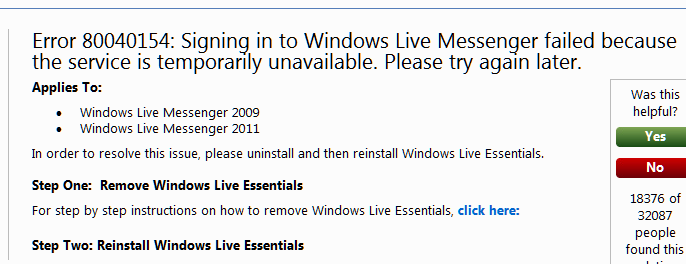
I retried and got the same message, so I clicked the Get more information link, which took me here:

image

The help document says that the solution is to reinstall Windows Live Essentials. I confirmed this, not by reinstalling (yet), but by trying Live Messenger on another machine, where I could sign into the same account successfully.

A few observations about this:

  • The error message is incorrect, since the error is apparently on the client whereas the message states it is a temporary problem with the service.
  • Microsoft’s engineers know that the error message is incorrect, since the help document references both the message and the solution.
  • The error message has been incorrect for years, since it applies to both Windows Live Messenger 2009 and 2011.
  • The misleading error message is particularly annoying, since if the user wants to use Live Messenger urgently they may well wait as advised by the message, not realising that the problem can be fixed immediately.
  • The solution is a brute-force one that involves many other applications, including Live Mail and Live Writer (on which I am typing this post). Or is it enough just to reinstall Messenger? The message suggests not. However if you use Live Mail for all your email, you probably want to know whether the uninstall will delete all your email and contacts or not. The referenced article on uninstalling Live Essentials does not say.

How could Microsoft improve this? At risk of stating the obvious:

  • Give an accurate error message.
  • Give a solution which targets the exact problem rather than relying on an uninstall/reinstall procedure that changes many things that are working fine.
  • If this is impossible, at least advise the user in one place concerning their obvious questions, such as “what happens to my stuff”.

Update: I found the cause of this problem. A developer tool beta had overwritten my system path with its own, breaking this among other things. I do not blame any application for breaking in these circumstances. I fixed the Live Messenger problem by performing a Repair on Live Essentials – less risky than uninstall/reinstall, and in this case sufficient.

Another idea if you have this kind of problem is System Restore.

Nevertheless, the error message could do with some work!

Adobe says role of Flex and Flash has changed, makes play for mobile

Adobe’s Andrew Shorten has posted on the future of Flex, the developer-oriented tool for building applications for the Flash runtime.

This is one of the clearest statements I have seen from Adobe that recognises that the role of Flash on the web is diminishing:

There are countless examples where, in the past, Flex was (rightly) selected as the only way to deliver a great user experience. Today, many of those could be built using HTML5-related technologies and delivered via the browser, and at Adobe, we will provide tooling to help designers and developers create those experiences – Edge and Muse are two such examples.

Adobe is not giving up on Flash, of course, and states that it is still the best for certain categories of application:

We firmly believe that Flex is already the best technology for building complex, high fidelity enterprise applications such as business dashboards, line of business tools, real time trading applications and desktop replacement applications.

I would add both statements are written from the perspective of application developers. The role of Flash as a video and multimedia player is a separate issue. Flash is also important in that context. There is some overlap, in that if your application includes multimedia content then Flash is correspondingly more attractive.

As an aside, it is interesting to note that this repositioning of Flash makes it not so different from Microsoft’s Silverlight: a runtime for business applications.

Adobe is focusing on a new market for Flex in mobile. This overcomes the Apple iOS problem, since you can compile a Flex application to iOS native code. Adobe promises “additional mobile development capabilities” later this year and says:

In our next major release timeframe we expect that the need to build a fully-native application will be reserved for a small number of use cases.

I agree that cross-platform mobile development is a key area and one where there is no clear winner yet. It is a good opportunity for Adobe, though there is increasing competition from the products like Appcelerator Titanium and PhoneGap.

I also think that Embarcadero’s new RAD Studio XE2 will attract interest. This tool which will be released soon does native code compilation across Windows, Mac and Apple iOS, with Android promised, using the Delphi IDE and language.

jQuery usage soars as Adobe Flash shows slight decline

A press release from .appendTo, a company which offers jQuery-based services and training, states that “jQuery Overtakes Flash on World’s Top Websites”. I found it a curious claim insofar as jQuery is not really an alternative to Flash, though there is some limited set of graphical effects for which I guess you could use either.

I took a look at the source data from httparchive.org – note that the data at this link changes regularly. I compared the most recent stats, from August 15 2011, to the oldest available, November 15 2010, an interval of nine months. The data is based on the most visited sites based on various lists and seems to amount to between 15,000 and 20,000 URLs.

In November 2010, jQuery was found on 39% of the sites, whereas Flash was on 49%. In August 2011, the stats show jQuery on 48% of sites with Flash on 47%, hence the press release.

Other figures that caught my eye: in web servers, Microsoft IIS has moved from 21% to 20%, apache from 51% to 49%, nginx from 11% to 13%.

Google analytics is the most commonly found script, moving from 61% to 63% of these sites. The amount of data Google receives on internet traffic is remarkable.

The real story here is the ascendancy of jQuery rather than the decline of Flash. If you want your website to work on Apple’s mobile devices as well as on desktop PCs, then Flash is not an option.

Adobe does not make money from the Flash runtime, which is free. It makes money from design tools and server-side services, among other things. Although it is good for Adobe if everyone uses its Flash client, it can still succeed in an HTML 5 world.

Flash has other roles too. Adobe AIR uses the Flash runtime on desktop PCs and some smartphones, and an iOS compiler lets you build Flash apps for Apple’s iPhone and iPad.

There is also some evidence that Adobe is tilting its efforts a little more towards HTML, with products including the preview of Edge which is a motion and interaction design tool for HTML5, CSS and JavaScript.

Continuous Integration vs Continuous Delivery vs Continuous Deployment: what is the difference?

I am reading the excellent book Continuous Delivery by Jez Humble and David Farley. But what is Continuous Delivery and how does it differ from the other “continuous” development methodologies?

It helps to understand that all these methodologies spring from the Agile software development movement, and the expression Continuous Delivery is a quote from the Agile Manifesto:

Our highest priority is to satisfy the customer through early and continuous delivery of valuable software.

Now, the starting assumption is that most software projects integrate a number of smaller projects, whether from third-parties or from team members. Since these pieces are developed to some extent independently there is a risk that changes made to one piece will require modifications to another piece; hence according to Humble and Farley:

Most software developed by large teams spends a significant proportion of its development time in an unusable state.

The business of getting all the parts to work together is called integration, and if this involves serious work you need to have an integration phase where this is the sole objective. This is a bad idea for all sorts of reasons, slowing development and preventing proper testing other than at the end of these integration phases.

The solution is called Continuous Integration (CI). You have a frequent automated build that assembles all the pieces from all the teams into a working application. If the build fails, or if automated tests run against the build fail, then this is a bug that should be fixed immediately, not later in some separate phase of development.

Tools for CI include Cruise Control, Hudson, TeamCity and others; .NET developers can also configure Visual Studio Team Foundation Server for CI.

The problem with CI alone is that the development environment is not the same as the production environment. What if the CI build works and tests pass, but once deployed the application breaks or performs badly? Perhaps the development environment runs a multi-tier application with all the tiers on a single box, but when deployed onto actual multiple machines or VMs, something goes wrong. Permission problems are another common source of errors.

Continuous Delivery means that you not only build the software, but also deploy it frequently. This usually means provisioning servers, which you can automate using a tool like Puppet for Unix-like servers, or with Virtual Lab Management in a Visual Studio environment. Automation is pretty much essential for this to work. The more closely the test environment matches the production environment, the better.

Generally though, Continuous Delivery means deployment to a test environment. What about taking the next step, and deploying continuously to production? That is the methodology called Continuous Deployment. It sounds risky; but if you have a very extensive and thorough set of automated tests, then the risks are mitigated, especially as the extent of the changes in any one deployment is reduced.

Other suggestions for reducing risk include deploying to a small subset of users first, called “canary testing”; and making rollback easy.

That said, to judge by the Humble/Farley book the distinction between Continuous Delivery and Continuous Deployment is just a little blurred. The authors acknowledge that continuous deployment into production is not always a good idea. They also imply that Continuous Deployment might mean only that your application is always ready and easy to deploy into production, not that you necessarily deploy it constantly:

Your implementation should make it possible to deploy any version of your application that has made it past the automated tests into any of your environments at the push of a button, given the correct credentials.

Compliance and security are also factors that may rightly make it impossible to automate deployment to production completely.

Client-installed applications present some special difficulties which Humble and Farley discuss.

In summary then:

Continuous integration: your application always builds and passes its tests, including all the pieces from different sub-teams.

Continuous delivery: your application always builds and deploys to a test environment and passes its tests.

Continuous deployment: your application is always ready to deploy to production through a largely automated process.

Update: I received an email from Martin Fowler about this post. He refers to Jez Humble’s post on Continuous Delivery vs Continous Deployment and adds:

– I would use your definition of Continuous Deployment for Continuous Delivery

– I would change the definition of Continuous Deployment to say something like "every good build is released to production"

However, I clarified with him that if you building for a test environment but are confident that any build that passes would be OK to deploy to production, then you are still doing Continuous Delivery. In the end, while I am sure you should use Fowler and Humble’s definitions rather than mine, it seems to me a fine distinction and that if you are doing Continuous Delivery properly then the transition to Continuous Deployment is largely a matter of policy.
Adobe Muse: so what is wrong with Dreamweaver?

Adobe has released a preview of Muse, a new web site design tool.

My first reaction was one of be-musement. What is wrong with Dreamweaver, the excellent web design tool included in Creative Suite? Bearing in mind that there is also a simplified Dreamweaver aimed at less technical business users, called Contribute.

Here are some distinctive features of Muse:

1. It is aimed at non-coders. The catch phrase is “Design and publish HTML websites without writing code”. Muse actually hides the code. I installed Muse on a Mac, and one of the first things I looked for was View Source. I cannot find any such feature. You have to preview the page in the browser, and view the source there. That is in contrast to Dreamweaver, where the split view shows you simultaneous HTML and visual designers, and you can edit freely in either.

2. It is an Adobe AIR application. I discovered this in a bad way. It would not install for me on Windows:

image

A curious error. Luckily I am also working on a Mac right now, and there it worked fine.

image

3. It will be sold by subscription only. The FAQ answer is worth quoting in full, as it describes one of the key advantages of cloud computing:

Muse will be sold only by subscription because it will allow the Muse team to improve the product more quickly and be more responsive to your needs. Traditionally Adobe builds up a collection of new features over 12, 18 or 24 months, then makes those changes available as a major upgrade. It is anticipated that new updates of Muse will be released much more frequently, probably quarterly. New features will be made available when they’re ready, not held to be part of an annual or biannual major upgrade. This will enable us to stay on top of browser and device compatibility issues and web design trends, as well as enabling us to respond to feature requests and market changes in a much more timely fashion.

I am reminded of Project Rome, a cancelled project which was also intended to be subscription only. Rome was for desktop publishing, Muse is for web design; otherwise there are plenty of parallels.

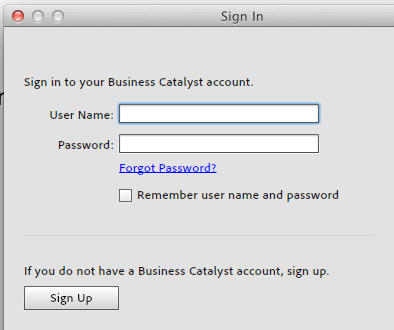
4. Muse promotes Adobe hosting via Business Catalyst, and if you select Publish this is the sole option:

image

Of course you can also Export as HTML. Still, it looks as if Muse is intended as part of a wider initiative which will include hosting and web analytics.

5. Muse is not a Flash authoring tool. Check out the Features page. The word Flash does not appear. Nor did any hidden Flash content appear when I exported a page as HTML. My guess: there is a quiet Flash crisis at Adobe, and the company is hastening to make its tools less Flash-centric, in favour of something more cloud and HTML 5 based. I do not mean that Flash is now unimportant. It is still critical to Adobe, and after all Muse itself runs on Flash. However it is being repositioned.

A few comments. Unfortunately I’ve not yet spoken to Adobe about Muse, but the obvious question is reflected in my heading: what is wrong with Dreamweaver? To answer my own question, I can see that Dreamweaver is a demanding tool, and that Muse, while still aimed at professionals, should be easier to learn.

On the other hand, I recall many early web design tools that tried to hide the mechanics of web pages, some more successful than others, and that in the end Dreamweaver triumphed partly thanks to its easy access to the code. Some still miss HomeSite, an even more code-centric tool. What has changed now?

Needless to say, Dreamweaver is not going away, but there is clearly overlap between the two tools.

Of course non-coders do need to be involved in web site authoring, but the trend has been towards smart content management tools, such as WordPress or Drupal, which let designers and coders develop themes while making content authoring easy for contributors. Muse is taking a different line.

Watch this space though. Even on the briefest of looks, this is an impressive AIR application, and it will be interesting to see how it fits into Adobe’s evolving business strategy.

Update: Elliot Jay Stocks blogs about the code generated by Muse, which he says is poor, and his opinion that it is too much print-oriented:

warning signs are present in this public beta that suggest Muse is very much a step in the wrong direction.

Google Native Client: browser apps unleashed, or misconceived and likely to fail?

Last week Google integrated Native Client into the beta of Chrome 14. Native client lets you compile C/C++ code to run in the browser. It depends on a new plug-in API called Pepper. These are open source projects sponsored by Google and implemented in the Chrome browser, and therefore also likely to turn up in Chrome OS which is an operating system in which all apps run in the browser.

Native Client is cool. For example, NaCLBox lets you run old DOS games in the browser by porting DOSBox to Native Client.

image

Another project is Qt for Google Native Client, a project currently in development. Qt is an excellent and popular GUI and application framework which would speed development of Native Client apps as well as enabling many existing applications to be ported.

It is also worth mentioning that Native Client provides another way to run .NET code in the browser, via Mono with NaCl support.

Why Native Client? Google’s vision, or at least the part of it that focuses on Chrome OS rather than Android, is that everything runs on the Internet and in the browser, making the local operating system unimportant and easily replaced. Native Client removes any performance compromises in managed languages such as JavaScript, ActionScript or Java, as well as easing migration for businesses with existing C/C++ code.

Writing native code for the browser is nothing new. Both Microsoft’s ActiveX and the NPAPI plug-in API used by non-Microsoft browsers let you extend the browser with native code. However Native Client is seamless for the user; you do not have to install any additional plug-in. The main limitation is that Native Client applets do not have access to the local operating system, for security reasons.

It is also worth noting that Native Client apps are not altogether cross-platform. They must be recompiled for different CPU instruction sets, with the current implementation supporting x86 and ARM though you have to compile two binaries. Google says it will support LLVM output to enable cross-platform binaries though this will impact performance.

But is Native Client secure? That is an open question. Google was aware of the security challenge from the beginning of the project. Unlike the plug-in mechanisms which rely mainly on trust in developer competence and signed code to verify the origin of the plug-in or ActiveX control, Native Client inspects the actual code for unsafe instructions before allowing it to run. There is also an “outer sandbox” which intercepts system calls.

However, adding any new way for code to run makes the browser less secure. Google ran a Native Client Security Contest to help identify vulnerabilities, and the contestants did not have any problem finding security flaws. Of course all of these discovered flaws will have been fixed, but there may be others and likely will be.

And is Native Client necessary? The latest JIT-compiled JavaScript engines are fast enough to enable most types of application to run at a satisfactory speed. This is not just about performance though; it is about reusing existing skills, libraries and applications. There is no doubt that Native Client is nice to have; whether its benefits outweigh the risks is harder to judge.

The last question, which may prove the most significant, is political. Google has forged ahead on its own with Native Client, saying as vendors always do that it hopes it will become a web standard. In the early days of the project, it looked like a Native Client plug-in might enable the feature in other browsers, but abandoning NPAPI for Pepper makes this difficult. Will other browser vendors support Native Client?

Here is a comment from Google’s Ian NI-Lewis that I find remarkable:

As you probably know, the rule in Web standards is "implementation wins." So we’re concentrating on getting a good quality implementation out the door. We’re doing that in Chrome. That doesn’t mean that NaCl is intended to be "Chrome only," just that we have to start somewhere.

So Native Client is non-standard, and therefore less interesting than HTML 5 until either Google has a Microsoft-Office-like de facto monopoly of web browsers, or it persuades Mozilla, Microsoft and Apple to support it.

That said, you can think of Chrome as an installable runtime in the same way as the Java Virtual Machine or Adobe Flash, just a potentially more intrusive one. Here is our app, you have to install the free Chrome browser to use it. If this happens to any great extent, I can foresee other browser makers hastening to support it.

C++ 11 is approved by ISO: a big day for native code development

Herb Sutter reports that C++ 0x, which will be called C++ 11, has been unanimously approved by the ISO C++ committee. The “11” in the name refers to the year of approval, 2011. The current standard is C++ 98, though amended as C++ 03, so it has taken 8 or 13 years to update it depending on how you count it.

This means that compiler makers can get on with implementing the full C++ 11 standard. Most current compilers implement some of the features already. This Apache wiki shows the current status. A quick glance suggests that the open source GCC is ahead of the pack, followed by Intel C++ and then perhaps Microsoft Visual C++.

C++ 11 is pretty much compatible with C++ 03 so existing code should still work. However there are many new features, enough for Bjarne Stroustrup to say in his feature summary:

Surprisingly, C++0x feels like a new language: The pieces just fit together better than they used to and I find a higher-level style of programming more natural than before and as efficient as ever. If you timidly approach C++ as just a better C or as an object-oriented language, you are going to miss the point. The abstractions are simply more flexible and affordable than before. Rely on the old mantra: If you think of it as a separate idea or object, represent it directly in the program; model real-world objects, and abstractions directly in code. It’s easier now.

Concurrent programming is better supported in C++ 11, important for getting the best performance from modern hardware.

It is curious how the programming landscape has changed in recent year. A few years back, you might have foreseen a day when most programming would be .NET, Java or JavaScript: all varieties of managed code. While those languages do still dominate, native code has come more to the fore, thanks to factors like Apple’s focus on Objective C, and signs of internal conflict at Microsoft over the best language for coding Windows applications.

That said, C++ 11 remains a demanding language to learn and use. As Stroustrup notes, since C++ 11 is a superset of C++ 98 it is technically harder to learn all of it, though new libraries and abstractions should help beginners. The reasons for using or not using C++ are not going to change significantly with this new standard.

Building PasswordSafe for the Mac: Lion development hassles

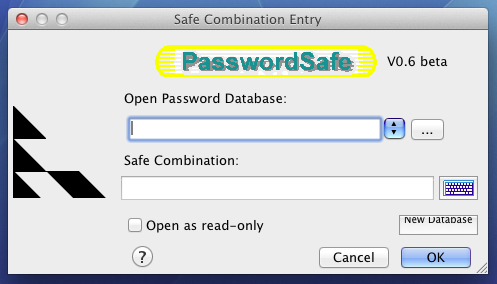
I am doing some work on a Mac at the moment. On Windows I store passwords in PasswordSafe, an open source utility that works well, so I wondered if I could access my PasswordSafe database from the Mac.

image

I could have run the Windows version in Parallels, which I have just installed, but I figured a Mac version would be more convenient. I didn’t see a Mac build among the downloads, but PasswordSafe is cross-platform, so I downloaded the source to do a quick compile.

I was glad to find README.MAC.DEVELOPERS.txt in the PasswordSafe source and set to work. The first task is to download wxWidgets, a cross-platform GUI library, so I went off to download that. Ran the osx-build-wx script as instructed. Result: error message stating C compiler cannot create executables.

The problem seems to be that PasswordSafe expects GCC 4.0 but the latest Xcode installs GCC 4.2. The solution suggested here is to remove Xcode 4, install Xcode 3, and then reinstate Xcode 4. There are related issues concerning PPC fat binaries and older versions of the Mac SDK.

That solution seemed risky and ardous to me, and I remembered that I still had an old Mac Mini from which I was forced to upgrade in order to install Lion, the latest OS X. I hooked it up, removed Xcode 4, installed Xcode 3, and set to work again.

I get the impression not many people build PasswordSafe for the Mac. The first issue I discovered was that the steps in in the README.MAC.DEVELOPERS.txt don’t mention that after running osx-build-wx you also have to run make in order to build static libraries. That was easy though. The next thing is to load the supplied PasswordSafe project into Xcode and build.

I did that but got an error – the linker could not resolve SizeRestrictedPanel. The fix was to add SizeRestrictedPanel.cpp and SizeRestrictedPanel.h to the project. PasswordSafe then built and seems to work fine, on Lion as well as earlier versions of OS X, though there are a few cosmetic issues. You can see from the image that the caption for the New Database button is slightly awry.

If anyone wants my build, it is here. There is also a Java version, and some people have success with that on the Mac.

Mozilla to take on the cross-platform app challenge

Mozilla is facing an uncertain future. Its problem: basing a business (even a non-profit one) on being the alternative to Microsoft’s Internet Explorer is no longer sensible, given that Apple and Google are now doing this too, and even Microsoft is now investing in HTML 5. I discussed these issues in more detail here.

So what is Mozilla to do? Mozilla Chair Mitchell Baker has posted about a possible new approach, based on being the alternative to Apple for apps. She lists some of the problems with the current “app experience”. Apps are device-specific, require permission at many levels, and a few App Store owners (mainly Apple but also Google) control the business model and customer relationships.

Mozilla is proposing what I presume is a new app platform, which will be cross-platform and cross-device. Instead of discovering apps in a single app store, she envisages multiple providers and the ability to find apps in the same way we find web content.

In other words, if the old Mozilla was about freedom from Microsoft and allowing web technology to progress, the new Mozilla might be about freedom from Apple and allowing app technology to progress.

It is a bold vision and one that in principle would be welcome. That said, Mozilla cannot change the control Apple has over its platform, and its insistence that apps are installed only through its own App Store. Maybe she has in mind a cross-platform toolkit, or browser-based apps, or some combination.

Another snag is that whereas there was widespread dissatisfaction with Microsoft’s Internet Explorer back in 2004 when Firefox was launched, this is not the case with Apple and its app platform today. Apple’s App Store system undoubtedly has a dark side, but the user experience is good and developers are making money, some of them at least. Apple’s control over app installation and the constraints imposed on what apps can do are also good for security.

Nevertheless, having looked at a number of cross-platform mobile toolkits, from PhoneGap to Appcelerator Titanium to Adobe AIR, I can see both the significance of this kind of development and that there is plenty of scope for improvement.