Category Archives: software development

Charlie Kindel leaving Microsoft

Charlie Kindel, Windows Phone 7 developer champion at Microsoft, is leaving to start a new company, though he is vague about exactly what it will be:

Charlie will be staying in the Seattle area building a new tech company. The new company will be in stealth mode initially but involves advertising, mobile, cloud computing, and youth athletics.

says the press release.

He goes back a long way at Microsoft, 21 years to be precise. Among the accomplishments he claims:

  • Built ActiveX and DCOM
  • Shipped Internet Explorer 3.0
  • Drove the development of the home networking features in Windows XP
  • Founded eHome and shipped the first version of Windows Media Center
  • Drove the invention of Windows Smart Displays and Windows Media Center Extenders
  • Was the driving force behind Windows Home Server.

I remember IE 3.0 coming out. Surprising though it may seem today, it was an impressive achievement, though history has not been kind either to ActiveX or to DCOM.

Real-world Microsoft Team Foundation Server: Not very good, says ThoughtWorks

I spoke to Sam Newman, who is European Continuous Delivery Practice Lead at ThoughtWorks, a software development company. Needless to say, we talked extensively about Continuous Delivery and I will be reporting on this separately; but I was also interested in his comments on Microsoft’s Team Foundation Server (TFS).  He told me that ThoughtWorks teams often end up working with it at their .NET clients, but it is problematic. In one case, he said, 6% of productive time was absorbed dealing with TFS.

What was the problem, performance, bugs, features lacking?

When we’ve looked at the problems we’ve had, a lot of it unfortunately comes down to the version control system. It’s not very good. It’s slow, you can’t do rollbacks, sometimes things go missing, you get locks. When we talked about 6% of time, they were things like waiting for a solution to expand in Visual Studio. A lot of those issues are in the version control system.

A frustration is that you cannot use TFS with any version control system other than its own.

Every other build server in the world, from Anthill to Go to Cruise Control to Hudson, you can put in at least 10 version control systems. In TFS they are all coupled. So you can’t take the version control and point it at Subversion. That might resolve a lot of the issues.

Why is TFS so widely used? It is because it comes in the box, says Newman.

I can’t think of a single client that wanted a tool, went out into the marketplace, and selected TFS because it is the right tool for them. Most clients use TFS because it comes with their Enterprise MSDN licence.

I have tried TFS myself and found it pretty good; but then I am just testing it on small projects as a solo developer, so it is hard for me to replicate the experience of a real-world team. You would have thought that performance issues, such as waiting ages for a solution to expand in Visual Studio, could be solved by tracing the reason for the delay; but apparently this is not easy.

This is anecdotal evidence, and of course there may be plenty of TFS installations out there that work very well; I would be interested in hearing of counter examples. I am also not sure to what extent the problems apply to all versions of TFS, or whether there is improvement in TFS 2010.

Newman recognizes that anecdotal evidence is not much use: he says ThoughtWorks is trying to collect some solid data that can be used both to discuss with clients making version control and build system choices, and with Microsoft.

Performance is a feature, and makes a large contribution to user satisfaction. The first release of Outlook 2007 was extraordinarily slow in some setups, and I remember the pain of clicking on a folder and then waiting tapping my fingers while it thought about expanding. It sounds like some TFS users are having a similar experience but in Visual Studio.

Delphi for Windows, Mac and iOS: screenshots and video of cross-platform development

Embarcardero is drip-feeding information about its forthcoming RAD Studio XE2 in an annoying manner; nevertheless the product does look interesting and promises cross-platform native code apps for Windows 64-bit, Windows 32-bit, Mac OS X and Apple iOS. I have grabbed some screens from a video recently posted by Embarcadero’s Andreano Lanusse; the video is also embedded below.

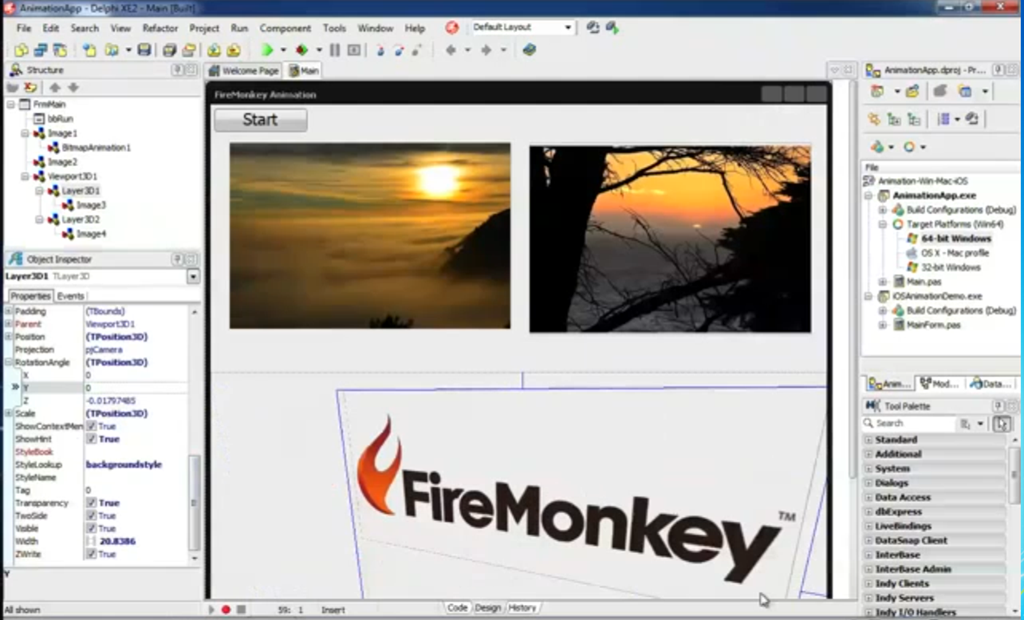
Here is Delphi XE2 showing a FireMonkey application in the designer. FireMonkey is a new cross-platform GUI framework.

image

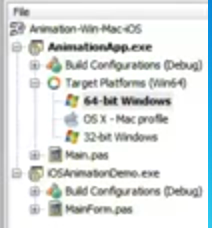
Note the list of target platforms on the right. If you squint you can see 64-bit Windows, OSX, and 32-bit Windows.

image

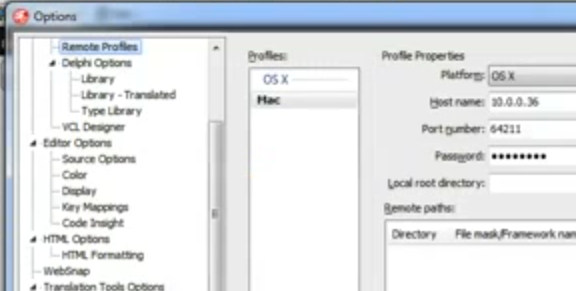
How do you compile for the Mac? It is clear from the demo that Lanusse is running in a VMWare virtual machine on a Mac. He also has a Remote Profile option set to target the host Mac:

image

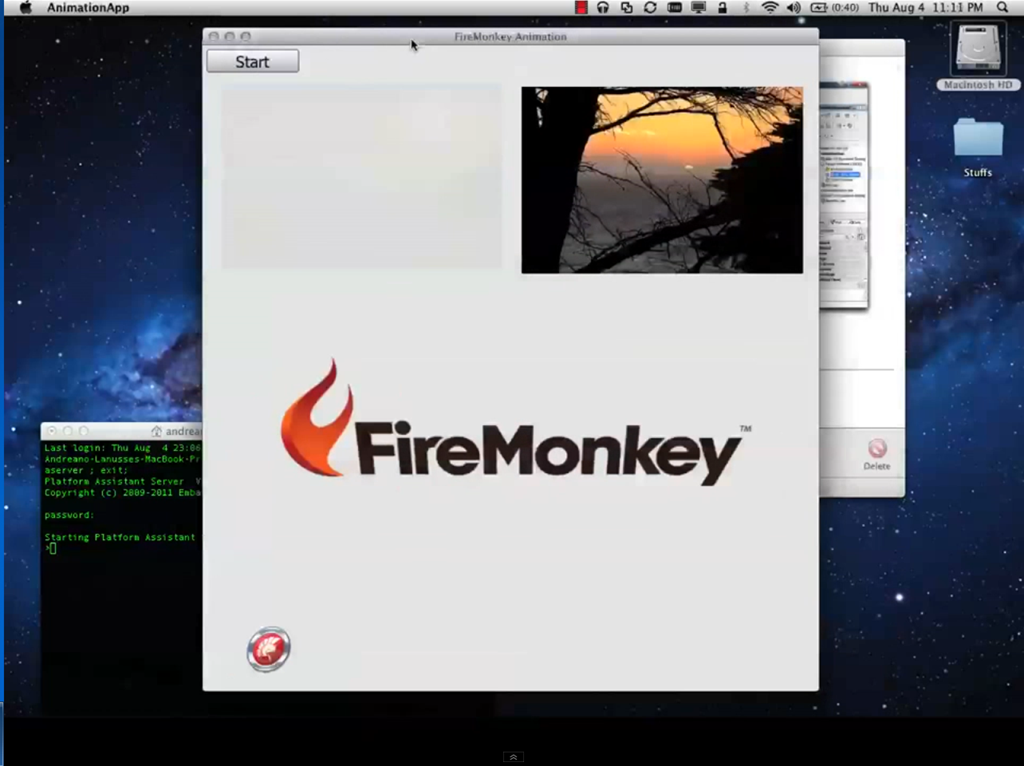
He then refers to a “Platform assistant” which you can see running in a terminal window on the Mac.  He is then able to compile and run from the Windows IDE:

image

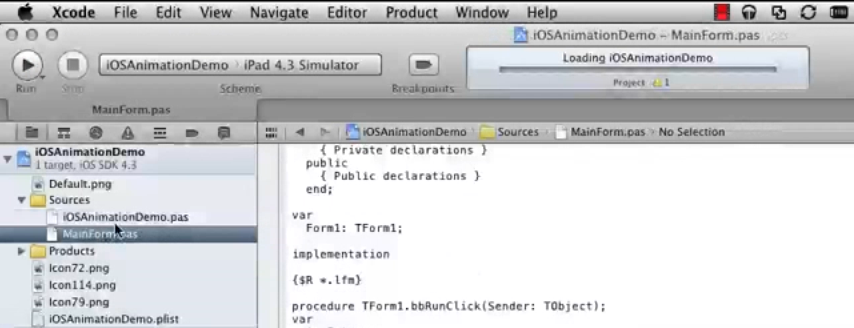
Finally, he targets iOS, though this is a separate project, not just another target. The process exports the project to Xcode, Apple’s Mac and iOS IDE:

image

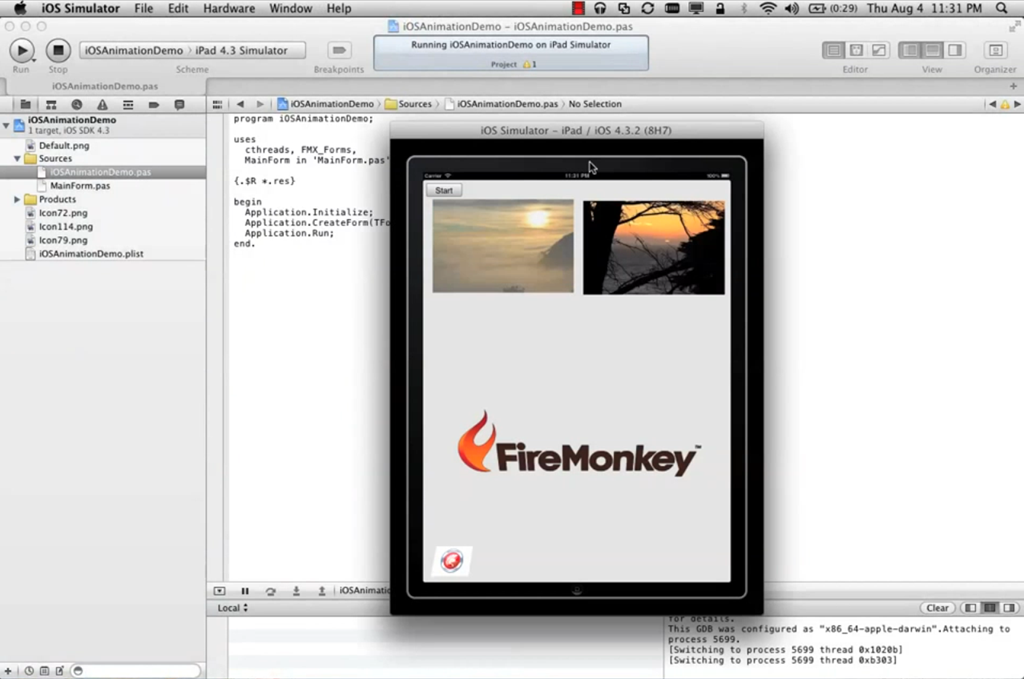
Next, we see the app running on the iPad simulator:

image

The ability to target the Mac is nice to have, but I suspect it is iOS that will attract more interest, given the importance of Apple’s mobile platform.

Here’s the complete video where you can perhaps puzzle out a few more details.

Update: there is also some Q&A in the comments here.

Graphics rendering is Direct2D or Direct3D on Windows, OpenGL on Mac. FireMonkey renders all components through the graphics API, it does not support use native OS components, though Embarcadero’s Michael Swindell says:

FireMonkey client area controls are rendered by OpenGL on Mac, but appear and work just like Cocoa controls – or however you want them to. There are many different Cocoa UI styles in OSX apps, and Firemonkey can render any of them – including iTunes, or Prokit which is an Apple UI style for Pro apps like Final Cut, not available to devs via Cocoa. Windows are Cocoa Windows and the client areas and all user controls are rendered by OpenGL in HD(2D) or 3D. Menus are std and rendered by Cocoa in the menu bar, and common dialogs are rendered by Cocoa. If the “true OSX” look isn’t for you, you’re welcome to use any included Style, download a custom style, or create your own custom style.

Swindell also addresses the matter of Linux and Android:

We do plan Linux and Android. But no eta yet until we get Win/OSX/iOS out. We would also like to provide language bindings for other languages.

Finally, a bit more about that Platform Assistant:

Developer requires a PC and a Mac (or Mac with VM running Windows). You will develop on Windows, and use the platform assistant (PA running on your Mac) to compile natively to your Mac and the PA handles debugging communication between the Mac and your IDE running on Windows. Delphi (or C++Builder) and Firemonkey create compiled stand alone OSX executables that you can sell/distribute to your users. They are native Mac apps. They “copy install” and run like any other Mac app, or you can use a Mac installer if you like.

PhoneGap is at version 1.0

I’ve just spotted that PhoneGap has reached version 1.0. The release was announced at PhoneGap day in Portland, on Friday 29th July.

I have spent some time trying out various cross-platform mobile development tools. PhoneGap is among the most interesting and popular, and is also open source and free to use. If you believe that using the browser engine as an application runtime is the most sensible route to cross-platform mobile applications, then PhoneGap is the leading contender. It wraps your application to look like a native app, and also provides ways to call the native API when necessary.

PhoneGap received a boost when Adobe built it into Dreamweaver 5.5. I tried it out and was impressed with the design environment, but I am not sure how serious Adobe is about PhoneGap since there is no documentation on how to package your PhoneGap app for release, and my post has comments from puzzled users. My solution was to export the project to Eclipse and the standard PhoneGap tools, which misses part of the value of having it integrated into Dreamweaver.

Adobe installs PhoneGap into the Dreamweaver directory, so another issue is how to take advantage of the latest version if you are using Adobe’s tools. Overall I would suggest that using the PhoneGap SDK and Eclipse is a better option, though there is no problem with bringing in Dreamweaver for parts of the design.

I interviewed Nitobi president André Charland about PhoneGap earlier this year.

What’s coming in Delphi RAD Studio XE2: more details of 64-bit and Mac announced, introducing FireMonkey

Embarcadero’s David Intersimone has posted more details of what is coming in the new version of Delphi and RAD Studio XE2, to tie in with an international publicity tour.

One intriguing comment is a reference to FireMonkey:

with FireMonkey, the GPU-powered next-generation application platform, you’ll be able to create visually stunning HD and 3D business applications

Here is the teaser list of features:

  • Create GPU-powered FireMonkey applications
  • Build 64-bit Delphi applications
  • Create a single application and target both Windows and OS X
  • Extend your multi-tier DataSnap applications with new mobile and cloud connectivity in RAD Cloud
  • Connect any visual element to any type of data using LiveBindings™
  • Modernize the look and feel of your Windows applications with VCL styles
  • Create mobile-optimized web applications and standalone apps for iOS and Android devices using RadPHP

Hmm, so RAD Studio XE2 is targeting iOS and Android not with Delphi, but with RadPHP. That suggests some sort of HTML and JavaScript approach rather than a true native executable.

I was not greatly impressed with Delphi for PHP when I first looked at it. That was four years ago though, and since then Embarcadero has acquired Qadram, the third-party developer behind Delphi for PHP, so I would expect something more worthwhile in the forthcoming new version.

Update: Embarcadero’s Andreano Lanusse has posted more details about FireMonkey.

Android only 23% open says report; Linux, Eclipse win praise

Vision Mobile has published a report on what it calls the Open Governance Index. The theory is that if you want to measure the extent to which an open source project is really open, you should look at its governance, rather than focusing on the license under which code is released:

The governance model used by an open source project encapsulates all the hard questions about a project. Who decides on the project roadmap? How transparent are the decision-making processes? Can anyone follow the discussions and meetings taking place in the community? Can anyone create derivatives based on the project? What compliance requirements are there for creating derivative handsets or applications, and how are these requirements enforced? Governance determines who has influence and control over the project or platform – beyond what is legally required in the open source license.

The 45-page report is free to download, and part-funded by the European Union Seventh Framework Program. It is a good read, covering 8 open source projects, including the now-abandoned Symbian Foundation. Here is the result:

Open Governance Index (%open)
Eclipse 84%
Linux 71%
WebKit 68%
Mozilla 65%
MeeGo 61%
Symbian 58%
Qt 58%
Android 23%

The percentages are derived by analysing four aspects of each project.

  • Access covers availability of source code and transparency of decisions.
  • Development refers to the transparency of contributions and acceptance processes.
  • Derivatives covers constraints on use of the project, such as trademarks and distribution channels.
  • Community structure looks at project membership and its hierarchy.

What is wrong with Android? I am not sure how the researchers get to 23%, but it scores badly in all four categories. The report observes that the code to the latest “Honeycomb” version of Android has not been published. It also has this to say about the Open Handset Alliance:

When launched, the Open Handset Alliance served the purpose of a public industry endorsement for
Android. Today, however, the OHA serves little purpose besides a stamp of approval for OHA
members; there is no formal legal entity, no communication processes for members nor frequent
member meetings.

By contrast, Eclipse and Linux are shining lights. MeeGo and Mozilla are also praised, thought the report does mention Mozilla’s “Benevolent dictators”:

In the case of conflicts and disputes, these are judged by one of two Mozilla “benevolent dictators” – Brendan Eich for technical disputes and Mitchell Baker for non-technical disputes.

Qt comes out OK but has a lower score because of Nokia’s control over decision making, though it sounds like this was written before Nokia’s Windows Mobile revolution.

WebKit scores well though the report notes that most developers work for Apple or Google and that there is:

Little transparency regarding how decisions are made, and no public information provided on this

Bearing that in mind, it seems odd to me that WebKit comes above Mozilla, but I doubt the percentages should be taken too seriously.

It is good to see a report that looks carefully at what it really means to be open, and the focus on governance makes sense.

Adobe Edge previewed: another step towards HTML 5

Adobe has released a preview of Edge, a new tool for creating animations in HTML 5, JavaScript and CSS3.

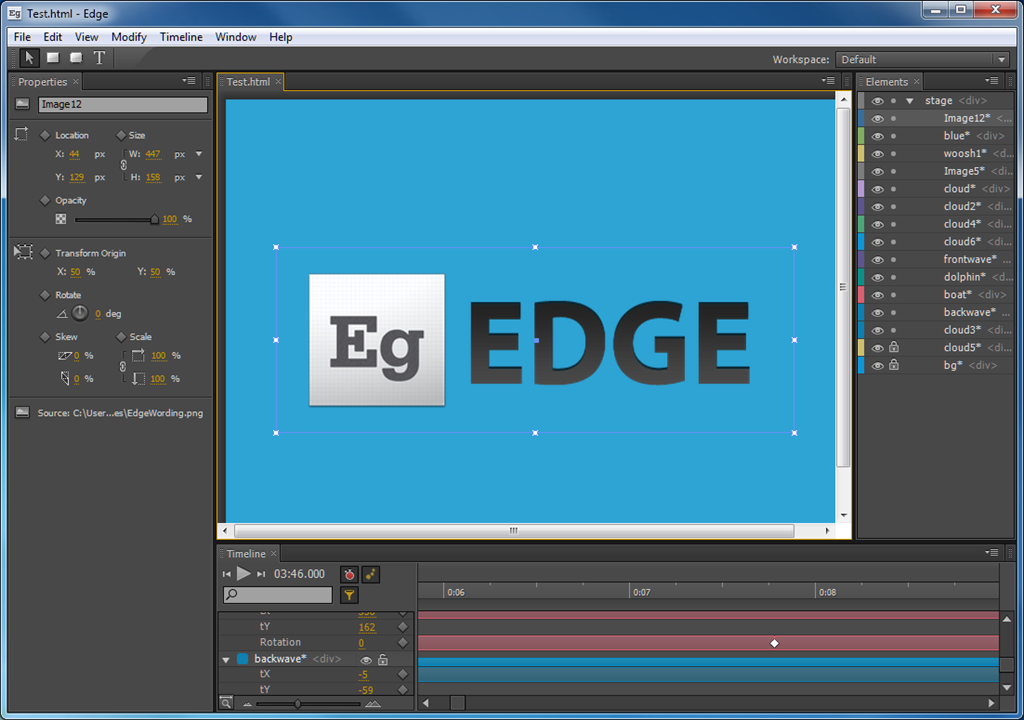
Edge is interesting on two levels. First, HTML 5 lacks strong design tools so a new tool from Adobe is welcome. Edge is a timeline-based tool for creating animations. You import elements such as images, or create text and graphic elements in the tool. Using the timeline, you create keyframes and specify effects. Here is the designer:

image

and you can view the output right here. This is one of Adobe’s samples, created by Sarah Hunt.

image

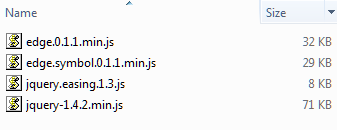
Under the covers Edge uses the JQuery JavaScript library. Here are the includes for this example:

image

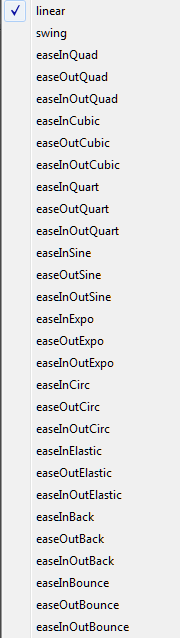
and here are the transition effects on offer:

image

Edge is not complete yet.  A future update will add a JavaScript editor, making this more interesting for application developers. There will be a documented Edge library that will let you customise and I presume interact with the Edge output. One of the possibilities that interests me is data visualisation. Will Edge support this? Adobe is not yet saying, but it would be a natural move.

Adobe already has an HTML design tool, Dreamweaver. Why another one? Or put another way, why is Edge not a new designer for Dreamweaver rather than a new product in its own right?

This is an early preview, and all things are possible. However, Adobe has a tricky positioning task, given that Edge is encroaching on territory that used to belong to Flash, timeline-based animation. In its FAQ [PDF], Adobe distinguishes its products like this:

Product Sample use cases
Adobe Edge Preview 1 Advertising, simple animations and motion design for new compositions or using existing CSS-based page layouts
Adobe Dreamweaver Websites and web applications for desktops, smartphones, and other devices
Adobe Flash Professional Immersive interactive experiences, mobile applications, gaming, premium video, advertising
Adobe Flash Builder Rich Internet Applications (RIAs) and mobile applications

This table fails to mention what must be part of the core rationale for Edge, which is working on Apple iOS, the mobile operating system for iPhone and iPad that does not run Flash content. If you view the demo page above on the iPhone 4 or iPad 2, you will find that it works fine.

Adobe’s distinctions in the table above are not particularly clear. Leaving aside the relative merits of Flash and HTML 5 as technologies, a key question for developers and designers is one of reach. HTML 5 has a reach that extends to iOS and to other devices that do not run Flash in the browser. Flash has a reach that replaces browser-dependency with dependency on Adobe’s runtime, which can be a good thing.

Incidentally, I asked Adobe during a press briefing about mobile support and also browser requirements for Edge content, but there is no official statement on this yet.

Is Adobe moving away from Flash towards standards-based HTML tools? The purpose of a table like the one above is to insist that this is not the case and that Adobe will continue to support both. Nevertheless, Edge is a significant move. A gradual decline in Flash usage in favour of HTML 5 is not necessarily bad for Adobe. Designers will use the same Adobe tools to create content for Edge as they do for Flash.

What about Wallaby, another Adobe experimental project which exports Flash content to HTML, in effect making Flash Professional an HTML 5 authoring tool? Adobe says that Wallaby and Edge are separate projects and there is no plan to have Edge import Wallaby content. Still, you would have thought that, if Wallaby makes it into an official product, some compatibility is inevitable.

image

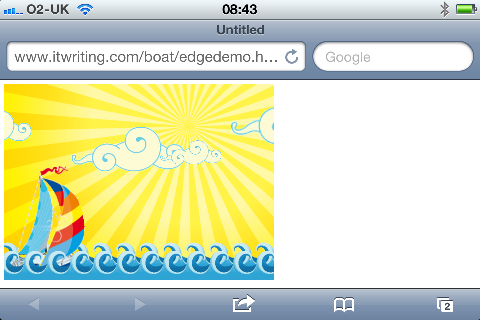
Edge demo on Apple iPhone 4

GPU Programming for .NET: Tidepowerd’s GPU.NET gets some improvements, more needed

When I attended the 2010 GPU programming conference hosted by NVIDIA I encounted Tidepowerd, which has a .NET library called GPU.NET for GPU programming.

GPU programming enables amazing performance improvements for certain types of code. Most GPU programming is done in C/C++, but Typepowerd lets you run code in .NET, simply marking any methods you want to run on the GPU with a [kernel] attribute:

[Kernel]

private static void AddGpu(float[] a, float[] b, float[] c)

{

// Get the thread id and total number of threads

int ThreadId = BlockDimension.X * BlockIndex.X + ThreadIndex.X;

int TotalThreads = BlockDimension.X * GridDimension.X;

for (int ElementIndex = ThreadId; ElementIndex < a.Length; ElementIndex += TotalThreads)

{

c[ElementIndex] = a[ElementIndex] + b[ElementIndex];

}

}

GPU.NET is now at version 2.0 and includes Visual Studio Error List and IntelliSense support. This is useful, since some C# code will not run on the GPU. Strings, for example, are not supported. Take a look at this article which lists .NET OpCodes that do not work in GPU.NET.

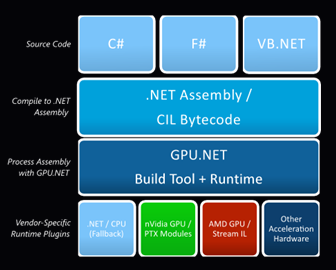
GPU.NET requires an NVIDIA GPU with CUDA support and a CUDA 3.0 driver. It can run on Mac and Linux using Mono, the open source implementation of .NET. In principle, GPU.NET could also work with AMD GPUs or others via a vendor-specific runtime:

image

but the latest FAQ says:

Support for AMD devices is currently under development, and support for other hardware architectures will follow shortly.

Another limitation is support for multiple GPUs. If you want to do serious supercomputing relatively cheaply, stuffing a PC with a bunch of Tesla GPUs is a great way to do it, but currently GPU.NET only used one GPU per active thread as far as I can tell from this note:

The GPU.NET runtime includes a work-scheduling system which can distribute device method (“kernel”) calls to multiple GPUs in the system; at this time, this only works for applications which call device-based methods from multiple host threads using multiple CPU cores. In a future release, GPU.NET will be able to use multiple GPUs to execute a single method call.

I doubt that GPU.NET or other .NET libraries will ever compete with C/C++ for performance, but ease of use and productivity count for a lot too. Potentially GPU.NET could bring GPU programming to the broad range of .NET developers.

It is also worth checking out hoopoe’s CUDA.NET and OpenCL.NET which are free libraries. I have not done a detailed comparison but would be interested to hear from others who have.

Microsoft releases Visual Studio LightSwitch: a fascinating product with an uncertain future

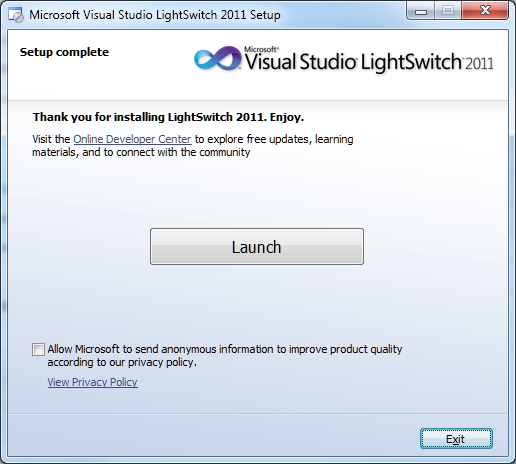
Microsoft has released Visual Studio LightSwitch, a rapid application builder for data-centric applications.

image

LightSwitch builds Silverlight applications, which may seem strange bearing in mind that the future of Silverlight has been hotly debated since its lack of emphasis at the 2010 Professional Developers Conference. The explanation is either that Silverlight – or some close variant of Silverlight – has a more important future role than has yet been revealed; or that the developer division invented LightSwitch before Microsoft’s strategy shifted.

Either way, note that LightSwitch is a model-driven tool that is inherently well-suited to modification for different output types. If LightSwitch survives to version two, it would not surprise me to see other application targets appear. HTML 5 would make sense, as would Windows Phone.

So LightSwitch generates Silverlight applications, but they do not run on Windows Phone 7 which has Silverlight as its development platform? That is correct, and yes it does seem odd. I will give you the official line on this, which is that LightSwitch is not aimed primarily at developers, but is for business users who run Windows and who want a quick and easy way to build database applications. They will not care or even, supposedly, realise that they are building Silverlight apps.

I do not believe this is the whole story. It seems to me that either LightSwitch is a historical accident that will soon be quietly forgotten; or it is version one of a strategic product that will build multi-tier database applications, where the server is either Azure or on-premise, and the client any Windows device from phone to PC. Silverlight is ideal for this, with its modern presentation language (XAML), its sandboxed security, and its easy deployment. This last point is critical as we move into the app store era.

LightSwitch could be strategic then, or it could be a Microsoft muddle, since the official marketing line is unconvincing. I have spent considerable time with the beta and doubt that the supposed target market will get on with it well. Developers will also have a challenge, since the documentation is, apparently deliberately, incomplete when it comes to writing code. There is no complete reference, just lots of how-to examples that might or might not cover what you wish to achieve.

Nevertheless, there are flashes of brilliance in LightSwitch and I hope, perhaps vainly, that it does not get crushed under Microsoft’s HTML 5 steamroller. I set out some of its interesting features in a post nearly a year ago.

Put aside for a moment concerns about Silverlight and about Microsoft’s marketing strategy. The truth is that Microsoft is doing innovative work with database tools, not only in LightSwitch with its model-driven development but also in the SQL Server database projects and “Juneau” tools coming up for “Denali”, SQL Server 2011, which I covered briefly elsewhere. LightSwitch deserves a close look, even it is not clear yet why you would want actually to use it.

image

Living in an App Store world: what are the implications?

A few recent events prompt some reflections on the rise of app stores and the implications for developers and for the IT industry.

One is Apple’s OS X Lion release, available only through the Mac App Store; and the removal of the optical drive on the Mac Mini, making it hard to install shrink-wrap software.

Another is Adobe’s closure of its InMarket service and AIR Marketplace app store. Some app stores are doing better than others.

A third is TechCrunch reporting that book apps such as Nook and Kindle are being hobbled or removed from the Apple iOS store. While I cannot verify this at the moment – I still see the Kindle app in the store, and it still has a link to the Kindle web store – it is in tune with Apple’s announcement in February:

… publishers may no longer provide links in their apps (to a web site, for example) which allow the customer to purchase content or subscriptions outside of the app.

Enforcing this on an app such as Kindle promotes Apple’s own iBooks app and store.

There are lots of app stores out there, though one fewer with the forthcoming closure of AIR Marketplace, but how many of them matter? Here is my pick of the top three:

  • Apple iOS and Mac App Store – arguably two different stores, but since you access them with the same account I bracket them together.
  • Google Android Market – not a lock-in like Apple’s store, but still the primary store for Android.
  • Windows vNext marketplace – how this will work is not yet public, but the existence of a new app store in Windows 8 is widely rumoured and might be expected to tie in with what is already in place for Windows Phone 7.

Perhaps I am overstating the importance of the Windows 8 marketplace, given the failure of the Windows Vista marketplace, but given that Apple has now shown the way I find it hard to see how Microsoft can fail with this one.

Note that an app store is not just a marketing ploy. It is a software deployment and update tool.

App Stores score well in terms of usability. Another advantage is that users have a centralised mechanism for software updates, managed by the operating system. That is good for security, because it is unlikely to be disabled, and good for usability as it should mean fewer third-party updaters like those from Adobe, Oracle Java, Symantec and others.

App Stores typically enforce certain conditions on developers. In essence they must be well-behaved. For examples, the Mac App Store prohibits apps that request escalation to root privileges. Apple also rejects apps that use “deprecated or optionally installed technologies”, including specifically Java and by implication Adobe Flash or other runtimes.

This is great for security. In principle, if you decide that you will only install apps from the App Store, you can be confident that all your apps are well-behaved. On the Mac this is interesting; on Windows it would be a revolution.

What are the business implications though?

  • First, it is a significant source of new revenue for the operating system vendor. It gets a cut of everything.
  • Second, it gives tremendous empowerment to user ratings and reviews. On iOS or Android, if you want an app, you automatically search the app store and take note of factors such as user ratings and popularity. Most of us can figure that if there are few ratings or reviews, the app is not popular.

If you are a software company, getting high ratings and good reviews on app stores is now a key challenge, even more so than it is already with the likes of Amazon.

  • Speaking of Amazon, the third point is that app stores will not be welcomed by software resellers. They are simply being bypassed. Amazon is addressing this with its own App Store for Android; but can it really win against the official Google Android Market? Its MP3 store is better value than Apple’s iTunes, but has smaller market share.

Amazon has other business to fall back on, but specialist software resellers will be watching the growth of app stores nervously. Apple resellers in general are already hurting and diversifying, thanks in part to Apple bypassing them with releases like OS X Lion.

The app store revolution is good for users in many ways, especially as prices seem to end up lower than before, but there are worrying aspects. In particular, the ability of the operating system vendor to tilt the store in its own favour is a concern, and we will hear more complaints about that.

Finally, it is interesting to speculate how this may impact enterprise software deployment. Will Microsoft aim to link its forthcoming Windows app store to other deployment mechanisms such as System Center Configuration Manager? What about volume licensing sales, will resellers be able to keep hold of those? Maybe we will learn more of Microsoft’s story on this at the Build conference in September.