Category Archives: software development

Adobe acquires PhoneGap company Nitobi

Adobe has announced the acquisition of Nitobi, the company which created and sponsors the open source PhoneGap project for creating cross-platform mobile applications using HTML5 technology.

Apparently this does not affect the plan to donate PhoneGap to the Apache Software Foundation:

We are also excited to announce our donation of the PhoneGap code to the Apache Software Foundation,” said Dave Johnson, chief technology officer, Nitobi. “Adobe has been fully supportive of our decision.

Adobe already offers PhoneGap integration in Dreamweaver 5.5, though I found some gaps in this initial release.

I spoke to Nitobi CEO André Charland earlier this year.

Smart move, though it will be interesting to see how Adobe now balances mobile app development with PhoneGap vs mobile app development with Flash – both of which are cross-platform approaches.

Here at Adobe’s MAX conference in Los Angeles I will be quizzing Adobe about how it plans to evolve its design and development tools to better support PhoneGap.

Windows Runtime must come to Windows Phone

I’ve been trying Windows Phone 7 in its latest “Mango” version over the last couple of days and mostly enjoying it. One thing I am not impressed by though is the range of apps available. Have a look at the Marketplace – Microsoft may claim 30,000 apps, but given how unexciting even the “top” selections are, you can imagine how bad the bottom ones must be. Microsoft I guess has been guilty of accepting almost anything to puff up the numbers.

What would fix this? Sell more phones, of course; but also improve the platform for developers. Windows Phone 7.x is not a bad platform: you get Silverlight, XNA, C# and Visual Studio.

By contrast though, the Windows Runtime (WinRT) shown at the BUILD conference earlier this month is a platform mobile developers can love. Here are what seem to me three great features:

  • Three first-class languages and programming platforms – C#/.NET, JavaScript and HTML 5, C++ and native code. All three are strategic platforms. I particularly like the native code option, as many mobile developers like native code and it is a weakness of Windows Phone 7.
  • Asynchrony built into the platform. This is a smart move: make every API call that might cause a delay an async-only call. On top of that, build easy async programming into the languages. The result should give apps a responsive user interface almost by default; developers will need to make an effort to freeze the UI.
  • Contracts which integrate apps with the operating system and with one another. There are five contracts: search, share, play to, settings, and app to app picking (for example, file selection).

Microsoft’s Windows chief Steven Sinofsky says Windows 8 is for tablets but not for phones. But he has to say that, because if Microsoft announced that the current Windows Phone 7.5 is a platform without a future, it would further dampen enthusiasm for the product.

Is there any reason why WinRT should not come to Windows Phone? A few:

  • Windows Phone is currently built on Windows CE, a cut-down version of Windows, whereas WinRT runs on top of the full Windows API.
  • The Metro-style UI is designed for tablets rather than phones.
  • Finally, the existence of Desktop Windows is presumed in the current Windows 8 design. If Microsoft has not had time to work out a Metro-style UI for something, you simply use the Desktop version.

All of these are good reasons why the arrival of WinRT on the phone will be delayed, but none are insuperable. Long-term, I find it inconceivable that Microsoft will persevere with a different programming platform for the phone and for tablets.

What are the implications for Windows Phone developers today? Well, WinRT and Metro borrow from the phone OS, so the porting effort should not be too bad, except in the case of XNA, a .NET wrapper for DirectX which WinRT does not support.

Of course this post is entirely speculative, and I have no insight into Microsoft’s plans beyond what is publicly stated, so there might be other compatibility options when and if the time comes.

And it is time that is Microsoft’s biggest enemy. Fumbling tablet computing has been a costly mistake, and the big question is whether anyone will care how good some future Windows Phone will be, if the ecosystem which Nokia likes to talk about is firmly established as Android vs Apple.

PhoneGap likely to move to Apache Software Foundation

Nitobi’s Brian LeRoux, who works on PhoneGap, has announced the start of a process to move the project to the Apache Software Foundation:

We have initialized the process to contribute PhoneGap to the Apache Software Foundation (ASF). The process is straightforward beginning w/ a submission of a proposal to the ASF that describes the move in detail. We’ve been looking at different options for a foundation contribution since the beginning. Now is the time. PhoneGap is hugely adopted and the IP belongs in an org aligned w/ our goals, philosophy and the web. It will remain free software, licensed as it always has been: Apache/BSD/MIT.

Apparently the name may change thanks to a trademark dispute.

PhoneGap seems to have plenty of momentum and is turning up in a variety of tools, including Adobe DreamWeaver and Embarcadero RAD PHP XE2, to mention two I am aware of.

Delphi and RAD Studio XE2 gets its first update as Embarcadero confesses copyright issue

Embarcadero has posted its first update for Delphi XE2 and C++Builder XE2. Whether this shows commendable responsiveness, or that that the original release was buggy and premature, is a matter for debate.

Either way, the list of fixed bugs is extensive. There is also a copyright issue, since Embarcadero says – note use of that mightily abused word “may”:

We were recently made aware that some code in the 3D support in FireMonkey may be similar to code in GLScene, an MPL open source project. We worked with Eric Grange, a key contributor to the GLScene project to remedy the issue and replace the code in question.

Unfortunately applying the patch means a full uninstall and reinstall, though Embarcardero says that future patches will be based on this new build which I presume means this surgery will not be required again.

A simple example of async and await in C# 5

I have been playing with the Visual Studio 11 developer preview and exploring its asynchronous features, specifically the async and await keywords which are new to C# 5.0. These features have actually been available as a CTP (Community Tech Preview) since October 2010, but I had not found time to try it.

I like to keep examples as simple as possible. I have a Windows Forms application which has a long-running task to perform, and I do not want to lock the UI while it runs. Here is my long-running function:

 private int slowFunc(int a,int b)       
 {          
 System.Threading.Thread.Sleep(10000); 
 return a + b;
 }

Yes, it takes 10 seconds! I am going to click a button on a form, call the function, and show the result on a label control.

Now, here is how I might try to achieve the goal of not locking the UI using Visual Studio 2010 and C# 4.0:

 private void button1_Click(object sender, EventArgs e)
 {            
 this.button1.Enabled = false; //prevent re-entry 
 var someTask = Task<int>.Factory.StartNew(() => slowFunc(1, 2));
 this.label1.Text = "Result: " + someTask.Result.ToString(); //oops, blocks calling thread 
 this.button1.Enabled = true;       
 }

Oops, this did not work at all! The reason is that although I have gone to the trouble of creating a Task in order to run the slow function on a background thread, my work is undone when I call the Result property of the Task object – since this blocks the thread until the Task completes.

Here is how you can fix it in Visual Studio 2010 – remember, there is an easier way in C# 5.0 coming up soon:

 private void button1_Click(object sender, EventArgs e)        
 {
 this.button1.Enabled = false;          
 var uiScheduler = TaskScheduler.FromCurrentSynchronizationContext(); //get UI thread context 
 var someTask = Task<int>.Factory.StartNew(() => slowFunc(1, 2)); //create and start the Task 
 someTask.ContinueWith(x =>     
   {                                          
   this.label1.Text = "Result: " + someTask.Result.ToString();   
   this.button1.Enabled = true;   
   }, uiScheduler  
  );        
 }

This one works. I click the button and the UI does not lock up at all; I can minimize the form, move it around the screen, and so on.

However, I have had to do some extra work. The ContinueWith method tells the Task to run some other code after the background thread has completed. By default this code will not run on the UI thread, which means it will raise an exception when it updates the UI, but you can pass in a TaskScheduler object so that it continues on the UI thread.

Now here is a look at the same problem using C# 5.0. The slowFunc is the same, so I will not retype it. Here is the code for the button click:

 private async void button1_Click(object sender, EventArgs e)
 {
 this.button1.Enabled = false; 
 var someTask = Task<int>.Factory.StartNew(() => slowFunc(1, 2)); 
 await someTask;  
 this.label1.Text = "Result: " + someTask.Result.ToString(); 
 this.button1.Enabled = true;
 }

Less code, same result, which is usually a good thing.

What is going on here though? First, the async modifier is added to the click event handler. This does not mean that the method runs asynchronously. It means that it contains code that will run asynchronously using await. As Eric Lippert explains, it tells the compiler to rewrite the method for you.

Second, there is the await keyword. I cannot improve on Lippert’s explanation so here it is:

The “await” operator … does not mean “this method now blocks the current thread until the asynchronous operation returns”. That would be making the asynchronous operation back into a synchronous operation, which is precisely what we are attempting to avoid. Rather, it means the opposite of that; it means “if the task we are awaiting has not yet completed then sign up the rest of this method as the continuation of that task, and then return to your caller immediately; the task will invoke the continuation when it completes.”

If you refer back to the Visual Studio 2010 examples, you will see that the code is very close to my first, non-working example. In other words,using await makes the code work in the way that intuitively I hoped that it might, without specifically called the ContinueWith method and messing around with the thread context as in the second example.

This is still concurrent programming though. One thing that C# 5.0 cannot prevent is an impatient user clicking several times on the button when the result does not appear immediately, so in all the examples I have disabled the button while the background thread runs.

Appcelerator opens component marketplace for mobile developers

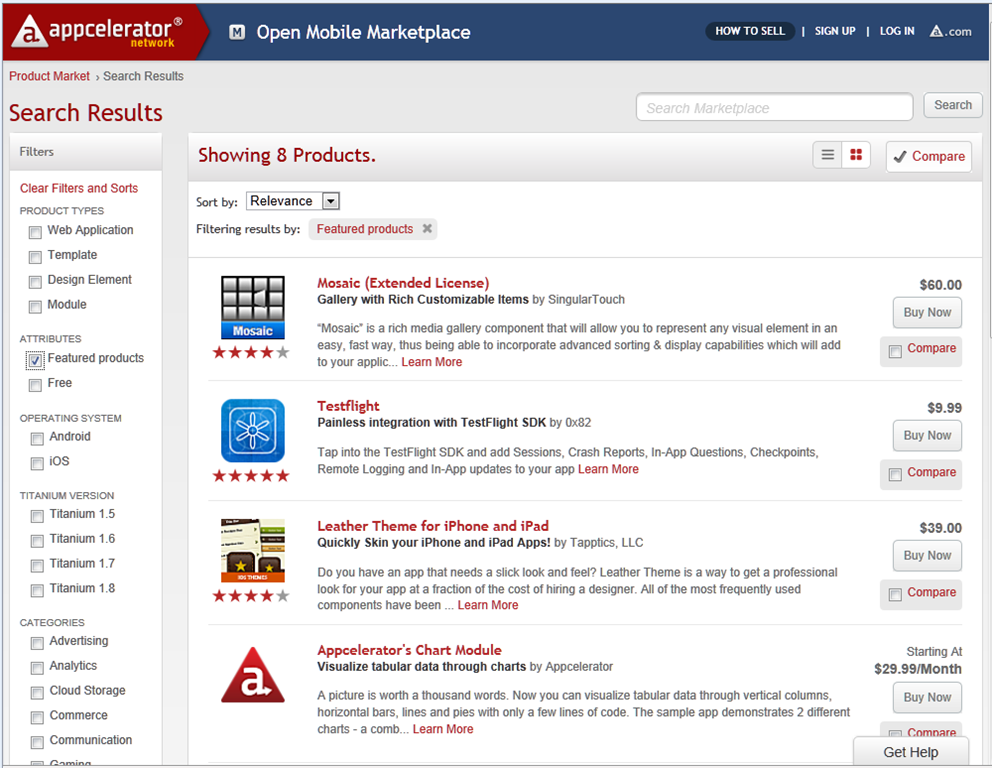
Appcelerator has launched its Mobile Marketplace, offering software components for mobile and web developers using Titanium, Appcelerator’s cross-platform toolkit for Apple iOS, Google Android, and others – though only iOS and Android seem to be supported in the Marketplace currently.

image

Developers create modules using the Titanium Module SDK, and get 70% of revenue.

I took a quick look and found it thought-provoking. I am a fan of user reviews, and one nice feature of the Mobile Marketplace is that it supports reviews and ratings. Finding out what other developers think of a particular component often involves trawling through Google searches, asking on forums and so on; a marketplace with authentic hands-on reviews has real value.

That said, when I checked out an example, LucidChart, which is a diagramming component with 5 star rating and four reviews, I was not impressed with the review quality, and puzzled that some of the reviews date from July, before the Marketplace opened. Still, developers can make their own judgment about the reliability of a particular review.

Many of the components are on a monthly subscription, on a per seat, per month basis. Some developers are uncomfortable with this model and the likely costs:

… charging such high monthly fees is a complete rip off. My entire Apple developer license only works out at $8.25, are you seriously thinking that a module is worth more than what Apple provide to developers for a fraction of the cost?

Another issue is that some of the products are not really code components, but developer services like TeamworkPM.

Some components are free though, and if the Marketplace attracts a reasonable level of traffic and interest then it could prove an excellent resource for Titanium developers.

Adobe to ship Flash 11 and AIR 3, repositions Flash vs HTML 5

Adobe has announced that Flash 11 and AIR 3 will ship in early October.

There are significant changes in this release.

  • Flash gets Stage 3D (previously codenamed Molehill), a set of low-level 3D APIs, GPU accelerated where hardware allows, which will make console-like 3D graphics and games possible in Flash. Stage 3D wraps DirectX on Windows and OpenGL on desktop and mobile platforms.
  • 64-bit Flash is here at last, supporting 64-bit Internet Explorer and other browses on Windows, Mac and Linux.
  • AIR, which uses Flash as a runtime for desktop and mobile applications, now supports native extensions for better device support, operating system integration, and the ability to speed performance-critical code or use open source libraries.
  • In addition, the AIR packager for iOS, which lets you wrap your application as a native executable, is now a feature called Captive Runtime which is available for Windows, Mac and Android as well as iOS. Users who install a packaged application will not know it uses AIR, and will not need to install or update the AIR runtime as it is packaged with the application, though it is not actually a single file (on Windows at least).

These new options make the Flash and AIR combination an interesting comparison with other cross-platform development tools, such as Embarcadero’s new Delphi XE2, which targets Windows, Mac and iOS with a new framework called FireMonkey; or Appcelerator’s Titanium tool for cross-platform desktop and mobile development. Note though that Adobe is not promising any performance improvement. This is just another way to package the same runtime.

Adobe’s advantage is its high quality design and development tools and the maturity of the Flash runtime. For application size and performance, it will likely fall short of true native development tools. The ActionScript language could do with updating, and I would not be surprised if Adobe addresses this in the next major Flash release.

But do we still need Flash? Flash in the browser is in decline, thanks to the influence of Apple and the rise of HTML 5. Adobe’s MAX conference is coming up soon, and I noticed in the schedule [Flash needed] a defensive note in some of the sessions; there is even one called “The Death of Flash” which talks about “the misinformation that’s percolated through the web over the past year”.

That may be so; but even Adobe is re-positioning Flash and recognizing the rise of HTML 5. “Customers see significant advantages for Flash in a few focused areas,” said Adobe’s Danny Winokur, VP and General Manager of Platform , in a press briefing. He identified these areas as gaming, media apps, and “sophisticated data-driven applications” – think data visualisation rather than just forms over data. “For everything else it is very clear that … HTML 5 is a mature enough technology that it is a really good solution.”

Adobe is therefore investing in HTML 5 tools as well as Flash tools, and Winokur mentioned the Edge motion design tool as well as the venerable Dreamweaver.

I asked Winokur, given that HTML 5 is maturing fast, how Adobe sees the picture vs Flash in say two years time. He replied that Adobe is actively working to advance HTML 5, but that “there will continue to be opportunities for innovation in Flash, where we can … enable new possibilities that did not previously exist on the Web.” He makes the case for Flash as a kind of leading edge for HTML, with features that eventually become part of the HTML standard.

It is a fair point, but it is obvious that the niche for Flash is getting smaller rather than larger.

Adobe has never charged for the Flash runtime, and while the Flash vs HTML path is tricky to navigate, Adobe mainly makes its money from design tools, server applications and web analytics, and while Flash plays some client role in many of these products, Adobe can tune them over time to make less use of the runtime. I believe we can see this happening.

More positively, Adobe is benefiting from the demand for rich content across both web and applications, and has just reported decent financial results, showing the company’s resilience.

Finally, everyone is asking what Adobe will do about Microsoft’s WIndows 8 Metro platform for tablets, given that browser plug-ins are not supported. Here is the answer:

… we expect Flash based apps will come to Metro via Adobe AIR, much the way they are on Android, iOS and BlackBerry Tablet OS today

though I hope this will be delivered more quickly than the promised Flash runtime for Windows Phone 7, which is not a subject either Adobe or Microsoft seems willing to talk about.

Update: Adobe has also announced the Flex 4.6 SDK and Flash Builder 4.6, which supports these new capabilities including Captive Runtime and Native Extensions, and has new controls specifically aimed at tablet apps.

Delphi team focusing on FireMonkey, VCL winding down?

Julian Bucknall at componnent vendor DevExpress writes a thoughtful post arguing that Embarcadero will focus on Delphi’s new cross-platform FireMonkey framework in future, and that the VCL (Visual Component Library) which has been at the heart of Delphi since its first release will receive little future investment.

Bucknall notes that ex-Borland employee Danny Thorpe tweeted about 1/3 of the Delphi VCL and IDE team being laid off in Scotts Valley, USA; while Embarcadero’s Tony De La Lama blogs about new posts in Europe. FireMonkey was originally developed in Russia.

The VCL is a mature framework by any standards (Delphi was first released in 1995), and now that the 64-bit VCL has been released the most pressing demands of developers have been met.

Further, Microsoft itself is slowing development of the Win32 API on which VCL is based, in favour of the mobile and touch-friendly Metro user interface and the new Windows Runtime on which it is built. The VCL will never adapt to Metro, but FireMonkey might do so. The Windows Runtime has an API which is represented by metadata in same format used by .NET’s Ildasm. If Embarcadero can adapt Delphi to read this metadata so that you can easily call the API, then a Delphi for Metro seems plausible, but it would not use the VCL.

Delphi already works well for Windows applications, so from Embarcadero’s point of view, growth will come from cross-platform and mobile development using FireMonkey.

The main snag is that unlike the VCL, FireMonkey is far from mature, and developers are complaining about lack of documentation as well as limitations in the current implementation.

There is also a philosophical difference between VCL and FireMonkey. VCL is a “heavyweight” GUI framework in that it depends on native Windows controls, with the advantage that you get a truly native look and feel in your Delphi application. FireMonkey is a “lightweight” GUI framework which renders the UI entirely through custom drawing, which is great for cross-platform consistency, but poor if you want a native look and feel. Performance-wise, and despite the name, heavyweight frameworks often feel faster because native controls are optimised for the operating system.

The key question then: will FireMonkey be as good for cross-platform, as the VCL has been for Windows? Based on my first experiments I am not sure at the moment, though I expect it to improve. I would be interested in views from others who have worked with it.

Reflections on Microsoft BUILD 2011

I’m just back from Microsoft’s BUILD conference at Anaheim in California, which lived up to the hype as a key moment of transition for the company. Some said it was the most significant PDC – yes, it was really the Professional Developers Conference renamed – since 2000, when .NET was introduced; some said the most significant ever.

image

“Significant” does not necessarily mean successful, and history will judge whether BUILD 2011 was a new dawn or the beginning of the end for Windows. Nevertheless, I have not heard so much cheering and whooping at a Microsoft conference for a while, and although I am no fan of cheering and whooping I recognise that there was genuine enthusiasm there for the new direction that was unveiled.

So what happened? First, let me mention the Windows Server 8 preview, which looks a solid upgrade to Server 2008 with a hugely improved Hyper-V virtualisation and lots of changes in storage, in IIS, networking, in data de-duplication, in modularisation (enabling seamless transition between Server Core and full Server) and in management, with the ascent of PowerShell scripting and recognition that logging onto a GUI on the server itself is poor practice.

The server team are not suffering the same angst as the client team in terms of direction, though the company has some tricky positioning to do with respect to Azure (platform) and Server 8 (infrastructure) cloud computing, and how much Microsoft hosts in its own datacentres and how much it leaves to partners.

What about Windows client? This is the interesting one, and you can almost hear the discussions among Microsoft execs that led them to create the Windows Runtime and Metro-style apps. There is the Apple iPad; there is cloud; there are smartphones; and Windows looks increasingly like a big, ponderous, legacy operating system with its dependence on keyboard and mouse (or stylus), security issues, and role as a fat client when the industry is moving slowly towards a cloud-plus-device model.

At the same time Windows and Office form a legacy that Microsoft cannot abandon, deeply embedded in the business world and the source of most of the company’s profits. The stage is set for slow decline, though if nothing else BUILD demonstrates that Microsoft is aware of this and making its move to escape that fate.

Its answer is a new platform based on the touch-friendly Metro UI derived from Windows Phone 7, and a new high-performance native code runtime, called Windows Runtime or WinRT. Forget Silverlight or WPF (Windows Presentation Foundation); this is a new platform in which .NET is optional, and which is friendly to all of C#, C/C++, and HTML5/JavaScript. That said, WinRT is a locked-down platform which puts safety and lock-in to Microsoft’s forthcoming Windows Store ahead of developer freedom, especially (and I am speculating a little) in the ARM configuration of which we heard little at BUILD.

BUILD attendees were given a high-end Samsung tablet with Windows 8 pre-installed, and in general the Metro-style UI was a delight, responsive and easy to use, and with some fun example apps, though many of the apps that will come as standard were missing and there was evidence of pre-beta roughness and instability in places.

The client strategy seems to me to look like this:

Windows desktop will trundle on, with a few improvements in areas like boot time, client Hyper-V, and the impressive Windows To Go that runs Windows from a bootable and bitlocker-encrypted USB stick leaving no footprint on the PC itself. Many Windows 8 users will spend all their time in the desktop, and I suspect Microsoft will be under pressure to allow users to stick with the old Start menu if they have no desire or need to see the new Metro-style side of Windows..

A new breed of Intel tablets and touch-screen notebooks will make great devices towards the high end of mobile computing. This is something I look forward to taking with me when I need to work on the road: Metro-style apps for when you are squashed in an aeroplane seat, browsing the web or checking a map, but full Windows only a tap away. These will be useful but slightly odd hybrids, and will tend to be expensive, especially as you will want a keyboard and stylus or trackpad for working in desktop Windows. They will not compete effectively with the iPad or Android tablets, being heavier, with shorter battery life, more expensive and less secure. They may compete well with Mac notebooks, depending on how much value Metro adds for business users mainly focused on desktop applications.

Windows on ARM, which will be mainly for Metro-style apps and priced to compete with other media tablets. This is where Microsoft is being vague, but we definitely heard at BUILD that only Metro-style apps will be available from the Windows Store for ARM, and even hints that there may be no way to install desktop apps. I suspect that Microsoft would like to get rid of desktop Windows on ARM, but that it will be too difficult to achieve that in the first iteration. One unknown factor is Office. It is obvious that Microsoft cannot rework full Office for Metro by this time next year; yet offering desktop Office will be uncomfortable and (knowing Microsoft) expensive on a lightweight, Metro-centric ARM device. Equally, not offering Office might be perceived as throwing away a key advantage of Windows.

Either way, Windows on ARM looks like Microsoft’s iPad competitor, safe, cloud-oriented, inexpensive, long battery life, and lots of fun and delightful apps, if developers rush to the platform in the way Microsoft hopes.

There are several risks for Microsoft here. OEM partners may cheapen the user experience with design flaws and low-quality add-ons. Developers may prove reluctant to invest in an unproven new platform. It may be hard to get the price down low enough, bearing in mind Apple’s advantage with enormous volume purchasing of components for iPad.

Still, one clever aspect of Microsoft’s strategy is that everyone with Windows 8 will have Metro, which means there will be a large installed base even if many of those users only really want desktop Windows.

I also wonder if this is an opportunity for Nokia, to use its hardware expertise to deliver excellent devices for Windows on ARM.

Finally, let me mention a few other BUILD highlights. Anders Hejlsberg spoke on C# and VB futures (though I note that there were few VB developers at BUILD) and I was impressed both by the new asynchronous programming support and the forthcoming compiler API which will enable some amazing new capabilities.

I also enjoyed Don Syme’s session on F#, where he focused on programming information rather than mere algorithms, and showed how the language can query internet data sources with IntelliSense and code hints in the IDE, inferred from schemas retrieved dynamically. You really need to watch his session to understand what this means.

In the end this was a great conference, with an abundance of innovation and though-provoking technology. In saying that, I do not mean to understate the challenges this huge company still faces.

A few facts about Microsoft’s new Windows Runtime

I’ve just come out of Martyn Lovell’s talk on WinRT internals here at BUILD in Anaheim, California.

Make no mistake: Microsoft has re-invented the Windows API in WinRT. Just to recap, WinRT is the API for Metro-style applications, the touch-centric, app-centric API for tablets and, one presumes, eventually for Windows Phone (though Microsoft has yet to admit it).

WinRT is only useable from Metro applications. You cannot call WinRT from a Win32 application, nor vice versa*. I think it is reasonable to assume that a future version of Windows which runs only WinRT is a possibility; and that Windows 8 on ARM will look a bit like that even though Win32 will still be there, but mainly out of sight; but I am speculating.

Does that mean Win32 is now legacy? In a way, but such a huge legacy that for the moment we should think of Windows 8 as two platforms side by side.

There is no inter-app communication in WinRT other than by the pre-defined contracts built into the system (though Lovell noted that you could always use the file system and polling for a crude inter-process communication).

There is no way to install a shared dynamic library. Apps can only use the system libraries together with what you install with the app. Each app lives in its own context and is isolated. In other words, WinRT is not extensible, other than within your app’s code*.

If you figure out a way to bypass limitations of WinRT by calling other Windows APIs, your app might work but the submission process for the Windows Store will prohibit it.

Versioning is built into WinRT. This means that when Windows 9 comes along, you will be able to code just against the Windows 8 versions of the classes, for compatibility, and your IDE can support this by only exposing the Windows 8 version of the API.

The CLR exists in the Metro environment, for use by .NET applications, complete with JIT (Just in time) compilation. However only a subset of the .NET Framework libraries are included. Microsoft aimed to include only what was necessary for Metro. I am not sure yet what is included and what is not, beyond the obvious (no Windows Forms, for example) but will be investigating what is documented. The native WinRT APIs look similar to a COM callable wrapper from the .NET side. That said, you do not normally need to care about WinRT interfaces, even though these are there in WinRT. Normally you interact with WinRT classes, making it more natural for .NET than working with COM.

WinRT is full of asynchronous calls. Lovell told us that Microsoft had seen in the past that if both synchronous and asynchronous APIs are available for the same function, then developers often use the synchronous version even when they should not, making applications less responsive. The new await keyword in C# makes this easy to code.

WinRT makes use of the ILDasm metadata format which is also used by .NET. This means you get rich metadata for IntelliSense and debugging, but note that the actual runtime is not .NET; they just borrowed the same metadata format.

WinRT objects are reference counted like COM for memory management, with weak references to avoid circularity. You should not have to worry about this; you can code according to the conventions of your language.

There are three ways to write WinRT applications. One is C++, in which case you write directly to the “projection” of WinRT into your language. The second is .NET, in which case your code goes via the CLR. The third is HTML and JavaScript, in which case your code goes via the “Chakra” JavaScript engine also used by Internet Explorer 9 and higher. Lovell assured me that there is little difference in performance in most cases, though there could be advantages for C++ in certain niche scenarios. Of course we heard that story for .NET as well, but from what I have seen it is more plausible in WinRT.

There is no message loop in WinRT. There is no GDI in WinRT. All graphics are via DirectX. XNA, the .NET games framework, is not supported. It seems that you will need to use C++ for fancy DirectX coding, though this is not confirmed. Of course your XAML or Canvas code will be rendered by DirectX under the covers.

It is fascinating to see how Microsoft has borrowed XAML and ILDasm from .NET, but that WinRT is native and not .NET at its core. My take on this is that Microsoft intended to preserve the productivity of .NET, but without any performance compromise.

Despite the inclusion of .NET though, the fact that only a subset of the Framework is available, and that interop to the Windows API will not work*, means that most existing apps will need considerable work to be ported to Metro.

*Updates

A few clarifications.

It has been shown that you can call WinRT from Win32 (the favoured word for Win32 seems to be “desktop applications”) though I’m not sure how useful it is.

Concerning P/Invoke (Platform Invocation) to Win32 APIs, apparently this does work for a certain specified, small subset of the Windows API. It also works for your own native code DLL, with the proviso that if your native code DLL calls a disallowed Win32 API it will raise an error.

WinRT is partially extensible. A Framework Extension is a library which you can reference as a dependency in your app’s manifest. When the app is deployed it will download this dependency from the Windows Store. An example is the C Runtime Library. An extension library installs into its own directory, and can be used by multiple WinRT apps provided each one also references it in their manifests. However, the caveat is that only Microsoft can create these extensions: there is no way to create your own shared extension for general distribution, though an enterprise can deploy a shared extension internally.