Category Archives: windows

Search for virus help highlights lack of authority in Google, Wikipedia

A contact suffered a trojan infection on his Windows XP machine the other day. He was alerted to the infection by Windows Defender, but the Remove or Quarantine actions offered by Defender did not work. If he removed the trojan, it reappeared on the next reboot. The installed AVG security suite sat there unconcerned.

I am not sure exactly what path he took, but he did some clicking of links and ended up at a site which offered software that promised to fix the issue. The software was called SpyHunter, from Enigma Software. He purchased and installed SpyHunter, which proved no more effective than Defender. At this point he asked me to look at his machine.

A person who has discovered a virus on their PC will be anxious about the attack and its unknown consequences, and will want to fix it urgently. That makes them vulnerable to ill-considered downloads and purchases; and searching the web for assistance with a virus can be like trying to cure alcoholism with drinking. That said, there is good advice to be had; but assessing the authority and reliability of the assistance offered is critical.

My advice in general is only to visit sites that you know to be trusted, such as official Microsoft support, major security software vendors, and only those community sites with which you are already familiar. It is difficult advice to follow though, particularly for non-technical users.

The best course of action after a confirmed infection is to flatten and rebuild the operating system. Larger organizations do this efficiently by restoring a pre-configured image to standardised hardware, but this too is difficult for individuals and SMEs who want to get on with their work.

I digress. My first question: was SpyHunter bona fide, or could it have made the problem worse? The only quick way to find out: back to the search engines, source of all good and all evil. The top entries for SpyHunter on both Google and Bing are the official company site and a Wikipedia entry. Bing has Wikipedia first, while Google puts the company site top.

Note the large role Google (or your favourite search engine) is playing here, both in leading users to possible solutions, and in assessing their value. Although the high placement of the company site is somewhat reassuring, in that Google would probably try not to give a high ranking to known malware, it would be a mistake to rely entirely on a detail like this. Google makes no guarantees concerning the content of the sites it indexes.

Naturally I was more interested in the Wikipedia entry. The entry is annotated with warnings that the article is near-orphaned (though the search engines find it readily enough) and that it reads like an advertisement. There is little detail and it is out-of-date. Further, the language seems strange:

In early 2004, SpyHunter was blamed for producing false positives and using aggressive advertising techniques. This resulted in a lot of bad SpyHunter reviews published. Some of them were harsh, but fair, while others were simply ridiculous. We confirm that SpyHunter was promoted aggressively by some affiliates, but all of them were eventually banned by program makers in late 2004. Early SpyHunter versions had some obvious drawbacks. The product’s version 2.0 resolved all these issues.

This is a quote from a supposedly independent review on a site called 2-software.com. I don’t like the site, which seems (as are so many) dominated by its affiliate links.

SpyHunter is probably harmless, though ineffective. I used the Sophos command-line tool to remove the trojan, and deleted some rogue registry entries; the machine seems OK now though that might just mean that the other trojans are doing a better job of hiding. I also removed SpyHunter of course.

The state of security on the Internet remains lamentable, and security software is a partial solution at best. What interests me here though is the combination of two things:

1. The inadequacy of Wikipedia as an authoritative source, particularly in its less trafficked topics.

2. The high ranking accorded to seemingly any Wikipedia article by the leading search engines.

It is a dangerous combination – not only for virus victims, but for kids doing homework, or anyone researching anything.

Google Apps add-on breaks Outlook features in email wars

Google has released an add-on to Outlook that apparently breaks Outlook search. Google Apps Sync synchronizes Outlook email, calendar and contacts with Google Apps. Google recommends it as a transition tool for people migrating from Exchange, or for people who prefer the Outlook UI. A premium version of Google Apps is required.

Unfortunately it breaks some Outlook functionality. In particular, Outlook search no longer works correctly. There are also potential issues with the Hotmail connector and, according to Google, the Acrobat PDF Maker toolbar and the Outlook Change Notifier.

Although uninstalling Google Apps Sync should restore the features, this wasn’t working in early versions of Google Apps Sync. So the somewhat counter-intuitive advice is to upgrade Google Apps Sync to the latest version and then to uninstall; or tinker with the registry yourself according to Microsoft’s guidance.

Let’s reflect a bit on what is happening here. Google is encouraging its users to install an add-on that damages the functionality of a rival product. Understandably annoying for Microsoft; but it is explained in the documentation if you read it carefully. I doubt it is deliberate sabotage; on the other hand, it highlights the fragility of desktop versus cloud applications. Google’s technical advice on the subject is pretty much a shrug: if you don’t like it, uninstall it.

Another perspective on this is that if you are happy with Outlook with or without Exchange, be wary of third-party add-ons, especially from companies that want to migrate you to another product. If you are making the transition to Google Mail and just need to export your data, of course, breaking Outlook a little will not worry you.

The broader reflection is that many third-party add-ons for Windows, though claiming to make things better for you, actually make things worse.

Moving Vista to a larger hard drive using built-in backup and restore

I was running out of space on drive C, on my Vista 64-bit PC. Luckily hard drives are cheap, so I purchased a 1TB drive and then contemplated how to transfer the system. I have a slightly complex setup, with 3 physical drives installed and four versions of Windows (XP, XP64, Vista 32 and Vista 64) – Vista 64 is the one I use most of the time, but I find the others useful for testing or running otherwise incompatible software. Virtual machines are good for this too, but there is still a place for real installs

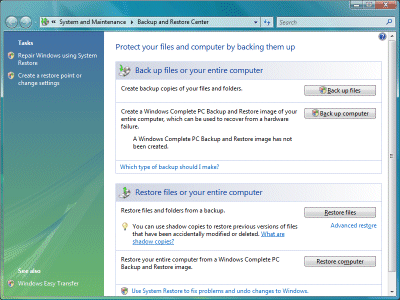
Last time I did this, on a laptop, I used an excellent tool called Drive Snapshot. It worked well; but I figured this was a good opportunity to test the backup and restore built into Windows. In effect, I would do a backup, then pretend my drive had failed and restore to a new one. I attached an external USB drive, opened Windows Backup and selected Create a Windows Complete PC Backup and Restore image of your entire computer, which can be used to recover from a hardware failure.

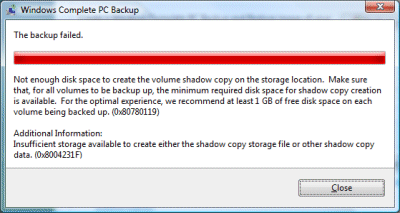
It started badly. As I mentioned, I was running out of space:

The backup failed: not enough disk space to create the volume shadow copy on the storage location.

I had a plan. Windows automatically creates a file called hiberfil.sys, which is roughly the same size as the amount of RAM in the system. Removing hiberfil.sys is easy, and frees up plenty of space. Just open a command prompt with administrator permissions and type:

powercfg.exe –h off

You can guess how to re-enable it later. I retried the backup and it worked. Next, I removed the old hard drive – my insurance policy – and attached the new one.

A little-known fact, which many people discover in bad circumstances: restore is harder than backup. This was no exception. I was expecting to boot from the Vista setup DVD, choose a restore option, and have my system back as it was. I was also hoping that I’d be able to resize the partitions, otherwise I’d be no better off than before, but if necessary that could be tackled later.

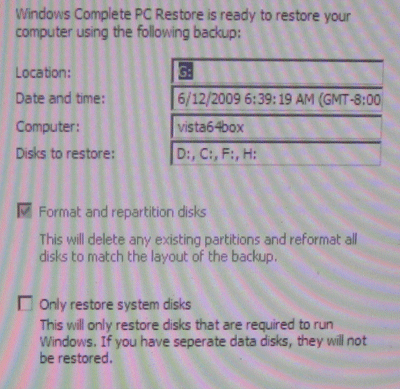
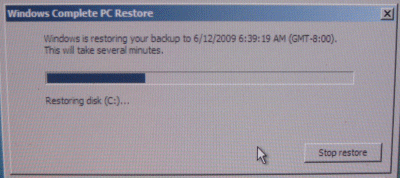
It didn’t go well. I booted from the Vista setup DVD, and clicked through several repair options selecting to use Windows Complete PC Restore. I arrived at this dialog (with apologies for the quality; it’s a photo of the screen):

The dialog says: This will delete any existing partitions and reformat all disks to match the layout of the backup. Yes, I had four partitions to restore. Still, this dialog caused me some anxiety. There were other physical disks in the machine, which I had not backed up recently; would Vista also format and re-partition these? I thought probably not; but to be on the safe side I powered down, disconnected the other drives, and started again. I then confidently clicked Finish.

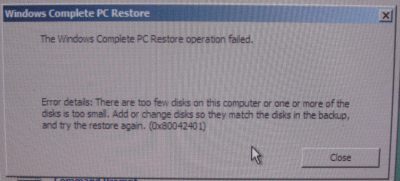
Unfortunately I got this notorious dialog:

There are too few disks on this computer or one or more of the disks is too small. Add or change disks so they match the disks in the backup, and try the restore again.

Do you ever want to argue with your computer? I’d removed a 180GB drive, and replaced it with a 1TB drive, but Vista was insisting that it was too small.

Time to Bing, or should that be Google? I found this discussion, headed discouragingly A Windows Complete PC Restore always fails.

Luckily there were some tips in the thread, though not from Microsoft (a fact that has not gone unnoticed) even though this is an official forum. I rebooted and selected Command Prompt from the System Recovery Options. Then I ran diskpart, a command line tool which makes no pretence to user friendliness. I created four partitions, each bigger than the ones I was restoring. I tried to assign the correct drive letters, but the tool would not let me, advising me to check the system event log for more information. In the recovery environment? Thanks.

I tried again, but it still failed. Then I rebooted, just in case. This time it worked. Why? I’m not sure what was the key. It appears that the restore does not like to see a raw drive; yet as I discovered, it re-partitions it anyway. So I can’t give any definitive solution here, except to say, try fiddling with diskpart.

I went away for a few hours, and when I returned the restore was complete, the PC had restarted, and it was waiting for me to log in.

There was one snag. Rather than using the partitions I had created, the restore made its own, of the same size as on the old drive. Fortunately – and I’m not sure if this was accident or design – the partition I cared about was at the end of the drive, followed by free space. Unfortunately, the Extend Volume option in Disk Management was disabled and greyed out. Unfortunately again, the equivalent option in diskpart also failed. Whatever size I selected, I got The volume size you have selected is too large for the disk. Either select a disk with more free space, or specify a smaller volume. More lies. My drives are set to Basic; I guess that changing them to Dynamic might fix this.

I’m slightly distrustful of Dynamic drives, so I booted into a different version of Windows located on a different drive (I said this could be useful). This time, diskpart was happy to extend the volume. I then also typed extend filesystem. It worked:

Overall, I’m glad that the process worked, but not impressed with the fragility of the restore process and the lack of help with these puzzling error messages. I suppose Microsoft considers this an advanced task undertaken by professionals, who know how to Bing. I don’t see why the emergency restore should not be able to prepare a new hard drive, restore to it, and even offer to resize the partitions in a sensible manner.

I’d be interested to know whether Windows 7 handles this better, but not interested enough to try it.

Fortunately, I’ll never again need to do this. I mean, 750GB free is enough for anyone, right?

Technorati Tags: ,,,

For your nightmares: 10 more things which could be unbundled from Windows

Microsoft is caving to the EU and unbundling Internet Explorer from Windows 7 in Europe. Arguments over whether bundling a browser with Windows is anti-competitive go back many years of course, and were central to the US Department of Justice case in the late nineties. The DOJ won in court, but too late to save Netscape.

But which other vendors have lost market share when the functionality of their products became a standard part of Windows? There are numerous examples. Trumpet Winsock was a popular TCP/IP implementation for Windows 3.0, for example.

Windows didn’t always come with a built-in firewall. You had to use a 3rd party product such as ZoneAlarm.

Windows now has basic CD/DVD writing built-in, which can’t have helped the market for Nero and the like.

Media players of course from iTunes to Real Player, which have to compete with Windows Media Player. The EU’s solution was the useless Windows N.

Application runtimes like Java – the .NET runtime comes standard with Windows.

Video editing and authoring: Movie Maker is free with Windows, which can’t help Sony Vegas products, for example.

Zip compression and extraction: building this into Explorer must have been a blow to WinZip.

Email clients – Outlook Express / Windows Mail comes free, which reduces the market for Thunderbird and the like.

Fax clients – remember WinFax? Now we have Windows Fax and Scan built-in.

Hard disk defragmentation – does Diskeeper like having to compete with utilities built into Windows?

What would Windows be like if third-parties insisted on either the removal of the competing functionality, or some sort of equal billing with user choices or OEM bundling deals (to some extent we have the latter already)? Most likely vile. We would all flee to Apple, which seemingly has no problem bundling all this stuff, or to Linux, which in many ways is designed for this kind of free-for-all.

I am no lawyer; but I can’t help wondering which other third-parties are queuing up to say, “You did this for Opera, what about us?” In fact, the EU’s January 2008 press release specifically mentions desktop search and Windows Live as other topics about which complaints were received.

Competition is good; but so too is a rich, stable and complete operating system.

Technorati Tags: ,,

Microsoft unbundles Internet Explorer from Windows 7 – in Europe, that is

Microsoft is to offer a special version of Windows in Europe. Called Windows 7 E, it will be identical to Windows 7 elsewhere except for one thing:

The E versions of Windows 7 will include all the features and functionality of Windows 7 in the rest of the world, other than browsing with Internet Explorer.  Computer manufacturers will be able to add any browser they want to their Windows 7 machines, including Internet Explorer, so European consumers who purchase new PCs will be able to access the Internet without any problem.  Consumers will also be able to add any Web browser to their PCs, to supplement or replace the browsers preinstalled by their computer manufacturer.

There’s only one reason for this. It’s an effort to comply with EU competition law:

We believe that this new approach, while not our first choice, is the best path forward given the ongoing legal case in Europe.  It will address the “bundling” claim while providing European consumers with access to the full range of Windows 7 benefits that will be available in the rest of the world.

The post linked above is from Microsoft’s VP and Deputy General Counsel Dave Heiner, who notes that Microsoft is keen to avoid a delay in shipping Windows 7 in Europe. In other words, it would rather give up whatever advantage it gets from shipping with IE included, than risk some sort of sales injunction and/or fine which would be hugely costly. It has more pressing problems than its share of the browser market, including competition from Apple and Vista’s poor reputation.

It may be fined anyway, of course, for past misdemeanours in the EU’s eyes.

Personally I have mixed feelings about the EU’s legal efforts in relation to Microsoft. Last time around we got the absurd Windows N, to address a Windows Media monopoly that hardly existed – Apple and Adobe are winning in media, and that’s nothing to do with Windows N, which nobody bought. That said, the EU may have made life better for the Samba folk by forcing the publication of Windows protocols, which is an interoperability benefit. It’s unfortunate that fines go, apparently, straight into EU coffers; the anonymous Mini Microsoft blogger says:

EU: you say "ee-you", I say, "ewwww!" As long as the Microsoft ATM continues shooting out cash fines the EU is going to keep mashing our buttons.

and I see his point.

What are the implications this time around? It’s worth bearing in mind that OEM vendors can already make other browsers the default in Windows. Still, on the face of it this is good for competing browser vendors, though they may find themselves having to pay for prime position in OEM installs. It could be annoying though for users installing or re-installing Windows from shrink-wrap editions, who find they have no browser; presumably Microsoft will include some sort of download utility other than a web browser to get them started.

More interesting questions: how much will this affect the market share for IE, which is already declining, and how much does that matter? Believe it or not, there are reasons to use IE, particularly in a business context where its integration with group policy and the fact that security updates flow through Microsoft update mechanisms are an advantage. Most web sites work well with IE, because they still have to. I expect IE to remain popular in Windows 7; and I expect change to be driven more by a move to web applications which require fast JavaScript or other such features found in rival browsers, rather than by OEM defaults.

There is a war being fought for the next generation of the client, and whether it runs on Flash (Adobe), on Silverlight (Microsoft), on Java (Sun/Oracle), on HTML 5 (Google), on native Windows (Microsoft again), or on OS X (Apple). Unbundling IE from Windows 7 removes a small advantage from Microsoft, but I doubt it will be decisive.

Incidentally, I expect this unbundling to be mostly cosmetic. The IE executable, iexplore.exe, is a wrapper round other components in Windows that pretty much have to remain, otherwise lots of applications which rely on them would break. The presence of these components does no harm to other browser vendors though, so gives them no reason to complain.

Windows 7: July RTM, October 22 launch

News is drifting out that Microsoft intends to launch Windows 7 – that is, have PCs with it pre-loaded on retail sale – on October 22.

Not unexpected news – it is exactly what many of us predicted last year, after seeing it at PDC – but it is good to have it confirmed and will help users considering PC purchase decisions. There should be an announcement very soon about free upgrade offers, where you but a PC with Vista now, and get a free upgrade to 7 when available.

By the way, there’s a further gallery of Windows 7 images up on the Guardian Technology site. This is not just more of the same: I included some of the less publicised corners of the new OS, such as the new-but-not-improved Movie Maker, PowerShell scripting, and the option to remove Internet Explorer.

Update: An official announcement is here:

Microsoft will deliver Release to Manufacturing (RTM) code to partners in the second half of July. Windows 7 will become generally available on Oct. 22, 2009, and Windows Server 2008 R2 will be broadly available at the same time.

I’ve also amended the title of this post to remove the ambiguity between “Windows: 7 July” and “Windows 7: July” 🙂

Technorati Tags: ,

Microsoft having another go at Windows help: Help 3

Online help is a part of Windows full of dead-ends and back-alleys. I’m not going to attempt the story in detail here; but it goes back many years. By online help I mean local help of course; in ancient times the word “online” meant something on your computer as opposed to being in a printed book.

The first help engine I remember was in Windows 3.x, called WinHelp, and used .hlp files. It was well-liked, but authoring the files was an arcane process involving Word, RTF, a help compiler, and a certain amount of black magic.

In 1997 Microsoft replaced .hlp with .chm (compiled HTML); its initial efforts were less good than the old .hlp, but this evolved into a decent help engine despite one or two quirks.

After that it gets messy. In 2001 Microsoft announced Help 2, still HTML based but with all sorts of improvements. It was used by MSDN and in Visual Studio; its viewer is the Microsoft Document Explorer. However, and despite the help authoring tool vendors getting all geared up for Help 2, Microsoft announced in 2003 that it would not be made into a general Windows help engine, but only used for Visual Studio. Since then Help 2 has had a curious status; it is possible to author for Help 2, and those building Visual Studio extensions have needed to do so, but it has never replaced compiled HTML.

There was a similar story with Vista Help. Microsoft built a new help engine for Vista but drew back from making this available to 3rd party applications. In fact, there is a rather wonderful tool called Guided Help which lets you include application automation within Help, complete with “show me” and “do it” functionality. You can get the Guided Help SDK if you know where to look, and it works, but the project was mostly abandoned. You are still meant to use HTML Help 1.4 for your own applications.

Now Microsoft is talking about Help 3. Microsoft’s Terry Clancy mentions it in an informative post about Visual Studio 2010:

Visual Studio 10 will come with a completely re-engineered Help system that introduces a new flexible, standards based Help framework which will ultimately be used in other products beyond Visual Studio. Help3 is a help system replacement for Microsoft Help 2.x . This new help system will be easier to produce content for, and will interfere less with Visual Studio itself. The standards based approach delivers not only a much better local experience but also a seamless transition to an online web browser and with infrastructure and tooling much more consistent other Visual Studio and internet technologies.

Will Help 3 ever replace the seemingly immortal HTML Help 1.x? Place your bets.

In practice, desktop help is less important than it used to be. Online help now means the Internet; or users just use Google.

One thing that is not better in Windows 7: Movie Maker

Microsoft does make surprising decisions on occasion. Here’s an example. Windows Movie Maker is a simple video editing application which ships as a free utility with the operating system. It was scorned when it first appeared in Windows Me, but has improved substantially, and in its latest guise is a popular choice for creating YouTube videos or touching up holiday footage. It is a significant factor in the Apple Mac vs Windows decision, since the Mac comes with a decent video editor called iMovie.

In Windows 7, Microsoft has removed Movie Maker from the Windows box and made it part of a Windows Live Essentials downloadable add-on. That makes some sense: it cross-promotes other Live products (though at risk of annoying users) and maybe helps Microsoft defend against allegations of anti-competitive tying of products to its Windows near-monopoly.

What does not make sense is that the new Live Movie Maker is completely re-written and currently nothing like as good as the old one. Key features like the timeline are simply missing, hence the strong comments to this official blog post:

That’s all fine and dandy (starting from the ground up and all), but if you don’t include the baseline functionality that was in Windows Movie Maker, this will be an abject failure.

says one of the more polite users.

Microsoft says there is more to come:

Hey guys – I’m the Lead PM on the new Windows Live Movie Maker project.  The beta is definitely not feature-complete; having said that, we are taking the product in a slightly different direction so it’s not going to have 100% the same features as the old Movie Maker.  Stay tuned – but please realize that we’re aware that we have work to do before final.

I think this is Mike Torres (warning: spam-ridden comments). In the meantime, the best anyone can offer is to download version 2.6, which is an older version of what is in Vista but apparently works on Windows 7. It strikes me as unlikely that Live Movie Maker will plug all these gaps in time for the release of Windows 7; but who knows, perhaps it will.

The bit that puzzles me: why doesn’t Microsoft stick with the older, better version of Movie Maker for Windows 7, until the new one evolves into a sane alternative?

Windows 7: on sale pre-installed from October 2009

Windows 7 will be on sale pre-installed from 23rd October 2009, according to plausible leaks. So much for “when it’s ready.” You heard it from me first though: on 29th October 2008 I posted that Windows 7 may be less than a year away.

The OEM vendors need at least a couple of months to prepare and distribute their machines with the release build. Vista was done on November 8th 2006, even though it was not “launched” until January. RTM July for Windows 7?

Technorati Tags: ,

A Silverlight database application with image upload

I’ve been amusing myself creating a simple online database application using Silverlight. I had this mostly working a while back, but needed to finish off some pieces in order to get it fully functional.

This is created using Silverlight 2.0 and demonstrates the following:

  • A bound DataGrid (as you can see, work is still needed to get the dates formatted sensibly).
  • Integration with ASP.NET authentication. You have to log in to see the data, and you have to log in with admin rights to be able to update it.
  • Create,Retrieve,Update,Delete using ASP.NET web services.
  • Image upload using Silverlight and an ASP.NET handler.
  • Filter a DataGrid (idea taken from here).
  • Written in Visual Studio 2008, and hosted on this site, which runs Debian Linux, hence Mono and MySQL. Would you have known if I had not told you?

You can try it here. I’ll post the code eventually, but it will be a couple of months as it links in with another article.

MVP Ken Cox notes in a comment to Jesse Liberty’s blog:

Hundreds of us are scouring the Internet for a realistic (but manageable and not over-engineered) sample of manipulating data (CRUD operations) in a Silverlight 2 application. There are promising pieces of the puzzle scattered all over the place. Unfortunately, after investing time in a sample, we discover it lacks a key element – like actually saving changed data back to the database.

I can safely say that mine is not over-engineered, and that yes, it does write data.