Category Archives: windows

Microsoft plans free anti-malware

Microsoft will be offering a free anti-malware suite codenamed “Morro”, from the second half of 2009, according to a press release:

This streamlined solution will … provide comprehensive protection from malware including viruses, spyware, rootkits and trojans. This new solution, to be offered at no charge to consumers, will be architected for a smaller footprint that will use fewer computing resources, making it ideal for low-bandwidth scenarios or less powerful PCs.

It’s a good move. Here’s why:

  • The current situation is calamitous. Even users with fully paid-up anti-virus solutions installed get infected, as I recently saw for myself. PC security is ineffective.
  • The practice of shipping PCs with pre-installed anti-virus that has a trial subscription is counter-productive. There will always be a proportion of users who take the free trial and do not renew, ending up with out-of-date security software. A free solution is better – several are available now – if only because it does not expire.
  • Microsoft wants to compete more effectively with Apple. It is addressing an extra cost faced by PC users, as well as (possibly) the poor user experience inherent in pre-installed anti-virus trialware.
  • The performance issue is also important. Anti-malware software is a significant performance drag. Microsoft is the vendor best placed to implement anti-malware that minimizes the drag on the system.

Counter-arguments:

  • Only specialist companies have the necessary expertise. I don’t believe this; Microsoft’s investment in security is genuine.
  • Single-supplier security gives malware a fixed target, easier to bypass. There’s some merit to this argument; but it is weakened by the fact that the current multi-vendor scenario is clearly failing. Further, the Mac is a fixed target that does not appear to be easy to bypass.

All of this is hot air compared to the real challenge, which is securing the operating system. Vista is progress, Windows 7 not much different according to my first impressions.

Why not just use another operating system? There’s a good case for it; ironically the theory that a large factor in Windows insecurity is its dominance can/will only be properly tested when an alternative OS is equally or more popular. If people continue switching to Macs perhaps it will happen some day. Windows is still hampered by its legacy, though my impression is that Vista’s UAC is having its intended effect: fewer applications now write to system areas in Windows, bringing us closer to the day when security can be tightened further.

What about business systems? This is one area that needs clarification. Microsoft says Morro is only for consumers. Why should businesses have to pay for a feature that consumers get for free? On the other hand, some equivalent initiative may be planned for business users.

Reasons to love Linux #1: package management

I posted recently about a difficult Ubuntu upgrade, drawing the comment “What do you prefer to do on Linux that you don’t on Windows?”

Today I patched the Debian server which runs this blog. APT upgraded the following applications:

MySQL 5

Apache 2.2

Clam AntiVirus

Time Zone data (tzdata)

Some of these involve several packages, so 16 packages were updated.

Bear in mind that this is a running system, and that MySQL and Apache are in constant heavy use, mostly by WordPress.

I logged on to the terminal and typed a single command:

apt-get upgrade

The package manager took less than a minute to upgrade all the packages, which had already been downloaded via a scheduled job. Services were stopped and started as needed. No reboot needed. Job done.

I guess a few people trying to access this site got a slow response, but that was all.

Now, how long would it take to upgrade IIS, SQL Server and some server anti-virus package on Windows? What are the odds of getting away without a restart?

Admittedly this is not risk-free. I’ve known package management to get messed up on Linux, and it can take many hours to resolve – but this usually happens on experimental systems. Web servers that stick to the official stable distribution rarely have problems in my experience.

I realise that the comment really referred to desktop Linux, not server, and here the picture is less rosy. In fact, this post was inspired by a difficult upgrade, though in this case it was the entire distribution being updated. Even on the desktop though, the user experience for installing updates and applications is generally much better.

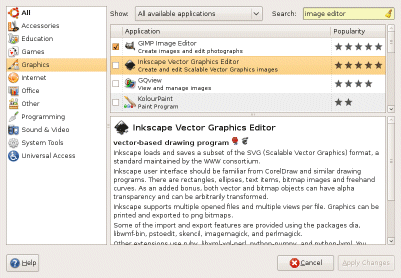
Let’s say I’m looking for an image editor. I click on Add/Remove and type a search:

I like the way the apps show popularity. I’d like a few more things like ratings and comments; but it’s a start. Inkscape looks interesting, so I check it, click Apply Changes, and shortly after I get this dialog:

I double-click, and there it is:

I admit, I did take a few moments to download an example SVG file from the W3C, just to make the screen grab look better. But provided you have broadband, and the app you want is in the list, it is a great experience.

Windows Vista has had a go at this. From Control Panel – Programs and Features you can get to Windows Marketplace, where you might search and find something like The Gimp (free)  or Sketsa SVG Editor (costs). I tried The Gimp, to be more like-with-like. I had to sign in with a Live ID even though it is free. I went through several web dialogs and ended up with a download prompt for a zipped setup. That was it.

In other words, I went through all these steps, but I still do not have The Gimp. OK, I know I have to extract the ZIP and run the setup; but Ubuntu’s Add/Remove spares me all that complication; it is way ahead in usability.

App Store on the iPhone also has it right. For the user, that is. I detest the lock-in and the business model; but usability generally wins. The online stores on games consoles, like XBox Live Marketplace, are good as well. I guess one day we will install or buy most applications this way.

Windows is an adventure game

Many video games in the adventure genre are in essence collecting games. You have to get the gem to open the gate, and to get the gem you need the three pieces of tablet, etc etc.

Windows is like this sometimes. I want to try Windows Azure. I need SQL Express. I download SQL Express 2008. Try to run, it tells me I need Windows Installer 4.5. I download Windows Installer 4.5. Try to run, it tells me “The system cannot find the file specified.”

This makes me pause. Is it a broken download, or is my system broken? Maybe it’s because I downloaded to a network drive. Yup – copy it to a local drive, and it runs fine. This is the adventure game equivalent of a puzzle.

Now the dialog says, “You must restart your computer for the updates to take effect.” To be continued, then.

Shame Microsoft hasn’t (as far as I know) issued a VM image with all this ready to go.

Code for Mac Cocoa in Visual Studio – surprised to see this?

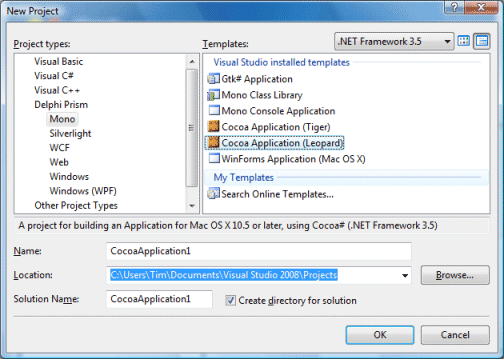
I grabbed this screenshot from a preview just installed:

Cocoa app in Visual Studio

It comes from Delphi Prism, a new product from Embarcadero/Codegear which lets you code for .NET using the Delphi language, an object-oriented version of Pascal. The product is not as new as it first appears. It is based on an existing product from RemObjects, called Oxygene, which it now replaces.

Here’s the story in a nutshell. 2003: Borland, the company which created Delphi, decides (rightly) that .NET is here to stay, and releases Delphi 8, a pure .NET version. Nobody wants it, because it has no advantages to speak of over Win32 Delphi (which is faster), or C#, which is the Microsoft .NET language.

At that time some voices muttered that what Borland should do is to integrate Delphi into Visual Studio, rather than doing its own .NET IDE.  One was Marc Hoffman at RemObjects, only he did more than mutter: his company developed its own implementation of Delphi Pascal for Visual Studio, called Chrome.

Borland soldiers on with Delphi 2005, which does both .NET and Win32 in a single IDE. Developers are happy to have a new Win32 Delphi, but most still don’t see the point of the .NET stuff. Further, Delphi 2005 is buggy; many stick with Delphi 7. Next comes Delphi 2006: more of the same, but less buggy.

There’s a couple of problems with Delphi’s .NET support. First, it is always out-of-date compared to Microsoft’s .NET tools. Second, it has component library schizophrenia. There’s VCL for .NET, based on Delphi’s component and GUI library, but that’s not compatible with .NET components built for Windows Forms. There’s Windows Forms, but that’s not compatible with existing Delphi code. Borland decides to deprecate use of Delphi .NET with Windows Forms. This is really for VCL developers, it says.

Next comes Delphi 2007. Nice product, but where’s .NET? Gone. Nobody seems to mind [and it turns up later in RAD Studio 2007*]. Delphi 2009, gone again. But now there’s Prism, and it is a complete U-turn. Forget VCL.NET. It uses standard .NET libraries, runs in Visual Studio, supports Windows Forms, ASP.NET, WPF, and soon Silverlight. Oh, and it’s based on what that other guy did back in 2004, with some Borland Codegear Embarcadero technology thrown in: dbExpress database framework, client support for DataSnap multi-tier applications, and the Blackfish pure .NET database engine.

Very good; but there’s still that awkward question: why not use C#? The answer, I guess, being either that you love coding in the Delphi language, or you want to use one of the Delphi-compatible libraries.

Or that you want to use Mono, which of course is what enables those tasty Mac options in the New Project dialog above. You can also use C# with Mono – possibly you should, since it is Mono’s core language – but in Prism it comes nicely integrated into Visual Studio. Well, somewhat nicely. In practice there are a few extra steps you need to take to get it working. The recommendation is to run Visual Studio in a VM on a Mac, since Windows cannot run Cocoa applications. And you’re going to be using Apple’s Interface Builder; there’s no GUI designer in Visual Studio itself.

Hardly enterprise-ready then; but still an intriguing development.

*Added correction thanks to John Moshakis’ comment below.

Anti-virus failure leaves XP broken, DNS hijacked, user frustrated

A colleague had some problems with his Windows XP laptop while I was away last week, and I promised to look at it on my return. It’s a sad story, particularly as he is doing everything Microsoft recommends (aside from upgrading to Vista). His HP laptop was fully patched with SP3, and he had a commercial license for AVG anti-virus. He noticed that his system started running slowly when connected to a network, though it worked fine offline, and suspected a faulty network card. It sounded suspicious to me. I wondered if malware was causing heavy network traffic, and advised him to check that his anti-virus was up-to-date and to scan his machine.

It got worse. He ran AVG, which discovered two viral autorun.inf files that it quarantined, but the machine still did not work right. The AVG tech support could not see what was wrong, and suggested reinstalling AVG. Reinstallation failed because AVG could not get updates (this was actually a good clue). Tech support said maybe a firewall problem. Hmm.

The best solution in cases like this is to flatten the machine and reinstall everything, but I was intrigued. I booted from the Ubuntu 8.10 live CD and confirmed that the hardware was fine. I then tried a couple of anti-virus scans that run from boot CDs, which is safer than running from within an infected operating system – the Kapersky rescue disk and the Avira Rescue System. Kapersky identified and removed Trojan-Downloader.Win32.Agent.ahcg somewhere in temporary files. Antivir found nothing. I also ran the Malicious Software Removal Tool which found Trojan: win32/Alureon.gen. Funny how all these tools find different things. No, I don’t find that reassuring.

At this point I connected the machine to the internet. Tried re-installing AVG but it still would not update. Tried downloading a more recent AVG build. However, when I clicked to download, I got an advertisement page instead. Aha! I checked the DNS settings. Instead of being set to obtain the DNS automatically, it was hard-coded to a pair of DNS servers in Ukraine. Clearly the AVG download site was among the ones privileged with an incorrect entry.

Things looked up after I fixed that. Spybot found evidence of Zlob.DNSChanger.Rtk: a registry entry pointing winlogon\system to an executable with a random name somewhere in Windows\system32, but the file itself was not present. Fixed that entry, and Spybot was happy. AVG installed and updated sweetly and found nothing wrong.

I also noticed a hidden directory called resycled (sic) on the root of both partitions, containing the single file boot.com. Has to be a virus, and seems to be associated with the autorun.inf infection; but none of the clean-up tools detected it.

The machine seems fine now, though it should still be flattened as a precaution. I do find the DNS hijack spooky though. It means you can visit safe sites but get dangerous ones. Nasty.

What all this illustrates (again) is that even users who do everything as recommended still get viruses – in this case, probably from an infected USB stick, though I can’t be sure. Why didn’t AVG catch it? Good question. Why didn’t AVG tech support advise how to fix it? Another good question. Vista would have been a little more robust – you would have to pass a UAC prompt to write to the root of drive C, or to HKLM – but I imagine some users would click OK to a prompt after connecting a USB stick, presuming it to be a driver install or something like that.

And if you get ads or porn sites appearing unexpectedly when you browse the web, yes you should be worried.

Update

I sent the suspect file boot.com to Sophos for analysis. I would have sent it to AVG as well, but could find no easy way of doing so. I received an email informing me that this is a worm called W32/Autorun-NX. A filter to detect it was added to Sophos on 7th November at 20.27, which is about 4.5 hours after I submitted it. If mine was the first report, that is impressive speed; but bear in mind that the infection was over a week old when I encountered it, and had circulated for an unknown length of time before my colleague picked it up. Anti-virus software offers only limited and inadequate protection from malware.

Technorati tags: , , , ,

Windows 7 media: AAC yes, FLAC no

Microsoft’s Larry Osterman is here at PDC 2008 and I took the opportunity to ask a couple of questions about media in Windows 7. Windows Media Player is getting built-in support for AAC (as used in iTunes – but not when DRM-protected) and H.264 – but not ALAC (Apple lossless) or FLAC (open-source lossless). What about DRM in Windows 7, any change to the Protected Media Path? No, he told me; adding how frustrated he was by the common supposition that DRM somehow slows everything down in Vista. His line is that Microsoft supports DRM content, but does not in any way impose it.

Windows 7 unveiled; hands on report

Here at PDC in Los Angeles, Microsoft’s Chief Architect Ray Ozzie and Windows VP Steven Sinofsky are introducing Windows 7.  A couple of days ago, journalists were loaned Windows 7 laptops to try and I’ve been using this over the last day or so. Generally it’s been a pleasure; performance is great and it works well, aside from Internet Explorer 8 going into an occasional sulk.

A question though: does it merit a new major version number, or is this really a big Vista service pack? It’s a bit of both. Under the hood Windows 7 reports itself as version 6.1 (Vista is 6), and that’s about right.

I see Windows 7 as a reaction to Vista’s problems. Vista was too different from XP; Windows 7 makes small, generally pleasant but evolutionary changes. Vista was too incompatible; Windows 7 uses the same core architecture and pretty much everything that worked on Vista will also work here. Vista was too demanding on hardware; Windows 7 is said to perform better on the same hardware, and while I haven’t had a chance to make the comparison, I can well believe it. Vista won a reputation for prompting the user too much with User Access Control security dialogs and others; Windows 7 is designed to be “quieter” and UAC has been tamed.

The build I have been trying is not feature-complete, and I am sure it will look, cosmetically, more different from Vista in its final release. Nevertheless, the points above are stated goals. The business world will greet Windows 7 with relief, and consumers will, I suspect, enjoy this release – but don’t expect anything revolutionary.

My reflection: if Vista had not been disrupted by the false WPF-based trail shown at PDC 2003 but later abandoned, and also disrupted by Microsoft’s security push which saw the Windows team focusing for a period on XP SP2 rather than Vista, then Vista itself might have most of what is now coming in Windows 7.

That said, if you are a Windows user you are going to like this release.

Technorati tags: , , ,

PDC 2008: Microsoft attempts to remake its image

There are two big themes at Microsoft’s Professional Developer’s Conference, just getting under way here in Los Angeles.

One is cloud computing. At this morning’s keynote, Ray Ozzie and others will present Microsoft’s cloud computing strategy. If it’s right that IT is moving inexorably into the cloud, this could be make-or-break for the company. Truth is, despite huge number of users for things like Hotmail and Live Messenger, Microsoft is not perceived as a web or on-demand computing company. That space belongs to others, like Google or Salesforce.com. Further, Microsoft has a problem that those companies do not have: how to keep its partners happy while embracing a computing model that may severely reduce their role.

The other is Windows itself. Vista’s image is tarnished: the wow started badly, and although the OS itself now works better than it did at the launch, its negative perception is beyond rescue. Windows 7 is Microsoft’s next opportunity to generate some consumer and user enthusiasm for Windows, and to stem the flow towards Apple. Tomorrow is Windows 7 day.

We’re also going to get insight into the future of key technologies like .NET, the next version of C# and Visual Studio, the Oslo modeling platform, Microsoft’s plans for identity management, and plenty more.

I’ll be blogging and tweeting as I can during PDC. I’m also keen to know what you think, whether or not you happen to be here in LA (the keynotes are being streamed over the Internet).

Technorati tags: , , ,

UK job stats show Java decline

Long-time readers of this blog may recall that I occasionally track IT job vacancies at Jobserve. There may be better sites to track; but it carries a lot of vacancies, and I need to be consistent. I started in early 2002 with the goal of seeing how much adoption Microsoft was winning for its .NET technology. In March 2002, there were 153 vacancies which mentioned C#, versus 2092 for Java.

Since then, C# has grown steadily. Today it overtook Java for the first time (in my random and infrequent visits). There are 2206 C# vacancies, 2066 Java.

I also noticed that the absolute number of vacancies has declined substantially since my last visit, but Java by more than C#. The economy, I guess.

Is Microsoft really sweeping all before it? Well, no. Vista has disappointed; Apple sales grow ever higher; Netcraft’s web server survey shows a decline in the percentage of IIS sites on the Internet in September 2008 and observes that 75% of new web sites coming online use Apache. So it is a matter of what statistic you want to pick. Nevertheless, there is clearly still a lot of C# development out there.

Technorati tags: , , ,

Tell me what’s wrong with Microsoft’s Team System

At Microsoft’s Remix08 in Brighton last month, a developer asked about Visual Studio Team System during a panel discussion. What interested me was not so much the question itself, but that after the session she was surrounded by other delegates advising her not to use it. These were people who had tried it, or were using it, but found it frustrating. The general proposal was to use open-source tools instead – things like Subversion and CruiseControl.NET.

I was surprised by the strength of feeling. I’ve looked in some detail at Team System and been reasonably impressed by what it does – but that’s not the same as using it in anger, of course. I admit, for my own work I do use Subversion, just because it is lightweight, works well cross-platform, and runs on my Linux web space as well as locally; but I am not part of a team of developers working on Microsoft platform projects, which is where Team System ought to make sense.

For the sake of balance, I’ll add that I met a developer at the airport on the way to Remix Las Vegas earlier this year, who loves Team System and told me that it is Microsoft’s best product.

I’d love to hear in more detail what users think of Team System. Is it broken, or does it depend on how it is set up and maintained? What are the key things that Microsoft needs to fix? Or is it just great, and those complainers in Brighton atypical?