Tag Archives: apple

Review: Audyssey iPhone Audio Dock South of Market Edition

How good can a dock for an Apple iPod or iPhone sound? Pretty good, as this high-end South of Market Audio Dock from Audyssey demonstrates. If you think all iPod docks have thin, tinny bass, think again. It also turns out to be a neat speakerphone.

The dock has a distinctive bulbous shape, measuring around 24cm (9.5”) square on its largest side, with the dock mounted on the front edge. The unit is designed to sit on a desk or table and is surprisingly heavy for its size – probably an encouraging sign. Viewed from the front it looks tall and compact.

image

The side view though shows that the speakers do have some room to breathe.

image

As you can see, the speakers are firing more or less sideways. This is not ideal for stereo imaging, but in practice the dock delivers a wider image than you might expect.

Here is what you get out of the box: the dock, a remote with a battery, a USB cable, and two 3.5mm audio cables.

image

Getting started is just a matter of putting the battery in the remote (slightly fiddly), plugging in the power cable, docking your iPod or iPhone, and playing some music. There is also an app you can download that provides some additional settings.

Before going into more detail about what this dock is capable of, let me say immediately that the sound quality is excellent. Words that come to mind are crisp, deep, rich, smooth and powerful. Vocals have real presence. The dock successfully conveyed the drama of a Mahler symphony, the growl of Tom Waits, the complex rhythms and pace of Santana, and the tender emotion of English folk singer Sandy Denny. Once I started playing music, I did not want to stop.

The secret of this high quality is twofold. First, the electronics follows high-end principles. There are four speakers – two 4-inch woofers, two .75 inch tweeters – which are powered by four separate amplifiers controlled by an active crossover. By contrast, a typical home hi-fi would have two amplifiers driving speakers with passive crossovers. Active crossovers mean that the musical signal is divided into the optimum frequencies for each speaker driver at a low level, introducing less distortion and improving control.

Audyssey takes further advantage of this, by using software processing to mitigate the limitations of the speaker drivers. That’s no surprise, since Audyssey specialises in audio processing technology for other manufacturers, which gets incorporated into home theatre and in-car equipment.

According to the specification, there are several techniques implemented in this dock. BassXT extends the bass response by boosting the signal dynamically to flatten the frequency response at a point when it would normally be dropping off. Audyssey EQ corrects “time and frequency response” imperfections introduced by the loudspeakers and cabinets. Dynamic EQ performs frequency response correction to preserve a flat response as volume changes. Dynamic Volume evens out the volume level to compensate for differences in the volume of the source.

Some of these features can be controlled or disabled by a companion iOS app, free to install. Specifically, you can disable Dynamic Volume or set it to optimize for Background Listening; you can apply tone controls including a single tone control called Tilt or traditional bass and treble; or you can set your own custom EQ.

image image

I admit that seems a lot of processing; and it would not have surprised me if the results were worse than pure straight-through audio reproduction. That is not the case though; the unit sounds very good indeed. Given the challenge of getting high quality sound from a relatively small enclosure, taking advantage of digital processing makes sense to me, provided it is carefully implemented at it is here.

Controlling playback

Once you have docked an iPhone and set it playing, you can control it either from the iPhone itself, or from the supplied remote, or pause and play by tapping an illuminated icon on top of the unit (It is not obvious that this is a button, but once you discover it, it is a handy feature; it also has some other functions including answering phone calls and showing Bluetooth status).

The remote has buttons for volume up/down, pause/play, and skip forward or back.

image

The Audyssey dock supports Bluetooth and for full features you should pair your iPhone with it and keep Bluetooth on. Now you can stream music from an iPhone even when it is not docked. This can be handy, since the iPhone is easier to use in your hand then when docked. Using Bluetooth, you can undock it with only brief interruption in playback, for example for selecting music. Range seems good, and I was able to detach the iPhone, walk through the door of my study and into the corridor, and the music kept playing – though note that the audio quality will not be as good. I found the quality acceptable though noticeably inferior.

When docked, the iPhone will charge provided the dock is not in standby mode.

There are also buttons on the remote intended for the dock’s speakerphone feature, which deserves its own paragraph.

Audyssey as conferencing speakerphone

The most intriguing feature of the Audyssey South of Market dock is its speakerphone feature. For this to work, you must have Bluetooth enabled.

Scenario: you are enjoying music, when a call comes in. At this point the music pauses, the iPhone invites you to decline or answer the call, and a ring sounds through the dock’s loudspeakers. Tap the phone icon on the remote and you can answer the call while using the dock as a speakerphone.

It turns out the Audyssey dock makes a rather good speakerphone. It performs microphone array processing and echo cancellation to improve voice quality, using front and rear microphones, and in my testing this worked well.

You can also wire up the dock to a computer, using its line in and mic out connections. This lets you use it as a speakerphone with Skype or other Voice over IP providers. Nice idea, though my guess it that this is too inconvenient for most users. Working with the iPhone is more compelling.

Connections

image

This is the back panel, showing the microphone output, line in, and USB port. Above the panel is a button for pairing a Bluetooth device. If you connect the USB port to a computer, the docked iPhone will sync with iTunes, though auto-sync can be a nuisance if you frequently dock and undock the device.

Annoyances

Not that many. However, I would like some way to select music from my seat when the iPhone is docked, beyond the simple track skip on the remote. Of course you can do this using Bluetooth streaming, though sound quality may be compromised.

Even with Bluetooth set up, I find that removing the iPhone from the dock pauses the music. I have to tap play to resume it. Re-docking the iPhone interrupts the music briefly but it resumes automatically.

Considering the cost of the device though, it’s a shame that Audyssey does not supply a proper manual; there is an excellent one online [pdf], but the one in the box is just safety warnings and limited warranty, pleasing for the lawyers but not for users.

The stereo separation is good considering it is a single box, but poor compared to two speakers set apart in the normal way.

Summary

The Audyssey South of Market Dock costs more than most iPod/iPhone docks, but in return it delivers superb sound quality along with some well thought-out speakerphone features.

The B&W Zeppelin makes an interesting comparison. The Zeppelin is a little more expensive but has better stereo separation thanks to its 640mm (25.2 in) width, and has a sub-woofer for extended bass. On the other hand, the Audyssey is more compact and could be considered less intrusive depending on what you think of the Zeppelin’s distinctive styling, and the Zeppelin has no Bluetooth streaming.

In the USA it is an easy decision. The Audyssey dock at around $400 is better value than a Zeppelin at around $600. In the UK the fact that B&W is a UK company whereas Audyssey is based in Los Angeles seems to bring the prices closer together: £400 for a Zeppelin versus £350 for the Audyssey dock. Try to hear them both; but the Audyssey dock is not shamed and is still well worth considering.

Compatibility

The South of Market Audio Dock fits:

  • iPhone 4
  • iPhone 3 and 3GS
  • iPod Touch
  • iPod Nano (4th and 5th generation)
  • iPod classic

Price and availability

The Audyssey South of Market Dock costs around $399.00. You should find it at Apple stores among other retailers.

Amazon.co.uk is advertising this dock for availability from 15th January 2011, at £349.99


iPhone plus Amazon app = shopping revolution through magic of barcode scanning

Amazon has added barcode scanning to its Apple iPhone shopping app. It is an amazing feature. Here’s why.

Among the questions that shoppers ask themselves, two of the biggest ones are first, is it any good; and second, is it good value? Barcode scanning helps with both of these. The scenario is that you are in the shop looking at a book, CD or DVD – or almost anything really, from kettles to MP3 players – and you wave your iPhone over it. Up comes the entry for that item in Amazon’s store, where you can see the rating, read customer reviews, and check the price both new and used.

OK, there is a little bit more involved than waving the iPhone, but not much. Here is how it works. Tap the Amazon app on the iPhone, then Search.

image 

Tap Scan a barcode and hold the iPhone over the barcode.

image

You adjust the size and position by moving the iPhone until the code is roughly central between the guide lines. At this point, the guide lines turn green.

image

No need to tap; the app will now look up the item and show you the results. Tap the right-pointing arrow for more detail.

image

Confession: I am sufficiently an Amazon addict that I have done this in shops even before the advent of the barcode feature. One reason is price-checking. We all know that you pay a premium for the instant gratification of bricks and mortar shopping; but how bad is it? This will tell you instantly.

That might not help if you need a gift at the last minute, but the reviews might. I use this for video games, or for CDs that I have not heard or DVDs/Blu-rays that I have not seen. It has saved me from some expensive mistakes.

Of course reviews are subjective and some are likely planted by publishers, authors or competitors; but there are usually enough to give you some idea of the range of opinions.

It is also handy for electronic devices. Is that MP3 player any good? How does that iPod dock sound?

When I was at school we learned about the concept of perfect competition. One of the requirements for perfect competition is perfect information – for example, knowing the price charged for an item in every outlet which sells it. We are a long way from that, but thanks to the Amazon marketplace, where third-party sellers compete, we are closer than we were. The barcode feature in the Amazon iPhone app makes it easy to access that information while shopping, which is a big feature.

Adobe declares glittering results as CEO says Apple’s Flash ban has no impact on its revenue

Adobe has proudly declared its first billion dollar quarter, $1,008 m in the quarter ending Dec 3 2010 versus $757.3 m in the same quarter of 2009.

I am not a financial analyst, but a few things leap out from the figures. One is that Omniture, the analytics company Adobe acquired at the end of 2009, is doing well and contributing significantly to Adobe’s revenue – $98.4 m in Q4 2010. The billion dollar quarter would not have happened without it. Second, Creative Suite 5 is selling well, better than Creative Suite 4.

Creative Suite 4 was released in October 2008, and Creative Suite 5 in April 2010. It is not perfect, but the following table compares the Creative Solutions segment (mainly Creative Suite) of the two products quarter by quarter from their respective release dates:

Quarters after release 1st 2nd 3rd 4th 5th 6th
Creative Suite 4 508.7 460.7 411.7 400.4 429.30 432.0
Creative Suite 5 532.7 549.7 542.1      

CS4 drops off noticeably following an initial surge, whereas CS5 has kept on selling. It is a good product and a de-facto industry standard, but not every user is persuaded to upgrade every time a new release appears. My guess is that things like better 64-bit support – which make a huge difference in the production tools – and new tricks in PhotoShop have been successful in driving upgrades to CS5. Further, the explosion of premium mobile devices led by Apple’s iPhone and iPad has not been bad for Adobe despite Apple CEO Steve Jobs doing his best to put down Flash. Publishers creating media for the iPad, for example, will most likely use Adobe’s tools to do so. CEO Shantanu Narayen said in the earnings calls, “We have not seen any impact on our revenue from Apple’s choice [to not support Flash]”, though I am sure he would make a big deal of it if Apple were to change its mind.

Before getting too carried away though, I note that Creative Suite 3, published in March 2007, did just as well as CS5.  Here are the figures:

Quarters after release 1st 2nd 3rd 4th 5th 6th
Creative Suite 3 436.6 545.5 570.5 543.5 527.2 493.6

In fact, Q4 2007 at $570.5 m is still a record for Adobe’s Creative Solutions segment. So maybe CS4 was an unfortunate blip. Then again, not quite all the revenue in Creative Solutions is the suite; it also includes Flash Platform services such as media streaming. Further, the economy looked rosier in 2007.

Here is the quarter vs quarter comparison over the whole company:

  Q4 2009 Q4 2010
Creative Solutions 429.3 542.1
Digital Enterprise 211.8 274.10
Omniture 26.3 98.4
Platform 47 46.1
Print and publishing 42.9 47.3

In this table, Creative Solutions has already been mentioned. Digital Enterprise, formerly called Business Productivity, includes Acrobat, LiveCycle and Connect web conferencing. Platform is confusing; according to the Q4 09 datasheet it includes the developer tools, Flash Platform Services and ColdFusion. However, the Q4 10 datasheet omits any list of products for Platform, though it includes them for the other segments, and lists ColdFusion under Print and Publishing along with Director, Contribute, PostScript, eLearning Suite and some other older products. According to this document [pdf] InDesign which is huge in print publishing is not included in Print and Publishing, so I guess it is in Creative Solutions.

In the earnings call, Adobe’s Mark Garrett did mention Platform, and attributed its growth (compared to Q3 2010) to “higher toolbar distribution revenue driven primarily by the release of the new Adobe Reader version 10 in the quarter.” This refers to the vile practice of foisting a third-party toolbar (unless they opt-out) on people forced to download Adobe Reader because they have been send a PDF. Perhaps in the light of these good results Adobe could be persuaded to stop doing so?

I am not sure how much this breakdown can be trusted as it makes little sense to me. Do not take the segment names too seriously then; but they are all we have when it comes to trying to compare like with like.

Still, clearly Adobe is doing well and has successfully steered around some nasty rocks that Apple threw in its way. I imagine that Microsoft’s decision to retreat from its efforts to establish Silverlight as a cross-platform rival to Flash has also helped build confidence in Adobe’s platform. The company’s point of vulnerability is its dependence on shrink-wrap software for the majority of its revenue; projects like the abandoned Rome show that Adobe knows how to move towards cloud-deployed, subscription-based software but with business booming under its current model, and little sign of success for cloud projects like Acrobat.com, you can understand why the company is in no hurry to change.  

First impressions of Google TV – get an Apple iPad instead?

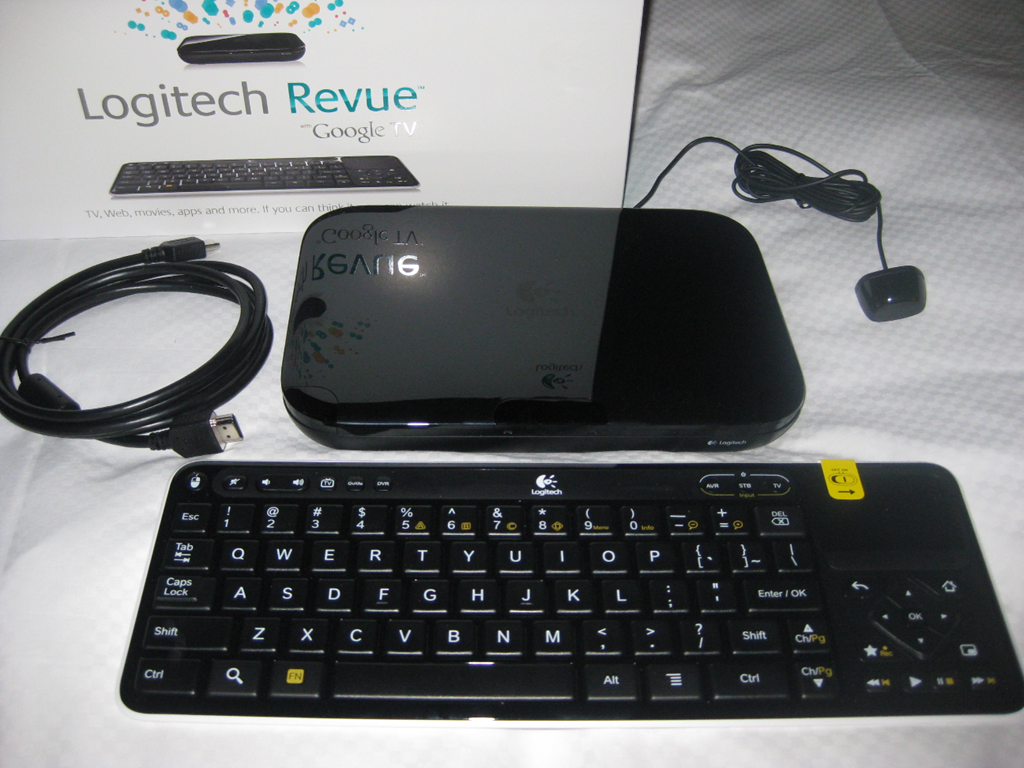
I received a Google TV as an attendee at the Adobe MAX conference earlier this year; to be exact, a Logitech Revue. It is not yet available or customised for the UK, but with its universal power supply and standard HDMI connections it works OK, with some caveats.

The main snag with my evaluation is that I use a TV with built-in Freeview (over-the-air digital TV) and do not use a set top box. This is bad for Google TV, since it wants to sit between your set top box and your TV, with an HDMI in for the set top box and an HDMI out to your screen. Features like picture-in-picture, TV search, and the ability to choose a TV channel from within Google TV, depend on this. Without a set-top box you can only use Google TV for the web and apps.

image

I found myself comparing Google TV to Windows Media Center, which I have used extensively both directly attached to a TV, and over the network via Xbox 360. Windows Media Center gets round the set top box problem by having its own TV card. I actually like Windows Media Center a lot, though we had occasional glitches. If you have a PC connected directly, of course this also gives you the web on your TV. Sony’s PlayStation 3 also has a web browser with Adobe Flash support, as does Nintendo Wii though it is more basic.

image

What you get with Google TV is a small set top box – in my case it slipped unobtrusively onto a shelf below the TV, a wireless keyboard, an HDMI connector, and an IR blaster. Installation is straightforward and the box recognised my TV to the extent that it can turn it on and off via the keyboard. The IR blaster lets you position an infra-red transmitter optimally for any IR devices you want to control from Google TV – typically your set-top box.

I connected to the network through wi-fi initially, but for some reason this was glitchy and would lose the connection for no apparent reason. I plugged in an ethernet cable and all was well. This problem may be unique to my set-up, or something that gets a firmware fix, so no big deal.

There is a usability issue with the keyboard. This has a trackpad which operates a mouse pointer, under which are cursor keys and an OK button. You would think that the OK button represents a mouse click, but it does not. The mouse click button is at top left on the keyboard. Once I discovered this, the web browser (Chrome, of course) worked better. You do need the OK button for navigating the Google TV menus.

I also dislike having a keyboard floating around in the living room, though it can be useful especially for things like Gmail, Twitter or web forums on your TV. Another option is to control it from a mobile app on an Android smartphone.

The good news is that Google TV is excellent for playing web video on your TV. YouTube has a special “leanback” mode, optimised for viewing from a distance that works reasonably well, though amateur videos that look tolerable in a small frame in a web browser look terrible played full-screen in the living room. BBC iPlayer works well in on-demand mode; the download player would not install. Overall it was a bit better than the PS3, which is also pretty good for web video, but probably not by enough to justify the cost if you already have a PS3.

The bad news is that the rest of the Web on Google TV is disappointing. Fonts are blurry, and the resolution necessary to make a web page viewable from 12 feet back is often annoying. Flash works well, but Java seems to be absent.

Google also needs to put more thought into personalisation. The box encouraged me to set up a Google account, which will be necessary to purchase apps, giving me access to Gmail and so on; and I also set up the Twitter app. But typically the living room is a shared space: do you want, for example, a babysitter to have access to your Gmail and Twitter accounts? It needs some sort of profile management and log-in.

In general, the web experience you get by bringing your own laptop, netbook or iPad into the room is better than Google TV in most ways apart from web video. An iPad is similar in size to the Google TV keyboard.

Media on Google TV has potential, but is currently limited by the apps on offer. Logitech Media Player is supplied and is a DLNA client, so if you are lucky you will be able to play audio and video from something like a NAS (network attached storage) drive on your network. Codec support is limited.

In a sane, standardised world you would be able to stream music from Apple iTunes or a Squeezebox server to Google TV but we are not there yet.

One key feature of Google TV is for purchasing streamed videos from Netflix, Amazon VOD (Video on Demand) or Dish Network. I did not try this; they do not work yet in the UK. Reports are reasonably positive; but I do not think this is a big selling point since similar services are available by many other routes. 

Google TV is not in itself a DVR (Digital Video Recorder) but can control one.

All about the apps

Not too good so far then; but at some point you will be able to purchase apps from the Android marketplace – which is why attendees at the Adobe conference were given boxes. Nobody really knows what sort of impact apps for TV could have, and it seems to me that as a means of running apps – especially games – on a TV this unobtrusive device is promising.

Note that some TVs will come with Google TV built-in, solving the set top box issue, and if Google can make this a popular option it would have significant impact.

It is too early then to write it off; but it is a shame that Google has not learned the lesson of Apple, which is not to release a product until it is really ready.

Update: for the user’s perspective there is a mammoth thread on avsforum; I liked this post.

HTML 5 Canvas: the only plugin you need?

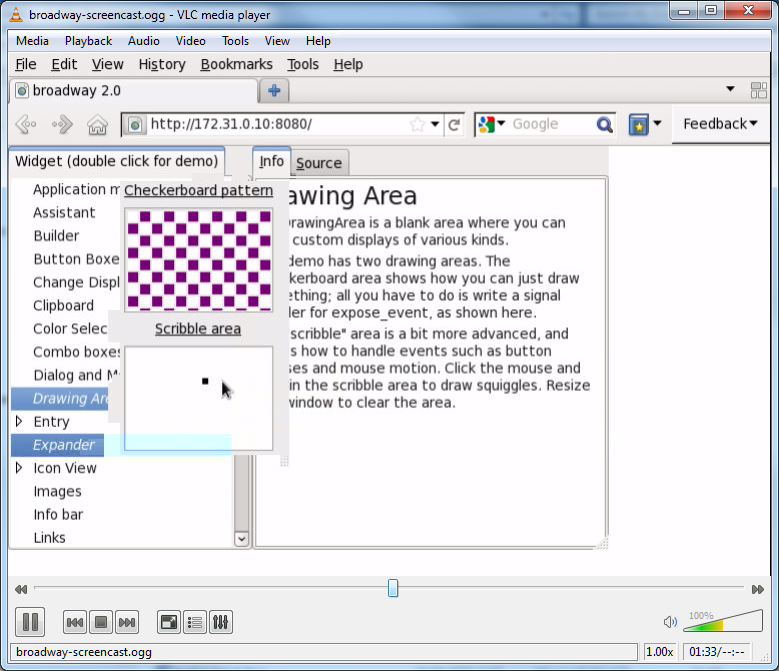
The answer is no, of course. And Canvas is not a plugin. That said, here is an interesting proof of concept blog and video from Alexander Larsson: a GTK3 application running in Firefox without any plugin.

image

GTK is an open source cross-platform GUI framework written in C but with bindings to other languages including Python and C#.

So how does C native code run the browser without a plugin? The answer is that the HTML 5 Canvas element, already widely implemented and coming to Internet Explorer in version 9, has a rich drawing API that goes right down to pixel manipulation if you need it. In Larsson’s example, the native code is actually running on a remote server. His code receives the latest image of the application from the server and transmits mouse and keyboard operations back, creating the illusion that the application is running in the browser. The client only needs to know what is different in the image as it changes, so although sending screen images sounds heavyweight, it is amenable to optimisation and compression.

It is the same concept as Windows remote desktop and terminal services, or remote access using vnc, but translated to a browser application that requires no additional client or setup.

There are downsides to this approach. First, it puts a heavy burden on the server, which is executing the application code as well as supplying the images, especially when there are many simultaneous users. Second, there are tricky issues when the user expects the application to interact with the local machine, such as playing sounds, copying to the clipboard or printing. Everything is an image, and not character-by-character text, for example. Third, it is not well suited to graphics that change rapidly, as in a game with fast-paced action.

On the other hand, it solves an immense problem: getting your application running on platforms which do not support the runtime you are using. Native applications, Flash and Silverlight on Apple’s iPad and iPhone, for example. I recall seeing a proof of concept for Flash at an Adobe MAX conference (not the most recent one) as part of the company’s research on how to break into Apple’s walled garden.

It is not as good as a true local application in most cases, but it is better than nothing.

Now, if Microsoft were to do something like this for Silverlight, enabling users to run Silverlight apps on their Apple and Linux devices, I suspect attitudes to the viability of Silverlight in the browser would change considerably.

The Beatles come to Apple iTunes

Apple made an extraordinary fuss about the arrival of Beatles music on its iTunes download store – even allowing the news to take over its home page for a day or two.

image

Why? I can think of a few reasons. Because Steve Jobs was born in 1955 and this is the music of his teen years. Because it is the finale in a long battle between Apple Computer and Apple Corps Ltd. And because the Beatles are arguably the pinnacle of popular music, regularly topping lists like the Rolling Stone 500 Greatest Albums of All Time. In fact, Beatles albums occupy four of the top ten slots.

image

It follows that the Beatles coming to iTunes is a landmark moment for Apple (computer) and shows the extent to which it now dominates music delivery.

That said, some observers were bewildered. Beatles fans already have the music, and have ripped their CDs to music servers and iPods so that iTunes availability will make no difference to them; and people born from a decade or two later than Steve Jobs mostly do not revere the band in the same way.

Speaking personally, those four albums are not in my top ten all-time favourites, good though they are, and I am more likely to put on Lennon’s cathartic Plastic Ono Band album than Sergeant Pepper.

I also wonder how long iTunes can sustain its position. To my mind, the streaming model of Spotify, where you pay a subscription and can listen to anything you want, makes more sense than the download model of iTunes.

But you want to own the music? Well, you cannot; even a CD or LP only sells you a licence. An iTunes purchase is more ephemeral than a CD, because it is a personal licence with no resale value, and comes with no physical container that you can put on the shelf. It is also, in the case of the Beatles albums and many others,  more expensive to buy the iTunes download than the CD, so you are paying a premium for the convenience of near-instant digital delivery.

It follows that iTunes offers rather poor value in an absolute sense. It is best to think of it as a service; and Apple does a nice job of making music easy to find and enjoy.

Final note: even if you have no interest in buying, it is worth running up iTunes and playing the hitherto unavailable video Live at the Washington Coliseum, 1964, which you can stream for free for an introductory period.

Apple gives up on Xserve dedicated server hardware – looking towards the cloud?

Apple is scrapping is Xserve products, according to the latest information on its web site:

Xserve will no longer be available after January 31, but we’ll continue to fully support it. To learn more, view the PDF.

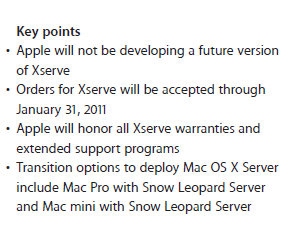
If you do indeed view the PDF, it confirms that:

Apple will not be developing a future version of Xserve

However, the Snow Leopard Server, a version of OS X tuned for server use, remains; and Apple suggests that you install it either on a Mac Pro or on a Mac Mini.

image

That’s all very well; but while a Mini might well make sense for a very small business, larger organisations will not be impressed by the lack of features like dual redundant power supplies, lights out management, and rack mounting, which the Xserve provides.

There are a couple of ways to look at this. One is that Apple is giving up on the server market. Largely true, I think; but my guess is that Apple realises that this type of on-premise server is under threat from the cloud. I do not see this as Apple giving up on corporate computing; that would be unexpected considering the gains it is making with Mac, iPhone and iPad. I do see this as a move towards a client and cloud, or device and cloud, strategy. In that context it is not so surprising.

That said, I imagine there are a few businesses out there focused on supplying Xserve-based systems who will be disappointed by the news. I’ve not used one myself; but from what I’ve heard it is rather good.

Microsoft pledges commitment to Silverlight – but is it enough?

Microsoft’s president of Server and Tools Bob Muglia has posted a response to the widespread perception that the company is backing off its commitment to Silverlight, a cross-browser, cross-platform runtime for rich internet applications. He is the right person to do so, since it was his remark that ”Our strategy with Silverlight has shifted” which seemed to confirm a strategy change that had already been implied by the strong focus in the keynote on HTML 5 as an application platform.

Muglia says Silverlight is in fact “very important and strategic to Microsoft”. He confirms that a new release is in development, notes that Silverlight is the development platform for Windows Phone 7, and affirms Silverlight both as a media client and as “the richest way to build web-delivered client apps.”

So what is the strategy change? It is this:

When we started Silverlight, the number of unique/different Internet-connected devices in the world was relatively small, and our goal was to provide the most consistent, richest experience across those devices.  But the world has changed.  As a result, getting a single runtime implementation installed on every potential device is practically impossible.  We think HTML will provide the broadest, cross-platform reach across all these devices.  At Microsoft, we’re committed to building the world’s best implementation of HTML 5 for devices running Windows, and at the PDC, we showed the great progress we’re making on this with IE 9.

The key problem here is Apple’s iOS, which Muglia mentioned specifically in his earlier interview:

HTML is the only true cross platform solution for everything, including (Apple’s) iOS platform.

Muglia’s words are somewhat reassuring to Silverlight developers; but not, I think, all that much. Silverlight will continue on Windows, Mac and on Windows Phone; but there are many more devices which developers want to target, and it sounds as if Microsoft does not intend to broaden Silverlight’s reach.

Faced with the same issues, Adobe has brought Flash to device platforms including Android, MeeGo, Blackberry and Google TV; and come up with a packager that compiles Flash applications to native iOS code. There is still no Flash or AIR (out of browser Flash) on Apple iOS; but Adobe has done all possible to make Flash a broad cross-platform runtime.

Microsoft by contrast has not really entered the fight. It has been left to Novell’s Mono team to show what can be done with cross-platform .NET, including MonoTouch for iOS and MonoDroid for Google’s Android platform.

Microsoft could have done more to bring Silverlight to further platforms, but has chosen instead to focus on HTML 5 – just as Muglia said in his earlier interview.

Whether Microsoft is right or wrong in this is a matter for debate. From what I have seen, the  comments on Microsoft’s de-emphasis of Silverlight at PDC have been worrying for .NET developers, but mostly cheered elsewhere.

The problem is that HTML 5 is not ready, nor is it capable of everything that can be done in Silverlight or Flash. There is a gap to be filled; and it looks as if Microsoft is leaving that task to Adobe.

It does seem to me inevitable that if Microsoft really gets behind HTML 5, by supporting it with tools and libraries to make it a strong and productive client for Microsoft’s server applications, then Silverlight will slip further behind.

Windows Phone 7 battles indifference in London

Today is launch day for Windows Phone 7 in the UK – but the hoped-for crowds of people waiting to buy the new phone failed to appear.

They are billed as the handsets that could topple the iPhone. Yet as Microsoft’s Windows 7 phones went on sale this morning there was not a queue in sight.

reported the London Evening Standard.

The device also suffered faint praise from the influential Wall Street Journal reviewer Walt Mossberg. Although he called the user interface “novel and attractive”, he complained about missing features:

Microsoft has inexplicably omitted from Windows Phone 7 key features now common, or becoming so, on competitive phones. These missing features include copy and paste, visual voicemail, multitasking of third-party apps, and the ability to do video calling and to use the phone to connect other devices to the Internet. The Android phones and the iPhone handle all these things today.

adding that

I couldn’t find a killer innovation that would be likely to make iPhone or Android users envious, except possibly for dedicated Xbox users.

Is he right? In some ways it does not matter; perception is reality. That said, none of his missing features strike me as deal-breakers for a majority of users. You can also argue that Microsoft has learnt from Apple not to put every possible feature into the first release, but rather to make the features it does implement work as well as possible and to build on that in the future.

The problem is that there is so much momentum around Google Android and Apple iPhone that the average consumer looking for a smartphone will need a lot of persuading before paying out for Windows Phone 7, or even really noticing it. Microsoft needed rave reviews, not so-so ones. There is a danger that the new phone may suffer the same fate as Palm’s webOS devices, well liked by those who take the trouble to explore them, but absent from the mainstream of consumer consciousness.

I’ve had a device for a few days, and it has been favourably received by people I’ve shown it to. Some of the games look great – The Harvest, for example, a Microsoft exclusive. The Facebook integration is also appealing to fans of that site, and feels deeper than Facebook apps on other devices. Windows Phone 7 does have distinctive features.

I’ll be reviewing the device properly in due course. What is more interesting than my opinions though is how the phone is received in the market. I had expected more interest from the curious on day one of retail release.

Update: Microsoft found a queue or two for its press release today. Big in Australia?

Apple deprecates Java

Apple has deprecated the version of Java that it ports and maintains for OS X:

As of the release of Java for Mac OS X 10.6 Update 3, the version of Java that is ported by Apple, and that ships with Mac OS X, is deprecated.

This means that the Apple-produced runtime will not be maintained at the same level, and may be removed from future versions of Mac OS X. The Java runtime shipping in Mac OS X 10.6 Snow Leopard, and Mac OS X 10.5 Leopard, will continue to be supported and maintained through the standard support cycles of those products.

This is not altogether a bad thing for Java. Waiting for Apple to update its official version has been a frustration for Java developers on the Mac. If Oracle now takes responsibility for delivering the JVM for OS X, it may keep in step.

Unfortunately there is not currently an Oracle JVM for OS X. Nor does the open source Apache Harmony support it. In the light of Apple’s announcement I imagine both may address this lack; though a further complication is that IBM has recently abandoned Harmony in favour of the Open JDK.

Further, in making this statement Apple is further discouraging use of Java application on OS X. This announcement should be put together with this one, in the new developer agreement for apps submitted to the forthcoming Mac App Store, a desktop version of the iOS App Store:

3.3.1    Applications may only use public APIs and frameworks included in the default installation of Mac OS X or as bundled with Xcode as provided by Apple, deprecated technologies (such as Java) may not be used.

I doubt Apple will ever attempt to lock down desktop OS X, iPad-style. But I think we will see strong encouragement from Apple steering users towards App Store installs. There will be hints that it is safer and better, the true Mac way to get apps onto your machine.

Remember the early days of Java? One of the reasons it won support was that it reduced the industry’s dependence on a single vendor and its operating system.

Plenty to think about as Apple increases its market share.

[Updated to clarify non-availability of alternative JVMs for OS X]