Tag Archives: google

Steve Ballmer ducks questions at the London School of Economics

This morning Microsoft CEO Steve Ballmer spoke at the London School of Economics on the subject of Seizing the opportunity of the Cloud: the next wave of business growth. Well, that was supposed to be the topic; but as it happened the focus was vague – maybe that is fitting given the subject. Ballmer acknowledged that nobody was sure how to define the cloud and did not want to waste time attempting to do so, “cloud blah blah blah”, he said.

image

It was a session of two halves. Part one was a talk with some generalisations about the value of the cloud, the benefits of shared resources, and that the cloud needs rather than replaces intelligent client devices. “That the cloud needs smart devices was controversial but is now 100% obvious,” he said. He then took the opportunity to show a video about Xbox Kinect, the controller-free innovation for Microsoft’s games console, despite its rather loose connection with the subject of the talk.

Ballmer also experienced a Windows moment as he clicked and clicked on the Windows Media Player button to start the video; fortunately for all of us it started on the third or so attempt.

Just when we were expecting some weighty concluding remarks, Ballmer abruptly finished and asked for questions. These were conducted in an unusual manner, with several questions from the audience being taken together, supposedly to save time. I do not recommend this format unless the goal is to leave many of the questions unanswered, which is what happened.

Some of the questions were excellent. How will Microsoft compete against Apple iOS and Google Android? Since it loses money in cloud computing, how will it retain its revenues as Windows declines? What are the implications of Stuxnet, a Windows worm that appears to be in use as a weapon?

Ballmer does such a poor job with such questions, when he does engage with them, that I honestly do not think he is the right person to answer them in front of the public and the press. He is inclined to retreat into saying, well, we could have done better but we are working hard to compete. He actually undersells the Microsoft story. On Stuxnet, he gave a convoluted answer that left me wondering whether he was up-to-date on what it actually is. The revenue question he did not answer at all.

There were a few matters to which he gave more considered responses. One was about patents. “We’re better off with today’s patent system than with no patent system”, he said, before acknowledging that patent law as it stands is ill-equipped to cope with the IT or pharmaceutical industries, which hardly existed when the laws were formed.

Another was about software piracy in China. Piracy is rampant there, said Ballmer, twenty times worse than it is the UK. “Enforcement of the law in China needs to be stepped up,” he said, though without giving any indication of how this goal might be achieved.

He spoke in passing about Windows Phone 7, telling us that it is a great device, and added that we will see slates with Windows on the market before Christmas. He said that he is happy with Microsoft’s Azure cloud offering in relation to the Enterprise, especially the way it includes both private and public cloud offerings, but admits that its consumer cloud is weaker.

Considering the widespread perception that Microsoft is in decline – its stock was recently downgraded to neutral by Goldman Sachs – this event struck me as a missed opportunity to present cogent reasons why Microsoft’s prospects are stronger than they appear, or to clarify the company’s strategy from cloud to device, in front of some of the UK’s most influential technical press.

I must add though that a couple of students I spoke to afterwards were more impressed, and saw his ducking of questions as diplomatic. Perhaps those of us who have followed the company’s activities for many years are harder to please.

Update: Charles Arthur has some more extensive quotes from the session in his report here.
Google’s web app vision: use our store

I’m at the Future of Web Applications conference in London, a crazy mixture of tips for web start-ups and general discussion about application development in a web context. The first session was from Google’s Michael Mahemoff who enthused about HTML5 and open web standards, while refusing to be pinned down on what HTML5 is, which standards are in and which may in the end be out.

Microsoft is here showing off IE9; but one of my reflections is that while the HTML5 support in IE9 is impressive in itself, there are going to be important parts of what, say, Google considers to be part of HTML5 that will not be in IE9, and given the pace of Microsoft’s browser development, probably will not turn up for some time. In other words, the pressure to switch to Chrome, Firefox or some other browser will likely continue.

I digress. Mahemoff identified four key features of web apps – by which he means something different than just an application on the web. These are:

  • Local storage – encompassing local storage API and also local SQL, though the latter is not yet well advanced
  • Application cache – Cache Manifest in HTML 5 that lets your app run offline
  • Local installation – interesting as this is something which is not yet widely used, but clearly part of Google’s vision for Chrome, and also in IE9 to some extent.
  • Payments

The last of these is interesting, and I sensed Mahemoff showing some discomfort as he steered his way between open web standards on the one hand, and Google-specific features on the other. He presented the forthcoming Chrome Web Store as the solution for taking payments for your web app, whether one-time or subscription.

I asked how this would work with regard to the payment provider – could you freely use PayPal, direct debits or other systems? He said that you could do if you wanted, but he anticipated that most users would use the system built into Chrome Web Store which I presume is Google Checkout. After all, he said, users will already be logged in, and this will offer the smoothest payment experience for them.

The side effect is that if Chrome Web Store takes off, Google gets to make a ton of money from being the web’s banker.

Outside in the exhibition area Vodafone is promoting its 360 app store, with payments going through the mobile operator, ie in this case Vodafone. Vodafone’s apps are for mobile not for web, but it is relevant because it is trying to draw users away from Google’s Android Marketplace and onto its own store. PayPal is here too, showing its developer API.

The app store and payment provider wars will be interesting to watch.

If Microsoft is serious about Silverlight, it needs to do Linux

Today was a significant event for the UK broadcasting industry: the announcement of YouView, formerly called Project Canvas, which is backed by partners including the BBC, ITV, Channel 4, Channel 5, and BT. It will provide broadcasts over IP, received by a set top box, include a catch-up service, and be capable of interactive features that hook into internet services.

Interesting stuff, though it may end up battling with Google TV. But what are the implications for media streaming services and media players? One is that they will have to run on Linux, which is the official operating system for Project Canvas. Google TV, for that matter, will run Android.

If you look at the YouView specifications, you’ll find that although the operating system is specified, the application player area is more open:

Application Player executables and libraries will be provided by 3rd party software vendors.

What is an application player?

Runtime environment for the execution of applications. Examples are Flash player, MHEG engine, W3C browser

I’d suggest that Adobe will do well out of YouView. Microsoft, on the other hand, will not be able to play in this space unless it delivers Silverlight for Linux, Android, and other open platforms.

Microsoft has a curious history of cross-platform Silverlight announcements. Early on it announced that Moonlight was the official Linux player, though in practice support for Moonlight has been half-hearted. Then when Intel announced the Atom Developer Program  (now AppUp) in September 2009, Microsoft stated that it would provide its own build of Silverlight for Linux, or rather, than Intel would build it with Microsoft’s code. Microsoft’s Brian Goldfarb told me that Microsoft and Intel would work together on bringing Silverlight to devices, while Moonlight would be the choice for desktop Linux.

Since then, the silence has been deafening. I’ve enquired about progress with both Intel and Microsoft, but vague rumours aside, no news. Silverlight is still listed as a future runtime for AppUp:

Microsoft® Silverlight™(future)

Silverlight is a cross-browser, cross-platform and cross-device browser plug-in that helps companies design, develop and deliver applications and experiences on the Web.

In the meantime, Adobe has gone ahead with its AIR runtime, and even if Silverlight eventually appears, has established an early presence on Intel’s netbook platform.

There have been recent rumours about internal battles between the Windows and Developer divisions at Microsoft, and I cannot help wondering if this is another symptom, with the Windows folk fighting against cross-platform Silverlight on the grounds that it could damage the Windows lock-in, while the Developer team tries to make Silverlight the ubiquitous runtime that it needs to be in order to succeed.

From my perspective, the answer is simple. Suppressing Silverlight will do nothing to safeguard Windows, whereas making it truly cross-platform could drive adoption of Microsoft’s server and cloud platform. When Silverlight was launched, just doing Windows and Mac was almost enough, but today the world looks different. If Microsoft is serious about WPF Everywhere, Linux and Android (which is Linux based) support is a necessity.

Microsoft Internet Explorer 9 beta is out

Head over to http://www.beautyoftheweb.com/ and you can download the beta of Internet Explorer 9, which is now up and running on my Windows 7 64-bit machine and looking good so far.

So what’s new? In terms of the rendering engine, this is like the last Platform Preview, but a little bit further along. During the briefing, we looked at at the experimental (and impressive) site put together by EMC, which shows 3D rotation of a motor vehicle along with other effects, put together entirely in HTML 5. At the time I only had the fourth platform preview installed, and the site did not work. Amusingly, I was advised to use Google Chrome, which worked fine. Now that I’ve installed the beta, the same site works in IE9, rather more smoothly than in Chrome.

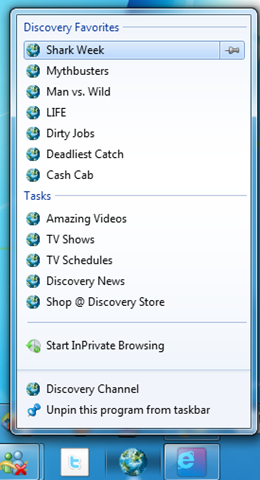
What’s really new though is the user interface. The two things that jump out are the adoption of a single box for search and URL entry – many users do not understand the difference anyway – and the ability to drag tabs to the taskbar to pin them there like application shortcuts. Once pinned, they support Windows 7 Jump Lists, even when the site is not active:

image

If you squint at this screenshot, you’ll notice that the Discovery site, which is tweaked to use this feature, has a good-looking icon as well as a Jump List, whereas the icons adjacent to it look bad. That’s because you need to create a new large favicon to support this feature, as well as optionally adding metadata to create the Jump List. None of this is any use, of course, if you use Vista; and if you use XP you cannot even install IE9.

There’s also a download manager at last.

There’s no doubt that IE9 is miles better than IE8. Is it better than rivals like Chrome, from which a casual observer might think it has drawn inspiration? Too soon to say; but using the official native browser does have advantages, like integration with Windows Update as well integration with the OS.

That said, I’m not personally a big fan of the single box approach, and I’ll miss the permanent menus. If you press the Alt key the old File, Edit View etc magically appear, but I can’t see any way to make it persist.

Microsoft’s Scott Guthrie: We have 200+ engineers working on Silverlight and WPF

Microsoft is countering rumours that WPF (Windows Presentation Foundation) or Silverlight, a cross-platform browser plug-in based on the same XAML markup language and .NET programming combination as WPF, are under any sort of threat from HTML 5.0.

We have 200+ engineers right now working on upcoming releases of SL and WPF – which is a heck of a lot.

says Corporate VP .NET Developer Platform Scott Guthrie in a Twitter post. Other comments include this one:

We are investing heavily in Silverlight and WPF

and this one:

We just shipped Silverlight for Windows Phone 7 last week, and WPF Ribbon about 30 days ago: http://bit.ly/aB6e6X

In addition, Microsoft has been showing off IIS Media Services 4.0 at the International Broadcasting Conference, which uses Silverlight as the multimedia client:

Key new features include sub-two-second low-latency streaming, transmuxing between H.264 file formats and integrated transcoding through Microsoft Expression Encoder 4. Microsoft will also show technology demonstrations of Silverlight Enhanced Movies, surround sound in Silverlight and live 3-D 1080p Internet broadcasting using IIS Smooth Streaming and Silverlight technologies.

No problem then? Well, Silverlight is great work from Microsoft, powerful, flexible, and surprisingly small and lightweight for what it can do. Combined with ASP.NET or Windows Azure it forms part of an excellent cloud-to-client .NET platform. Rumours of internal wrangling aside, the biggest issue is that Microsoft seems reluctant to grasp its cross-platform potential, leaving it as a Windows and desktop Mac solution just at the time when iPhone, iPad and Android devices are exploding in popularity. 

I will be interested to see if Microsoft announces Silverlight for Android this autumn, and if it does, how long it will take to deliver. The company could also give more visibility to its work on Silverlight for Symbian – maybe this will come more into the spotlight following the appointment of Stephen Elop, formerly of Microsoft, as Nokia CEO.

Apple is another matter. A neat solution I’ve seen proposed a few times is to create a Silverlight-to-JavaScript compiler along the lines of GWT (Google Web Toolkit) which converts Java to JavaScript. Of course it would also need to convert XAML layout to SVG. Incidentally, this could also be an interesting option for Adobe Flash applications.

As for WPF, I would be surprised if Microsoft is giving it anything like the attention being devoted to Silverlight, unless the Windows team has decided to embrace it within the OS itself. That said, WPF is already a mature framework. WPF will not go away, but I can readily believe that its future progress will be slow.

Anti-virus software continues to fail

I received an email from Trusteer noting that anti-virus detection rates for the latest Zeus variant are very low. This analysis shows that at the time of writing only Panda, among the major anti-virus products, picks it up. Does this mean we should all switch to Panda? No, because next time it will be one of the others that works, or none of them will work. You can only sympathise with users who imagine they are protected from malware because they have security software installed which tells them so.

The solution? Well, white-listing, visiting only trusted web sites, not opening attachments, keeping your OS fully patched, and so on. None of them perfect.

Alternatively, a new model of computing. One of the attractions of locked-in platforms like Apple’s iPhone and iPad is that they are harder to infect. Google’s forthcoming Chrome OS is even better designed from a security perspective. I am surprised that this aspect of cloud+device computing does not get more attention.

Ten ways the Android HTC Desire beats Apple’s iPhone

I’m just getting started with Android development, for which I got hold of an HTC Desire. And I’ve been using Apple’s iPhone 4 since its release in the UK. So which is better? There’s no satisfactory quick answer to that, though the two phones are certainly comparable; perhaps too much so, judging by Apple’s lawsuit. I thought it would be fun though to do a quick couple of posts on how they compare, of which this is the first. Reasons to prefer iPhone coming next. The following points are based on the Desire running Android 2.2 “Froyo”.

1. You can plug in a micro SD card to expand the storage. Apple does not support this with the iPhone; it may be because it wants to control what goes on the device, or because it uses storage space as means of selling more expensive versions of its devices.

2. Related to (1), you can copy a file to the phone by attaching it to a PC and using the filesystem. To do this with the iPhone you need additional software, or a solution like Dropbox which copies your document up to the Internet then down onto the iPhone.

3. You don’t need to install iTunes to get full use of the device. Some like iTunes, some do not; it is better on the Mac than on Windows, but it is great to avoid that dependency.

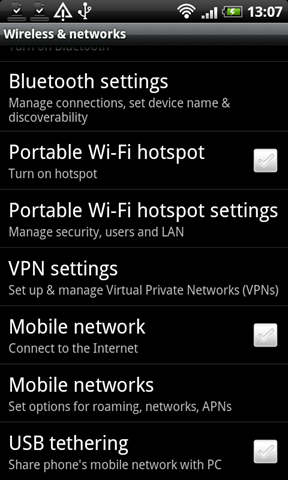
4. You can share your internet connection without fuss, either by creating a portable wi-fi hotspot, or through a USB connection.

image

5. Adobe Flash works on Desire. Coming soon is Adobe AIR, which will enable developers to create Flash applications as well as Flash-driven web content.

6. The platform is more open. Developer registration is only $25.00 (vs $99 for iPhone) and there are fewer restrictions concerning how you develop your application, what sort of app you create, or what language you use. The standard language is Java, which is easier to learn and more widely used than Apple’s Objective C.

7. The Desire has instant screen switching. Press home when already on the home screen, and you get thumbnails of all seven screens; touch a thumbnail to bring it to the front. Widget support means you can put those screens to good use too – not just for storing app shortcuts.

8. The battery is removable. The obvious advantage is that you can carry a spare with you.

9. It uses a standard USB cable. A small point perhaps; but it is easy to lose your cable or not have it with you, and being able to use a standard cable is convenient.

10. There’s no issue with the antenna when using the Desire without a case.

Getting started with Android – a few hassles

I’m setting myself up for Android development, and my HTC Desire arrived today. It is a lot of fun, though I have had a few hassles, partly because my device is locked to Orange and of course I wanted to upgrade to Android 2.2 “Froyo” right away. There are also a few issues with the Orange branding on a Desire, including the absence of Google Talk and applications like Orange Maps that you probably will not use. I went through a series of steps to unbrand the phone and install Android 2.2.

It is an odd situation, where mobile operators work hard at adding their branding and applications to the device, only for canny users to work out how to remove them. Branding also delays updates. If Android is updated, the operator has to receive the updated operating system image from the phone manufacturer, HTC in this case, add its customizations, and then apparently sent it back to HTC for packaging.

My guess is that if an operator decided to ship the standard Android image it would be a selling point and attract more customers. I even have a catchy name to offer: “Naked Desire”. How about it?

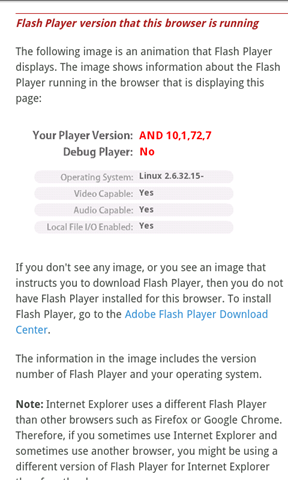
Still, all went well with my hacks; and eventually I was up and running with Android 2.2 and of course Flash 10.0:

image

That said, I had an annoying issue with Android Market. I selected an application, it would appear to start installing, but stuck on “Starting download” or “Downloading” with no actual progress.

It turns out this is a common problem – see here for one of many discussions. A popular fix is to change your account from someone@gmail.com to someone@googlemail.com, but this did not apply to me. I discovered the reason, which is that my wifi is behind Microsoft’s ISA Server. Android Market requires TCP outbound connections on port 5228. I configured ISA accordingly, and after cancelling and restarting the downloads they succeeded.

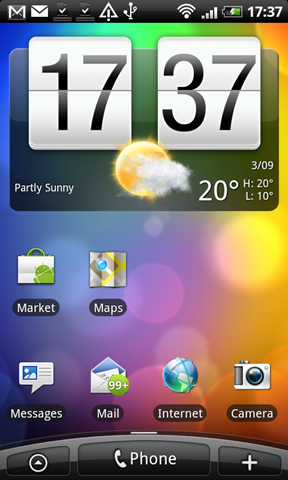
Finally, I wanted a screen grab or two to decorate this post. I used the method described here, fine for developers but not ideal for casual users.

image

I’ll report more impressions shortly, including no doubt the inevitable iPhone comparison.

Google favours big brands over diversity

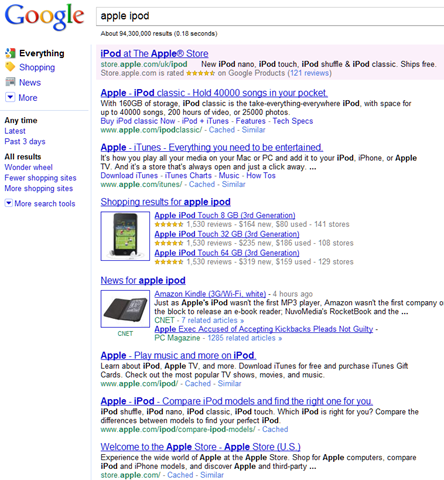
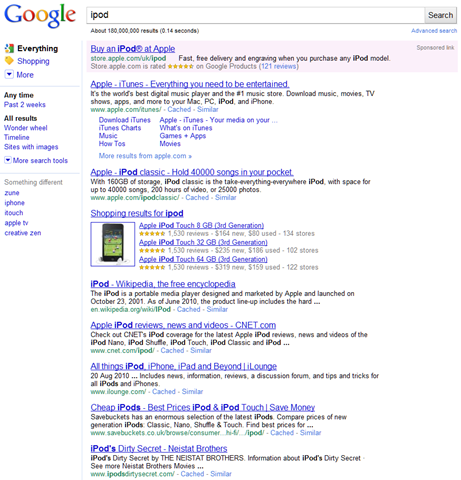
Google has made a change to its search algorithm that means most of the results shown for a search may now come from a single domain. Previously, it would only show a couple of results from one domain, on the assumption that users would prefer to select from a diversity of results.

The example chosen by searchengineland is a good one. Search for Apple iPod and you get a page that is mostly links to Apple’s site.

image

If you search for the single word ipod you get more diversity – odd, since only Apple manufacture the ipod so you could argue that the searches are the same. Some people use ipod as a generic name for MP3 player, but that doesn’t seem to be reflected; all the results still relate to Apple’s device.

image

Personally I’d rather see diversity. I don’t see the need for this change, since the site summary with deep links works well when a particular domain closely matches the search term. You can see an example of this in the top result for the ipod search above. Note that it even has a link for “More results from apple.com”. What is the value of suppressing the results from other domains?

The overall impact is that big brands benefit, while smaller businesses and new entrants to markets suffer. It also makes independent comment that bit harder to find.

While to most of us changes like these are only of passing interest, to some they make the difference between a flourishing business and a dead one. Google has too much power.

Incidentally, I generally find Google significantly better than Bing, now its major competitor. However in this case Bing impresses, with categories such as reviews, prices, accessories, manuals and so on; and in the case of the Apple ipod search, a better balance between the official site and independents.

Oracle still foisting Google Toolbar on Java users

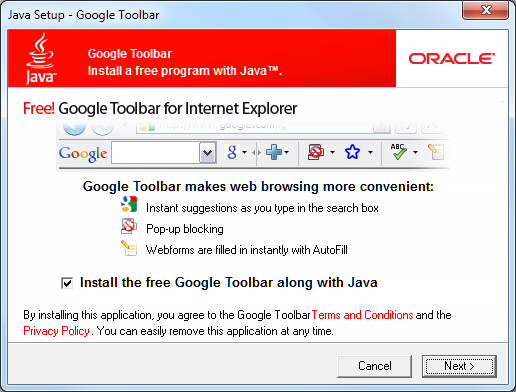
Oracle may be suing Google over its use of Java in Android; but the company is still happy to take the search giant’s cash in exchange for foisting the Google Toolbar on users who carelessly click Next when updating their Java installation on Windows. If they do, the Toolbar is installed by default.

image

This is poor practice for several reasons. It is annoying and disrespectful to the user, particularly when the same dialog has been passed many times before, bad for performance, bad for security.

Sun at least had the excuse that it needed whatever income it could get.

I know certain other companies do this as well with their free runtimes – Adobe is one – and I like it just as little. However, as far as I can recall Adobe only adds foistware on a new install, not with semi-automatic updates.