Category Archives: development

BlackBerry 10: QNX multitasking goodness

I attended the London BlackBerry Jam, one of around 500 developers (the event was sold out) who showed up to learn about developing for Blackberry 10 and in the hope of snagging a prototype of RIM’s next smartphone, the BlackBerry 10 Dev Alpha. The event is part of a tour of 26 cities worldwide. I also spoke to Vivek Bhardwaj, Head of Software Portfolio EMEA for RIM. Does BlackBerry 10 have what it takes to  compete against Apple iPhone and Google Android?

A few quick observations. The event was split into native and web tracks, with the native track focusing on  C/C++ development and the Cascades UI framework, and the web track covering WebWorks, the HTML 5 developer tools which you can use to target mobiles as far back as BlackBerry 5, or to create apps that share code between BlackBerry and other mobile platforms.

There was also a tour of various mobile JavaScript libraries. One that caught my attention was Zepto.js, which implements most of the jQuery API in just 8.4k of compressed code, around 25% of the size of jQuery. The trade-off, aside from some missing features, is lack of support for Internet Explorer, though support for IE 10 is under consideration. Thought-provoking: the price of legacy platforms?

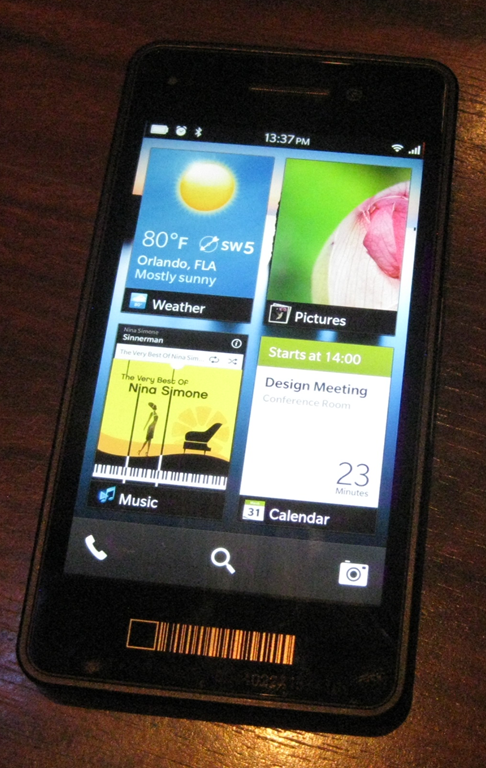
It turned out that the device Bhardwaj was holding, though pretty much the same hardware as the Dev Alpha giveaway, was more revealing as a glimpse of the next-generation BlackBerry. The Dev Alpha, which has an impressive 1280 x 768 screen, comes with no applications other than the web browser and its user interface is pretty much that of the PlayBook. Bhardwaj’s demo device on the other hand is a complete early version of BlackBerry 10 though there were parts that he would not demonstrate. I went to compose an email and he said, “we are not ready to show that yet.”

image

So what is distinctive about BlackBerry 10? One of its key features is multitasking, thanks to the processor scheduling capabilities of QNX, the embedded operating system which underlies both PlayBook and BlackBerry 10. According to Bhardwaj, this enables up to 8 apps to run at once. “Applications all run simultaneously. We don’t need to pause them,” he said. “It’s much more about flow.”

Although apps do run full screen, you can take advantage of the multitasking by “peeking” at a background app. This means holding your finger towards the corner of an app and dragging it left to see a little of what is underneath. In the pic below this is another image.

image

Talking to developers at the event I picked up considerable enthusiasm for BlackBerry 10, though compatibility is a headache. If your customer asks you to support all versions of BlackBerry back to the 5.0 series, you are stuck with WebWorks and the pre-WebKit browser in 5.0. If you can convince your customer to forget 5.0, then you can develop for WebKit. If you want to use Cascades then you are restricted to PlayBook and BlackBerry 10.

BlackBerry 10 also supports Adobe AIR, for Flash-based apps, and an Android runtime for repackaged Android apps.

The prototype BlackBerry 10 phone looks good, but as a brand new platform is it sufficiently exciting to revive RIM’s fortunes? “I don’t believe that in a trillion-dollar plus industry there can only be two players. I think there is more than enough space for four or five platforms. It’s very short-sighted if we think there can only be three ecosystems,” said Bhardwaj.  

Developers like coding in the dark

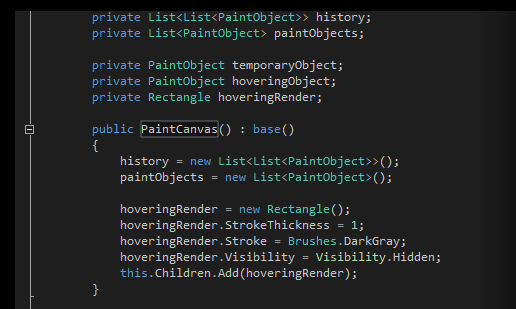
Many developers prefer to code against dark backgrounds, according to this post by Monty Hammontree, Director of User Experience in Microsoft’s developer tools division.

Many of you have expressed a preference for coding within a dark editor. For example, dark editor themes dominate the list of all-time favorites at web sites such as http://studiostyl.es/ which serve as a repository for different Visual Studio styles.

Chief among the reasons many of you have expressed for preferring dark backgrounds is the reduced strain placed on the eyes when staring at the screen for many hours. Many developers state that light text on a dark background is easier to read over longer periods of time than dark text on a light background.

image

Personally I am not in this group. A white-ish background works well for me, and if it is too bright, simply reducing the monitor brightness is an effective fix.

Interesting post though, if only for the snippets of information about the new Visual Studio. Apparently it has around 6000 icons used in 28,000 locations. Another little fact:

Visual Studio’s UI is a mix of WPF, Windows Forms, Win32, HTML, and other UI technologies which made scrollbar theming a challenging project.

If you will be using Visual Studio 2012, are you on the dark side?

Hands on: building an app for Windows 8 Metro

How difficult is it to build an app for the Windows Runtime (WinRT), which powers Metro-style apps in Windows 8?

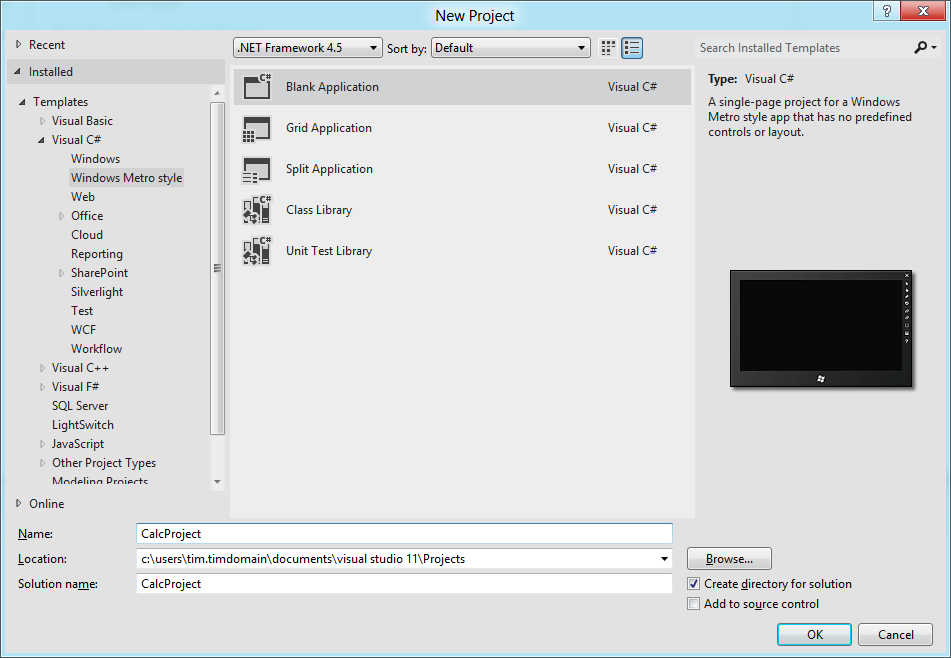
Here is how I created a simple calculator app (this is one in an occasional series) using Visual Studio 11 beta. I started with a new Visual C# Windows Metro Style project, choosing a blank template.

image

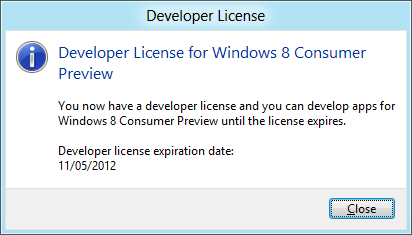
A slight complication is that you are prompted to install a Developer License, which means logging into your Windows Live account.

image

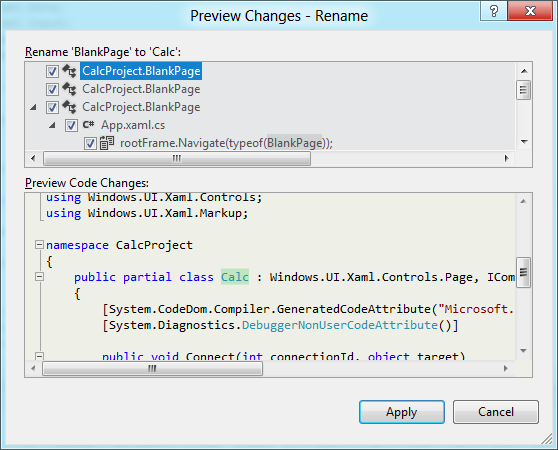
Next, I had to layout the controls. Visual Studio creates a single-page app with a main page called BlankPage.xaml. I renamed this to Calc.xaml. I also used Visual Studio’s refactor menu to rename the page class from BlankPage to Calc.

image

The default application has a black background, which seems gloomy. I changed the Background of the container grid to white.

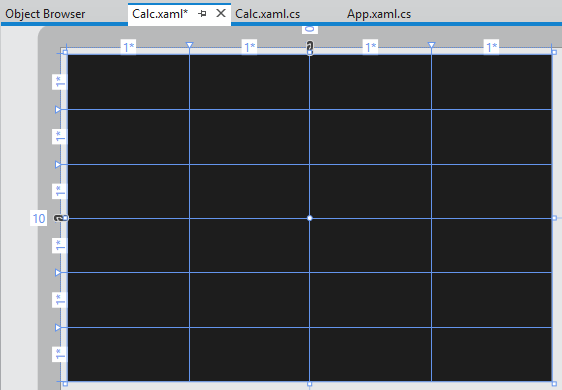
My basic calculator design is based on six rows and four columns, so I added 6 RowDefinitions and 4 ColumnDefinition to the XAML grid. The units for RowDefinitions and ColumnDefinitions can be set to Auto, Pixel or Star. Star means the unit is a weight which is calculated at runtime. For example, if you set the value of one RowDefinition.Height to 2 and the others to 1, the first one would be twice as high as the others. Here is my basic grid:

image

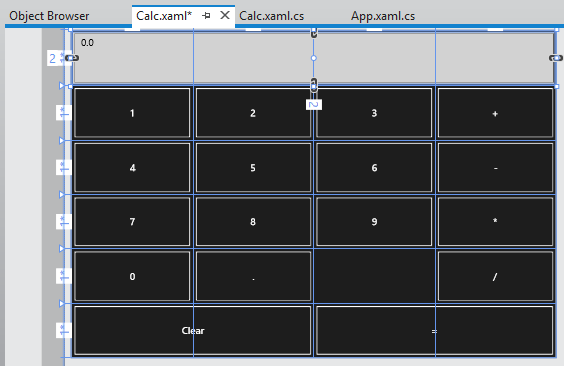
Next, I placed controls in the grid. The easiest way to get them to fill the space neatly is to set their HorizontalAlignment and VerticalAlignment properties to Stretch. Then you control the margin round the control with the Margin property. You can have a control fill more than one cell by using the Grid.ColumnSpan and Grid.RowSpan properties.

I found it easier to add the controls in code using copy and paste.

image

A Grid has no FontSize property, and although the Page has a FontSize property it does not seem to be inherited by the controls. I therefore set the FontSize individually for each control but there must be a better way of doing this.

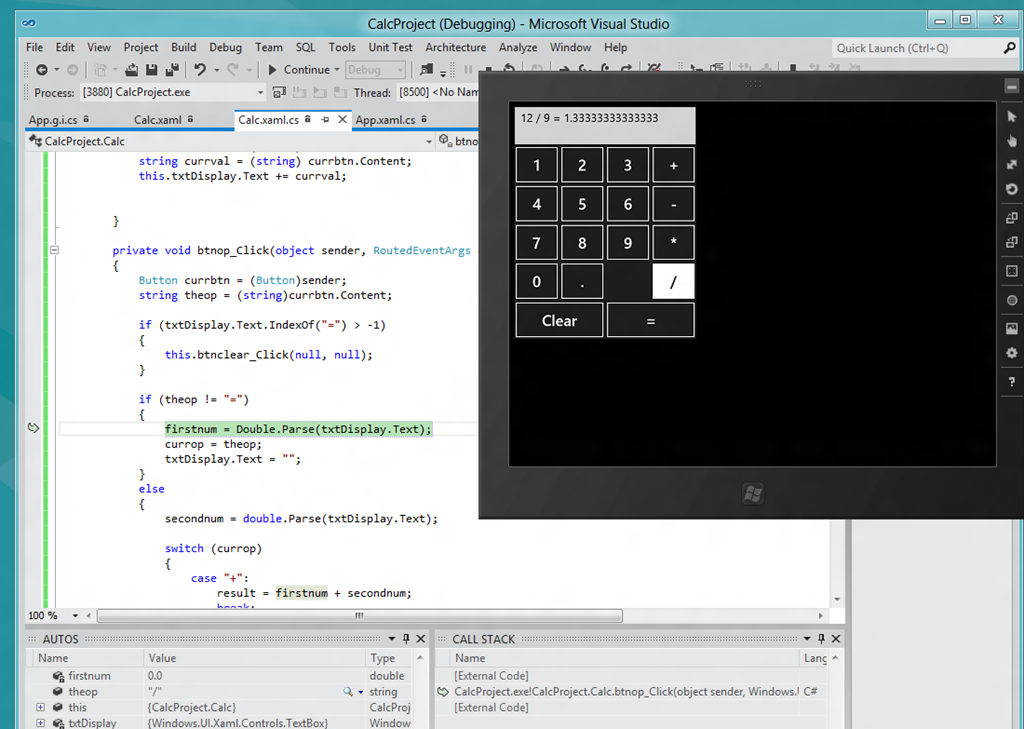
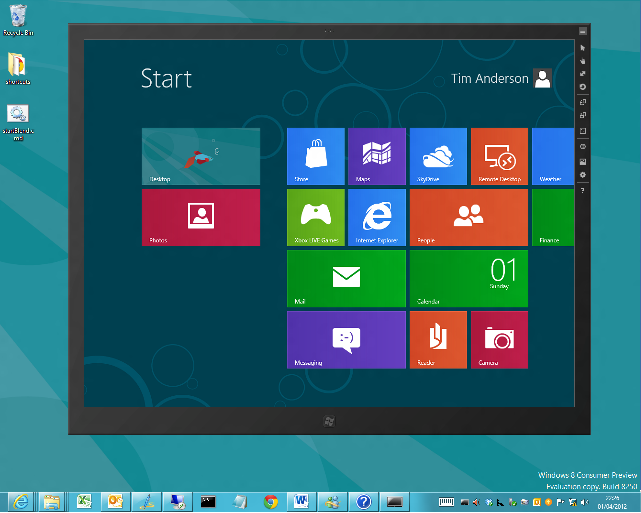
I then wrote minimal code that performs calculations without always crashing, and tested the app.  When you debug, you can choose Local Machine, Simulator, or Remote Machine. I found it easier to debug using the simulator, since if you use Local Machine and Visual Studio is running on the main display, then the app you are debugging becomes invisible if you hit a breakpoint or exception. The simulator seems really good (it is actually a remote session into your own machine) and I would like some way of running all Metro apps in a window like this, not just for debugging!

image

A few reflections

A developer with experience of C# and XAML (which is also used by Windows Presentation Foundation and by Silverlight) will not have much trouble getting started with WinRT, though I noticed that XAML is substantially cut-down, as Patrick Klug observes here.

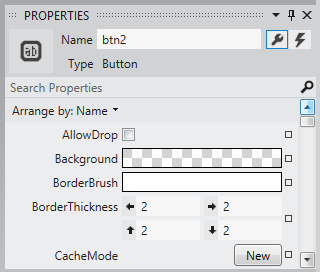
Visual Studio 2011 is an excellent IDE although I do not much like the new property editor; a minor point, but I find the latest go at prettification detrimental to usability; it is too busy. This may be a matter of familiarity and it is a minor point.

image

The XAML visual designer is slow to refresh even with my simple app, so this could be annoying with a more complex layout.

Layout with XAML works well, though it is more difficult than say Windows Forms for a new developer. It is easy to get peculiar results unless you do everything with pixel layout, which is not the best approach.

What about Metro itself? Apps always run full screen, and I had a problem with this in that my little calculator does not need all that space.

image

I am not a designer; and I suppose with a bit of effort you could add some decoration or effects to use the space, or add extra features. But why?

I was thinking about the Atari ST the other day, following the death of Jack Tramiel. The ST did not really multitask, but to get around the problem of needing to run a second app without closing the first, it had the concept of desktop accessories, available from a pull-down menu. My calculator would work well as a desktop accessory in Metro, except there is no such concept – unless you count the “Snap” split view. I wonder if Microsoft is too religious about its “Immersive UI” concept.

A few reservations then; but that does not take away from the overall impression of a strong integrated development experience for building Metro-style apps.

Run Metro apps in a window on Windows 8

I have been drilling into Visual Studio 11 beta recently. This includes a simulator for debugging Windows 8 Metro style apps and I was surprised by the way it works. Unlike the Windows Phone emulators, which are isolated environments for testing apps, the simulator is actually a window into your own machine.

image

You can do some strange stuff. For example, you can not only debug your app in the simulator, you can run up Visual Studio 11 on the desktop within the simulator and edit it as well. It will not let you run the simulator within the simulator though – I tried!

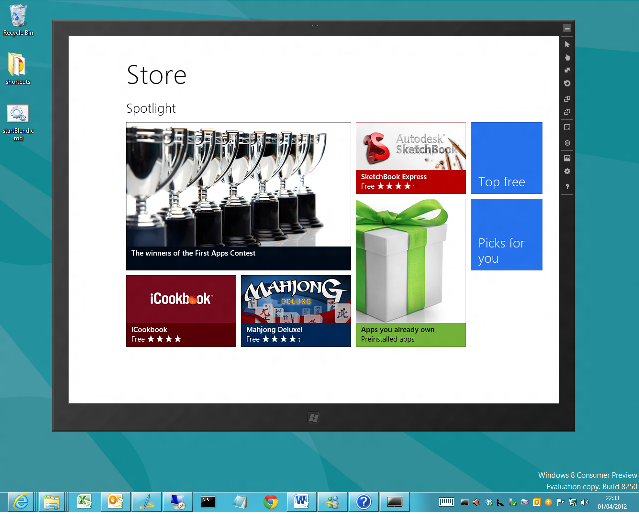
It occurred to me that the metro simulator accomplishes one of the things some users of the consumer preview have asked for. It lets you run Metro apps in a window, so that you can resize them, minimize them, and avoid the jarring context switch between full-screen Metro and the normal desktop with the taskbar.

image

What is the simulator? It is actually a remote desktop session into your own machine. Normally you cannot do this, as Windows client only allows one session at a time and you already have one running, but Microsoft has given itself special permission.

Running Metro apps in a windows is not its intended purpose but it is interesting to try as it shows how this might have worked if Microsoft had taken a more desktop-centric approach to the dual personality in Windows 8.

A further thought is to consider why the Visual Studio team decided to do things this way. Microsoft’s developers saw the necessity of working in the Visual Studio IDE while also exercising the Metro-style app.

Well, what if you are not a developer, but you still want to have Excel open while you check out, for example, the Bing Finance app? It is not only developers that may have good reasons to have a desktop and a Metro app running side by side.

Dual monitors accomplish this of course, and to some extent so does the “Snap” split view if you have the right screen resolution, but running Metro in its own window is a rather convenient solution.

Developers dislike monochrome Visual Studio 11 beta

Microsoft is having trouble convincing developers that its new Metro-influenced Visual Studio user interface, in the forthcoming version now in beta, is a good idea.

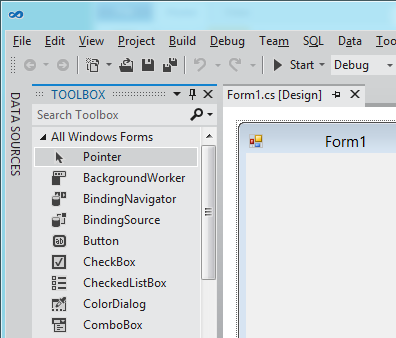
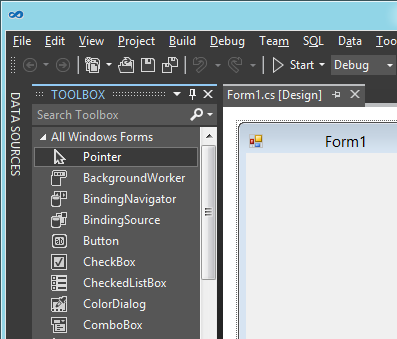
To be more precise, it is not so much Metro, but the way Microsoft has chosen to use it, with toolbox icons now black and white. The change also affects menus such as IntelliSense in the code editor. Here is the new design:

image

or you can choose a “Dark” colour scheme:

image

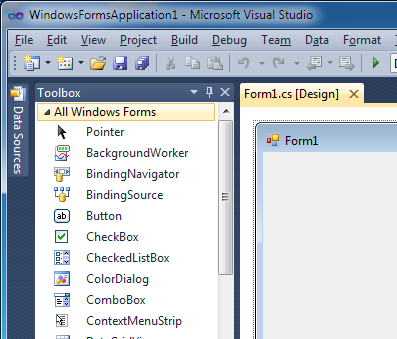
and the old 2010 design for comparison:

image

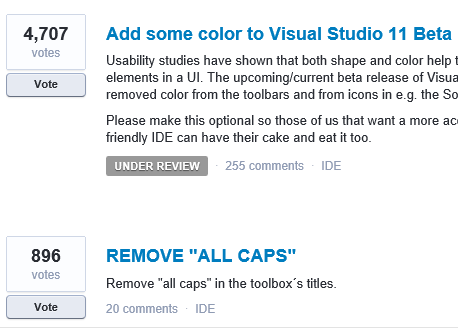
Developers voting on this over at UserVoice, the official feedback site, have made this the single biggest issue, with 4707 votes.

image

They do not much like the All Caps in the toolbox names either.

Microsoft has marked this as “Under review” so maybe there could yet be a more colourful future for Visual Studio 11.

Adobe will charge a royalty for use of “Premium features” in Flash Player

Adobe has announced that from August 1 2012, developers who make use of hardware-accelerated Stage3D in Flash Player, in combination with Domain Memory, will pay a 9% net revenue share as royalty. Net revenue is what remains after taxes, payment processing fees and “social network platform fees” (sounds like Facebook) are deducted.

“Domain Memory” is a block of memory declared as a byte array that is used as memory by the Alchemy C/C++ to ActionScript compiler. Allocating some bytes from this byte array is much faster than asking the Flash Player to grab some real memory from the system for your new object or variable, and manipulating memory via this technique is quicker too. In other words, it is a hack to improve performance.

Adobe is aiming the new licensing arrangement at games developers. Most developers will not be affected because of the following:

  • A license is only needed if both Stage3D hardware acceleration and Domain Memory are used. Use just one of these and you are fine.
  • If the game or app is packaged using Adobe AIR for iOS, Android, Windows or Mac (in other words, anywhere) then no license is needed.
  • Applications that make less than $50,000 in revenues (not clear whether this is net or gross) will be royalty-free
  • Applications released before July 31 2012 will remain royalty-free

There may be a program fee however, which I imagine will apply whether or not you pay royalties.

Although the new royalty is not all that onerous, it is significant as a change of direction. Until now, the deal with all these runtimes – Flash Player, Silverlight, Java – is that you might pay for the tools, but the runtime is free.

If you are considering Flash versus other runtimes for your new project, Adobe has now informed you that future free use of the runtime is not a foregone conclusion. Who knows what Adobe will define as “premium features” that might require royalties in future?

According to the FAQ, further premium features are indeed planned:

We are already planning premium features that enable "instant play" gaming experiences for content that relies on large assets which will be able to cache data using a local storage API. For content publishers looking for better branding and user acquisition, another planned new feature would allow apps to request if the user would like to create a shortcut on the desktop, task bar or start menu pointing to the application.

Overall it seems a curious move, at a time when Adobe seems to be moving away from Flash and towards HTML5 as its long-term strategy. The company may profit a little from a few high-profile games, but the dampening effect on Flash usage in the long term will offset any advantage.

No developer likes to pay runtime royalties and I would guess that Adobe’s move will spark an immediate search for alternatives.

Update: there is a great discussion of the issue with participation from Adobe’s Thibault Imbert here. Why the change in direction, when Adobe has previously made money from its tools:

at some point you are capped. Ask any tooling company today, hence why you see companies going to consumers, services, because games could generate millions of revenue with maybe 200 copies of Flash Builder and Flash Pro sold. Is it a good business? Not really.

says Imbert. Another issue is that third-party tools for Flash have been taking market share away from Adobe, which must hurt:

The model where Adobe invests all of the resources in developing the Flash Player, and then projects such as Haxe and Unity pull developers away from Adobe tooling is one that was not sustainable under the old model. Under the new model, it doesnt matter which tools and technologies you are using to develop Flash content, since revenue is generated based on the runtime and not tooling.

says Adobe’s Mike Chambers.

The most enduring software development techniques revealed at QCon London

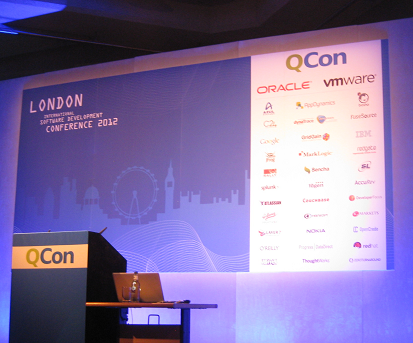
I am in London for the QCon event, a vendor-neutral development conference which I have been fortunate to attend regularly over the last few years.

image

These events tend to have an underlying theme, which reflects the current thinking of developers and software architects. Each year I hear cogent and thoughtful explanations of why this or that approach will enable us to code better and please users more. Each year I also hear cogent and thoughtful explanations of why the fix proposed last year or the year before is actually a prime reason why projects fail.

Way back when it was SOA (Service Oriented Architecture) that was sweeping away the mistakes of the past. Next SOA itself was the mistake of the past and we got REST (Representational State Transfer). This year I am hearing how RPC is making a comeback, or at least not going away, for example because it can be more efficient when you want to transfer as little data as possible across the WAN.

Another example is enterprise Java. Enterprise Java Beans and J2EE were the fix, and then the problem, for scalable distributed applications. Rod Johnson came up with Spring, the lightweight alternative. Now I am hearing how Spring has become bloated and complicated and developers are looking for lightweight alternatives.

Test-driven development (TDD) brings fantastic benefits to software development, making it possible to change and improve your code while defending against the introduction of bugs. Yesterday though Dan North observed that TDD also has a cost, in that you write much more code. It is not uncommon for projects to have more test code than code that is active in production. If you did not write that code, you could be doing other productive work in the time made available. 

Agile methodologies like Scrum were devised to promote or even create communication and agility in software teams. Now every big enterprise vendor says it does Scrum and runs courses, but the result is a long way from the agile (with a small a) original concept.

This year I have heard a lot about over-optimisation, or creating code for situations that in fact never arise. This is the problem to which the solution is YAGNI (You Ain’t Gonna Need It). Since they apply across all the methodologies, I suggest that YAGNI, and its cousin DRY (Don’t Repeat Yourself), and the even older KISS (Keep It Simple Stupid) are the most enduring software methodologies.

That said, even DRY took a beating yesterday. Greg Young in his evening keynote said that rigorous DRY advocates can end up creating single blocks of code where really the procedure was only nearly the same. If your DRY functions are full of edge cases and special conditions, then maybe DRY has been taken to excess.

In the light of the above, I would therefore like to propose the first draft of my first theorem of software development:

There is no development methodology which will not become a burden when embraced rigidly

The other lesson I have learned from multiple QCons is that effective teams and smart developers count for much, much more than any specific tool or language or approach. There is no substitute.

How Amazon Web Services dominate infrastructure as a service

During Mobile World Congress I met with some folk from Twilio, the cloud telephony company, who said something that interested me. Twilio uses Amazon Web Service (AWS) for its infrastructure and told me that essentially there is no choice, AWS is the only cloud provider which can scale on demand quickly and smoothly as required.

Today at QCon London I met a guy from another major cloud-based company, which is also built on Amazon, and I put the same point to him. Not only did he agree, he said that Amazon is increasing its lead over the competition. Amazon is less visible than some, he said, because of its approach to PR. It concentrates on marketing directly to developers rather than chasing press stories or running big advertising campaigns.

Amazon has also just reduced its prices.

This is mixed news for the industry. In general developers I speak to like working with AWS, and its scalability is a huge benefit when, for example, you are entering a new market. You can do so without having to invest in IT infrastructure.

On the other hand, stronger competition would be healthy. My contact said that he reckoned his company could move away from Amazon in 12 weeks or so if necessary, so it is not an absolute lock-in.

Sold out QCon kicks off in London: big data, mobile, cloud, HTML 5

QCon London has just started in London, and I’m interested to see that it is both bigger than last year and also sold out. I should not be surprised, because it is usually the best conference I attend all year, being vendor-neutral (though with an Agile bias), wide-ranging and always thought-provoking.

image

A few more observations. One reason I attend is to watch industry trends, which are meaningful here because the agenda is driven by what currently concerns developers and software architects. Interesting then to see an entire track on cross-platform mobile, though one that is largely focused on HTML 5. In fact, mobile and cloud between them dominate here, with other tracks covering cloud architecture, big data, highly available systems, platform as a service, HTML 5 and JavaScript and more.

I also noticed that Abobe’s Christophe Coenraets is here this year as he was in 2011 – only this year he is talking not about Flex or AIR, but HTML, JavaScript and PhoneGap.

Financial Times thrives on HTML 5, paywall, and snubbing Apple iTunes

I spoke to Rob Grimshaw, Managing Director of FT.Com, shortly after Mobile World Congress in Barcelona, where the FT web app won an award for “Best Mobile Innovation for Publishing”.

image

I was interested in speaking to Grimshaw for two reasons.

First, the FT is a publication which has successfully managed the transition from print to online. The latest published results , for the first half of 2011, report that FT Group sales were up 7% and profits up 10%, “enhanced by digital subscriptions.”

Second, the FT took the initiative to bypass Apple’s app store with its onerous subscription terms by remaking its app as HTML5, as reported here .
The award “was the icing on the cake for the whole process,” Grimshaw told me. “When we abandoned the native app and stepped out of iTunes, it was a big commercial gamble, and it was a rueful moment as well because we’d created a beautiful native app and won an Apple design award.”

Was the FT move all about subscription fees, or were there other factors? “It was not all about Apple,” said Grimshaw. “Certainly their 30% tax on subscriptions didn’t make sense to us, because we already have our own platform so why pay somebody else to use their platform? Second, they would have owned the relationship with the customer. That’s important for various reasons, but for example it makes it difficult to manage churn, which is a crucial aspect of a subscription business.

“There were some other reasons. The mobile market would have been problematic if we had to keep developing all our applications for many different  operating systems. The overhead is enormous. It doesn’t stop once you’ve launched the app, you have to keep ugrading and changing.

“HTML 5 offers a way out of that headache by producing code that runs across multiple platforms.

“When you add all of that together, it seems to be smart to go the HTML 5 route even though it was technologically risky because at the time nobody else had done it.”

So what has been the impact of the web app versus the native app?

“A lot of people said, if we leave iTunes we’ll disappear from the world. We haven’t found that to be the case. In the four month period after we launched the web app, from June through to October 2011, our traffic on the iPad and the iPhone increased by over 50%. 1.7 million people have now visited the web application, more than ever downloaded our old iPhone and iPad app combined.

“We have many tools and techniques which help us to promote and build audience in the browser, and they work just as effectively for the web app as they do for our normal web sites.”

Is the success of the web app a reflection of the type of app, which is content-dominated, or will web apps dominate more generally in the mobile space?

“I think that HTML 5 will dominate. The buzz around HTML 5 at Mobile World Congress reinforced that view. It feels to me that there is an unstoppable momentum behind it,” said Grimshaw, mentioning PhoneGap-style native wrappers as well as pure web apps. “The counter argument is that for some of the new features of phones and tablets you have to use native code. However, I think 90% of applications don’t need that kind of support. We produce a very sophisticated app, and HTML 5 covers all the functions that we would ever need to use.”

“Once people discover what they can do within the browser they will start thinking why would you develop in native when it creates all of these headaches.”

As form factors become more varied, do you see a convergence between what you do for mobile and what you do for the wider internet?

“I can see them coming together. I can imagine a day where a single set of HTML 5 code can power our site across the full range of smartphones, tablets and desktop. The only obstacle is that so many browsers on the desktop don’t support HTML 5 fully.

“That doesn’t make all the contexting go away. Now with our mobile development we are dividing screen sizes into four buckets, and the thinking is that we will have to design for those four screen sizes. Device manufacturers are going to carry on producing a device to occupy every possible niche, and as publishers we have to cope with that.”

How important is cloud and mobile to your business, what new opportunities does it offer?

“Mobile is incredibly strategically important. I’m personally convinced that mobile will be the main distribution channel for news in the future. People’s lives don’t stop when they leave their desks or exit their houses. They want to carry on their friendships, their business, their reading. If you have a powerful mobile device that can deliver that, you’re going to gravitate to that device, and pretty soon it does become the main channel.

“We already see the audience migrating onto mobile. About 20% of our page views now come from mobile devices. That could be over half within three years. Figuring out how to present our content, sell our subscriptions, deliver our advertising on mobile devices is hugely important.

“It’s a shift on a tectonic scale. For publishers this is a bigger shift than the shift from print to desktop, and it’s happening faster.

“It does create new opportunities as well. We have a new sales channel, we’re now selling our subscriptions through mobile devices. 15 to 20% of our new digital subscriptions every week are sold directly through mobile devices.

“It gives us the potential to reach new audiences. We’ve seen some good evidence from the mobile operators to show that our audience from mobile is much younger that our audience on desktop or on print. Devices are helping us to reach younger audiences and recruit readers who might be with us for the rest of their lives.”

What about social media and the relationship with the big web portals, Google, Facebook, Twitter?

“I see social media as a parallel trend to mobile. Mobile is the desire of people to take content with them physically. Social media is about the desire of people to take content with them virtually, and equally powerful.

“On the advertising side I find social media a little alarming because of scale. Facebook has a trillion page views a month, which makes them 400 times bigger than the BBC and 1500 times bigger than the New York Times. It’s scale which is unimaginable for most publishers, and they have tremendous insight into their audience. That’s a potent cocktail. And every time someone shares an FT article on Facebook, an extra bit of data builds up on their side that tells them about our readers.

“On the subscription side though it is all positive and they can be powerful sales channels for us. We have big communities in social media, 300,000 odd on Facebook, 1.2 million Twitter followers, and these are to some extend self-selecting marketing audiences, people who stuck up their hand and said we’re interested in the FT.

“We also believe we can find ways to allow people to consume content in the social media environment if they are subscribers. We’re working on finding ways to do that.”

What do you think of paywalls versus free content for newspapers on the web? Does the paywall only work because the FT is a niche publication, albeit a large niche?

“We are very much on the paywall side and unashamedly so, we think our content has tremendous value and people do not object to paying for it. We now have 270,000 digital subscribers and that compares to our newspaper circulation which is around 330,000, so we’ve been successful in building up a paying audience in digital which is now pretty close in scale to our paying audience. It’s been an enormously success business venture for us.

“When you look at the publishers that are giving all their content away, the reason they are giving it all away is in order to build up a bigger audience for advertising. But the scale of the competition in the advertising market is so huge that actually it is a fruitless exercise, unless you can acquire a scale which will give you billions of page views a month. It’s very hard to see how you can build a decent business just from online advertising. The numbers don’t stack up.

“My message to other publishers is not necessarily that you have got to have a paywall, but is that you probably need other ways to make money, other than online advertising.”