Category Archives: development

Microsoft Build 2014: what happened

It’s curious. Microsoft’s new CEO Satya Nadella has been in place for only a month which means that almost everything announced at Build, Microsoft’s developer conference which took place last week in San Francisco, must have been set before he was appointed; yet there was a sense of “all things new” at the event, as if he had overseen a wave of changes.

The wave began the previous week, with the simultaneous announcement and delivery of Office for iPad. The significance of this is threefold:

  • It demonstrated Microsoft’s decision to give first-class support to mobile platforms other than Windows
  • It demonstrated that Office can be redesigned to work nicely on a tablet
  • The quality of the product exceeded expectations, showing that in the right circumstances Microsoft can do excellent non-Windows software

image

Next came Build itself. It was a tale of two keynotes. The first was all about Windows client – both Phone and PC. The core news is the arrival of the Windows Runtime  (WinRT, the engine behind Metro/Store Apps) on Windows Phone 8.1. This means that WinRT is now the runtime that developers should target for apps that run across phone and desktop – and even, we were shown, Xbox One, which will support WinRT apps written in HTML and WinJS (Microsoft’s JavaScript library for Windows apps).

In support of this, Microsoft announced a new Universal App project for Visual Studio, which lets you share both visual and non-visual code across multiple targets. How much is shared is a developer choice.

There is more. A Universal App is now (kind-of) a desktop app as well as a Store app, since in a future free update to Windows 8, it will run on the desktop within a window, as well as appearing in the Start menu on the desktop. We were even shown this; apparently it is a mock-up. This was the biggest surprise at Build.

image

What did Executive VP Terry Myerson say about this? Here is the exact quote:

We are going all in with this desktop experience, to make sure your applications can be accessed and loved by people that love the Windows desktop. We’re going to enable your Universal Windows applications to run in a window. We’re going to enable your users to find, discover and run your Windows applications with the new Start menu. We have Live Tiles coming together with the familiar experience customers are looking for to start and run their applications and we’ll be making this available to all Windows 8.1 users as an update. I think there will be a lot of happy people out there.

This is significant. When Myerson says, “we are going all in with this desktop experience”, he does not mean backtracking on Windows Store apps, to return to desktop windows apps (Win32 or WPF) as the future of Windows development. Rather, he means Windows Store apps integrated into the desktop.

There is a further twist to this. Windows Store apps are sandboxed and cannot communicate with each other or with the operating system other than via carefully designed and secured paths. This is in general a good thing, but restrictive for businesses designing line of business apps. It also means that legacy code cannot be carried over into a Store app, other than by full porting.

In the just-released Windows 8.1 Update this has changed. Side-loaded apps (in other words, not deployed from the Windows Store) can now escape the sandbox thanks to Brokered Windows Runtime Components. There are some limitations (32-bit only on the desktop side, for example) but this will make it possible to implement business applications as Store apps even if they need to interact with existing desktop applications or services.

There is still a huge blocker to Store apps from a business perspective, which is that you need Windows 8. Still, my guess is that once the update with the restored Start menu appears, most of the objections to Windows 8 will melt away.

We also saw Office for the Windows Runtime, which will run on both Phone and PC. It is written, I discovered later, in XAML, DirectX and C++ (“Blazingly fast”, we were told). Corporate VP Kirk Koenigsbauer introduced a preview of this, or at least PowerPoint.

image

No detail yet, and several references to “early code” suggest to me that this is a year or more away from full release (giving Office on iPad a big head start); but it will come. Koenigsbauer did not call it cut-down; in fact, it was instanced as proof that WinRT is suitable for large-scale apps, so I would expect something more complete than Office on iPad; yet it is hard to imagine things like the VBA macro language appearing here in its current form (VBA is based on the ancient Visual Basic 6.0 runtime), so there will be some major differences.

We also saw Windows Phone 8.1, including the Cortana virtual personal assistant who responds to voice input. For me other things in Windows Phone 8.1 are more significant, including new swipe-style keyboard for fast text input, VPN, S/MIME secure email, and a new notification centre. Unlike touch Office, Windows Phone 8.1 is coming soon; Nokia’s Stephen Elop (soon to be in charge of Windows Phone at Microsoft) said that the first 8.1 Lumia devices could be out from May, depending on territory, and that all Lumia Windows Phone 8 devices will get the update in the summer.

On to day two, which was Cloud day, though we also got significant .NET developer news.

Executive VP Scott Guthrie introduced a new portal for Microsoft Azure, the cloud platform. This is not just a new look, but integrates with Visual Studio online so you can easily view and edit the code and track team projects. There are also new monitoring and analytics features so you can check page views, page load time, browser usage and more. Guthrie also announced integration with Puppet and Chef for deployment automation.

image

Language designer Anders Hejsberg also came on stage. He announced the release version of TypeScript, a “typed superset of JavaScript” which is suitable for large applications. He also announced a new preview release of the compiler project code-named Roslyn, and on stage pushed the button that published it as open source. What is Roslyn? It is the next generation compiler for C# and VB, and is itself written in C#. This enables compiler and workspace APIs, which in turn enable rich editor features:

The transition to compilers as platforms dramatically lowers the barrier to entry for creating code focused tools and applications. It creates many opportunities for innovation in areas such as meta-programming, code generation and transformation, interactive use of the C# and VB languages, and embedding of C# and VB in domain specific languages.

Roslyn will be fully released in the next version of Visual Studio, for which we do not yet have a date. Roslyn will be delivered alongside C# 6.0.

There is also a new .NET Foundation which will oversee open source projects for .NET, with backing from folk including Xamarin’s Miguel de Icaza and Umbraco’s Niels Hartvig. It is all a bit vague at the moment:

In the upcoming months, the .NET Foundation will be inviting many companies and community leaders to join the foundation, including its Board of Directors and will then finalize its operational details, including governance models for its open source initiatives, membership structure and industry and community engagement.

Another significant event in the .NET story is the arrival of true native code compilation for .NET, although currently only for 64-bit Store apps. More on this soon.

A couple of events during Build caught my eye. One was de Icaza’s session on using C# to build for iOS and Android, not so much for the content itself (though there was nothing wrong with it), but rather for the huge attendance it drew.

image

The session was moved to the Build keynote room, and while there were spare seats, the room felt well filled. This speaks loudly about the importance of those platforms even to Microsoft platform developers, as well as of Microsoft’s support of Xamarin’s work.

Another was the appearance of John Gruber, author of the Daring Fireball blog and an Apple enthusiast. He appeared in a video during the keynote, explaining how a project in which he is involved uses Azure for back-end services, and then in person at another session, interviewing journalist Ed Bott about what is changing at Microsoft.

image

Gruber seems to me representative of a group of smart observers who have not in general been impressed with Microsoft’s endeavours over the past few years; but he for one is now more positive on the subject. Windows Phone is much better than its market share suggests, he said. This alongside Azure and a new openness to supporting third-party clients has made him look more favourably on the company.

My summary is this. On the Windows client side, Microsoft is taking its unpopular Windows release and its minority Phone platform and making them better and more compatible with each other, making sense of the client platform in a way that should result in growth of the app ecosystem both on Phone and PC/Tablet. On the cloud side, the company is building Azure and Office 365 (two platforms united by Azure Active Directory) into a one-stop platform that is increasingly compelling. The result was a conference and a direction that was largely welcomed by those in attendance, as far as I could tell.

That does not mean that the PC will stop declining, or that iOS and Android will become less dominant in mobile. There is progress though, and more clarity about the direction of Microsoft’s platform than we have seen for some years.

For the official news from Build, see the Build Newsroom.

Microsoft CEO Satya Nadella introduces Microsoft Office for iPad, talks up Azure Active Directory and Office 365 development

New Microsoft CEO Satya Nadella has announced Office for iPad at an event in San Francisco. Office General Manager Julie White gave a demo of Word, Excel and Powerpoint on Apple’s tablet.

image

White made a point of the fidelity of Office documents in Microsoft’s app, as opposed to third party viewers.

image

Excel looks good with a special numeric input tool.

image

Office will be available immediately – well, from 11.00 Pacific Time today – and will be free for viewing, but require an Office 365 subscription for editing. I am not clear yet how that works out for someone who wants full Office for iPad, but does not want to use Office 365; perhaps they will have to create an account just for that purpose.

There was also a focus on Office 365 single sign-on from any device. This is Azure Active Directory, which has several key characteristics:

1. It is used by every Office 365 account.

2. It can be synchronised and/or federated with Active Directory on-premise. Active Directory handles identity and authentication for a large proportion of businesses, small and large, so this is a big deal.

3. Developers can write apps that use Azure Active Directory for authentication. These can be integrated with SharePoint in Office 365, or hosted on Azure as a separate web destination.

While this is not new, it seems to me significant since new cloud applications can integrate seamlessly with the directory already used by the business.

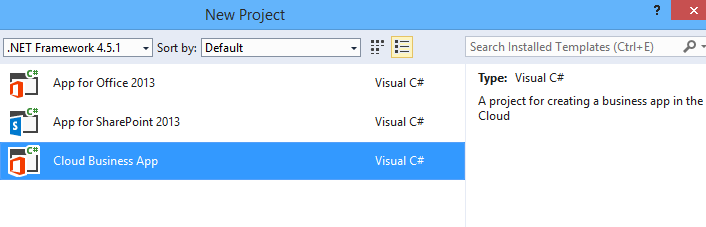
Microsoft already has some support for this in Visual Studio and elsewhere – check out Cloud Business Apps, for example – but it could do more to surface this and make it easy for developers. Nadella talked about SDK support for iOS and other devices.

Microsoft hardly mentioned Android at the event, even though it has a larger market share than iOS. That may be because of the iPad’s popularity in the enterprise, or does it show reluctance to support the platform of a bitter competitor?

Microsoft is late with Office for iPad; it should perhaps have done this two years ago, but was held back by wanting to keep Office as an exclusive for Windows tablets like Surface, as well as arguments with Apple over whether it should share subscription income (I do not know how that has been resolved).

There was also a brief introduction to the Enterprise Mobility Suite, which builds on existing products including Azure Active Directory, InTune (for device management) and Azure Rights Management to form a complete mobility management suite.

Nadella made a confident performance, Office for iPad looks good.

What is coming up at Build, Microsoft’s developer conference next week? Nadella said that we will hear about innovations in Windows, among other things. Following the difficulties Microsoft has had in marketing Windows 8, this will be watched with interest.

Flash developers fret as Adobe doubles down on PhoneGap


Adobe has announced Experience Manager Apps for Marketers and Developers. This comes in two flavours: Experience Manager Apps is for marketers, and PhoneGap Enterprise is for developers. The announcements are unfortunately sketchy when it comes to details, though Andre Charland’s post has a little more:

  • Better collaboration – With our new PhoneGap Enterprise app, developer team members and business colleagues can view the latest version of apps in production, development and staging

  • App editing capabilities – Non-developer colleagues can edit and improve the app experience using a simple drag-and-drop interface from the new Adobe Experience Manager apps; this way developers can focus on building new features, not on making updates.

  • Analytics & optimization – Teams can immediately start measuring app performance with Adobe Analytics; we’re also planning to incorporate functionality so teams can start A/B testing their way to higher app engagement and monetization using Adobe Target.

  • Push notifications – Engage your customers on-the-go with push notifications from Adobe Campaign

  • Support and training – PhoneGap Enterprise comes with SLA and support so customers can be rest assured that Adobe PhoneGap has their back.

Head over to the PhoneGap Enterprise site and you get nothing more than a “Get in touch” button.

image

Announcement-ware then. Still, enough to rile Flash and AIR (Adobe Integrated Runtime) developers who feel that Adobe is abandoning a better technology for app development. Despite the absence of the Flash runtime on Apple iOS, you can still build mobile apps by compiling the code with a native wrapper.

Adobe… this whole thread should make you realize what an awesome platform and die hard fans you have in AIR. Even after all that crap you pulled with screwing over Flex developers, mitigating Flash to just games, retreating it from the web, killing AS4 and god knows what else you’ve done to try to kill the community’s spirit. WE STILL WANT AIR!

says one frustrated developer.

Gary Paluk has also posted on the subject:

I have invested 13 years of my own development career in Adobe products and evangelized the technology over that time. Your users can see that there is a perfectly good technology that does more than the new HTML5 offerings and they are evidently frustrated that you are not supporting developers that do not understand why they are being forced to retrain to use inferior technologies.

Has Adobe in fact abandoned Flash and AIR? Not quite; but as this detailed roadmap shows, plans for a next-generation Flash player have been abandoned and Adobe is now focused on “web-based virtual machines,” meaning I guess JavaScript and other browser technologies:

Adobe will focus its future Flash Player development on top of the existing Flash Player architecture and virtual machine, and not on a completely new virtual machine and architecture (Flash Player "Next") as was previously planned. At the same time, Adobe plans to continue its next-generation virtual machine and language work as part of the larger web community doing such work on web-based virtual machines.

From my perspective, Adobe seemed to mostly lose interest in the developer community after its November 2011 shift to digital marketing, other than in an “apps for marketing” context. Its design tools on the other hand go from strength to strength, and the transition to subscription in the form of Creative Cloud has been brilliantly executed.

Nokia’s puzzling Android announcement: Nokia X

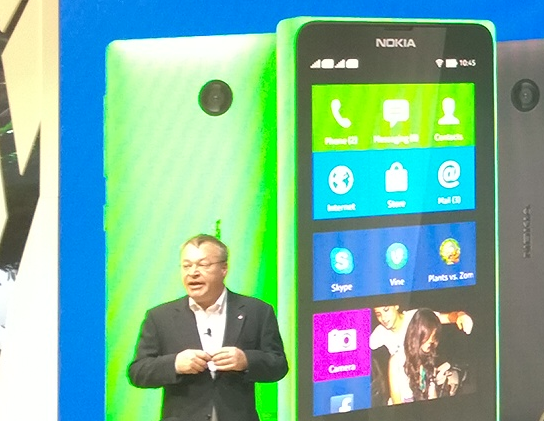
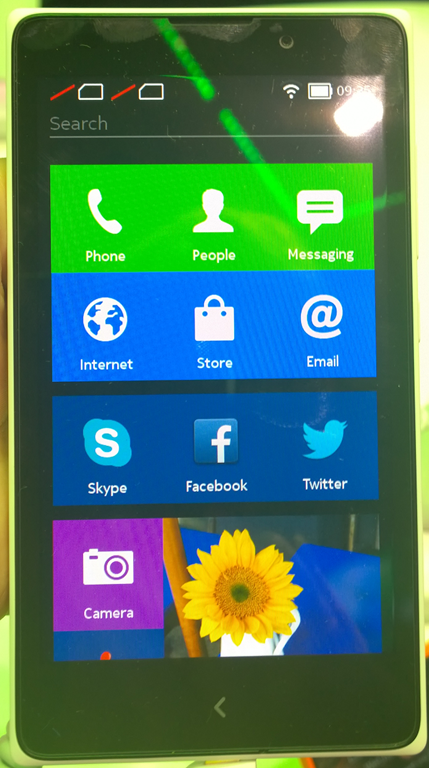
Nokia has announced the X range: Android smartphones connected to Microsoft/Nokia services including Bing search, OneDrive cloud storage, Nokia Here maps, and Nokia Music.
image

The phones, according to Nokia, are aimed at the “affordable” market especially in “growth markets” or in other words, less developed territories.
image

The stated reason for Nokia X is combine the rich Android app ecosystem – apart from Google’s own apps which largely will not run because of their dependence on proprietary Google Play services – with a “feeder” for the cloud services which are shared with the Lumia range. The UI is tiled and the phones have the look and feel of cut-down Lumia more than Android. Nokia’s Stephen Elop stated that Lumia and Windows Phone remains Nokia’s primary smartphone strategy.

Note that although Nokia is being acquired by Microsoft, the deal is not complete, and Nokia’s management is equally as independent of Microsoft as it was this time last year.

Here’s the puzzle though. Elop also announced that the low-end Windows Phone, Lumia 520, outsells Android in the €75-150 price range, exactly the range also occupied by Nokia X. It is no more affordable than Windows Phone. The real rationale then is about the Android app ecosystem rather than affordability.

There are several reasons why Nokia X might not be a big hit.

First, consumers will pick up that these do not offer the same experience as mainstream Android devices running Google services. This might not matter if the Microsoft/Nokia services were superior to those from Google, but that is hard to see. Bing vs Google for search?, Nokia Music vs Google Play music? Google Now vs no equivalent? Play Store vs Nokia Store?

Second, if you want a Microsoft services device, how likely is it that the supporting apps on Android will be superior to those on Windows Phone? Take Office 365, for example. Windows Phone has better support than Android, and that is part of Microsoft’s differentiation.

If Nokia X is a worse Android than Android, and a worse Windows Phone than Windows Phone, what is the point of it and why will anyone buy?

Here is where Nokia X does make sense. It is a strong Plan B for a company that is having second thoughts about the long-term prospects of Windows Phone. Perhaps it could also replace Asha at the low end, if in time Nokia manages to drive the cost down. The Android operating system is free, if you leave out the proprietary Google bits, so there is some cost saving versus Windows Phone.

Unfortunately there is also a negative impact on Lumia, in that Nokia is seen to be wavering in its commitment to Windows Phone and distracted by supporting too many mobile operating systems. There was no Lumia announcement today at Mobile World Congress, which is odd considering that Nokia has a reasonable story to report in terms of platform growth.

What’s on at the QCon London software development conference (and a discount for readers)

The QCon London conference is on in early March (5-7). It is always a conference I look forward to since it is vendor neutral, though with an agile flavour. Although it covers high scale systems it is not the place to go if you think heavyweight Enterprise middleware from a big name vendor will solve your problems. In fact, it was QCon where I heard Martin Fowler and Jim Webber from Thoughtworks expound on Does my Bus look big in this? (what a great title) in which they argue that whatever software need you have, an Enterprise Service Bus is not the best way to meet it. You are not going to hear this kind of disruptive address at vendor-driven events.

So what is on this year? There are 15 tracks, some covering the buzzwords of the day like Big Data Architecture, DevOps, Internet of Things (two different tracks on this) and Bleeding Edge HTML5 and JavaScript (with case studies from Netflix and the Financial Times). Next Gen Cloud intrigues me because it covers multi-cloud services.

Java is almost conspicuous by absence (though it will no doubt show up throughout) but there is a track on Not Only Java which looks at performance tuning, garbage collections, lambdas and streams in Java 8, and more.

In the wake of Snowden’s revelations, Privacy and Security gets a track to itself, long overdue.

So how does QCon choose its tracks? It’s done by a committee of community experts, InfoQ CEO Floyd Marinescu told me.

Over 15 people came together, facilitated by QCon, and through an intensive multi-week process debated and voted down our tracks until we had these final 15.   We do place some constraints such as a desire to have a certain balance of tracks to cover areas of innovation of interest to different communities such as project managers, architects, engineers as well as operations people.

What really counts of course is the speakers, and this year they include Jafar Husain (technical lead at Netflix), Eva Andreasson who pioneered deterministic garbage collection, Graham Tackley, director of architecture at Guardian News and Media, Erik Meijer who created Microsoft’s LINQ, and Joe Armstrong, co-inventor of Erlang.

If you book with the code “itwriting50” you will get a £50 discount.

Microsoft and developer trust

David Sobeski, former Microsoft General Manager, has written about Trust, Users and The Developer Division. It is interesting to me since I recall all these changes: the evolution of the Microsoft C++ from Programmer’s Workbench (which few used) to Visual C++ and then Visual Studio; the original Visual Basic, the transition from VBX to OCX; DDE, OLE and OLE Automation and COM automation, the arrival of C# and .NET and the misery of Visual Basic developers who had to learn .NET; how DCOM (Distributed COM) was the future, especially in conjunction with Transaction Server, and then how it wasn’t, and XML web services were the future, with SOAP and WSDL, and then it wasn’t because REST is better; the transition from ASP to ASP.NET (totally different) to ASP.NET MVC (largely different); and of course the database APIs, the canonical case for Microsoft’s API mind-changing, as DAO gave way to ADO gave way to ADO.NET, not to mention various other SQL Server client libraries, and then there was LINQ and LINQ to SQL and Entity Framework and it is hard to keep up (speaking personally I have not yet really got to grips with Entity Framework).

There is much truth in what Sobeski says; yet his perspective is, I feel, overly negative. At least some of Microsoft’s changes were worthwhile. In particular, the transition to .NET and the introduction of C# was successful and it proved an strong and popular platform for business applications – more so than would have been the case if Microsoft had stuck with C++ and COM-based Visual Basic forever; and yes, the flight to Java would have been more pronounced if C# had not appeared.

Should Silverlight XAML have been “fully compatible” with WPF XAML as Sobeski suggests? I liked Silverlight; to me it was what client-side .NET should have been from the beginning, lightweight and web-friendly, and given its different aims it could never be fully compatible with WPF.

The ever-expanding Windows API is overly bloated and inconsistent for sure; but the code in Petzold’s Programming Windows mostly still works today, at least if you use the 32-bit edition (1998). In fact, Sobeski writes of the virtues of Win16 transitioning to Win32s and Win32 and Win64 in a mostly smooth fashion, without making it clear that this happened alongside the introduction of .NET and other changes.

Even Windows Forms, introduced with .NET in 2002, still works today. ADO.NET too has been resilient, and if you prefer not to use LINQ or Entity Framework then concepts you learned in 2002 will still work now, in Visual Studio 2013.

Why does this talk of developer trust then resonate so strongly? It is all to do with the Windows 8 story, not so much the move to Metro itself, but the way Microsoft communicated (or did not communicate) with developers and the abandonment of frameworks that were well liked. It was 2010 that was the darkest year for Microsoft platform developers. Up until Build in October, rumours swirled. Microsoft was abandoning .NET. Everything was going to be HTML or C++. Nobody would confirm or deny anything. Then at Build 2010 it became obvious that Silverlight was all-but dead, in terms of future development; the same Silverlight that a year earlier had been touted as the future both of the .NET client and the rich web platform, in Microsoft’s vision.

Developers had to wait a further year to discover what Microsoft meant by promoting HTML so strongly. It was all part of the strategy for the tablet-friendly Windows Runtime (WinRT), in which HTML, .NET and C++ are intended to be on an equal footing. Having said which, not all parts of the .NET Framework are supported, mainly because of the sandboxed WinRT environment.

If you are a skilled Windows Forms developer, or a skilled Win32 developer, developing for WinRT is a hard transition, even though you can use a familiar language. If you are a skilled Silverlight or WPF developer, you have knowledge of XAML which is a substantial advantage, but there is still a great deal to learn and a great deal which no longer applies. Microsoft did this to shake off its legacy and avoid compromising the new platform; but the end result is not sufficiently wonderful to justify this rationale. In particular, there could have been more effort to incorporate Silverlight and the work done for Windows Phone (also a sandboxed and touch-based platform).

That said, I disagree with Sobeski’s conclusion:

At the end of the day, developers walked away from Microsoft not because they missed a platform paradigm shift. They left because they lost all trust. You wanted to go somewhere to have your code investments work and continue to work.

Developers go where the users are. The main reason developers have not rushed to support WinRT with new applications is that they can make more money elsewhere, coding for iOS and Android and desktop Windows. All Windows 8 machines other than those running Windows RT (a tiny minority) still run desktop applications, whereas no version of Windows below 8 runs WinRT apps, making it an easy decision.

Changing this state of affairs, if there is any hope of change, requires Microsoft to raise the profile of WinRT among users more than among developers, by selling more Windows tablets and by making the WinRT platform more compelling for users of those tablets. Winning developer support is a factor of course, but I do not take the view that lack of developer support is the chief reason for lacklustre Windows 8 adoption. There are many more obvious reasons, to do with the high demands a dual-personality operating system makes on users.

That said, the events of 2010 and 2011 hurt the Microsoft developer community deeply. The puzzle now is how the company can heal those wounds but without yet another strategy shift that will further undermine confidence in its platform.

Visual Studio 2013 update 1: avoid the RC if you use C++

Microsoft has released Visual Studio 2013 Update 1 RC which I installed for a look. It has a “go-live” license, which means you can use it in production, and when the final version comes out you will be able to install it over the top, so it sounded safe enough.

Update 1 is only a bug-fix release – the fixes are listed in the link above. “When you edit multiple resources in Resource Editor, Visual Studio crashes randomly,” is one, so if that affects you, you might want to install it.

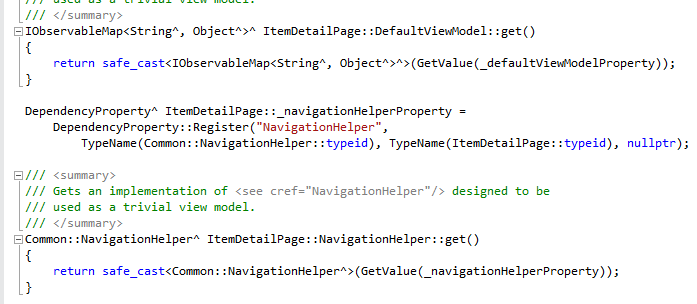
Unfortunately the RC introduces a new problem. The syntax highlighting in the C++ editor is broken. Here is a snippet of code before the update:

image

and after

image

Microsoft is aware of the issue and apparently the RTM update will be OK.

While investigating this, I discovered another issue. Visual Studio 2013 was crashing whenever I tried to open a C++ project. If I tried to debug Visual Studio with a new instance, the new instance would crash too. I uninstalled Update 1 RC but that did not fix it. This post on StackOverflow does not describe exactly the same issue, but did lead me to suspect Xamarin, an add-on for Android and iOS development with C#. I uninstalled Xamarin and the problem disappeared; Visual Studio seems to start up more quickly too. A shame as I like the product.

Update: the final Update 1 is now available. What’s in Update 1: http://support.microsoft.com/kb/2911573

Download: http://go.microsoft.com/fwlink/?LinkId=301714

Do you miss manuals? Why and why not …

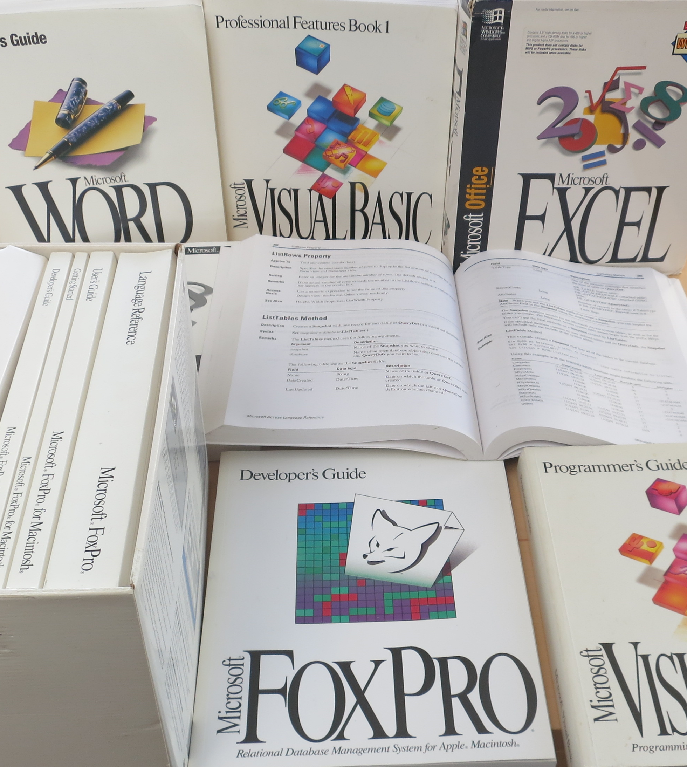
It’s that time of year. I keep more than I should, but now and again you have to clear things out. I don’t promise to dispose of all of these though: they remind me of another era, when software came in huge boxes packed with books.

image

If you purchased Microsoft Office, for example, you would get a guide describing every feature, as well as an Excel formula reference, a Visual Basic reference and so on.

If you purchased a development tool, you would get a complete language reference plus a guide to the IDE plus a developer guide.

The books that got most use in my experience were the references – convenient to work on a screen while using a book as reference, especially in the days before multiple displays – and the developer guides. You did not have to go the way the programmer’s guide suggested, but it did give you a clue about how the creators of the language or tool intended that it should be used.

Quality varied of course, but in Microsoft’s case the standard was high. When something new arrived, you could learn a lot by sitting down with just the books for a few hours.

What happened to manuals? Cost was one consideration, especially as many were never opened, being duplicates of what you had already. Obsolescence went deeper than that though. Manuals were always out of date before they printed, especially when update distribution was a download rather than a disk sent out by support (which means from the nineties onward).

Even without the internet, manuals would have died. Online help is cheaper to distribute and integrates with software – press F1 for help.

Then add the power of the web. Today’s references are online and have user comments. Further, the web is a vast knowledgebase which, while not wholly reliable, is far more productive than leafing through pages and pages trying to find the solution to some problem that might not even be referenced. In many cases you could post a question to StackOverflow and get an answer more quickly.

Software has bloated too. I am not sure what a full printed documentation set for Visual Studio 2013 would look like, but it would likely fill a bookshelf if not a room.

When software companies stopped sending out printed manuals, the same books were produced as online (that is, local, but disk-based) help. Then as the web took over more help went to the web, and F1 would either open the web browser or use a help viewer that displayed web content. There are still options for downloading help locally in many development tools.

Nothing to miss then? I am not so sure. It strikes me that the requirement to deliver comprehensive documentation was a valuable discipline. I wonder how many bugs were fixed because the documentation team raised a query about something that did not seem to work right or make sense?

Another inevitable problem is that since documentation no longer has to be in the box (or in the download), some software is delivered without adequate documentation. You are meant to figure it out via videos, blog posts, online forums, searches and questions.

A good documentation team takes the side of the user – whether end user, developer, or system administrator, depending on context. They write the guide by trying things out, and goad the internal developers to supply the information on what does and does not work as necessary. That can still happen today; but without the constraint of having to get books prepared it often does not.

Microsoft Project Siena: another go at the spirit of Visual Basic

Remember Visual Basic? By which I mean, not the current language that is a case-insensitive alternative to C# that does much the same thing, but the original rapid app development tool that democratised Windows development back in 1991. At the time, Windows development was a sought-after skill but rather difficult. VB meant anyone could create an application; pros could build excellent ones, amateurs something ugly and unmaintainable, but nevertheless something that worked. The transition to .NET brought many benefits, but also more complexity. The latest evolution of the Windows client, the Windows Runtime, is also challenging to get right (I am currently writing a simple C# game on the platform).

Microsoft has been looking for a new “VB” for years. 2007: Popfly (now abandoned). 2011: Lightswitch. Now we have Project Siena.

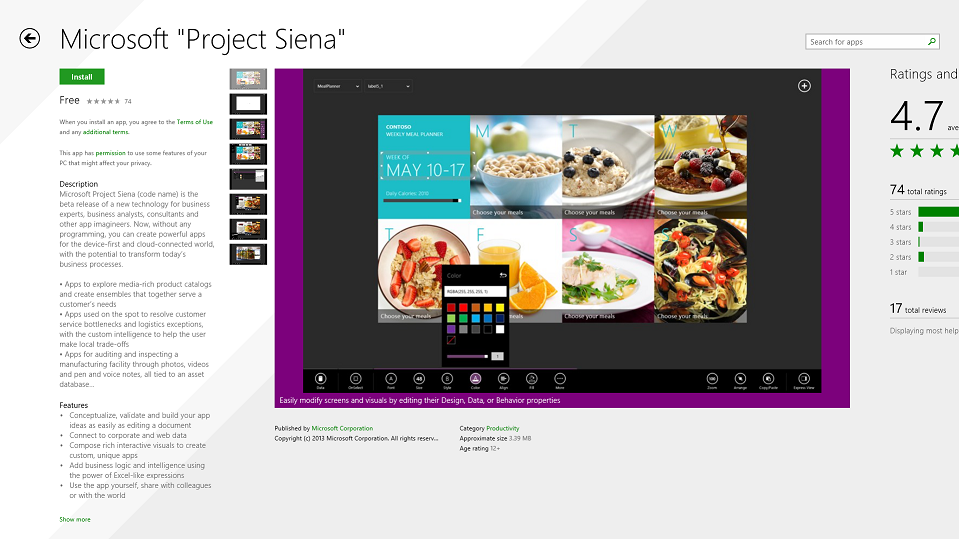
image

Siena is an app for building apps. An app is a Siena document with a .siena extension. Here is what Microsoft’s Bryan Group says:

Microsoft Project Siena (code name) is the beta release of a new technology for business experts, business analysts, consultants, and other app imagineers. Now, without any programming, you can create powerful apps for the device-first and cloud-connected world, with the potential to transform today’s business processes.

Building Siena apps is as easy as editing a document. Place some visuals on a canvas. Hook them up to your data. Customize how your app looks and works. Then, if you need special logic and intelligence, write Excel-like expressions. You can use your app immediately, or share it with colleagues or the world.

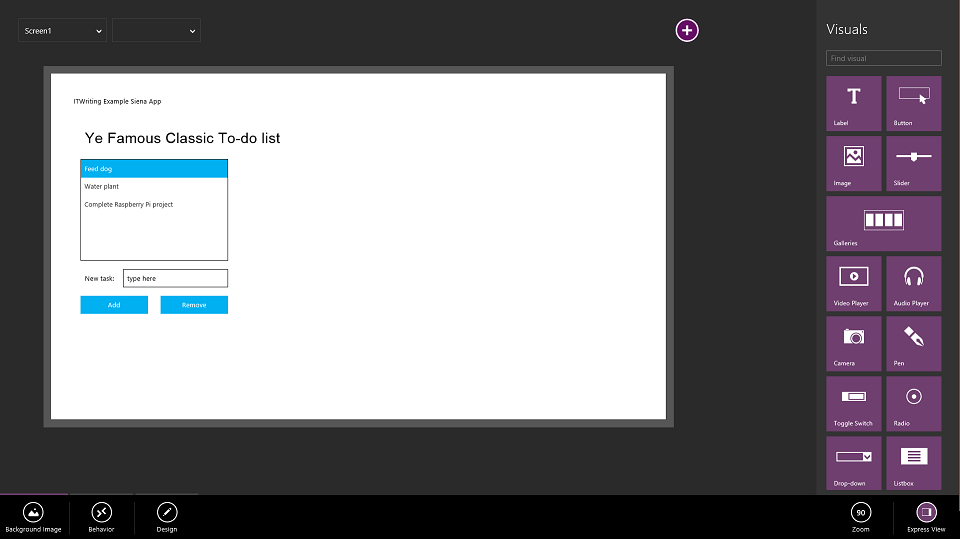
This sounds great to me. I installed it and set about building an app. I decided to create the same app I have used to try out dozens of programming tools over the years: a to-do list with the ability to add and remove tasks

image

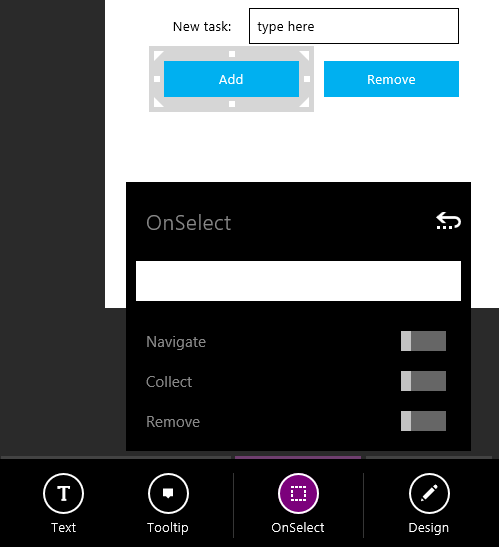
Building the user interface went OK, but how do I add and remove items from the list? I have got as far as figuring out that I need to type the right magic into the OnSelect property of a button:

image

I will let you know when I have worked out what to do next. I will observe that the environment is geared towards data binding, rather than directly updating the user interface, and remote data, such as binding to tables in Azure Mobile Services, a REST API, an RSS feed or a SharePoint list. However you can also bind to an Excel spreadsheet for local data.

Unfortunately there is no “Run” button. You can preview your Siena app by pressing F5 or tapping the Run button in the top app bar.

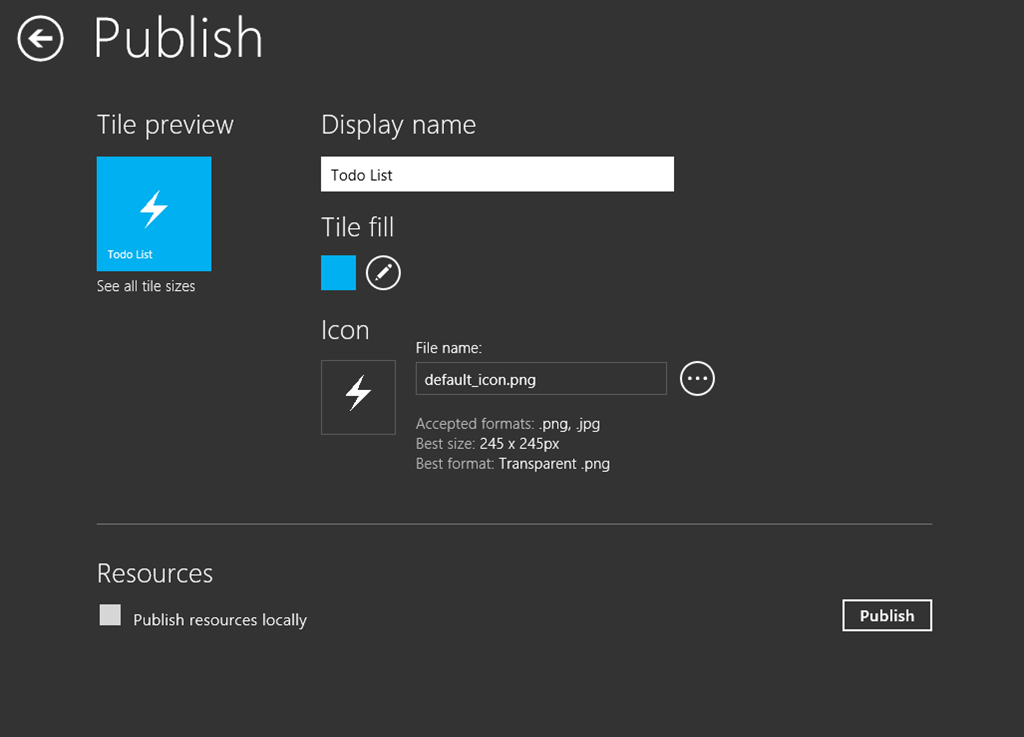
To deploy your Siena app, you hit Publish:

image 

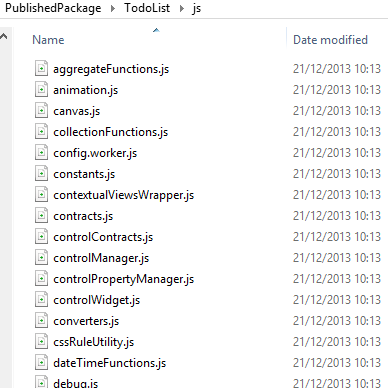
This creates a package of files, including InstallApp.exe. Siena generates HTML and JavaScript so you can learn a lot about the environment by poking around in the generated files.

image

Run InstallApp.exe and the app installs into your local PC. Mine runs fine, it just does not work yet.

Siena, as is usual for this type of release, suffers from lack of documentation. There is a function reference and a few sketchy help topics. There are also some sample apps. Here is what the Personnel Manager has in the OnSelect of its Add button; perhaps this is a clue:

UpdateIf(Assoc,ID = ThisItem!ID,{AssignedTo:SelectedDepartment, Time:Now()}); RemoveIf(SelectedAssociates, ID = ThisItem!ID)

While it is great to have a genuinely easy visual interface builder, the development features of Visual Studio are greatly missed; the code editor as far as I can tell is limited to a single line in a text input field, though you do get a squiggly underline if you do it wrong, and a bit of code completion.

How is the average “business expert, business analyst, consultant, and other app imagineer” going to get on with Project Siena? That is the question; and in the current preview I’d guess they will be flummoxed and go straight back to Excel or Access, though I would love to be proved wrong.

It looks like a lot of work has gone into this though, and no doubt better documentation and enhanced features are on the way.

Microsoft cloud account problems

I am working extensively with Visual Studio 2013, Office 365 and Windows Azure, researching cloud development on Microsoft’s platform. It is in general a reasonable experience, but the way Microsoft manages its cloud accounts is a constant annoyance and sometimes a source of bugs.

The problem is that you cannot manage with just one Microsoft cloud account. I have an MSDN subscription which is a Microsoft account, and an Office 365 subscription for which I log in with an Organizational account, for example. Microsoft accounts are for accounts with Microsoft itself, while Organizational accounts are controlled by my business. The distinction makes some sense, but Internet Explorer does not cope all that well when you are using both, which for development seems unavoidable.

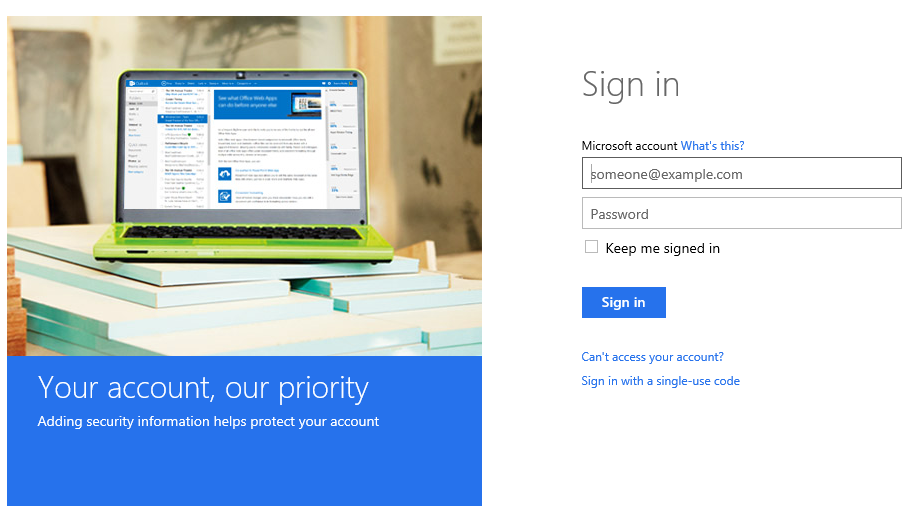
Right now, for example, I have encountered a bug. I want to log in to Office 365, so I browse to http://portal.microsoftonline.com. However, this is redirecting automatically to login.live.com (it should not do this), which is a Microsoft account. So I get this screen:

image

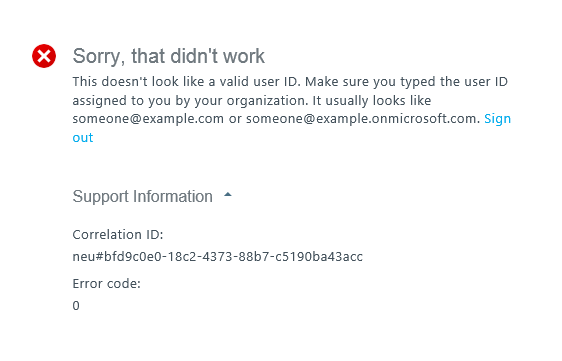
This is for a Microsoft account, which will not work with Office 365. If I now present Organizational account credentials, it says the account is not recognized. If I present valid Microsoft account credentials, I get an error. “Sorry, that didn’t work”.

image

Agreed – but if I now click Sign out, I bounce back to the very same screen. In other words, I cannot sign out.

I have also seen the scenario where you cannot sign out of Office 365. You choose Sign out, Internet Explorer thinks for a moment, then logs you back in automatically. This may be a consequence of checking the mysterious “Keep me signed in” option when logging into Office 365. This should only keep you signed in until you specifically log out, but it can fail in both directions, asking you to sign in again later, or failing to sign you out. “Keep me signed in” is actually required for some features to work properly, such as Open in Explorer (or WebDav) in SharePoint online.

The inability to sign out is a security issue, since you may need to leave your machine, think you have signed out, and find someone else can access your account; though I suppose you can lock your Windows account to overcome this.

It can also be a practical problem. As a developer, you might want to log in with an Office 365 administrator account to configure a new app, and then with a non-administrator account to test. You need to be able to switch accounts for this purpose. It might be better to use a virtual machine for one of the two accounts.

I am not sure what the fix is, though it usually starts working again eventually. As ever, rebooting Windows may well help. Microsoft has a problems when signing out article which hints at some of these problems; it suggests that you to a couple of special logout urls to log out from an organizational account and logout from a Microsoft account but this does not always work. It also suggests clearing all cookies, which is a nuisance because then have to log back in to all your internet accounts, but even this can fail in my experience. Using another browser is a partial workaround. I do not know if you can get this problem in other browsers.

Visual Studio can also get confused. Imagine you are developing an Office 365 application hosted on Azure. You might have a Microsoft account for Azure along with the Organizational account for Office 365. You proceed through a publish wizard which needs both sets of credentials, and you are likely to get an error in my experience.

I can understand that this stuff is complex to get right, but from the user’s perspective logging in and logging out is basic functionality and something Microsoft should get right.rrrrrrrrr