Category Archives: microsoft

File operations in Windows: the good and the bad, the past and the future

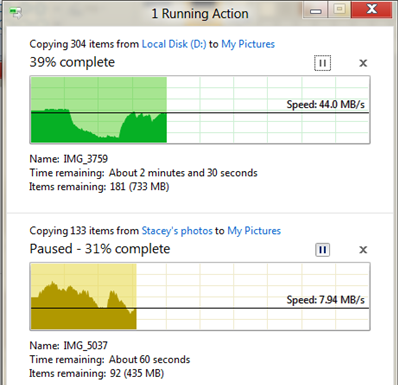
Microsoft’s Windows chief Steven Sinofksy has posted details of what file operations look like in Windows 8. There are a few changes, including a consolidated view of all current file operations that lets you pause and resume any of them. You can also click for more details and get a pretty graph.

image

Microsoft has also worked on the conflict resolution dialog, the one that says “Copy and Replace”, “Don’t copy”, and “Copy, but keep both files”. I consider this a pretty good dialog, but the new one adds the ability to inspect the actual files or even open them to check which is which.

A few observations. First, file operations are hard to get right from a usability perspective. I guess we have all had the experience of trying to help a non-technical user over the phone with some operation like, say, downloading a zip file, extracting it, and doing something with the contents. A common problem is that the user cannot find what they downloaded. Then they are not sure whether they did download it, and do so again. Then they get confused by the ZIP file, which mostly behaves like a folder in Explorer but is not quite the same; and of course since Windows XP SP2 all downloaded files are “blocked” by default which is another source of perplexity.

If you add complications like hidden folders and hidden file extensions in Windows Explorer, what should be a simple task can be really awkward. Let’s say your user has a video file called somemovie.vob that needs to be renamed to somevideo.mpg before it will play. With the default setting, when you rename it you actually get somevideo.mpg.vob. You have to talk the user through showing file extensions before it will work, or maybe open up a command prompt and use ren which does actually work correctly. Microsoft could fix this with a “Change file extension” option in Windows Explorer, but I do not know if this has made it to Windows 8.

The problems with hidden files and hidden file extensions show that something is wrong with the underlying model. Showing them is wrong because they are ugly and confusing; hiding them is wrong because you sometimes need them. It is a partial abstraction that is only partly successful. 

Apple’s solution in iOS is to hide the file system completely. The user will never have these problems. However, this is an autocratic approach that introduces new difficulties. If you have a documents in Pages in iOS you cannot move it directly to DropBox, for example, because there is no accessible file system. You are limited by whatever options the Pages app gives you for doing something with a document.

I believe thought that Apple is on the right lines. The app-centric view makes sense to users, and abstracting the file system so that users do not generally need to care about the location of a file is a reasonable goal. If the File Explorer goes the way of the command prompt, and becomes a tool used rarely by most users, that will mean Windows usability has improved.

Cloud-centric computing has potential to improve this, with your local storage just a cache of your internet-stored documents and data.

Finally, it is worth noting that file operations have got significantly better in Windows. Using the clipboard to copy and paste files, which I think came in with Windows 95, was a big advance. Then Vista fixed another annoyance: multiple file operations would abort on the first failure, leaving you uncertain which files had actually been transferred. Vista broke performance though, and file operations could be hilariously slow as Windows “discovered” files or just seemed to hang with a spinning bagel. Service packs and then Windows 7 pretty much fixed that.

I still like ROBOCOPY though. Hey Microsoft – why doesn’t Explorer have “Copy new and changed files only” or “Mirror directory”?

HP business breakdown and why a PC spin-off could backfire

I had a look at HP’s latest financials, following last night’s triple blast of news from the computer giant. It is ceasing webOS operations, acquiring enterprise knowledge management company Autonomy, and considering (though only considering) a spin-off or other major change to its PC division, the Personal Systems Group. Here is what HP said:

As part of the transformation, HP announced that its board of directors has authorized the exploration of strategic alternatives for the company’s Personal Systems Group. HP will consider a broad range of options that may include, among others, a full or partial separation of PSG from HP through a spin-off or other transaction. (See accompanying press release.)

Looking at the results for the second quarter 2011, here is how the main pieces break down:

$millions

Segment Percentage of revenue Earnings Percentage of total earnings
Services 9,089 28.5% 1225 33.8%
Servers, storage and networking 5396 16.9% 699 19.3%
HP Software 780 2.4% 151 4.2%
Personal systems group 9,592 30.1% 567 15.7%
Imaging and printing 6,087 19.1% 892 24.6%
Financial Services 932 2.9% 88 2.4%

Note that “Earnings” is earnings from operations; HP actually made less money than that, because various other corporate costs have to be deducted. But it gives an idea of where HP’s profit comes from.

So what do these groups do? PSG is notebooks, desktops, workstations and other, where “other” I’d guess will include the webOS mobile devices. In PSG, notebooks accounts for 54% of the total, with desktops taking 38% of the rest. Virtually all of these run Windows.

In servers, storage and networking, 61% is from what HP calls “Industry standard servers”. This is code for Windows server.

Under services, the three big businesses are Infrastructure Technology Outsourcing (42%), Technology Services (30%) and Application Services (19%). The first of these is clear-cut (have HP run your infrastructure), but the second two are both consulting services and on a brief look seem to have some overlap.

Autonomy, by the way, reported revenue of $million 247 in the three months ending June 30 2011 – pretty tiny relative to HP.

A few comments then. It’s worth noting that PSG is the biggest single segment for revenue, but not so for profit, though it is still making a useful contribution.

Imaging and Printing contributes most earnings as a proportion of revenue. I do not know how much of that comes from absurdly overpriced ink cartridges!

If you take PSG together with Industry Standard Servers, you find that around 40% of HP’s revenue comes from boxes running Windows. If you then consider what its printers, network and storage systems attach to, and that a proportion of HP’s consulting business concerns Windows systems and applications, it is obvious that HP’s fortunes are deeply entwined with Microsoft.

If HP removes PSG that will still be true, though less so. But why would HP want do remove PSG? I would guess two main reasons. One is that it is unprofitable relative to the other segments, and the other is that HP foresees the business declining under the force of various well-documented pressures: Apple, mobile, cloud.

It still makes little sense to me. I can understand why HP might want to get out of consumer desktops and laptops, but it seems to me that to supply corporate PCs fits snugly with the rest of HP’s business and has beneficial side-effects. After all, PCs, printers and servers do all plug together both physically and conceptually. Getting rid of PSG might have a negative effect on other parts of HPs business.

In the SMB market, by the way, resellers like HP because unlike Dell it does not mainly sell direct. HP boxes generally work as advertised in my experience, though I rate the laptops less highly than the servers and desktops.

HP discontinues WebOS, considers PC spin-off. Should have stuck with Microsoft

Oh yes, and buys Autonomy, a fast-growing specialist in enterprise knowledge management.

Here’s the news from HP’s announcement:

As part of the transformation, HP announced that its board of directors has authorized the exploration of strategic alternatives for the company’s Personal Systems Group. HP will consider a broad range of options that may include, among others, a full or partial separation of PSG from HP through a spin-off or other transaction. (See accompanying press release.)

HP will discontinue operations for webOS devices, specifically the TouchPad and webOS phones. The devices have not met internal milestones and financial targets. HP will continue to explore options to optimize the value of webOS software going forward.

In addition, HP announced the terms of a recommended transaction for all of the outstanding shares of Autonomy Corporation plc for £25.50 ($42.11) per share in cash.

A few quick comments. First, the failure of webOS does not surprise me. There is not much wrong with webOS as such; in pure technical terms it deserves better. Its focus on adapting web technologies for local mobile applications is far-sighted; it is a more interesting operating system than Android and in some ways it is surprising that it went to HP and not to Google, which is a web technology specialist.

The problem is that HP, despite its size, is not big enough to make a success of webOS on its own. This was my comment from just over a year ago:

Mobile platforms stand (or fall) on several pillars: hardware, software, mobile operator partners, and apps. Apple is powering ahead with all of these. Google Android is as well, and has become the obvious choice for vendors (other than HP) who want to ride the wave of a successful platform. Windows Phone 7 faces obvious challenges, but at least in theory Microsoft can make it work though integration with Windows and by offering developers a familiar set of tools, as I’ve noted here.

It is obvious that not all these platforms can succeed. If we accept that Apple and Android will occupy the top two rungs of the ladder when it comes to attracting app developers, that means HP webOS cannot do better than third; and I’d speculate that it will be some way lower down than that.

Frankly, if HP did not want to do Android, it should have stuck with Microsoft. But this is where the webOS news ties in with the announcement about he Personal Systems Group. HP fell out with Microsoft last year, as I noted in my 2010 retrospective. I said the two companies should make up; but it looks as if HP is more inclined to give up on PCs and pursue other lines that have better margins – like enterprise software.

I am puzzled though by the PSG announcement. It is always curious when a company announces that it might or might not do something, and the fact that HP says it is considering a spin-off of its PC division will be enough to makes its customers uncertain about the long-term future of HP PCs and some of them will buy elsewhere as a result. It would have paid HP either to say nothing, or to be more definite and aim for a speedy transition.

All this, on the eve of Microsoft’s detailed unveiling of Windows 8. What are the implications? More than I can put into a single post; but like Gartner’s reports of dramatically declining PC sales in Western Europe presented earlier this week, this is a sign of structural change in the industry.

Microsoft will be glad of one thing: it no longer has this major partner promoting a rival mobile and tablet operating system. Note that HP still is a major partner: even if it sells the Personal Systems Group, its server and services business will still be deeply entwined with Windows.

Reports of 19% decline in Western European PC market show structural change

As if we needed telling, a new Gartner report shows a steep decline in the PC market in Western Europe. A “PC” in this context includes Macs but excludes smartphones and what Gartner called “media tablets”, mostly Apple iPads. A few figures comparing shipments in the second quarter 2011 with the same period in 2010:

  • Total PC sales down 18.9%
  • Netbook sales down 53%
  • Desktop PCs down 15.4%
  • Apple up 0.5%
  • Consumer PC market down 27%

What interests me here is not so much the normal ebbing and flowing of the PC market, but structural change indicating a switch away from PCs and laptops to more lightweight mobile devices. I believe this is evidence of that, though the economy is weak and extending the life of existing PCs is an obvious saving both for businesses and consumers.

Still, the dramatic decline in netbook sales suggests that consumers really are buying the more expensive iPad in preference. If you believe that consumers are to some extent ahead of business in their technology choices, then we can expect more of the same in the corporate market too.

No doubt alarm bells have been ringing in Microsoft’s Redmond headquarters for some time. The company is betting on Windows 8 to rescue its operating system from permanent decline, which is why next month’s BUILD conference is so critical. Nevertheless, it will be a year or so before we get new-style tablets running Windows 8, so will it be too late? I tend to think not, just because of the strength of Microsoft in the business world and the importance of Windows for existing applications, but it is interesting to speculate.

One factor which you can argue either way, in terms of Microsoft’s prospects, is that non-iPad tablets seem to be struggling. HP’s TouchPad and RIM’s PlayBook seem to be selling poorly. Google Android looks more hopeful though overshadowed by legal concerns from multiple sources. In Australia and parts of Europe Apple has successfully barred or delayed sales of Samsung’s Galaxy Tab 10.1, though the latest news is that the ban has been lifted outside Germany.

See also: Fumbling tablet computing – Microsoft’s biggest mistake?

Google is now a hardware company as it announces acquisition of Motorola Mobility and its patents

Google is to acquire Motorola Mobility, a major manufacturer of Android handsets. Why? I believe this is the key statement:

We recently explained how companies including Microsoft and Apple are banding together in anti-competitive patent attacks on Android. The U.S. Department of Justice had to intervene in the results of one recent patent auction to “protect competition and innovation in the open source software community” and it is currently looking into the results of the Nortel auction. Our acquisition of Motorola will increase competition by strengthening Google’s patent portfolio, which will enable us to better protect Android from anti-competitive threats from Microsoft, Apple and other companies.

What are the implications? This will assist Google in the patent wars and perhaps give it some of the benefits of vertical integration enjoyed by Apple with iOS; though this last is a difficult point. The more Google invests in Google Motorola, the more it will upset other Android partners. Google CEO Larry Page says:

This acquisition will not change our commitment to run Android as an open platform. Motorola will remain a licensee of Android and Android will remain open. We will run Motorola as a separate business.

It is unlikely to be so simple; and the main winner I foresee from today’s announcement is Microsoft. Nokia’s decision to embrace Windows Phone rather than Android looks smarter today, since for all its faults Microsoft has a history of working with multiple hardware vendors. The faltering launches of HP’s TouchPad and RIM’s PlayBook have also worked in Microsoft’s favour. I do not mean to understate Microsoft’s challenge in competing with Apple and Android, but I believe it has a better chance than either HP or RIM, thanks to its size and existing market penetration with Windows.

Microsoft will be clarifying its mobile and slate strategy next month at the BUILD conference.

Today’s announcement is also a sign that Google takes Android’s patent problems seriously, as indeed it should. The company’s policy of act first, seek forgiveness later seems to be unravelling. Oracle has a lawsuit against Google with respect to use of Java in Android that looks like it will run and run. FOSS patent expert Florian Mueller argues today that Android also infringes the Linux license, and that this is a problem that cannot easily be fixed. Samsung’s latest Galaxy Tab has been barred from the EU; not entirely a Google issue, but it runs Android.

Note of clarification: Google is acquiring Motorola Mobility, not the whole of Motorola. In January 2011 Motorola split into two businesses. Motorola Mobility is one, revenue in second quarter 2011 around $3.3 billion. The other is Motorola Solutions, revenue in second quarter 2011 around $2 billion.

C++ 11 is approved by ISO: a big day for native code development

Herb Sutter reports that C++ 0x, which will be called C++ 11, has been unanimously approved by the ISO C++ committee. The “11” in the name refers to the year of approval, 2011. The current standard is C++ 98, though amended as C++ 03, so it has taken 8 or 13 years to update it depending on how you count it.

This means that compiler makers can get on with implementing the full C++ 11 standard. Most current compilers implement some of the features already. This Apache wiki shows the current status. A quick glance suggests that the open source GCC is ahead of the pack, followed by Intel C++ and then perhaps Microsoft Visual C++.

C++ 11 is pretty much compatible with C++ 03 so existing code should still work. However there are many new features, enough for Bjarne Stroustrup to say in his feature summary:

Surprisingly, C++0x feels like a new language: The pieces just fit together better than they used to and I find a higher-level style of programming more natural than before and as efficient as ever. If you timidly approach C++ as just a better C or as an object-oriented language, you are going to miss the point. The abstractions are simply more flexible and affordable than before. Rely on the old mantra: If you think of it as a separate idea or object, represent it directly in the program; model real-world objects, and abstractions directly in code. It’s easier now.

Concurrent programming is better supported in C++ 11, important for getting the best performance from modern hardware.

It is curious how the programming landscape has changed in recent year. A few years back, you might have foreseen a day when most programming would be .NET, Java or JavaScript: all varieties of managed code. While those languages do still dominate, native code has come more to the fore, thanks to factors like Apple’s focus on Objective C, and signs of internal conflict at Microsoft over the best language for coding Windows applications.

That said, C++ 11 remains a demanding language to learn and use. As Stroustrup notes, since C++ 11 is a superset of C++ 98 it is technically harder to learn all of it, though new libraries and abstractions should help beginners. The reasons for using or not using C++ are not going to change significantly with this new standard.

Parallels Desktop 6 for Mac: nice work but beware Windows security settings

I’ve just set up Parallels Desktop 6 on a Mac, in preparation for some development work. Installed Parallels, created a new virtual machine, and selected a Windows 7 Professional with SP1 CD image downloaded from Microsoft’s excellent MSDN subscription service.

The way this works is that you install the Parallels application and the create a new virtual machine, selecting a boot CD or image. Next, you have a dialog where you select whether or not you want an Express installation. It is checked by default. I left it checked and proceeded with the install.

image

The setup was delightfully smooth and I was soon running Windows on the Mac. I chose a “Like my PC” install so that Windows runs in a window. The alternative is to hide the virtual Windows desktop and simply to show Windows applications on the Mac desktop.

Everything seemed fine, but I was puzzled. Why was Windows not installing any updates? It turns out that the Express install disables this setting.

image

It also sets user account control to an insecure setting, where the approval dialog does not use the secure desktop.

image

The Parallels Express install also sets up an Administrator account with a blank password, so you log on automatically.

No anti-virus is installed, which is not surprising since Windows does not come with anti-virus software by default.

These choices make a remarkable difference to the user experience. Set up was a pleasure and I could get to work straight away, untroubled by prompts, updates or warnings.

Unfortunately Windows in this state is insecure, and I am surprised that Parallels sets this as the default. Disabling automatic updates is particularly dangerous, leaving users at the mercy of any security issues that have been discovered since the install CD was built.

In mitigation, the Parallels user guide advises that you set a password after installation – but who reads user guides?

If you uncheck the Express Install option, you get a normal Windows installation with Microsoft’s defaults.

These security settings are unlikely to matter if you do not connect your Windows virtual machine to the internet, or if you never use a web browser or other Internet-connected software such as email clients. If you do real work in Windows though, which might well include Windows Outlook since the Mac version is poor in comparison, then I suggest changing the settings so that Window updates properly, as well as installing anti-virus software such as the free Security Essentials.

Charlie Kindel leaving Microsoft

Charlie Kindel, Windows Phone 7 developer champion at Microsoft, is leaving to start a new company, though he is vague about exactly what it will be:

Charlie will be staying in the Seattle area building a new tech company. The new company will be in stealth mode initially but involves advertising, mobile, cloud computing, and youth athletics.

says the press release.

He goes back a long way at Microsoft, 21 years to be precise. Among the accomplishments he claims:

  • Built ActiveX and DCOM
  • Shipped Internet Explorer 3.0
  • Drove the development of the home networking features in Windows XP
  • Founded eHome and shipped the first version of Windows Media Center
  • Drove the invention of Windows Smart Displays and Windows Media Center Extenders
  • Was the driving force behind Windows Home Server.

I remember IE 3.0 coming out. Surprising though it may seem today, it was an impressive achievement, though history has not been kind either to ActiveX or to DCOM.

Real-world Microsoft Team Foundation Server: Not very good, says ThoughtWorks

I spoke to Sam Newman, who is European Continuous Delivery Practice Lead at ThoughtWorks, a software development company. Needless to say, we talked extensively about Continuous Delivery and I will be reporting on this separately; but I was also interested in his comments on Microsoft’s Team Foundation Server (TFS).  He told me that ThoughtWorks teams often end up working with it at their .NET clients, but it is problematic. In one case, he said, 6% of productive time was absorbed dealing with TFS.

What was the problem, performance, bugs, features lacking?

When we’ve looked at the problems we’ve had, a lot of it unfortunately comes down to the version control system. It’s not very good. It’s slow, you can’t do rollbacks, sometimes things go missing, you get locks. When we talked about 6% of time, they were things like waiting for a solution to expand in Visual Studio. A lot of those issues are in the version control system.

A frustration is that you cannot use TFS with any version control system other than its own.

Every other build server in the world, from Anthill to Go to Cruise Control to Hudson, you can put in at least 10 version control systems. In TFS they are all coupled. So you can’t take the version control and point it at Subversion. That might resolve a lot of the issues.

Why is TFS so widely used? It is because it comes in the box, says Newman.

I can’t think of a single client that wanted a tool, went out into the marketplace, and selected TFS because it is the right tool for them. Most clients use TFS because it comes with their Enterprise MSDN licence.

I have tried TFS myself and found it pretty good; but then I am just testing it on small projects as a solo developer, so it is hard for me to replicate the experience of a real-world team. You would have thought that performance issues, such as waiting ages for a solution to expand in Visual Studio, could be solved by tracing the reason for the delay; but apparently this is not easy.

This is anecdotal evidence, and of course there may be plenty of TFS installations out there that work very well; I would be interested in hearing of counter examples. I am also not sure to what extent the problems apply to all versions of TFS, or whether there is improvement in TFS 2010.

Newman recognizes that anecdotal evidence is not much use: he says ThoughtWorks is trying to collect some solid data that can be used both to discuss with clients making version control and build system choices, and with Microsoft.

Performance is a feature, and makes a large contribution to user satisfaction. The first release of Outlook 2007 was extraordinarily slow in some setups, and I remember the pain of clicking on a folder and then waiting tapping my fingers while it thought about expanding. It sounds like some TFS users are having a similar experience but in Visual Studio.

GPU Programming for .NET: Tidepowerd’s GPU.NET gets some improvements, more needed

When I attended the 2010 GPU programming conference hosted by NVIDIA I encounted Tidepowerd, which has a .NET library called GPU.NET for GPU programming.

GPU programming enables amazing performance improvements for certain types of code. Most GPU programming is done in C/C++, but Typepowerd lets you run code in .NET, simply marking any methods you want to run on the GPU with a [kernel] attribute:

[Kernel]

private static void AddGpu(float[] a, float[] b, float[] c)

{

// Get the thread id and total number of threads

int ThreadId = BlockDimension.X * BlockIndex.X + ThreadIndex.X;

int TotalThreads = BlockDimension.X * GridDimension.X;

for (int ElementIndex = ThreadId; ElementIndex < a.Length; ElementIndex += TotalThreads)

{

c[ElementIndex] = a[ElementIndex] + b[ElementIndex];

}

}

GPU.NET is now at version 2.0 and includes Visual Studio Error List and IntelliSense support. This is useful, since some C# code will not run on the GPU. Strings, for example, are not supported. Take a look at this article which lists .NET OpCodes that do not work in GPU.NET.

GPU.NET requires an NVIDIA GPU with CUDA support and a CUDA 3.0 driver. It can run on Mac and Linux using Mono, the open source implementation of .NET. In principle, GPU.NET could also work with AMD GPUs or others via a vendor-specific runtime:

image

but the latest FAQ says:

Support for AMD devices is currently under development, and support for other hardware architectures will follow shortly.

Another limitation is support for multiple GPUs. If you want to do serious supercomputing relatively cheaply, stuffing a PC with a bunch of Tesla GPUs is a great way to do it, but currently GPU.NET only used one GPU per active thread as far as I can tell from this note:

The GPU.NET runtime includes a work-scheduling system which can distribute device method (“kernel”) calls to multiple GPUs in the system; at this time, this only works for applications which call device-based methods from multiple host threads using multiple CPU cores. In a future release, GPU.NET will be able to use multiple GPUs to execute a single method call.

I doubt that GPU.NET or other .NET libraries will ever compete with C/C++ for performance, but ease of use and productivity count for a lot too. Potentially GPU.NET could bring GPU programming to the broad range of .NET developers.

It is also worth checking out hoopoe’s CUDA.NET and OpenCL.NET which are free libraries. I have not done a detailed comparison but would be interested to hear from others who have.