Category Archives: microsoft

Which Microsoft cloud? Windows Server 8 shows Azure is not everything

I was fortunate to attend a two-day drilldown into what is coming in Windows Server 8 last week, just before the BUILD conference under way in Anaheim, California. It is an impressive release, with two things standing out for me.

One is that Microsoft has successfully re-engineered Windows Server so that it is both sufficiently modular that you can transition from Server Core to full Server and back without reinstall, and also sufficiently detached from the Windows GUI that everything runs and can be configured without the need to log on to the Windows desktop on the server itself. This is a huge achievement.

Second, much of the engineering in Server 8 is focussed on making it better for cloud hosting. This the focus of changes in both Hyper-V and IIS, isolation of virtual networks, proper bandwidth and CPU quotas and throttling, and the ability to move VMs freely between hosts without taking them offline, and to replicate them for failover purposes. You can read more in my piece on The Register.

The question this raises for me is about Windows Server clouds and Azure. Of course Azure runs on Windows Server, but Azure is a platform, all the VMs are stateless, and when you use Azure you are buying into a whole set of services that might or might not match your needs. At a developer event yesterday, one explained how he could not use Azure because he needed to install a third-party application. The Hyper-V role helps a little, but it is not ideal as you still need to solve the stateless problem; at any time, changes you make to the server may be reverted.

If you simply rent plain Windows Server VMs in the cloud, you lose some of the benefits of cloud computing since you are responsible for everything about how the server is configured and maintained; but you also get complete freedom to set it up as you want.

One of the issues with moving from running your own Exchange and SharePoint, for example, to a cloud-hosted service like Office 365 is that you lose control of your destiny. If the service goes down, you have to beg and plead with support to get information and to speed recovery.

Now consider a scenario in which you have your Exchange and SharePoint on hosted Hyper-V VMs with replication (now coming in Server 8) to an alternate provider such as Amazon Web Services, or to your own on-premise servers. If the service goes down, you failover to the replicas.

Another compelling idea relates to live migration. Imagine you have a VM running on premise, and want to move it to the cloud. Without interruption of service, you could in principle migrate it from on-premise to the cloud and back at will. You need a fast connection of course, but this aspect is constantly improving.

The bottom line: plain Windows Server on a VM has many attractions versus an entire platform like Azure.

The snag is, Microsoft does not offer this type of hosting at the moment. Well, that is not necessarily a snag depending on what you think about hosting with Microsoft; but for some there is considerable reassurance in hosting with a company of Microsoft’s size, and which should in theory have the best understanding of what it takes to host Windows Server.

My guess is that Microsoft will either add this capability to Azure – without the limitations of the Hyper-V role, but with replication and failover – or else develop a new cloud service alongside Azure for this purpose.

My further guess is that it would be popular, possibly more so than Azure is today.

Here comes Windows 8 – but what about the apps?

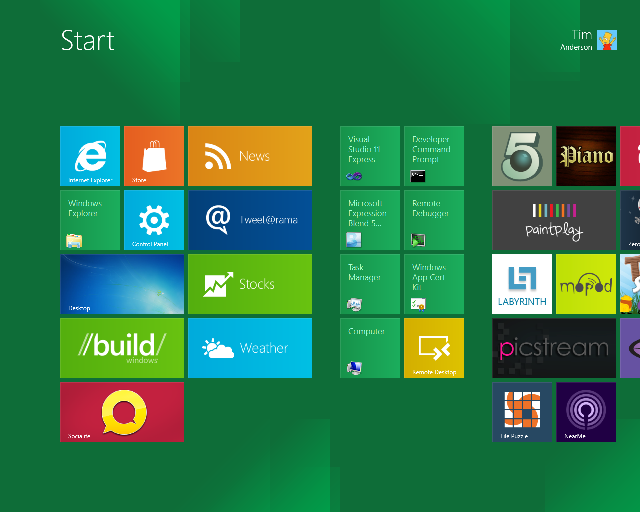
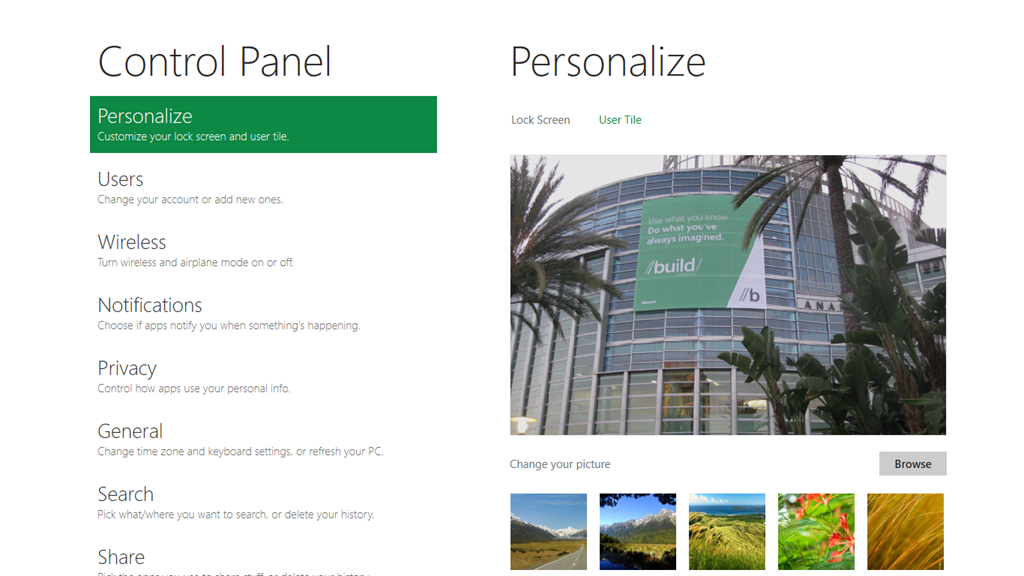
I’ve spent what feels like most of the night trying out the first developer preview of Windows 8, using an Intel tablet PC loaned by Microsoft for that purpose. The early preview is frustrating, in that many of what will be standard apps like Mail and Contacts are missing, but it is already obvious that Microsoft has done a great job with what I am calling the “Metro” platform within Windows 8. Here is Control Panel in the new user interface:

image

This is the touch-optimized personality of tthe new operating system, featuring a Start menu with live tiles like an evolved Windows Phone 7, apps that run full-screen to create an "immersive user interface", and swipe control to show application menus, switch apps, or access standard features.

It is a delight to use; but this is Metro, with its own Windows Runtime (WinRT), a native code API which is wrapped for access by either HTML and JavaScript apps (which also use the IE 10 runtime), or by C/C++, VB or C# apps driving XAML-defined user interfaces – yes, kind of like Silverlight but not Silverlight.
What about all our Windows apps? For that we need the desktop personality in Windows 8. Tap the Desktop tile, or launch a "Desktop" app, and it suddenly appears, looking much like Windows 7.

The problem: while Windows 8 "Metro" looks great, there are currently zero apps for it, or at least only those supplied with the preview, because it is brand new.
In truth then, Microsoft has not quite done what would have been ideal, which is to make Windows touch-friendly. That would have been impossible. Instead, it has integrated Windows with a new touch-friendly platform.

The key question: will this new platform attract the support it needs from developers in order to become successful in its own right, so that we can do most of our work there and retreat to the desktop only for legacy apps, or apps which really need mouse and keyboard?

It is a big ask, and we have seen HP with WebOS, and probably RIM with PlayBook, fail at this task.

Of course it is still Windows; but I do have a concern that a proportion of users will try Windows 8, find the transitions between Desktop and Metro unsettling, and stick with version 7.0.

Let me add these are very much first impressions; and that Metro really does look good. Perhaps it will win; but a lot of momentum has to build behind it for that to be possible.

Building Windows – when Microsoft shows its hand

I’m in Anaheim, California on the eve of Microsoft’s BUILD conference. I have heard the phrase “wait until BUILD” so many times from Microsoft over the last few months that it has given this conference a special flavour. After Wednesday, the company will have to think of another way to avoid awkward questions like what is happening to Silverlight.

This is the latest chapter in the progression of Windows, server client and mobile. In particular, I will be trying to understand Microsoft’s software development platform. Whatever it looks like, it will be diverse, and include native code, HTML and JavaScript, .NET code including Silverlight, and perhaps some new hybrid. What will be the pros and cons of each approach, how do developers create apps that span desktop, tablet and mobile, and how will the delivery model change in the app store era?

Interesting questions; but the other theme is about how effectively Microsoft will compete versus its competition as the importance of desktop Windows shrinks. Cloud, mobile and tablet are the themes here, and after many mis-steps time is running out.

Not much to add except “watch this space” over the next few days; though I would be interested in any specific comments or questions on Microsoft’s strategy.

PhoneGap comes to Windows Phone

Nitobi has announced PhoneGap for Windows Phone 7, nicely timed just before the Microsoft BUILD conference next week.

PhoneGap is a cross-platform mobile development tool that uses the HTML and JavaScript engine on the phone as its runtime, supplemented by extensions which give access to other device features:

After unpackaging the contents of the www folder, your www/index.html file is loaded into an embedded headless browser control. This is essentially the same paradigm as other platforms, except here it is an IE9 browser and not a webkit variant. IE9 is a much more standards-compliant browser than previous IEs, and implements commonly used html5 features like DOMContentLoaded events, addEventListener interfaces, and CSS3. Be sure to use to get the html5 implementation otherwise the browser may fallback to a compatibility mode, and your code will likely choke and die.

The version for Windows Phone 7, just released in preview, is extended to support features including the camera, accelerometer, contacts, and notifications. There is also support for plugins:

PhoneGap-WP7 maintains the plugability of other platforms via a command pattern, to allow developers to add functionality with minimal fuss, simply define your C# class in the WP7GapClassLib.PhoneGap.Commands namespace and derive your class from BaseCommand.

In general Windows Phone 7 is not well supported by cross-platform toolkits, so PhoneGap support is an interesting development. PhoneGap has a high profile currently, and is being integrated into a diverse range of tools ranging from Adobe Dreamweaver to Embarcadero RadPHP, as well as the standard PhoneGap tools based on Eclipse.

Review: Continuous Delivery by Jez Humble and David Farley

I like this book. I know I like it because I find myself wanting to quote from it frequently. It is a book that almost every software developer should read, even if you disagree with parts of it – which is likely, because it is opinionated. The authors always give reasons for their opinions though, which means that if you disagree, you need to articulate why that is; or they may even change your mind. In consequence you find yourself learning as you read.

The authors are software theoreticians, but they are also practitioners; in fact they are practitioners first and theoreticians afterwards. This means they are pragmatic rather than dogmatic. Here is an example. Chapter 13 discusses software dependencies, and page 372 covers circular dependencies, “probably the nastiest dependency problem.” A circular dependency is when component A depends on component B, and component B also depends on component A.

A bad idea; but the authors write:

Surprisingly, we have seen successful projects with circular dependencies in their build systems. You may argue with our definition of “successful” in this case, but there was working code in production, which is enough for us.

As an aside, this kind of dry humour is characteristic, as also evident in remarks like this:

We are certain that, occasionally, manually intensive releases work smoothly. We may well have been unlucky in having mostly seen the bad ones.

The subject of the book is Continuous Delivery. So what is that? Well, if Continuous Integration is about ensuring that your software always builds, then Continuous Delivery is about ensuring that your software always deploys. The final form, as it were, of Continuous Delivery is Continuous Deployment, where you are so confident of your automated build and deploy process that any checked-in code that passes its tests can be deployed immediately. I was confused about the difference between Continuous Delivery and Continuous Deployment so I wrote a post about it; it turns out that there is not much difference.

The principle behind Continuous Delivery is that software is not done until it is released. If the release process is long, arduous and infrequent, then you are not really doing Agile development. A section of chapter 1 is devoted to release anti-patterns, and these form an excellent rationale for taking an interest in Continuous Delivery.

My guess is that anyone who has been involved in professional software development will wince a little while reading through these anti-patterns, thinking “that is what we used to do” or even “that is what we do”.

That said, Humble and Farley do not fall into the trap of merely writing about how not to do it. Rather, they address in some detail the kinds of problems you will face if you decide to embrace the Continuous Delivery methodology. The key ingredient in Continuous Delivery is that pretty much everything must be automated, otherwise it is too difficult to do. But how do you automate something like Acceptance Testing? That is the subject of chapter 8. How do you automate a deployment at all? That is the subject of chapter 6. The authors are not on a higher plane than the rest of us, and much of the advice is straightforward, even at the level of “Always use relative paths,” which is a tip in chapter 6.

The authors talk a lot about testing, as you would expect, but there is also extensive discussion of software configuration management, describing different approaches such as centralised and distributed version control and even specific tools. The chapter on Advanced Version Control is a particularly good read. Humble and Farley articulate the point that branching and merging is antithetical to Continuous Integration and therefore Continuous Delivery:

If different members of the team are working on separate branches or streams then by definition they’re not continuously integrating (p 390)

Does this mean branches are a bad idea? Not always, say the authors, but they also state:

Our strong recommendation is to crate long-lived branches only on release … new work is always committed to the trunk (p 392)

The reason is not only to enable Continuous Integration, but also because merging is complex and error-prone.

Software configuration management is not easy, but it is a relatively mature aspect of software development. This is less true of what you might call infrastructure configuration management; yet infrastructure dependencies such as versions and configurations of the operating system or web server are a common reason for deployment failures. Several chapters discuss this problem in detail. In principle, the authors say:

The desired state of your infrastructure should be specified through version-controlled configuration.

This leads to some thoughtful discussion of how to achieve this.

Another theme, as you would expect, is that development and operations people need to be working together and not in isolation. To some extent this is a DevOps book.

A great book then; but there are flaws. One is that there is some repetition because of the way the book is organised. This is good if you are inclined to read chapters in isolation, but not so good if you are reading straight through. In practice I did not find it too annoying, but it is there.

Another issue is that while the authors do cover Microsoft .NET to some extent, this is usually in the form of a brief mention and there is more focus on Java. This may be in part because of their preference for open source. It is still a good read for .NET developers, because the principles are platform-agnostic, but Microsoft platform developers may find it irritating at times. Team Foundation Server, say the authors, is “essentially an inferior knock-off of Perforce” (p 386).

The discussion of specific tools is a strength but also a weakness, in that the tools will change over time and the book will become dated.

This is not the last word on Continuous Delivery, but it is an enjoyable and thought-provoking read. Recommended.


Windows Phone 7 apps, stats and future

Justin Angel, a former Microsoft employee who worked on Silverlight, has posted his analysis of the 24,505 apps he found in the Windows Phone 7 marketplace, exploiting a loophole that lets you get the download links. A few highlights:

  • 97% of the apps are not obfuscated, meaning that it is trivial (with easily available tools) to decompile the source.
  • 90% are Silverlight vs 10% XNA. This is not so much an indicator of the popularity of the two frameworks, but more an indicator of how many apps are graphic-rich games rather than some other kind of utility. Of course if you are making a very simple app, Silverlight is easier than XNA, so that may be a factor too.
  • 99% are C# vs 1% Visual Basic and a smattering of F#. A fascinating stat that makes me wonder what is the future of Visual Basic.

There are more interesting stats about libraries and components used, for which I refer you to the original post.

Does it matter? Well, Windows Phone 7 has not been a big success so far, though the reasons for that are not so much the quality of the OS or the ease of developing apps, but rather its low profile at retail and the fact that most operators and manufacturers don’t really need it: Apple and Android between them pretty much have the market.

That said, there are a few reasons why Windows Phone or some evolution of it may yet be significant. Nokia is betting on it, and while Nokia is undoubtedly in difficulties, this must work in Microsoft’s favour. Further, fear uncertainty and doubt surrounding Android patent and copyright issues may persuade some industry players to give Windows Phone another look.

Perhaps more significantly, when Microsoft unveils its developer strategy at the BUILD conference next week, it is likely that the application model in Windows Phone, or some evolution of it, will integrate with what is planned for Windows 8. NVIDIA is already talking about how Windows 8 will run Windows Phone apps.

For these reasons I believe there is at least a glimmer of hope for Microsoft in the mobile world; certainly the developer story to be officially told next week will be an interesting one.

Full circle for Microsoft database APIs as OLEDB for SQL Server is deprecated

Microsoft’s Eric Nelson has posted about how the OLEDB driver for SQL Server is being deprecated and will not be supported beyond “Denali”, the forthcoming version.

OLEDB was created to be the successor to ODBC – expanding the supported data sources/models to include things other than relational databases. Notably OLEDB was tightly tied to a Windows only technology (COM) whilst ODBC was not (Although we did try and take COM cross platform via partners)

ODBC never did get replaced. What actually happened is that ODBC remained the dominant of the two technologies for many scenarios – and became increasingly used on none Windows platforms and has become the de-facto industry standard for native relational data access.

ODBC was as I recall Microsoft’s first attempt at creating a universal database API.

The death of OLEDB will be slow, according to Nelson. The OLEDB driver for Denali will be supported for seven years following Denali’s release. He also says that OLEDB itself, as opposed to the SQL Server OLEDB driver, is not necessarily being deprecated; though frankly if Microsoft ceases supporting it with its own database I cannot see much future for it.

Note that ADO.NET, which to some extent replaced OLEDB, is not being deprecated. However ADO.NET is only usable from .NET applications. When you consider that Microsoft may be to some extent tilting away from .NET and towards native code, the deprecation of OLEDB becomes even more significant.

ODBC is not particularly easy to use in its raw form. However, you can wrap ODBC with, yes, an OLEDB provider or an ADO.NET provider; or you can wrap the whole lot in an object-relational framework such as Entity Framework.

One more chapter in the long, strange and tortuous history of Microsoft’s data APIs.

Perfect virtualization is a threat to Windows: VMWare aims to embrace and extinguish

One advantage Microsoft Windows has in the cloud and tablet wars is that it it is, well, Windows. Microsoft’s Office 365 cloud computing product largely depends on the assumption that users want to run Office on their local PC or tablet. Windows 8 tablets will be attractive to enterprises that want to continue running custom Windows applications, though they had better be x86 tablets since applications for Windows on ARM processors will require recompilation.

On the other hand, if you can run Windows applications just as easily on a Mac, Apple iPad or Android tablet, then Microsoft’s advantage disappears. Virtualization specialist VMWare is making that point at its VMworld conference in Las Vegas this week. In a press release announcing “New Products and Services for the Post-PC Era”, VMWare VP Christopher Young says:

As our customers begin to embrace this shift to the post-PC era, we offer a simple way to deliver a better Windows-based desktop-as-a-service that empowers organizations to do more with what they already have. At the same time, we are investing in expertise and delivering the open products needed to accelerate the journey to a new way to work beyond the Windows desktop.

Good for Windows, good for what comes after Windows is the message. It is based on several products:

VMView: enables users to work on a remote Windows desktop from a machine running thick or thin client Windows, Mac, iPad or Android. Some versions let you check out a VM for offline working. Virtual desktops have advantages over local ones, in that they are more manageable, more secure, and more robust. Zapping and reinstating a virtual desktop is easier than rebuilding the OS on a physical machine. The new VMView 5.0 claims up 75 percent bandwidth improvement and better 3D graphics. Performance is always compromised to some extent, versus a local operating system, but for many business applications it is more than good enough.

VMWare Horizon: A cloud identity platform which centralizes authentication and access management. You can think of it as VMWare’s cloud-based replacement for Microsoft Active Directory. It is currently focused on access to web-based applications but at VMWorld the company announced its extension to virtual Windows applications, a capability to be in beta by the end of 2011.

Project AppBlast: Lets users run virtual Windows application in an HTML5-capable browser running on any device.

Project Octopus: a data synchronization service to enable collaboration and data-sharing, which will link to VMWare’s other services.

VMWare’s advantage is its strong technology and that Microsoft allowed its own virtualization technologies, including Hyper-V and Remote Desktop Services, to fall behind.

That said, Microsoft has made a substantial effort to catch up in the last few years. Hyper-V and System Center working together form the basis of Microsoft’s private cloud, and under the covers the Azure platform is based on Hyper-V virtual machines. Microsoft’s advantage is the notion that if you are running Windows server and Windows applications anyway, you will be better off with the built-in virtualization features rather than a third-party solution. Microsoft can also afford to undercut VMWare’s prices, because it is bundling virtualization with its operating system. Microsoft has made it easier to run mixed VMWare and Hyper-V systems by supporting VMWare with System Center.

An entrenched competitor is hard to shift though, and VMWare appears to have won the argument with Dell, which has announced the Dell Cloud based on VMWare’s vCloud multi-tenant services.

What is interesting here is not so much the question of who runs Windows applications best, in a variety of virtual scenarios, but the extent to which VMWare succeeds in establishing its own identify system as the heart of an application platform that lets enterprises move seamlessly to a non-Windows world. In other words, VMWare Horizon is now VMWare’s most strategic product. If it succeeds, then it is not only Microsoft that will need to pay attention.

Windows Live Messenger error message hell

Recently I tried to sign into Live Messenger on Windows 7, only to be informed of what appears to be a temporary interruption in service.

image

Show details, by the way, shows Error code: 80040154

I retried and got the same message, so I clicked the Get more information link, which took me here:

image

The help document says that the solution is to reinstall Windows Live Essentials. I confirmed this, not by reinstalling (yet), but by trying Live Messenger on another machine, where I could sign into the same account successfully.

A few observations about this:

  • The error message is incorrect, since the error is apparently on the client whereas the message states it is a temporary problem with the service.
  • Microsoft’s engineers know that the error message is incorrect, since the help document references both the message and the solution.
  • The error message has been incorrect for years, since it applies to both Windows Live Messenger 2009 and 2011.
  • The misleading error message is particularly annoying, since if the user wants to use Live Messenger urgently they may well wait as advised by the message, not realising that the problem can be fixed immediately.
  • The solution is a brute-force one that involves many other applications, including Live Mail and Live Writer (on which I am typing this post). Or is it enough just to reinstall Messenger? The message suggests not. However if you use Live Mail for all your email, you probably want to know whether the uninstall will delete all your email and contacts or not. The referenced article on uninstalling Live Essentials does not say.

How could Microsoft improve this? At risk of stating the obvious:

  • Give an accurate error message.
  • Give a solution which targets the exact problem rather than relying on an uninstall/reinstall procedure that changes many things that are working fine.
  • If this is impossible, at least advise the user in one place concerning their obvious questions, such as “what happens to my stuff”.

Update: I found the cause of this problem. A developer tool beta had overwritten my system path with its own, breaking this among other things. I do not blame any application for breaking in these circumstances. I fixed the Live Messenger problem by performing a Repair on Live Essentials – less risky than uninstall/reinstall, and in this case sufficient.

Another idea if you have this kind of problem is System Restore.

Nevertheless, the error message could do with some work!

Thoughts on Apple and Steve Jobs as he resigns as CEO

image

Steve Jobs has written to Apple’s board of directors:

I have always said if there ever came a day when I could no longer meet my duties and expectations as Apple’s CEO, I would be the first to let you know. Unfortunately, that day has come.

I hereby resign as CEO of Apple. I would like to serve, if the Board sees fit, as Chairman of the Board, director and Apple employee.

As far as my successor goes, I strongly recommend that we execute our succession plan and name Tim Cook as CEO of Apple.

I believe Apple’s brightest and most innovative days are ahead of it. And I look forward to watching and contributing to its success in a new role.

Apple is at times an infuriating company, but it is infused with genius that Jobs has inspired and nurtured.

I do not know how the computing landscape today would look without his influence, but I am convinced that it would be very different and largely worse.

Under Jobs, Apple refined personal computing with successive versions of the Mac, reinvented the music industry with iPod and iTunes, made the first mobile phone that was a delight to use and freed us from the tyranny of mobile operators so that the promise of the mobile internet could be fulfilled, and created the first tablet computer that is sufficiently useable and affordable to bring touch computing to the mainstream.

I count that as four milestones, any one of which would be enough to make Apple a great company. Most companies live forever on their first and only breakthrough idea or technology; only Apple has continued reinventing itself.

Apple inspires devotion from its users not only because of its delightful products, but also because Jobs has fought on our behalf as users, rejecting who-knows-how-many ideas and features that were not quite there and would have spoilt our experience. These are the ideas that most companies deliver as version 1.0 of their product.

Jobs remains at Apple, but his letter suggests that his health is failing so my guess is that his role will be greatly reduced.

Apple after Jobs will be a different company and is unlikely to be a better one, though its strong culture and many brilliant engineers and designers remain. New CEO Tim Cook has been acting CEO for some time so the transition will be smooth.

Thank you to Steve Jobs for making computing better.