Category Archives: microsoft

Whither Microsoft Vine?

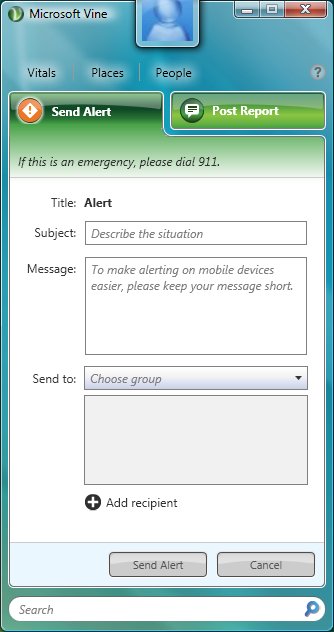
I’ve been trying Microsoft Vine. I’m not in the US so strictly outside the area of beta coverage; but the application seems to work fine.

What is Vine? It’s hard to position it, since parts of the UI suggest that it is mainly intended for communication in disasters. You install the application, set up contacts, and you can then send alerts concerning your well-being and report on “situations”. A Live Maps mash-up lets you see alerts in your local area; I’m imagining “the fire has not yet reached this part of the city”.

I find the disaster idea a bit fanciful. The world is crashing down around me, so I boot up Windows XP or Vista – the only supported operating systems so far, though Microsoft says it will add other platforms – as do all my contacts, and start interacting with Vine?

Then again, perhaps this isn’t mainly for disasters. The alerts you can show on the map include Politics, Business, Sports and Entertainment. The Post Report drop-down includes “Looking for music” as an option. Maybe Microsoft is trying to compete with Twitter after all?

Third possibility: it is a prototype, a mash-up example to promote Microsoft’s Live services, on which it depends? In that respect, it is somewhat interesting. Yet the application looks polished, and has a fully-fledged beta program; it looks like this is something Microsoft cares about and wants to promote.

There’s a blog post from the team which aims to clarify Vine’s positioning:

Microsoft Vine is not just another Social Network site or tool. It provides a way to keep track of places you care about, your friends and family and ask for and receive help. We aren’t going to compete with these other tools and we sure don’t think of ourselves as Twitter on Steroids.

Sorry, I still don’t understand. It is as if your mobile provider offered you a second phone, specially tailored for use in emergencies, but which you could use it at other times as well. But you are never going to carry two around, just in case. The provider should add the emergency features to all its phones.

So why doesn’t Microsoft just add a couple of features to Live Messenger, instead of messing around with a new client? Further, if Microsoft really wants to help in emergencies, its client should be supremely lightweight and cross-platform, the service should be one any client can easily call on, and it should be doing this in concert with all the main telecom providers, device manufacturers, and social networks. If this is a problem that needs solving, that might yield useful results.

Then again, maybe the disaster stuff is not the real purpose of Vine; maybe that is a kind of emotional marketing to get us to use it.

Personally I am allergic to applications that want to run constantly in the background and occupy a space in the notification area. Vine has to be obviously and immediately useful to warrant it; and right now I’m not getting it.

In a real emergency, I will pick up my mobile, use SMS, turn on the radio, and possibly even consult Twitter – but only because I use Twitter all the time anyway.
One thing that is not better in Windows 7: Movie Maker

Microsoft does make surprising decisions on occasion. Here’s an example. Windows Movie Maker is a simple video editing application which ships as a free utility with the operating system. It was scorned when it first appeared in Windows Me, but has improved substantially, and in its latest guise is a popular choice for creating YouTube videos or touching up holiday footage. It is a significant factor in the Apple Mac vs Windows decision, since the Mac comes with a decent video editor called iMovie.

In Windows 7, Microsoft has removed Movie Maker from the Windows box and made it part of a Windows Live Essentials downloadable add-on. That makes some sense: it cross-promotes other Live products (though at risk of annoying users) and maybe helps Microsoft defend against allegations of anti-competitive tying of products to its Windows near-monopoly.

What does not make sense is that the new Live Movie Maker is completely re-written and currently nothing like as good as the old one. Key features like the timeline are simply missing, hence the strong comments to this official blog post:

That’s all fine and dandy (starting from the ground up and all), but if you don’t include the baseline functionality that was in Windows Movie Maker, this will be an abject failure.

says one of the more polite users.

Microsoft says there is more to come:

Hey guys – I’m the Lead PM on the new Windows Live Movie Maker project.  The beta is definitely not feature-complete; having said that, we are taking the product in a slightly different direction so it’s not going to have 100% the same features as the old Movie Maker.  Stay tuned – but please realize that we’re aware that we have work to do before final.

I think this is Mike Torres (warning: spam-ridden comments). In the meantime, the best anyone can offer is to download version 2.6, which is an older version of what is in Vista but apparently works on Windows 7. It strikes me as unlikely that Live Movie Maker will plug all these gaps in time for the release of Windows 7; but who knows, perhaps it will.

The bit that puzzles me: why doesn’t Microsoft stick with the older, better version of Movie Maker for Windows 7, until the new one evolves into a sane alternative?

New York Times switches from WPF/Silverlight to Flash and AIR for Reader 2

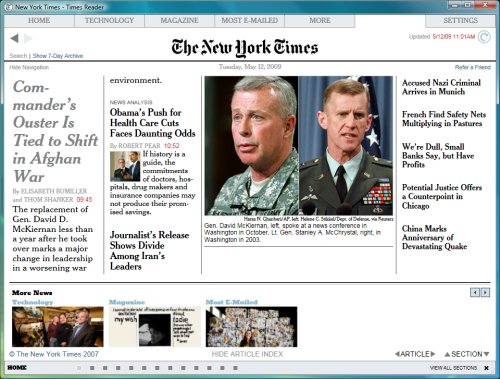
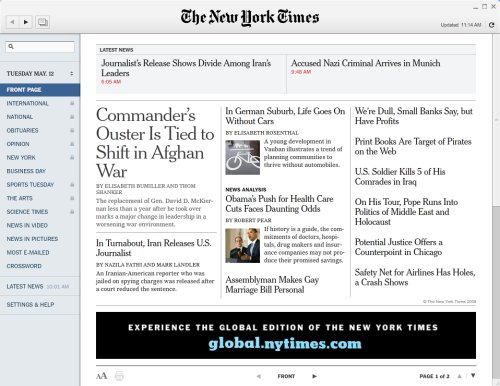
The New York Times has released Version 2 of its Times Reader, for seamless online/offline viewing of its content. It’s interesting from a media perspective, but hardly a breakthrough, since it is not new. What’s more interesting to me is that the Times switched from a hybrid approach using WPF (Windows Presentation Framework) on Windows and Silverlight on the Mac, to Adobe AIR. Switches like this are bad PR for Microsoft, since it gives the impression that the developers were sufficiently unhappy with WPF/Silverlight, or so strongly attracted to AIR, that they were willing to throw away much of their previous development effort.

I’ve been tracking Times Reader for some years. It was presented at Microsoft Mix07 and I wrote up a panel discussion on the subject:

I asked about the cross-platform issue. According to Bodkin a Silverlight implementation is on the way, which includes most of the features in the full version, in “a matter of months.”

That was optimistic; but a Silverlight version was delivered and I used it successfully on the Mac; though it lacked some features of the WPF edition. It also attracted hostility from Mac users who are Microsoft-averse, as I reported here, and apparently ran into further problems because of incompatibility with Safari 4.

I tried the new AIR edition and it seems pretty good, though my impression is that it is not quite as smooth as the old WPF version. I might be wrong, since I could not install both on the same machine. The new version does add video support. Here’s the old one:

and this is the new effort:

I think this is a fascinating case study which demonstrates a number of things.

First, that cross-platform support is not an optional feature any more (if it ever was) for this kind of public application. Let’s assume here that the WPF version was just fine for Windows users, but was not viable long-term for lack of cross-platform support. It was inevitable that the Times would eventually either use Silverlight on both Windows and Mac, or abandon both WPF and Silverlight for a cross-platform alternative.

Second, that Silverlight is not yet mature enough for this kind of application. Although the Times developers were able to deliver a Silverlight version, it required a bit of hackery for offline support (embedded Safari on the Mac) and apparently ran into version problems when Apple upgraded Safari. Silverlight is also known to be poor for text rendering – a Google search for “blurry text Silverlight” brings back plenty of hits. Adobe also made a big improvement to text handling in Flash player 10, with the new flash.text.engine.

Third, that offline support really is a big deal. Would Silverlight 3.0 have been good enough? Possibly, though I haven’t seen any suggestion that Silverlight 3.0 offline apps will be able to run in the background while showing just an icon in the notification area, to support continuous synchronization.

It is possibel that these problems may be fixed in Silverlight 4.0. That’s a long time to wait though, when you need your application out now (and your industry is in crisis).

It would be silly to extrapolate this case study into a broader statement about the superiority of Flash over Silverlight. For the specific needs of the New York Times though, it is easy to see why Adobe AIR appeals.

Is Zend really the PHP company?

I’m at Yahoo! Hack day in London – not hacking, but here for sessions on topics such as YUI (Yahoo! User Interface Library) and PHP.

I had a brief chat with Rasmus Lerdorf who is speaking later. I asked him about Zend, which presents itself as the PHP company (that is actually the slogan on its web site). Is it really?

Lerdorf says Zend has no special status. While acknowledging its contribution, he says there are 1300 PHP committers, and only 6 work for Zend. He emphasises that PHP is a community project and that decisions are made by consensus, influenced by who is actually willing to write the code, not by Zend or any company.

I also asked about PDT (PHP Development Tools), the Eclipse-based open source IDE. Lerdorf says there are lots of PHP IDEs, and people who use generic editors for PHP, and none has any more status than any other; he doesn’t use PDT.

From my perspective as press, there are only two organizations who ever encourage me to write about PHP. One is Zend; the other is Microsoft, keen to establish Windows as a credible PHP platform (Lerdorf says PHP on Windows has made enormous progress in the last couple of years). Zend does seem to do more than any other company to promote PHP for commercial and corporate development.

Lerdorf is not surprised. We’re developers, he says, we don’t do PR.

Zend’s effort is broadly beneficial to the PHP community – provided that it does not give a false impression of who owns PHP.

Silverlight: developer win, designer fail?

I posed this question in a post over on itjoblog. There are several reasons why Silverlight struggles to get designer attention, including:

1. Designers are pragmatic and target the runtime that is already deployed most broadly, ie. Flash.

2. Flash is already good enough so why bother?

3. The tools: Adobe’s designer tools are a de facto standard, target Flash, and run on the Mac.

Developer is another matter. The cross-platform .NET runtime is Silverlight’s big advantage; and this time the tools tip the balance towards Microsoft (Visual Studio) – not for everyone, but for the substantial Microsoft platform community. That’s going to be further reinforced by Visual Studio 2010 which gets full visual designer support, plus of course Silverlight 3.0.

Microsoft does have a problem with Silverlight out of the browser. Developers need a way to have these run with more local permissions, subject to user consent, otherwise they will turn to Adobe AIR. Actually the whole Silverlight on the desktop story is confused, since you can also do Silverlight Mesh-Enabled Web Applications, or stick Silverlight content in a desktop gadget or other embedded browser. No, not the one in AIR (nice idea though): Adobe only includes Flash support and the PDF plug-in.

The tension behind this is that ultimately developers and designers need to work on the same applications, so this remains a fascinating contest.

First baby steps for Moonlight 2.0: Silverlight for Linux

Miguel de Icaza has announced the first preview release of Moonlight 2.0. This is the one that counts, in that it brings the .NET runtime to Silverlight applets running on Linux:

This is the ECMA VM running inside the browser and powering C# and any other CIL-compatible languages like Ruby, Python, Boo and others. You can use Moonlight/Silverlight as a GUI (this is what most folks do) or you can use it as the engine to power your Python/Ruby scripting in the browser.

The download page has plenty of health warnings:

Keep in mind this preview release is not feature complete. Most importantly not all security features are present or fully enabled in this release. Even existing security features have, at this stage, received only minimal testing and no security audit of the source code (mono or moonlight) has yet been done.

Undeterred, I installed it into FireFox 3.0, running on Ubuntu Linux. The download is under 9 MB. My first effort was unsuccessful; the plug-in appeared to load OK, but no Silverlight apps displayed. My second attempt in a VM worked. Naturally I went along to my Silverlight database example which as it happens runs on Mono. Here it is:

This is what it should look like (Silverlight on Windows):

Well, it is only an alpha preview, and it shows. On the plus side, the data is displayed, the search works, and the buttons operate. It is a considerable achievement. But don’t plan to move your users onto Moonlight applications just yet.

Windows 7 XP Mode dialogs confuse virtual with real

I was impressed with the integration between XP Mode virtual applications and native Windows 7, as I explained in this review. I’d suggest though that Microsoft needs to do better in distinguishing dialogs that come from virtual XP from dialogs displayed by native Windows 7. This may seem perverse – integration is about disguising the difference, not accentuating it. But let me give you an example of where this is a problem. I started Access 2000 as a virtual application, which worked fine, and behind the scenes Virtual XP kicked into life. Then I saw this dialog on the Windows 7 desktop:

This dialog does not mention Windows XP. It just says Windows. How am I to know that it relates to a virtual instance of XP, and not to Windows 7 itself? Well, if I am awake I might spot that the window close gadget is XP-style, and not the Windows 7 style which is wider and with a smaller X. I am sure that is too subtle for many users.

Here is another example:

In this case, Windows 7 has popped up a notification saying my computer might be at risk, on the arguably dubious grounds that no antivirus software is installed. The balloon has (Remote) in brackets. So what does that mean? Actually, it means the virtual instance of XP, but the word Remote is not a clear way of saying so.

If I click the balloon, I get the XP security center, with no indication that it relates to virtual XP rather than to Windows 7 directly.

I’d like to see more clarity, even if it makes integration a tiny bit less seamless.

Technorati Tags: ,,

OpenDocument comes to Microsoft Word and Excel

After the intense interest in OOXML vs ODF during last year’s ISO document standardisation wars, I’m surprised that the inclusion of OpenDocument support in the newly-released Office 2007 SP2 has attracted so little attention. Well, not really surprised. The general public doesn’t care much about document formats as such, just that the documents they send and receive open OK. The anti-OOXML fervour was about exploiting a chink in the armour of Microsoft’s de facto near-monopoly in Office suites.

Well, Microsoft has ticked the box now. I haven’t done exhaustive tests; but I did some sanity checks. I opened a .docx (OOXML) in Word, saved it as OpenDocument Text; opened in OpenOffice.org, saved it out to a new .odt document, opened that in Word, saved it out as docx. And you know what? It looks the same. Even the styles are still there. What’s more the conversion was fast and convenient, just a Save As. All in all, a contrast with the wretched experience I had with the earlier Microsoft-sponsored converter.

Next, I tried a small stress-test; a .doc bidding card for Contract Bridge that has some tricky tables. This document crashed WordPerfect’s .odt converter. Word could happily save it as .odt and reopen. Opening the exported .odt in OpenOffice showed some minor differences – part of the table went slightly out of alignment, as the illustration shows (Word is on the left, OpenOffice 3.0 on the right), but nothing drastic.

Is this the end of the format wars? Not quite; there is still a long list of features not supported by the conversion, and if you want an easy life it still pays to stay with one vendor’s Office suite. My impression though is that Microsoft has done a decent job, and that for everyday documents the conversion will work as expected.

For the OpenDocument crowd, getting the format incorporated into Microsoft Office is a victory of sorts, but not the real goal, which is to establish it as the universal document format. Microsoft is betting that its inclusion will help it sell Office, but that customers will still mostly use .doc or .docx (and the Excel equivalents). If enough institutions mandate OpenDocument, that bet could yet fail, but right now that looks unlikely.

Update

Ivan Zlatev reports on a less successful import here.

Update 2

While word processing import and export is reasonable in some circumstances, there is a deal-breaking problem with spreadsheet import and export: all formulae are either ignored or broken. That is, you can save from Excel to .ods, open in OpenOffice.org Calc, and get cells like msoxl:=SUM(C6:C8) (in plain text). You can save from OpenOffice.org Calc, open in Excel, and find formulae converted to plain text. If you save and open sheets from Excel, but in .ods format, it works; the clue why is in the OpenOffice.org rendering. It appears Microsoft has stuck by the letter of the standard, which does not specify how formulae work, but broken any kind of meaningful interoperability.

Microsoft’s Outlook 2007 SP2 speed report

The poor performance of Outlook 2007 has driven many users to Google for solutions, and a good proportion arrive at this blog, which is why there are nearly 200 comments to this post.

Microsoft says it has fixed the problems with Office 2007 Service Pack 2 – though this comment disagrees. Personally I’ve not installed SP2 yet, but I did apply a February update which as I understand it has most of the performance fixes, and I’ve found noticeable improvement.

On my 64-bit desktop, with Outlook 2007 set with cached mode turned off (not the default) I’m enjoying excellent performance despite a huge mailbox.

Microsoft has sponsored a benchtest [pdf] that shows (as you would expect) substantial speed gains in SP2, and claims that the number of disk writes the latest Outlook makes is much reduced. There’s also a performance tip buried in there: turn the To-Do bar off if you want best responsiveness.

I’m sceptical about tests like this which often don’t match real-world experience. I wonder if the testers had anti-virus software running, as highly recommended by Microsoft, but which slows down performance a lot particularly where there is intensive disk activity.

Still, it’s encouraging that Microsoft has taken the problem seriously.

Update

I installed SP2 shortly after writing this post. So far, no noticeable impact on Outlook vs the February update.

Windows 7: on sale pre-installed from October 2009

Windows 7 will be on sale pre-installed from 23rd October 2009, according to plausible leaks. So much for “when it’s ready.” You heard it from me first though: on 29th October 2008 I posted that Windows 7 may be less than a year away.

The OEM vendors need at least a couple of months to prepare and distribute their machines with the release build. Vista was done on November 8th 2006, even though it was not “launched” until January. RTM July for Windows 7?

Technorati Tags: ,