Category Archives: .net

Moonlight 2 released; no Microsoft codecs unless you get it from Novell

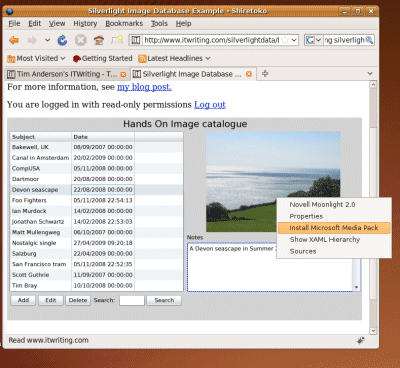
The Mono Project has released Moonlight 2, its implementation of Silverlight for Linux. I tried my own database application and was pleased to find that it works fine; better than it did with the earlier release.

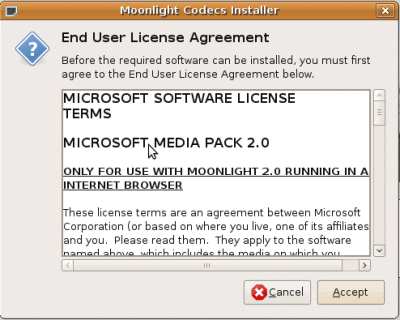
Note the right-click menu which offers some handy debugging features as well as the invitation to “Install Microsoft Media Pack”. If you choose this, you get a dialog offering the Microsoft codecs which are downloaded from Microsoft, not from Mono servers. You have to agree a EULA that restricts use to Moonlight running in a web browser.

That last bit is intriguing; it seems Microsoft is trying to prevent desktop or out-of-browser Moonlight (or Mono) from taking advantage of its codecs.

So what is in Moonlight 2? Miguel de Icaza explains:

Moonlight 2 is a superset of Silverlight 2. It contains everything that is part of Silverlight 2 but already ships with various features from Silverlight 3.

Those additional features include the pluggable pipeline, easing animation support, writeable bitmaps, and partial out-of-browser support. Further, de Icaza says:

We are moving quickly to complete our 3 support. Microsoft is not only providing us with test suites for Moonlight but also assisting us in making sure that flagship Silverlight applications work with Moonlight.

There is also a new patent covenant that:

ensures that other third party distributions can distribute Moonlight without their users fearing of getting sued over patent infringement by Microsoft

That said, the media pack is a source of friction. Only the Novell Moonlight distribution will raise the above dialog to install the Microsoft codecs; others will have to make their own arrangements; at least that is how I understand de Icaza’s post.

It seems an odd restriction, and means that most users should download from Novell.

Reflections on Microsoft PDC 2009

Microsoft’s Professional Developers Conference has long been a key event in the company’s calendar. CEO Steve Ballmer and his colleagues are famous for their belief that developers make or break a platform, and PDC is where the most committed of those developers learn as much as Microsoft is willing to share of its long-term plans. There have been good – for example, 2000 C# and .NET launch, 2008 Windows 7 – and bad – for example, 2001 Hailstorm, 2003 Longhorn – PDCs but they have all been interesting, at least the ones I have attended.

So how was PDC 2009? While there was a ton of good content there, and an impressive launch for Silverlight 4, there was a noticeable lack of direction; maybe that was why Ballmer decided not to show up. It should have been the Windows Azure PDC, but as I have just written elsewhere, Microsoft has little excitement about its cloud. Chief Software Architect Ray Ozzie gave almost exactly the same keynote this year that he gave last year; and the body language, as it were, is more about avoiding the cloud than embracing it. Cross-platform clients, commodity pricing, throw away your servers: from Microsoft’s point of view, what’s not to hate?

In theory, mobile computing could have been another big story at the PDC, but Microsoft’s slow progress in Mobile is well known.

My instinct is that Microsoft needs to change but does not know how: the wheels continue to turn and we will get new versions of Windows, ever more complex iterations of Windows Server, Exchange, SharePoint, and feature after feature added to Microsoft Office – does it really need to become PhotoShop – but in the end this is more of the same.

The mitigating factors are the high quality of Windows 7, which will drive a lot of new PC sales for a quarter or two, and the strong products coming out of the developer division. Visual Studio 2010 plus Silverlight is an interesting platform, and ASP.NET MVC is in my opinion a big advance from Web Forms.

That’s not enough though; and we still await a convincing strategic discussion of how Microsoft intends to flourish in the next decade.

Technorati Tags: ,,

COM automation in Silverlight 4 is not an “edge case”

I wrote a piece for The Register about the arrival of Windows-specific features in Silverlight, which attracted some comments both on the Reg and also on Slashdot. Plenty of people said it was just what they expected from Microsoft, some of them misunderstanding the point that this only applies to out-of-browser applications that are trusted: the user has to pass a dialog box granting the application permission to access the local system. A few defended Microsoft’s decision; and this Slashdot comment on COM automation in Silverlight 4 strikes me as a good encapsulation of the official line:

This is a fairly obscure feature, and I’m fairly surprised that it was included at all, but doubt it’ll be of use to the vast majority of current and future Silverlight developers out there. Like the html control, it’s a crutch, to allow developers that want to use Silverlight a way to leverage existing investments. The mantra I’ve heard out of the Silverlight team is to focus on unblocking customer scenarios (scenarios they cannot unblock themselves) without compromising the overall feature goals (like keeping the runtime download small) … it’s an edge case feature that doesn’t affect Silverlight’s over all "Cross-Platforminess".

The idea that COM automation is merely an “edge case” surprises me, even though I also recall it being described like that at PDC. Access to COM automation gives a Silverlight desktop application on Windows substantial extra capability. At PDC program manager Joe Stegman showed how Silverlight 4 can integrate with Office, sending data into an Excel spreadsheet: an example with obvious value for real applications. I also heard developers at PDC discussing how they might wrap up a Silverlight application with a COM DLL, creating an application which in effect has full access to the local operating system. Although Silverlight cannot access the Windows API directly, there are no such restrictions on the COM DLL, so the combination means that pretty much anything is possible.

Let’s also bear in mind that Microsoft’s Brad Becker is on record saying that one day WPF and Silverlight might simply become different .NET profiles. He told me this at Mix earlier this year; and said a similar thing to Mary Jo Foley at PDC:

Some day — Microsoft won’t say exactly when — Silverlight and WPF are going to merge into one Web programming and app delivery model that, most likely, will be known as Silverlight, Brad Becker, Director of Product Management for Microsoft’s Rich Client Platforms, told me this week

If Microsoft is contemplating such a thing, then clearly full access to the native features of Windows will have to be possible.

I am not entirely negative about this prospect. Even if you are only targeting Windows, Silverlight has a lot to commend it: a small runtime, easy setup, and options for browser-hosted or desktop deployment. If you have ever wrestled with the Windows installer or tackled a failed .NET runtime installation you will like the simplicity of running a Silverlight application.

Nevertheless, with version 4.0 Microsoft is changing its Silverlight story. It is no longer a pure cross-platform play; rather, it is a runtime where some features are cross-platform, and others Windows only. Microsoft calls this developer choice; I see it as evolving into the inverse of Sun’s aim with Java. Sun tried strenuously to guide developers towards cross-platform, but provided a way out – via Java Native Interface – if absolutely necessary. Microsoft will provide cross-platform where we really need it, but make it easy to slip into Windows-only development in order to get some nice feature like a location API, or Office integration.

I see this as an advantage for Flash, because developers know that Adobe has no incentive to prefer one operating system over another – except to the extent that minority platforms (like desktop Linux) tend to receive less investment.

Personally I think Microsoft should at least provide a way for Mac users to get similar benefits – perhaps by implementing something like the native process API in Adobe AIR 2.

I also think Microsoft will have to get real about Linux support. It is wrong that Microsoft will cheerfully state:

Silverlight 4 runs across all platforms and major browsers

as it does in the “Fact sheet” handed out at PDC; while leaving Linux implementation to a third-party process uncertain in both features and timing. Here is the reality of cross-platform Silverlight, in a screenshot taken seconds ago from Linux:

Right now it is a two-platform play – admittedly, the two platforms that matter most, especially in a Western world business context, but never forget that Google Chrome OS is coming.
Silverlight 4 ticks all the boxes, questions remain

Microsoft has announced Silverlight 4 here at PDC in Los Angeles. The gist of it I was expecting – device support, an option for fuller system access out of the browser – but the extent of the new features is remarkable. Here’s a few highlights:

  • Improved Just-in-time compilation gives 30% faster start-up, up to 100% performance increase
  • COM automation support on Windows when out of browser with full trust
  • Access to local file system, cross-site Internet access, custom window chrome when in full trust out of browser
  • Notification pop-up support even when sandboxed
  • Drag and drop target even when sandboxed
  • HTML control (only works out of browser), supports plug-ins
  • Rich text control with right-to-left text support
  • Printing support
  • Clipboard, right-click and mouse wheel support
  • Web cam and microphone support

Of course there are a few unanswered questions, such as what level of HTML support is available, or how Microsoft is protecting users from malicious Silverlight applets; I’ll be exploring these later today.

It’s clear though that Microsoft wants to compete fully with Adobe AIR, and that its energetic Silverlight development is continuing at full pace.

The beta is available now; full release is promised for the first half of 2010.

So where is Microsoft going with this? Why would anyone develop for WPF and Windows, if good enough features, cross-platform, and zero install is available through Silverlight?

Interesting times for .NET developers.

Technorati Tags: ,,,

Miguel de Icaza on eight years of Mono, its future, and the Silverlight desktop

Mono founder Miguel de Icaza spoke at the Monospace conference – 250 enthusiasts in Austin, Texas – on the past and future of the project. I wasn’t there but enjoyed listening to the keynote as posted by Redmonk’s Michael Coté.

“Never ask for permission, ask for forgiveness – that’s how we’ve done a lot of things in the Mono world,” said de Icaza, who also remarked that in the beginning “we thought it would be a walk in the park, we thought it would up and running in 6 months.” His motivation: “We think that .net is a fantastic development platform – we were envious when Microsoft came out with it.”

Eight years on and the Mono team is now around 35 people at Novell, plus 30-70 external contributors. “We don’t dictate the direction of mono, it’s mandated by the direction of the community,” says de Icaza. He talks about MonoDevelop, the Mono IDE, which is now licensed under LGPL allowing commercial plug-ins; about MonoTouch which lets you develop for Apple’s iPhone and “will expand towards Android”; and about XNATouch, a Mono game framework for iPhone.

The task of keeping up with Microsoft – insofar as Mono succeeds – has become easier thanks to open source. “In the last couple of years Microsoft has become very open-source friendly in some areas,” says de Icaza. “For example ASP.NET MVC, we don’t have to do anything, it just runs on our ASP.NET implementation.”

Someone asked about Mono’s plans for WPF, which is becoming more important on Windows, and this led to some intriguing comments on Moonlight/Silverlight and its future. “I think Silverlight has more potential than WPF has, because it runs on the Mac, it runs on Linux, it runs on Windows, and Silverlight is easier to learn than WPF is. We like the Silverlight model but we don’t like that it is limited to a sandbox on the browser,” he said.

“Moonlight can be used in two modes. One of them is moonlight in the plug-in, like you do with Microsoft, and you can out-of-browser if you want, but you are still restricted by the sandbox. We also offer the same graphical engine that we use for Silverlight [Moonlight] but with the .NET 4.0 APIs. You have full access to .NET 4.0 with the Silverlight UI. Isn’t that awesome?”

“WPF is interesting but a lot of work, and we don’t have the bandwidth and the resources. Our best possible option is to use Silverlight with the .NET 4.0 APIs. Our wish is to bring this expanded Silverlight to Windows and Mac OS. Maybe we’ll gently push Microsoft in that direction.”

One of his team is working on “the whole desktop rendered by Silverlight.”

In general I agree that Silverlight is more significant than WPF, particularly if Microsoft keeps up its current energetic level of development. I will be surprised if we don’t hear from Microsoft about an enhanced desktop Silverlight at the forthcoming PDC and Mix conferences.

There is another side to this though: if you can do your cross-platform .NET development in Microsoft Silverlight, do you still need Mono? Particularly if official ports to Linux start appearing?

Of course there is more to Mono than Moonlight. Running ASP.NET on Linux web servers is an attractive proposition, though historically its performance and reliability hasn’t matched that of Microsoft .NET – not surprising given its relatively small resources. Eight years on, and Mono has done more than just survived, yet has not quite tipped over into a platform popular enough to attract the level of contributions it needs.

WPF not Windows Forms gets the Windows 7 love

Microsoft’s Scott Guthrie has a blog post today about what’s new in Windows Presentation Foundation 4, and one of the things he mentions is Windows 7 multitouch support – as also described in this walkthrough – and integration with the Windows 7 taskbar, jump lists, icon overlays and so on. Taskbar support is wrapped in the System.Windows.Shell namespace in PresentationFramework.dll.

This means that Microsoft is making it easy for .NET developers to support Windows 7 in WPF applications. However it is not extending the same love to developers using Windows Forms, the older GUI framework. That said, there is always the Windows API Code Pack which covers many Windows 7 features including the taskbar and jump lists, or you can do your own COM and native code interop. No doubt with a bit of effort all the features can be be integrated into a Windows Forms application.

Still, there’s no doubt that Microsoft is now steering us towards WPF rather than Windows Forms for new desktop development. About time, you may say, considering that WPF first arrived in 2006. While that’s true, there have been good reasons to be cautious about adoption. WPF apps use more resources than Windows Forms applications, require the .NET Framework 3.0 or higher, and for a long time were talked down even by Microsoft as unsuitable for line of business applications.

That tune has now changed, though when you consider the large numbers of existing Windows Forms applications, and the fact that developers contemplating radical revisions or new projects may well be looking at web or rich internet clients, WPF is still something of a hard sell.

On the other hand, the improvements Guthrie describes are significant, not only for Windows 7 features, but also key areas like cached composition for graphics, which can greatly improve performance, and a new text rendering API.

It’s also worth noting that Windows Forms was never a great framework. It wraps the old Windows GUI API which makes resizable layouts and scaling for different display resolutions difficult, as well as lacking all the multimedia and effects goodness in WPF. Another factor is that WPF is designer friendly, with its own Expression Blend design tool. Windows Forms has nothing like that.

WPF has a family connection to Silverlight, which was originally called WPF Everywhere. Microsoft’s idea is that we code in WPF for the desktop, and transition to Silverlight for applications that require broad reach. So far though, mass migration to WPF has not happened, and Silverlight has an independent life as a platform for browser-hosted .NET applications that work cross-platform. Developers have many other choices for broad reach applications, including HTML and JavaScript, Java, and Adobe Flash.

Is it possible that broad adoption for Windows 7 could see renewed interest in WPF and Windows development? I think it will happen to a limited degree, but will not really disrupt the underlying trend towards web and cross-platform.

Visual Studio 2010 and .NET Framework 4.0 – a simply huge release

I’ve been exercising the new beta 2 of Visual 2010. It is hard to encapsulate in a few words because this is a simply huge release. OK, so I did download the Ultimate version; but the changes at every level seem greater than in Visual Studio 2008. One of the reasons is that this is the first full update to the .NET Framework since version 2.0 in late 2005. Versions  3.0 and 3.5 extended 2.0 but did not replace it. Another factor is that Visual Studio 2010 has a new editor built with Windows Presentation Foundation, and has a different look and feel than its predecessor. In addition, there is a new language, Visual F#, though I don’t hear much buzz about it; I think elevating IronRuby or IronPython to this status would have attracted more interest – but they are dynamic languages, whereas Visual F# is a functional language. 

When you are assessing Visual Studio you are in part assessing Microsoft’s platform, and as that platform has sprawled, so too has the tool. It is now so large that it is difficult to have in-depth knowledge of the entire thing. I also notice this when speaking to Microsoft folk about the product.

So what is new?

If you need to acclimatise, I suggest you start with What’s new in .NET Framework 4.0. This is a large topic in itself. Some of the things to look out for are What’s new in the Base Class Library, including Complex numbers, Location API, IObservable<T> for observable collections, and other tweaks and enhancements.

Then there are things like in-process side-by-side execution – the ability to run two versions of the Framework at once in the same process, which is remarkable.

Parallel programming with PLINQ and the Task Parallel Library is another major topic.

COM interop is changing; you no longer need to deploy Primary Interop Assemblies, because the compiler can include only the types you need in your application.

Next, take a look at what’s new in specific frameworks, such as WPF version 4 and ASP.NET MVC 2.

After that, you might be ready to look at new stuff in specific languages: including the dynamic keyword in C#, implicit line continuation in VB, lambda expressions in VC++, the concurrency runtime, and the arrival of Visual F#.

With that sorted, check out the new tools in the Visual Studio IDE. I’m thinking of the new code editor, the updated WPF visual designer, the new visual designer for Silverlight, and the Tools for SharePoint development; and not forgetting the updated modelling and application lifecycle management tools.

But isn’t this the era of cloud computing? That’s another part of the problem; the Windows-oriented tools seem less important if you are immersed in the latest cloud news. That said, don’t forget Windows Azure, though I was disappointed to find that the Windows Azure Tools for Visual Studio are a separate download, and not done yet.

I’m impressed that Microsoft seems to be pulling all this together successfully; it is a significant integration task. And as ever I’d be interested in what developers think – was the new code editor really necessary? Is Microsoft addressing the right areas? Has Microsoft done enough to support new Windows 7 features? And is performance OK in this version (it was a problem in beta 1)?

Blast from the past: how Adobe praised XAML at PDC 2003

I’ve been trawling back through material from Microsoft’s Professional Developer’s Conference in 2003 for a piece that will be posted shortly. I believe that the vision that was presented at PDC 2003, and how it fell apart, sheds a lot of light on why Windows is as it is today.

In doing so I came across this snippet about Adobe’s participation in the PDC keynote. It’s still online in Microsoft’s PDC press release:

Adobe Systems, a leading developer of software for consumers, creative professionals and enterprises, demonstrated the possibilities for ISVs created by integrating the new "Avalon" presentation technology and declarative programming techniques for Windows. Using these technologies, a prototype version of Adobe After Effects showed how developers could unify documents, cutting-edge graphics and media. For example, developers would now be able to build animated charts and graphs that are linked to back-end data sources to produce a smart solution that displays stock prices, sales and other information within a high-end professionally designed format.

"Many developers have not taken the visual design of their applications seriously enough, with the most innovative work restricted to creative professional software and games," said Greg Gilley, vice president of Graphics Applications Development at Adobe. "Longhorns new Avalon technology brings the designer and developer closer, so they can truly collaborate on creating software applications that are as beautiful as they are functional."

The odd thing is, this quote could come from the Adobe MAX 2009 conference from which I have just returned. “Animated charts and graphs … linked to back-end data sources” is what we saw in applications build with Mosaic, Adobe’s new framework for LiveCycle ES2 clients.

The difference: Adobe is doing all this with Flex and MXML, not XAML, and the client platform is the Flash runtime, not Avalon running on Windows.

Gilley of course was speaking before Adobe’s acquisition of Macromedia (and Flash and MXML) in 2005. Furthermore, nobody at PDC in 2003 could have guessed how long it would take Microsoft to deliver XAML.

Technorati Tags: ,,

Visual Studio 2010 to launch March 22 with Azure, Team Foundation Server for all

Microsoft has announced more details about Visual Studio 2010 and .NET Framework 4.0. Beta 2 of both products is available round about now, at least for MSDN subscribers, while thee are a few interesting packaging changes:

  • No more roles – there will be three paid-for versions of Visual Studio, Professional, Premium and Ultimate. I’ve been told that Premium will be pretty much the current Development and Database editions combined, while Ultimate has everything.
  • Team Foundation Server comes with every version, meaning that all Visual Studio developers will be able to use it if they choose. General Manager Jason Zander has the details of TFS Basic, which can even run on the client machine.
  • There will be a number of Azure hours bundled with each edition, so that developers can get started with Microsoft’s cloud platform without further payment. For example, Visual Studio 2010 Premium will come with 750 Azure hours initially, though this will supposedly reduce to 100 hours at a later date.

Visual Studio 2010 includes a new editor based on WPF, and users have complained of performance problems. Apparently this has been addressed, though now that beta 2 is out we will soon discover for sure.

I’ve also learned that the price of Visual Studio is increasing, by around 9%. To soften the blow, Microsoft has a special offer for those with current MSDN subscriptions when Visual Studio 2010 is released. These subscribers will get an automatic upgrade, not only to the equivalent 2010 edition, but to the one above. Thus, Professional subscribers will get Premium, and Team System subscribers will get Ultimate.

There is also an MSDN redesign, though it looks minor to me, and the most important section, the reference library, seems little changed. There is a ton of useful material on MSDN, but I still find Microsoft’s plethora of development and technical sites confusing to navigate, especially with specialist sites like Silverlight.Net offering overlapping content.

Ars technica has a handy product matrix.

Silverlight data, image upload example code

Some time ago I created a simple example of CRUD (Create, Retrieve, Update, Delete) in Silverlight with ASP.NET – you can view it online here. I originally posted it in April; see this post for details. Several people asked me for the code and I’ve not done so until now – mainly because of the hassle involved in making a Visual Studio solution portable as a demo. The Silverlight app was originally written in Visual Basic and I’ve now ported it to C# for convenience. The version on this site runs on Mono, but the demo code is for Visual Studio 2008 on Windows – there really is no difference apart from the database code.

One issue I had with the demo was providing a database. I wanted something easier than just providing the SQL to create a database, ideally a solution that would just open and run immediately. I tried using SQL Server Compact Edition but Microsoft has actually hard-coded something that stops you using this for an ASP.NET application and I got an exception accordingly. I’ve therefore used Access. I wouldn’t consider this for a real web app, but it is convenient for a demo.

The code is somewhat retro – no entity framework, no WCF, no LINQ – except an expression to filter the datagrid – and old-style ASP.NET Forms Authentication. It would be good to convert it to use RIA Services, which I may do if I can find the time. This may mean the code is no use to you at the moment.

Although it is a simple app and not production-ready, I found it interesting to do. Silverlight code is easy to write, but interacting with remote web services for all the content is more challenging. There are flaws – for example, I’ve not handled what happens when multiple users edit the data simultaneously.

There are a few little hacks too. For example, I have an edit form where you can upload an image. I want to have the image display as soon as it is uploaded, but found that if I try to display it in the WebClient’s OpenWriteCompleted event handler it fails; somehow the file is not quite ready to be served. I use a timer to insert a small delay.

Another issue was faking synchronous web service calls.

Anyway, I’ve now uploaded the code and you can find it here. If there is enough interest I’ll put it in a repository to make it easier to add bug-fixes and so on.