Category Archives: .net

Visual Studio 2010 RC arrives with go-live license

Microsoft has made the Release Candidate of Visual Studio 2010 available for download to MSDN subscribers. From tomorrow (10th February) the same release will be available to everyone. There is a go-live license so you can use this in production if you wish, though if the full release comes in April as planned, it hardly seems worth it in most scenarios.

What’s new since the beta? Jason Zander says mainly performance. Note that the Chief Architect of Visual Studio is Rico Mariani, formerly Microsoft’s .NET performance guru, which is encouraging in this respect.

The blow-by-blow account of issues with the RC is here.

Whatever your views on the direction and future of Microsoft’s platform, there’s no doubting the huge scope of this release, though in my view the company has not communicated this particularly well, saying too much about things like SharePoint development, top of its list of walkthroughs but still an ugly business, and not enough about features such as IntelliTrace debugging, or the new ability to float windows out of the IDE and onto a second display, which will have a more immediate impact on developers. Note that the Visual Studio IDE has been re-built using WPF (Windows Presentation Foundation), and that it comes with a the first completely new version of the .NET Framework since 2005.

Silverlight 4.0 is another area of interest, though I understand that it will not be complete in time for this release. Visual Studio 2010 will have Silverlight 3.0 out of the box, with the ability to install the 4.0 preview release and eventually the final release as an add-on. I’ve also heard that Silverlight 4.0 is not yet supported at all in the RC, so be cautious if this is your area of work – you may need to stick with the last beta for the moment.

New is not always better, of course. I’m interested in hearing from developers working with Visual Studio 2010 – whether performance and stability issues have been overcome, and what you think of it overall.

What’s new in Visual Studio 2010 – more than you may realise

I’m beginning to think Microsoft has under-sold Visual Studio 2010. Of course it is a huge product, as I observed back in October, especially since it includes a major new release of the .NET Framework as well as updated tools, but I thought I had discovered most of the significant new features. Still, when I sat down recently to write up an extended review, I found a lot that I had missed.

One of my reflections on this is that Microsoft has done of poor job of communicating what is new. I attended the Professional Developer’s Conference in 2008 and 2009. The developer-focused keynote on the second day last November should have hyped the best of what is new; but instead we got Steven Sinofsky on Windows 7 quality control – hardly the most exciting of topics – a sneak preview of IE 9, an unconvincing tour of Sharepoint and Office 2010, and Scott Guthrie on Silverlight 4. Guthrie was fantastic, leading us blow by blow through Silverlight’s new capabilities, but much else was neglected.

It doesn’t help that Microsoft’s home page for Visual Studio 2010 has meaningless headlines. “Set your ideas free”, “Simplicity through integration”, “Quality tools help ensure quality results.” Pure fluff, which saps your will to read further.

Here are a few things that I found interesting – nothing like comprehensive, just features that perhaps have not had the attention they deserve.

Microsoft F# – a new language from Microsoft Research, integrated into Visual Studio with remarkable speed. The people I’ve spoken to who have taken the time to discover what it does are truly enthusiastic. Some of its strengths are parallelism, asynchronous programming, graphics manipulations, and maths. You probably won’t write a complete application in F#, but it will be great for assembling libraries.

Windows Workflow Foundation 4.0 – potentially a new and effective approach to visual programming and long-running state management. Flow charts are often used to teach programming, since they express common concepts like if conditions visually. WF lets you draw a process as a flow chart – or there are other types of chart – using the nice new WPF design tools, and then execute it in the runtime, which is part of the “Dublin” extensions to IIS, now known as Windows Server AppFabric (I have no clue why this confusing name was chosen). To get the idea, I suggest reading David Chappell’s Workflow Way. For applications that fit this kind of model, it is a compelling approach, and integrates well with Windows Communication Foundation for messaging.

Dotfuscator – I know this is a third-party thing, but this is no longer just a tool for obscuring your .NET assemblies in the hope of preventing decompilation. The new Dotfuscator does runtime analytics, and can report back to a portal when your application runs, what features you use, what operating system it is on, whether it crashed, and so on. It also supports application expiry, known as “shelf life”, and can detect if assemblies have been tampered with. Some of this sails close to the spyware wind, but this is a matter of getting informed user consent. These are interesting features for Windows desktop developers, if there are any left, and even the free edition is quite capable.

Test and Lab management – a challenge to set up and configure, but when it works, amazing. Lab Management uses Visual Studio, Hyper-V and System Center Virtual Machine Manager to automate deploying an application over one or more VMs, so you can run tests against it. This hooks into Team System so you can file a bug report with a link that actually shows the bug happening at runtime, with a snapshot of the virtual environment.

Step backwards through code – IntelliTrace is a new feature of the Visual Studio debugger. Configure it to collect IntelliTrace events and call information, and you can then step backwards as well as forwards from a breakpoint, examining variable values as they change.

Team Foundation Server Basic – what this means is that even a solo Visual Studio developer can have TFS running locally or on a networked machine for source code management, issue tracking and so on. It’s worth considering because of the way it integrates with the IDE. I admit, I still like Subversion which I have on a remotely hosted server, since it acts as an effective off-site backup, but I’d much rather use TFS Basic than nothing.

UML – Microsoft has finally done what it should have done years ago, and implemented a wide range of up-to-date UML diagram tools. Nothing revolutionary, just useful.

Not everything is wonderful in the new Visual Studio. Deploying to Azure remains clunky in Beta 2 – when is this going to get better? SharePoint is another one; I appreciate the value of F5 debugging, but you still need SharePoint installed locally, with great potential for mucking up IIS, and the whole thing feels unwieldy.
A Silverlight UI for Windows Mobile 7, backward compatibility in doubt

Note: speculative post; I have no official information on this.

It’s been rumoured for ages; but at this point I would be surprised if the Windows Mobile 7 UI were not built with Silverlight. Consider:

  • Silverlight has to be supported – it should have been in 6.5 – otherwise nobody will take mobile Silverlight seriously
  • WM7 has to have excellent UI design; and WPF/Silverlight is Microsoft’s designer-friendly UI framework
  • Silverlight 4 already supports touch control in the current beta
  • Scaling/Zooming is baked into Silverlight and ideal for a mobile UI
  • If Silverlight is present on the device it would make sense to build the UI with it

If this is right, there are a couple of interesting aspects for developers. It will make Silverlight a more attractive platform in scenarios such as Enterprise roll-outs where the device can be specified.

The awkward question: what about all those existing Windows Mobile apps built either with native code or with the compact framework? Again, there are rumours of lack of backward compatibility. Does that mean that all Windows Mobile 7 apps with a UI will have to be done in Silverlight? That’s what John Biggs says:

WinMo 7 will not run 6.x code. End of story. It is based on Silverlight and .Net. Everything save a few basic programs will not work under WinMo 7. There is no expectation that this will be a “business device” and the focus is currently on games including some XBox Live functionality for gaming and messaging. There will be a Microsoft App store with an easy approval process.

I find this a stretch. I can believe that Microsoft might initially target the consumer market, or have crippled “consumer” versions; but not that it would give up on mobile business apps – we heard at PDC (to the point of tedium) how Microsoft is supporting “three screens and a cloud”, unified for developers by Visual Studio. There’s no reason why Silverlight should not be used for business apps.

What about backward compatibility though? Traditionally Microsoft does a good job of keeping your old stuff running, within reason; possibly too good – Windows is full of compatibility hacks that may be to its detriment overall.

Another point to bear in mind: WM7 needs a browser, and I don’t see Microsoft re-implementing IE in Silverlight.

So I’m sceptical about this too; but with Windows Mobile at such a low ebb could the company decide it has little to lose?

Windows Azure is too expensive for small apps

I’m researching Windows Azure development; and as soon as you check out early feedback one problem jumps out immediately. Azure is prohibitively expensive for small applications.

Here’s a thread that makes the point:

Currently I’m hosting 3 relatively small ASP.net web applications on a VPS. This is costing about $100 per month. I’m considering transitioning to Azure.
Q: Will I need to have 1 azure instance per each ASP.net application? So if I have 3 web apps, then I will need to run 3 instances which costs about $300 per month minimum, correct?

The user is correct. Each application consumes an “instance”, costing from $0.12 per hour, and this cost is incurred whenever the application is available.

Amazon also charges $0.12 per hour for a Windows instance; but the Amazon instance is a virtual machine. You can run as many applications on there as you like, until it chokes.

Google App Engine has a free quota for getting started, and then it is charged according to CPU time. If the app is idle, you don’t pay.

In addition, all these services charge extra for storage and data transfer; but in a low-usage application these are likely to be a small proportion of the total.

Summary: Azure’s problem is that it does not scale down in a way that makes business sense. There is no free quota, unless you count what is bundled with an MSDN subscription.

I realise that it is hard to compare like with like. A cheap Windows plan with a commodity ISP will cost less than either Amazon EC2 or Azure, but it is worth less, because you don’t get a complete VM as with Amazon, or a managed platform as with Azure, or the scalability of either platform. The point though is that by cutting out smaller businesses, and making small apps excessively expensive for customers of any size – even enterprises run small apps – Azure is creating a significant deterrent to adoption and will lose out to its rivals.

Check out the top feature request for Azure right now: Make it less expensive to run my very small service.

Silverlight 4 with COM can do anything – on Windows

At PDC Microsoft played down the significance of adding COM support to Silverlight 4 when run out of the browser and fully trusted (you can also be out of the browser and not fully trusted). The demos were of Office automation, and journalists were told that the feature was there to satisfy the requests of a few Enterprise customers.

Now former Microsoft Silverlight program manager Justin Angel, who has implemented his blog in Silverlight, has spelt out what we all knew, that Silverlight with COM support can do just about anything. His richly-illustrated blog post has code examples for:

  • reading and writing to any file (subject I guess to the permissions of the current user)
  • executing any command or file
  • emulating user input with WShell.SendKeys
  • pinning files to the Windows 7 taskbar
  • reading any registry values
  • adding an application to the Windows startup folder
  • doing text to speech using Windows built-in engine
  • accessing local databases with ODBC
  • automating scanners and cameras
  • using the Windows 7 location API, accessing the full .NET Framework
  • and of course … automating Microsoft Office.

Well, fully trusted means fully trusted; and these are great features for powerful though Windows-only Silverlight applications, though I hope no user installs and trusts one of these applets thinking it is “only Silverlight” and can’t do much harm.

The post also has comments on the lack of any equivalent feature for the Mac in Silverlight 4:       

If Microsoft chooses to not go ahead with Mac support in Silverlight 4 RTM, well, it’s not because they couldn’t

says Angel, suggesting that it would be easy to add AppleScript support. (I had to type that quote – no clipboard support in Silverlight 3).

Of course there is time for Microsoft to unveil such a feature, say at Mix10 in March, though I wouldn’t count on it.

Why F# rather than IronPython in Visual Studio 2010?

Dynamic languages are all the rage; and after JavaScript, Python is perhaps the dynamic language of the day, loved by Google and gaining increasing attention. IronPython, built on .NET, is stable and at version 2.6. Now Visual Studio 2010 turns up with an additional language in the box, but it is not IronPython; rather it is a little-known language out of Microsoft Research called F#.

Now, F# is very interesting and brings real diversity to Visual Studio; it is great for mathematics and for parallel programming. But wouldn’t IronPython have sparked more immediate interest from the .NET community? Judging by this feature request, with 500 votes, it would. It’s is a little embarrassing for Microsoft that the favoured IDE for IronPython work is SharpDevelop. Plenty of IronPython enthusiasts are pressing for Visual Studio support.

Here’s what IronPython MVP Jeff Hardy says:

I think I can safely say that adding full, high-quality support for IronPython to Visual Studio would require at least a couple of man-years of work. The rabbit hole goes pretty deep when you consider all of the functionality that VS offers, not to mention the difficulty of doing IntelliSense well. I estimate they’d have to at least double the IronPython team to get full support into VS11. IronRuby would require the same commitment.

Hardy is hopeful for VS 2012.

I still find it odd. Official Visual Studio integration would do a lot to raise awareness and usage of IronPython; and make Microsoft’s commitment to dynamic languages more visible – though I guess F# supporters will be happy with Microsoft’s priorities here.

The end of Code Access Security in Microsoft .NET

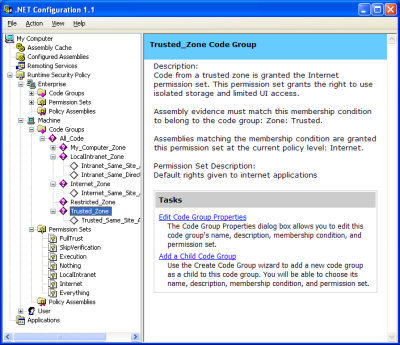
In the early days of .NET I remember being hugely impressed by Code Access Security. It gave administrators total control over what .NET code was permitted to run. It’s true that the configuration tool was a little intimidating, but there were even wizards to adjust .NET security, trust an assembly, or fix an application – great idea, that last one.

image

Well, now the truth is out. Code Access Security was too complex for humans to configure. Buried deep in the documentation for .NET Framework 4.0 you can find Microsoft’s confession, under the heading Security Policy Simplification:

In the .NET Framework 4 Beta 2, the common language runtime (CLR) is moving away from providing security policy for computers. Historically, the .NET Framework has provided code access security (CAS) policy as a mechanism to tightly control and configure the capabilities of managed code. Although CAS policy is powerful, it can be complicated and restrictive. Furthermore, CAS policy does not apply to native applications, so its security guarantees are limited. System administrators should look to operating system-level solutions such as Windows Software Restriction Policies (SRP) as a replacement for CAS policy, because SRP policies provide simple trust mechanisms that apply to both managed and native code. As a security policy solution, SRP is simpler and provides better security guarantees than CAS.

The section below, headed Obsolete Permission Requests, is even more damning of the old system:

Runtime support has been removed for enforcing the Deny, RequestMinimum, RequestOptional, and RequestRefuse permission requests. In general, these requests were not well understood and presented the potential for security vulnerabilities when they were not used properly.

It goes on to explain why they did not work, with explanations like this one for RequestOptional:

RequestOptional was confusing and often used incorrectly with unexpected results. Developers could easily omit permissions from the list without realizing that doing so implicitly refused the omitted permissions.

The new .NET Framework 4.0 no longer enforces these obsolete permissions.

Microsoft is right. As far as I’m aware, few used the .NET Configuration tool, and I cannot even find it in Windows 7, even though Visual Studio and all the versions of the .NET Framework are installed. Developers feared, with justification, that tinkering with the settings would simply cause mysterious exceptions that were hard to resolve.

I recall though that Code Access Security was considered a highly strategic feature when .NET was first released. One of the promises of .NET was that applications would be more secure and malware less prevalent. The fine-grained permissions were a selling point versus Java.

The painful lesson is that simplicity is a feature. Of course some things are inherently complex; but technology succeeds when it simplifies rather than complicates the tasks that we face.

Windows Presentation Foundation now ready, too late

The immortal film The Railway Children has a scene in which a band plays during an award presentation. Unfortunately a series of false starts delay the performance, until finally it all comes together and the music begins. The camera pans – the audience has already departed.

Is it like that for WPF (Windows Presentation Foundation), Microsoft’s user interface framework which is built on .NET and DirectX and was intended to replace the ancient GDI (Graphics Device Interface) and GDI+?

In this new post I make the case that with WPF 4.0 is the framework is now truly ready to use, not least because Microsoft itself is using it in Visual Studio and the interaction between these two teams has solved a number of problems in WPF.

But who now wants to develop just for Windows? Well, it makes sense in some contexts, though I note that in the Thoughtworks paper on emerging technology and trends about which I wrote yesterday, neither Windows nor WPF gets a mention. Nor for that matter does the Mac, Linux, or OS X, though iPhone and Android feature strongly. The only emerging desktop technology that interests Thoughtworks is the browser.

Technology trends: Silverlight, Flex little use says Thoughtworks as it Goes Google

Today Martin Fowler at Thoughtworks tweeted a link to the just-published Thoughtworks Technology Radar [pdf] paper, which aims to “help decision makers understand emerging technologies and trends that affect the market today”.

It is a good read, as you would expect from Thoughtworks, a software development company with a bias towards Agile methodology and a formidable reputation.

The authors divide technology into four segments, from Hold – which means steer clear for the time being – to Adopt, ready for prime time. In between are Assess and Trial.

I was interested to see that Thoughtworks is ready to stop supporting IE6 and that ASP.NET MVC is regarded as ready to use now. So is Apple iPhone as a client platform, with Android not far behind (Trial).

Thoughtworks is also now contemplating Java language end of life (Assess), but remains enthusiastic about the JVM as a platform (Adopt), and about Javascript as a first class language (also Adopt). C# 4.0 wins praise for its new dynamic features and pace of development in general.

Losers? I was struck by how cool Thoughtworks is towards Rich Internet Applications (Adobe Flash and Microsoft Silverlight):

Our position on Rich Internet Applications has changed over the past year. Experience has shown that platforms such as Silverlight, Flex and JavaFX may be useful for rich visualizations of data but provide few benefits over simpler web applications.

The team has even less interest in Microsoft’s Internet Explorer – even IE8 is a concern with regard to web standards – whereas Firefox lies at the heart of the Adopt bullet.

In the tools area, Thoughtworks is moving away from Subversion and towards distributed version control systems (Git, Mercurial).

Finally, Thoughtworks is Going Google:

At the start of October, ThoughtWorks became a customer of Google Apps. Although we have heard a wide range of opinions about the user experience offered by Google Mail, Calendar and Documents, the general consensus is that our largely consultant workforce is happy with the move. The next step that we as a company are looking to embrace is Google as a corporate platform beyond the standard Google Apps; in particular we are evaluating the use of Google App Engine for a number of internal systems initiatives.

A thought-provoking paper which makes more sense to me than the innumerable Gartner Magic Quadrants; I’d encourage you to read the whole paper (only 8 pages) and not to be content with my highlights.

A year of blogging: another crazy year in tech

At this time of year I allow myself a little introspection. Why do I write this blog? In part because I enjoy it; in part because it lets me write what I want to write, rather than what someone will commission; in part because I need to be visible on the Internet as an individual, not just as an author writing for various publications; in part because I highly value the feedback I get here.

Running a blog has its frustrations. Adding content here has to take a back seat to paying work at times. I also realise that the site is desperately in need of redesign; I’ve played around with some tweaks in an offline version but I’m cautious about making changes because the current format just about works and I don’t want to make it worse. I am a writer and developer, but not a designer.

One company actually offered to redesign the blog for me, but I held back for fear that a sense of obligation would prevent me from writing objectively. That said, I have considered doing something like Adobe’s Serge Jespers and offering a prize for a redesign; if you would like to supply such a prize, in return for a little publicity, let me know. One of my goals is to make use of WordPress widgets to add more interactivity and a degree of future-proofing. I hope 2010 will be the year of a new-look ITWriitng.com.

So what are you reading? Looking at the stats for the year proves something I was already aware of: that the most-read posts are not news stories but how-to articles that solve common problems. The readers are not subscribers, but individuals searching for a solution to their problem. For the record, the top five in order:

Annoying Word 2007 problem- can’t select text – when Office breaks

Cannot open the Outlook window – what sort of error message is that? – when Office breaks again

Visual Studio 6 on Vista – VB 6 just won’t die

Why Outlook 2007 is slow- Microsoft’s official answer – when Office frustrates

Outlook 2007 is slow, RSS broken – when Office still frustrates

The most popular news posts on ITWriting.com:

London Stock Exchange migrating from .NET to Oracle/UNIX platform -  case study becomes PR disaster

Parallel Programming: five reasons for caution. Reflections from Intel’s Parallel Studio briefing – a contrarian view

Apple Snow Leopard and Exchange- the real story – hyped new feature disappoints

Software development trends in emerging markets – are they what you expect?

QCon London 2009 – the best developer conference in the UK

and a few others that I’d like to highlight:

The end of Sun’s bold open source experiment – Sun is taken over by Oracle, though the deal has been subject to long delays thanks to EU scrutiny

Is Silverlight the problem with ITV Player- Microsoft, you have a problem – prophetic insofar as ITV later switched to Adobe Flash; it’s not as good as BBC iPlayer but it is better than before

Google Chrome OS – astonishing – a real first reaction written during the press briefing; my views have not changed much though many commentators don’t get its significance for some reason

Farewell to Personal Computer World- 30 years of personal computing – worth reading the comments if you have any affection for this gone-but-not-forgotten publication

Is high-resolution audio (like SACD) audibly better than than CD – still a question that fascinates me

When the unthinkable happens: Microsoft/Danger loses customer data – as a company Microsoft is not entirely dysfunctional but for some parts there is no better word

Adobe’s chameleon Flash shows its enterprise colours – some interesting comments on this Flash for the Enterprise story

Silverlight 4 ticks all the boxes, questions remain – in 2010 we should get some idea of Silverlight’s significance, now that Microsoft has fixed the most pressing technical issues

and finally HAPPY NEW YEAR