Category Archives: windows

WPF not Windows Forms gets the Windows 7 love

Microsoft’s Scott Guthrie has a blog post today about what’s new in Windows Presentation Foundation 4, and one of the things he mentions is Windows 7 multitouch support – as also described in this walkthrough – and integration with the Windows 7 taskbar, jump lists, icon overlays and so on. Taskbar support is wrapped in the System.Windows.Shell namespace in PresentationFramework.dll.

This means that Microsoft is making it easy for .NET developers to support Windows 7 in WPF applications. However it is not extending the same love to developers using Windows Forms, the older GUI framework. That said, there is always the Windows API Code Pack which covers many Windows 7 features including the taskbar and jump lists, or you can do your own COM and native code interop. No doubt with a bit of effort all the features can be be integrated into a Windows Forms application.

Still, there’s no doubt that Microsoft is now steering us towards WPF rather than Windows Forms for new desktop development. About time, you may say, considering that WPF first arrived in 2006. While that’s true, there have been good reasons to be cautious about adoption. WPF apps use more resources than Windows Forms applications, require the .NET Framework 3.0 or higher, and for a long time were talked down even by Microsoft as unsuitable for line of business applications.

That tune has now changed, though when you consider the large numbers of existing Windows Forms applications, and the fact that developers contemplating radical revisions or new projects may well be looking at web or rich internet clients, WPF is still something of a hard sell.

On the other hand, the improvements Guthrie describes are significant, not only for Windows 7 features, but also key areas like cached composition for graphics, which can greatly improve performance, and a new text rendering API.

It’s also worth noting that Windows Forms was never a great framework. It wraps the old Windows GUI API which makes resizable layouts and scaling for different display resolutions difficult, as well as lacking all the multimedia and effects goodness in WPF. Another factor is that WPF is designer friendly, with its own Expression Blend design tool. Windows Forms has nothing like that.

WPF has a family connection to Silverlight, which was originally called WPF Everywhere. Microsoft’s idea is that we code in WPF for the desktop, and transition to Silverlight for applications that require broad reach. So far though, mass migration to WPF has not happened, and Silverlight has an independent life as a platform for browser-hosted .NET applications that work cross-platform. Developers have many other choices for broad reach applications, including HTML and JavaScript, Java, and Adobe Flash.

Is it possible that broad adoption for Windows 7 could see renewed interest in WPF and Windows development? I think it will happen to a limited degree, but will not really disrupt the underlying trend towards web and cross-platform.

Visual Studio 2010 and .NET Framework 4.0 – a simply huge release

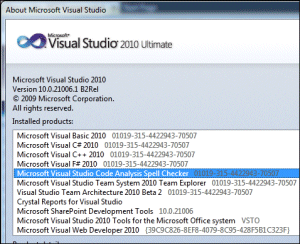
I’ve been exercising the new beta 2 of Visual 2010. It is hard to encapsulate in a few words because this is a simply huge release. OK, so I did download the Ultimate version; but the changes at every level seem greater than in Visual Studio 2008. One of the reasons is that this is the first full update to the .NET Framework since version 2.0 in late 2005. Versions  3.0 and 3.5 extended 2.0 but did not replace it. Another factor is that Visual Studio 2010 has a new editor built with Windows Presentation Foundation, and has a different look and feel than its predecessor. In addition, there is a new language, Visual F#, though I don’t hear much buzz about it; I think elevating IronRuby or IronPython to this status would have attracted more interest – but they are dynamic languages, whereas Visual F# is a functional language. 

When you are assessing Visual Studio you are in part assessing Microsoft’s platform, and as that platform has sprawled, so too has the tool. It is now so large that it is difficult to have in-depth knowledge of the entire thing. I also notice this when speaking to Microsoft folk about the product.

So what is new?

If you need to acclimatise, I suggest you start with What’s new in .NET Framework 4.0. This is a large topic in itself. Some of the things to look out for are What’s new in the Base Class Library, including Complex numbers, Location API, IObservable<T> for observable collections, and other tweaks and enhancements.

Then there are things like in-process side-by-side execution – the ability to run two versions of the Framework at once in the same process, which is remarkable.

Parallel programming with PLINQ and the Task Parallel Library is another major topic.

COM interop is changing; you no longer need to deploy Primary Interop Assemblies, because the compiler can include only the types you need in your application.

Next, take a look at what’s new in specific frameworks, such as WPF version 4 and ASP.NET MVC 2.

After that, you might be ready to look at new stuff in specific languages: including the dynamic keyword in C#, implicit line continuation in VB, lambda expressions in VC++, the concurrency runtime, and the arrival of Visual F#.

With that sorted, check out the new tools in the Visual Studio IDE. I’m thinking of the new code editor, the updated WPF visual designer, the new visual designer for Silverlight, and the Tools for SharePoint development; and not forgetting the updated modelling and application lifecycle management tools.

But isn’t this the era of cloud computing? That’s another part of the problem; the Windows-oriented tools seem less important if you are immersed in the latest cloud news. That said, don’t forget Windows Azure, though I was disappointed to find that the Windows Azure Tools for Visual Studio are a separate download, and not done yet.

I’m impressed that Microsoft seems to be pulling all this together successfully; it is a significant integration task. And as ever I’d be interested in what developers think – was the new code editor really necessary? Is Microsoft addressing the right areas? Has Microsoft done enough to support new Windows 7 features? And is performance OK in this version (it was a problem in beta 1)?

Microsoft quarterly results: server and tools shine, overall decline

Microsoft has reported its results for the quarter ending 30th Sept 2009. I’ve got into the habit of making a small table to help make sense of the figures:

Quarter ending Sept 30th 2009 vs quarter ending Sept 30th 2008, $millions

Segment Revenue % change Profit % change
Client (Windows) 2620 -38.8 1463 -52.17
Server and Tools 3434 0.50 1283 22.89
Online 490 5.80 -480 -49.53
Business (Office) 4404 -11.1 2863 -11.37
Entertainment and devices 1891 -0.11 312 96.22

A quick glance tells you that Windows suffered a sharp decline, though Microsoft says this is because it has deferred $1.47 billion of Windows 7 upgrade revenue, and that adding this back would reduce the decline to 4% year on year.

Note that even with the deferral, Windows is highly profitable.

The star here is server and tools, growing in the downturn and delivering strongly increased profits. I doubt tools counts for much of this; I’m guessing it reflects the positive reception for Server 2008.

Online is as dismal as ever. Clearly the Live properties are still not performing. Presuming Azure is in this category, it’s possible that this will start to turn this round; that is more likely I guess than an improvement in the fortunes of existing products such as Bing.

Office strikes me as pretty good bearing in mind the weak economy and that Microsoft is now talking about Office 2010. Entertainment and devices ticking along but nothing special.

I’m guessing Windows 7 will deliver Microsoft a great next quarter no matter what; but when if ever will it be profitable online?

Disclaimer: I am not a financial analyst, and hold no shares in companies about which I write. Please do not misconstrue this as investment advice; I know nothing about the subject.

Technorati Tags: ,

Blast from the past: how Adobe praised XAML at PDC 2003

I’ve been trawling back through material from Microsoft’s Professional Developer’s Conference in 2003 for a piece that will be posted shortly. I believe that the vision that was presented at PDC 2003, and how it fell apart, sheds a lot of light on why Windows is as it is today.

In doing so I came across this snippet about Adobe’s participation in the PDC keynote. It’s still online in Microsoft’s PDC press release:

Adobe Systems, a leading developer of software for consumers, creative professionals and enterprises, demonstrated the possibilities for ISVs created by integrating the new "Avalon" presentation technology and declarative programming techniques for Windows. Using these technologies, a prototype version of Adobe After Effects showed how developers could unify documents, cutting-edge graphics and media. For example, developers would now be able to build animated charts and graphs that are linked to back-end data sources to produce a smart solution that displays stock prices, sales and other information within a high-end professionally designed format.

"Many developers have not taken the visual design of their applications seriously enough, with the most innovative work restricted to creative professional software and games," said Greg Gilley, vice president of Graphics Applications Development at Adobe. "Longhorns new Avalon technology brings the designer and developer closer, so they can truly collaborate on creating software applications that are as beautiful as they are functional."

The odd thing is, this quote could come from the Adobe MAX 2009 conference from which I have just returned. “Animated charts and graphs … linked to back-end data sources” is what we saw in applications build with Mosaic, Adobe’s new framework for LiveCycle ES2 clients.

The difference: Adobe is doing all this with Flex and MXML, not XAML, and the client platform is the Flash runtime, not Avalon running on Windows.

Gilley of course was speaking before Adobe’s acquisition of Macromedia (and Flash and MXML) in 2005. Furthermore, nobody at PDC in 2003 could have guessed how long it would take Microsoft to deliver XAML.

Technorati Tags: ,,

Visual Studio 2010 to launch March 22 with Azure, Team Foundation Server for all

Microsoft has announced more details about Visual Studio 2010 and .NET Framework 4.0. Beta 2 of both products is available round about now, at least for MSDN subscribers, while thee are a few interesting packaging changes:

  • No more roles – there will be three paid-for versions of Visual Studio, Professional, Premium and Ultimate. I’ve been told that Premium will be pretty much the current Development and Database editions combined, while Ultimate has everything.
  • Team Foundation Server comes with every version, meaning that all Visual Studio developers will be able to use it if they choose. General Manager Jason Zander has the details of TFS Basic, which can even run on the client machine.
  • There will be a number of Azure hours bundled with each edition, so that developers can get started with Microsoft’s cloud platform without further payment. For example, Visual Studio 2010 Premium will come with 750 Azure hours initially, though this will supposedly reduce to 100 hours at a later date.

Visual Studio 2010 includes a new editor based on WPF, and users have complained of performance problems. Apparently this has been addressed, though now that beta 2 is out we will soon discover for sure.

I’ve also learned that the price of Visual Studio is increasing, by around 9%. To soften the blow, Microsoft has a special offer for those with current MSDN subscriptions when Visual Studio 2010 is released. These subscribers will get an automatic upgrade, not only to the equivalent 2010 edition, but to the one above. Thus, Professional subscribers will get Premium, and Team System subscribers will get Ultimate.

There is also an MSDN redesign, though it looks minor to me, and the most important section, the reference library, seems little changed. There is a ton of useful material on MSDN, but I still find Microsoft’s plethora of development and technical sites confusing to navigate, especially with specialist sites like Silverlight.Net offering overlapping content.

Ars technica has a handy product matrix.

Why Outlook rules copy a message when you asked for it to be moved

Ever wished computers had a “do what I mean” button?

Here’s a case in point. I use Outlook/Exchange rules to sort email into subfolders. I set up a new rule, and was annoyed to find that while messages were correctly being moved into the selected folder, they were not being deleted from the source folder. In other words, I’d asked for move but I was getting copy.

Bug in Outlook/Exchange rules? I don’t entirely trust them; but on this occasion it was my fault. The problem: these messages also matched another rule, which moved them to a different subfolder – the one, in fact, that I was treating as the “source folder”. When confronted with two rules that both move a message, Exchange makes a copy. Whether that is the right behaviour is arguable, but it is not a bug.

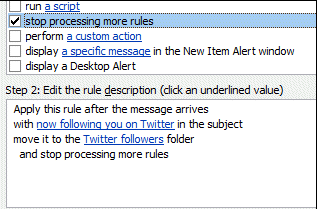
Here’s the solution. In the Actions for the rule, also check the option to “Stop processing more rules”.

Problem solved.

Technorati Tags: ,

Hands On with Microsoft Security Essentials – terrible name, but product looks good

Microsoft has released its free Security Essentials software, antivirus and antispyware protection aimed at home users. It runs on XP 32-bit, or Vista or Windows 7 32-bit or 64-bit, the only technical restriction being that Windows must validate as “genuine”.  Businesses are meant to use Forefront Client Security, though “home-based small businesses” are specifically permitted in the license agreement. I installed it on my Windows 7 64-bit desktop PC.

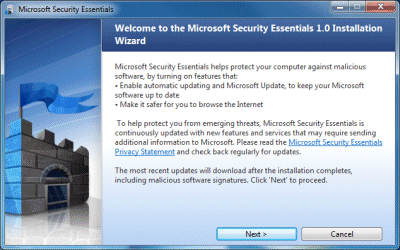
Installation was smooth, guided by a simple wizard with a castle logo:

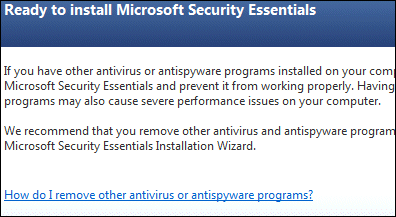
The trickiest moment comes when the installer recommends that you “remove other antivirus and antispyware programs”:

I am glad that Microsoft is confronting this issue, since running multiple antivirus applications is terrible for performance. It does make the point that this free software will not be good for competitors at this end of the market. The other issue is that removing other security software will probably mean a reboot as well as passing one or more dialogs pleading with you to reconsider. Do this before running the installer.

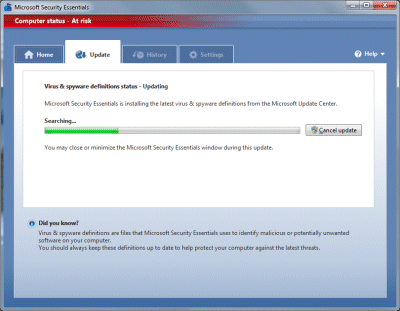
Once done, Security Essentials – a terrible, unmemorable, tongue-twisting name – announces that your computer is at risk while it goes off and downloads updates:

When the update completes, it does a quick scan, which took around 30 minutes on my machine. I let this complete – nothing was found – and then had a poke around the tabs and settings.

The user interface is nicely designed and there isn’t much to see. Be default Security Essentials will scan your PC once a week on Sunday night. You can specify quick or full scans. The software also monitors all file activity looking for malware. I get the impression that Microsoft has tried to make Security Essentials as unobtrusive as possible, which is most welcome.

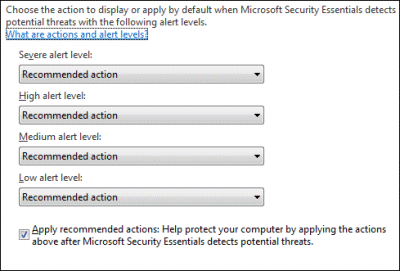
One thing that did annoy me is the settings for recommended actions:

In patronising style, Microsoft offers “Recommended action” as the default when malware is detected, but does not tell you what that action is. It is explained here – for severe or high alerts, it attempts to remove the malware, while for medium or low alerts it quarantines it. However, it does seem to ask first, which is important in the case of false positives.

I couldn’t find any way of setting the frequency of updates, which surprised me.

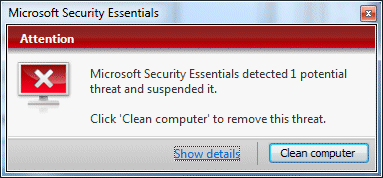
I gave Security Essentials an easy test by downloading eicar, a harmless file which for testing antivirus software. Security Essentials sprang into life:

I clicked Show details and got another red dialog offering to perform the recommended action, which was Remove. Another click, and it claimed to have done it, with the dialog turning a reassuring shade of green.

Is it any good? That’s a tough one. I don’t have high expectations of any security software based on scanning for known malware. Such software tends to fail when new viruses appear, as they do constantly. Another problem is that the bad guys can run the same security software as you, and design their malware to avoid its effects. In general, it is obvious that antivirus software has failed to prevent the spread of malware. I rate other things as more important, such as keeping systems up-to-date with patches and observing best practice concerning what you allow to execute. Unfortunately clever social engineering can often defeat good intentions.

Still, if you consider antivirus software a necessary evil, this one impresses by being nicely designed and mostly staying out of the way. If you are looking for the highest detection rates, you will have to wait for statistical analyses to be done. I am sure the commercial security companies will be quick to report on failures.

Personally I’m delighted that users can now get the Windows security center (Action Center in Windows 7) to stop bugging them without installing third-party software. Another advantage is that the software won’t stop updating when the user fails to subscribe or renew. Microsoft has plenty of incentive to get this one right, and to deliver something at least as good as the competition without slugging performance or annoying the user with advertisements and/or  constant exhortations to upgrade. I think it is worth a try.

Intel gets into the App Store game – but where does Silverlight fit in?

Intel has announced its Atom Developer Program including a new app store. The idea is to encourage a flow of applications that are well suited to netbooks, rather than general desktop applications that tend to get pressed into service because they are there, but may not be well suited to the smaller screen and more limited resources typical of netbooks versus full laptops. No doubt Intel has its eye on Apple’s successful iPhone App Store, which enhances sales of the hardware as well as providing a ready-made sales channel for independent software vendors, and wants to do the same for netbooks.

In order to participate as a developer, you have to sign up for the program, which will cost $99 annually though currently it is free. An interesting twist is that the developer program is a component market as well as an application market. Write a cool component, and you can get paid whenever any application that uses your component is sold. Intel handles all the business details, for a cut of course.

Intel is supporting two operating systems, Windows and Moblin, Intel’s Linux distribution. Your applications must be one of the following:

  • Native Windows (I am not sure whether .NET is allowed)
  • Native Moblin
  • Java
  • Adobe AIR

A puzzle is that Intel’s press release makes several references to Silverlight as a cross-platform runtime; yet although there is a Linux version of Silverlight, called Moonlight, there isn’t any exact equivalent to AIR for desktop Silverlight and I am not clear how Silverlight fits in any of the categories above. I may be reading too much into this; but perhaps all will be explained when Silverlight 4 is unveiled at PDC in November? Here’s what the press release says:

“Using Silverlight’s cross-device, cross-browser, cross-platform technology, developers will be able to write applications once and have them run on Windows and Moblin devices – expanding the reach of Silverlight applications to more consumers, regardless of whether the device they’re using is a PC, TV or phone,” said Ian Ellison Taylor, general manager, Microsoft Client Platforms and Tools.

Note that despite the above quote, Moonlight 2.0 is still in beta, and no current phones include the Silverlight runtime.

Apps must be delivered in one of the following forms:

  • .msi (for Windows*)
  • .jar (for Java*)
  • .air (for Adobe® AIR*)
  • .deb (for Debian Mobilin/Linux)
  • .rpm (for RedHat* Linux)

All applications in the store are subject to Intel’s approval (called validation):

The validation process checks your code for suitability for the Developer Program, licensing and legal issues, and some basic functionality.

Here’s the checklist. Note this requirement:

Runtimes and technologies the application can support can only be any of the following: Moblin* Native, Windows* Native, Adobe AIR*, Java FX *, and Microsoft* Silverlight*.

Hmm, Silverlight again.

Intel gets 30% of your revenue. You can also market components and if your application uses a paid-for component a share of the revenue will be paid to the component vendor. Free applications and components are also permitted.

I really like the checklist – I wish all desktop applications conformed to some of the requirements. Like this one:

The application will completely uninstall when desired, and leave no garbage files behind.

are great to read.

You can sign up here, though the SDK is not yet available.

One curious facet of the program is that although it is specifically for the Atom, in most cases your application will likely run fine on other processors. I am not sure if Intel will do anything to ensure that only Atom-powered computers use the store.

In May I posted that we should get ready for more app stores. This is really coming to pass now, with Adobe’s offering which I mentioned yesterday, Nokia’s Ovi, as well as others for Android, Palm Pre and so on.

London Stock Exchange migrating from .NET to Oracle/UNIX platform

The London Stock Exchange has agreed to acquire MillenniumIT, and will be replacing its TradElect and Infolect systems with the MillenniumIT trading system. TradElect is based on Windows Server and .NET,  and was created by Microsoft and Accenture. Microsoft used to use the LSE’s system as a showcase for .NET scalability, but while it proved that .NET can work for large systems, the LSE suffered an outage in September 2008 that was rumoured to be the fault of TradElect.

I don’t know much about MillenniumIT but note that the company is a partner with Sun and Oracle and that the MillenniumIT Exchange brochure [pdf] states:

Operating System: UNIX or Linux

Database: Oracle

As Brian Bryson of IBM/Rational observes, it is short-sighted to lay the blame on the platform. Nevertheless, considering the high profile of this system and Microsoft’s active involvement it is at least an embarrassment.

The mitigation for Microsoft is that .NET has less to prove these days. Even if running a system as large and performance-critical as the London Stock Exchange was a step too far, particularly for Server 2003 and (apparently) SQL Server 2000, that doesn’t rule out Microsoft’s technology for more usual workloads; and there are improvements in Server 2008 and SQL Server 2008.

Still, I’d love to know more about why the LSE is abandoning TradElect and what the lessons are for those designing and implementing systems at this level.

The problems with TradElect are thoroughly debated in the comments here.

Update: Microsoft’s LSE Case Study from 2006 is here.

I have also received the following statement from a Microsoft spokesperson:

Microsoft continues to support some of the most demanding, mission-critical environments in the world and is constantly raising the performance bar with new solutions.  Most recently, Microsoft completed three different proof-of-concept projects for a major international stock exchange that demonstrate Windows Server 2008 and Microsoft .NET can successfully support very low latency trading activities, in the 100 microsecond range using standard 1 Gigabit Ethernet.  With the addition of Microsoft Network Direct, that latency is further reduced by 50%, which is industry leading performance.

Why you probably don’t want to buy Microsoft SBS 2008 Premium CALs

I’ve been trying to figure out licensing for Microsoft’s Small Business Server 2008. It’s somewhat perplexing. There are two editions, Standard and Premium, but you can apparently use Standard CALs with the Premium SBS. The Premium edition offers two extra features over the Standard:

1. A second server license for Windows Server 2008.

2. SQL Server 2008 Standard Edition.

So what’s the difference between Standard and Premium CALs? First of all, price. A pack of 5 standard CALs is $385 full retail, while 5 Premium CALs is $945 – that’s 245% more, real money.

But what else? You would have thought that a Premium CAL would be needed to access Premium SBS, but this is not the case. The Pricing page says:

Microsoft offers several flexible licensing options to allow for complete scalability of your cost in relation to your usage, including various CAL quantities to suit your specific needs as well as the ability to purchase SBS 2008 CAL Suite for Premium Users or Devices for only those users or devices accessing the “premium” features.

OK, so what are the “premium” features? Does this mean anyone accessing the second server? Apparently not. The Licensing FAQ says:

The Windows Small Business Server 2008 CAL Suite for Premium Users or Devices should be purchased for only those users or devices accessing the SQL Server 2008 Standard for Small Business shipped as part of Windows Small Business Server 2008 Premium server software.

Now we are getting there. It seems that the “premium features” boil down to just one feature: SQL Server 2008 Standard.

It’s also worth bearing in mind that SBS 2008 can be used by a maximum of 75 users; and that Microsoft offers a free version of SQL Server 2008 called Express which is limited to using a single processor, 1GB RAM and 4GB maximum database size.

It follows that small businesses only need Premium CALs if they are running a SQL Server 2008 application that is beyond the capabilities of Express, and even then only for those users who access that application.

SBS 2008 Premium Edition comes with 5 Premium CALs and costs $1899 full retail, vs $1089 full retail for the Standard Edition. Real-world prices are likely to be less.

My conclusion is that Premium Edition plus Standard CALs is good value if you can make use of the second server, whereas Premium Edition with Premium CALs (beyond the bundled 5) is poor value for the majority of small businesses, who simply do not need those SQL CALs.

Microsoft could make this much clearer by striking out all the references to “Premium features” in its publicity for SBS 2008, and replacing it with “SQL Server 2008 Standard” – unless it is hoping to sell Premium CALs to customers who do not need them.