Tag Archives: microsoft

The battle to own Windows Explorer shell overlay icons, or why your OneDrive green ticks have stopped working

There are a number of dark areas in Windows that do not work quite right. MAXPATH anyone? But here is another one that I have only recently become aware of.

If you use applications such as Mozy, OneDrive (Business or Personal), Adobe Creative Cloud, Tortoise (a developer utility) or Dropbox, you will be familiar with the idea of files in Explorer showing little icons to indicate their state: synced, not synced, in conflict, excluded and so on.

image

A common complaint is that while everything still works, the little green ticks (or whatever) no longer appear.

The reason for this is simple, if depressing. Well, there are two reasons. One is that Windows has a limit of 15 overlay icons. If more than that are specified (by multiple applications) then anything over the limit does not work.

The second is that multiple applications cannot apply overlays to the same file. So if you tried to set up your Tortoise repository in a OneDrive folder (do not do this), one or other would win the overlay battle but not both.

The overlay configuration is stored in the registry, at HKLM\Software\Microsoft\Windows\CurrentVersion\Explorer\ShelliconOverlayIdentifiers\

If you visit this location in RegEdit, you will notice something interesting:

image

Some of these entries, including AccExtIco (Adobe Creative Cloud), OneDrive (personal OneDrive) and SkyDrivePro (OneDrive for Business), have a leading space in their name. Why? That is because the authors of these applications want THEIR stuff to work right, so by including the leading space they get to the top of the queue.

(I also have entries for SkyDrive as well as OneDrive, registry bloat caused by the name change no doubt).

Microsoft’s support article on the subject therefore suggests renaming these entries to have TWO leading spaces:

Rename the following registry keys. To do this, right-click the folder, select Rename, and then rename the folder. When you rename the folder, add two spaces at the beginning of the name.

You can see where this is going to end … Adobe will install its entries with three spaces, Microsoft will come back with four, and so on. Possibly.

It is also an imperfect solution. On a machine suffering from this issue I performed an Office repair, which restored the old entries with a single leading space while not removing those with two leading spaces. More bloat.

If you get this problem, the best solution is to remove applications so that there is no conflict. If you want to use Mozy for backup, Dropbox because it works, and two OneDrives because they are nearly free, well, you are not going to have all your icon overlays working and that is that.

What to do when Outlook is stuck on “processing”

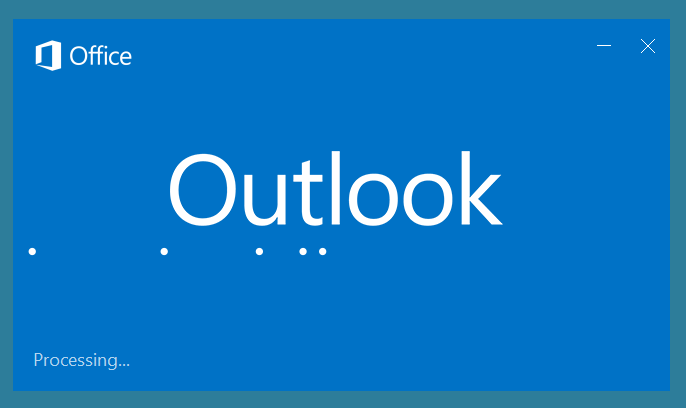
I have seen this a couple of times recently, both cases where Outlook 2016 is installed. You start Outlook, it loads plug-ins, then presents a dialog that says “Processing”.

image

It does this for a long time. What is is processing? Who knows. Will it complete in its own good time? Not sure, but for sure it takes longer than you want to wait in order to get your email.

Here is the fix that worked for me. Close Outlook by clicking the X at top right. If that doesn’t work, you can use Task Manager to end the Outlook process.

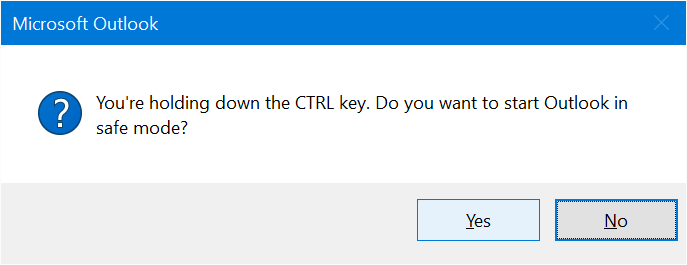
Now hold down Ctrl and click the Outlook shortcut on the taskbar, presuming it is pinned. This dialog appears:

image

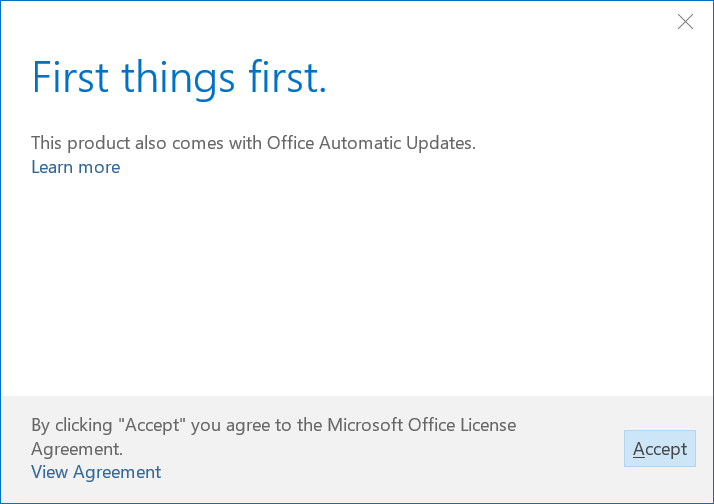
Click Yes. If you get further dialogs such as First things First, click Accept:

image

In both cases I have seen, Outlook now opens immediately, though in safe mode which means no plug-ins are loaded.

Close Outlook and restart it. Again it opens quickly, this time complete with plug-ins.

What is going on here? Not sure, but it may be related to automatic updates for those of us with the Pro Plus version of Office installed via Office 365 or other entitlement.

Observation: this is poor from Microsoft. One of the issues is that showing a generic busy dialog with no indication of what the software is actually doing makes poor UI. Users are more accepting of a long process if they can see evidence of it, even if the technical details of what is displayed make no sense. Maybe something like “Verifying nodes nnn of nnn” with the number incrementing.

This would also help if in fact the software is stuck in a loop, since the user can see that nothing is really happening.

Another issue of course is that this looks like a bug. Most users will end up calling support, despite the trivial fix above.

There may be other reasons for this problem which require different fixes. If that is the case with you, apologies!

The case of the disappearing Azure AD application registration

Some time ago I wrote a simple web application which runs on Microsoft Azure and uses Azure Active Directory for authentication. The application is used constantly and has proved reliable; however yesterday it stopped working. A quick debug session showed that the problem was an Azure AD permissions error.

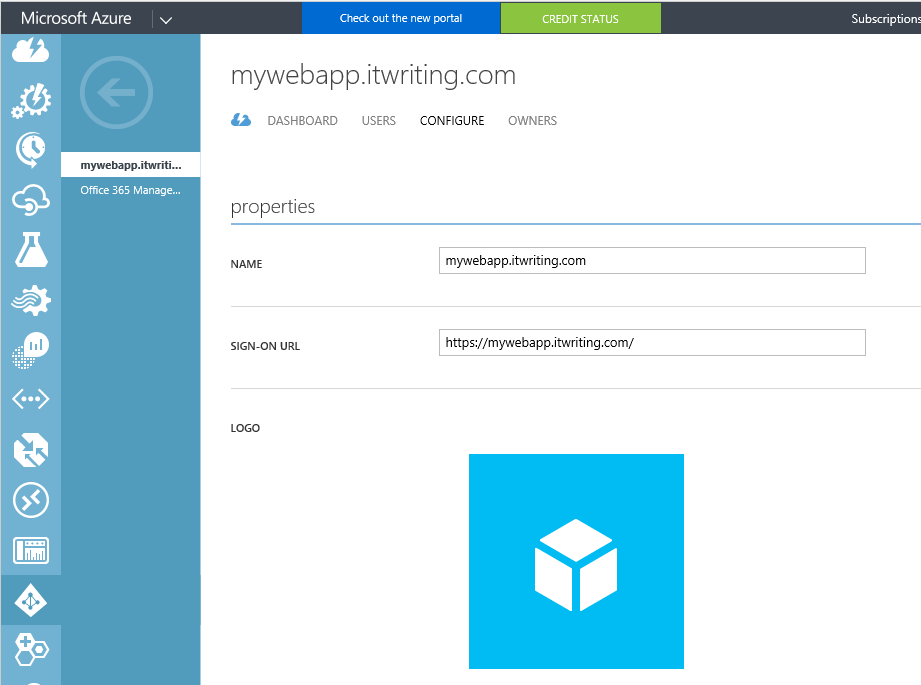
In order to use Azure AD, applications have to be registered in the Azure management portal. I use the old portal for this; I am not sure that the functionality exists in the new portal yet. There is a nice how-to here.

image

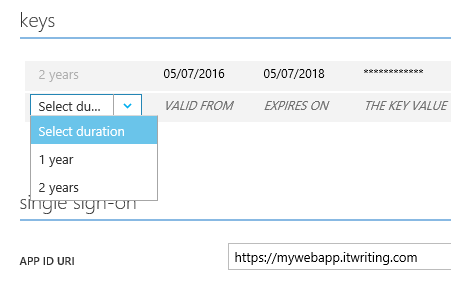
One of the elements in the registration is a key which has a maximum lifetime of 2 years:

image

My application was deployed about two years ago so I went to the portal to see if it had expired.

What I found surprised me. The application was not listed at all. It had disappeared.

Instead of simply obtaining a new key and updating my application config, I had to create a new application registration and update several keys in the config, which was an annoyance.

There is a wider point here, in the whole category of dealing with “things that expire”. Some time ago, Microsoft suffered an extended Azure outage because of an expired certificate. It is a shame that Microsoft insists on a maximum 2 year lifetime for this key but does not provide a check box for “alert me when this key is about to expire”, how difficult would that be?

Problems like this also mean that things which “just work” may not continue to do so. Of course a well organised enterprise setup can deal with this type of problem, but imagine, for example, the case of a small business with an application running on Azure where the developers have gone out of business, perhaps, or are no longer available. In fact the only code I needed to change was in web.config, but I can imagine it could take some time to figure out what to do and what to change.

Last thoughts on Windows Phone

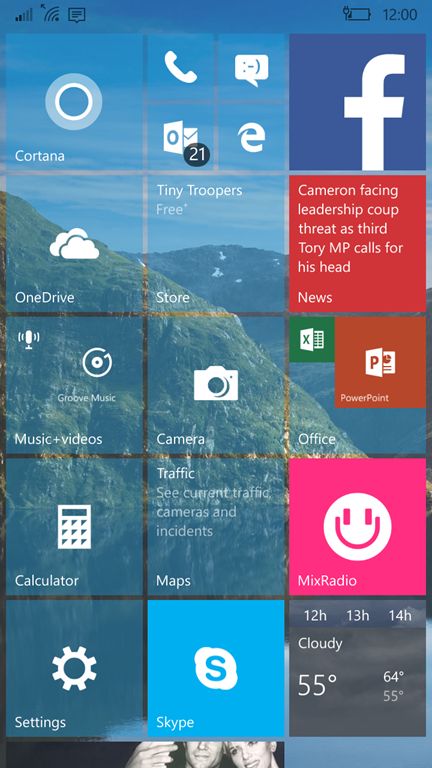
Microsoft’s Windows Phone disaster lurched further towards oblivion last week, when Windows boss Terry Myerson emailed employees with the news that “Today I want to share that we are taking the additional step of streamlining our smartphone hardware business, and we anticipate this will impact up to 1,850 jobs worldwide, up to 1,350 of which are in Finland.”
image

“Streamlining” is exec-speak for further withdrawal from the mobile phone business.

Microsoft is at times a dysfunctional company and nowhere is this better illustrated than in its mobile devices adventures. The failure of Windows Phone is a self-inflicted wound. Mis-steps include:

  • Aiming the first release of Windows Phone 7, in 2010, at the consumer market despite Windows core strength being in business computers
  • Launching Windows Phone while failing to do the spadework with operators and retailers to ensure that it was actually widely available
  • Using Silverlight as the development platform for Windows Phone and then abandoning Silverlight on Windows and releasing Windows 8 with a different and incompatible development platform
  • Promising that Windows Phone would be updated by Microsoft so users could stay up to date, while in fact leaving this to operators who did not care – this applied until April 2014 when the Developer Preview program kicked off, allowing users to update by signing up as developers, subject to hardware constraints
  • Long dormant periods while Microsoft went through one of its, “let’s pause while we make huge changes that will be great eventually” phases, such as before Windows Phone 8.0 which introduced the NT kernel and before Windows Mobile 10 which introduced the Universal Windows Platform

Despite all the above, the arrival of a former Microsoft executive at Nokia meant that Windows Phone was adopted by a company that actually understood how to develop and market smartphones. Visibility of Windows Phone at retail greatly improved and technology such as Nokia’s PureView photography gave it an edge in some areas. Windows Phone was also strong for turn by turn driving directions with Here maps.

It was an uphill battle against iPhone and Android, and with Microsoft’s too-slow platform development, but Nokia made some impact and built significant market share in certain territories, though in Europe rather than the USA.

Microsoft acquired Nokia’s devices business in 2014, along with CEO Stephen Elop, and it was here that everything went wrong. Specifically:

The transition period along with the coming Windows 10 resulted in not much happening in terms of new phones or announcements

Steve Ballmer was replaced as Microsoft CEO by Satya Nadella, before the acquisition completed. Ballmer had a strong belief in “Windows everywhere” and the importance of Microsoft not conceding the mobile space to competitors. Nadella came from a server background and believes everything will be fine as long as Microsoft’s server and cloud products are strong.

There was no consensus at Microsoft about whether Windows Phone was a key strategic asset or a waste of time and after running around in circles for a bit the inevitable happened: in June 2015 Nadella cut back the Windows Phone staff, cancelled some forthcoming devices, and parted company with Elop, who presumably had no appetite for presiding over the death of the business he had nurtured.

Myerson’s memo still presents the illusion that Windows Phone has some kind of future. “We’re scaling back, but we’re not out!” he writes. However you cannot be a little bit in the mobile phone business any more than you can be a little bit pregnant. The reason, as Elop announced when Nokia chose Windows Phone, is that you need an ecosystem. No, Continuum (the ability to use a phone like a desktop with an external display) is not an ecosystem. Maybe there will be some specialist business cases where a mobile device running Windows meets the need, but it will be a tiny niche.

This is also the reason why June 2015 was really the date that Windows Phone died, at least in public. Once it became obvious that Microsoft no longer believed in its own mobile platform, there was no hope, and sales suffered accordingly.

Could it have been different? Of course. The Nokia acquisition was not necessarily a bad idea: in theory it gave the hardware the backing of Microsoft’s deep pockets and brought to the company the skills that it lacked in how to make and market phones.

The saga has not been pretty to watch. In particular, the destruction of value in acquiring and then disposing of Nokia is distressing, as is the destruction of value in the Windows Phone operating system itself.

I have used a Windows Phone as my main mobile device for several years, and yes, it has a lot going for it. Navigation is easier than on Android or iOS, performance is good, and the integration with social media was for a while excellent. The camera on a Lumia 1020 remains superb. The development platform is strong, with Visual Studio and C#.

The subject of operating system design is another story; but there is another take on this narrative which looks like this:

Old world: Windows 7, Windows Mobile 6

Lurch towards mobile: Windows 8, Windows Phone 7

Lurch back towards desktop: Windows 10, Windows Mobile 10 with Continuum

Windows 10 is not as good as Windows 8.x on tablets, and Windows Mobile 10 is perhaps not as good as Windows Phone 8.x on mobile. I say perhaps because I don’t hate it; but there is a trade-off with performance and touch-friendliness worse while the capability of the operating system and its apps has improved.

In this way of reading Microsoft’s strategy, the death of Windows Phone is a consequence of the unravelling of former Windows boss Steven Sinofsky’s strategy to make Windows a secure and mobile-friendly platform.

The new Microsoft

That is it then; Microsoft is exiting mobile and trusting in server and cloud, plus a large but declining desktop Windows business, plus applications for other people’s mobile platforms. It is a software company after all.

It is too early though to say whether or not Ballmer was wrong and Nadella right in steering away from Windows everywhere. For sure Google will continue to do all it can to push Android users towards its own cloud services. Apple’s is a more open platform in this sense, because the company has no real equivalent to Office 365 or Azure, but Microsoft is vulnerable here as well. There is also Amazon Web Services to think about, the dominant cloud player, with its own offerings for email, cloud database and so on.

Still, this is the new Microsoft; and from a customer perspective there is good news in that both iOS and Android should be well supported for Microsoft’s services, and that Office 365 and Azure have to compete on technical merit, not just on the basis of integrating nicely with Windows.
Microsoft Financials: steady, but a turning point as on-premises server business declines

Microsoft has announced its latest financials, and I have made a quick table summarising the year-on-year comparison for the quarter. See the end of this post for what the confusing segment categories represent.

Quarter ending  March 31st 2016 vs quarter ending March 31st 2015, $millions

Segment Revenue Change Operating income Change
Productivity and Business Processes 6522 +65 2994 -210
Intelligent Cloud 6096 +193 2188 -345
More Personal Computing 9458 +89 1645 +596
Corporate and Other -1545 -1545 -1544 -1352

A few observations.

Overall the figures are flat. That is not a bad result if you think of Microsoft as a PC company, considering that the PC is in decline; disappointing if you think of Microsoft as a cloud company. The answer is that one is offsetting the other, which is not too bad.

Microsoft says that revenue and income would be up, were it not for currency fluctuations. Of course there is that big hit in “Corporate and other” which is “net revenue deferral related to Windows 10 of $1.6 billion,” according to the earnings statement.

On-premises server business is in retreat. It is not possible to migrate customers to the cloud while at the same time growing on-premises business. That truth finally showed up in Microsoft’s figures. CFO Amy Hood referred to a “larger than expected decline in our transactional on premise server business” in the earnings call.

Margins are not so good in cloud. Selling software license is almost all profit, once you have developed it. Not so with cloud, which requires data centres, networking, and ongoing maintenance. “Our company gross margin percentage declined this quarter driven by our accelerating mix of cloud services in our Intelligent Cloud and Productivity and Business Processes segment offset by higher gross margin percentage performance from products within More Personal Computing,” said Hood.

Office 365 continues to grow. CEO Satya Nadella said that “Commercial Office 365 customers surpassed 70 million monthly active users and we grew seats by 57 percent” year on year. This is key to the company’s health. Customers in Office 365 are hooked to the platform and more likely to buy other services such as Dynamics CRM, Enterprise Mobility Services MDM (Mobile Device Management), or applications hosted on Azure. “Dynamics CRM Online seats more than doubled this quarter with over 80 percent of our new CRM customers deploying in the cloud,” said Nadella.

Windows 10 is being taken up. The nagware is working according to Nadella, who said that “The number of Windows 10 devices is twice that of Windows 7 over the same time period since launch.” Nevertheless I still hear a lot of caution out there, with people advising one another to stick with Windows 7. Windows 10 pushes users more strongly to Microsoft services than 7, with Cortana driven by Bing. “Over 35 percent of our search revenue last month came from Windows 10 devices,” said Nadella.

Windows Phone is dying fast. “For phone we expect year over year revenue declines to deepen in Q4 as we work through our Lumia channel position,” said Hood.

Linux is growing. Nadella made a few comments about SQL Server on Linux and Linux on Azure. Why SQL Server on Linux? “We look at that as an expansion opportunity,” he said. Over 20% of VMs on Azure are Linux, he added. Microsoft made Linux “first class” on Azure in order to be able to host an enterprise’s “entire data estate across Windows and Linux.” People don’t move between operating systems, he said, but “now they have a choice around database.”

I’d add that we are now seeing scenarios where Linux is ahead of Windows on Azure. The new Azure Container service is currently Linux only, for example, though a Windows option is planned.

What Microsoft does with Linux in the coming years will be interesting to see. Office on Linux? Microsoft Android?

A reminder of Microsoft’s segments:

Productivity and Business Processes: Office, both commercial and consumer, including retail sales, volume licenses, Office 365, Exchange, SharePoint, Skype for Business, Skype consumer, OneDrive, Outlook.com. Microsoft Dynamics including Dynamics CRM, Dynamics ERP, both online and on-premises sales.

Intelligent Cloud: Server products not mentioned above, including Windows server, SQL Server, Visual Studio, System Center, as well as Microsoft Azure.

More Personal Computing: What a daft name, more than what? Still, this includes Windows in all its non-server forms, Windows Phone both hardware and licenses, Surface hardware, gaming including Xbox, Xbox Live, and search advertising.

Microsoft SQL Server is coming to Linux. What are the implications for Windows Server?

Microsoft is porting SQL Server, its popular database manager, to Linux. According to Executive VP Scott Guthrie:

Today I’m excited to announce our plans to bring SQL Server to Linux as well. This will enable SQL Server to deliver a consistent data platform across Windows Server and Linux, as well as on-premises and cloud. We are bringing the core relational database capabilities to preview today, and are targeting availability in mid-2017.

Why do this? The short answer is that like any other software company, Microsoft wants to sell more licenses, and porting its premier (and excellent) database manager to Linux extends its market and helps it compete more directly with the likes of Oracle and even MySQL.

image

However that begs a second question, which is why has Microsoft not done this before? After all, SQL Server has been around forever. The first release was in 1989, jointly with Ashton Tate and Sybase, and was for OS/2. The first Windows release was 1993. There was a significant leap forward in SQL Server 7.0, in 1998, which I think of as the beginning of the product as we know it today.

Microsoft in the nineties and in the first decade of the new millennium was all about Windows. Dominant on the desktop, the idea was to build synergies between Windows desktop and Windows server so that running server applications like Active Directory, Exchange and SQL Server was the obvious choice. The Visual Studio development environment pushed developers towards Visual Studio in subtle and not-so-subtle ways. Some programming language innovations like LINQ to SQL (a form of Language Integrated Query) only worked with SQL Server. It was not quite lock-in, it was always possible to use a different database engine, but SQL Server was always the default, used in all the examples and documentation, and the best understood when you needed support.

Today Microsoft’s circle of dominance is breaking down. Windows still has desktop dominance, but the importance of the desktop is less, thanks to mobile devices which mostly do not run Windows, and a move away from desktop applications towards web applications that do not care which operating system you use. Active Directory is still important, but cloud computing giants like Google and Amazon are encroaching on that space.

“Only on Windows Server” has become a liability rather than the key to keeping customers locked to Microsoft’s platform.

You can see this in the company’s development strategy, which is migrating towards a cross-platform implementation of .NET as well as embracing iOS and Android via the recently announced Xamarin acquisition. You can also see it in the Azure cloud platform, and Microsoft’s partnership with Red Hat for Linux on Azure. The company is happy to take your money whatever operating system you choose.

It is early days though, and Microsoft is still a Windows-centric company. SQL Server on Linux, expected sometime next year, will probably not be feature-complete compared to SQL Server on Windows – I am guessing, but things like .NET Stored Procedures may be tricky to get right, as well as features like in-memory databases that are tightly integrated with the operating system.

It is worth noting that cross-platform is actually a burden as well as a strength and may involve compromises. It will be fascinating to see how performance compares on equivalent hardware.

Microsoft is now betting than opening up new markets for SQL Server is more important than keeping customers hooked on Windows Server – especially as that last strategy is failing in the cloud computing era.

Finally, there is the question I posed in the title of this post. How does moving key server applications to Linux impact the appeal of Windows Server? After all, Linux licenses are generally cheaper than Windows Server and in some cases free. The answer is that it is one less reason to buy Windows Server, presuming SQL Server works properly on Linux.

You can see this as a process of commoditizing the operating system so that in time expensive server operating system licenses are a thing of the past. This is probably not a good trend for Microsoft. It can still prosper though if you rent your virtual infrastructure from the company and use its cloud services, like Azure and Office 365.

Another way of looking at this is that there is more pressure on Windows Server architect Jeffrey Snover and his team to make Windows Server better than Linux, so that you want to run it because of its merits, not because it is the only way to run SQL Server or Exchange.

Outlook 2016 attachment mysteries and annoyances

Microsoft Outlook 2016 has a new feature which the company highlighted when it first appeared, which is that it sends attachments as links by default, if they are stored in network-accessible locations. The idea is to prevent proliferation of different versions if several respondents make changes and email them back. It also means that everyone has the latest version. Good stuff, right?

I am not sure. Of course Outlook is meant to give you the choice about whether to send as a link or as a copy, but we all know that busy people just click and expect it to work; they mostly will not think through which method is appropriate in a particular case, or in some cases, even understand the difference. One of the implications of sending links is that the document received may not be what is sent. For example, consider this scenario:

1. Hmm, shall I send the minutes of our last meeting to this person at supplier X? Better check there is nothing sensitive in it. [Checks]. OK, send.

2. Colleague happens to look at minutes, thinks, why did we not minute our difficulties with supplier X? Adds section of sensitive information and proposal to switch to supplier Y.

3. Person at supplier X receives document …

OK, my scenario is somewhat contrived, but you can see the underlying issue.

There is also the question of whether the mechanism behind this feature is really robust. It is not in fact a simple feature. What is meant to happen is that Outlook detects whether your document can be sent as a link, and if it can, interacts with SharePoint to create a magic link with either view or edit permissions. In my experience, it is easy to end up sending an attachment that cannot in fact be accessed by the person at the other end.

I have an internal SharePoint and soon figured out that I had to prevent Outlook from sending documents as links. The URL I use for SharePoint internally is not accessible externally, which is perhaps a flaw in my setup, but not one that has ever caused problems before. In any case, I would prefer not to give out any magic links to documents in my SharePoint; it just seems an unnecessary security risk.

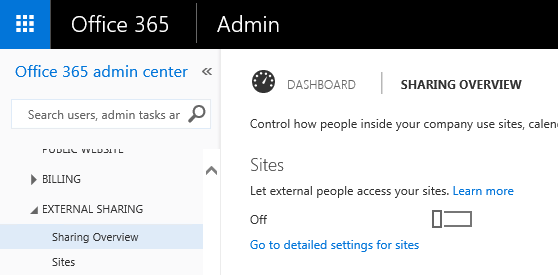
In the case of Office 365, note that external sharing may be switched off, in which case links will not work. External sharing may also be disabled for specific sites.

image

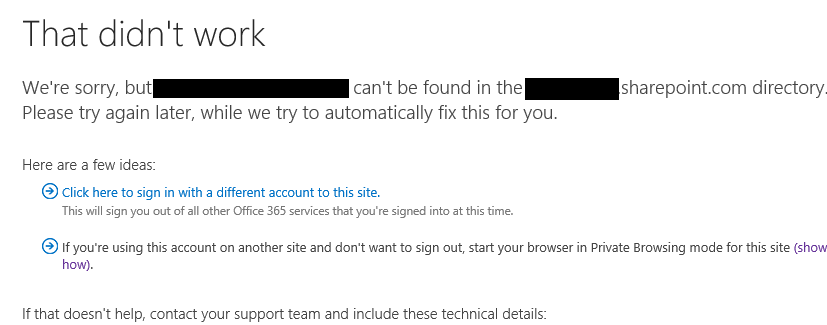
Maybe Outlook 2016 is smart enough to detect whether or not external sharing is enabled, but if so, this does seem to go wrong sometimes. I have seen cases where users send an attachment link, but the recipient cannot access the document. Rather, they click the link and get a “can’t be found in directory” error or similar.

image

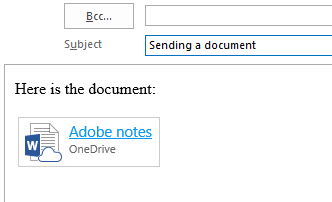
Another issue is that Outlook 2016 does not always offer you the choice of link or attachment. Here is how it is meant to work. What happens sometimes though is that the attachment does not end up in the “attached” header at the top of the email, but rather in the body. In this scenario, you actually end up with a small Word table (Outlook messages use the Word editor) that cannot be converted into a standard attachment:

image

Note the little icon, an embedded image, which includes a cloud to give you a clue that this is not really attached. It also seems to mess up text formatting; note that my typing is now Times New Roman rather than Calibri. Another Outlook mystery.

This problem only seems to happen if you select a file from Outlook 2016’s recently accessed document list, which appears when you click the new Attach File button:

image

So how do you prevent this behaviour? Given the difficulties it can cause, I thought Outlook might have an option to disable sending attachments as links, or at least to prevent it happening by default. I have not found such an option yet. One point to bear in mind is that in previous versions of Outlook it was not easy to send a document from SharePoint at all, unless you could access it from Windows Explorer. This means using WebDAV (“Open in Explorer”), or the still-problematic OneDrive for Business client. So the dropdown with recently accessed SharePoint and OneDrive documents is new and potentially welcome functionality.

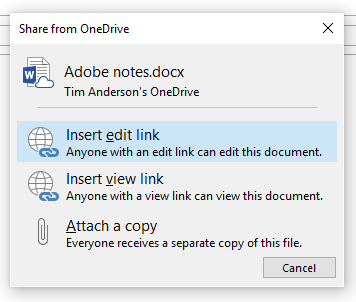
Here are a couple of workarounds though. If you format an email as plain text, which you can set as default if you choose, then you will not get the embedded link that cannot be changed. Instead, you will get the dialog with options to link or attach a copy:

image

What if you want Outlook 2016 to behave like Outlook 2013 and earlier? Well, the Attach File with the dropdown is not customizable directly, but you can add an old-style Attach File button. To do this, start a new email, right-click the toolbar, and click Customize the Ribbon. Right-lick the New Mail Message section on the right, and choose Add new group. Then select the Attach File command on the left, and the new group on the right, and click Add. I have called my new group Custom:

image

The effect is that you now have two Attach File commands, one of which behaves just like Outlook 2013:

image

My custom Attach File is on the right in the image above, does not have a drop-down list, and simply selects a file using an insert file dialog.

I appreciate that these are workarounds and not complete solutions.

Did Microsoft really think through this feature? Why the bugs? Why no easy way to disable it? I wish I knew.

Microsoft Office 365 and desktop friction

Microsoft would like us to think of Office 365, its hosted email and collaboration service, as “cloud”. And it is in many ways; you can even get all your email and Onedrive-stored documents direct from a web browser.

The truth though is that Microsoft has been careful not to disrupt its desktop Office software too much. Most users, in my experience, choose Office 365 in part because of its integration with Outlook, Word and Excel. You can install the software from the Office 365 portal, and open and save documents from Onedrive for Business.

Another part of the service is online chat and conferencing, for which you need the Skype for Business (formerly Lync) client on your PC.

There is an issue here though. Part of the attraction of “cloud” is that you do not have to manage software; but in the case of Office 365 you do have to manage the software that is installed on your PC. Microsoft’s investment in click-to-run installation has helped to simplify the setup, but under the covers it is as complex as ever.

Take the case of a small business I know, which was on the Office Midsize Business plan. Microsoft has retired this plan, so when it came to renewal time the customer had to change to a different plan. If they wanted to keep *all* the features of Midsize Business, including the Access database app, they could migrate to the Enterprise E3 plan – at £14.70 per month, nearly double the £7.80 per user/month for Midsized Business. On the other hand, they could migrate to the Business Premium plan for the same cost and, well, *nearly* the same features. The horrible details are here.

They didn’t use Access so Business Premium seemed OK. On the cloud side, the migration was straightforward. However, since Access was no longer included they had to remove and reinstall Office, as well as the Skype for Business client.

In this particular small business, most of the users needed some assistance with this operation. Unfortunately there is no single button to click that will remove the old Office and install the new one. You have to remove Office using Control Panel, then reinstall it from the Office 365 portal. Removing Office removes the old Skype for Business client, but putting it back means choosing a separate installation option in the portal, which most of them missed. One user somehow ended up with two versions of Office 2016 installed, neither of which worked properly. Office would not activate, reported an error, and offered to repair itself. This was not going to work, since it was the wrong version of Office.

Even when it goes smoothly, the business of removing Office and reinstalling both the desktop software and Skype for Business takes a long time, over an hour.

Overall, life in the Office 365 era is easier than it was in the days of 27 Office floppies, one or two of which were bound to be unreadable. Nevertheless, it is friction, and not fulfilling the seamless promise of cloud.

Microsoft’s story continues: Windows down, cloud up in financials Oct-Dec 2015

Microsoft has reported its latest financial results, for the quarter ending December 31st 2015.

Here are the latest figures (see end of post for what is in the segments):

Quarter ending  December 31st 2015 vs quarter ending December 31st 2014, $millions

Segment Revenue Change Operating income Change
Productivity and Business Processes 6690 -132 6460 -528
Intelligent Cloud 6343 +302 4977 +272
More Personal Computing 12660 -622 3542 +528
Corporate and Other -1897 -2222 -1897 -1980

A few points to note.

Revenue is down: Revenue overall was $million 23.8, $million 2.67 down on the same quarter in 2014. This is because cloud revenue has increased by less than personal computing has declined. The segments are rather opaque. We have to look at Microsoft’s comments on its results to get a better picture of how the company’s business is changing.

Windows: Revenue down 5% “due primarily to lower phone and Windows revenue and negative impact from foreign currency”.

Windows 10: Not much said about this specifically, except that search revenue grew 21% overall, and “nearly 30% of search revenue in the month of December was driven by Windows 10 devices.” That enforced Cortana/Bing search integration is beginning to pay off.

Surface: Revenue up 29%, but not enough to offset a 49% decline in phone revenue.

Azure: Azure revenue grew 140%, compute usage doubled year on year, Azure SQL database usage increased by 5 times year on year.

Office 365: 59% growth in commercial seats.

Server products: Revenue is up 5% after allowing for currency movements.

Xbox: Xbox Live revenue is growing (up 30% year on year) but hardware revenue declined, by how much is undisclosed. Microsoft attributes this to “lower volumes of Xbox 360” which is lame considering that the shiny Xbox One is also available.

Further observations

This is a continuing story of cloud growth and consumer decline, with Microsoft’s traditional business market somewhere in between. The slow, or not so slow, death of Windows Phone is sad to see; Microsoft’s dismal handling of its Nokia acquisition is among its biggest mis-steps and hugely costly.

CEO Satya Nadella came from the server side of the business and seems to be shaping the company in that direction, if he had any choice.

Azure and Office 365 are its big success stories. Nadella said in the earnings call that “the enterprise cloud opportunity is massive, larger than any market we’ve ever participated in.”

A reminder of Microsoft’s segments:

Productivity and Business Processes: Office, both commercial and consumer, including retail sales, volume licenses, Office 365, Exchange, SharePoint, Skype for Business, Skype consumer, OneDrive, Outlook.com. Microsoft Dynamics including Dynamics CRM, Dynamics ERP, both online and on-premises sales.

Intelligent Cloud: Server products not mentioned above, including Windows server, SQL Server, Visual Studio, System Center, as well as Microsoft Azure.

More Personal Computing: What a daft name, more than what? Still, this includes Windows in all its non-server forms, Windows Phone both hardware and licenses, Surface hardware, gaming including Xbox, Xbox Live, and search advertising.

Microsoft financials July-Sept 2015: decline of Windows hits home, cloud rises

Microsoft has reported its financials for its first quarter. Making sense of these is harder than usual because the company has changed its segment breakdown (and the names are misleading). The new segments are as follows:

Productivity and Business Processes: Office, both commercial and consumer, including retail sales, volume licenses, Office 365, Exchange, SharePoint, Skype for Business, Skype consumer, OneDrive, Outlook.com. Microsoft Dynamics including Dynamics CRM, Dynamics ERP, both online and on-premises sales.

Intelligent Cloud: Server products not mentioned above, including Windows server, SQL Server, Visual Studio, System Center, as well as Microsoft Azure.

More Personal Computing: What a daft name, more than what? Still, this includes Windows in all its non-server forms, Windows Phone both hardware and licenses, Surface hardware, gaming including Xbox, Xbox Live, and search advertising.

Here are the latest figures:

Quarter ending  Sept 30th 2015 vs quarter ending Sept 30th 2014, $millions

Segment Revenue Change Operating income Change
Productivity and Business Processes 6306 -184 3105 -233
Intelligent Cloud 5892 +417 2400 +294
More Personal Computing 9381 -1855 1562 -57
Corporate and Other -1200 -1200 -1274 -55

A few points to note.

Death of Windows Phone: Microsoft acquired Nokia’s Devices and Services business in April 2014. In fiscal year 2015, according to Microsoft’s 10-Q report, the company “eliminated approximately 19,000 positions in fiscal year 2015, including approximately 13,000 professional and factory positions related to the Nokia Devices and Services business.” This was rationalisation following the acquisition; the real blow came a year later. “In June 2015, management approved a plan to restructure our phone business to better focus and align resources (the “Phone Hardware Restructuring Plan”), under which we will eliminate up to 7,800 positions in fiscal year 2016.”

Windows Phone is not quite dead, but Microsoft seems to have given up on the idea of competing with Android and iOS in the mainstream. Year on year, phone revenue is down 58%, Lumia units down from 9.3 million to 5.8 million, non-Lumia phones down from 42.9 million to 25.5 million. This is what happens when you tell the world you are giving up.

Windows: Revenue down 7% “driven by declines in the business and consumer PC markets”.

Surface: Revenue down by 26% because Surface Pro 3 launched in June 2014; this should pick up following the launch of new Surface hardware recently.

Cloud: Microsoft’s “Commercial cloud” comprises Office 365 Commercial, Azure and Dynamics CRM online. All are booming. Azure revenue and usage more than doubled year on year, with 121% revenue growth. In addition, Office 365 consumer subscribers increased by 3 million in the quarter, to 18.2 million, an increase of nearly 20%.

Server products: Revenue is up 6% thanks to “higher revenue from premium versions of Microsoft SQL Server, Windows Server, and System Center”

Xbox: Steady, with Live revenue up 17%, Minecraft adding 17% to game revenue, and hardware revenue down 17% because of Xbox 360 declining (and by implication, not being replaced by Xbox One, a worrying trend).

Further observations

Is Microsoft now facing permanent long (but slow) decline in Windows as a client or standalone operating system? It certainly looks that way. The last hope is that Windows 10 in laptop, tablet and hybrid forms wins some users over from Mac computers and iPad/Android tablets. Despite some progress, Microsoft still has work to do before Windows delivers the smooth appliance-like experience of competing tablets, so I do not regard this as likely. The app ecosystem is also a problem. Tablets need Universal Windows Platform (UWP) apps but developers can still target more Windows users with desktop apps, discouraging UWP development.

Microsoft is also busy removing the advantage of Windows by stepping up its first-party Mac, iOS and Android application development, though this makes sense as a way of promoting Office 365.

That leads on to the next question. If Windows continues to decline, can Microsoft still grow with Office 365 and Azure? Of course it is possible, and on these figures that strategy looks to be going reasonably well. That said, you can expect both Google to continue integrating Android and of course Chromebook with its rival cloud services. Apple today does not compete so much in the cloud, but may do in future. If the future Microsoft has to relying on third-party operating systems for user interaction it will be a long-term weakness.