Tag Archives: microsoft

Is Windows 10 stable? Mostly it is, but there are some concerns

“Windows 10’s lack of stability is really starting to be an issue for me” says Mary Jo Foley over on zdnet.

The problems she experienced include the Store not working, the Mail app not syncing and then wiping her accounts after an update, and the PC randomly shutting down. She has now done a clean install and so far all is good.

I am using Windows 10 now for most of my work, having in-place upgraded from Windows 8.1. My experience has been better, with no random shutdowns, and the desktop environment has been perfectly stable. There are some bugs and annoyances though. Here are the ones that come to mind:

The Start menu bug is the biggest annoyance. This one deserves some reflection. If you have a lot (possibly more than 512, possibly some other factors) of Start menu entries, Windows 10 does not show them all. Even Cortana/Search does not find them. The entries exist though, and I use my Explorer workaround to find them.

I find this bug astonishing. It looks like poor coding in a hugely sensitive part of Windows, the first thing people mention when they explain why they dislike Windows 8. There is still no fix from Microsoft, though some users report improvement after various updates.

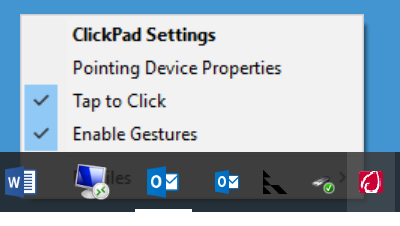
Another annoyance is that on my HP laptop I cannot disable tap-to-click. I can disable it temporarily but it reverts, certainly on the next start-up.

image

While some users like tap-to-click, I loathe it and do not think it should ever be on by default. In many Windows laptops the setting is hard to find and some users have ditched Windows because of it, and switched to Macs. The reason is that it is easy to tap the trackpad by mistake; and an accidental click can have dire consequences, such as sending an email by mistake, or clicking Yes in a dialog when you meant No. If you suffer from any sort of tremble it is a disaster.

I am not sure who is responsible for this bug; it could be the Synaptics driver, but it was fine in Windows 8.1.

Another annoyance relates to the new Windows calculator. On my desktop PC I am in the habit of pressing the Calculator key to open it (I have a Microsoft keyboard). In earlier versions of Windows the calculator appears instantly. In Windows 10 it may take several minutes or not appear at all. Of course what you tend to do is to assume that you did not press the key hard enough and press it again. Eventually lots of instances appear. I’ve looked into this a little; the Calculator does appear in the Task Manager process list, but with a status of Suspended. I’ve also had a scenario where the calculator appears but does not accept input until you click on it with the mouse, defeating the value of the key.

I am using the Edge browser but in practice it is not that good. I like the direction Edge is taking, but some sites do not work properly, and there are bugs. Favourites do not work when you have a long list; you click a sub-folder but the wrong entries appear, until it settles down and starts functioning correctly. You can pin the task pane (with Favourites, History etc) but the setting does not persist when you next start the browser. I also sometimes get long delays opening a web page; it is always hard to say what causes these and sometimes it will be a server issue, but Edge is worse than other browsers so I think it is partly to blame.

Some of the new apps show promise but are not 100% stable. Photos is good but I have had it exit silently when scrolling through a long list (perhaps related to OneDrive issues). I still prefer Paint for quick cropping and simple editing. The Music app has its attractions, but Foobar2000 is much faster, and Spotify is better if you want all the cloud streaming and social aspects.

Talking of OneDrive, the lack of placeholders in Explorer, where a file is listed but only downloaded on request, is an issue though I do not find it too difficult to work around. I have a OneDrive folder called synced which I sync on every PC I use. Photos of course does have a kind of OneDrive placeholder system.

So there are annoyances, and others will have different ones, but nothing I would describe as instability. Most applications run fine, and I have found application compatibility with Windows 7 and 8 very good. I like the faster boot and resume. I like the new Task View button and the multiple desktops. Overall it is working OK for me.

My general advice when consulted about whether to upgrade is to wait until next year, unless there are pressing reasons to go more quickly. I am also aware of numerous issues related to the in-place upgrade. One user for example upgraded from Windows 7 because of the annoying nags from Windows Update. The upgrade worked, but for some reason resulted in tablet mode being enabled (I cannot be sure whether this was a mis-click or an upgrade issue). This is on a desktop PC. Unfortunately, tablet mode is almost as confusing as Windows 8 was for a less technical user. The taskbar is hidden and it is not easy to find your applications.

I am sure Windows 10 will be the best version yet. It is taking time though and from a user perspective there is no rush (yes, it was released before it was ready). From Microsoft’s point of view it is important that the worst bugs get fixed soon (Start menu, please); and the generally poor performance of the Universal apps is a concern, considering the strategic significance of the platform.

Update: a newer Synaptics driver on the HP site has improved the trackpad problem; at least, the setting has survived a reboot so I hope it is fixed.

Notes from the field: unexpected villain breaks Dynamics CRM and IIS on Windows Server 2012

Yesterday I was asked to convert a Dynamics CRM 2013 installation from an internal to an Internet Facing Deployment (IFD). It is a bit fiddly, but I have done this before so I was confident.

The installation in question is only for test; the company has its production CRM 2011 on another server. Because it is for test though, it is a small deployment on a single server.

I got to work running the Claims Based Authentication wizard in the CRM Deployment Manager but also noticed something odd about the server. WSUS (Windows Server Update Services) was installed though it was not in use. This seems a bad idea so I asked if I could remove it. Sure, it was just a quick experiment. I removed WSUS and got on with the next steps of configuring IFD.

Unfortunately ADFS 2.0 (in this case) would not play ball. It could not communicate with CRM. I quickly saw why: attempting to browse to the special FederationMetadata.xml URL raised a 500 error.

I tried a few things. There are plenty of odd things that can go wrong: permissions on the private keys of the certificate used for the CRM web site, Service Principal Names, incorrect DNS entries and so on. All seemed fine. Still the error.

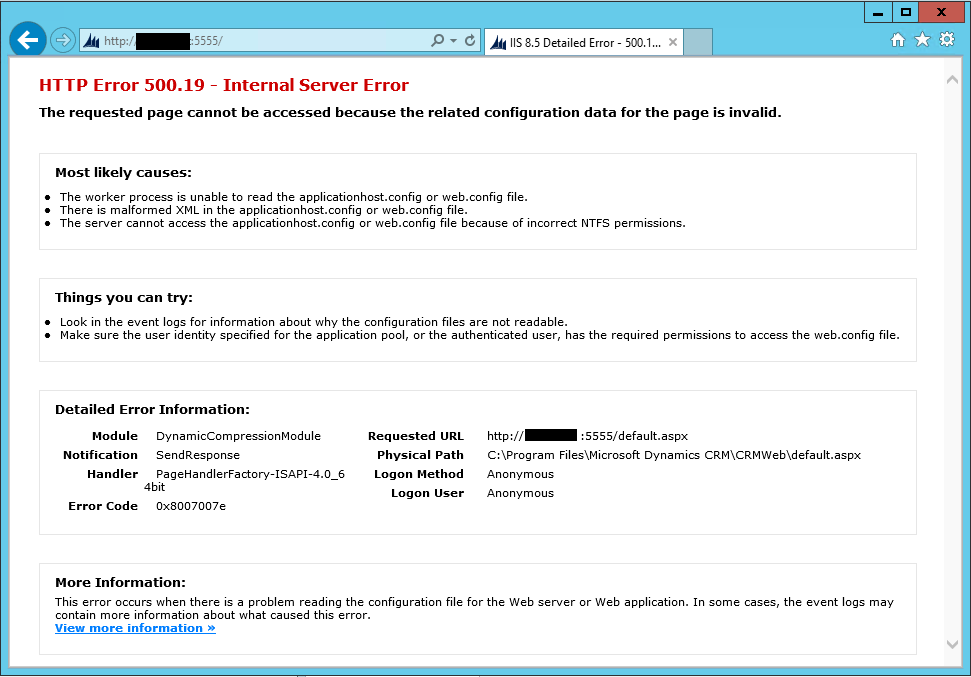
I decided to backtrack and temporarily disable Claims Based Authentication. Unfortunately it appeared that I had broken CRM completely. All access to the site raised the same 500.19 IIS error.

image

The web page IIS delivers says that the most likely causes are that the worker process is unable to read the ApplicationHost.config or web.config file, or malformed XML in the applicationhost.config or web.config file, or incorrect NTFS permissions.

I did a repair install on CRM. I reapplied the rollups. No difference.

I ran Process Monitor to try to figure out what configuration file was causing the problem. It was not a great help, but did point me in the right direction to the extent that it seemed that ASP.NET was not working properly at all. I now focused on this rather than CRM itself, observing also that there were not many CRM-related errors in the event log and I would expect more if it was really broken.

I created a hello world ASP.NET application and installed it in a separate site on a different port. Same error.

Searching for help on this particular error was not particularly helpful. In the context of CRM, the few users that encountered something similar had reinstalled everything from scratch. However, now at least I knew that IIS rather than CRM was broken. This helpful MSDN article actually includes a hint to the solution:

For above specific error (mentioned in this example), DynamicCompressionModule module is causing the trouble. This is because of the XPress compression scheme module (suscomp.dll) which gets installed with WSUS. Since Compression schemes are defined globally and try to load in every application Pool, it will result in this error when 64bit version of suscomp.dll attempts to load in an application pool which is running in 32bit mode.

which is also referenced here. These refer to WSUS breaking 32-bit applications, but in my case after removing WSUS neither 64-bit nor 32-bit apps were running.

Let me put it more clearly. If you remove WSUS using the role wizard in Server Manager, a number of bits get left behind, including a setting in ApplicationHost.config (in /System32/Inetsrv) that breaks IIS.

So it was my attempt to clean up the server that had made it worse.

That said, this is also a Windows Server failure. Adding and removing a role should result as far as possible in no change.

Once identified, the problem is easy to fix (this is often true). Still, several hours wasted and more evidence for Martin Fowler’s assertion that you should automate server configuration and spin up a new one from scratch when you want to make a change, to avoid configuration drift. There is a more detailed post on the same theme – Phoenix servers that rise from the ashes, not snowflake servers that are unique and ugly – here.

In a small business context this perhaps is harder to achieve – though the cost of entry gets lower all the time, through either cloud computing or internal virtualization platforms.

Using Explorer as an alternate Start menu for Windows 10 to work around missing entries

There are a couple of issues with the Start menu in Microsoft’s just-released Windows 10. One is that some sort of bug means there may be missing entries. Second, the All Apps list is not great for navigation even when it is working. There are two many clicks: click Start, click All Apps, click a letter or start scrolling, maybe expand the folder you want, and you eventually get there.

I have upgraded my own desktop PC to Windows 10, which was running Windows 8.1 Enterprise. The good news is that the upgrade went smoothly, but unfortunately I have run into this bug and some applications are missing from the All Apps list.

I am reluctant to install a third-party Start menu like Start 10, though this is a good solution for many users, since I like to keep Windows as plain as possible as well as tracking changes Microsoft makes to the user interface. How than can I retain easy access to all my applications until this bug is fixed?

My first thought was to use the Windows libraries feature. Using this, you can combine the two main locations for Start menu entries into a single list in Explorer. These are the locations:

C:\ProgramData\Microsoft\Windows\Start Menu\Programs

C:\Users\[Username]\AppData\Roaming\Microsoft\Windows\Start Menu\Programs

The first location is for applications available to all users of your PC, while the second is per-user. I combined these in a new library which I called Store Complete and was initially pleased; all the shortcuts were there. Except they were not: I realised that my new Start folder did not include any Store apps, since the shortcuts for these are handled differently.

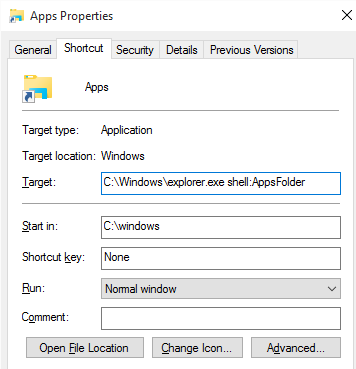
This led me to investigate Store app shortcuts, and I came across another approach. Make a new shortcut (no need for a library), and in the Target field type:

c:\windows\explorer.exe shell:AppsFolder

image

I called the Shortcut Apps but you can call it what you like. This creates a folder with shortcuts to all your applications, both Store and desktop apps. The snag: they are all in a single list, whereas the Library approach preserves the hierarchy if an application has several subfolders of shortcuts (like some developer tools).

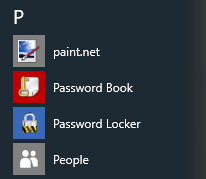
The Apps list on my PC has 836 items and it is complete. For example, I have the application Password Safe, which is not listed in All Apps, nor is Futuremark’s PC Mark which I have just installed:

image

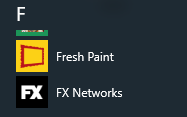
Actually PC Mark should be under F for Futuremark, but it is not there either:

image

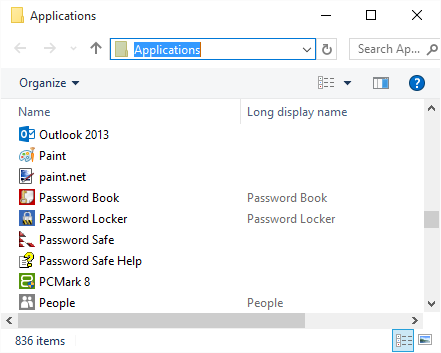
Nor are they found if I type Password Safe or PC Mark into Cortana/Search in the taskbar. But they are there in my Apps folder:

image

Scrolling through this list is a little tedious, but it also has a search box which works. Not ideal, but a workable alternative.

Note: I tried pinning this folder to the Start panel but that does not work. However you can pin it to the taskbar for quick access.

Windows 10

The launch of Windows 10 today is a key moment for Microsoft and users of its platform. A few observations.

I like new Windows more than I had expected. I get on fine with Windows 8, though mostly on the desktop since that is where the applications are. Being able to run Store apps in a window makes a big difference though, and there is a real chance that this will kick-start Microsoft’s app platform at last. See my overview on The Register here.

Is Windows 10 ready, or rushed out too soon? The latter I fear. The desktop side is solid as far as I can tell, with the exception of the new Start menu – actually a Universal Windows Platform (UWP) app – which is a bit broken. Since this is how users launch applications that is a serious problem. Still, it might work OK for you if you have fewer than 512 application shortcuts. I have also seen issues with search within the Start menu, either not finding apps, or in one case just hanging (reboot sorted it).

It really should not be difficult to have reliable search across a tiny database.

The Windows Store is another source of problems. I tried to install the latest Twitter app, and ended up with a “Restoring user data” message that would not go away. It is frustrating because you cannot simply cancel the process and try again. At this time my event viewer filled with DCOM activation errors, which may or may not be related, but did remind me how much intricate and ancient technology remains in Windows.

Microsoft also has this mad idea that all eligible users should be upgraded automatically using a Get Windows 10 (GWX) application installed via Windows Update. From what I have heard so far, failures are common. Users who suffer a long update process that ends with an error message and return to the previous version of Windows may never try again, or next time buy a Mac.

This is exactly what you would expect from an in-place upgrade. There are simply too many variations of hardware and software, too many things to go wrong, for this to work reliably across millions of users.

These things will distract attention from what matters more, which is Microsoft steering Windows towards becoming a modern, mobile-friendly operating system. There is also a lot of good work on the business side, in security and manageability. In six months time Windows 10 will be a delight.

The coverage of Windows 10 in the general media also interests me. Never mind Microsoft’s generally strong financials, the common view is that the company is failing because of its lack of success in mobile. That may prove true, but it is not true yet.

In this light, I am still puzzled by CEO Satya Nadella’s decision to dismantle the Nokia acquisition, at huge cost. At the Build conference in April, Microsoft seemed determined to make Windows Phone work, with the universal app platform, Android runtime layer, and Objective C compiler support. The Nokia team had the skills to design and build phones. Disposing of it seems short-sighted.

If the app platform in Windows 10 does succeed, users will want to run those apps on their smartphones too.

Microsoft financials April-June 2015: loss from Nokia write-down, comments on future direction

Microsoft has reported its financials for its fourth quarter. The company made a loss of over three billion dollars ($bn 3.195) but this was because of an eight billion dollar write-down mostly on the phone business – in effect, writing off the value of its Nokia acquisition. It still has plenty of cash in the bank – over $96 bn according to its balance sheet. Perhaps it is too easy for companies of this size to make bad business decisions (I leave open whether it was the acquisition or the way it was handled that was the bad decision, but one of them was).

Here are the latest figures:

Quarter ending  June 30th 2015 vs quarter ending June 30th 2014, $millions

Segment Revenue Change Gross margin Change
Devices and Consumer Licensing 3233 -1670 2966 -1555
Computing and Gaming Hardware 1933 +591 435 +417
Phone Hardware 1234 -748 -104 -158
Devices and Consumer Other 2300 +538 594 +303
Commercial Licensing 10451 -782 9529 -769
Commercial Other 3076 +814 1350 +659

A few points to note. The confusing segment names are summarised at the end of this post. Revenue was slightly down quarter on quarter, from $bn 23.4 to 22.2, largely because of a decline in consumer Windows (weak PC sales). Commercial licensing was also down, which Microsoft attributes to the end of the XP migration boom.

Phone aside, Microsoft’s hardware is performing well, thanks to Surface Pro 3 and Xbox One. Although Xbox One has been outsold by Sony’s PlayStation 4, it is holding its own and Microsoft says that Xbox Live usage has grown by over 30% over the year. The company says this is “deeper user engagement”; another way of looking at this is that playing games without an Xbox Live subscription is often disappointing.

Microsoft’s cloud and server projects are both growing. Business cloud revenue (Office 365, Azure and Dynamics CRM) is up 106% over the year and server products up 12%.

A bright spot is that search advertising revenue grew by 21% and Bing is expected to be profitable in the next financial year. The search wars are last year’s thing but Microsoft’s determination has won it a small but viable slice of the market. It is important because the data from search is essential for high quality predictive analysis and personalisation services, which is still a coming thing (Cortana, Siri, Google Now).

In the earnings call, CEO Satya Nadella revealed some data:

  • 15 million consumer Office 365 subscribers growing by 1 million per month
  • 50,000 new SMB customers for Office 365 per month
  • Paid seats for Dynamics CRM up 140% year on year
  • 17,000 customers for Enterprise Mobility Services (Mobile Device Management)
  • Over 100% growth in Azure both in revenue and compute usage

Of Windows 10, Nadella says:

While the PC ecosystem has been under pressure recently, I do believe that Windows 10 will broaden our economic opportunity and return Windows to growth.

A short-term boost from Windows 10 would not be surprising, but does he think that Microsoft can reverse the trend from PC to mobile, or that Windows can be successful enough in the mobile category (tablets and phones) to benefit from that trend? If the latter, perhaps destroying the Nokia acquisition was not the best move (but I must not harp on about this).

On Windows 10, Nadella described three phases:

Upgrade phase: From July 29th when free Windows 10 upgrades begin.

OEM device phase: From “the fall” when Windows 10 PCs and devices go on sale.

Enterprise upgrade phase: Piloting and deployments from January 2016

Note from the last that Windows 10 is not fully business-ready yet. Enterprise Store, OneDrive for Business client, “Project Centennial” which lets you wrap Win32 apps for Store deployment, none of these are done.

How is Microsoft hoping to grow its business? CFO Amy Hood identified three areas, in response to a question on operational expenditure:

The first one is Windows 10. The second is the first party hardware where we just had such terrific performance again this Q4. And then, finally, the third bucket was about accelerating our commercial cloud leads.

Of these, the third looks a sure bet, the other two are more speculative. Microsoft will continue to be a fascinating business to watch.

Microsoft’s segments summarised

Devices and Consumer Licensing: non-volume and non-subscription licensing of Windows, Office, Windows Phone, and “ related patent licensing; and certain other patent licensing revenue” – all those Android royalties?

Computing and Gaming Hardware: the Xbox One and 360, Xbox Live subscriptions, Surface, and Microsoft PC accessories.

Devices and Consumer Other: Resale, including Windows Store, Xbox Live transactions (other than subscriptions), Windows Phone Marketplace; search advertising; display advertising; Office 365 Home Premium subscriptions; Microsoft Studios (games), retail stores.

Commercial Licensing: server products, including Windows Server, Microsoft SQL Server, Visual Studio, System Center, and Windows Embedded; volume licensing of Windows, Office, Exchange, SharePoint, and Lync; Microsoft Dynamics business solutions, excluding Dynamics CRM Online; Skype.

Commercial Other: Enterprise Services, including support and consulting; Office 365 (excluding Office 365 Home Premium), other Microsoft Office online offerings, and Dynamics CRM Online; Windows Azure.

Microsoft completes Visual Studio 2015

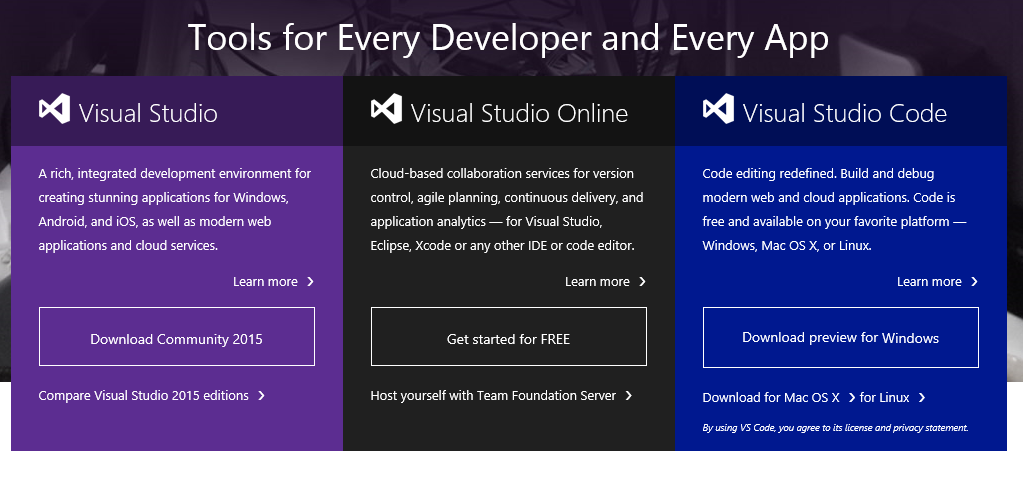
Microsoft has completed Visual Studio 2015, the latest version of its all-encompassing development tool. You can download it here. Today is also the release day for TypeScript 1.5 (a language which compiles to JavaScript)

image

Windows 10 is released in just 9 days, so all eyes will be on this and its new/old app platform – the Universal Windows Platform, based on the Windows Runtime, as found in Windows 8, but considerably revised so that developers can in theory write one app and run it on any Windows 10 device, from PC to tablet to phone to Xbox to HoloLens, and sell or distribute it from a unified Windows Store.

Microsoft CEO Satya Nadella recently confirmed that the Windows Store is a key part of the Windows 10 strategy:

Why then make all these changes to the Start Menu with Windows 10? It’s not because I just want to bring back the old. It’s because that’s the best way to improve the liquidity [of] our store. Windows 8 was great except that nobody discovered the store. In Windows 10, the store is right there and done in a tasteful way.

The Store is more visible in Windows 10 than in 8 because in Windows 10 there are no longer two separate environments (Metro and desktop), but only one (desktop). Windows Runtime apps run in desktop windows. This makes the experience a little worse for tablet users, but the advantage is that now desktop users are more likely to interact with the Store, and more likely to use the apps they install, since they run in a familiar environment.

Another key change is “Project Centennial”, which I wrote up for the Register here. This lets developers package desktop apps for delivery from the Store, using app virtualisation (based on an Enterprise product called App-V). If Microsoft gets this right, Project Centennial will be the preferred way to deliver most desktop apps, since it is both easier and safer for the user.

If the Store does take off (and if it does not, Windows 10 will in part have failed), then Visual Studio will be the key tool for created or repackaging apps for Windows.

Windows 10 is important, but so too is Azure, Microsoft’s cloud platform. Visual Studio has a key role here, too. Microsoft has an entire stack, including Windows as both operating system and development environment, Visual Studio for coding and testing, and Azure for hosting cloud applications. Since the early days of Azure, the development experience has improved, so that with a modest understanding of the ASP.NET MVC framework you can go from an idea to a working demo, hosted on Azure, that you can show customers, in a short space of time.

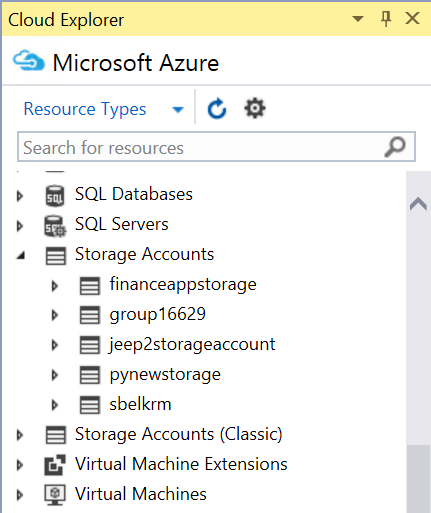
There is also a new Cloud Explorer in Visual Studio which lets you view Azure resources from the IDE.

image

Mobile is Microsoft’s weak point, but the the company has made efforts to support Android and iOS both through mobile service back-ends hosted on Azure, and by supporting various approaches to building cross-platform apps. Visual Studio 2015 includes Xamarin project types, though out of the box these just tell you to go and install Xamarin, which lets you build Android and iOS apps with C#, subject to a separate Xamarin subscription.

Another option is to use Microsoft’s new iOS tools to code in Visual Studio while targeting Apple’s mobile platform, though this does require a Mac running a remote agent.

There is also Visual Studio Tools for Apache Cordova, where you code in JavaScript and wrap the results as native apps for both Windows and mobile platforms.

Visual Studio comes with an Android emulator, based on Hyper-V, for debugging either Xamarin or Cordova apps. Xamarin also offers its own emulator and I am not sure how these compare.

In addition to the above, Visual Studio 2015 introduces C# 6.0, Visual Basic 12, the Roslyn compiler platform which enables new IDE features, and .NET Core which is an open source, cross-platform fork of the .NET Framework. Thanks to .NET Core, the latest version of ASP.NET runs on Mac and Linux as well as Windows.

Despite Microsoft’s new cross-platform focus, Visual Studio itself runs only on Windows. In a world of Mac-wielding developers that is a problem, so the company has come up with Visual Studio code, an editor with some IDE features that runs on Window, Mac and Linux. Other options for non-Windows developers are to run Windows in an emulator such as Parallels, or on a virtual machine hosted in the code (Azure has suitable pre-baked images with Visual Studio), or to use third-party tools.

Visual Studio is a critical product then, but is it really done? Although you can download the final product today, many parts are not available (Project Centennial) or still in beta (ASP.NET 5 is beta 5). This is a milestone though, and credit to the team for bringing it out in advance of Windows 10 (I recall some Windows releases where Visual Studio was still in preview on release day).

Satya Nadella positions Windows Phone as small PC, Microsoft retreats from Phone business

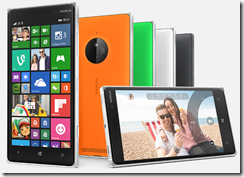
Microsoft CEO Satya Nadella has spoken to journalist Mary Jo Foley about the future of Windows Phone and Windows Mobile. What you read there does, I suspect, reflect heated discussions on Microsoft’s board about Windows strategy. I am guessing of course; but given the departure of Stephen Elop in June, and the cuts announced by Nadella last week, including the departure of 7,800 employees mostly from the phone business and the write-off of the value of the assets acquired from Nokia, it is likely that Elop disagreed with the new strategy.
image

So what is the future of Windows Phone? I suggest you read the transcript carefully because it is not clear, deliberately so. Nadella says:

We will do everything we have to do to make sure we’re making progress on phones. We have them. Even today Terry (Myerson, the head of Windows and Devices) reinforced, again, yes, we will have premium Lumias coming this year.

When then was the meaning of last week’s announcement? Mainly, it seems to me, that having acquired a phone business from Nokia, Microsoft is now dismantling it and drawing back from the phone business. Nadella tells Foley she is right to conclude that “Your phones are going to be more of like showcase devices for what Windows mobile can look like on a phone.”

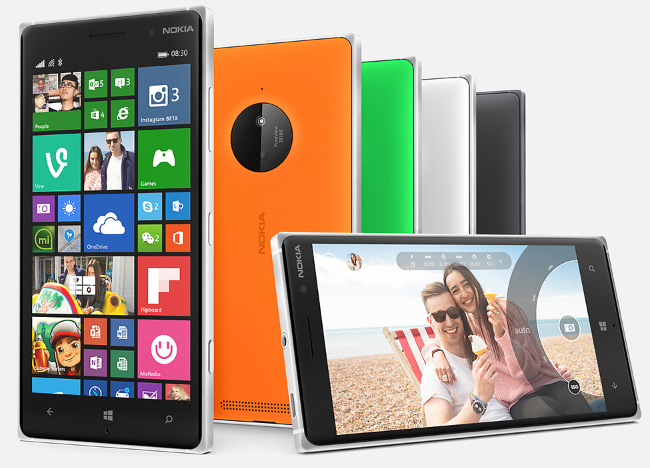
He also makes a couple of other remarks. Curiously, he says that “If no OEM stands up to build Windows devices we’ll build them. There will be Lumia devices.” What if we turn that round. Let’s say OEMs do continue to build Windows phones. You get the impression that in that case, Nadella would be happy to scrap Lumia. But what constitutes building a Windows Phone? The lacklustre efforts that appeared at the launch of Windows Phone 7, slightly adapted Android phones? Or beautiful Nokia devices like the 1020 with a 40MP camera, or the elegantly crafted Lumia 830?

Nadella views Windows Mobile through a PC lens. In fact, he says that the best thing about Windows Phone is its ability to be a PC:

So when I think about our Windows Phone, I want it to stand for something like Continuum. When I say, wow, that’s an interesting approach where you can have a phone and that same phone, because of our universal platform with Continuum, and can, in fact, be a desktop.

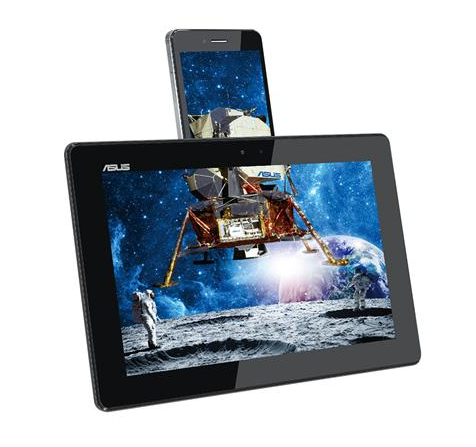
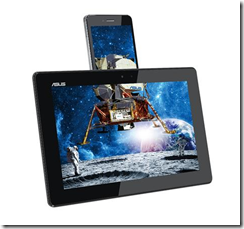
Like most things in IT, this has been tried before. The Asus Padfone has been around for several years in various guises, the idea being that you dock your phone into the back of a tablet to give it a big screen.
image

It is a great gimmick but the Padfone has had limited success; most people, it seems, use phones as phones, tablets as tablets, PCs as PCs. That could change, but I doubt Continuum will rescue Windows Phone.

This also betrays a PC-centric view of Windows Phone. Hey, it looks like a phone, but it has the brains of a PC. I can certainly see uses for this kind of device, but nobody goes into a phone shop and says, “I am looking for a phone that works like my PC”.

I recapped the history of Windows Phone here. Many things need to come together to make a successful phone, including not only the OS but the hardware design, the apps, the marketing, the sales channel and the operator partnerships. Microsoft proved incapable of doing this until Nokia adopted the platform.

There are now hints that Microsoft will outsource future Lumia (if it makes them) to OEMs to build. Here is what Nadella says:

I want people to evaluate us on the phones that we produce, but not the inside baseball — what are we doing to produce — because that should not be relevant to our broad consumers.

Don’t look too closely, Nadella seems to be saying, because Microsoft might not be as closely involved in the phones it makes as it first appears.

Financially, of course, the cost involved in paying the likes of Asus or Acer to make some phones running Windows is tiny compared to the cost of operating a phone business. The results though will not be the same at all.

All about the apps

The big puzzle here is about the apps. The single biggest factor holding back Windows Phone has been lack of apps, or the inferior quality of available apps. Thus, the Nokia acquisition combined with Windows 10 universal apps seemed to based on the idea that by providing a single developer platform across Windows and Phone, Microsoft could fix the app problem and make a success of the phone by combining it with Nokia’s hardware and design expertise.

Nadella now seems to be removing the Nokia element before the app strategy has had a chance to succeed, though he re-iterates the notion of Windows 10 being beneficial to the phone:

All of this comes down to how are you going to get developers to come to Windows. If you come to Windows, you are going to be on the phone, too. Even if you want to come to Windows because of HoloLens, you want to come to it because of Xbox, you want to come to the desktop, all those get you to the phone.

Note that in reality it is not that simple. Universal Apps will run on the phone and PC, but the user interface may require considerable effort before it makes sense on both form factors. There is still a cost, for developers, in supporting both phone and PC. In fact, there is a cost even in cases where the code runs untouched, just because of the additional testing and support required.

In practice though, Nadella does not think Windows Phone makes much difference to developers:

Universal Windows apps are going to be written because you want to have those apps used on the desktop. The reason why anybody would want to write universal apps is not because of our three percent share in phones.

This shows, I think, the extent to which Nadella has given up on Windows Phone. This too is where Nadella’s leadership has diverged from that of his predecessor, Steve Ballmer. Ballmer acquired Nokia because he believed that Microsoft needed to continue bashing away at Windows Phone until it worked, because the PC is in decline and mobile is the future. Nadella has abandoned that plan because he does not think Windows Phone can ever succeed, and thinks instead that Microsoft can prosper as a device-neutral company:

We want to be in every device, not only have our application endpoints on every device. I want the identity management. It’s not MSA [Microsoft Account] alone, it’s Azure Active Directory. It is managing those devices, securing those devices in terms of data protection. These are all core capabilities that we have. … one big mistake we made in our past was to think of the PC as the hub for everything for all time to come. And today, of course, the high volume device is the six-inch phone. I acknowledge that. But to think that that’s what the future is for all time to come would be to make the same mistake we made in the past without even having the share position of the past. So that would be madness.

Microsoft then is also hoping that some future thing comes up which makes its Windows Phone failure unimportant.

I am not so sure. I think Nadella should have given the Nokia acquisition a chance to work, and the destruction of value from this acquisition saddens me. The other side of this argument is that it is better to kill something that is not working earlier rather than later. Whichever is right, Microsoft has taken the most expensive route possible, making the Nokia acquisition and then changing course.
Windows Phone puzzles: strategy, what strategy?

Today Microsoft CEO Satya Nadella announced that 7,800 employees will be removed “primarily in our phone business” and that the company is taking a $7.6 billion “impairment charge … related to assets associated with the acquisition of the Nokia Devices and Services business.”

Time for a quick resume of the company’s troubled mobile efforts since the introduction of Windows Phone in October 2010:

October 2010: botched launch of Windows Phone. Despite much good work in the OS and user interface, Microsoft had lacklustre support from hardware partners, and focused on the consumer when its potential strength was in business integration with Office, Exchange etc. In addition, availability was poor; after the UK launch I went down to my local town centre and not one of the 4 or 5 mobile phone shops had it on sale.

February 2011: Nokia announces that Windows Phone will be its primary smartphone OS.

October 2011: First Nokia Windows Phones appeared. Lumia 800 was a nicely designed phone in some respects, but suffered from poor battery life and some quality issues.

Nevertheless, the Nokia Windows Phones were the first ones where the manufacturer made an effort to get the best from the OS and to tailor the hardware for it. In addition, Nokia brought excellent mapping and photography expertise, so that Windows Phones began to get some standout features.

11 July 2013: Launch of Nokia Lumia 1020 with an amazing 41MP camera.

September 2013: Microsoft announces that it will acquire Nokia.

An awkward period follows before the acquisition completes. It is meant to be business as usual at Nokia but of course it is not.

February 2014: Despite some progress, Windows Phone is not getting the market share Nokia needs, so CEO Stephen Elop announces the Nokia X range, Android smartphones with Google removed and replaced by Microsoft services. A curious announcement, since why would anyone buy Nokia X? It was not because Android works better than Windows Phone on low-end hardware; vendors have told me that the reverse is true. Nor does it make sense bearing in mind the Microsoft acquisition – though it will have been in the planning stage before that was decided.

April 2014: Microsoft’s Nokia acquisition completes. Elop joins Microsoft to head up devices. As soon as July, it is obvious that Microsoft will not be continuing with Nokia X.

September 2014: Microsoft announces Windows 10. “we are delivering one application platform for our developers … Windows 10 will deliver the right experience on the right device at the right time. It will be our most comprehensive platform ever,” says Windows VP Terry Myerson.

The new universal app platform is all very well, but it means that Windows Phone is now in stasis, waiting for Windows 10 before anything much can happen to it. There is a notable lack of new high-end phones. No phone since the Lumia 1020 has had a camera of equal resolution.

At the same time, part of the point of Windows 10 is to revive the application platform across phone and PC. If you remove the phone, the Universal Windows Platform is what, PC, Xbox (mainly a games console) and HoloLens? With a few Raspberry Pis and IoT devices thrown in?

17 June 2015: Elop leaves Microsoft following an executive re-shuffle.

8 July 2015: Suspicions that Microsoft is wavering in its commitment to Windows Phone (or Windows 10 Mobile) are confirmed by the announcement of major cuts to the phone business.

A few observations

Microsoft has given Nokia little chance of success following the acquisition. It is not quite a repeat of the Kin disaster (acquisition of Danger in February 2008, a strong company wrecked by its acquirers), but there are echoes. It is only a year and three months since the acquisition completed, and the phone range is in an uncomfortable “waiting for Windows 10” phase. What did the company expect, that a Microsoft halo effect would suddenly lift sales, even without distinctive new models?

Nokia did a much better job with Windows Phone than either Microsoft or its other hardware partners. Nokia’s retail presence, operator partnerships, and marketing, were all far superior.

The main reason for the failure of Windows Phone is the lack of apps and ecosystem, and the reason for that is that Microsoft was too late to launch; iOS and, more to the point, Android, were already well entrenched. The Windows Phone OS is pretty good, and superior to the competition in some respects; apps are easier to find, for example.

Another problem is that Windows Phone has been more successful in Europe than in the USA. This means that US-centric vendors perceive that Windows Phone has an even smaller market than in fact it has.

Bearing in mind that the app story is the biggest single problem for Windows Phone vendors, and that Windows 10 is intended to address that, it is puzzling that Microsoft is now writing off the phone division before Windows 10 has launched.

Nadella writes:

I am committed to our first-party devices including phones. However, we need to focus our phone efforts in the near term while driving reinvention. We are moving from a strategy to grow a standalone phone business to a strategy to grow and create a vibrant Windows ecosystem that includes our first-party device family.

The problem is that frail market confidence in Windows Phone will be further shaken by today’s announcement. Further, if Nadella thinks that Microsoft’s trusty hardware partners will step up their game if Lumia is given less investment, than he has forgotten their dismal performance first time around.

Does Microsoft need Windows Phone?

Microsoft has been investing in Android and iOS apps since Nadella’s appointment, and it may not have a choice about whether or not it needs a mobile OS, if it cannot find a market for it.

There some strategic issues though. Microsoft itself succeeded first with Windows on the desktop, and exploited its desktop presence to drive server products that integrated with Windows and shared its user interface and operating system.

Mobile operating systems are now ascendant, and if Microsoft has little or no presence in that market, it is vulnerable to its competitors exploiting their control of the client to drive users to their own services, rather than those run by Microsoft.

Therefore it seems to me that ceding the mobile market to Apple and Google is a strategic risk.

Running ASP.NET 5.0 on Nano Server preview

I have been trying out Microsoft’s Nano Server Preview and wrote up initial experiences for the Register. One of the things I mentioned is that I could not get an ASP.NET app successfully deployed. After a bit more effort, and help from a member of the team, I am glad to say that I have been successful.

image

What was the problem? First, a bit of background. Nano Server does not run the .NET Framework, presumably because it has too many dependencies on pieces of Windows which Microsoft wanted to omit from this cut-down deployment. Nano Server does support .NET Core, also known as Core CLR, which is the open source fork of the .NET Framework. This enables it to run PowerShell, although with a limited range of cmdlets, and my main two ways of interacting with Nano Server are with PowerShell remoting, and Windows file sharing for copying files across.

On your development machine, you need several pieces in order to code for ASP.NET 5.0. Just installing Visual Studio 2015 RC will do, except that there is currently an incompatibility between the version of the ASP.NET 5.0 .NET Core runtime shipped with Visual Studio, and what works on Nano Server. This meant that my first effort, which was to build an empty ASP.NET 5.0 template app and publish it to the file system, failed on Nano Server with a NativeCommandError.

This meant I had to dig a bit more deeply into ASP.NET 5.0 running on .NET Core. Note that when you deploy one of these apps, you can include all the dependencies in the app directory. In other words, apps are self-hosting. The binary that enables this bit of magic is called DNX (.NET Execution Environment); it was formerly known as the K runtime.

Developers need to install the DNX SDK on their machines (Windows, Mac or Linux). There is currently a getting started guide here, though note that many of the topics in this promising documentation are as yet unwritten.

image

However, after installation you will be able to use several handy commands:

dnvm This is the .NET Version manager. You can have several versions of the DNX runtime installed and this utility lets you list them, set aliases to save typing full paths, and manage defaults.

image

dnu This is the .NET Development Utility (formerly kpm) that builds and publishes .NET Core projects. The two commands I found myself using regularly are dnu restore which downloads Nuget (.NET repository) packages and dnu publish which packages an app for deployment. Once published, you will find .cmd files in the output which you use to start the app.

dnx This is the binary which you call to run an app. On the development machine, you can use dnx . run to run the console app in the current directory and dnx . web to run the web app in the current directory.

Now, back to my deployment issues. The Visual Studio templates are all hooked to DNX beta 4, and I was informed that I needed DNX beta 5 for Nano Server. I played around with trying to get Visual Studio to target the updated DNX but ran into problems so decided to ignore Visual Studio and do everything from the command line. This should mean that it would all work on Mac and Linux as well.

I had a bit of trouble persuading DNX to update itself to the latest unstable builds; the main issue I recall is targeting the correct repository. You NuGet sources must include (currently) https://www.myget.org/F/aspnetvnext/api/v2.

Since I was not using Visual Studio, I based my samples on these, Hello World Console, MVC and Web apps that you can use for testing that everything works. My technique was to test on the development machine using dnx . web, then to use dnu publish and copy the output to Nano Server where I could run ./web.cmd in a remote PowerShell session.

Note that I found it necessary to specify the CoreClr 64-bit runtime in order to get dnu to publish the correct files. I tried to make this the default but for some reason* it reverted itself to x86:

dnu publish –runtime "c:\users\[USERNAME]\.dnx\runtime\dnx-coreclr-win-x64.1.0.0-beta5-11701"

Of course the exact runtime version to use will change soon.

If you run this command and look in the /bin/output folder you will find web.cmd, and running this should start the app. The port on which the app listens is set in project.json in the top level directory of the project source. I set this to 5001, opened that port in the Windows Firewall on the Nano Server, and got a started message on the command line. However I still could not browse to the app running on Nano Server; I got a 400 error. Even on the development machine it did not work; the browser just timed out.

It turned out that there were several issues here. On the development machine, which is running Windows 10 build 10074, I discovered to my annoyance that the web app worked fine with Internet Explorer, but not in Project Spartan, sorry Edge. I do not know why.

Support also gave me some tips to get this working on Nano Server. In order for the app to work across the network, you have to edit project.json so that localhost is replaced either with the IP number of the server, or with a *. I was also advised to add dnx.exe to the allowed apps in the firewall, but I do not think this is necessary if the port is open (it is a nuisance, since the location of dnx.exe changes for every app).

Finally I was successful.

Final observations

It seems to me that ASP.NET vNext running on .NET Core has the characteristic of many open source projects, a few dedicated people who have little time for documentation and are so close to the project that their public communications assume a fair amount of pre-knowledge. The site I referenced above does have helpful documentation though, for the few topics that are complete. Some other posts I found helpful are this series by Steve Perkins, and the troubleshooting suggestions here especially David Fowler’s post.

I like The .NET Core initiative overall since I like C# and ASP.NET MVC and now it is becoming a true cross-platform framework. That said, the code does seem to be in rapid flux and I doubt it will really be ready when Visual Studio 2015 ships. The danger I suppose is that developers will try it in the first release, find lots of problems, and never go back.

I also like the idea of running apps in Nano Server, a low-maintenance environment where you can get the isolation of a dedicated server for your app at low cost in terms of resources.

No doubt though, the lack of pieces that you expect to find on Windows Server will be an issue and I am not sure that the mainstream Microsoft developer ecosystem will take to it. Aidan Finn is not convinced, for example:

Am I really expected to deploy a headless OS onto hardware where the HCL certification has the value of a bucket with a hole in it? If I was to deploy Nano, even in cloud-scale installations, then I would need a super-HCL that stress tests all of the hardware enhancements. And I would want ALL of those hardware offloads turned OFF by default so that I can verify functionality for myself, because clearly, neither Microsoft’s HCL testers nor the OEMs are capable of even the most basic test right now.

Finn’s point is that if your headless server is having networking issues it is hard to troubleshoot, since of course remote tools will not work reliably. That said, I have personally run Hyper-V Server (which is essentially Server Core with just the Hyper-V role) with great success for several years; I started keeping notes on how to troubleshoot from the command line and found solutions to common problems. If networking fails with Nano Server then yes, you have a problem, but there is always something you can do, even if it means mounting the Nano Server VHD or VHDX on another VM. Windows Server admins have become accustomed to a local GUI though and adjusting even to Server Core has not been easy.

*the reason was that I did not use the –p argument with dnvm use which would have made it persistent

Windows 10: Moving Windows into the mobile and app era take 2, and why Windows 8 is not so bad

I attended Microsoft’s Build conference last week where there was a big focus on Windows 10. I spent some time with the latest Build 10074 which came out last week as well attending various sessions on developing for the upcoming OS. I also spoke to Corporate VP Joe Belfiore and I recommend this interview on the Reg which says a lot about Microsoft’s approach. Note that the company is determined to appeal to Windows 7 users who largely rejected Windows 8; Windows 10 is meant to feel more familiar to them.

image

That said, Microsoft is not backtracking on the core new feature in Windows 8, which is its new app platform, called the Windows Runtime (WinRT). In fact, in its latest guise as the Universal App Platform (UAP) it is more than ever at the forefront of Microsoft’s marketing effort.

Why is this? In essence, Microsoft needs a strong app ecosystem for Windows if it is to escape legacy status. That means apps which are store-delivered, run in a secure sandbox, install and uninstall easily, update automatically, and work on tablets as well as with keyboard and mouse. Interaction and data transfer between apps is managed through OS-controlled channels, called Contracts. Another advantage is that you do not need setup CDs or downloads when you get a new PC; your apps flow down automatically. When you think of it like this, the advantages are huge; but nevertheless the Windows 8 app platform largely failed. It is easy to enumerate some of the reasons:

  • Most users live in the Windows desktop and rarely transition to the “Metro” or “Modern” environment
  • Lack of Windows 7 compatibility makes the Windows 8 app platform unattractive to developers who want to target the majority of Windows users
  • Many users simply avoided upgrading to Windows 8, especially in business environments where they have more choice, reducing the size of the Windows 8 app market
  • Microsoft made a number of mistakes in its Windows 8 launch, including an uncompromising approach that put off new users (who felt, rightly, that “Metro” was forced upon them), lack of compelling first-party apps, and encouraging a flood of abysmal apps into the Store by prioritising quantity over quality

History will judge Windows 8 harshly, but I have some admiration for what Microsoft achieved. It is in my experience the most stable and best performing version of Windows, and despite what detractors tell you it works fine with keyboard and mouse. You have to learn a new way of doing a few things, such as finding apps in the Start screen, following which it works well.

The designers of Windows 8 took the view that the desktop and app environments should be separate. This has the advantage that apps appear in the environment they are designed for. Modern apps open up full-screen, desktop apps in a window (unless they are games that are designed to run full-screen). The disadvantage is that integration between the two environments is poor, and you lose one of the key benefits of Windows (from which it got its name), the ability to run multiple apps in resizable and overlapping windows.

Windows 10 takes the opposite approach. Modern apps run in a window just like desktop apps. The user might not realise that they are modern apps at all; they simply get the benefits of store delivery, isolation and so on, without having to think about it.

image

This sounds good and following the failure of the first approach, it is probably the right thing for Microsoft to do. However there are a couple of problems. One is the risk of what has been called the “uncanny valley” in an app context, where apps nearly but not quite work in the way you expect, leading to a feeling of unease or confusion. Modern apps look a little bit different from true desktop apps in Windows 10, and behave a little bit different as well. Modern apps have a different lifecycle, for example, can enter a suspended state when they do not have the focus or even be terminated by the OS if the memory is needed. A minimized desktop app keeps running, but a minimized modern app is suspended, and the developer has to take special steps if you want a task to keep running in the background.

Another issue with Windows 10 is that its attempt to recreate a Windows 8 like tablet experience is currently rather odd. Windows 10 “Tablet Mode” makes all apps run full screen, even desktop apps for which this is wholly inappropriate. Here is the Snipping Tool in Tablet Mode:

image

and here is the desktop Remote Desktop Connection:

image

Personally I find that Tablet Mode trips me up and adds little value, even when I am using a tablet without a keyboard, so I tend not to use it at all. I would prefer the Windows 8 behaviour, where Modern apps run full screen (or in a split view), but desktop apps open in a window on the desktop. Still, it illustrates the point, which is that integrating the modern and desktop environments has a downside; it is just a different set of compromises than those made for Windows 8.

Now, I do think that Microsoft is putting a more wholehearted effort into its UAP than it did for Windows 8 modern apps (even though both run on WinRT). This time around, the Store is better, the first-party apps are better (not least because we have Office), and the merging of the Windows Phone and Xbox platforms with the PC platform gives developers more incentive to come up with apps. Windows 10 is also a free upgrade for many users which must help with adoption. Even with all this, though, Microsoft has an uphill task creating a strong modern app ecosystem for Windows, and a lot of developers will take a wait and see approach.

The other huge question is how well users will take to Windows 10. Any OS upgrade has a problem to contend with, which is that users dislike change – perhaps especially what has become the Windows demographic, with business users who are by nature cautious, and many conservative consumer users. Users are contradictory of course; they dislike change, but they like things to be made better. It will take more than a Cortana demo to persuade a contented Windows 7 user that Windows 10 is something for them.

Note that I say that in full knowledge of how much potential the modern app model has to improve the Windows experience – see my third paragraph above.

Microsoft told me in San Francisco that things including Tablet Mode are still being worked on so a little time remains. It was clear at Build that there is a lot of energy and determination behind Windows 10 and the UAP so there is still room for optimism, even though it is also obvious that Windows 10 has to improve substantially on the current preview to have a chance of meeting the company’s goals.