Tag Archives: .net

Google seeks to automate the home

Google made a bunch of announcements at its Google I/O keynote today. It showed off the next version of Android, called “Ice Cream Sandwich”; it announced its Music Beta, a service which looks a lot like Amazon’s Cloud Player, in which you upload your music collection to the cloud; it announced movie rentals.

The most intriguing announcements though were about how Android devices will be able to connect to other devices in future. The Open Accessory API lets manufacturers create devices which talk to Android over USB, and in future over Bluetooth, in a standard manner. The idea is that if you have an Android-compatible device – Google demoed an exercise bike – you can attach your smartphone and do some clever stuff, such as controlling it, analysing its data, or whatever is appropriate.

A related idea is called Android@Home. Google has developed a new lightweight wireless protocol which will let manufacturers create household devices that can communicate with Android:

We previewed an initiative called Android@Home, which allows Android apps to discover, connect and communicate with appliances and devices in your home.

image

The automated home is a grand concept where almost any device, from a light to a coffee maker to a fridge or a door becomes available to control and program. However, the examples Google gave were not exciting: playing a CD by waving it at a player, coding an alarm clock to turn the light on gradually. Big deal.

It is not really a new concept. Sun had ideas to develop Java as a universal runtime and language to automate the home. Microsoft has similar thoughts, maybe using the .NET Micro Framework. So far none of these efforts have come to much – will Google’s initiative be different?

Probably not; but there is something else going on here. I travel a bit, and it is now common to find an iPod dock in your hotel room. If you have an Ipod or iPhone you just plug in and go; if you have a non-Apple device, you are out of luck. That is a kind of pressure exerted on every guest, a hint that they might be better off with an Apple device.

Google wants to do the same for a variety of other devices, but with respect to Android. Here is a refrigerator, and by the way, if you have an Android device you can do this other clever stuff like, I don’t know, alerting you if the temperature goes too high, or letting you peek at the contents from your smartphone so you can see if you need to buy milk.

Same with the Open Accessory API. If Google can sign up enough manufacturers, it will be increasingly difficult for non-Android devices to compete.

That said, we did not hear much about Google TV at today’s keynote. Why? Because it has flopped; a reminder that not all Google’s efforts succeed.
Adobe AIR 2.6, MonoMac 1.0, cross-platform is not dead yet

It is a busy time for cross-platform toolkits. Adobe has released AIR 2.6, and reading the list of what’s new you would think it was mainly for mobile, since the notes focus on new features for Apple iOS, though AIR is also a runtime for Windows, Linux and desktop Mac. New features for iOS include GPU rendering – a form of hardware accelerated graphics – access to the camera, microphone, and camera roll, and embedded Webkit for apps that use web content. On Google Android, you can now debug on devices connected via USB.

There is also a new feature called “owned native windows” which lets you have a group of windows that remain together in the Z order – this lets you have things like floating toolbars without odd results where toolbars get hidden underneath other applications.

Asynchronous decoding of bitmaps is another new feature, allowing images to be processed in the background. This seems like a stopgap solution to overcome the lack of mullti-threading in AIR, but useful nonetheless.

Since the Flash runtime does not run on iOS, Adobe has a packager that compiles an AIR application into a native app. This is now called the AIR Developer Tool or ADT. You can use the ADT to target Windows, Linux or Android as well; however platforms other than iOS still need the AIR runtime installed.

Adobe is dropping support for the original iPhone and the iPhone 3G. iPhone 3GS or higher is needed.

If you want to build a cross-platform app but prefer .NET to Adobe’s Flash and ActionScript, the Mono folk have what you need. I’d guess that the Mono team has a small fraction of the resources of Adobe; but nevertheless it has delivered MonoTouch for iOS and is working on MonoDroid for Android. Just completed in its 1.0 version is MonoMac, for building Cocoa applications on Apple OSX. Mono is not fully cross-platform, since the GUI framework is different on the various platforms, but you do get to use C# throughout.

I am happy to agree that true native code is usually a better solution for any one platform; but at a time when the number of viable platforms is increasing the attraction of cross-platform has never been greater.

Microsoft’s code-first Entity Framework 4.1 nearly done

Microsoft has announced the release candidate of Entity Framework 4.1, the data persistence library for .NET, with a go-live licence. The final release to the web is expected in around one month’s time.

The big new feature is code-first, where you do not need to define a database schema or even a database model. You simply write classes that define objects you want to store, and the framework handles the work of defining the database for you.

Note that according to this article on MSDN:

The Entity Framework is Microsoft’s recommended data access technology for most types of applications.

Of course Microsoft has a long history of data access APIs and keeping up with the latest recommendation over the years has been a challenge. That said, the low-level ADO.NET data API has been in place since the first release of the .NET framework and has evolved rather than been replaced. There has been some confusion over LINQ to SQL versus Entity Framework; but note that LINQ (Language Integrated Query) works with Entity Framework as well.

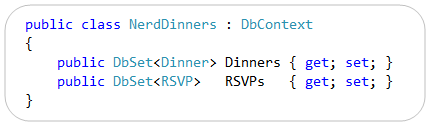
So what is code-first? A good starting point is VP Scott Guthrie’s post from July last year, where he walks through a complete example using his Nerd Dinner theme. He writes classes to define two entities, Dinner and RSVP. Then he writes the following code:

image

Having defined this NerdDinners class inheriting from DbContext, he can go ahead and write a complete database application.

At this point there is still no database. In the simplest case though, you can just add a database connection to the project with the same name as the DbContext class – in this case, “NerdDinners”. The Entity Framework will use this connection, define a database schema for you, and save and retrieve objects accordingly.

The magic under the hood is an example of convention over configuration. That is, the framework will generate code and schema according to assumptions it makes based on the names used in your classes. For example, it picks up the field named DinnerID and makes it a primary key; and seeing a collection of RSVP objects called RSVPs in the Dinner class, the framework creates a relationship between the two generated tables. You can override the default behaviour with code mapping rules. There is also provision for updating the schema if you need to add or modify the fields, though this is a point of uncertainty in Guthrie’s post.

It looks fantastic; though there are a few caveats. One is that Microsoft tends to assume use of its own database managers, SQL Server or for simple cases, SQL Server CE. That said, there are drivers for other databases; for example devart has code-first drivers for Oracle, MySQL, PostgreSQL and SQLite.

Another point is that there is a trade-off when working at such a high level of abstraction. There is less code for you to write, but a large amount of generated code, which can make debugging or optimizing an application harder. This is a familiar trade-off though; and you could say that hand-rolled SQL is no different in principle from hand-rolled assembly code; you can get fantastic results but the amount of effort and skill required is greater, as is the risk of errors if you get it slightly wrong.

The Mono team has said that it does not intend to implement Entity Framework currently; there is a summary of work needed here. If you want to write .NET code that ports easily to Mono it is best avoided.

Are you using Entity Framework in new .NET projects? I would be interested to hear from .NET developers what approach you take to data persistence.

What’s the story with IE9 and embedded Internet Explorer?

There is a certain amount of fuss over the fact that Apple’s latest mobile Safari does not give full performance when either embedded in another application, or pinned to the home screen.

It would help if Apple were more forthcoming on the issue; but in general you cannot assume that embedded browser components will behave the same way as the full browser, even when they share common libraries.

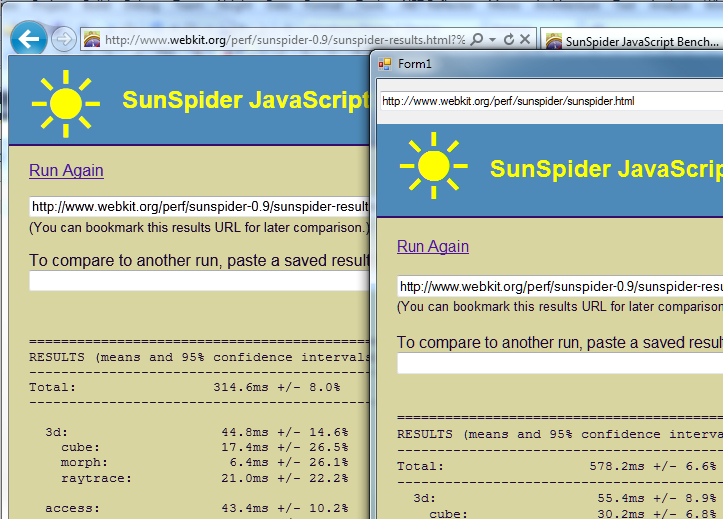
I did some quick experimentation with the released Internet Explorer 9 and the .NET Webbrowser control. First, I tried the SunSpider JavaScript benchmark. I had to use version 0.9 since the latest one gives an error in the Webbrowser control. No great surprise: the embedded version was substantially slower. I ran the tests separately, and for the .NET application I ran in release mode outside Visual Studio. IE9 completed in 314.6ms, the Webbrowser control in 578.2ms.

image

While that may seem a bad result for embedded IE, it could be much worse. Unfortunately I did not think to run this test before installing IE9, so I dual-booted into a Windows install that still has IE8 and ran the exact same application. At 6175ms it was more than ten times slower. It was slightly quicker in standalone IE8, but not by much.

image

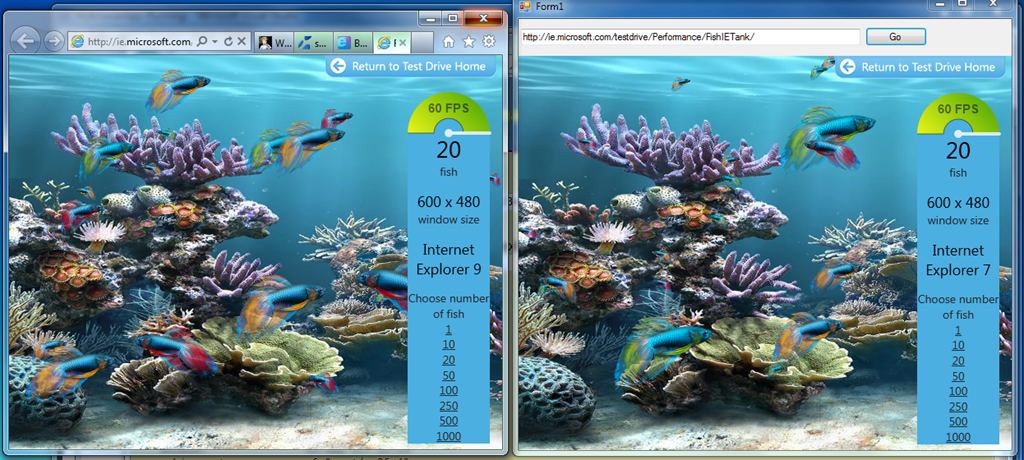
Next I tried the Fish Tank demo, which tests hardware graphic acceleration.

image

There were two notable facts about my result here. First, the Webbrowser control reports itself as Internet Explorer 7. Second, the frame rate for the two instances was nearly identical. In practice it varied slightly and some of the time the standalone IE9 was fractionally faster, but still close. By way of reference, Apple’s Safari was around 10 times slower.

Update: embedded IE is slower on the Fish Tank than I first realised. 60fps is a kind of maximum for the demo. Embedded IE9 slows to 45fps with 50 fish, whereas full IE9 does not drop below 60fps until 500 fish on my system. It does makes the fans whir though!

My guess is that Microsoft is more concerned about compatibility than performance, when it comes to embedded IE. However, clearly there is significant benefit from IE9 even when embedded.

How can you get embedded IE not to report itself as IE7 and to use full standards mode by default? If it is like IE8, this can only be done on a per-application basis via setting a registry key. That is awkward for developers, who would prefer an API call to set this. I am not sure if there is any change for IE9.

Mono project: no plans for cross-platform WPF

Miguel de Icaza’s report from the Game Developer Conference is upbeat, rightly so in my view as usage of Mono is continuing to build, not only in game development with Unity, a development tool that uses Mono as its scripting engine, but also for mobile development for Apple’s iOS with Monotouch and for Android with Monodroid. These mobile toolkits also give Mono a stronger business model; many sites use Mono for serving ASP.NET applications on Linux, but without paying or contributing back to the project.

Mono is an open source implementation of C# and Microsoft’s .NET Framework.

That said, it is interesting that Mono is still struggling with an issue that has been a problem since its first days: how to implement Microsoft’s GUI (Graphical User Interface) framework on other platforms. Mono does have Gtk# for Windows, Mac and Linux, but this does not meet the goal of letting developers easily port their Visual Studio client projects to Mono. There is also an implementation of Windows.Forms, but de Icaza mentions that “our Windows.Forms is not actively developed.”

Apparently many tools vendors asked the Mono team at GDC when Windows Presentation Foundation (WPF) would be implemented for Mono. WPF is the current presentation framework for Microsoft.NET, though there is some uncertainty about where Microsoft intends to take it. I remember asking de Icaza about this back in 2003, when the WPF framework was first announced (then called Avalon); he said it was too complex and that he did not plan to implement it.

This is still the case:

We have no plans on building WPF. We just do not have the man power to build an implementation in any reasonable time-frame.

That said, Mono has implemented Silverlight, which is based on WPF, and there are some signs that Microsoft might merge WPF and Silverlight. What would the Mono team do then?

Miguel de Icaza says:

Silverlight runs on a sandbox, so you can not really P/Invoke into native libraries, or host DirectX/Win32 content inside of it.
There are other things missing, like menubar integration and things like that.

Of course, this is no longer true on Windows: Platform Invoke is coming in Silverlight 5.

Perhaps the Mono team will knuckle down and implement Silverlight with desktop integration, which would be good for cross-platform Silverlight and compatibility with Microsoft .NET.

Then again, it seems to me that Mono is increasingly divergent from Microsoft .NET, focusing on implementing C# in places that Microsoft does not touch, such as the mobile platforms from Apple and Google.

That is actually a sign of health; and you can understand why the Mono team may be reluctant to shadow Microsoft’s every move with Silverlight and WPF.

Red Gate to charge for .NET Reflector, runs into storm of protest

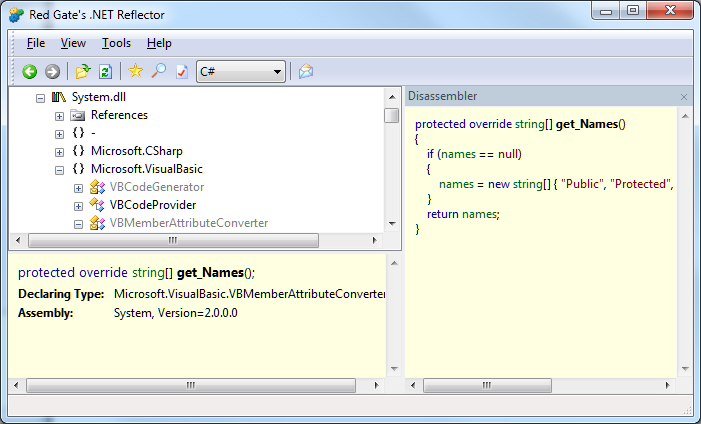
Tools company Red Gate is to discontinue the free version of .NET Reflector, a popular tool for debugging and decompiling .NET code.

image

The tool itself is amazing. It takes advantage of the fact that .NET code is not compiled to native code until runtime. The code that is distributed is in .NET “intermediate language”, which means it can easily be decompiled. Reflector makes this as easy as opening a file. This is invaluable for debugging when you do not have the original source code, though a further implication is that if you want to protect your source code you need to obfuscate it.

Reflector was created by Lutz Roeder, who shared it freely with the community. In 2008 Roeder sold Reflector to Red Gate, stating:

Red Gate will continue to provide the free community version and is looking for your feedback and ideas for future versions.

Red Gate developed Visual Studio integration and some further features, offering a free version as well as a paid-for premium edition. Now it has decided this is no longer viable. Watch this video as distinctly uncomfortable CEO Simon Galbraith answers the question “Didn’t we promise that Reflector was always going to be free?”:

Right now owning Reflector doesn’t make commercial sense. Further development of Reflector doesn’t make commercial sense. Reflector’s a tool that needs to stay up to date. We need to spend money on it. At the moment we can’t do so in a commercially justifiable way.

We’re really regretful that we ever made such a statement that we were going to try not to charge for it. In hindsight we wish we hadn’t done that. It was never a promise by the way. Two years ago we thought we could make a success of it without having to charge for it, it turns out that wasn’t the case.

Galbraith says that Red Gate had expected two benefits from Reflector: sales of other tools to Reflector users, and up-sell to the premium version. Neither has really happened, he says, adding:

We know that people are going to be cross with us.

What has particularly annoyed users in the feedback forum is that the existing free version is time-bombed, and will expire on May 30th. So users will be forced to upgrade.

i have been a happy (paying) customer of red-gate for some time now – sql tools, .net tools.
i have told many other developers of your products – happy to explain how good they are and how awesome red-gate is.
i won’t be doing that any more. IMO you have managed to destroy your company reputation such that purely on principle i won’t be recommending you to anyone anymore.

says one user.

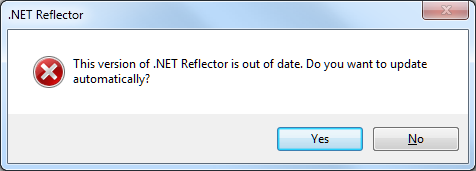
Reflector has actually been time-bombed for years. I have a download from 2008, and if I run it I get this message:

image

If I click Yes, I am told that automatic update is impossible and directed to the Red Gate download page. If I click No, the dialog closes. In either case, the Reflector executable deletes itself. This is not so bad if you can download another free version; but following the change of policy that will not be the case.

Red Gate might not have made money from Reflector, but now it has the opposite problem: bad PR because of withdrawing an existing and popular free tool.

The price for the new Reflector will be just $35.00; not much for such as useful tool. There is nothing wrong with a software company charging for its work. This is a difficult transition though, and the question is: would Red Gate have been better off releasing Reflector back to the community and ceasing its own investment, rather than making a renewed effort to make it a viable commercial product?

How Microsoft’s Office Web Apps were written in C# and compiled to JavaScript, maybe

While researching another product I came across this 2009 tweet from Microsoft’s Nikhil Kothari:

Office 2010 web apps – perhaps one of the most ambitious script# projects!

Script# is loosely equivalent to the Google Web Toolkit, but whereas GWT compiles Java to JavaScript, Script# compiles C# to JavaScript. According to the site:

Script# is used extensively by developers within Microsoft building Ajax experiences in Windows Live, Office to name just a couple, as well as by a external developers and companies including Facebook.

I had come across the project before, but was waiting to see if would evolve beyond what looks like a personal project for Kothari. It is hosted on http://projects.nikhilk.net rather than on an official Microsoft domain, and the latest release is 0.6.2. In other words, it does not have the look of a project that you would recommend for production work, interesting though it is. Nor is there much public activity around Script# that I can see, though there is a CodePlex site dedicated to improving its JQuery support.

Seeing Kothari’s tweet though raises several questions.

  • Did Microsoft really use it for Office Web Apps, a high profile project which is a key part of Microsoft’s cloud computing strategy?
  • Is there another, more up-to-date version of Script# that is used internally and which may one day burst into the public arena?
  • How might it impact the Silverlight vs HTML5 debate, if Microsoft comes up with a C# to JavaScript compiler in Visual Studio that lets developers code in .NET but deploy to cross-platform JavaScript?

I am sure there are readers of this blog who know more than I do, so by all means let me know.

Adobe AIR is user-hostile compared to native apps says BankSimple CTO

Alex Payne, CTO at BankSimple, has written an analysis of Adobe AIR from the user’s perspective. The scenario: his team was looking for a an alternative to Campfire for group chat, and selected HipChat. They liked the features of HipChat, but not the desktop app, which is built using Adobe AIR:

My team experienced a number of the usual problems one has with AIR applications: lousy performance, odd interface bugs, key combinations and UI elements that didn’t conform to our operating system. AIR apps exist in an uncanny valley between a web application and a desktop application, and the result is unsettling and annoying. Pretty soon, we were itching to go back to Campfire (via the native Mac client Propane), even though HipChat has better features and the promise of improved reliability.

Payne investigated further and came to the conclusion that users prefer native apps; and that cross-platform toolkits are for the benefit of software companies not users. Echoes of Steve Jobs’ Thoughts on Flash:

Flash is a cross platform development tool. It is not Adobe’s goal to help developers write the best iPhone, iPod and iPad apps. It is their goal to help developers write cross platform apps.

And lest you think this is bad for AIR but good for Java, note that Payne adds:

For anyone who used a computer in the 1990s, AIR probably brings back scarring memories of Java apps: slow, ugly, inconsistent, awkward.

I was also reminded of Evernote’s experience with .NET versus native code, which I blogged here.

Payne is not all wrong, neither is Jobs. That said, the distinction between what is good for users and what is good for developers is not absolute. Maintaining a single cross-platform code-base, for example, is good for both users and developers, because it reduces bugs and assists feature-compatibility across platforms. It is also good for users of minority platforms who might otherwise have nothing.

Another question: how many of the issues Payne identifies are inherent to using AIR (or another cross-platform runtime), and how many are implementation issues? It is impossible to know without drilling into the details; but I don’t believe that all AIR (or Java, or .NET) apps have “lousy performance”.

It is true that ActionScript code is slower than Java or .NET code, and much slower than compiled C/C++, but speed of script execution is not always the performance bottleneck that users will notice most.

This is seemingly one of those never-ending computing debates; but a post like Payne’s is a reminder that neither Adobe AIR, nor any cross-platform runtime, is a perfect solution to the challenge of multiple client platforms.

Windows 8 will run on ARM processors – a natural home for Silverlight?

Microsoft announced today at CES in Las Vegas that the next version of Windows will run on ARM as well as Intel CPUs. But why? The reason is that ARM CPUs have huge momentum in mobile computing, thanks to their low power consumption. Microsoft wants Windows to support System on a Chip (SoC) architectures such as NVIDIA’s Tegra 2, which has two ARM Cortex-A9 CPUs combined with an HD-capable graphics processor in a single package. In its press release, the company is careful not to upset established x86/x64 partners Intel and AMD too much, emphasising that Windows will run on SoC packages based on those CPUs as well.

It is an interesting announcement, but one that raises as many questions as answers. The first concerns Microsoft’s mobile strategy, with Windows now seeming to encroach on territory that you have thought belonged to its embedded operating system, Windows CE, which underlies both Windows Mobile and Windows Phone 7. With all its legacy APIs, full-blown Windows does not seem ideal for low-powered, resource-constrained mobile devices; yet the company seems set on bringing full Windows rather than something based on Windows Phone 7 to the emerging tablet market.

The second issue is that applications will need at least re-compiling, and in many cases some re-coding, in order to run on ARM CPUs. Microsoft says it will deliver Office for ARM:

Sinofsky: Microsoft Office is an important part of customers’ PC experience and ensuring it runs natively on ARM is a natural extension of our Windows commitment to SoC architectures.

Windows and Office alone is enough for a decent business device; but customers who buy Windows on ARM expecting their existing games or applications to run will be disappointed.

We have been here before. In the early days of Windows CE, devices ran a variety of processors such as MIPS or Hitachi SH3, and developers had to compile multiple binaries and create setups that installed the right one on each device. In an attempt to overcome the friction this created, Microsoft introduced the Common Executable Format (CEF) with Windows CE 3.0 in 2000. This was an intermediate language format which was translated to native code by a “translator” when it was installed onto a device.

It sounds  a bit like .NET or Java; and it was indeed a forerunner of the .NET Common Language Runtime, which appeared in 2002. However, CEF never really caught on. Although it solved deployment issues, it introduced performance problems and was troublesome to debug. Most developers preferred to stick with true native code.

Today though .NET is mature; and we also have Silverlight, a cross-platform implementation of the .NET Framework combined with multimedia player and graphics framework. If Microsoft includes .NET and Silverlight in its ARM build of Windows, that would solve some of the deployment problems, especially for business devices. Many custom applications are built for .NET; and these would in principle run without any need to recompile, since a .NET executable is intermediate code which is compiled to native code at runtime, though any code which includes “platform invoke” calls to native APIs would not work.

It is surprising therefore that neither .NET nor Silverlight is mentioned in Windows president Steve Sinofsky’s Q&A about Windows on ARM. Still, we should not read too much into that. It would be madness if Microsoft did not support its .NET technologies on this new platform, would it not?

Single sign-on from Active Directory to Windows Azure: big feature, still challenging

Microsoft has posted a white paper setting out what you need to do in order to have users who are signed on to a local Windows domain seamlessly use an Azure-hosted application, without having to sign in again.

I think this is a huge feature. Maintaining a single user directory is more secure and more robust than efforts to synchronise a local directory with a cloud-hosted directory, and this is a point of friction when it comes to adopting services such as Google Apps or Salesforce.com. Single sign-on with federated directory services takes that away. As an application developer, you can write code that looks the same as it would for a locally deployed application, but host it on Azure.

There is also a usability issue. Users hate having to sign in multiple times, and hate it even more if they have to maintain separate username/password combinations for different applications (though we all do).

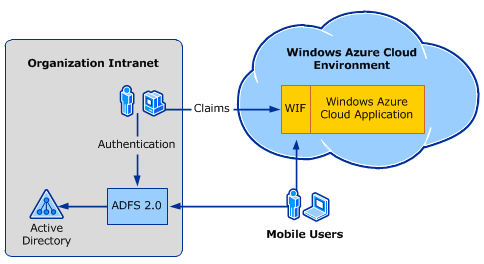
The white paper explains how to use Active Directory Federation Services (ADFS) and Windows Identity Foundation (WIF, part of the .NET Framework) to achieve both single sign-on and access to user data across local network and cloud.

image

The snag? It is a complex process. The white paper has a walk-through, though to complete it you also need this guide on setting up ADFS and WIF. There are numerous steps, some of which are not obvious. Did you know that “.NET 4.0 has new behavior that, by default, will cause an error condition on a page request that contains a WS-Federation authentication token”?

Of course dealing with complexity is part of the job of a developer or system administrator. Then again, complexity also means more to remember and more to troubleshoot, and less incentive to try it out.

One of the reasons I am enthusiastic about Windows Small Business Server Essentials (codename Aurora) is that it promises to do single sign-on to the cloud in a truly user-friendly manner. According to a briefing I had from SBS technical product manager Michael Leworthy, cloud application vendors will supply “cloud integration modules,” connectors that you install into your SBS to get instant single sign-on integration.

SBS Essentials does run ADFS under the covers, but you will not need a 35-page guide to get it working, or so we are promised. I admit, I have not been able to test this feature yet, and aside from Microsoft’s BPOS/Office 365 I do not know how many online applications will support it.

Still, this is the kind of thing that will get single sign-on with Active Directory widely adopted.

Consider FaceBook Connect. Register your app with Facebook; write a few lines of JavaScript and PHP; and you can achieve the same results: single sign-on and access to user account information. Facebook knows that to get wide adoption for its identity platform it has to be easy to implement.

On Microsoft’s platform, another option is to join your Azure instance to the local domain. This is a feature of Azure Connect, currently in beta.

Are you using ADFS, with Azure or another platform? I would be interested to hear how it is going.