Tag Archives: windows

Windows Phone 8 and Windows 8: nearly converged

Microsoft has shared details of the forthcoming Windows Phone 8 operating system, which is set to be available on devices before the end of 2012.

The improvements are fundamental, and it seems that Microsoft has finally created a mobile platform that has what it takes, technically, to compete in the modern smartphone market. Winning share from competitors is another thing of course; Nokia’s hoped-for third ecosystem is still tiny relative to Apple iOS or Google Android.

It starts with a change in the core operating system, from Windows CE to Windows 8. The two now share the same kernel, and APIs including Graphics, Audio, Media, File System, Networking, Input, Commerce, Base Types and Sensors. The .NET Framework is also the same. The browser will be Internet Explorer 10.

image

Silverlight was not mentioned, nor was XNA, though we were told that Windows Phone 7.x apps will run on Windows Phone 8.

The change does enable multi-core support at last. Screen resolution can now go up to 1280 x 768, ready for high-definition displays. There is also support for MicroSD storage, a feature which should have been in the first release.

What about Windows RT, the runtime for Metro-style apps in Windows 8? Here is the significant slide from yesterday’s presentation:

devchoices

This looks similar to Windows RT, which also supports three development models: XAML and .NET, native C/C++ code, and HTML5. It is not quite the same though. One thing I did not hear mentioned was contracts, the communication and file sharing system built into Windows 8, though we were promised “sharing under user control”. Nor did we hear about language “projections”, the layer that lets different languages in Windows 8 call the same Windows Runtime APIs. My guess at the moment is that Windows Phone 8 does not include the Windows Runtime, though it does have much in common with it. The further guess is that the full Windows Runtime will come in Windows Phone 9.

In other words, it seems that Windows Phone 8 will not run apps coded for Windows 8, though we were told that if you code to the XAML and .NET model for apps, and the native code model for games, few changes will be needed. XNA developers should consider a change of direction.

Support for C/C++ is a key feature and one that in my view should have been in the first Windows Phone release. One of the things it enables is official support for SQLite, the cross-platform database engine also found in Mac OS X and numerous other platforms. A good day for SQLite, which pleases me as I am a fan.

There will also be C/C++ gaming libraries coming to Windows Phone 8, including Havoc:

havoc

What else is new? Users will like the new Start screen, which unlike the whole of Windows Phone 8 is also coming to existing devices, which will get a half-way upgrade called Windows Phone 7.8 (7 and 8, geddit?). The innovation in the new Start screen is that any tile can be sized by the user to any of the supported sizes. The smallest size allows four tiles across, so you can make your Windows Phone look more like Android or iOS if you so choose.

newstart2

What else? Microsoft is not announcing “end-user features” yet, but did promise Nokia offline maps plus turn by turn directions; digital wallet which can be paired with a secure SIM for NFC (near field communications) payment, and deep support for Skype and VOIP so they “feel like any other call”. Apparently operators will love the way the wallet is implemented, because unlike Android it is hooked to the SIM, but I doubt they will be so keen on Skype.

There is an improved speech engine which duly failed to recognise speech input correctly in the first demo, though it worked after that.

Finally, Microsoft is now talking Enterprise for Windows Phone. There will be bitlocker encryption and enterprise app deployment without Windows store, as well as device management. Think full System Center 2012 integration.

Conclusion? There is disappointment that existing Windows Phone 7 devices are not fully upgradeable, but this is hardly surprising given the changed core. As a platform it is greatly improved, though I would like to see full WinRT included. Despite its poor start, you cannot dismiss this mobile OS as Microsoft continues to use its financial muscle to try and try again.

If it succeeds, will it be too late for Nokia? Maybe, though my hunch is that Microsoft will do what it takes to keep its key mobile partner alive.

Three reasons why Microsoft should make its own Windows RT (ARM) Tablet

Rumours are flying that Microsoft will announce an own-brand Windows RT tablet on Monday.

No comment on the truth of these, but it would be a smart move.

Here are three reasons.

First, the OEM foistware problem. This has got a little better in recent years, but not enough to compete with Apple and its clean machines. The problem is so bad that Microsoft set up its own retail stores to sell  cleaned-up Windows PCs:

Many new PCs come filled with lots of trialware and sample software that slows your computer down—removing all that is a pain, so we do it for you! Every PC the Microsoft Store sells is put on a software diet and performance is tuned to run the best it can.

Microsoft addressed this in Windows Phone by imposing conditions on the extent to which OEMs can customise the user interface or embed their own software. It cannot do this  though with Windows 8 on x86. Manufacturing its own model is one of the few ways Microsoft can get Windows PCs that work as designed into the hands of consumers.

Second, the design problem. Few Windows PCs (if any) are as well designed as Macs or iPads. Manufacturers are geared towards low prices and frequent model changes rather than intensive work on every detail of the design.

Third, Microsoft wants to make a splash with Windows RT, the ARM version, and there is evidence that it is having difficulty communicating its benefits or convincing its OEM partners to get fully behind it.

This third is the biggest issue, which might drive Microsoft to compete with its third-party partners, and requires some explanation. Many people I speak to cannot see the point of Windows RT. This version of Windows 8 will not run x86 applications, so you cannot install any of your old software. Further, there is no way to install desktop applications, so software vendors cannot port their existing applications. They must create new Metro-style apps instead. So why bother with Windows RT?

This reaction is understandable, but unfortunately for Microsoft Windows 8 on x86 has no chance of competing with Apple’s iPad.

Yesterday I attended an Asus event in London where the company was showing its new range of Android tablets and Windows ultrabooks. It was not showing its prototype Windows 8 machines, but I was able to discuss the likely Windows 8 products, All but one is x86, and they will have Wacom digitizers,  which means they will work with a stylus like an old-style Tablet PC, as well as with touch. That will push up the price.

Worse still, these x86 devices, like the Samsung Slate on which I run WIndows 8 Release Preview, will not be enjoyable to use with touch alone. Users will find themselves running applications designed for keyboard and mouse: you can get them to work, but it is frustrating. These devices are not Windows reimagined, they are the old Windows plus a few new tricks.

Too expensive, too hard to use: Windows 8 on x86 is not an iPad-beater.

Windows RT on the other hand is more promising. This does have a desktop, but it will only run Office, Windows Explorer, and whatever other desktop utilities Microsoft chooses to provide. Office aside, you will be forced to use touch-friendly Metro apps most of the time. Microsoft can tune Windows RT by removing legacy components that are no longer needed, because applications which rely on them cannot be installed. You also get the power efficiency of ARM, so a long battery life. Finally, if Microsoft has done it right Windows RT should be more secure, since the entire operating system is locked down.

Windows RT is critical to Microsoft and if it has to make its own hardware in order to market it properly, then it should do so.
The new Windows Azure: a better cloud platform from Microsoft

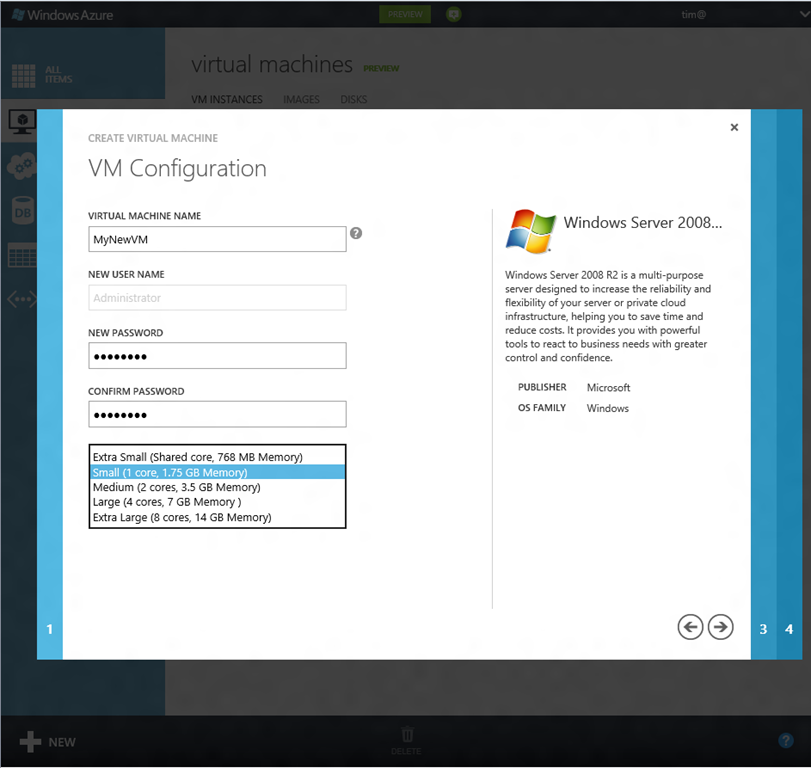
Microsoft’s Scott Guthrie has posted more details of changes in Windows Azure. I was also able to sign up for the preview of Virtual Machines and Web Sites (my web site application is pending).

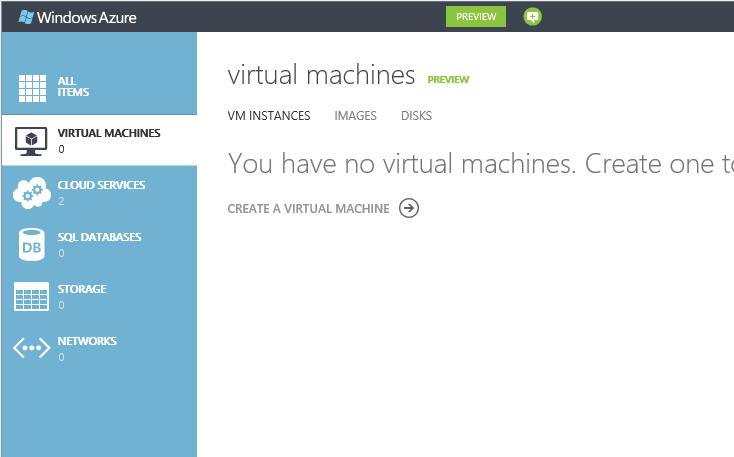
In the past the Azure portal for managing your cloud services has been functional but ugly and irritating. This has been replaced by a new portal (in preview) which is a great improvement.

image

image

Even better, the portal has a REST API which developers can program directly, giving Amazon-like programmatic control of your Azure infrastructure, though I have not looked at the actual API yet. The SDK is open source and hosted on GitHub under an Apace 2 license.

Guthrie talks about scaling in Azure web sites. You can control the number of VM instances used by your web site and “Windows Azure automatically handles load balancing traffic across VM instances”. The one thing I do not see is how you would have instances brought online and taken offline in response to demand. However, given the REST API you would imagine that writing code to do this would not be too challenging. The portal includes a dashboard for monitoring performance so the API can access this information.

You can have up to 10 web sites on a free shared hosting environment, and pay only when you upgrade to a dedicated VM.

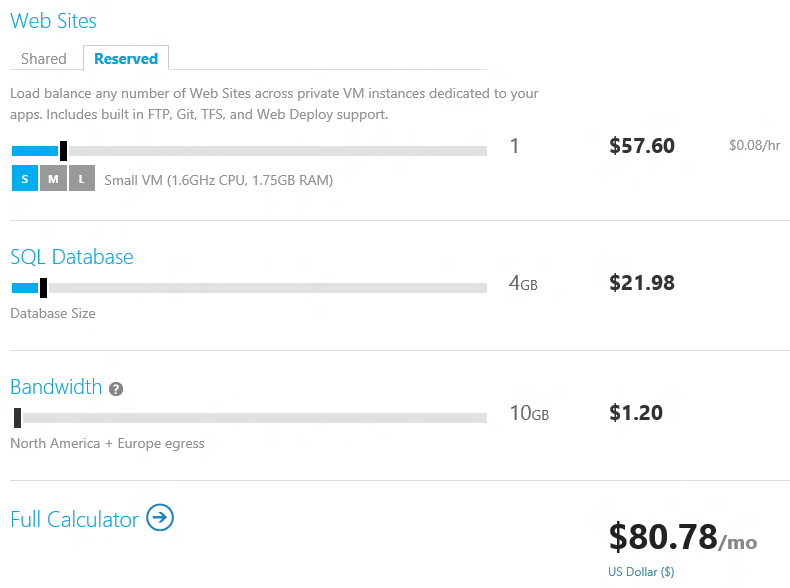
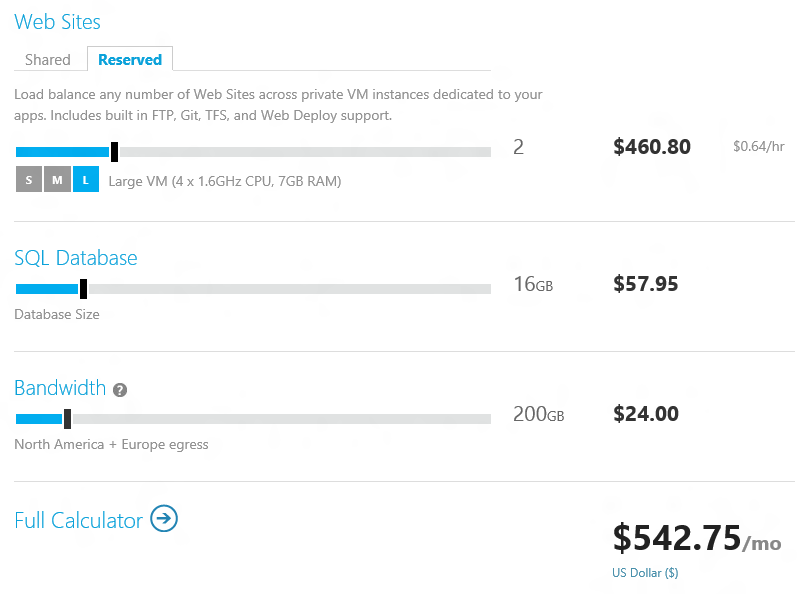
Free is free; but once you do scale up it does not look cheap to me. Here are a couple of samples from the calculator:

image

or for a busier site:

image

These kinds of figures would put me off moving this site to Azure, for example. That said, I would be interested to see a detailed cost comparison between Azure, Amazon, and other cloud hosting providers like Rackspace.

There are more features mentioned in Guthrie’s post and it does look like an improvement both in features and usability.

Huge icons in Windows 8 Metro

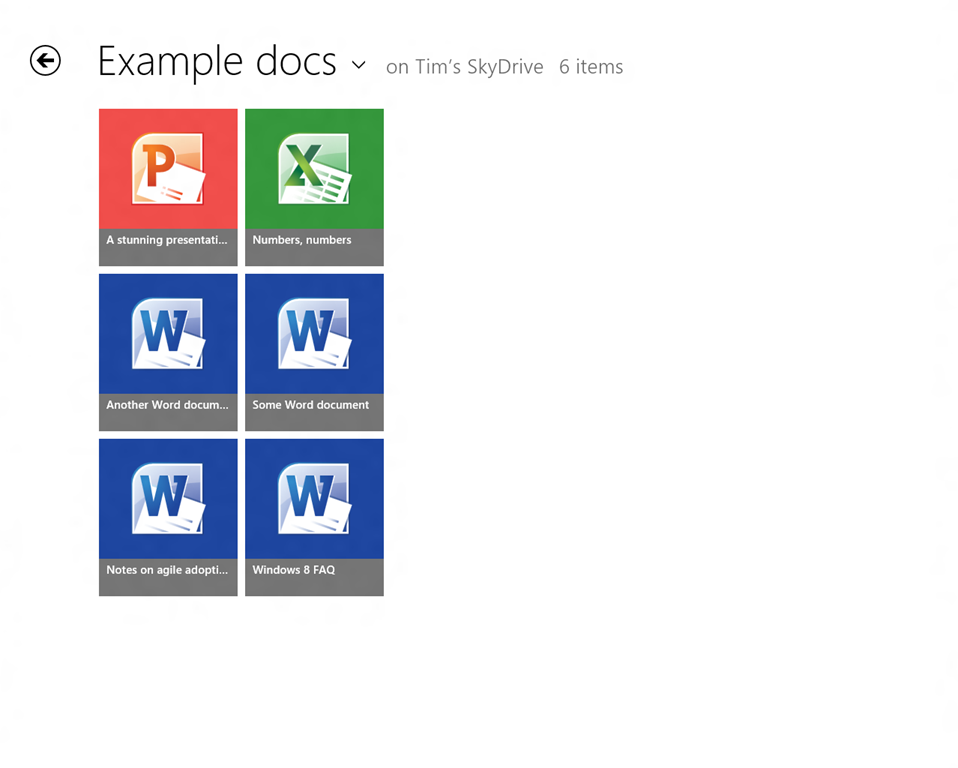
This is the SkyDrive Metro-style app running on my 1280 x 1024 desktop, in its default view. Note that each icon is 185 x 211 px. The actual title of each document is in relatively small text though still readable.

image

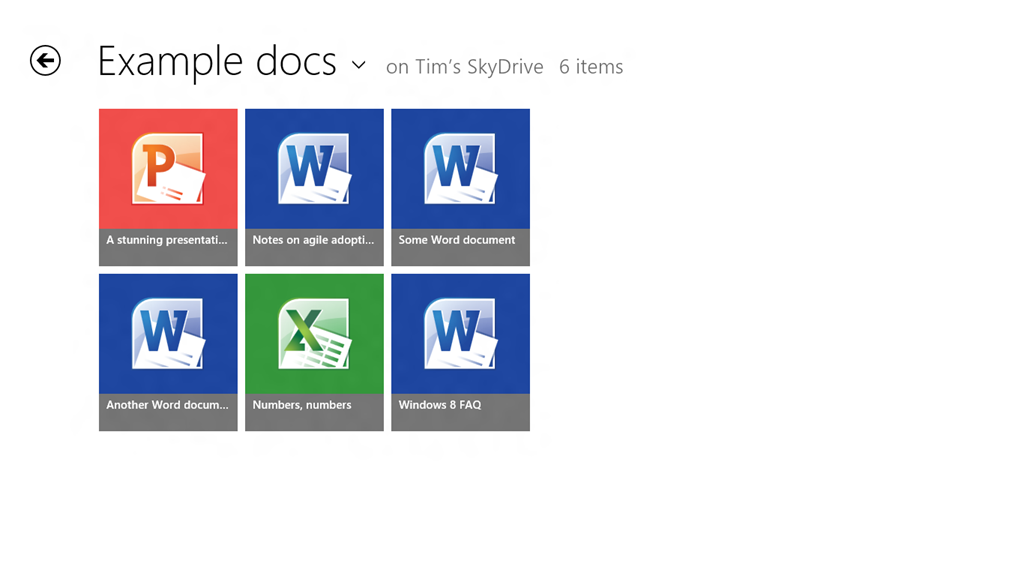
On my slate I only get two rows per screen:

image

You can set it to Detail view which gives nine rows on the desktop display and six rows on the slate.

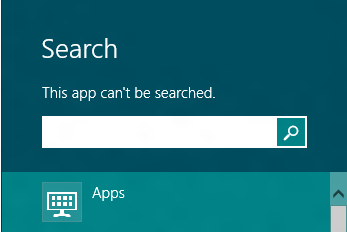
Touch-friendly, undoubtedly, but is this really best-practice design? What if you have lots of documents in a folder? I suppose it is just swipe-swipe-swipe, not helped by the fact that the SkyDrive app cannot be searched:

image

nor is there any way that I can see to sort the documents, say by last modified.

Of course you can do all these things in the touch-hostile desktop application.

Both the app and Windows 8 itself are pre-release so may improve, but I would like to see a smarter approach to browsing and selecting documents in Windows 8 Metro-style.

For more on Windows 8, see my review on The Register.

New Windows 8, new Visual Studio 2012

Microsoft has released the Release Candidate of Visual Studio 2012 (now the official name), which you can download here, to coincide with the release of Windows 8 Release Preview and Windows Server 2012 Release Preview.

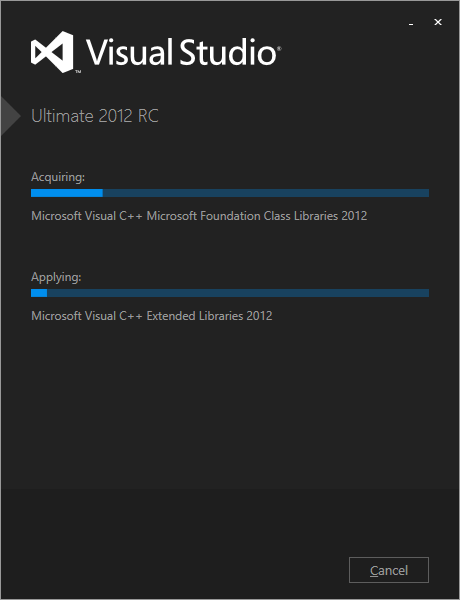
Visual Studio also has a new logo, as you can see from the setup window below.

image

Microsoft’s Jason Zander has posted about the new release here. Some of the main areas of difference between the RC and the Beta are:

  • Better performance
  • User interface tweaks including the return of a little more colour to the product
  • Solution Explorer filtering
  • New Metro style app templates
  • Improved XAML and Blend designers
  • Updated ASP.NET 4.5 web forms to support the await keyword
  • Tweaks to LightSwitch, Team Foundation Server, Architectural Tools

There is also a more detailed post by Scott Hanselman on what’s new in web development here.

Windows 8 Release Preview now available, Adobe Flash included, finished version expected August 2012

Microsoft has made the Release Preview of Windows 8 available to download. So what’s new?

image

The press release:

  • Confirms that a “touch-friendly and power-optimized Adobe Flash Player” is integrated into Internet Explorer 10
  • Announces new Family Safety features
  • States that IE10 is “Do not track” by default
  • Announces new apps and improvements to existing ones

All of which will come as a disappointment to those hoping for any sort of change of direction following a mixed-to-negative reception for the Consumer Preview.

Windows chief Steven Sinofsky says:

If the feedback and telemetry on Windows 8 and Windows RT match our expectations, then we will enter the final phases of the RTM process in about 2 months.

My guess that feedback along the lines of “Bring back the Start menu” will not count as an obstacle.

The application that would not uninstall

I install a ton of pre-release and test software so it is not surprising that I sometimes run into Windows Installer issues. Here is an entertaining error though. It is unlikely, I guess, that you will hit this problem; but I present it as an illustration of what can go wrong, as we move into the era of locked-down operating systems and easy app installs. Though even these are not perfect. Notice how the operating system fights me all the way.

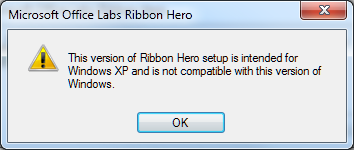
Years ago I installed Microsoft’s Office Labs Ribbon Hero, a tutorial add-on for Office. At the time I was running Windows Vista. Since then I have done an in-place upgrade to Windows 7. I tried to remove it today through Control Panel and got this message:

image

After presenting this information setup closed and the application was not uninstalled.

So … the application does not support Windows 7 and therefore you cannot remove it. Clever, and I found this a tricky problem to get around.

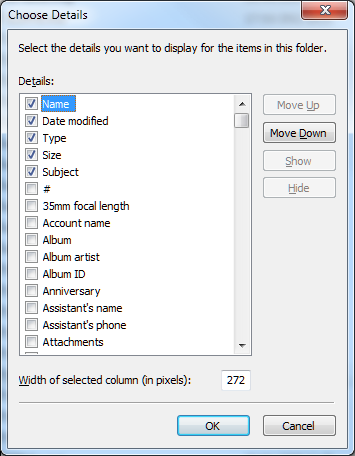
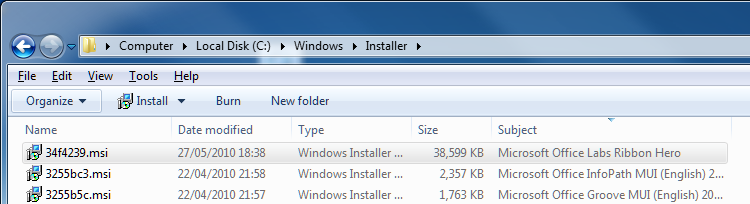
I took a look at the Windows installer files which you can find in %SYSTEMROOT%\Installer. All the msi files have random names. However, you can right-click the column heading area and choose More, then check Subject in the list. Click OK, and now the application to which each msi relates appears.

image

Now you can click the column heading to sort by subject and find the problem msi.

image

I copied the msi to my desktop.

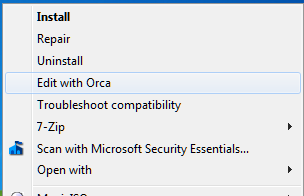
For the next step you need the Orca tool from the Windows Installer SDK. If Orca is installed, you can right-click the MSI and choose Edit with Orca.

image

I then selected LaunchCondition and deleted the launch condition that required Windows XP.

INSTALLED OR VersionNT = 501 OR APPLYING_AUTOUPDATE

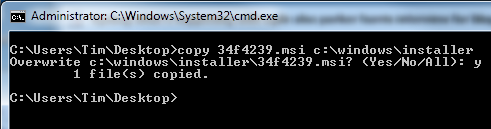
Hmm, something odd here as it should pass INSTALLED? Still, save, right-click the msi, choose Uninstall. You still hit the error. Why? Somehow, Windows works out that you are uninstalling a product for which an msi exists in the official location and uses that one instead. You have to copy your modified msi to the correct location. Open an administrator command prompt:

image

Now right-click the msi and choose Uninstall.

It worked. Phew.

Making sense of Microsoft’s Windows 8 strategy

Here are two things we learn from Jensen Harris’s post of 18 May.

image

First, Microsoft cares more about WinRT and Metro, the new tablet-oriented user interface in Windows 8, than about the desktop. In the section entitled Goals of the Windows 8 user experience, Harris refers almost exclusively to WinRT apps. Further, he asks the question: what is the role of desktop in Windows 8?

It is pretty straightforward. The desktop is there to run the millions of existing, powerful, familiar Windows programs that are designed for mouse and keyboard. Office. Visual Studio. Adobe Photoshop. AutoCAD. Lightroom. This software is widely-used, feature-rich, and powers the bulk of the work people do on the PC today.

Does that mean the desktop is for legacy, like XP Mode in Windows 7? Harris denies it:

We do not view the desktop as a mode, legacy or otherwise—it is simply a paradigm for working that suits some people and specific apps.

He adds though that “We think in a short time everyone will mix and match” desktop and Metro apps – though he does not call them Metro apps, he calls them “new Windows 8 apps.”

Second, Microsoft considers that the poor reaction to the Consumer Preview can be fixed by tweaking the detail rather than by changing the substance of how Windows 8 is designed.

But fundamentally, we believe in people and their ability to adapt and move forward. Throughout the history of computing, people have again and again adapted to new paradigms and interaction methods—even just when switching between different websites and apps and phones. We will help people get off on the right foot, and we have confidence that people will quickly find the new paradigms to be second-nature.

In fact, this post is peppered with references to negative reactions for previous versions of Windows. Microsoft is presuming that this is normal and that history will repeat:

Although some people had critical reactions and demanded changes to the user interface, Windows 7 quickly became the most-used OS in the world.

This is revisionist, as I am sure Harris and his team are aware. The reaction to Windows 7 was mainly positive, from the earliest preview on. It was better than Windows Vista; it was better than Windows XP.

Windows Vista on the other hand had a troubled launch and was widely disliked. User Account Control and its constant approval prompts was part of the problem, but more serious was that OEMs released Vista machines with underpowered hardware further slowed down by foistware and in many cases it Vista worked badly out of the box. You could get Vista working nicely with sufficient effort, but many just stayed with Windows XP.

The failure of Vista was damaging to Microsoft, but mitigated in that most users simply skipped a version and waited for Windows 7. The situation now is more serious for Microsoft, both because of the continuing popularity of the Mac and the rise of tablets, especially Apple’s iPad.

It is precisely because of that threat that Microsoft is making such a big bet on Metro and WinRT. The reasoning is that while shipping a build of Windows that improves on 7 would please the Microsoft platform community, it would be ineffective in countering the iPad. It would also fail to address problems inherent in Windows: lack of isolation between applications, and between applications and the operating system; the complexity of application installs and the difficulty of troubleshooting them when they go wrong; and the unsuitability of Windows for touch control.

There is also a hint in this most recent post that classic Windows uses too much power:

Once we understood how important great battery life was, certain aspects of the new experience became clear. For instance, it became obvious early on in the planning process that to truly reimagine the Windows experience we would need to reimagine apps as well. Thus, WinRT and a new kind of app were born.

Another key point: Microsoft’s partnership with hardware manufacturers has become a problem, since they damage the user experience with trialware and low quality utilities. The Metro-style side of Windows 8 fixes that by offering a locked-down environment. This will be most fully realised in Windows RT, Windows on ARM, which only allows WinRT apps to be installed.

Microsoft decided that only a new generation of Windows, a “reimagining”, would be able to compete in the era of BYOD (Bring Your Own Device).

One thing is for sure: the Windows team under Steven Sinofsky does not lack courage. They have form too. Many of the key players worked on the Office 2007 Ribbon UI, which was also controversial at the time, since it removed the familiar drop-down menus that had been in every previous version of Office. They stuck by their decision, and refused to add an option to restore the menus, thereby forcing users to use the ribbon even if they disliked it. That strategy was mostly successful. Users got used to the ribbon, and there was no mass refusal to upgrade from Office 2003, nor a substantial migration to OpenOffice which still has drop-down menus.

I have an open mind about Windows 8. I see the reasoning behind it, and agree that it works better on a real tablet than on a traditional PC or laptop, or worst of all, a virtual machine. Harris says:

The full picture of the Windows 8 experience will only emerge when new hardware from our partners becomes available, and when the Store opens up for all developers to start submitting their new apps.

Agreed; but it also seems that Windows 8 will ship with a number of annoyances which at the moment Microsoft looks unlikely to fix. These are mainly in the integration, or lack of it, between the Metro-style UI and the desktop. I can live without the Start menu, but will miss the taskbar with its guide to running applications and its preview thumbnails; these remain in the desktop but do not include Metro apps. Having only full-screen apps can be irritation, and I wonder if the commitment to the single-app “immersive UI” has been taken too far. When working in Windows 8 I miss the little clock that sits in the notification area; you have to swipe to see the equivalent and the fast and fluid UI is making me work harder than before.

I believe Microsoft will listen to complaints like these, but probably not until Windows 9. I also believe that by the time Windows 9 comes around the computing landscape will look very different; and the reception won by Windows 8 will be a significant factor in how it is shaped.

A bug in embedded Internet Explorer in Windows 8

Long-time readers of this site may remember that I did some work on embedding Internet Explorer, and its core rendering component MSHTML, in .NET applications. The code is still online.

I noticed that it does not work properly in Windows 8 Consumer Preview. Specifically, plain HTML works but you can no longer apply external CSS stylesheets. I reported the bug here (sign-in required).  I did not use my own component, but rather the standard WebBrowser control. I have appended the code to reproduce the bug in case you cannot see the report.

Microsoft has now responded as follows:

We were able to validate your feedback. However, based on the limited impact this bug may have, we will not be able to address this bug during this release.

This status is also known as “won’t fix” and gives me pause for thought. How many other little bugs are there which Microsoft is not fixing, but which break a certain number of applications?

If you are one of those few people using embedded IE in an application, I suggest checking Windows 8 compatibility now to avoid any unpleasant surprises.

Perhaps it would be preferable to use WebKit or Gecko (Mozilla) rather than IE in any case. There is a thread on stackoverflow that discusses some options. OpenWebKitSharp looks promising.

Code to reproduce the bug:

Create a Windows Forms application in C# in VS 11. Add a Webbrowser control and two buttons, and an OpenFileDialog control. Also add a reference to the COM library Microsoft HTML Object Library.

Here is the code for the first button that loads some HTML:

string sHTML = "<html><head><title>Some title</title></head><body><p>Some text</p></body></html>";
this.webBrowser1.DocumentText = sHTML;

Here is the code for the second button that applies a stylesheet:

openFileDialog1.Filter = "CSS files|*.css";
if (openFileDialog1.ShowDialog() == DialogResult.OK)  {
mshtml.HTMLDocument doc = (mshtml.HTMLDocument)this.webBrowser1.Document.DomDocument;
doc.createStyleSheet(openFileDialog1.FileName);
}

This is the stylesheet I am applying:

body
{
    font-family: Arial;
    font-size: 18pt;
}

To reproduce, run the application. Click the first button to load the HTML. Then click the second button to apply the stylesheet. In Windows 7 and earlier the stylesheet is applied. In Windows 8, the stylesheet is not applied.

UPDATE: It seems this bug was fixed in Windows 8 RTM, despite the “will not fix” designation. Good.

Windows Phone and Windows 8 convergence: a few more hints from Microsoft

The moment when Nokia is in the midst of the US launch for its Lumia 900 phone, which both Nokia and Microsoft hope will win some market share for Windows Phone 7, is not the best time to talk about Windows Phone 8 from a marketing perspective. Especially when Windows Phone 8 will have a new kernel based on Windows 8 rather than Windows CE, news which was leaked in early February and made almost official by writer Paul Thurrott who has access to advance information under NDA:

Windows Phone 8, codenamed Apollo, will be based on the Windows 8 kernel and not on Windows CE as are current versions. This will not impact app compatibility: Microsoft expects to have over 100,000 Windows Phone 7.5-compatible apps available by the time WP8 launches, and they will all work fine on this new OS.

Nevertheless, Microsoft is talking a little about Windows Phone 8. Yesterday Larry Lieberman posted about the future of the Windows Phone SDK. After echoing Thurrott’s words about compatibility, he added:

We’ve also heard some developers express concern about the long term future of Silverlight for Windows Phone. Please don’t panic; XAML and C#/VB.NET development in Windows 8 can be viewed as a direct evolution from today’s Silverlight. All of your managed programming skills are transferrable to building applications for Windows 8, and in many cases, much of your code will be transferrable as well. Note that when targeting a tablet vs. a phone, you do of course, need to design user experiences that are appropriately tailored to each device.

Panic or not, these are not comforting words if you love Silverlight. Lieberman is saying that if you code today in Silverlight, you had better learn to code for WinRT instead in order to target future versions of Windows Phone.

The odd thing here is that while Lieberman says:

today’s Windows Phone applications and games will run on the next major version of Windows Phone.

(in bold so that you do not doubt it), he also says that “much of your code will be transferrable as well”. Which is equivalent to saying “not all your code will be transferrable.” So how is it that “non-transferrable code” nevertheless runs on Windows Phone 8 if already compiled for Window Phone 7? It sounds like some kind of compatibility layer; I would be interested to know more about how this will work.

I was also intrigued by this comment from Silverlight developer Morton Nielsen:

Its really hard to sell this investment to customers with all these rumors floating, and you only willing to say that my skill set is preserved is only fuel onto that. The fact is that there is no good alternative to Silverlight, and its an awesome solution for distribution LOB apps, but the experience on win8 is horrible at best. And it doesn’t help that the blend team is ignoring us with a final v5, and sl5 is so buggy it needs 100% DEET but we don’t see any GDRs any longer.

What are these acronyms? DEET just means insect repellent, ie. bug fixes. GDR is likely “General Distribution Release”; I guess Nielsen is saying that no bug-fix releases are turning up are turning up for Silverlight 5, implying that Microsoft has abandoned it.

All in all, this does not strike me as a particularly reassuring post for Windows Phone developers hoping that their code will continue to be useful, despite Lieberman’s statement that:

I hope we’ve dispelled some of your concerns

Still, it has been obvious for some time that WinRT, not Silverlight, is how Microsoft sees the future of its platform so nobody should be surprised.

Update: Several of you have commented that Lieberman talks about WinRT on Windows 8 not on Windows Phone 8. Nobody has said that WinRT will be on Windows Phone 8, only that the kernel will be the that of Windows 8 rather than Windows CE. That said, Lieberman does specifically refer to “the long term future of Silverlight for Windows Phone” and goes on to talk about WinRT. The implication is that WinRT is the future direction for Windows Phone as well as for Windows 8 on tablets. Maybe that transition will not occur until Windows Phone 9; maybe Windows Phone as an OS will disappear completely and become a form factor for Windows 8 or Windows 9. This aspect is not clear to me; if you know more, I would love to know.